

אתם יכולים להשתמש ב-Google Ads API כדי לנהל המרות של קליקים אונליין ב-Google Ads. המרות אונליין מקליקים עוזרות לכם לעקוב אחרי מודעות שהובילו למכירות בעולם האונליין, למשל דרך אתר.
המרות אונליין מתועדות באמצעות Google Tag, אבל אפשר לשנות או לשפר אותן באמצעות Google Ads API.
אם כבר הגדרתם את Google Tag ואתם רוצים לשנות את ההמרות אונליין, עיינו בדף שינויים של ערכי המרות. אם הגדרתם את Google Tag ואתם רוצים לשפר את ההמרות אונליין באמצעות פרטים שהמשתמשים סיפקו, שנקראים גם תיעוד המרות משופר באתרים, המשיכו לקרוא.
תיעוד המרות משופר באתרים
בקטע הבא מוסבר איך לשפר את ההמרות אונליין מסוג קליקים, שנקראות גם תיעוד המרות משופר באתרים.
כדי להשתמש בתיעוד המרות משופר באתרים, צריך להגדיר תג ששולח באופן אוטומטי מזהה קליק, כמו GCLID, ומזהה הזמנה ל-Google Ads כשמשתמש משלים המרה. אתם יכולים להגדיר המרות משופרות באמצעות Google Tag Manager, באמצעות Google Tag או באמצעות Google Ads API. כשמשתמשים ב-Google Ads API, אפשר לשלוח נתוני המרות מאינטראקציה ישירה (First-Party) תוך 24 שעות מאירוע ההמרה, במקום באותו זמן. כך אפשר לאתר נתונים מאינטראקציה ישירה ממגוון מקורות, כמו מסד נתונים של לקוחות או מערכת לניהול קשרי לקוחות (CRM).
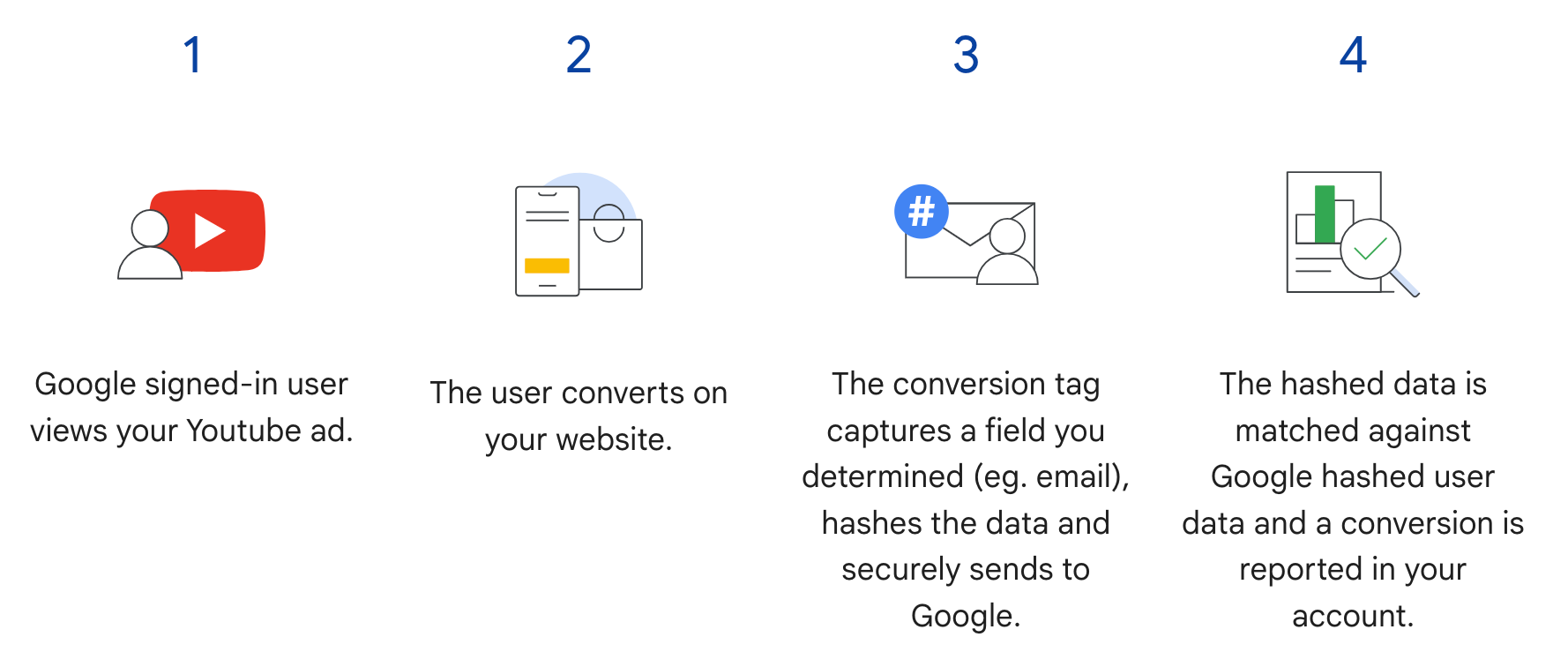
איך פועלת התכונה "תיעוד המרות משופר באתרים"
המרות משופרות לצורך שיוך באתרים ב-Google Ads API משלימות את שלב 3 בתרשים הבא. במקום לשלוח את פרטי המשתמש המגובבים כשהמשתמש משלים המרה, התג שולח רק את ה-GCLID ואת מזהה ההזמנה, ואתם שולחים את פרטי המשתמש המגובבים מאוחר יותר על ידי ייבוא מזהה ההזמנה יחד עם הנתונים המגובבים. מידע נוסף על תיעוד המרות משופר באתרים
דרישות מוקדמות
כדי להשתמש בתיעוד המרות משופר באתרים, צריך לאשר את התנאים בנוגע לנתוני לקוחות. כדי לבדוק אם אישרתם את התנאים לאיסוף נתוני לקוחות ושימוש בהם, אתם יכולים להריץ את השאילתה הבאה בלקוח ההמרה ממודעה של Google Ads:
SELECT
  customer.id,
  customer.conversion_tracking_setting.accepted_customer_data_terms
FROM customer
אם הערך של accepted_customer_data_terms הוא false, פועלים לפי ההוראות במאמר הגדרה של תיעוד המרות משופר באתרים כדי להשלים את הדרישה המוקדמת הזו.
הגדרת תיוג
כדי להגדיר תיוג באתר, פועלים לפי ההוראות במאמר הגדרה של תיעוד המרות משופר באתרים באמצעות Google Ads API. מומלץ גם להוסיף מזהי עסקאות (מזהי הזמנות) לתג מעקב ההמרות כדי לשפר את ההתאמה בין ההמרות.
הטמעה של API
זהו התהליך הכולל לייבוא של תיעוד המרות משופר באתרים ב-Google Ads API.
מנרמלים ומגבבים את הפרטים שהמשתמשים סיפקו, כמו כתובת אימייל, מספר טלפון וכתובת למשלוח דואר.
מאכלסים את האובייקטים של
ConversionAdjustmentבפרטים שהמשתמשים סיפקו, אחרי שעברו נרמול וגיבוב.מייבאים את האובייקטים של
ConversionAdjustmentאלConversionAdjustmentUploadService.
נרמול וגיבוב (hash) של פרטים שהמשתמשים סיפקו
משיקולי פרטיות, צריך לבצע גיבוב של הנתונים הבאים באמצעות SHA-256 לפני שמייבאים אותם:
- כתובת אימייל
- מספר טלפון
- שם פרטי
- שם משפחה
- רחוב
אין לבצע גיבוב של הנתונים הבאים:
- מדינה
- מדינה (State)
- עיר
- מיקוד
כדי לבצע סטנדרטיזציה של תוצאות הגיבוב, צריך לבצע את הפעולות הבאות לפני שמגבבים את הערכים האלה:
- מסירים רווחים לבנים בתחילת הטקסט ובסופו.
- ממירים את הטקסט לאותיות קטנות.
- מזינים מספרי טלפון בפורמט שתואם לתקן E.164.
פורמט כתובת האימייל להמרות משופרות
כדי להבטיח את אחוזי הלקוחות לטירגוט הגבוהים ביותר להמרות משופרות, צריך להגדיר את הפורמט של כתובות האימייל ולגבב אותן בצורה נכונה לפי השלבים הבאים:
החלת נורמליזציה סטנדרטית (כל כתובות האימייל):
- מסירים רווחים לבנים בתחילת הטקסט ובסופו.
- ממירים את כל התווים בכתובת האימייל לאותיות קטנות.
החלת נורמליזציה ספציפית לדומיין (רק ב-
gmail.comוב-googlemail.com):- אחרי שממירים את כתובת האימייל לאותיות קטנות, בודקים אם הדומיין (אחרי התו
@) הואgmail.comאוgooglemail.com. - הסרת נקודות (
.): מסירים את כל הנקודות משם המשתמש (לפני הסמל@). - הסרת סיומות עם סימן הפלוס (
+): בחלק של שם המשתמש, מסירים את סימן הפלוס הראשון (+) ואת כל התווים שאחריו עד לסמל@.- דוגמה:
Jane.Doe+Shopping@googlemail.comהופך קודם ל-jane.doe+shopping@googlemail.com(אותיות קטנות), ואז ל-janedoe@googlemail.com(כללים של Gmail ו-Googlemail).
- דוגמה:
- דומיינים אחרים: בכל דומיין שאינו
gmail.comאוgooglemail.com, אין להסיר נקודות או סיומות פלוס משם המשתמש. מבצעים רק נורמליזציה רגילה (חיתוך רווחים לבנים והמרה לאותיות קטנות).- לדוגמה:
user.name+NYC@Example.comעובר נורמליזציה ל-user.name+nyc@example.com.
- לדוגמה:
- אחרי שממירים את כתובת האימייל לאותיות קטנות, בודקים אם הדומיין (אחרי התו
גיבוב של כתובת האימייל המנורמלת:
- מקודדים את מחרוזת כתובת האימייל שעברה נרמול כבייטים של UTF-8.
- מבצעים גיבוב (hash) של בייטים בקידוד UTF-8 באמצעות האלגוריתם SHA-256.
- מעצבים את התקציר שנוצר כמחרוזת הקסדצימלית באותיות קטנות (64 תווים).
import hashlib
import re


def normalize_and_hash_email(email: str) -> str:
    """Normalizes and SHA-256 hashes an email address for enhanced conversions."""
    normalized = email.strip().lower()
    parts = normalized.split("@")
    if len(parts) != 2:
        raise ValueError("Invalid email address format.")
    username, domain = parts
    if domain in ("gmail.com", "googlemail.com"):
        username = username.replace(".", "")
        username = re.sub(r"\+.*$", "", username)
    normalized = f"{username}@{domain}"
    return hashlib.sha256(normalized.encode("utf-8")).hexdigest()
קוד לדוגמה
בדוגמה הזו מוסבר איך לנרמל ולגבב נתונים שהמשתמשים סיפקו.
Java
private String normalizeAndHash(MessageDigest digest, String s, boolean trimIntermediateSpaces) throws UnsupportedEncodingException { // Normalizes by first converting all characters to lowercase, then trimming spaces. String normalized = s.toLowerCase(); if (trimIntermediateSpaces) { // Removes leading, trailing, and intermediate spaces. normalized = normalized.replaceAll("\\s+", ""); } else { // Removes only leading and trailing spaces. normalized = normalized.trim(); } // Hashes the normalized string using the hashing algorithm. byte[] hash = digest.digest(normalized.getBytes("UTF-8")); StringBuilder result = new StringBuilder(); for (byte b : hash) { result.append(String.format("%02x", b)); } return result.toString(); } /** * Returns the result of normalizing and hashing an email address. For this use case, Google Ads * requires removal of any '.' characters or trailing '+' and characters that follow it from the * username portion of the email address if the domain is {@code gmail.com} or {@code * googlemail.com}. * * @param digest the digest to use to hash the normalized string. * @param emailAddress the email address to normalize and hash. */ private String normalizeAndHashEmailAddress(MessageDigest digest, String emailAddress) throws UnsupportedEncodingException { // Removes all whitespace (leading, trailing, and intermediate) from the email address. String normalizedEmail = emailAddress.toLowerCase().replaceAll("\\s+", ""); String[] emailParts = normalizedEmail.split("@", 2); if (emailParts.length == 2 && emailParts[1].matches("^(gmail|googlemail)\\.com$")) { // Removes any '.' characters from the portion of the email address before the domain if the // domain is gmail.com or googlemail.com. emailParts[0] = emailParts[0].replaceAll("\\.", ""); // Removes any '+' and all characters that follow it from the portion of the email address // before the domain if the domain is gmail.com or googlemail.com. emailParts[0] = emailParts[0].replaceAll("\\+.*", ""); normalizedEmail = String.format("%s@%s", emailParts[0], emailParts[1]); } return normalizeAndHash(digest, normalizedEmail, true); } /** * Returns the result of normalizing and hashing a phone number. For this use case, Google Ads * requires phone numbers to be in E.164 format. * * @param digest the digest to use to hash the normalized string. * @param phoneNumber the phone number to normalize and hash. */ private String normalizeAndHashPhoneNumber(MessageDigest digest, String phoneNumber) throws UnsupportedEncodingException { // Removes non-digit characters and prepends a leading '+' sign. String digitsOnly = phoneNumber.replaceAll("[^0-9]", ""); String formattedPhone = "+" + digitsOnly; if (!formattedPhone.matches("^\\+[1-9]\\d{6,14}$")) { throw new IllegalArgumentException("Phone number must be in E.164 format: " + phoneNumber); } return normalizeAndHash(digest, formattedPhone, true); }
C#
/// <summary> /// Normalizes the email address and hashes it. For this use case, Google Ads requires /// removal of any '.' characters preceding <code>gmail.com</code> or /// <code>googlemail.com</code>. /// </summary> /// <param name="emailAddress">The email address.</param> /// <returns>The hash code.</returns> private string NormalizeAndHashEmailAddress(string emailAddress) { string normalizedEmail = emailAddress.ToLower(); string[] emailParts = normalizedEmail.Split('@'); if (emailParts.Length > 1 && (emailParts[1] == "gmail.com" || emailParts[1] == "googlemail.com")) { // Removes any '.' characters from the portion of the email address before // the domain if the domain is gmail.com or googlemail.com. emailParts[0] = emailParts[0].Replace(".", ""); normalizedEmail = $"{emailParts[0]}@{emailParts[1]}"; } return NormalizeAndHash(normalizedEmail); } /// <summary> /// Normalizes and hashes a string value. /// </summary> /// <param name="value">The value to normalize and hash.</param> /// <returns>The normalized and hashed value.</returns> private static string NormalizeAndHash(string value) { return ToSha256String(digest, ToNormalizedValue(value)); } /// <summary> /// Hash a string value using SHA-256 hashing algorithm. /// </summary> /// <param name="digest">Provides the algorithm for SHA-256.</param> /// <param name="value">The string value (e.g. an email address) to hash.</param> /// <returns>The hashed value.</returns> private static string ToSha256String(SHA256 digest, string value) { byte[] digestBytes = digest.ComputeHash(Encoding.UTF8.GetBytes(value)); // Convert the byte array into an unhyphenated hexadecimal string. return BitConverter.ToString(digestBytes).Replace("-", string.Empty); } /// <summary> /// Removes leading and trailing whitespace and converts all characters to /// lower case. /// </summary> /// <param name="value">The value to normalize.</param> /// <returns>The normalized value.</returns> private static string ToNormalizedValue(string value) { return value.Trim().ToLower(); }
PHP
private static function normalizeAndHash( string $hashAlgorithm, string $value, bool $trimIntermediateSpaces ): string { // Normalizes by first converting all characters to lowercase, then trimming spaces. $normalized = strtolower($value); if ($trimIntermediateSpaces === true) { // Removes leading, trailing, and intermediate spaces. $normalized = str_replace(' ', '', $normalized); } else { // Removes only leading and trailing spaces. $normalized = trim($normalized); } return hash($hashAlgorithm, strtolower(trim($normalized))); } /** * Returns the result of normalizing and hashing an email address. For this use case, Google * Ads requires removal of any '.' characters preceding "gmail.com" or "googlemail.com". * * @param string $hashAlgorithm the hash algorithm to use * @param string $emailAddress the email address to normalize and hash * @return string the normalized and hashed email address */ private static function normalizeAndHashEmailAddress( string $hashAlgorithm, string $emailAddress ): string { $normalizedEmail = strtolower($emailAddress); $emailParts = explode("@", $normalizedEmail); if ( count($emailParts) > 1 && preg_match('/^(gmail|googlemail)\.com\s*/', $emailParts[1]) ) { // Removes any '.' characters from the portion of the email address before the domain // if the domain is gmail.com or googlemail.com. $emailParts[0] = str_replace(".", "", $emailParts[0]); $normalizedEmail = sprintf('%s@%s', $emailParts[0], $emailParts[1]); } return self::normalizeAndHash($hashAlgorithm, $normalizedEmail, true); }
Python
def normalize_and_hash_email_address(email_address): """Returns the result of normalizing and hashing an email address. For this use case, Google Ads requires removal of any '.' characters preceding "gmail.com" or "googlemail.com" Args: email_address: An email address to normalize. Returns: A normalized (lowercase, removed whitespace) and SHA-265 hashed string. """ normalized_email = email_address.strip().lower() email_parts = normalized_email.split("@") # Check that there are at least two segments if len(email_parts) > 1: # Removes any '.' and '+' characters from the portion of the email address # before the domain chars_to_remove = ".+" translation_table = str.maketrans("", "", chars_to_remove) email_parts[0] = email_parts[0].translate(translation_table) normalized_email = "@".join(email_parts) return normalize_and_hash(normalized_email) def normalize_and_hash(s): """Normalizes and hashes a string with SHA-256. Private customer data must be hashed during upload, as described at: https://support.google.com/google-ads/answer/9888656 Args: s: The string to perform this operation on. Returns: A normalized (lowercase, removed whitespace) and SHA-256 hashed string. """ return hashlib.sha256(s.strip().lower().encode()).hexdigest()
Ruby
# Returns the result of normalizing and then hashing the string using the # provided digest. Private customer data must be hashed during upload, as # described at https://support.google.com/google-ads/answer/9888656. def normalize_and_hash(str) # Remove leading and trailing whitespace and ensure all letters are lowercase # before hasing. Digest::SHA256.hexdigest(str.strip.downcase) end # Returns the result of normalizing and hashing an email address. For this use # case, Google Ads requires removal of any '.' characters preceding 'gmail.com' # or 'googlemail.com'. def normalize_and_hash_email(email) email_parts = email.downcase.split("@") # Removes any '.' characters from the portion of the email address before the # domain if the domain is gmail.com or googlemail.com. if email_parts.last =~ /^(gmail|googlemail)\.com\s*/ email_parts[0] = email_parts[0].gsub('.', '') end normalize_and_hash(email_parts.join('@')) end
Perl
sub normalize_and_hash { my $value = shift; my $trim_intermediate_spaces = shift; if ($trim_intermediate_spaces) { $value =~ s/\s+//g; } else { $value =~ s/^\s+|\s+$//g; } return sha256_hex(lc $value); } # Returns the result of normalizing and hashing an email address. For this use # case, Google Ads requires removal of any '.' characters preceding 'gmail.com' # or 'googlemail.com'. sub normalize_and_hash_email_address { my $email_address = shift; my $normalized_email = lc $email_address; my @email_parts = split('@', $normalized_email); if (scalar @email_parts > 1 && $email_parts[1] =~ /^(gmail|googlemail)\.com\s*/) { # Remove any '.' characters from the portion of the email address before the # domain if the domain is 'gmail.com' or 'googlemail.com'. $email_parts[0] =~ s/\.//g; $normalized_email = sprintf '%s@%s', $email_parts[0], $email_parts[1]; } return normalize_and_hash($normalized_email, 1); }
curl
אכלוס אובייקטים מסוג ConversionAdjustment
בקטע הבא מוסבר איך ליצור התאמה לשיפור שכוללת מזהה הזמנה, וגם מזהים של כתובת אימייל, מספר טלפון וכתובת פיזית, עם סטנדרטיזציה וגיבוב (hashing) לפי הצורך. מומלץ לכלול את gclid בהתאמה, אם הוא זמין.
השלב הזה כמעט זהה לשלב שמתואר במדריך ייבוא של שינויים בערכי המרות, עם כמה הסתייגויות:
- מאכלסים את
user_identifiersבנתוני המשתמשים שעברו נרמול וגיבוב. אם יש לכם כמה מזהי משתמשים, צרוUserIdentifierנפרד לכל אחד מהם, עד חמישה מזהים.
Java
// Creates a builder for constructing the enhancement adjustment. ConversionAdjustment.Builder enhancementBuilder = ConversionAdjustment.newBuilder().setAdjustmentType(ConversionAdjustmentType.ENHANCEMENT); // Extracts user email, phone, and address info from the raw data, normalizes and hashes it, // then wraps it in UserIdentifier objects. // Creates a separate UserIdentifier object for each. The data in this example is hardcoded, but // in your application you might read the raw data from an input file. // IMPORTANT: Since the identifier attribute of UserIdentifier // (https://developers.google.com/google-ads/api/reference/rpc/latest/UserIdentifier) is a // oneof // (https://protobuf.dev/programming-guides/proto3/#oneof-features), you must set only ONE of // hashedEmail, hashedPhoneNumber, mobileId, thirdPartyUserId, or addressInfo. Setting more // than one of these attributes on the same UserIdentifier will clear all the other members // of the oneof. For example, the following code is INCORRECT and will result in a // UserIdentifier with ONLY a hashedPhoneNumber. // // UserIdentifier incorrectlyPopulatedUserIdentifier = // UserIdentifier.newBuilder() // .setHashedEmail("...") // .setHashedPhoneNumber("...") // .build(); ImmutableMap.Builder<String, String> rawRecordBuilder = ImmutableMap.<String, String>builder() // Email address that includes a period (.) and plus (+) suffix before the Gmail domain. .put("email", "alex.2+myalias@gmail.com") // Address that includes all four required elements: first name, last name, country // code, and postal code. .put("firstName", "Alex") .put("lastName", "Quinn") .put("countryCode", "US") .put("postalCode", "94045") // Phone number to be converted to E.164 format, with a leading '+' as required. .put("phone", "+1 800-555-0102") // This example lets you put conversion details as arguments, but in reality you might // store this data alongside other user data, so we include it in this sample user // record. .put("orderId", orderId) .put("conversionActionId", Long.toString(conversionActionId)) .put("currencyCode", "USD"); // Adds entries for the optional fields. if (conversionDateTime != null) { rawRecordBuilder.put("conversionDateTime", conversionDateTime); } if (userAgent != null) { rawRecordBuilder.put("userAgent", userAgent); } // Builds the map representing the record. Map<String, String> rawRecord = rawRecordBuilder.build(); // Creates a SHA256 message digest for hashing user identifiers in a privacy-safe way, as // described at https://support.google.com/google-ads/answer/9888656. MessageDigest sha256Digest = MessageDigest.getInstance("SHA-256"); // Creates a list for the user identifiers. List<UserIdentifier> userIdentifiers = new ArrayList<>(); // Creates a user identifier using the hashed email address, using the normalize and hash method // specifically for email addresses. UserIdentifier emailIdentifier = UserIdentifier.newBuilder() // Optional: specify the user identifier source. .setUserIdentifierSource(UserIdentifierSource.FIRST_PARTY) // Uses the normalize and hash method specifically for email addresses. .setHashedEmail(normalizeAndHashEmailAddress(sha256Digest, rawRecord.get("email"))) .build(); userIdentifiers.add(emailIdentifier); // Checks if the record has a phone number, and if so, adds a UserIdentifier for it. if (rawRecord.containsKey("phone")) { UserIdentifier hashedPhoneNumberIdentifier = UserIdentifier.newBuilder() .setHashedPhoneNumber( normalizeAndHashPhoneNumber(sha256Digest, rawRecord.get("phone"))) .build(); // Adds the hashed phone number identifier to the UserData object's list. userIdentifiers.add(hashedPhoneNumberIdentifier); } // Checks if the record has all the required mailing address elements, and if so, adds a // UserIdentifier for the mailing address. if (rawRecord.containsKey("firstName")) { // Checks if the record contains all the other required elements of a mailing address. Set<String> missingAddressKeys = new HashSet<>(); for (String addressKey : new String[] {"lastName", "countryCode", "postalCode"}) { if (!rawRecord.containsKey(addressKey)) { missingAddressKeys.add(addressKey); } } if (!missingAddressKeys.isEmpty()) { System.out.printf( "Skipping addition of mailing address information because the following required keys" + " are missing: %s%n", missingAddressKeys); } else { // Creates an OfflineUserAddressInfo object that contains all the required elements of a // mailing address. OfflineUserAddressInfo addressInfo = OfflineUserAddressInfo.newBuilder() .setHashedFirstName( normalizeAndHash(sha256Digest, rawRecord.get("firstName"), false)) .setHashedLastName(normalizeAndHash(sha256Digest, rawRecord.get("lastName"), false)) .setCountryCode(rawRecord.get("countryCode")) .setPostalCode(rawRecord.get("postalCode")) .build(); UserIdentifier addressIdentifier = UserIdentifier.newBuilder().setAddressInfo(addressInfo).build(); // Adds the address identifier to the UserData object's list. userIdentifiers.add(addressIdentifier); } } // Adds the user identifiers to the enhancement adjustment. enhancementBuilder.addAllUserIdentifiers(userIdentifiers);
C#
// Normalize and hash the raw data, then wrap it in UserIdentifier objects. // Create a separate UserIdentifier object for each. The data in this example is // hardcoded, but in your application you might read the raw data from an input file. // // IMPORTANT: Since the identifier attribute of UserIdentifier // (https://developers.google.com/google-ads/api/reference/rpc/latest/UserIdentifier) // is a oneof // (https://protobuf.dev/programming-guides/proto3/#oneof-features), you must set // only ONE of hashed_email, hashed_phone_number, mobile_id, third_party_user_id, // or address-info. Setting more than one of these attributes on the same UserIdentifier // will clear all the other members of the oneof. For example, the following code is // INCORRECT and will result in a UserIdentifier with ONLY a hashed_phone_number: // UserIdentifier incorrectlyPopulatedUserIdentifier = new UserIdentifier() // { // HashedEmail = "..." // HashedPhoneNumber = "..." // } UserIdentifier addressIdentifier = new UserIdentifier() { AddressInfo = new OfflineUserAddressInfo() { HashedFirstName = NormalizeAndHash("Dana"), HashedLastName = NormalizeAndHash("Quinn"), HashedStreetAddress = NormalizeAndHash("1600 Amphitheatre Pkwy"), City = "Mountain View", State = "CA", PostalCode = "94043", CountryCode = "US" }, // Optional: Specifies the user identifier source. UserIdentifierSource = UserIdentifierSource.FirstParty }; // Creates a user identifier using the hashed email address. UserIdentifier emailIdentifier = new UserIdentifier() { UserIdentifierSource = UserIdentifierSource.FirstParty, // Uses the normalize and hash method specifically for email addresses. HashedEmail = NormalizeAndHashEmailAddress("dana@example.com") }; // Adds the user identifiers to the enhancement adjustment. enhancement.UserIdentifiers.AddRange(new[] { addressIdentifier, emailIdentifier });
PHP
// Creates the conversion enhancement. $enhancement = new ConversionAdjustment(['adjustment_type' => ConversionAdjustmentType::ENHANCEMENT]); // Extracts user email, phone, and address info from the raw data, normalizes and hashes it, // then wraps it in UserIdentifier objects. // Creates a separate UserIdentifier object for each. The data in this example is hardcoded, // but in your application you might read the raw data from an input file. // IMPORTANT: Since the identifier attribute of UserIdentifier // (https://developers.google.com/google-ads/api/reference/rpc/latest/UserIdentifier) is a // oneof // (https://protobuf.dev/programming-guides/proto3/#oneof-features), you must set only ONE // of hashedEmail, hashedPhoneNumber, mobileId, thirdPartyUserId, or addressInfo. Setting // more than one of these attributes on the same UserIdentifier will clear all the other // members of the oneof. For example, the following code is INCORRECT and will result in a // UserIdentifier with ONLY a hashedPhoneNumber. // // $incorrectlyPopulatedUserIdentifier = new UserIdentifier([ // 'hashed_email' => '...', // 'hashed_phone_number' => '...' // ]); $rawRecord = [ // Email address that includes a period (.) before the Gmail domain. 'email' => 'alex.2@example.com', // Address that includes all four required elements: first name, last name, country // code, and postal code. 'firstName' => 'Alex', 'lastName' => 'Quinn', 'countryCode' => 'US', 'postalCode' => '94045', // Phone number to be converted to E.164 format, with a leading '+' as required. 'phone' => '+1 800 5550102', // This example lets you input conversion details as arguments, but in reality you might // store this data alongside other user data, so we include it in this sample user // record. 'orderId' => $orderId, 'conversionActionId' => $conversionActionId, 'conversionDateTime' => $conversionDateTime, 'currencyCode' => 'USD' ]; // Creates a list for the user identifiers. $userIdentifiers = []; // Uses the SHA-256 hash algorithm for hashing user identifiers in a privacy-safe way, as // described at https://support.google.com/google-ads/answer/9888656. $hashAlgorithm = "sha256"; // Creates a user identifier using the hashed email address, using the normalize and hash // method specifically for email addresses. $emailIdentifier = new UserIdentifier( [ // Uses the normalize and hash method specifically for email addresses. 'hashed_email' => self::normalizeAndHashEmailAddress( $hashAlgorithm, $rawRecord['email'] ), // Optional: Specifies the user identifier source. 'user_identifier_source' => UserIdentifierSource::FIRST_PARTY ] ); $userIdentifiers[] = $emailIdentifier; // Checks if the record has a phone number, and if so, adds a UserIdentifier for it. if (array_key_exists('phone', $rawRecord)) { $hashedPhoneNumberIdentifier = new UserIdentifier( [ 'hashed_phone_number' => self::normalizeAndHash( $hashAlgorithm, $rawRecord['phone'], true ) ] ); // Adds the hashed email identifier to the user identifiers list. $userIdentifiers[] = $hashedPhoneNumberIdentifier; } // Checks if the record has all the required mailing address elements, and if so, adds a // UserIdentifier for the mailing address. if (array_key_exists('firstName', $rawRecord)) { // Checks if the record contains all the other required elements of a mailing // address. $missingAddressKeys = []; foreach (['lastName', 'countryCode', 'postalCode'] as $addressKey) { if (!array_key_exists($addressKey, $rawRecord)) { $missingAddressKeys[] = $addressKey; } } if (!empty($missingAddressKeys)) { printf( "Skipping addition of mailing address information because the " . "following required keys are missing: %s%s", json_encode($missingAddressKeys), PHP_EOL ); } else { // Creates an OfflineUserAddressInfo object that contains all the required // elements of a mailing address. $addressIdentifier = new UserIdentifier( [ 'address_info' => new OfflineUserAddressInfo( [ 'hashed_first_name' => self::normalizeAndHash( $hashAlgorithm, $rawRecord['firstName'], false ), 'hashed_last_name' => self::normalizeAndHash( $hashAlgorithm, $rawRecord['lastName'], false ), 'country_code' => $rawRecord['countryCode'], 'postal_code' => $rawRecord['postalCode'] ] ) ] ); // Adds the address identifier to the user identifiers list. $userIdentifiers[] = $addressIdentifier; } } // Adds the user identifiers to the conversion. $enhancement->setUserIdentifiers($userIdentifiers);
Python
# Extracts user email, phone, and address info from the raw data, normalizes # and hashes it, then wraps it in UserIdentifier objects. Creates a separate # UserIdentifier object for each. The data in this example is hardcoded, but # in your application you might read the raw data from an input file. # IMPORTANT: Since the identifier attribute of UserIdentifier # (https://developers.google.com/google-ads/api/reference/rpc/latest/UserIdentifier) # is a oneof # (https://protobuf.dev/programming-guides/proto3/#oneof-features), you must # set only ONE of hashed_email, hashed_phone_number, mobile_id, # third_party_user_id, or address_info. Setting more than one of these # attributes on the same UserIdentifier will clear all the other members of # the oneof. For example, the following code is INCORRECT and will result in # a UserIdentifier with ONLY a hashed_phone_number: # # incorrectly_populated_user_identifier = client.get_type("UserIdentifier") # incorrectly_populated_user_identifier.hashed_email = "..."" # incorrectly_populated_user_identifier.hashed_phone_number = "..."" raw_record = { # Email address that includes a period (.) before the Gmail domain. "email": "alex.2@example.com", # Address that includes all four required elements: first name, last # name, country code, and postal code. "first_name": "Alex", "last_name": "Quinn", "country_code": "US", "postal_code": "94045", # Phone number to be converted to E.164 format, with a leading '+' as # required. "phone": "+1 800 5550102", # This example lets you input conversion details as arguments, but in # reality you might store this data alongside other user data, so we # include it in this sample user record. "order_id": order_id, "conversion_action_id": conversion_action_id, "conversion_date_time": conversion_date_time, "currency_code": "USD", "user_agent": user_agent, } # Constructs the enhancement adjustment. conversion_adjustment = client.get_type("ConversionAdjustment") conversion_adjustment.adjustment_type = ( client.enums.ConversionAdjustmentTypeEnum.ENHANCEMENT ) # Creates a user identifier using the hashed email address, using the # normalize and hash method specifically for email addresses. email_identifier = client.get_type("UserIdentifier") # Optional: Specifies the user identifier source. email_identifier.user_identifier_source = ( client.enums.UserIdentifierSourceEnum.FIRST_PARTY ) # Uses the normalize and hash method specifically for email addresses. email_identifier.hashed_email = normalize_and_hash_email_address( raw_record["email"] ) # Adds the email identifier to the conversion adjustment. conversion_adjustment.user_identifiers.append(email_identifier) # Checks if the record has a phone number, and if so, adds a UserIdentifier # for it. if raw_record.get("phone") is not None: phone_identifier = client.get_type("UserIdentifier") phone_identifier.hashed_phone_number = normalize_and_hash( raw_record["phone"] ) # Adds the phone identifier to the conversion adjustment. conversion_adjustment.user_identifiers.append(phone_identifier) # Checks if the record has all the required mailing address elements, and if # so, adds a UserIdentifier for the mailing address. if raw_record.get("first_name") is not None: # Checks if the record contains all the other required elements of a # mailing address. required_keys = ["last_name", "country_code", "postal_code"] # Builds a new list of the required keys that are missing from # raw_record. missing_keys = [ key for key in required_keys if key not in raw_record.keys() ] if len(missing_keys) > 0: print( "Skipping addition of mailing address information because the" f"following required keys are missing: {missing_keys}" ) else: # Creates a user identifier using sample values for the user address, # hashing where required. address_identifier = client.get_type("UserIdentifier") address_info = address_identifier.address_info address_info.hashed_first_name = normalize_and_hash( raw_record["first_name"] ) address_info.hashed_last_name = normalize_and_hash( raw_record["last_name"] ) address_info.country_code = raw_record["country_code"] address_info.postal_code = raw_record["postal_code"] # Adds the address identifier to the conversion adjustment. conversion_adjustment.user_identifiers.append(address_identifier)
Ruby
# Extracts user email, phone, and address info from the raw data, normalizes # and hashes it, then wraps it in UserIdentifier objects. Creates a separate # UserIdentifier object for each. The data in this example is hardcoded, but # in your application you might read the raw data from an input file. # IMPORTANT: Since the identifier attribute of UserIdentifier # (https://developers.google.com/google-ads/api/reference/rpc/latest/UserIdentifier) # is a oneof # (https://protobuf.dev/programming-guides/proto3/#oneof-features), you must # set only ONE of hashed_email, hashed_phone_number, mobile_id, # third_party_user_id, or address_info. Setting more than one of these # attributes on the same UserIdentifier will clear all the other members of # the oneof. For example, the following code is INCORRECT and will result in # a UserIdentifier with ONLY a hashed_phone_number: # # incorrectly_populated_user_identifier.hashed_email = "..."" # incorrectly_populated_user_identifier.hashed_phone_number = "..."" raw_record = { # Email address that includes a period (.) before the Gmail domain. "email" => "alex.2@example.com", # Address that includes all four required elements: first name, last # name, country code, and postal code. "first_name" => "Alex", "last_name" => "Quinn", "country_code" => "US", "postal_code" => "94045", # Phone number to be converted to E.164 format, with a leading '+' as # required. "phone" => "+1 800 5550102", # This example lets you input conversion details as arguments, but in # reality you might store this data alongside other user data, so we # include it in this sample user record. "order_id" => order_id, "conversion_action_id" => conversion_action_id, "conversion_date_time" => conversion_date_time, "currency_code" => "USD", "user_agent" => user_agent, } enhancement = client.resource.conversion_adjustment do |ca| ca.conversion_action = client.path.conversion_action(customer_id, conversion_action_id) ca.adjustment_type = :ENHANCEMENT ca.order_id = order_id # Sets the conversion date and time if provided. Providing this value is # optional but recommended. unless conversion_date_time.nil? ca.gclid_date_time_pair = client.resource.gclid_date_time_pair do |pair| pair.conversion_date_time = conversion_date_time end end # Creates a user identifier using the hashed email address, using the # normalize and hash method specifically for email addresses. ca.user_identifiers << client.resource.user_identifier do |ui| # Uses the normalize and hash method specifically for email addresses. ui.hashed_email = normalize_and_hash_email(raw_record["email"]) # Optional: Specifies the user identifier source. ui.user_identifier_source = :FIRST_PARTY end # Checks if the record has a phone number, and if so, adds a UserIdentifier # for it. unless raw_record["phone"].nil? ca.user_identifiers << client.resource.user_identifier do |ui| ui.hashed_phone_number = normalize_and_hash_email(raw_record["phone"]) end end # Checks if the record has all the required mailing address elements, and if # so, adds a UserIdentifier for the mailing address. unless raw_record["first_name"].nil? # Checks if the record contains all the other required elements of a # mailing address. required_keys = ["last_name", "country_code", "postal_code"] # Builds a new list of the required keys that are missing from # raw_record. missing_keys = required_keys - raw_record.keys if missing_keys puts( "Skipping addition of mailing address information because the" \ "following required keys are missing: #{missing_keys}" ) else ca.user_identifiers << client.resource.user_identifier do |ui| ui.address_info = client.resource.offline_user_address_info do |info| # Certain fields must be hashed using SHA256 in order to handle # identifiers in a privacy-safe way, as described at # https://support.google.com/google-ads/answer/9888656. info.hashed_first_name = normalize_and_hash( raw_record["first_name"]) info.hashed_last_name = normalize_and_hash( raw_record["last_name"]) info.postal_code = normalize_and_hash(raw_record["country_code"]) info.country_code = normalize_and_hash(raw_record["postal_code"]) end end end end
Perl
# Construct the enhancement adjustment. my $enhancement = Google::Ads::GoogleAds::V26::Services::ConversionAdjustmentUploadService::ConversionAdjustment ->new({ adjustmentType => ENHANCEMENT }); # Extract user email, phone, and address info from the raw data, # normalize and hash it, then wrap it in UserIdentifier objects. # Create a separate UserIdentifier object for each. # The data in this example is hardcoded, but in your application # you might read the raw data from an input file. # # IMPORTANT: Since the identifier attribute of UserIdentifier # (https://developers.google.com/google-ads/api/reference/rpc/latest/UserIdentifier) # is a oneof # (https://protobuf.dev/programming-guides/proto3/#oneof-features), you must set # only ONE of hashed_email, hashed_phone_number, mobile_id, third_party_user_id, # or address-info. Setting more than one of these attributes on the same UserIdentifier # will clear all the other members of the oneof. For example, the following code is # INCORRECT and will result in a UserIdentifier with ONLY a hashed_phone_number: # # my $incorrect_user_identifier = Google::Ads::GoogleAds::V26::Common::UserIdentifier->new({ # hashedEmail => '...', # hashedPhoneNumber => '...', # }); my $raw_record = { # Email address that includes a period (.) before the Gmail domain. email => 'alex.2@example.com', # Address that includes all four required elements: first name, last # name, country code, and postal code. firstName => 'Alex', lastName => 'Quinn', countryCode => 'US', postalCode => '94045', # Phone number to be converted to E.164 format, with a leading '+' as # required. phone => '+1 800 5550102', # This example lets you input conversion details as arguments, # but in reality you might store this data alongside other user data, # so we include it in this sample user record. orderId => $order_id, conversionActionId => $conversion_action_id, conversionDateTime => $conversion_date_time, currencyCode => "USD", userAgent => $user_agent, }; my $user_identifiers = []; # Create a user identifier using the hashed email address, using the normalize # and hash method specifically for email addresses. my $hashed_email = normalize_and_hash_email_address($raw_record->{email}); push( @$user_identifiers, Google::Ads::GoogleAds::V26::Common::UserIdentifier->new({ hashedEmail => $hashed_email, # Optional: Specify the user identifier source. userIdentifierSource => FIRST_PARTY })); # Check if the record has a phone number, and if so, add a UserIdentifier for it. if (defined $raw_record->{phone}) { # Add the hashed phone number identifier to the list of UserIdentifiers. push( @$user_identifiers, Google::Ads::GoogleAds::V26::Common::UserIdentifier->new({ hashedPhoneNumber => normalize_and_hash($raw_record->{phone}, 1)})); } # Confirm the record has all the required mailing address elements, and if so, add # a UserIdentifier for the mailing address. if (defined $raw_record->{firstName}) { my $required_keys = ["lastName", "countryCode", "postalCode"]; my $missing_keys = []; foreach my $key (@$required_keys) { if (!defined $raw_record->{$key}) { push(@$missing_keys, $key); } } if (@$missing_keys) { print "Skipping addition of mailing address information because the following" . "keys are missing: " . join(",", @$missing_keys); } else { push( @$user_identifiers, Google::Ads::GoogleAds::V26::Common::UserIdentifier->new({ addressInfo => Google::Ads::GoogleAds::V26::Common::OfflineUserAddressInfo->new({ # First and last name must be normalized and hashed. hashedFirstName => normalize_and_hash($raw_record->{firstName}), hashedLastName => normalize_and_hash($raw_record->{lastName}), # Country code and zip code are sent in plain text. countryCode => $raw_record->{countryCode}, postalCode => $raw_record->{postalCode}, })})); } } # Add the user identifiers to the enhancement adjustment. $enhancement->{userIdentifiers} = $user_identifiers;
curl
- מגדירים את
order_id,adjustment_type(ENHANCEMENT), ו-conversion_action(WEBPAGE), יחד עםgclid_date_time_pairהאופציונלי (בפורמטyyyy-mm-dd HH:mm:ss+|-HH:mm, לדוגמה:2022-01-01 19:32:45-05:00(התעלמות משעון קיץ) ) ו-user_agent:
Java
// Sets the conversion action. enhancementBuilder.setConversionAction( ResourceNames.conversionAction( customerId, Long.parseLong(rawRecord.get("conversionActionId")))); // Sets the order ID. Enhancements MUST use order ID instead of GCLID date/time pair. enhancementBuilder.setOrderId(rawRecord.get("orderId")); // Sets the conversion date and time if provided. Providing this value is optional but // recommended. if (rawRecord.containsKey("conversionDateTime")) { enhancementBuilder.setGclidDateTimePair( GclidDateTimePair.newBuilder() .setConversionDateTime(rawRecord.get("conversionDateTime"))); } // Sets the user agent if provided. This should match the user agent of the request that sent // the original conversion so the conversion and its enhancement are either both attributed as // same-device or both attributed as cross-device. if (rawRecord.containsKey("userAgent")) { enhancementBuilder.setUserAgent(rawRecord.get("userAgent")); }
C#
// Set the conversion action. enhancement.ConversionAction = ResourceNames.ConversionAction(customerId, conversionActionId); // Set the order ID. Enhancements MUST use order ID instead of GCLID date/time pair. enhancement.OrderId = orderId; // Sets the conversion date and time if provided. Providing this value is optional but // recommended. if (string.IsNullOrEmpty(conversionDateTime)) { enhancement.GclidDateTimePair = new GclidDateTimePair() { ConversionDateTime = conversionDateTime }; } // Sets optional fields where a value was provided. if (!string.IsNullOrEmpty(userAgent)) { // Sets the user agent. This should match the user agent of the request that // sent the original conversion so the conversion and its enhancement are either // both attributed as same-device or both attributed as cross-device. enhancement.UserAgent = userAgent; }
PHP
// Sets the conversion action. $enhancement->setConversionAction( ResourceNames::forConversionAction($customerId, $rawRecord['conversionActionId']) ); // Sets the order ID. Enhancements MUST use order ID instead of GCLID date/time pair. if (!empty($rawRecord['orderId'])) { $enhancement->setOrderId($rawRecord['orderId']); } // Sets the conversion date and time if provided. Providing this value is optional but // recommended. if (!empty($rawRecord['conversionDateTime'])) { // Sets the conversion date and time if provided. Providing this value is optional but // recommended. $enhancement->setGclidDateTimePair( new GclidDateTimePair( [ 'conversion_date_time' => $rawRecord['conversionDateTime'] ] ) ); } // Sets the user agent if provided. This should match the user agent of the request that // sent the original conversion so the conversion and its enhancement are either both // attributed as same-device or both attributed as cross-device. if (!empty($rawRecord['userAgent'])) { $enhancement->setUserAgent($rawRecord['userAgent']); }
Python
conversion_action_service = client.get_service("ConversionActionService") # Sets the conversion action. conversion_adjustment.conversion_action = ( conversion_action_service.conversion_action_path( customer_id, raw_record["conversion_action_id"] ) ) # Sets the order ID. Enhancements MUST use order ID instead of GCLID # date/time pair. conversion_adjustment.order_id = order_id # Sets the conversion date and time if provided. Providing this value is # optional but recommended. if raw_record.get("conversion_date_time"): conversion_adjustment.gclid_date_time_pair.conversion_date_time = ( raw_record["conversion_date_time"] ) # Sets optional fields where a value was provided if raw_record.get("user_agent"): # Sets the user agent. This should match the user agent of the request # that sent the original conversion so the conversion and its # enhancement are either both attributed as same-device or both # attributed as cross-device. conversion_adjustment.user_agent = user_agent
Ruby
ca.conversion_action = client.path.conversion_action(customer_id, conversion_action_id) ca.adjustment_type = :ENHANCEMENT ca.order_id = order_id # Sets the conversion date and time if provided. Providing this value is # optional but recommended. unless conversion_date_time.nil? ca.gclid_date_time_pair = client.resource.gclid_date_time_pair do |pair| pair.conversion_date_time = conversion_date_time end end # Creates a user identifier using the hashed email address, using the # normalize and hash method specifically for email addresses. ca.user_identifiers << client.resource.user_identifier do |ui| # Uses the normalize and hash method specifically for email addresses. ui.hashed_email = normalize_and_hash_email(raw_record["email"]) # Optional: Specifies the user identifier source. ui.user_identifier_source = :FIRST_PARTY end # Checks if the record has a phone number, and if so, adds a UserIdentifier # for it. unless raw_record["phone"].nil? ca.user_identifiers << client.resource.user_identifier do |ui| ui.hashed_phone_number = normalize_and_hash_email(raw_record["phone"]) end end # Checks if the record has all the required mailing address elements, and if # so, adds a UserIdentifier for the mailing address. unless raw_record["first_name"].nil? # Checks if the record contains all the other required elements of a # mailing address. required_keys = ["last_name", "country_code", "postal_code"] # Builds a new list of the required keys that are missing from # raw_record. missing_keys = required_keys - raw_record.keys if missing_keys puts( "Skipping addition of mailing address information because the" \ "following required keys are missing: #{missing_keys}" ) else ca.user_identifiers << client.resource.user_identifier do |ui| ui.address_info = client.resource.offline_user_address_info do |info| # Certain fields must be hashed using SHA256 in order to handle # identifiers in a privacy-safe way, as described at # https://support.google.com/google-ads/answer/9888656. info.hashed_first_name = normalize_and_hash( raw_record["first_name"]) info.hashed_last_name = normalize_and_hash( raw_record["last_name"]) info.postal_code = normalize_and_hash(raw_record["country_code"]) info.country_code = normalize_and_hash(raw_record["postal_code"]) end end end end # Sets optional fields where a value was provided. unless user_agent.nil? # Sets the user agent. This should match the user agent of the request # that sent the original conversion so the conversion and its enhancement # are either both attributed as same-device or both attributed as # cross-device. ca.user_agent = user_agent end
Perl
# Set the conversion action. $enhancement->{conversionAction} = Google::Ads::GoogleAds::V26::Utils::ResourceNames::conversion_action( $customer_id, $raw_record->{conversionActionId}); # Set the order ID. Enhancements MUST use order ID instead of GCLID date/time pair. $enhancement->{orderId} = $raw_record->{orderId}; # Set the conversion date and time if provided. Providing this value is optional # but recommended. if (defined $raw_record->{conversionDateTime}) { $enhancement->{gclidDateTimePair} = Google::Ads::GoogleAds::V26::Services::ConversionAdjustmentUploadService::GclidDateTimePair ->new({ conversionDateTime => $raw_record->{conversionDateTime}}); } # Set the user agent if provided. This should match the user agent of the # request that sent the original conversion so the conversion and its enhancement # are either both attributed as same-device or both attributed as cross-device. if (defined $raw_record->{userAgent}) { $enhancement->{userAgent} = $raw_record->{userAgent}; }
curl
סיכום של סכימת Request ו-ConversionAdjustment
בטבלאות הבאות מסוכמים השדות ברמה העליונה ב-UploadConversionAdjustmentsRequest והשדות לכל פריט ב-ConversionAdjustment (conversion_adjustments[]) כשמעלים תיעוד המרות משופר באתרים באמצעות ConversionAdjustmentUploadService.UploadConversionAdjustments:
| שדה בקשה | דרישה | פורמט ומגבלות |
|---|---|---|
customer_id |
חובה | מגדירים את מספר הלקוח של ההמרה ב-Google Ads (google_ads_conversion_customer ב-customer.conversion_tracking_setting), ללא מקפים. |
conversion_adjustments[] |
חובה | עד 2,000 רשומות ConversionAdjustment לכל בקשה (TOO_MANY_ADJUSTMENTS_IN_REQUEST). |
partial_failure |
חובה | צריך להגדיר את הערך true כדי ששינויים תקינים יעובדו ושגיאות ברמת השורה יוחזרו ב-partial_failure_error. |
validate_only |
אופציונלי | כשהערך הוא true, המערכת מאמתת את הבקשה בלי לבצע התאמות. |
job_id |
אופציונלי | חיובי int32 (1 עד 2^31 - 1; 0 הוא ערך השמירה שלא הוגדר ומוחזר INVALID_JOB_ID אם הוא צוין) כדי לקבץ כמה בקשות תחת משימה לוגית אחת ב-job_summaries. |
כל ConversionAdjustment ב-conversion_adjustments[] (עד 2,000 התאמות לכל בקשה) תומך בשדות הבאים:
השדה ConversionAdjustment |
דרישה | פורמט ומגבלות |
|---|---|---|
adjustment_type |
חובה | הערך חייב להיות ENHANCEMENT (ConversionAdjustmentType). |
conversion_action |
חובה | שם המשאב (customers/{conversion_customer_id}/conversionActions/{action_id}) של ENABLED פעולת המרה עם type = WEBPAGE שנוצרה לפחות 6 שעות לפני ההעלאה (TOO_RECENT_CONVERSION_ACTION). |
order_id |
חובה | מזהה העסקה של ההמרה שרוצים לשפר. המזהה הזה צריך להיות זהה למזהה ההזמנה שנשלח על ידי תג המרה באתר. |
user_identifiers[] |
חובה | אובייקט אחד עד חמישה UserIdentifier לכל שיפור. מגדירים user_identifier_source אופציונלי (כמו FIRST_PARTY) ומזהה אחד לכל רשומה:• hashed_email: מחרוזת הקסדצימלית של SHA-256.• hashed_phone_number: מחרוזת הקסדצימלית SHA-256 בפורמט E.164.• address_info: OfflineUserAddressInfo עם hashed_first_name, hashed_last_name, hashed_street_address שעברו גיבוב (hash) באמצעות SHA-256, ו-city, state, country_code, postal_code שלא עברו גיבוב. |
gclid_date_time_pair |
אופציונלי (מומלץ) | GclidDateTimePair שמכיל את gclid ו-conversion_date_time (
yyyy-mm-dd HH:mm:ss+|-HH:mm, לדוגמה: 2022-01-01 19:32:45-05:00 (ללא התייחסות לשעון קיץ)
, לדוגמה, 2026-06-01 14:30:00-04:00) של ההמרה המקורית. אי אפשר לשנות את הערך של המרות שהתרחשו לפני יותר מ-54 ימים (CONVERSION_EXPIRED). |
adjustment_date_time |
אופציונלי | חותמת הזמן (
yyyy-mm-dd HH:mm:ss+|-HH:mm, לדוגמה: 2022-01-01 19:32:45-05:00 (ללא התייחסות לשעון קיץ)
) שבה בוצע השינוי. אם מגדירים את חותמת הזמן, היא צריכה להיות אחרי conversion_date_time. |
user_agent |
אופציונלי | מחרוזת הכותרת User-Agent של ה-HTTP מבקשת ההמרה המקורית, כדי שההמרה והשיפור ישתפו את אותו שיוך למכשיר (same-device או cross-device). |
restatement_value |
לא להגדיר ב-ENHANCEMENT |
המערכת מתעלמת מהמדיניות הזו כשהמדיניות adjustment_type מוגדרת כ-ENHANCEMENT. כדי לשנות ערך של המרה, צריך לשלוח פעולה נפרדת עם adjustment_type = RESTATEMENT. |
ייבוא שיפורים של המרות
Java
// Creates the conversion adjustment upload service client. try (ConversionAdjustmentUploadServiceClient conversionUploadServiceClient = googleAdsClient.getLatestVersion().createConversionAdjustmentUploadServiceClient()) { // Uploads the enhancement adjustment. Partial failure should always be set to true. // NOTE: This request contains a single adjustment as a demonstration. However, if you have // multiple adjustments to upload, it's best to upload multiple adjustments per request // instead of sending a separate request per adjustment. See the following for per-request // limits: // https://developers.google.com/google-ads/api/docs/best-practices/quotas#conversion_adjustment_upload_service UploadConversionAdjustmentsResponse response = conversionUploadServiceClient.uploadConversionAdjustments( UploadConversionAdjustmentsRequest.newBuilder() .setCustomerId(Long.toString(customerId)) .addConversionAdjustments(enhancementBuilder) // Enables partial failure (must be true). .setPartialFailure(true) .build());
C#
// Uploads the enhancement adjustment. Partial failure should always be set to true. // // NOTE: This request contains a single adjustment as a demonstration. // However, if you have multiple adjustments to upload, it's best to upload // multiple adjustmenst per request instead of sending a separate request per // adjustment. See the following for per-request limits: // https://developers.google.com/google-ads/api/docs/best-practices/quotas#conversion_adjust UploadConversionAdjustmentsResponse response = conversionAdjustmentUploadService.UploadConversionAdjustments( new UploadConversionAdjustmentsRequest() { CustomerId = customerId.ToString(), ConversionAdjustments = { enhancement }, // Enables partial failure (must be true). PartialFailure = true, });
PHP
// Issues a request to upload the conversion enhancement. $conversionAdjustmentUploadServiceClient = $googleAdsClient->getConversionAdjustmentUploadServiceClient(); // NOTE: This request contains a single adjustment as a demonstration. However, if you have // multiple adjustments to upload, it's best to upload multiple adjustments per request // instead of sending a separate request per adjustment. See the following for per-request // limits: // https://developers.google.com/google-ads/api/docs/best-practices/quotas#conversion_adjustment_upload_service $response = $conversionAdjustmentUploadServiceClient->uploadConversionAdjustments( // Enables partial failure (must be true). UploadConversionAdjustmentsRequest::build($customerId, [$enhancement], true) );
Python
# Creates the conversion adjustment upload service client. conversion_adjustment_upload_service = client.get_service( "ConversionAdjustmentUploadService" ) # Uploads the enhancement adjustment. Partial failure should always be set # to true. # NOTE: This request only uploads a single conversion, but if you have # multiple conversions to upload, it's still best to upload them in a single # request. See the following for per-request limits for reference: # https://developers.google.com/google-ads/api/docs/best-practices/quotas#conversion_upload_service response = conversion_adjustment_upload_service.upload_conversion_adjustments( customer_id=customer_id, conversion_adjustments=[conversion_adjustment], # Enables partial failure (must be true). partial_failure=True, )
Ruby
response = client.service.conversion_adjustment_upload.upload_conversion_adjustments( customer_id: customer_id, # NOTE: This request only uploads a single conversion, but if you have # multiple conversions to upload, it's still best to upload them in a single # request. See the following for per-request limits for reference: # https://developers.google.com/google-ads/api/docs/best-practices/quotas#conversion_upload_service conversion_adjustments: [enhancement], # Partial failure must be set to true. partial_failure: true, )
Perl
# Upload the enhancement adjustment. Partial failure should always be set to true. # # NOTE: This request contains a single adjustment as a demonstration. # However, if you have multiple adjustments to upload, it's best to # upload multiple adjustments per request instead of sending a separate # request per adjustment. See the following for per-request limits: # https://developers.google.com/google-ads/api/docs/best-practices/quotas#conversion_adjustment_upload_service my $response = $api_client->ConversionAdjustmentUploadService() ->upload_conversion_adjustments({ customerId => $customer_id, conversionAdjustments => [$enhancement], # Enable partial failure (must be true). partialFailure => "true" });
curl
מבנה הבקשה והתגובה של REST
כשמפעילים את ConversionAdjustmentUploadService.UploadConversionAdjustments באמצעות REST, שולחים בקשת POST עם partialFailure שמוגדר ל-true:
POST https://googleads.googleapis.com/v26/customers/{customer_id}:uploadConversionAdjustments
{
  "partialFailure": true,
  "jobId": 2001,
  "conversionAdjustments": [
    {
      "conversionAction": "customers/{customer_id}/conversionActions/{conversion_action_id}",
      "adjustmentType": "ENHANCEMENT",
      "orderId": "ORDER-2026-1001",
      "gclidDateTimePair": {
        "gclid": "EAIaIQobChMI...",
        "conversionDateTime": "2026-06-01 14:30:00-04:00"
      },
      "userAgent": "Mozilla/5.0 (Macintosh; Intel Mac OS X 10_15_7)",
      "userIdentifiers": [
        {
          "userIdentifierSource": "FIRST_PARTY",
          "hashedEmail": "f660ab912ec121d1b1e928a0bb4bc61b15f5ad44d5efdc4e1c92a25e99b8e44a"
        },
        {
          "userIdentifierSource": "FIRST_PARTY",
          "hashedPhoneNumber": "42975f8f9e46c2e13c1a2294957e5cb8d8e6f4f7341a036c6e595bc9f5e24621"
        },
        {
          "userIdentifierSource": "FIRST_PARTY",
          "addressInfo": {
            "hashedFirstName": "a665a45920422f9d417e4867efdc4fb8a04a1f3fff1fa07e998e86f7f7a27ae3",
            "hashedLastName": "b3a8e0e1f9ab1bfe3a36f231f676f78bb30a519d2b21e6c530c0eee8ebb4a5d0",
            "hashedStreetAddress": "35a9e381b1a27567549b5f8a6f783c167ebf809f1c4d6a9e367240484d8ce281",
            "city": "New York",
            "state": "NY",
            "postalCode": "10011",
            "countryCode": "US"
          }
        }
      ]
    },
    {
      "conversionAction": "customers/{customer_id}/conversionActions/{conversion_action_id}",
      "adjustmentType": "ENHANCEMENT",
      "userIdentifiers": [
        {
          "userIdentifierSource": "FIRST_PARTY",
          "hashedEmail": "f660ab912ec121d1b1e928a0bb4bc61b15f5ad44d5efdc4e1c92a25e99b8e44a"
        }
      ]
    }
  ]
}
במקבץ הזה של שתי התאמות, שבו ההתאמה השנייה משמיטה את orderId,
שורות שההתאמה שלהן הצליחה מחזירות רשומות
ConversionAdjustmentResult מאוכלסות ב-results[],
ואילו שורות שההתאמה שלהן נכשלה מחזירות אובייקטים ריקים של {} ב-results[] לצד פרטי שגיאה ברמת השורה ב-partialFailureError ב-UploadConversionAdjustmentsResponse:
{
  "results": [
    {
      "gclidDateTimePair": {
        "gclid": "EAIaIQobChMI...",
        "conversionDateTime": "2026-06-01 14:30:00-04:00"
      },
      "orderId": "ORDER-2026-1001",
      "conversionAction": "customers/{customer_id}/conversionActions/{conversion_action_id}",
      "adjustmentType": "ENHANCEMENT"
    },
    {}
  ],
  "jobId": "2001",
  "partialFailureError": {
    "code": 3,
    "message": "The required field was not present., at conversion_adjustments[1].order_id",
    "details": [
      {
        "@type": "type.googleapis.com/google.ads.googleads.v26.errors.GoogleAdsFailure",
        "errors": [
          {
            "errorCode": {
              "fieldError": "REQUIRED"
            },
            "message": "The required field was not present.",
            "location": {
              "fieldPathElements": [
                {
                  "fieldName": "conversion_adjustments",
                  "index": 1
                },
                {
                  "fieldName": "order_id"
                }
              ]
            }
          }
        ]
      }
    ]
  }
}
בדיקת הייבוא
אפשר להשתמש בדוח האבחון של ה-API להמרות משופרות כדי לוודא שההמרות המשופרות באתרים פועלות בצורה יעילה, וכדי לאבחן בעיות בהגדרה.
אתם יכולים להשתמש באבחון של נתונים ממקורות אופליין כדי לבדוק את התקינות הכללית של הייבוא האחרון.
שאילתה לאבחון העלאות באמצעות GAQL
אתם יכולים גם לבדוק באופן פרוגרמטי את תקינות ההעלאה ברמת החשבון, את מספר המשימות האחרונות ואת התראות השגיאה, על ידי שליחת שאילתה ל-offline_conversion_upload_client_summary עם מספר הלקוח של ההמרה:
SELECT
  customer.id,
  offline_conversion_upload_client_summary.client,
  offline_conversion_upload_client_summary.status,
  offline_conversion_upload_client_summary.total_event_count,
  offline_conversion_upload_client_summary.successful_event_count,
  offline_conversion_upload_client_summary.success_rate,
  offline_conversion_upload_client_summary.pending_event_count,
  offline_conversion_upload_client_summary.pending_rate,
  offline_conversion_upload_client_summary.last_upload_date_time,
  offline_conversion_upload_client_summary.alerts,
  offline_conversion_upload_client_summary.daily_summaries,
  offline_conversion_upload_client_summary.job_summaries
FROM offline_conversion_upload_client_summary
כשמדווחים על מדדי המרות בקמפיינים, כדאי לעיין במאמר מיפוי מדדים של ממשק המשתמש כדי להתאים בין המדדים של ממשק המשתמש של Google Ads לבין שדות הדיווח של Google Ads API. אפשר גם לשלוח שאילתה למשאב conversion_action כדי לראות את המספר הכולל של ההמרות ואת ערך ההמרה הכולל של פעולת המרה נתונה.
שיטות מומלצות
כשמטמיעים תיעוד המרות משופר באתרים, חשוב לזכור את השיטות המומלצות הבאות.
בדיקה של מזהה הלקוח
כשמייבאים המרות, צריך להגדיר את מספר הלקוח לחשבון שמכיל את פעולת ההמרה ושבו מתבצע מעקב ההמרות. כדי לבדוק את ההגדרה הזו, שולחים שאילתה למשאב Customer של Google Ads שמשמש להצגת המודעות, ומבקשים את השדה ConversionTrackingSetting. מריצים את השאילתה הבאה באמצעות GoogleAdsService.SearchStream כדי למצוא את הערך של customer.conversion_tracking_setting.google_ads_conversion_customer.
SELECT
  customer.conversion_tracking_setting.google_ads_conversion_customer,
  customer.conversion_tracking_setting.conversion_tracking_status,
  customer.conversion_tracking_setting.conversion_tracking_id,
  customer.conversion_tracking_setting.cross_account_conversion_tracking_id
FROM customer
מגדירים את הערך customer_id לערך google_ads_conversion_customer בבקשות לייבוא המרות.
אם יש לכם כמה מזהים, כדאי לכלול אותם
אם יש לכם את ה-GCLID של המרה, מומלץ לשלוח אותו בנוסף ל-user_identifiers כדי לשפר את הביצועים. בנוסף, אם יש לכם יותר מ-UserIdentifier אחד להמרה, כדאי לכלול את כולם כדי להגדיל את הסיכוי להתאמה. צריך לכלול את כל המזהים באותו ConversionAdjustment.
בדיקת שגיאות של כשל חלקי בהגדרת השילוב
כשמגדירים בפעם הראשונה את השילוב של תיעוד המרות משופר באתרים, צריך לבדוק ולטפל בשגיאות חלקיות בשדה partial_failure_error בתגובה. אם יש בעיות בהגדרה, אפשר לבדוק את השדה הזה כדי לחקור ולטפל בהן. במדריך הייעודי בנושא שגיאות חלקיות מפורטים פרטים נוספים ודוגמאות שקשורות לטיפול בשגיאות חלקיות.
אחרי שפותרים את הבעיות שמופיעות בשגיאות של כשל חלקי ומשלימים את השילוב, אפשר לעבור לשימוש באבחון נתונים ממקורות אופליין כדי לבדוק באופן קבוע את תקינות ההמרות.
איך מבצעים כמה התאמות בבקשה אחת
אם יש לכם כמה שינויים לייבא, כדאי לקבץ את הפעולות (עד 2,000 שינויים בערכי המרות לכל בקשה) ב-UploadConversionAdjustmentsRequest אחד, במקום לשלוח בקשת ייבוא לכל שינוי.
במדריך המכסות מפורטות ההגבלות על מספר השינויים בכל בקשה. אם אתם רוצים שאבחון הנתונים ממקורות אופליין יקבץ קבוצה של בקשות באותה משימה לוגית, הגדירו את job_id של כל הבקשות לאותו ערך.
פתרון בעיות
אתם יכולים להשתמש בדוח האבחון של ה-API להמרות משופרות כדי לוודא שהתכונה תיעוד המרות משופר באתרים פועלת בצורה יעילה, ולאבחן בעיות בהגדרה.
ניפוי באגים של שגיאות נפוצות
ההנחיות הבאות יעזרו לכם לאבחן ולתקן שגיאות נפוצות שקשורות לתיעוד המרות משופר באתרים.
| שגיאה | |
|---|---|
CONVERSION_NOT_FOUND
|
לא נמצאה המרה שתואמת לצמד של פעולת ההמרה ומזהה ההמרה שצוינו או
order_id מוודאים שההמרה היא המרה ממודעה ב-Google Ads שמשויכת ל
חשבון הלקוח ב-Google Ads שצוין בשדה customer_id בבקשה.בנוסף, צריך לוודא שההמרה לא הייתה עבור קליק שבו אוכלסו gbraid
או wbraid במקום
gclid.
מערכת Google Ads לא תומכת בתיעוד המרות משופר באתרים להמרות האלה.
|
CUSTOMER_NOT_ACCEPTED_CUSTOMER_DATA_TERMS
|
התנאים וההגבלות בנוגע לנתוני לקוחות לא אושרו עבור
customer_id של הבקשה. הוראות לביצוע הפעולה הזו מופיעות במדריך דרישות מוקדמות.
|
CONVERSION_ALREADY_ENHANCED
|
ההמרה הזו כבר קיבלה התאמה עם הערכים order_id ו-conversion_action שצוינו. חשוב לספק order_id ייחודי לכל המרה.
|
CONVERSION_ACTION_NOT_ELIGIBLE_FOR_ENHANCEMENT
|
הערך שצוין בשדה conversion_action לא עומד בדרישות לשימוש בתיעוד המרות משופר באתרים. בממשק המשתמש של Google Ads, מסמנים את התיבה הפעלת המרות משופרות בפעולת ההמרה שצוינה בבקשה. הוראות בנושא הזה זמינות במרכז העזרה.
|