

คุณสามารถใช้ Google Ads API เพื่อจัดการ Conversion จากการคลิกออนไลน์ใน Google Ads ได้ Conversion จากการคลิกออนไลน์ช่วยให้คุณติดตามโฆษณาที่นําไปสู่ยอดขายในโลกออนไลน์ เช่น ผ่านเว็บไซต์
ระบบจะติดตาม Conversion ออนไลน์โดยใช้แท็ก Google แต่คุณ สามารถปรับหรือเพิ่มประสิทธิภาพ Conversion เหล่านั้นได้โดยใช้ Google Ads API
หากตั้งค่าแท็ก Google ไว้แล้วและต้องการปรับ Conversion ออนไลน์ โปรดดูหน้าการปรับ Conversion หากตั้งค่าแท็ก Google ไว้แล้วและต้องการเพิ่มประสิทธิภาพ Conversion ออนไลน์ด้วย ข้อมูลที่ได้จากผู้ใช้ หรือที่เรียกว่า Conversion ที่ปรับปรุงแล้วสำหรับเว็บ โปรดอ่านต่อ
Conversion ที่ปรับปรุงแล้วสําหรับเว็บ
ส่วนต่อไปนี้อธิบายวิธีเพิ่มประสิทธิภาพ Conversion จากการคลิกออนไลน์ หรือที่เรียกว่า Conversion ที่ปรับปรุงแล้วสำหรับเว็บ
Conversion ที่ปรับปรุงแล้วสำหรับเว็บต้องมีการตั้งค่าแท็กที่จะส่งตัวระบุการคลิก เช่น GCLID และรหัสคำสั่งซื้อไปยัง Google Ads โดยอัตโนมัติเมื่อผู้ใช้ทำ Conversion คุณสามารถเลือกตั้งค่า Conversion ที่ปรับปรุงแล้วผ่าน Google Tag Manager, แท็ก Google หรือ Google Ads API การใช้ Google Ads API มีข้อดีคือคุณสามารถส่งข้อมูล Conversion จากบุคคลที่หนึ่งได้ภายใน 24 ชั่วโมงหลังจากเหตุการณ์ Conversion แทนที่จะส่งในเวลาเดียวกัน ซึ่งจะช่วยให้คุณค้นหาข้อมูลจากบุคคลที่หนึ่งจากแหล่งที่มาต่างๆ ได้ เช่น ฐานข้อมูลลูกค้าหรือระบบ CRM
การทำงานของ Conversion ที่ปรับปรุงแล้วสำหรับเว็บ
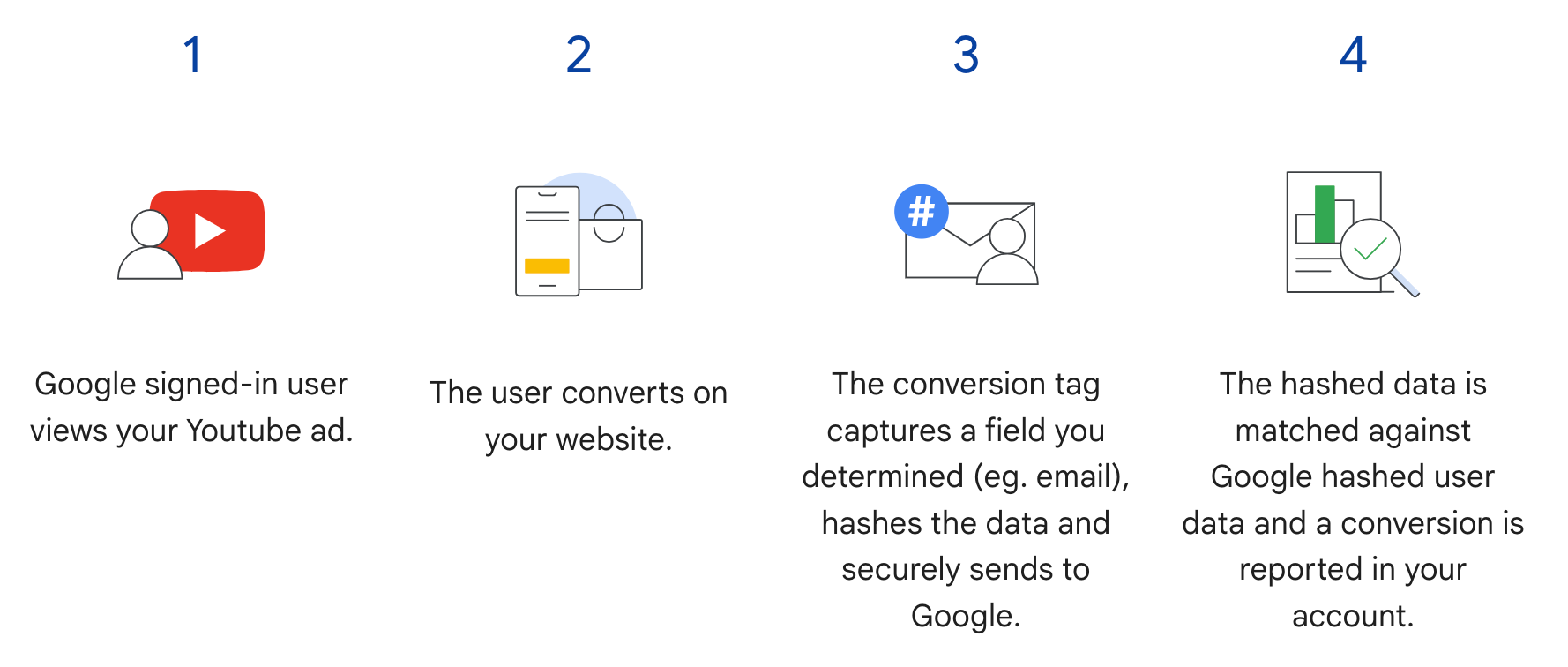
Conversion ที่ปรับปรุงแล้วสำหรับเว็บใน Google Ads API จะเสริมขั้นตอนที่ 3 ในโฟลว์ต่อไปนี้
แทนที่จะส่งข้อมูลผู้ใช้ที่แฮชเมื่อผู้ใช้ทำ Conversion แท็กจะส่งเพียง GCLID และรหัสคำสั่งซื้อเท่านั้น และคุณจะส่งข้อมูลผู้ใช้ที่แฮชในภายหลังโดยการนําเข้ารหัสคำสั่งซื้อพร้อมกับข้อมูลที่แฮช ดูข้อมูลเพิ่มเติมเกี่ยวกับ Conversion ที่ปรับปรุงแล้วสำหรับเว็บได้ที่ หัวข้อเกี่ยวกับ Conversion ที่ปรับปรุงแล้ว
ข้อกำหนดเบื้องต้น
คุณต้องยอมรับข้อกําหนดสำหรับข้อมูลลูกค้าก่อนจึงจะ ใช้ Conversion ที่ปรับปรุงแล้วสำหรับเว็บได้ คุณสามารถตรวจสอบว่าได้ยอมรับข้อกําหนดสำหรับข้อมูลลูกค้าแล้วหรือไม่โดยส่งคําค้นหาต่อไปนี้ไปยังลูกค้า Conversion โฆษณาของ Google Ads
SELECT
  customer.id,
  customer.conversion_tracking_setting.accepted_customer_data_terms
FROM customer
หาก accepted_customer_data_terms เป็น false ให้ทําตามวิธีการใน
ตั้งค่า Conversion ที่ปรับปรุงแล้วสำหรับเว็บ เพื่อทํา
ข้อกําหนดเบื้องต้นนี้ให้เสร็จสมบูรณ์
กําหนดค่าการติดแท็ก
คุณสามารถกําหนดค่าการติดแท็กสําหรับเว็บไซต์ได้โดยทําตามวิธีการในหัวข้อ ตั้งค่า Conversion ที่ปรับปรุงแล้วสำหรับเว็บโดยใช้ Google Ads API เราขอแนะนำให้คุณ เพิ่มรหัสธุรกรรม (รหัสคำสั่งซื้อ) ลงในแท็ก เครื่องมือวัด Conversion ด้วยเพื่อช่วยในการจับคู่ Conversion
การใช้งาน API
นี่คือโฟลว์โดยรวมสําหรับการนําเข้า Conversion ที่ปรับปรุงแล้วสำหรับเว็บใน Google Ads API
แปลงข้อมูลที่ได้จากผู้ใช้ให้เป็นรูปแบบมาตรฐานและแฮชข้อมูลดังกล่าว เช่น อีเมล ที่อยู่ หมายเลขโทรศัพท์ และที่อยู่จัดส่ง
ป้อนข้อมูลที่ได้จากผู้ใช้ที่แปลงให้เป็นรูปแบบมาตรฐานและแฮชแล้วลงในออบเจ็กต์
ConversionAdjustmentนําเข้าออบเจ็กต์
ConversionAdjustmentไปยังConversionAdjustmentUploadService
แปลงข้อมูลที่ได้จากผู้ใช้ให้เป็นรูปแบบมาตรฐานและแฮชข้อมูลดังกล่าว
ข้อมูลต่อไปนี้ต้องได้รับการแฮชโดยใช้ SHA-256 ก่อนที่จะนําเข้า เพื่อคำนึงถึงความเป็นส่วนตัว
- อีเมล
- หมายเลขโทรศัพท์
- ชื่อ
- นามสกุล
- ที่อยู่
อย่าแฮช ข้อมูลต่อไปนี้
- ประเทศ
- รัฐ
- เมือง
- รหัสไปรษณีย์
ก่อนแฮชค่าใดค่าหนึ่งต่อไปนี้ ให้ทําดังนี้เพื่อให้ผลลัพธ์การแฮชเป็นมาตรฐาน
- นําช่องว่างขึ้นต้นและต่อท้ายออก
- แปลงข้อความให้เป็นตัวพิมพ์เล็ก
- จัดรูปแบบหมายเลขโทรศัพท์ตามมาตรฐาน E.164
การจัดรูปแบบอีเมลสําหรับ Conversion ที่ปรับปรุงแล้ว
เพื่อให้มั่นใจว่าอัตราการจับคู่ Conversion ที่ปรับปรุงแล้วจะสูงที่สุด คุณต้องจัดรูปแบบและแฮชอีเมลอย่างถูกต้องโดยทําตามขั้นตอนต่อไปนี้
ใช้การแปลงเป็นรูปแบบมาตรฐาน (อีเมลทั้งหมด)
- นําช่องว่าง ASCII ขึ้นต้นและต่อท้ายออก
- แปลงอักขระทั้งหมดในอีเมลให้เป็นตัวพิมพ์เล็ก
ใช้การแปลงเป็นรูปแบบมาตรฐานเฉพาะโดเมน (
gmail.comและgooglemail.comเท่านั้น)- หลังจากแปลงอีเมลเป็นตัวพิมพ์เล็กแล้ว ให้ตรวจสอบว่าโดเมน (หลังสัญลักษณ์
@) คือgmail.comหรือgooglemail.com - นําจุด (
.) ออก: จากส่วนชื่อผู้ใช้ (ก่อนสัญลักษณ์@) ให้นําอักขระจุดทั้งหมดออก - นําส่วนต่อท้ายที่เป็นเครื่องหมายบวก (
+) ออก: จากส่วนชื่อผู้ใช้ ให้นําเครื่องหมายบวก (+) ตัวแรกและอักขระทั้งหมดที่ตามมาออกจนถึงสัญลักษณ์@- ตัวอย่าง:
Jane.Doe+Shopping@googlemail.comจะกลายเป็นjane.doe+shopping@googlemail.com(ตัวพิมพ์เล็ก) ก่อน แล้วจึงกลายเป็นjanedoe@googlemail.com(กฎของ Gmail และ Googlemail)
- ตัวอย่าง:
- โดเมนอื่นๆ: สําหรับโดเมน อื่นๆ ที่ไม่ใช่
gmail.comหรือgooglemail.comอย่า นําจุดหรือส่วนต่อท้ายที่เป็นเครื่องหมายบวกออกจากชื่อผู้ใช้ ให้ใช้การแปลงเป็นรูปแบบมาตรฐานเท่านั้น (ตัดช่องว่างและแปลงเป็นตัวพิมพ์เล็ก)- ตัวอย่าง:
user.name+NYC@Example.comจะแปลงเป็นรูปแบบมาตรฐานเป็นuser.name+nyc@example.com
- ตัวอย่าง:
- หลังจากแปลงอีเมลเป็นตัวพิมพ์เล็กแล้ว ให้ตรวจสอบว่าโดเมน (หลังสัญลักษณ์
แฮชอีเมลที่แปลงเป็นรูปแบบมาตรฐานแล้ว
- เข้ารหัสสตริงอีเมลที่แปลงเป็นรูปแบบมาตรฐานแล้วเป็นไบต์ UTF-8
- แฮชไบต์ UTF-8 โดยใช้อัลกอริทึม SHA-256
- จัดรูปแบบไดเจสต์ที่ได้เป็นสตริงเลขฐานสิบหกตัวพิมพ์เล็ก (64 อักขระ)
import hashlib
import re


def normalize_and_hash_email(email: str) -> str:
    """Normalizes and SHA-256 hashes an email address for enhanced conversions."""
    normalized = email.strip().lower()
    parts = normalized.split("@")
    if len(parts) != 2:
        raise ValueError("Invalid email address format.")
    username, domain = parts
    if domain in ("gmail.com", "googlemail.com"):
        username = username.replace(".", "")
        username = re.sub(r"\+.*$", "", username)
    normalized = f"{username}@{domain}"
    return hashlib.sha256(normalized.encode("utf-8")).hexdigest()
ตัวอย่างโค้ด
ตัวอย่างนี้แสดงวิธีแปลงข้อมูลที่ได้จากผู้ใช้ให้เป็นรูปแบบมาตรฐานและแฮชข้อมูลดังกล่าว
Java
private String normalizeAndHash(MessageDigest digest, String s, boolean trimIntermediateSpaces) throws UnsupportedEncodingException { // Normalizes by first converting all characters to lowercase, then trimming spaces. String normalized = s.toLowerCase(); if (trimIntermediateSpaces) { // Removes leading, trailing, and intermediate spaces. normalized = normalized.replaceAll("\\s+", ""); } else { // Removes only leading and trailing spaces. normalized = normalized.trim(); } // Hashes the normalized string using the hashing algorithm. byte[] hash = digest.digest(normalized.getBytes("UTF-8")); StringBuilder result = new StringBuilder(); for (byte b : hash) { result.append(String.format("%02x", b)); } return result.toString(); } /** * Returns the result of normalizing and hashing an email address. For this use case, Google Ads * requires removal of any '.' characters or trailing '+' and characters that follow it from the * username portion of the email address if the domain is {@code gmail.com} or {@code * googlemail.com}. * * @param digest the digest to use to hash the normalized string. * @param emailAddress the email address to normalize and hash. */ private String normalizeAndHashEmailAddress(MessageDigest digest, String emailAddress) throws UnsupportedEncodingException { // Removes all whitespace (leading, trailing, and intermediate) from the email address. String normalizedEmail = emailAddress.toLowerCase().replaceAll("\\s+", ""); String[] emailParts = normalizedEmail.split("@", 2); if (emailParts.length == 2 && emailParts[1].matches("^(gmail|googlemail)\\.com$")) { // Removes any '.' characters from the portion of the email address before the domain if the // domain is gmail.com or googlemail.com. emailParts[0] = emailParts[0].replaceAll("\\.", ""); // Removes any '+' and all characters that follow it from the portion of the email address // before the domain if the domain is gmail.com or googlemail.com. emailParts[0] = emailParts[0].replaceAll("\\+.*", ""); normalizedEmail = String.format("%s@%s", emailParts[0], emailParts[1]); } return normalizeAndHash(digest, normalizedEmail, true); } /** * Returns the result of normalizing and hashing a phone number. For this use case, Google Ads * requires phone numbers to be in E.164 format. * * @param digest the digest to use to hash the normalized string. * @param phoneNumber the phone number to normalize and hash. */ private String normalizeAndHashPhoneNumber(MessageDigest digest, String phoneNumber) throws UnsupportedEncodingException { // Removes non-digit characters and prepends a leading '+' sign. String digitsOnly = phoneNumber.replaceAll("[^0-9]", ""); String formattedPhone = "+" + digitsOnly; if (!formattedPhone.matches("^\\+[1-9]\\d{6,14}$")) { throw new IllegalArgumentException("Phone number must be in E.164 format: " + phoneNumber); } return normalizeAndHash(digest, formattedPhone, true); }
C#
/// <summary> /// Normalizes the email address and hashes it. For this use case, Google Ads requires /// removal of any '.' characters preceding <code>gmail.com</code> or /// <code>googlemail.com</code>. /// </summary> /// <param name="emailAddress">The email address.</param> /// <returns>The hash code.</returns> private string NormalizeAndHashEmailAddress(string emailAddress) { string normalizedEmail = emailAddress.ToLower(); string[] emailParts = normalizedEmail.Split('@'); if (emailParts.Length > 1 && (emailParts[1] == "gmail.com" || emailParts[1] == "googlemail.com")) { // Removes any '.' characters from the portion of the email address before // the domain if the domain is gmail.com or googlemail.com. emailParts[0] = emailParts[0].Replace(".", ""); normalizedEmail = $"{emailParts[0]}@{emailParts[1]}"; } return NormalizeAndHash(normalizedEmail); } /// <summary> /// Normalizes and hashes a string value. /// </summary> /// <param name="value">The value to normalize and hash.</param> /// <returns>The normalized and hashed value.</returns> private static string NormalizeAndHash(string value) { return ToSha256String(digest, ToNormalizedValue(value)); } /// <summary> /// Hash a string value using SHA-256 hashing algorithm. /// </summary> /// <param name="digest">Provides the algorithm for SHA-256.</param> /// <param name="value">The string value (e.g. an email address) to hash.</param> /// <returns>The hashed value.</returns> private static string ToSha256String(SHA256 digest, string value) { byte[] digestBytes = digest.ComputeHash(Encoding.UTF8.GetBytes(value)); // Convert the byte array into an unhyphenated hexadecimal string. return BitConverter.ToString(digestBytes).Replace("-", string.Empty); } /// <summary> /// Removes leading and trailing whitespace and converts all characters to /// lower case. /// </summary> /// <param name="value">The value to normalize.</param> /// <returns>The normalized value.</returns> private static string ToNormalizedValue(string value) { return value.Trim().ToLower(); }
PHP
private static function normalizeAndHash( string $hashAlgorithm, string $value, bool $trimIntermediateSpaces ): string { // Normalizes by first converting all characters to lowercase, then trimming spaces. $normalized = strtolower($value); if ($trimIntermediateSpaces === true) { // Removes leading, trailing, and intermediate spaces. $normalized = str_replace(' ', '', $normalized); } else { // Removes only leading and trailing spaces. $normalized = trim($normalized); } return hash($hashAlgorithm, strtolower(trim($normalized))); } /** * Returns the result of normalizing and hashing an email address. For this use case, Google * Ads requires removal of any '.' characters or trailing '+' and characters that follow it * from the username portion of the email address if the domain is "gmail.com" or * "googlemail.com". * * @param string $hashAlgorithm the hash algorithm to use * @param string $emailAddress the email address to normalize and hash * @return string the normalized and hashed email address */ private static function normalizeAndHashEmailAddress( string $hashAlgorithm, string $emailAddress ): string { // Removes all whitespace (leading, trailing, and intermediate) from the email address. $normalizedEmail = preg_replace('/\s+/', '', strtolower($emailAddress)); $emailParts = explode('@', $normalizedEmail, 2); if ( count($emailParts) === 2 && preg_match('/^(gmail|googlemail)\.com$/', $emailParts[1]) ) { // Removes any '.' characters from the portion of the email address before the domain // if the domain is gmail.com or googlemail.com. $emailParts[0] = str_replace('.', '', $emailParts[0]); // Removes any '+' and all characters that follow it from the portion of the email // address before the domain if the domain is gmail.com or googlemail.com. $emailParts[0] = preg_replace('/\+.*/', '', $emailParts[0]); $normalizedEmail = sprintf('%s@%s', $emailParts[0], $emailParts[1]); } return self::normalizeAndHash($hashAlgorithm, $normalizedEmail, true); } /** * Returns the result of normalizing and hashing a phone number. For this use case, Google Ads * requires phone numbers to be in E.164 format. * * @param string $hashAlgorithm the hash algorithm to use * @param string $phoneNumber the phone number to normalize and hash * @return string the normalized and hashed phone number * @throws \InvalidArgumentException if the phone number is not in E.164 format */ private static function normalizeAndHashPhoneNumber( string $hashAlgorithm, string $phoneNumber ): string { // Removes non-digit characters and prepends a leading '+' sign. $digitsOnly = preg_replace('/[^0-9]/', '', $phoneNumber); $formattedPhone = '+' . $digitsOnly; if (!preg_match('/^\+[1-9]\d{6,14}$/', $formattedPhone)) { throw new \InvalidArgumentException( "Phone number must be in E.164 format: $phoneNumber" ); } return self::normalizeAndHash($hashAlgorithm, $formattedPhone, true); }
Python
def normalize_and_hash_email_address(email_address): """Returns the result of normalizing and hashing an email address. For this use case, Google Ads requires removal of any '.' characters preceding "gmail.com" or "googlemail.com" Args: email_address: An email address to normalize. Returns: A normalized (lowercase, removed whitespace) and SHA-265 hashed string. """ normalized_email = email_address.strip().lower() email_parts = normalized_email.split("@") # Check that there are at least two segments if len(email_parts) > 1: # Removes any '.' and '+' characters from the portion of the email address # before the domain chars_to_remove = ".+" translation_table = str.maketrans("", "", chars_to_remove) email_parts[0] = email_parts[0].translate(translation_table) normalized_email = "@".join(email_parts) return normalize_and_hash(normalized_email) def normalize_and_hash(s): """Normalizes and hashes a string with SHA-256. Private customer data must be hashed during upload, as described at: https://support.google.com/google-ads/answer/9888656 Args: s: The string to perform this operation on. Returns: A normalized (lowercase, removed whitespace) and SHA-256 hashed string. """ return hashlib.sha256(s.strip().lower().encode()).hexdigest()
Ruby
# Returns the result of normalizing and then hashing the string using the # provided digest. Private customer data must be hashed during upload, as # described at https://support.google.com/google-ads/answer/9888656. def normalize_and_hash(str) # Remove leading and trailing whitespace and ensure all letters are lowercase # before hasing. Digest::SHA256.hexdigest(str.strip.downcase) end # Returns the result of normalizing and hashing an email address. For this use # case, Google Ads requires removal of any '.' characters preceding 'gmail.com' # or 'googlemail.com'. def normalize_and_hash_email(email) email_parts = email.downcase.split("@") # Removes any '.' characters from the portion of the email address before the # domain if the domain is gmail.com or googlemail.com. if email_parts.last =~ /^(gmail|googlemail)\.com\s*/ email_parts[0] = email_parts[0].gsub('.', '') end normalize_and_hash(email_parts.join('@')) end
Perl
sub normalize_and_hash { my $value = shift; my $trim_intermediate_spaces = shift; if ($trim_intermediate_spaces) { $value =~ s/\s+//g; } else { $value =~ s/^\s+|\s+$//g; } return sha256_hex(lc $value); } # Returns the result of normalizing and hashing an email address. For this use # case, Google Ads requires removal of any '.' characters preceding 'gmail.com' # or 'googlemail.com'. sub normalize_and_hash_email_address { my $email_address = shift; my $normalized_email = lc $email_address; my @email_parts = split('@', $normalized_email); if (scalar @email_parts > 1 && $email_parts[1] =~ /^(gmail|googlemail)\.com\s*/) { # Remove any '.' characters from the portion of the email address before the # domain if the domain is 'gmail.com' or 'googlemail.com'. $email_parts[0] =~ s/\.//g; $normalized_email = sprintf '%s@%s', $email_parts[0], $email_parts[1]; } return normalize_and_hash($normalized_email, 1); }
curl
ป้อนข้อมูลลงในออบเจ็กต์ ConversionAdjustment
ส่วนต่อไปนี้แสดงวิธีสร้างการปรับการเพิ่มประสิทธิภาพที่มีรหัสคำสั่งซื้อ รวมถึงตัวระบุสำหรับอีเมล หมายเลขโทรศัพท์ และที่อยู่จริง โดยมีการใช้การแปลงเป็นรูปแบบมาตรฐานและการแฮชตามที่จำเป็น เราขอแนะนําให้ใส่ gclid ในการปรับหากมี
ขั้นตอนนี้เกือบจะเหมือนกับ คู่มือการนําเข้าการปรับ Conversion โดยมีข้อควรระวังเล็กน้อยดังนี้
- ป้อนข้อมูลผู้ใช้ที่แปลงเป็นรูปแบบมาตรฐานและแฮชแล้วลงใน
user_identifiersหากมีตัวระบุผู้ใช้หลายรายการ ให้สร้างUserIdentifierแยกกันสําหรับตัวระบุแต่ละรายการ โดยสร้างได้สูงสุด 5 ตัวระบุ
Java
// Creates a builder for constructing the enhancement adjustment. ConversionAdjustment.Builder enhancementBuilder = ConversionAdjustment.newBuilder().setAdjustmentType(ConversionAdjustmentType.ENHANCEMENT); // Extracts user email, phone, and address info from the raw data, normalizes and hashes it, // then wraps it in UserIdentifier objects. // Creates a separate UserIdentifier object for each. The data in this example is hardcoded, but // in your application you might read the raw data from an input file. // IMPORTANT: Since the identifier attribute of UserIdentifier // (https://developers.google.com/google-ads/api/reference/rpc/latest/UserIdentifier) is a // oneof // (https://protobuf.dev/programming-guides/proto3/#oneof-features), you must set only ONE of // hashedEmail, hashedPhoneNumber, mobileId, thirdPartyUserId, or addressInfo. Setting more // than one of these attributes on the same UserIdentifier will clear all the other members // of the oneof. For example, the following code is INCORRECT and will result in a // UserIdentifier with ONLY a hashedPhoneNumber. // // UserIdentifier incorrectlyPopulatedUserIdentifier = // UserIdentifier.newBuilder() // .setHashedEmail("...") // .setHashedPhoneNumber("...") // .build(); ImmutableMap.Builder<String, String> rawRecordBuilder = ImmutableMap.<String, String>builder() // Email address that includes a period (.) and plus (+) suffix before the Gmail domain. .put("email", "alex.2+myalias@gmail.com") // Address that includes all four required elements: first name, last name, country // code, and postal code. .put("firstName", "Alex") .put("lastName", "Quinn") .put("countryCode", "US") .put("postalCode", "94045") // Phone number to be converted to E.164 format, with a leading '+' as required. .put("phone", "+1 800-555-0102") // This example lets you put conversion details as arguments, but in reality you might // store this data alongside other user data, so we include it in this sample user // record. .put("orderId", orderId) .put("conversionActionId", Long.toString(conversionActionId)) .put("currencyCode", "USD"); // Adds entries for the optional fields. if (conversionDateTime != null) { rawRecordBuilder.put("conversionDateTime", conversionDateTime); } if (userAgent != null) { rawRecordBuilder.put("userAgent", userAgent); } // Builds the map representing the record. Map<String, String> rawRecord = rawRecordBuilder.build(); // Creates a SHA256 message digest for hashing user identifiers in a privacy-safe way, as // described at https://support.google.com/google-ads/answer/9888656. MessageDigest sha256Digest = MessageDigest.getInstance("SHA-256"); // Creates a list for the user identifiers. List<UserIdentifier> userIdentifiers = new ArrayList<>(); // Creates a user identifier using the hashed email address, using the normalize and hash method // specifically for email addresses. UserIdentifier emailIdentifier = UserIdentifier.newBuilder() // Optional: specify the user identifier source. .setUserIdentifierSource(UserIdentifierSource.FIRST_PARTY) // Uses the normalize and hash method specifically for email addresses. .setHashedEmail(normalizeAndHashEmailAddress(sha256Digest, rawRecord.get("email"))) .build(); userIdentifiers.add(emailIdentifier); // Checks if the record has a phone number, and if so, adds a UserIdentifier for it. if (rawRecord.containsKey("phone")) { UserIdentifier hashedPhoneNumberIdentifier = UserIdentifier.newBuilder() .setHashedPhoneNumber( normalizeAndHashPhoneNumber(sha256Digest, rawRecord.get("phone"))) .build(); // Adds the hashed phone number identifier to the UserData object's list. userIdentifiers.add(hashedPhoneNumberIdentifier); } // Checks if the record has all the required mailing address elements, and if so, adds a // UserIdentifier for the mailing address. if (rawRecord.containsKey("firstName")) { // Checks if the record contains all the other required elements of a mailing address. Set<String> missingAddressKeys = new HashSet<>(); for (String addressKey : new String[] {"lastName", "countryCode", "postalCode"}) { if (!rawRecord.containsKey(addressKey)) { missingAddressKeys.add(addressKey); } } if (!missingAddressKeys.isEmpty()) { System.out.printf( "Skipping addition of mailing address information because the following required keys" + " are missing: %s%n", missingAddressKeys); } else { // Creates an OfflineUserAddressInfo object that contains all the required elements of a // mailing address. OfflineUserAddressInfo addressInfo = OfflineUserAddressInfo.newBuilder() .setHashedFirstName( normalizeAndHash(sha256Digest, rawRecord.get("firstName"), false)) .setHashedLastName(normalizeAndHash(sha256Digest, rawRecord.get("lastName"), false)) .setCountryCode(rawRecord.get("countryCode")) .setPostalCode(rawRecord.get("postalCode")) .build(); UserIdentifier addressIdentifier = UserIdentifier.newBuilder().setAddressInfo(addressInfo).build(); // Adds the address identifier to the UserData object's list. userIdentifiers.add(addressIdentifier); } } // Adds the user identifiers to the enhancement adjustment. enhancementBuilder.addAllUserIdentifiers(userIdentifiers);
C#
// Normalize and hash the raw data, then wrap it in UserIdentifier objects. // Create a separate UserIdentifier object for each. The data in this example is // hardcoded, but in your application you might read the raw data from an input file. // // IMPORTANT: Since the identifier attribute of UserIdentifier // (https://developers.google.com/google-ads/api/reference/rpc/latest/UserIdentifier) // is a oneof // (https://protobuf.dev/programming-guides/proto3/#oneof-features), you must set // only ONE of hashed_email, hashed_phone_number, mobile_id, third_party_user_id, // or address-info. Setting more than one of these attributes on the same UserIdentifier // will clear all the other members of the oneof. For example, the following code is // INCORRECT and will result in a UserIdentifier with ONLY a hashed_phone_number: // UserIdentifier incorrectlyPopulatedUserIdentifier = new UserIdentifier() // { // HashedEmail = "..." // HashedPhoneNumber = "..." // } UserIdentifier addressIdentifier = new UserIdentifier() { AddressInfo = new OfflineUserAddressInfo() { HashedFirstName = NormalizeAndHash("Dana"), HashedLastName = NormalizeAndHash("Quinn"), HashedStreetAddress = NormalizeAndHash("1600 Amphitheatre Pkwy"), City = "Mountain View", State = "CA", PostalCode = "94043", CountryCode = "US" }, // Optional: Specifies the user identifier source. UserIdentifierSource = UserIdentifierSource.FirstParty }; // Creates a user identifier using the hashed email address. UserIdentifier emailIdentifier = new UserIdentifier() { UserIdentifierSource = UserIdentifierSource.FirstParty, // Uses the normalize and hash method specifically for email addresses. HashedEmail = NormalizeAndHashEmailAddress("dana@example.com") }; // Adds the user identifiers to the enhancement adjustment. enhancement.UserIdentifiers.AddRange(new[] { addressIdentifier, emailIdentifier });
PHP
// Creates the conversion enhancement. $enhancement = new ConversionAdjustment(['adjustment_type' => ConversionAdjustmentType::ENHANCEMENT]); // Extracts user email, phone, and address info from the raw data, normalizes and hashes it, // then wraps it in UserIdentifier objects. // Creates a separate UserIdentifier object for each. The data in this example is hardcoded, // but in your application you might read the raw data from an input file. // IMPORTANT: Since the identifier attribute of UserIdentifier // (https://developers.google.com/google-ads/api/reference/rpc/latest/UserIdentifier) is a // oneof // (https://protobuf.dev/programming-guides/proto3/#oneof-features), you must set only ONE // of hashedEmail, hashedPhoneNumber, mobileId, thirdPartyUserId, or addressInfo. Setting // more than one of these attributes on the same UserIdentifier will clear all the other // members of the oneof. For example, the following code is INCORRECT and will result in a // UserIdentifier with ONLY a hashedPhoneNumber. // // $incorrectlyPopulatedUserIdentifier = new UserIdentifier([ // 'hashed_email' => '...', // 'hashed_phone_number' => '...' // ]); $rawRecord = [ // Email address that includes a period (.) and plus (+) suffix before the Gmail domain. 'email' => 'alex.2+myalias@gmail.com', // Address that includes all four required elements: first name, last name, country // code, and postal code. 'firstName' => 'Alex', 'lastName' => 'Quinn', 'countryCode' => 'US', 'postalCode' => '94045', // Phone number to be converted to E.164 format, with a leading '+' as required. 'phone' => '+1 800-555-0102', // This example lets you input conversion details as arguments, but in reality you might // store this data alongside other user data, so we include it in this sample user // record. 'orderId' => $orderId, 'conversionActionId' => $conversionActionId, 'conversionDateTime' => $conversionDateTime, 'currencyCode' => 'USD' ]; // Creates a list for the user identifiers. $userIdentifiers = []; // Uses the SHA-256 hash algorithm for hashing user identifiers in a privacy-safe way, as // described at https://support.google.com/google-ads/answer/9888656. $hashAlgorithm = "sha256"; // Creates a user identifier using the hashed email address, using the normalize and hash // method specifically for email addresses. $emailIdentifier = new UserIdentifier( [ // Uses the normalize and hash method specifically for email addresses. 'hashed_email' => self::normalizeAndHashEmailAddress( $hashAlgorithm, $rawRecord['email'] ), // Optional: Specifies the user identifier source. 'user_identifier_source' => UserIdentifierSource::FIRST_PARTY ] ); $userIdentifiers[] = $emailIdentifier; // Checks if the record has a phone number, and if so, adds a UserIdentifier for it. if (array_key_exists('phone', $rawRecord)) { $hashedPhoneNumberIdentifier = new UserIdentifier( [ 'hashed_phone_number' => self::normalizeAndHashPhoneNumber( $hashAlgorithm, $rawRecord['phone'] ) ] ); // Adds the hashed phone number identifier to the user identifiers list. $userIdentifiers[] = $hashedPhoneNumberIdentifier; } // Checks if the record has all the required mailing address elements, and if so, adds a // UserIdentifier for the mailing address. if (array_key_exists('firstName', $rawRecord)) { // Checks if the record contains all the other required elements of a mailing // address. $missingAddressKeys = []; foreach (['lastName', 'countryCode', 'postalCode'] as $addressKey) { if (!array_key_exists($addressKey, $rawRecord)) { $missingAddressKeys[] = $addressKey; } } if (!empty($missingAddressKeys)) { printf( "Skipping addition of mailing address information because the " . "following required keys are missing: %s%s", json_encode($missingAddressKeys), PHP_EOL ); } else { // Creates an OfflineUserAddressInfo object that contains all the required // elements of a mailing address. $addressIdentifier = new UserIdentifier( [ 'address_info' => new OfflineUserAddressInfo( [ 'hashed_first_name' => self::normalizeAndHash( $hashAlgorithm, $rawRecord['firstName'], false ), 'hashed_last_name' => self::normalizeAndHash( $hashAlgorithm, $rawRecord['lastName'], false ), 'country_code' => $rawRecord['countryCode'], 'postal_code' => $rawRecord['postalCode'] ] ) ] ); // Adds the address identifier to the user identifiers list. $userIdentifiers[] = $addressIdentifier; } } // Adds the user identifiers to the conversion. $enhancement->setUserIdentifiers($userIdentifiers);
Python
# Extracts user email, phone, and address info from the raw data, normalizes # and hashes it, then wraps it in UserIdentifier objects. Creates a separate # UserIdentifier object for each. The data in this example is hardcoded, but # in your application you might read the raw data from an input file. # IMPORTANT: Since the identifier attribute of UserIdentifier # (https://developers.google.com/google-ads/api/reference/rpc/latest/UserIdentifier) # is a oneof # (https://protobuf.dev/programming-guides/proto3/#oneof-features), you must # set only ONE of hashed_email, hashed_phone_number, mobile_id, # third_party_user_id, or address_info. Setting more than one of these # attributes on the same UserIdentifier will clear all the other members of # the oneof. For example, the following code is INCORRECT and will result in # a UserIdentifier with ONLY a hashed_phone_number: # # incorrectly_populated_user_identifier = client.get_type("UserIdentifier") # incorrectly_populated_user_identifier.hashed_email = "..."" # incorrectly_populated_user_identifier.hashed_phone_number = "..."" raw_record = { # Email address that includes a period (.) before the Gmail domain. "email": "alex.2@example.com", # Address that includes all four required elements: first name, last # name, country code, and postal code. "first_name": "Alex", "last_name": "Quinn", "country_code": "US", "postal_code": "94045", # Phone number to be converted to E.164 format, with a leading '+' as # required. "phone": "+1 800 5550102", # This example lets you input conversion details as arguments, but in # reality you might store this data alongside other user data, so we # include it in this sample user record. "order_id": order_id, "conversion_action_id": conversion_action_id, "conversion_date_time": conversion_date_time, "currency_code": "USD", "user_agent": user_agent, } # Constructs the enhancement adjustment. conversion_adjustment = client.get_type("ConversionAdjustment") conversion_adjustment.adjustment_type = ( client.enums.ConversionAdjustmentTypeEnum.ENHANCEMENT ) # Creates a user identifier using the hashed email address, using the # normalize and hash method specifically for email addresses. email_identifier = client.get_type("UserIdentifier") # Optional: Specifies the user identifier source. email_identifier.user_identifier_source = ( client.enums.UserIdentifierSourceEnum.FIRST_PARTY ) # Uses the normalize and hash method specifically for email addresses. email_identifier.hashed_email = normalize_and_hash_email_address( raw_record["email"] ) # Adds the email identifier to the conversion adjustment. conversion_adjustment.user_identifiers.append(email_identifier) # Checks if the record has a phone number, and if so, adds a UserIdentifier # for it. if raw_record.get("phone") is not None: phone_identifier = client.get_type("UserIdentifier") phone_identifier.hashed_phone_number = normalize_and_hash( raw_record["phone"] ) # Adds the phone identifier to the conversion adjustment. conversion_adjustment.user_identifiers.append(phone_identifier) # Checks if the record has all the required mailing address elements, and if # so, adds a UserIdentifier for the mailing address. if raw_record.get("first_name") is not None: # Checks if the record contains all the other required elements of a # mailing address. required_keys = ["last_name", "country_code", "postal_code"] # Builds a new list of the required keys that are missing from # raw_record. missing_keys = [ key for key in required_keys if key not in raw_record.keys() ] if len(missing_keys) > 0: print( "Skipping addition of mailing address information because the" f"following required keys are missing: {missing_keys}" ) else: # Creates a user identifier using sample values for the user address, # hashing where required. address_identifier = client.get_type("UserIdentifier") address_info = address_identifier.address_info address_info.hashed_first_name = normalize_and_hash( raw_record["first_name"] ) address_info.hashed_last_name = normalize_and_hash( raw_record["last_name"] ) address_info.country_code = raw_record["country_code"] address_info.postal_code = raw_record["postal_code"] # Adds the address identifier to the conversion adjustment. conversion_adjustment.user_identifiers.append(address_identifier)
Ruby
# Extracts user email, phone, and address info from the raw data, normalizes # and hashes it, then wraps it in UserIdentifier objects. Creates a separate # UserIdentifier object for each. The data in this example is hardcoded, but # in your application you might read the raw data from an input file. # IMPORTANT: Since the identifier attribute of UserIdentifier # (https://developers.google.com/google-ads/api/reference/rpc/latest/UserIdentifier) # is a oneof # (https://protobuf.dev/programming-guides/proto3/#oneof-features), you must # set only ONE of hashed_email, hashed_phone_number, mobile_id, # third_party_user_id, or address_info. Setting more than one of these # attributes on the same UserIdentifier will clear all the other members of # the oneof. For example, the following code is INCORRECT and will result in # a UserIdentifier with ONLY a hashed_phone_number: # # incorrectly_populated_user_identifier.hashed_email = "..."" # incorrectly_populated_user_identifier.hashed_phone_number = "..."" raw_record = { # Email address that includes a period (.) before the Gmail domain. "email" => "alex.2@example.com", # Address that includes all four required elements: first name, last # name, country code, and postal code. "first_name" => "Alex", "last_name" => "Quinn", "country_code" => "US", "postal_code" => "94045", # Phone number to be converted to E.164 format, with a leading '+' as # required. "phone" => "+1 800 5550102", # This example lets you input conversion details as arguments, but in # reality you might store this data alongside other user data, so we # include it in this sample user record. "order_id" => order_id, "conversion_action_id" => conversion_action_id, "conversion_date_time" => conversion_date_time, "currency_code" => "USD", "user_agent" => user_agent, } enhancement = client.resource.conversion_adjustment do |ca| ca.conversion_action = client.path.conversion_action(customer_id, conversion_action_id) ca.adjustment_type = :ENHANCEMENT ca.order_id = order_id # Sets the conversion date and time if provided. Providing this value is # optional but recommended. unless conversion_date_time.nil? ca.gclid_date_time_pair = client.resource.gclid_date_time_pair do |pair| pair.conversion_date_time = conversion_date_time end end # Creates a user identifier using the hashed email address, using the # normalize and hash method specifically for email addresses. ca.user_identifiers << client.resource.user_identifier do |ui| # Uses the normalize and hash method specifically for email addresses. ui.hashed_email = normalize_and_hash_email(raw_record["email"]) # Optional: Specifies the user identifier source. ui.user_identifier_source = :FIRST_PARTY end # Checks if the record has a phone number, and if so, adds a UserIdentifier # for it. unless raw_record["phone"].nil? ca.user_identifiers << client.resource.user_identifier do |ui| ui.hashed_phone_number = normalize_and_hash_email(raw_record["phone"]) end end # Checks if the record has all the required mailing address elements, and if # so, adds a UserIdentifier for the mailing address. unless raw_record["first_name"].nil? # Checks if the record contains all the other required elements of a # mailing address. required_keys = ["last_name", "country_code", "postal_code"] # Builds a new list of the required keys that are missing from # raw_record. missing_keys = required_keys - raw_record.keys if missing_keys puts( "Skipping addition of mailing address information because the" \ "following required keys are missing: #{missing_keys}" ) else ca.user_identifiers << client.resource.user_identifier do |ui| ui.address_info = client.resource.offline_user_address_info do |info| # Certain fields must be hashed using SHA256 in order to handle # identifiers in a privacy-safe way, as described at # https://support.google.com/google-ads/answer/9888656. info.hashed_first_name = normalize_and_hash( raw_record["first_name"]) info.hashed_last_name = normalize_and_hash( raw_record["last_name"]) info.postal_code = normalize_and_hash(raw_record["country_code"]) info.country_code = normalize_and_hash(raw_record["postal_code"]) end end end end
Perl
# Construct the enhancement adjustment. my $enhancement = Google::Ads::GoogleAds::V25::Services::ConversionAdjustmentUploadService::ConversionAdjustment ->new({ adjustmentType => ENHANCEMENT }); # Extract user email, phone, and address info from the raw data, # normalize and hash it, then wrap it in UserIdentifier objects. # Create a separate UserIdentifier object for each. # The data in this example is hardcoded, but in your application # you might read the raw data from an input file. # # IMPORTANT: Since the identifier attribute of UserIdentifier # (https://developers.google.com/google-ads/api/reference/rpc/latest/UserIdentifier) # is a oneof # (https://protobuf.dev/programming-guides/proto3/#oneof-features), you must set # only ONE of hashed_email, hashed_phone_number, mobile_id, third_party_user_id, # or address-info. Setting more than one of these attributes on the same UserIdentifier # will clear all the other members of the oneof. For example, the following code is # INCORRECT and will result in a UserIdentifier with ONLY a hashed_phone_number: # # my $incorrect_user_identifier = Google::Ads::GoogleAds::V25::Common::UserIdentifier->new({ # hashedEmail => '...', # hashedPhoneNumber => '...', # }); my $raw_record = { # Email address that includes a period (.) before the Gmail domain. email => 'alex.2@example.com', # Address that includes all four required elements: first name, last # name, country code, and postal code. firstName => 'Alex', lastName => 'Quinn', countryCode => 'US', postalCode => '94045', # Phone number to be converted to E.164 format, with a leading '+' as # required. phone => '+1 800 5550102', # This example lets you input conversion details as arguments, # but in reality you might store this data alongside other user data, # so we include it in this sample user record. orderId => $order_id, conversionActionId => $conversion_action_id, conversionDateTime => $conversion_date_time, currencyCode => "USD", userAgent => $user_agent, }; my $user_identifiers = []; # Create a user identifier using the hashed email address, using the normalize # and hash method specifically for email addresses. my $hashed_email = normalize_and_hash_email_address($raw_record->{email}); push( @$user_identifiers, Google::Ads::GoogleAds::V25::Common::UserIdentifier->new({ hashedEmail => $hashed_email, # Optional: Specify the user identifier source. userIdentifierSource => FIRST_PARTY })); # Check if the record has a phone number, and if so, add a UserIdentifier for it. if (defined $raw_record->{phone}) { # Add the hashed phone number identifier to the list of UserIdentifiers. push( @$user_identifiers, Google::Ads::GoogleAds::V25::Common::UserIdentifier->new({ hashedPhoneNumber => normalize_and_hash($raw_record->{phone}, 1)})); } # Confirm the record has all the required mailing address elements, and if so, add # a UserIdentifier for the mailing address. if (defined $raw_record->{firstName}) { my $required_keys = ["lastName", "countryCode", "postalCode"]; my $missing_keys = []; foreach my $key (@$required_keys) { if (!defined $raw_record->{$key}) { push(@$missing_keys, $key); } } if (@$missing_keys) { print "Skipping addition of mailing address information because the following" . "keys are missing: " . join(",", @$missing_keys); } else { push( @$user_identifiers, Google::Ads::GoogleAds::V25::Common::UserIdentifier->new({ addressInfo => Google::Ads::GoogleAds::V25::Common::OfflineUserAddressInfo->new({ # First and last name must be normalized and hashed. hashedFirstName => normalize_and_hash($raw_record->{firstName}), hashedLastName => normalize_and_hash($raw_record->{lastName}), # Country code and zip code are sent in plain text. countryCode => $raw_record->{countryCode}, postalCode => $raw_record->{postalCode}, })})); } } # Add the user identifiers to the enhancement adjustment. $enhancement->{userIdentifiers} = $user_identifiers;
curl
ตรวจสอบว่าได้ตั้งค่า
order_idเป็นรหัสคำสั่งซื้อ ของ Conversion ที่จะปรับ ซึ่งควรตรงกับรหัสคำสั่งซื้อที่ แท็กส่งโดย แท็กตั้งค่า
adjustment_typeเป็นENHANCEMENTตั้งค่า
conversion_actionเป็น ชื่อทรัพยากรของConversionActionที่มีtypeเป็นWEBPAGE(ไม่บังคับ) หากเป็นไปได้ ให้ป้อนข้อมูลลงใน
gclid_date_time_pairเพื่อให้การวัดผลมีความแม่นยําสูงสุด ตั้งค่าconversion_date_timeเป็นวันที่และเวลาที่เกิด Conversion ที่มีorder_idที่ระบุ รวมออฟเซ็ตเขตเวลา และใช้รูปแบบyyyy-mm-dd HH:mm:ss+|-HH:mmเช่น2022-01-01 19:32:45-05:00(ไม่รวมเวลาออมแสง)(ไม่บังคับ) ตั้งค่า
user_agentเป็น User Agent ของคําขอที่ส่ง Conversion เดิม เพื่อให้ระบบระบุแหล่งที่มาของ Conversion และ การเพิ่มประสิทธิภาพเป็นอุปกรณ์เดียวกันหรือข้ามอุปกรณ์
Java
// Sets the conversion action. enhancementBuilder.setConversionAction( ResourceNames.conversionAction( customerId, Long.parseLong(rawRecord.get("conversionActionId")))); // Sets the order ID. Enhancements MUST use order ID instead of GCLID date/time pair. enhancementBuilder.setOrderId(rawRecord.get("orderId")); // Sets the conversion date and time if provided. Providing this value is optional but // recommended. if (rawRecord.containsKey("conversionDateTime")) { enhancementBuilder.setGclidDateTimePair( GclidDateTimePair.newBuilder() .setConversionDateTime(rawRecord.get("conversionDateTime"))); } // Sets the user agent if provided. This should match the user agent of the request that sent // the original conversion so the conversion and its enhancement are either both attributed as // same-device or both attributed as cross-device. if (rawRecord.containsKey("userAgent")) { enhancementBuilder.setUserAgent(rawRecord.get("userAgent")); }
C#
// Set the conversion action. enhancement.ConversionAction = ResourceNames.ConversionAction(customerId, conversionActionId); // Set the order ID. Enhancements MUST use order ID instead of GCLID date/time pair. enhancement.OrderId = orderId; // Sets the conversion date and time if provided. Providing this value is optional but // recommended. if (string.IsNullOrEmpty(conversionDateTime)) { enhancement.GclidDateTimePair = new GclidDateTimePair() { ConversionDateTime = conversionDateTime }; } // Sets optional fields where a value was provided. if (!string.IsNullOrEmpty(userAgent)) { // Sets the user agent. This should match the user agent of the request that // sent the original conversion so the conversion and its enhancement are either // both attributed as same-device or both attributed as cross-device. enhancement.UserAgent = userAgent; }
PHP
// Sets the conversion action. $enhancement->setConversionAction( ResourceNames::forConversionAction($customerId, $rawRecord['conversionActionId']) ); // Sets the order ID. Enhancements MUST use order ID instead of GCLID date/time pair. if (!empty($rawRecord['orderId'])) { $enhancement->setOrderId($rawRecord['orderId']); } // Sets the conversion date and time if provided. Providing this value is optional but // recommended. if (!empty($rawRecord['conversionDateTime'])) { // Sets the conversion date and time if provided. Providing this value is optional but // recommended. $enhancement->setGclidDateTimePair( new GclidDateTimePair( [ 'conversion_date_time' => $rawRecord['conversionDateTime'] ] ) ); } // Sets the user agent if provided. This should match the user agent of the request that // sent the original conversion so the conversion and its enhancement are either both // attributed as same-device or both attributed as cross-device. if (!empty($rawRecord['userAgent'])) { $enhancement->setUserAgent($rawRecord['userAgent']); }
Python
conversion_action_service = client.get_service("ConversionActionService") # Sets the conversion action. conversion_adjustment.conversion_action = ( conversion_action_service.conversion_action_path( customer_id, raw_record["conversion_action_id"] ) ) # Sets the order ID. Enhancements MUST use order ID instead of GCLID # date/time pair. conversion_adjustment.order_id = order_id # Sets the conversion date and time if provided. Providing this value is # optional but recommended. if raw_record.get("conversion_date_time"): conversion_adjustment.gclid_date_time_pair.conversion_date_time = ( raw_record["conversion_date_time"] ) # Sets optional fields where a value was provided if raw_record.get("user_agent"): # Sets the user agent. This should match the user agent of the request # that sent the original conversion so the conversion and its # enhancement are either both attributed as same-device or both # attributed as cross-device. conversion_adjustment.user_agent = user_agent
Ruby
ca.conversion_action = client.path.conversion_action(customer_id, conversion_action_id) ca.adjustment_type = :ENHANCEMENT ca.order_id = order_id # Sets the conversion date and time if provided. Providing this value is # optional but recommended. unless conversion_date_time.nil? ca.gclid_date_time_pair = client.resource.gclid_date_time_pair do |pair| pair.conversion_date_time = conversion_date_time end end # Creates a user identifier using the hashed email address, using the # normalize and hash method specifically for email addresses. ca.user_identifiers << client.resource.user_identifier do |ui| # Uses the normalize and hash method specifically for email addresses. ui.hashed_email = normalize_and_hash_email(raw_record["email"]) # Optional: Specifies the user identifier source. ui.user_identifier_source = :FIRST_PARTY end # Checks if the record has a phone number, and if so, adds a UserIdentifier # for it. unless raw_record["phone"].nil? ca.user_identifiers << client.resource.user_identifier do |ui| ui.hashed_phone_number = normalize_and_hash_email(raw_record["phone"]) end end # Checks if the record has all the required mailing address elements, and if # so, adds a UserIdentifier for the mailing address. unless raw_record["first_name"].nil? # Checks if the record contains all the other required elements of a # mailing address. required_keys = ["last_name", "country_code", "postal_code"] # Builds a new list of the required keys that are missing from # raw_record. missing_keys = required_keys - raw_record.keys if missing_keys puts( "Skipping addition of mailing address information because the" \ "following required keys are missing: #{missing_keys}" ) else ca.user_identifiers << client.resource.user_identifier do |ui| ui.address_info = client.resource.offline_user_address_info do |info| # Certain fields must be hashed using SHA256 in order to handle # identifiers in a privacy-safe way, as described at # https://support.google.com/google-ads/answer/9888656. info.hashed_first_name = normalize_and_hash( raw_record["first_name"]) info.hashed_last_name = normalize_and_hash( raw_record["last_name"]) info.postal_code = normalize_and_hash(raw_record["country_code"]) info.country_code = normalize_and_hash(raw_record["postal_code"]) end end end end # Sets optional fields where a value was provided. unless user_agent.nil? # Sets the user agent. This should match the user agent of the request # that sent the original conversion so the conversion and its enhancement # are either both attributed as same-device or both attributed as # cross-device. ca.user_agent = user_agent end
Perl
# Set the conversion action. $enhancement->{conversionAction} = Google::Ads::GoogleAds::V25::Utils::ResourceNames::conversion_action( $customer_id, $raw_record->{conversionActionId}); # Set the order ID. Enhancements MUST use order ID instead of GCLID date/time pair. $enhancement->{orderId} = $raw_record->{orderId}; # Set the conversion date and time if provided. Providing this value is optional # but recommended. if (defined $raw_record->{conversionDateTime}) { $enhancement->{gclidDateTimePair} = Google::Ads::GoogleAds::V25::Services::ConversionAdjustmentUploadService::GclidDateTimePair ->new({ conversionDateTime => $raw_record->{conversionDateTime}}); } # Set the user agent if provided. This should match the user agent of the # request that sent the original conversion so the conversion and its enhancement # are either both attributed as same-device or both attributed as cross-device. if (defined $raw_record->{userAgent}) { $enhancement->{userAgent} = $raw_record->{userAgent}; }
curl
นําเข้าการเพิ่มประสิทธิภาพ Conversion
Java
// Creates the conversion adjustment upload service client. try (ConversionAdjustmentUploadServiceClient conversionUploadServiceClient = googleAdsClient.getLatestVersion().createConversionAdjustmentUploadServiceClient()) { // Uploads the enhancement adjustment. Partial failure should always be set to true. // NOTE: This request contains a single adjustment as a demonstration. However, if you have // multiple adjustments to upload, it's best to upload multiple adjustments per request // instead of sending a separate request per adjustment. See the following for per-request // limits: // https://developers.google.com/google-ads/api/docs/best-practices/quotas#conversion_adjustment_upload_service UploadConversionAdjustmentsResponse response = conversionUploadServiceClient.uploadConversionAdjustments( UploadConversionAdjustmentsRequest.newBuilder() .setCustomerId(Long.toString(customerId)) .addConversionAdjustments(enhancementBuilder) // Enables partial failure (must be true). .setPartialFailure(true) .build());
C#
// Uploads the enhancement adjustment. Partial failure should always be set to true. // // NOTE: This request contains a single adjustment as a demonstration. // However, if you have multiple adjustments to upload, it's best to upload // multiple adjustmenst per request instead of sending a separate request per // adjustment. See the following for per-request limits: // https://developers.google.com/google-ads/api/docs/best-practices/quotas#conversion_adjust UploadConversionAdjustmentsResponse response = conversionAdjustmentUploadService.UploadConversionAdjustments( new UploadConversionAdjustmentsRequest() { CustomerId = customerId.ToString(), ConversionAdjustments = { enhancement }, // Enables partial failure (must be true). PartialFailure = true, });
PHP
// Issues a request to upload the conversion enhancement. $conversionAdjustmentUploadServiceClient = $googleAdsClient->getConversionAdjustmentUploadServiceClient(); // NOTE: This request contains a single adjustment as a demonstration. However, if you have // multiple adjustments to upload, it's best to upload multiple adjustments per request // instead of sending a separate request per adjustment. See the following for per-request // limits: // https://developers.google.com/google-ads/api/docs/best-practices/quotas#conversion_adjustment_upload_service $response = $conversionAdjustmentUploadServiceClient->uploadConversionAdjustments( // Enables partial failure (must be true). UploadConversionAdjustmentsRequest::build($customerId, [$enhancement], true) );
Python
# Creates the conversion adjustment upload service client. conversion_adjustment_upload_service = client.get_service( "ConversionAdjustmentUploadService" ) # Uploads the enhancement adjustment. Partial failure should always be set # to true. # NOTE: This request only uploads a single conversion, but if you have # multiple conversions to upload, it's still best to upload them in a single # request. See the following for per-request limits for reference: # https://developers.google.com/google-ads/api/docs/best-practices/quotas#conversion_upload_service response = conversion_adjustment_upload_service.upload_conversion_adjustments( customer_id=customer_id, conversion_adjustments=[conversion_adjustment], # Enables partial failure (must be true). partial_failure=True, )
Ruby
response = client.service.conversion_adjustment_upload.upload_conversion_adjustments( customer_id: customer_id, # NOTE: This request only uploads a single conversion, but if you have # multiple conversions to upload, it's still best to upload them in a single # request. See the following for per-request limits for reference: # https://developers.google.com/google-ads/api/docs/best-practices/quotas#conversion_upload_service conversion_adjustments: [enhancement], # Partial failure must be set to true. partial_failure: true, )
Perl
# Upload the enhancement adjustment. Partial failure should always be set to true. # # NOTE: This request contains a single adjustment as a demonstration. # However, if you have multiple adjustments to upload, it's best to # upload multiple adjustments per request instead of sending a separate # request per adjustment. See the following for per-request limits: # https://developers.google.com/google-ads/api/docs/best-practices/quotas#conversion_adjustment_upload_service my $response = $api_client->ConversionAdjustmentUploadService() ->upload_conversion_adjustments({ customerId => $customer_id, conversionAdjustments => [$enhancement], # Enable partial failure (must be true). partialFailure => "true" });
curl
ตรวจสอบการนําเข้า
ใช้รายงานการวินิจฉัย API สำหรับ Conversion ที่ปรับปรุงแล้วเพื่อ ตรวจสอบว่า Conversion ที่ปรับปรุงแล้วสำหรับเว็บทํางานอย่างมีประสิทธิภาพ และเพื่อ วินิจฉัยปัญหาในการตั้งค่า
ใช้การวินิจฉัยข้อมูลออฟไลน์เพื่อตรวจสอบประสิทธิภาพโดยรวมของ การนําเข้าล่าสุด
เมื่อรายงานเมตริก Conversion สําหรับแคมเปญ โปรดดู
การจับคู่เมตริกของอินเทอร์เฟซผู้ใช้เพื่อเชื่อมโยงเมตริก UI ของ Google Ads กับ
ช่องการรายงานของ Google Ads API นอกจากนี้ คุณยังค้นหาทรัพยากร
conversion_action เพื่อดูจํานวน Conversion ทั้งหมด
และมูลค่า Conversion ทั้งหมดสําหรับการกระทําที่ถือเป็น Conversion ที่ระบุได้ด้วย
แนวทางปฏิบัติแนะนำ
โปรดคำนึงถึงแนวทางปฏิบัติแนะนำต่อไปนี้เมื่อติดตั้งใช้งาน Conversion ที่ปรับปรุงแล้วสำหรับเว็บ
ตรวจสอบตัวระบุลูกค้า
เมื่อนำเข้า Conversion คุณต้องตั้งค่ารหัสลูกค้าเป็นบัญชีที่มีการกระทำที่ถือเป็น Conversion และทำเครื่องมือวัด Conversion หากต้องการตรวจสอบ
การตั้งค่านี้ ให้ค้นหาทรัพยากร Google Ads ที่แสดงโฆษณา Customer
เพื่อดู ConversionTrackingSetting ส่งคําค้นหาต่อไปนี้ด้วย GoogleAdsService.SearchStream เพื่อค้นหาค่าของ
customer.conversion_tracking_setting.google_ads_conversion_customer
SELECT
  customer.conversion_tracking_setting.google_ads_conversion_customer,
  customer.conversion_tracking_setting.conversion_tracking_status,
  customer.conversion_tracking_setting.conversion_tracking_id,
  customer.conversion_tracking_setting.cross_account_conversion_tracking_id
FROM customer
ตั้งค่า customer_id เป็นค่า google_ads_conversion_customer ในคําขอของคุณเพื่อนําเข้า Conversion
ใส่ตัวระบุหลายรายการหากมี
หากมี GCLID สําหรับ Conversion เราขอแนะนําให้ส่ง GCLID นอกเหนือจาก user_identifiers เพื่อปรับปรุงประสิทธิภาพ นอกจากนี้ หากคุณมี UserIdentifier มากกว่า 1 รายการสําหรับ Conversion การใส่ตัวระบุทั้งหมดนี้อาจเพิ่มโอกาสในการจับคู่ ใส่ตัวระบุทั้งหมดใน ConversionAdjustment เดียวกัน
ตรวจสอบข้อผิดพลาดบางส่วนเมื่อตั้งค่าการผสานรวม
เมื่อตั้งค่าการผสานรวม Conversion ที่ปรับปรุงแล้วสำหรับเว็บเป็นครั้งแรก
ให้ตรวจสอบและแก้ไขข้อผิดพลาดบางส่วนใน
partial_failure_error
ช่องของการตอบกลับ หากการตั้งค่ามีปัญหา คุณสามารถตรวจสอบช่องนี้เพื่อตรวจสอบและแก้ไขปัญหาได้ ดูรายละเอียดและตัวอย่างที่เกี่ยวข้องกับ
การจัดการข้อผิดพลาดบางส่วนได้ที่คู่มือข้อผิดพลาดบางส่วน
เมื่อแก้ไขปัญหาที่พบในข้อผิดพลาดบางส่วนแล้วและการผสานรวมเสร็จสมบูรณ์ ให้เปลี่ยนไปใช้การวินิจฉัยข้อมูลออฟไลน์เพื่อตรวจสอบประสิทธิภาพของ Conversion เป็นประจํา
จัดกลุ่มการปรับหลายรายการไว้ในคําขอเดียว
หากมีการปรับหลายรายการที่ต้องนําเข้า ให้จัดกลุ่มการดําเนินการ (การปรับ Conversion สูงสุด 2,000
รายการต่อคําขอ) ไว้ในหนึ่งรายการ
UploadConversionAdjustmentsRequest,
แทนที่จะส่งคําขอนําเข้าต่อการปรับแต่ละรายการ
ดูคู่มือโควต้าเพื่อดูขีดจํากัดจํานวนการปรับต่อ
คําขอ หากต้องการให้ การวินิจฉัยข้อมูลออฟไลน์ จัดกลุ่มชุด
คําขอไว้ภายใต้งานเชิงตรรกะเดียวกัน ให้ตั้งค่า job_id ของคําขอทั้งหมด
เป็นค่าเดียวกัน
การแก้ปัญหา
ใช้รายงานการวินิจฉัย API สำหรับ Conversion ที่ปรับปรุงแล้วเพื่อ ตรวจสอบว่า Conversion ที่ปรับปรุงแล้วสำหรับเว็บทํางานอย่างมีประสิทธิภาพ และเพื่อ วินิจฉัยปัญหาในการตั้งค่า
แก้ไขข้อผิดพลาดที่พบบ่อย
คําแนะนําต่อไปนี้จะช่วยคุณวินิจฉัยและแก้ไขข้อผิดพลาดที่พบบ่อยเกี่ยวกับ Conversion ที่ปรับปรุงแล้วสำหรับเว็บ
| ข้อผิดพลาด | |
|---|---|
CONVERSION_NOT_FOUND
|
ไม่พบ Conversion สําหรับคู่การกระทําที่ถือเป็น Conversion และตัวระบุ Conversion หรือ
order_id ที่ระบุ ตรวจสอบว่า Conversion เป็น Conversion ของ Google Ads สําหรับ
ลูกค้า Conversion ของ Google Ads ที่ระบุใน customer_id ของคําขอนอกจากนี้ ให้ตรวจสอบว่า Conversion ไม่ได้มาจากการคลิกที่มีการป้อนข้อมูล gbraid
หรือ wbraid แทน
gclid
Google Ads ไม่รองรับ Conversion ที่ปรับปรุงแล้วสำหรับเว็บสําหรับ Conversion เหล่านี้
|
CUSTOMER_NOT_ACCEPTED_CUSTOMER_DATA_TERMS
|
ยังไม่ได้ยอมรับข้อกําหนดและเงื่อนไขสำหรับข้อมูลลูกค้าสําหรับ
customer_id ของคําขอ ดูวิธีการสําหรับข้อกําหนดเบื้องต้นนี้ได้ใน
คู่มือข้อกําหนดเบื้องต้น
|
CONVERSION_ALREADY_ENHANCED
|
Conversion นี้ได้รับการปรับด้วย
order_id และ conversion_action ที่ระบุแล้ว ตรวจสอบว่าได้ระบุ
order_id ที่ไม่ซ้ำกันสําหรับ Conversion แต่ละรายการ
|
CONVERSION_ACTION_NOT_ELIGIBLE_FOR_ENHANCEMENT
|
conversion_action ที่ระบุไม่มีสิทธิ์ใช้ Conversion ที่ปรับปรุงแล้วสำหรับเว็บ ใน UI ของ Google Ads ให้ตรวจสอบว่าคุณได้เลือกช่องเปิด
Conversion ที่ปรับปรุงแล้ว ในการกระทําที่ถือเป็น Conversion ที่อ้างอิงในคําขอ
ดูวิธีการสําหรับข้อกําหนดเบื้องต้นนี้ได้ใน
ศูนย์ช่วยเหลือ
|