

Google Ads'deki online tıklama dönüşümlerini yönetmek için Google Ads API'yi kullanabilirsiniz. Online tıklama dönüşümleri, online dünyada (ör. bir web sitesi üzerinden) satışla sonuçlanan reklamları izlemenize yardımcı olur.
Online dönüşümler Google etiketi kullanılarak izlenir ancak Google Ads API ile ayarlanabilir veya geliştirilebilir.
Google etiketini zaten ayarladıysanız ve online dönüşümlerinizi düzenlemek istiyorsanız dönüşüm düzenlemeleri sayfasına bakın. Google etiketiniz ayarlanmışsa ve web için gelişmiş dönüşümler olarak da bilinen kullanıcı tarafından sağlanan verilerle online dönüşümlerinizi artırmak istiyorsanız okumaya devam edin.
Web için gelişmiş dönüşümler
Aşağıdaki bölümde, web için gelişmiş dönüşümler olarak da bilinen online tıklama dönüşümlerinin nasıl iyileştirileceği açıklanmaktadır.
Web için gelişmiş dönüşümler, bir kullanıcı dönüşüm gerçekleştirdiğinde Google Ads'e otomatik olarak tıklama tanımlayıcısı (ör. GCLID) ve sipariş kimliği gönderen bir etiket oluşturulmasını gerektirir. Gelişmiş dönüşümleri Google Etiket Yöneticisi, Google etiketi veya Google Ads API aracılığıyla ayarlayabilirsiniz. Google Ads API'yi kullanmak, birinci taraf dönüşüm verilerini aynı anda göndermek yerine dönüşüm etkinliğinden sonraki 24 saat içinde gönderme avantajı sağlar. Bu sayede, müşteri veritabanı veya CRM sistemi gibi çeşitli kaynaklardan gelen birinci taraf verilerinin yerini belirleyebilirsiniz.
Web için gelişmiş dönüşümler nasıl çalışır?
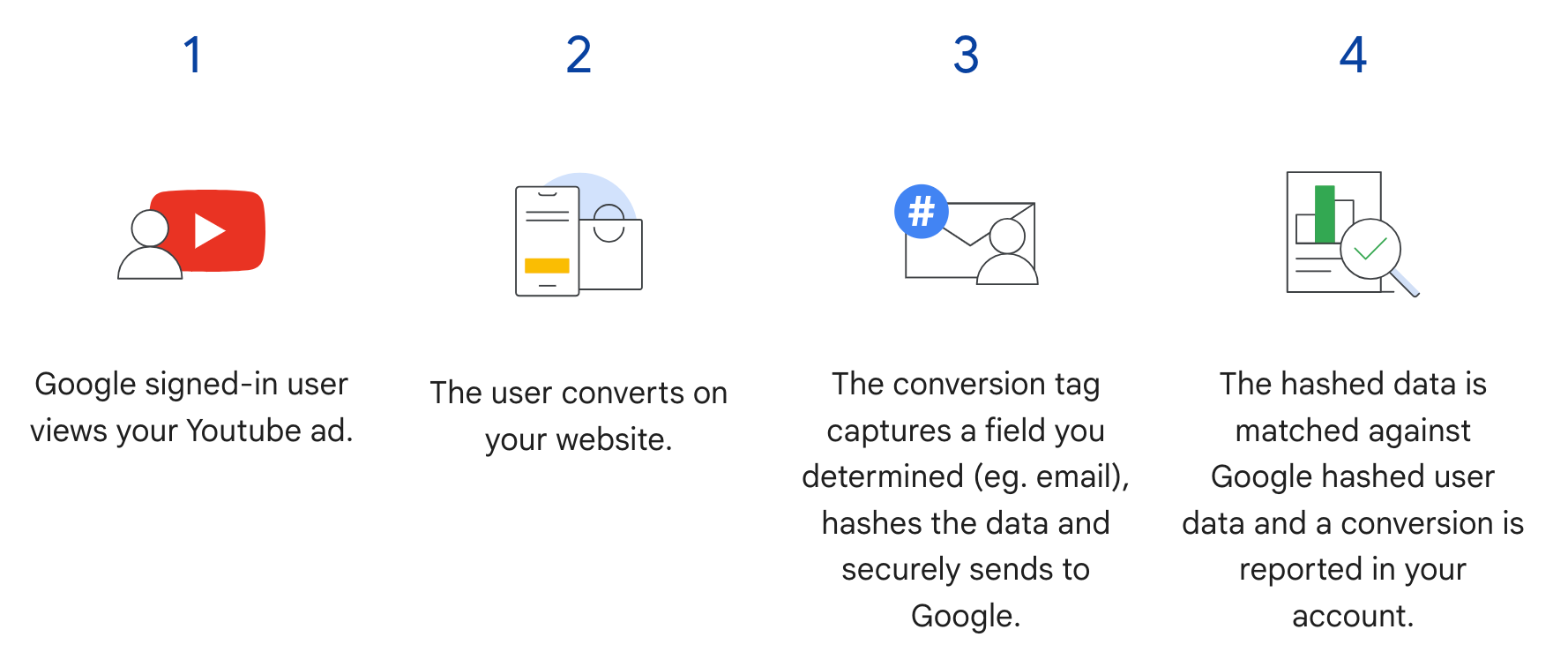
Google Ads API'deki web için gelişmiş dönüşümler, aşağıdaki şemada 3. adımı tamamlar. Etiket, kullanıcı dönüşüm gerçekleştirdiğinde karma oluşturma işlemi uygulanmış kullanıcı bilgilerini göndermek yerine yalnızca GCLID'yi ve sipariş kimliğini gönderir. Karma oluşturma işlemi uygulanmış kullanıcı bilgilerini daha sonra, sipariş kimliğini karma oluşturma işlemi uygulanmış verilerle birlikte içe aktararak gönderirsiniz. Web için gelişmiş dönüşümler hakkında daha fazla bilgi edinmek istiyorsanız Gelişmiş dönüşümler hakkında başlıklı makaleyi inceleyin.
Ön koşullar
Web için gelişmiş dönüşümleri kullanabilmek için müşteri verisi şartlarını kabul etmeniz gerekir. Müşteri verileri şartlarının kabul edilip edilmediğini doğrulamak için Google Ads reklam dönüşümü müşterisine aşağıdaki sorguyu gönderebilirsiniz:
SELECT
  customer.id,
  customer.conversion_tracking_setting.accepted_customer_data_terms
FROM customer
accepted_customer_data_terms, false ise bu ön koşulu tamamlamak için Web için gelişmiş dönüşümleri ayarlama bölümündeki talimatları uygulayın.
Etiketlemeyi yapılandırma
Google Ads API'yi kullanarak web için gelişmiş dönüşümleri ayarlama başlıklı makaledeki talimatları uygulayarak web siteniz için etiketlemeyi yapılandırabilirsiniz. Dönüşüm eşleştirmeye yardımcı olması için dönüşüm izleme etiketinize işlem kimlikleri (sipariş kimlikleri) eklemeniz de önerilir.
API uygulaması
Google Ads API'de web için gelişmiş dönüşümleri içe aktarmayla ilgili genel akışı aşağıda bulabilirsiniz.
E-posta adresi, telefon numarası ve posta adresi gibi kullanıcı tarafından sağlanan verileri normalleştirin ve karma oluşturma işlemi uygulayın.
ConversionAdjustmentnesnelerini, normalleştirilmiş ve karma oluşturma işlemi uygulanmış kullanıcı tarafından sağlanan verilerle doldurun.ConversionAdjustmentnesneleriniConversionAdjustmentUploadService'e aktarın.
Kullanıcı tarafından sağlanan verileri normalleştirme ve karma oluşturma işlemi uygulama
Gizlilik nedeniyle, aşağıdaki veriler içe aktarılmadan önce SHA-256 kullanılarak anonimleştirilmelidir (hashed):
- E-posta adresi
- Telefon numarası
- Ad
- Soyadı
- Açık adres
Aşağıdaki verileri anonimleştirmeyin (hash):
- Ülke
- Eyalet
- Şehir
- Posta kodu
Karma oluşturma sonuçlarını standart hale getirmek için bu değerlerden birine karma oluşturma işlemi uygulamadan önce şunları yapın:
- Baştaki ve sondaki boşlukları kaldırın.
- Metni küçük harfe dönüştürün.
- Telefon numaralarını E.164 standardına göre biçimlendirin.
Gelişmiş dönüşümler için e-posta adresi biçimlendirmesi
Gelişmiş dönüşümlerde en yüksek eşleşme oranlarını elde etmek için e-posta adreslerini aşağıdaki adımları uygulayarak doğru şekilde biçimlendirmeniz ve karma oluşturma işlemi uygulamanız gerekir:
Standart normalleştirme uygulama (tüm e-posta adresleri):
- Baştaki ve sondaki ASCII boşluklarını kaldırın.
- E-posta adresindeki tüm karakterleri küçük harfe dönüştürün.
Alana özgü normalleştirme uygulama (yalnızca
gmail.comvegooglemail.com):- E-posta adresini küçük harfe dönüştürdükten sonra alan adının (
@simgesinden sonra)gmail.comveyagooglemail.comolup olmadığını kontrol edin. - Noktaları kaldırın (
.): Kullanıcı adı kısmındaki (@simgesinden önce) tüm nokta karakterlerini kaldırın. - Artı işaretli sonekleri (
+) kaldırın: Kullanıcı adı bölümünde, ilk artı işaretini (+) ve@simgesine kadar olan tüm karakterleri kaldırın.- Örnek:
Jane.Doe+Shopping@googlemail.comöncejane.doe+shopping@googlemail.com(küçük harf), ardındanjanedoe@googlemail.com(Gmail ve Googlemail kuralları) olur.
- Örnek:
- Diğer alanlar:
gmail.comveyagooglemail.comharicindeki alanlarda, kullanıcı adından nokta veya artı eklerini kaldırmayın. Yalnızca standart normalleştirme uygulayın (boşlukları kırpın ve küçük harfe dönüştürün).- Örnek:
user.name+NYC@Example.com,user.name+nyc@example.comolarak normalleştirilir.
- Örnek:
- E-posta adresini küçük harfe dönüştürdükten sonra alan adının (
Normalleştirilmiş e-posta adresinin karmasını oluşturun:
- Normalleştirilmiş e-posta dizesini UTF-8 bayt olarak kodlayın.
- SHA-256 algoritmasını kullanarak UTF-8 baytlarına karma oluşturma işlemi uygulayın.
- Elde edilen özet, küçük harfli onaltılık dize (64 karakter) olarak biçimlendirilmelidir.
import hashlib
import re


def normalize_and_hash_email(email: str) -> str:
    """Normalizes and SHA-256 hashes an email address for enhanced conversions."""
    normalized = email.strip().lower()
    parts = normalized.split("@")
    if len(parts) != 2:
        raise ValueError("Invalid email address format.")
    username, domain = parts
    if domain in ("gmail.com", "googlemail.com"):
        username = username.replace(".", "")
        username = re.sub(r"\+.*$", "", username)
    normalized = f"{username}@{domain}"
    return hashlib.sha256(normalized.encode("utf-8")).hexdigest()
Kod örneği
Bu örnekte, kullanıcı tarafından sağlanan verilerin nasıl normalleştirileceği ve karma oluşturma işlemi uygulanacağı gösterilmektedir.
Java
private String normalizeAndHash(MessageDigest digest, String s, boolean trimIntermediateSpaces) throws UnsupportedEncodingException { // Normalizes by first converting all characters to lowercase, then trimming spaces. String normalized = s.toLowerCase(); if (trimIntermediateSpaces) { // Removes leading, trailing, and intermediate spaces. normalized = normalized.replaceAll("\\s+", ""); } else { // Removes only leading and trailing spaces. normalized = normalized.trim(); } // Hashes the normalized string using the hashing algorithm. byte[] hash = digest.digest(normalized.getBytes("UTF-8")); StringBuilder result = new StringBuilder(); for (byte b : hash) { result.append(String.format("%02x", b)); } return result.toString(); } /** * Returns the result of normalizing and hashing an email address. For this use case, Google Ads * requires removal of any '.' characters or trailing '+' and characters that follow it from the * username portion of the email address if the domain is {@code gmail.com} or {@code * googlemail.com}. * * @param digest the digest to use to hash the normalized string. * @param emailAddress the email address to normalize and hash. */ private String normalizeAndHashEmailAddress(MessageDigest digest, String emailAddress) throws UnsupportedEncodingException { // Removes all whitespace (leading, trailing, and intermediate) from the email address. String normalizedEmail = emailAddress.toLowerCase().replaceAll("\\s+", ""); String[] emailParts = normalizedEmail.split("@", 2); if (emailParts.length == 2 && emailParts[1].matches("^(gmail|googlemail)\\.com$")) { // Removes any '.' characters from the portion of the email address before the domain if the // domain is gmail.com or googlemail.com. emailParts[0] = emailParts[0].replaceAll("\\.", ""); // Removes any '+' and all characters that follow it from the portion of the email address // before the domain if the domain is gmail.com or googlemail.com. emailParts[0] = emailParts[0].replaceAll("\\+.*", ""); normalizedEmail = String.format("%s@%s", emailParts[0], emailParts[1]); } return normalizeAndHash(digest, normalizedEmail, true); } /** * Returns the result of normalizing and hashing a phone number. For this use case, Google Ads * requires phone numbers to be in E.164 format. * * @param digest the digest to use to hash the normalized string. * @param phoneNumber the phone number to normalize and hash. */ private String normalizeAndHashPhoneNumber(MessageDigest digest, String phoneNumber) throws UnsupportedEncodingException { // Removes non-digit characters and prepends a leading '+' sign. String digitsOnly = phoneNumber.replaceAll("[^0-9]", ""); String formattedPhone = "+" + digitsOnly; if (!formattedPhone.matches("^\\+[1-9]\\d{6,14}$")) { throw new IllegalArgumentException("Phone number must be in E.164 format: " + phoneNumber); } return normalizeAndHash(digest, formattedPhone, true); }
C#
/// <summary> /// Normalizes the email address and hashes it. For this use case, Google Ads requires /// removal of any '.' characters preceding <code>gmail.com</code> or /// <code>googlemail.com</code>. /// </summary> /// <param name="emailAddress">The email address.</param> /// <returns>The hash code.</returns> private string NormalizeAndHashEmailAddress(string emailAddress) { string normalizedEmail = emailAddress.ToLower(); string[] emailParts = normalizedEmail.Split('@'); if (emailParts.Length > 1 && (emailParts[1] == "gmail.com" || emailParts[1] == "googlemail.com")) { // Removes any '.' characters from the portion of the email address before // the domain if the domain is gmail.com or googlemail.com. emailParts[0] = emailParts[0].Replace(".", ""); normalizedEmail = $"{emailParts[0]}@{emailParts[1]}"; } return NormalizeAndHash(normalizedEmail); } /// <summary> /// Normalizes and hashes a string value. /// </summary> /// <param name="value">The value to normalize and hash.</param> /// <returns>The normalized and hashed value.</returns> private static string NormalizeAndHash(string value) { return ToSha256String(digest, ToNormalizedValue(value)); } /// <summary> /// Hash a string value using SHA-256 hashing algorithm. /// </summary> /// <param name="digest">Provides the algorithm for SHA-256.</param> /// <param name="value">The string value (e.g. an email address) to hash.</param> /// <returns>The hashed value.</returns> private static string ToSha256String(SHA256 digest, string value) { byte[] digestBytes = digest.ComputeHash(Encoding.UTF8.GetBytes(value)); // Convert the byte array into an unhyphenated hexadecimal string. return BitConverter.ToString(digestBytes).Replace("-", string.Empty); } /// <summary> /// Removes leading and trailing whitespace and converts all characters to /// lower case. /// </summary> /// <param name="value">The value to normalize.</param> /// <returns>The normalized value.</returns> private static string ToNormalizedValue(string value) { return value.Trim().ToLower(); }
PHP
private static function normalizeAndHash( string $hashAlgorithm, string $value, bool $trimIntermediateSpaces ): string { // Normalizes by first converting all characters to lowercase, then trimming spaces. $normalized = strtolower($value); if ($trimIntermediateSpaces === true) { // Removes leading, trailing, and intermediate spaces. $normalized = str_replace(' ', '', $normalized); } else { // Removes only leading and trailing spaces. $normalized = trim($normalized); } return hash($hashAlgorithm, strtolower(trim($normalized))); } /** * Returns the result of normalizing and hashing an email address. For this use case, Google * Ads requires removal of any '.' characters preceding "gmail.com" or "googlemail.com". * * @param string $hashAlgorithm the hash algorithm to use * @param string $emailAddress the email address to normalize and hash * @return string the normalized and hashed email address */ private static function normalizeAndHashEmailAddress( string $hashAlgorithm, string $emailAddress ): string { $normalizedEmail = strtolower($emailAddress); $emailParts = explode("@", $normalizedEmail); if ( count($emailParts) > 1 && preg_match('/^(gmail|googlemail)\.com\s*/', $emailParts[1]) ) { // Removes any '.' characters from the portion of the email address before the domain // if the domain is gmail.com or googlemail.com. $emailParts[0] = str_replace(".", "", $emailParts[0]); $normalizedEmail = sprintf('%s@%s', $emailParts[0], $emailParts[1]); } return self::normalizeAndHash($hashAlgorithm, $normalizedEmail, true); }
Python
def normalize_and_hash_email_address(email_address): """Returns the result of normalizing and hashing an email address. For this use case, Google Ads requires removal of any '.' characters preceding "gmail.com" or "googlemail.com" Args: email_address: An email address to normalize. Returns: A normalized (lowercase, removed whitespace) and SHA-265 hashed string. """ normalized_email = email_address.strip().lower() email_parts = normalized_email.split("@") # Check that there are at least two segments if len(email_parts) > 1: # Removes any '.' and '+' characters from the portion of the email address # before the domain chars_to_remove = ".+" translation_table = str.maketrans("", "", chars_to_remove) email_parts[0] = email_parts[0].translate(translation_table) normalized_email = "@".join(email_parts) return normalize_and_hash(normalized_email) def normalize_and_hash(s): """Normalizes and hashes a string with SHA-256. Private customer data must be hashed during upload, as described at: https://support.google.com/google-ads/answer/9888656 Args: s: The string to perform this operation on. Returns: A normalized (lowercase, removed whitespace) and SHA-256 hashed string. """ return hashlib.sha256(s.strip().lower().encode()).hexdigest()
Ruby
# Returns the result of normalizing and then hashing the string using the # provided digest. Private customer data must be hashed during upload, as # described at https://support.google.com/google-ads/answer/9888656. def normalize_and_hash(str) # Remove leading and trailing whitespace and ensure all letters are lowercase # before hasing. Digest::SHA256.hexdigest(str.strip.downcase) end # Returns the result of normalizing and hashing an email address. For this use # case, Google Ads requires removal of any '.' characters preceding 'gmail.com' # or 'googlemail.com'. def normalize_and_hash_email(email) email_parts = email.downcase.split("@") # Removes any '.' characters from the portion of the email address before the # domain if the domain is gmail.com or googlemail.com. if email_parts.last =~ /^(gmail|googlemail)\.com\s*/ email_parts[0] = email_parts[0].gsub('.', '') end normalize_and_hash(email_parts.join('@')) end
Perl
sub normalize_and_hash { my $value = shift; my $trim_intermediate_spaces = shift; if ($trim_intermediate_spaces) { $value =~ s/\s+//g; } else { $value =~ s/^\s+|\s+$//g; } return sha256_hex(lc $value); } # Returns the result of normalizing and hashing an email address. For this use # case, Google Ads requires removal of any '.' characters preceding 'gmail.com' # or 'googlemail.com'. sub normalize_and_hash_email_address { my $email_address = shift; my $normalized_email = lc $email_address; my @email_parts = split('@', $normalized_email); if (scalar @email_parts > 1 && $email_parts[1] =~ /^(gmail|googlemail)\.com\s*/) { # Remove any '.' characters from the portion of the email address before the # domain if the domain is 'gmail.com' or 'googlemail.com'. $email_parts[0] =~ s/\.//g; $normalized_email = sprintf '%s@%s', $email_parts[0], $email_parts[1]; } return normalize_and_hash($normalized_email, 1); }
curl
ConversionAdjustment nesnelerini doldurma
Aşağıdaki bölümde, sipariş kimliğinin yanı sıra e-posta adresi, telefon numarası ve fiziksel adres tanımlayıcılarını içeren bir geliştirme ayarlamasının nasıl oluşturulacağı gösterilmektedir. Bu işlem sırasında, gerektiğinde standardizasyon ve karma oluşturma uygulanır. En iyi uygulama olarak, varsa ayarlamaya gclid ekleyin.
Bu adım, Dönüşüm ayarlamalarını içe aktarma rehberiyle neredeyse aynıdır ancak birkaç uyarı vardır:
user_identifiersparametresini, normalleştirilmiş ve karma oluşturma işlemi uygulanmış kullanıcı verileriyle doldurun. Birden fazla kullanıcı kimliğiniz varsa her biri için ayrı birUserIdentifieroluşturun (en fazla beş kimlik).
Java
// Creates a builder for constructing the enhancement adjustment. ConversionAdjustment.Builder enhancementBuilder = ConversionAdjustment.newBuilder().setAdjustmentType(ConversionAdjustmentType.ENHANCEMENT); // Extracts user email, phone, and address info from the raw data, normalizes and hashes it, // then wraps it in UserIdentifier objects. // Creates a separate UserIdentifier object for each. The data in this example is hardcoded, but // in your application you might read the raw data from an input file. // IMPORTANT: Since the identifier attribute of UserIdentifier // (https://developers.google.com/google-ads/api/reference/rpc/latest/UserIdentifier) is a // oneof // (https://protobuf.dev/programming-guides/proto3/#oneof-features), you must set only ONE of // hashedEmail, hashedPhoneNumber, mobileId, thirdPartyUserId, or addressInfo. Setting more // than one of these attributes on the same UserIdentifier will clear all the other members // of the oneof. For example, the following code is INCORRECT and will result in a // UserIdentifier with ONLY a hashedPhoneNumber. // // UserIdentifier incorrectlyPopulatedUserIdentifier = // UserIdentifier.newBuilder() // .setHashedEmail("...") // .setHashedPhoneNumber("...") // .build(); ImmutableMap.Builder<String, String> rawRecordBuilder = ImmutableMap.<String, String>builder() // Email address that includes a period (.) and plus (+) suffix before the Gmail domain. .put("email", "alex.2+myalias@gmail.com") // Address that includes all four required elements: first name, last name, country // code, and postal code. .put("firstName", "Alex") .put("lastName", "Quinn") .put("countryCode", "US") .put("postalCode", "94045") // Phone number to be converted to E.164 format, with a leading '+' as required. .put("phone", "+1 800-555-0102") // This example lets you put conversion details as arguments, but in reality you might // store this data alongside other user data, so we include it in this sample user // record. .put("orderId", orderId) .put("conversionActionId", Long.toString(conversionActionId)) .put("currencyCode", "USD"); // Adds entries for the optional fields. if (conversionDateTime != null) { rawRecordBuilder.put("conversionDateTime", conversionDateTime); } if (userAgent != null) { rawRecordBuilder.put("userAgent", userAgent); } // Builds the map representing the record. Map<String, String> rawRecord = rawRecordBuilder.build(); // Creates a SHA256 message digest for hashing user identifiers in a privacy-safe way, as // described at https://support.google.com/google-ads/answer/9888656. MessageDigest sha256Digest = MessageDigest.getInstance("SHA-256"); // Creates a list for the user identifiers. List<UserIdentifier> userIdentifiers = new ArrayList<>(); // Creates a user identifier using the hashed email address, using the normalize and hash method // specifically for email addresses. UserIdentifier emailIdentifier = UserIdentifier.newBuilder() // Optional: specify the user identifier source. .setUserIdentifierSource(UserIdentifierSource.FIRST_PARTY) // Uses the normalize and hash method specifically for email addresses. .setHashedEmail(normalizeAndHashEmailAddress(sha256Digest, rawRecord.get("email"))) .build(); userIdentifiers.add(emailIdentifier); // Checks if the record has a phone number, and if so, adds a UserIdentifier for it. if (rawRecord.containsKey("phone")) { UserIdentifier hashedPhoneNumberIdentifier = UserIdentifier.newBuilder() .setHashedPhoneNumber( normalizeAndHashPhoneNumber(sha256Digest, rawRecord.get("phone"))) .build(); // Adds the hashed phone number identifier to the UserData object's list. userIdentifiers.add(hashedPhoneNumberIdentifier); } // Checks if the record has all the required mailing address elements, and if so, adds a // UserIdentifier for the mailing address. if (rawRecord.containsKey("firstName")) { // Checks if the record contains all the other required elements of a mailing address. Set<String> missingAddressKeys = new HashSet<>(); for (String addressKey : new String[] {"lastName", "countryCode", "postalCode"}) { if (!rawRecord.containsKey(addressKey)) { missingAddressKeys.add(addressKey); } } if (!missingAddressKeys.isEmpty()) { System.out.printf( "Skipping addition of mailing address information because the following required keys" + " are missing: %s%n", missingAddressKeys); } else { // Creates an OfflineUserAddressInfo object that contains all the required elements of a // mailing address. OfflineUserAddressInfo addressInfo = OfflineUserAddressInfo.newBuilder() .setHashedFirstName( normalizeAndHash(sha256Digest, rawRecord.get("firstName"), false)) .setHashedLastName(normalizeAndHash(sha256Digest, rawRecord.get("lastName"), false)) .setCountryCode(rawRecord.get("countryCode")) .setPostalCode(rawRecord.get("postalCode")) .build(); UserIdentifier addressIdentifier = UserIdentifier.newBuilder().setAddressInfo(addressInfo).build(); // Adds the address identifier to the UserData object's list. userIdentifiers.add(addressIdentifier); } } // Adds the user identifiers to the enhancement adjustment. enhancementBuilder.addAllUserIdentifiers(userIdentifiers);
C#
// Normalize and hash the raw data, then wrap it in UserIdentifier objects. // Create a separate UserIdentifier object for each. The data in this example is // hardcoded, but in your application you might read the raw data from an input file. // // IMPORTANT: Since the identifier attribute of UserIdentifier // (https://developers.google.com/google-ads/api/reference/rpc/latest/UserIdentifier) // is a oneof // (https://protobuf.dev/programming-guides/proto3/#oneof-features), you must set // only ONE of hashed_email, hashed_phone_number, mobile_id, third_party_user_id, // or address-info. Setting more than one of these attributes on the same UserIdentifier // will clear all the other members of the oneof. For example, the following code is // INCORRECT and will result in a UserIdentifier with ONLY a hashed_phone_number: // UserIdentifier incorrectlyPopulatedUserIdentifier = new UserIdentifier() // { // HashedEmail = "..." // HashedPhoneNumber = "..." // } UserIdentifier addressIdentifier = new UserIdentifier() { AddressInfo = new OfflineUserAddressInfo() { HashedFirstName = NormalizeAndHash("Dana"), HashedLastName = NormalizeAndHash("Quinn"), HashedStreetAddress = NormalizeAndHash("1600 Amphitheatre Pkwy"), City = "Mountain View", State = "CA", PostalCode = "94043", CountryCode = "US" }, // Optional: Specifies the user identifier source. UserIdentifierSource = UserIdentifierSource.FirstParty }; // Creates a user identifier using the hashed email address. UserIdentifier emailIdentifier = new UserIdentifier() { UserIdentifierSource = UserIdentifierSource.FirstParty, // Uses the normalize and hash method specifically for email addresses. HashedEmail = NormalizeAndHashEmailAddress("dana@example.com") }; // Adds the user identifiers to the enhancement adjustment. enhancement.UserIdentifiers.AddRange(new[] { addressIdentifier, emailIdentifier });
PHP
// Creates the conversion enhancement. $enhancement = new ConversionAdjustment(['adjustment_type' => ConversionAdjustmentType::ENHANCEMENT]); // Extracts user email, phone, and address info from the raw data, normalizes and hashes it, // then wraps it in UserIdentifier objects. // Creates a separate UserIdentifier object for each. The data in this example is hardcoded, // but in your application you might read the raw data from an input file. // IMPORTANT: Since the identifier attribute of UserIdentifier // (https://developers.google.com/google-ads/api/reference/rpc/latest/UserIdentifier) is a // oneof // (https://protobuf.dev/programming-guides/proto3/#oneof-features), you must set only ONE // of hashedEmail, hashedPhoneNumber, mobileId, thirdPartyUserId, or addressInfo. Setting // more than one of these attributes on the same UserIdentifier will clear all the other // members of the oneof. For example, the following code is INCORRECT and will result in a // UserIdentifier with ONLY a hashedPhoneNumber. // // $incorrectlyPopulatedUserIdentifier = new UserIdentifier([ // 'hashed_email' => '...', // 'hashed_phone_number' => '...' // ]); $rawRecord = [ // Email address that includes a period (.) before the Gmail domain. 'email' => 'alex.2@example.com', // Address that includes all four required elements: first name, last name, country // code, and postal code. 'firstName' => 'Alex', 'lastName' => 'Quinn', 'countryCode' => 'US', 'postalCode' => '94045', // Phone number to be converted to E.164 format, with a leading '+' as required. 'phone' => '+1 800 5550102', // This example lets you input conversion details as arguments, but in reality you might // store this data alongside other user data, so we include it in this sample user // record. 'orderId' => $orderId, 'conversionActionId' => $conversionActionId, 'conversionDateTime' => $conversionDateTime, 'currencyCode' => 'USD' ]; // Creates a list for the user identifiers. $userIdentifiers = []; // Uses the SHA-256 hash algorithm for hashing user identifiers in a privacy-safe way, as // described at https://support.google.com/google-ads/answer/9888656. $hashAlgorithm = "sha256"; // Creates a user identifier using the hashed email address, using the normalize and hash // method specifically for email addresses. $emailIdentifier = new UserIdentifier( [ // Uses the normalize and hash method specifically for email addresses. 'hashed_email' => self::normalizeAndHashEmailAddress( $hashAlgorithm, $rawRecord['email'] ), // Optional: Specifies the user identifier source. 'user_identifier_source' => UserIdentifierSource::FIRST_PARTY ] ); $userIdentifiers[] = $emailIdentifier; // Checks if the record has a phone number, and if so, adds a UserIdentifier for it. if (array_key_exists('phone', $rawRecord)) { $hashedPhoneNumberIdentifier = new UserIdentifier( [ 'hashed_phone_number' => self::normalizeAndHash( $hashAlgorithm, $rawRecord['phone'], true ) ] ); // Adds the hashed email identifier to the user identifiers list. $userIdentifiers[] = $hashedPhoneNumberIdentifier; } // Checks if the record has all the required mailing address elements, and if so, adds a // UserIdentifier for the mailing address. if (array_key_exists('firstName', $rawRecord)) { // Checks if the record contains all the other required elements of a mailing // address. $missingAddressKeys = []; foreach (['lastName', 'countryCode', 'postalCode'] as $addressKey) { if (!array_key_exists($addressKey, $rawRecord)) { $missingAddressKeys[] = $addressKey; } } if (!empty($missingAddressKeys)) { printf( "Skipping addition of mailing address information because the " . "following required keys are missing: %s%s", json_encode($missingAddressKeys), PHP_EOL ); } else { // Creates an OfflineUserAddressInfo object that contains all the required // elements of a mailing address. $addressIdentifier = new UserIdentifier( [ 'address_info' => new OfflineUserAddressInfo( [ 'hashed_first_name' => self::normalizeAndHash( $hashAlgorithm, $rawRecord['firstName'], false ), 'hashed_last_name' => self::normalizeAndHash( $hashAlgorithm, $rawRecord['lastName'], false ), 'country_code' => $rawRecord['countryCode'], 'postal_code' => $rawRecord['postalCode'] ] ) ] ); // Adds the address identifier to the user identifiers list. $userIdentifiers[] = $addressIdentifier; } } // Adds the user identifiers to the conversion. $enhancement->setUserIdentifiers($userIdentifiers);
Python
# Extracts user email, phone, and address info from the raw data, normalizes # and hashes it, then wraps it in UserIdentifier objects. Creates a separate # UserIdentifier object for each. The data in this example is hardcoded, but # in your application you might read the raw data from an input file. # IMPORTANT: Since the identifier attribute of UserIdentifier # (https://developers.google.com/google-ads/api/reference/rpc/latest/UserIdentifier) # is a oneof # (https://protobuf.dev/programming-guides/proto3/#oneof-features), you must # set only ONE of hashed_email, hashed_phone_number, mobile_id, # third_party_user_id, or address_info. Setting more than one of these # attributes on the same UserIdentifier will clear all the other members of # the oneof. For example, the following code is INCORRECT and will result in # a UserIdentifier with ONLY a hashed_phone_number: # # incorrectly_populated_user_identifier = client.get_type("UserIdentifier") # incorrectly_populated_user_identifier.hashed_email = "..."" # incorrectly_populated_user_identifier.hashed_phone_number = "..."" raw_record = { # Email address that includes a period (.) before the Gmail domain. "email": "alex.2@example.com", # Address that includes all four required elements: first name, last # name, country code, and postal code. "first_name": "Alex", "last_name": "Quinn", "country_code": "US", "postal_code": "94045", # Phone number to be converted to E.164 format, with a leading '+' as # required. "phone": "+1 800 5550102", # This example lets you input conversion details as arguments, but in # reality you might store this data alongside other user data, so we # include it in this sample user record. "order_id": order_id, "conversion_action_id": conversion_action_id, "conversion_date_time": conversion_date_time, "currency_code": "USD", "user_agent": user_agent, } # Constructs the enhancement adjustment. conversion_adjustment = client.get_type("ConversionAdjustment") conversion_adjustment.adjustment_type = ( client.enums.ConversionAdjustmentTypeEnum.ENHANCEMENT ) # Creates a user identifier using the hashed email address, using the # normalize and hash method specifically for email addresses. email_identifier = client.get_type("UserIdentifier") # Optional: Specifies the user identifier source. email_identifier.user_identifier_source = ( client.enums.UserIdentifierSourceEnum.FIRST_PARTY ) # Uses the normalize and hash method specifically for email addresses. email_identifier.hashed_email = normalize_and_hash_email_address( raw_record["email"] ) # Adds the email identifier to the conversion adjustment. conversion_adjustment.user_identifiers.append(email_identifier) # Checks if the record has a phone number, and if so, adds a UserIdentifier # for it. if raw_record.get("phone") is not None: phone_identifier = client.get_type("UserIdentifier") phone_identifier.hashed_phone_number = normalize_and_hash( raw_record["phone"] ) # Adds the phone identifier to the conversion adjustment. conversion_adjustment.user_identifiers.append(phone_identifier) # Checks if the record has all the required mailing address elements, and if # so, adds a UserIdentifier for the mailing address. if raw_record.get("first_name") is not None: # Checks if the record contains all the other required elements of a # mailing address. required_keys = ["last_name", "country_code", "postal_code"] # Builds a new list of the required keys that are missing from # raw_record. missing_keys = [ key for key in required_keys if key not in raw_record.keys() ] if len(missing_keys) > 0: print( "Skipping addition of mailing address information because the" f"following required keys are missing: {missing_keys}" ) else: # Creates a user identifier using sample values for the user address, # hashing where required. address_identifier = client.get_type("UserIdentifier") address_info = address_identifier.address_info address_info.hashed_first_name = normalize_and_hash( raw_record["first_name"] ) address_info.hashed_last_name = normalize_and_hash( raw_record["last_name"] ) address_info.country_code = raw_record["country_code"] address_info.postal_code = raw_record["postal_code"] # Adds the address identifier to the conversion adjustment. conversion_adjustment.user_identifiers.append(address_identifier)
Ruby
# Extracts user email, phone, and address info from the raw data, normalizes # and hashes it, then wraps it in UserIdentifier objects. Creates a separate # UserIdentifier object for each. The data in this example is hardcoded, but # in your application you might read the raw data from an input file. # IMPORTANT: Since the identifier attribute of UserIdentifier # (https://developers.google.com/google-ads/api/reference/rpc/latest/UserIdentifier) # is a oneof # (https://protobuf.dev/programming-guides/proto3/#oneof-features), you must # set only ONE of hashed_email, hashed_phone_number, mobile_id, # third_party_user_id, or address_info. Setting more than one of these # attributes on the same UserIdentifier will clear all the other members of # the oneof. For example, the following code is INCORRECT and will result in # a UserIdentifier with ONLY a hashed_phone_number: # # incorrectly_populated_user_identifier.hashed_email = "..."" # incorrectly_populated_user_identifier.hashed_phone_number = "..."" raw_record = { # Email address that includes a period (.) before the Gmail domain. "email" => "alex.2@example.com", # Address that includes all four required elements: first name, last # name, country code, and postal code. "first_name" => "Alex", "last_name" => "Quinn", "country_code" => "US", "postal_code" => "94045", # Phone number to be converted to E.164 format, with a leading '+' as # required. "phone" => "+1 800 5550102", # This example lets you input conversion details as arguments, but in # reality you might store this data alongside other user data, so we # include it in this sample user record. "order_id" => order_id, "conversion_action_id" => conversion_action_id, "conversion_date_time" => conversion_date_time, "currency_code" => "USD", "user_agent" => user_agent, } enhancement = client.resource.conversion_adjustment do |ca| ca.conversion_action = client.path.conversion_action(customer_id, conversion_action_id) ca.adjustment_type = :ENHANCEMENT ca.order_id = order_id # Sets the conversion date and time if provided. Providing this value is # optional but recommended. unless conversion_date_time.nil? ca.gclid_date_time_pair = client.resource.gclid_date_time_pair do |pair| pair.conversion_date_time = conversion_date_time end end # Creates a user identifier using the hashed email address, using the # normalize and hash method specifically for email addresses. ca.user_identifiers << client.resource.user_identifier do |ui| # Uses the normalize and hash method specifically for email addresses. ui.hashed_email = normalize_and_hash_email(raw_record["email"]) # Optional: Specifies the user identifier source. ui.user_identifier_source = :FIRST_PARTY end # Checks if the record has a phone number, and if so, adds a UserIdentifier # for it. unless raw_record["phone"].nil? ca.user_identifiers << client.resource.user_identifier do |ui| ui.hashed_phone_number = normalize_and_hash_email(raw_record["phone"]) end end # Checks if the record has all the required mailing address elements, and if # so, adds a UserIdentifier for the mailing address. unless raw_record["first_name"].nil? # Checks if the record contains all the other required elements of a # mailing address. required_keys = ["last_name", "country_code", "postal_code"] # Builds a new list of the required keys that are missing from # raw_record. missing_keys = required_keys - raw_record.keys if missing_keys puts( "Skipping addition of mailing address information because the" \ "following required keys are missing: #{missing_keys}" ) else ca.user_identifiers << client.resource.user_identifier do |ui| ui.address_info = client.resource.offline_user_address_info do |info| # Certain fields must be hashed using SHA256 in order to handle # identifiers in a privacy-safe way, as described at # https://support.google.com/google-ads/answer/9888656. info.hashed_first_name = normalize_and_hash( raw_record["first_name"]) info.hashed_last_name = normalize_and_hash( raw_record["last_name"]) info.postal_code = normalize_and_hash(raw_record["country_code"]) info.country_code = normalize_and_hash(raw_record["postal_code"]) end end end end
Perl
# Construct the enhancement adjustment. my $enhancement = Google::Ads::GoogleAds::V26::Services::ConversionAdjustmentUploadService::ConversionAdjustment ->new({ adjustmentType => ENHANCEMENT }); # Extract user email, phone, and address info from the raw data, # normalize and hash it, then wrap it in UserIdentifier objects. # Create a separate UserIdentifier object for each. # The data in this example is hardcoded, but in your application # you might read the raw data from an input file. # # IMPORTANT: Since the identifier attribute of UserIdentifier # (https://developers.google.com/google-ads/api/reference/rpc/latest/UserIdentifier) # is a oneof # (https://protobuf.dev/programming-guides/proto3/#oneof-features), you must set # only ONE of hashed_email, hashed_phone_number, mobile_id, third_party_user_id, # or address-info. Setting more than one of these attributes on the same UserIdentifier # will clear all the other members of the oneof. For example, the following code is # INCORRECT and will result in a UserIdentifier with ONLY a hashed_phone_number: # # my $incorrect_user_identifier = Google::Ads::GoogleAds::V26::Common::UserIdentifier->new({ # hashedEmail => '...', # hashedPhoneNumber => '...', # }); my $raw_record = { # Email address that includes a period (.) before the Gmail domain. email => 'alex.2@example.com', # Address that includes all four required elements: first name, last # name, country code, and postal code. firstName => 'Alex', lastName => 'Quinn', countryCode => 'US', postalCode => '94045', # Phone number to be converted to E.164 format, with a leading '+' as # required. phone => '+1 800 5550102', # This example lets you input conversion details as arguments, # but in reality you might store this data alongside other user data, # so we include it in this sample user record. orderId => $order_id, conversionActionId => $conversion_action_id, conversionDateTime => $conversion_date_time, currencyCode => "USD", userAgent => $user_agent, }; my $user_identifiers = []; # Create a user identifier using the hashed email address, using the normalize # and hash method specifically for email addresses. my $hashed_email = normalize_and_hash_email_address($raw_record->{email}); push( @$user_identifiers, Google::Ads::GoogleAds::V26::Common::UserIdentifier->new({ hashedEmail => $hashed_email, # Optional: Specify the user identifier source. userIdentifierSource => FIRST_PARTY })); # Check if the record has a phone number, and if so, add a UserIdentifier for it. if (defined $raw_record->{phone}) { # Add the hashed phone number identifier to the list of UserIdentifiers. push( @$user_identifiers, Google::Ads::GoogleAds::V26::Common::UserIdentifier->new({ hashedPhoneNumber => normalize_and_hash($raw_record->{phone}, 1)})); } # Confirm the record has all the required mailing address elements, and if so, add # a UserIdentifier for the mailing address. if (defined $raw_record->{firstName}) { my $required_keys = ["lastName", "countryCode", "postalCode"]; my $missing_keys = []; foreach my $key (@$required_keys) { if (!defined $raw_record->{$key}) { push(@$missing_keys, $key); } } if (@$missing_keys) { print "Skipping addition of mailing address information because the following" . "keys are missing: " . join(",", @$missing_keys); } else { push( @$user_identifiers, Google::Ads::GoogleAds::V26::Common::UserIdentifier->new({ addressInfo => Google::Ads::GoogleAds::V26::Common::OfflineUserAddressInfo->new({ # First and last name must be normalized and hashed. hashedFirstName => normalize_and_hash($raw_record->{firstName}), hashedLastName => normalize_and_hash($raw_record->{lastName}), # Country code and zip code are sent in plain text. countryCode => $raw_record->{countryCode}, postalCode => $raw_record->{postalCode}, })})); } } # Add the user identifiers to the enhancement adjustment. $enhancement->{userIdentifiers} = $user_identifiers;
curl
order_id,adjustment_type(ENHANCEMENT) veconversion_action(WEBPAGE) değerlerini, isteğe bağlıgclid_date_time_pair(yyyy-mm-dd HH:mm:ss+|-HH:mmolarak biçimlendirilmiş, örneğin:2022-01-01 19:32:45-05:00(yaz saati yok sayılır)) veuser_agentile birlikte ayarlayın:
Java
// Sets the conversion action. enhancementBuilder.setConversionAction( ResourceNames.conversionAction( customerId, Long.parseLong(rawRecord.get("conversionActionId")))); // Sets the order ID. Enhancements MUST use order ID instead of GCLID date/time pair. enhancementBuilder.setOrderId(rawRecord.get("orderId")); // Sets the conversion date and time if provided. Providing this value is optional but // recommended. if (rawRecord.containsKey("conversionDateTime")) { enhancementBuilder.setGclidDateTimePair( GclidDateTimePair.newBuilder() .setConversionDateTime(rawRecord.get("conversionDateTime"))); } // Sets the user agent if provided. This should match the user agent of the request that sent // the original conversion so the conversion and its enhancement are either both attributed as // same-device or both attributed as cross-device. if (rawRecord.containsKey("userAgent")) { enhancementBuilder.setUserAgent(rawRecord.get("userAgent")); }
C#
// Set the conversion action. enhancement.ConversionAction = ResourceNames.ConversionAction(customerId, conversionActionId); // Set the order ID. Enhancements MUST use order ID instead of GCLID date/time pair. enhancement.OrderId = orderId; // Sets the conversion date and time if provided. Providing this value is optional but // recommended. if (string.IsNullOrEmpty(conversionDateTime)) { enhancement.GclidDateTimePair = new GclidDateTimePair() { ConversionDateTime = conversionDateTime }; } // Sets optional fields where a value was provided. if (!string.IsNullOrEmpty(userAgent)) { // Sets the user agent. This should match the user agent of the request that // sent the original conversion so the conversion and its enhancement are either // both attributed as same-device or both attributed as cross-device. enhancement.UserAgent = userAgent; }
PHP
// Sets the conversion action. $enhancement->setConversionAction( ResourceNames::forConversionAction($customerId, $rawRecord['conversionActionId']) ); // Sets the order ID. Enhancements MUST use order ID instead of GCLID date/time pair. if (!empty($rawRecord['orderId'])) { $enhancement->setOrderId($rawRecord['orderId']); } // Sets the conversion date and time if provided. Providing this value is optional but // recommended. if (!empty($rawRecord['conversionDateTime'])) { // Sets the conversion date and time if provided. Providing this value is optional but // recommended. $enhancement->setGclidDateTimePair( new GclidDateTimePair( [ 'conversion_date_time' => $rawRecord['conversionDateTime'] ] ) ); } // Sets the user agent if provided. This should match the user agent of the request that // sent the original conversion so the conversion and its enhancement are either both // attributed as same-device or both attributed as cross-device. if (!empty($rawRecord['userAgent'])) { $enhancement->setUserAgent($rawRecord['userAgent']); }
Python
conversion_action_service = client.get_service("ConversionActionService") # Sets the conversion action. conversion_adjustment.conversion_action = ( conversion_action_service.conversion_action_path( customer_id, raw_record["conversion_action_id"] ) ) # Sets the order ID. Enhancements MUST use order ID instead of GCLID # date/time pair. conversion_adjustment.order_id = order_id # Sets the conversion date and time if provided. Providing this value is # optional but recommended. if raw_record.get("conversion_date_time"): conversion_adjustment.gclid_date_time_pair.conversion_date_time = ( raw_record["conversion_date_time"] ) # Sets optional fields where a value was provided if raw_record.get("user_agent"): # Sets the user agent. This should match the user agent of the request # that sent the original conversion so the conversion and its # enhancement are either both attributed as same-device or both # attributed as cross-device. conversion_adjustment.user_agent = user_agent
Ruby
ca.conversion_action = client.path.conversion_action(customer_id, conversion_action_id) ca.adjustment_type = :ENHANCEMENT ca.order_id = order_id # Sets the conversion date and time if provided. Providing this value is # optional but recommended. unless conversion_date_time.nil? ca.gclid_date_time_pair = client.resource.gclid_date_time_pair do |pair| pair.conversion_date_time = conversion_date_time end end # Creates a user identifier using the hashed email address, using the # normalize and hash method specifically for email addresses. ca.user_identifiers << client.resource.user_identifier do |ui| # Uses the normalize and hash method specifically for email addresses. ui.hashed_email = normalize_and_hash_email(raw_record["email"]) # Optional: Specifies the user identifier source. ui.user_identifier_source = :FIRST_PARTY end # Checks if the record has a phone number, and if so, adds a UserIdentifier # for it. unless raw_record["phone"].nil? ca.user_identifiers << client.resource.user_identifier do |ui| ui.hashed_phone_number = normalize_and_hash_email(raw_record["phone"]) end end # Checks if the record has all the required mailing address elements, and if # so, adds a UserIdentifier for the mailing address. unless raw_record["first_name"].nil? # Checks if the record contains all the other required elements of a # mailing address. required_keys = ["last_name", "country_code", "postal_code"] # Builds a new list of the required keys that are missing from # raw_record. missing_keys = required_keys - raw_record.keys if missing_keys puts( "Skipping addition of mailing address information because the" \ "following required keys are missing: #{missing_keys}" ) else ca.user_identifiers << client.resource.user_identifier do |ui| ui.address_info = client.resource.offline_user_address_info do |info| # Certain fields must be hashed using SHA256 in order to handle # identifiers in a privacy-safe way, as described at # https://support.google.com/google-ads/answer/9888656. info.hashed_first_name = normalize_and_hash( raw_record["first_name"]) info.hashed_last_name = normalize_and_hash( raw_record["last_name"]) info.postal_code = normalize_and_hash(raw_record["country_code"]) info.country_code = normalize_and_hash(raw_record["postal_code"]) end end end end # Sets optional fields where a value was provided. unless user_agent.nil? # Sets the user agent. This should match the user agent of the request # that sent the original conversion so the conversion and its enhancement # are either both attributed as same-device or both attributed as # cross-device. ca.user_agent = user_agent end
Perl
# Set the conversion action. $enhancement->{conversionAction} = Google::Ads::GoogleAds::V26::Utils::ResourceNames::conversion_action( $customer_id, $raw_record->{conversionActionId}); # Set the order ID. Enhancements MUST use order ID instead of GCLID date/time pair. $enhancement->{orderId} = $raw_record->{orderId}; # Set the conversion date and time if provided. Providing this value is optional # but recommended. if (defined $raw_record->{conversionDateTime}) { $enhancement->{gclidDateTimePair} = Google::Ads::GoogleAds::V26::Services::ConversionAdjustmentUploadService::GclidDateTimePair ->new({ conversionDateTime => $raw_record->{conversionDateTime}}); } # Set the user agent if provided. This should match the user agent of the # request that sent the original conversion so the conversion and its enhancement # are either both attributed as same-device or both attributed as cross-device. if (defined $raw_record->{userAgent}) { $enhancement->{userAgent} = $raw_record->{userAgent}; }
curl
İstek ve ConversionAdjustment şema özeti
Aşağıdaki tablolarda, ConversionAdjustmentUploadService.UploadConversionAdjustments kullanarak web için gelişmiş dönüşümler yüklenirken UploadConversionAdjustmentsRequest üzerindeki üst düzey alanlar ve ConversionAdjustment (conversion_adjustments[]) üzerindeki öğe başına alanlar özetlenmektedir:
| İstek alanı | Gereksinim | Biçim ve kısıtlamalar |
|---|---|---|
customer_id |
Zorunlu | Google Ads reklam dönüşümü müşterisi kimliği (customer.conversion_tracking_setting üzerinde google_ads_conversion_customer) olarak ayarlayın (tire işareti olmadan). |
conversion_adjustments[] |
Zorunlu | İstek başına en fazla 2.000 ConversionAdjustment girişi (TOO_MANY_ADJUSTMENTS_IN_REQUEST). |
partial_failure |
Zorunlu | Geçerli ayarlamaların işlenmesi ve satır düzeyindeki hataların partial_failure_error içinde döndürülmesi için true olarak ayarlanmalıdır. |
validate_only |
İsteğe bağlı | true olduğunda, isteği düzenlemeleri yürütmeden doğrular. |
job_id |
İsteğe bağlı | job_summaries'da birden fazla isteği tek bir mantıksal iş altında gruplandırmak için pozitif int32 (1 - 2^31 - 1; 0, ayarlanmamış nöbetçidir ve belirtilirse INVALID_JOB_ID değerini döndürür). |
conversion_adjustments[] içindeki her ConversionAdjustment (istek başına en fazla 2.000 ayarlama) aşağıdaki alanları destekler:
ConversionAdjustment alanı |
Gereksinim | Biçim ve kısıtlamalar |
|---|---|---|
adjustment_type |
Zorunlu | ENHANCEMENT (ConversionAdjustmentType) olarak ayarlanmalıdır. |
conversion_action |
Zorunlu | Yüklemeden (TOO_RECENT_CONVERSION_ACTION) en az 6 saat önce oluşturulmuş type = WEBPAGE ile ENABLED dönüşüm işleminin kaynak adı (customers/{conversion_customer_id}/conversionActions/{action_id}). |
order_id |
Zorunlu | Geliştirilecek dönüşümün işlem kimliği; web sitesi dönüşümü etiketi tarafından gönderilen sipariş kimliğiyle eşleşmelidir. |
user_identifiers[] |
Zorunlu | İyileştirme başına bir ila beş UserIdentifier nesne. İsteğe bağlı user_identifier_source (ör. FIRST_PARTY) ve giriş başına bir tanımlayıcı ayarlayın:• hashed_email: SHA-256 onaltılık dize.• hashed_phone_number: E.164 SHA-256 onaltılık dizesi.• address_info: SHA-256 karma oluşturma işlemi uygulanmış hashed_first_name, hashed_last_name, hashed_street_address ve karma oluşturma işlemi uygulanmamış city, state, country_code, postal_code ile OfflineUserAddressInfo. |
gclid_date_time_pair |
İsteğe bağlı (önerilir) | Orijinal dönüşümün gclid ve conversion_date_time değerlerini içeren GclidDateTimePair (
yyyy-mm-dd HH:mm:ss+|-HH:mm, örneğin: 2022-01-01 19:32:45-05:00 (yaz saati yok sayılır)
, örneğin, 2026-06-01 14:30:00-04:00). 54 günden eski dönüşümler ayarlanamaz (CONVERSION_EXPIRED). |
adjustment_date_time |
İsteğe bağlı | Düzenlemenin yapıldığı zaman damgası (
yyyy-mm-dd HH:mm:ss+|-HH:mm, örneğin: 2022-01-01 19:32:45-05:00 (yaz saati dikkate alınmaz)
); ayarlanırsa conversion_date_time tarihinden sonra olmalıdır. |
user_agent |
İsteğe bağlı | Dönüşüm ve geliştirme aynı cihaz ilişkilendirmesine (same-device veya cross-device) sahip olacak şekilde orijinal dönüşüm isteğinden gelen HTTP User-Agent başlık dizesi. |
restatement_value |
ENHANCEMENT üzerinde ayarlama |
adjustment_type değeri ENHANCEMENT olduğunda yoksayılır. Bir dönüşümün değerini değiştirmek için adjustment_type = RESTATEMENT ile ayrı bir işlem gönderin. |
Dönüşüm geliştirmelerini içe aktarma
Java
// Creates the conversion adjustment upload service client. try (ConversionAdjustmentUploadServiceClient conversionUploadServiceClient = googleAdsClient.getLatestVersion().createConversionAdjustmentUploadServiceClient()) { // Uploads the enhancement adjustment. Partial failure should always be set to true. // NOTE: This request contains a single adjustment as a demonstration. However, if you have // multiple adjustments to upload, it's best to upload multiple adjustments per request // instead of sending a separate request per adjustment. See the following for per-request // limits: // https://developers.google.com/google-ads/api/docs/best-practices/quotas#conversion_adjustment_upload_service UploadConversionAdjustmentsResponse response = conversionUploadServiceClient.uploadConversionAdjustments( UploadConversionAdjustmentsRequest.newBuilder() .setCustomerId(Long.toString(customerId)) .addConversionAdjustments(enhancementBuilder) // Enables partial failure (must be true). .setPartialFailure(true) .build());
C#
// Uploads the enhancement adjustment. Partial failure should always be set to true. // // NOTE: This request contains a single adjustment as a demonstration. // However, if you have multiple adjustments to upload, it's best to upload // multiple adjustmenst per request instead of sending a separate request per // adjustment. See the following for per-request limits: // https://developers.google.com/google-ads/api/docs/best-practices/quotas#conversion_adjust UploadConversionAdjustmentsResponse response = conversionAdjustmentUploadService.UploadConversionAdjustments( new UploadConversionAdjustmentsRequest() { CustomerId = customerId.ToString(), ConversionAdjustments = { enhancement }, // Enables partial failure (must be true). PartialFailure = true, });
PHP
// Issues a request to upload the conversion enhancement. $conversionAdjustmentUploadServiceClient = $googleAdsClient->getConversionAdjustmentUploadServiceClient(); // NOTE: This request contains a single adjustment as a demonstration. However, if you have // multiple adjustments to upload, it's best to upload multiple adjustments per request // instead of sending a separate request per adjustment. See the following for per-request // limits: // https://developers.google.com/google-ads/api/docs/best-practices/quotas#conversion_adjustment_upload_service $response = $conversionAdjustmentUploadServiceClient->uploadConversionAdjustments( // Enables partial failure (must be true). UploadConversionAdjustmentsRequest::build($customerId, [$enhancement], true) );
Python
# Creates the conversion adjustment upload service client. conversion_adjustment_upload_service = client.get_service( "ConversionAdjustmentUploadService" ) # Uploads the enhancement adjustment. Partial failure should always be set # to true. # NOTE: This request only uploads a single conversion, but if you have # multiple conversions to upload, it's still best to upload them in a single # request. See the following for per-request limits for reference: # https://developers.google.com/google-ads/api/docs/best-practices/quotas#conversion_upload_service response = conversion_adjustment_upload_service.upload_conversion_adjustments( customer_id=customer_id, conversion_adjustments=[conversion_adjustment], # Enables partial failure (must be true). partial_failure=True, )
Ruby
response = client.service.conversion_adjustment_upload.upload_conversion_adjustments( customer_id: customer_id, # NOTE: This request only uploads a single conversion, but if you have # multiple conversions to upload, it's still best to upload them in a single # request. See the following for per-request limits for reference: # https://developers.google.com/google-ads/api/docs/best-practices/quotas#conversion_upload_service conversion_adjustments: [enhancement], # Partial failure must be set to true. partial_failure: true, )
Perl
# Upload the enhancement adjustment. Partial failure should always be set to true. # # NOTE: This request contains a single adjustment as a demonstration. # However, if you have multiple adjustments to upload, it's best to # upload multiple adjustments per request instead of sending a separate # request per adjustment. See the following for per-request limits: # https://developers.google.com/google-ads/api/docs/best-practices/quotas#conversion_adjustment_upload_service my $response = $api_client->ConversionAdjustmentUploadService() ->upload_conversion_adjustments({ customerId => $customer_id, conversionAdjustments => [$enhancement], # Enable partial failure (must be true). partialFailure => "true" });
curl
REST isteği ve yanıt yapısı
REST üzerinden ConversionAdjustmentUploadService.UploadConversionAdjustments yöntemini çağırırken partialFailure, true olarak ayarlanmış bir POST isteği gönderin:
POST https://googleads.googleapis.com/v26/customers/{customer_id}:uploadConversionAdjustments
{
  "partialFailure": true,
  "jobId": 2001,
  "conversionAdjustments": [
    {
      "conversionAction": "customers/{customer_id}/conversionActions/{conversion_action_id}",
      "adjustmentType": "ENHANCEMENT",
      "orderId": "ORDER-2026-1001",
      "gclidDateTimePair": {
        "gclid": "EAIaIQobChMI...",
        "conversionDateTime": "2026-06-01 14:30:00-04:00"
      },
      "userAgent": "Mozilla/5.0 (Macintosh; Intel Mac OS X 10_15_7)",
      "userIdentifiers": [
        {
          "userIdentifierSource": "FIRST_PARTY",
          "hashedEmail": "f660ab912ec121d1b1e928a0bb4bc61b15f5ad44d5efdc4e1c92a25e99b8e44a"
        },
        {
          "userIdentifierSource": "FIRST_PARTY",
          "hashedPhoneNumber": "42975f8f9e46c2e13c1a2294957e5cb8d8e6f4f7341a036c6e595bc9f5e24621"
        },
        {
          "userIdentifierSource": "FIRST_PARTY",
          "addressInfo": {
            "hashedFirstName": "a665a45920422f9d417e4867efdc4fb8a04a1f3fff1fa07e998e86f7f7a27ae3",
            "hashedLastName": "b3a8e0e1f9ab1bfe3a36f231f676f78bb30a519d2b21e6c530c0eee8ebb4a5d0",
            "hashedStreetAddress": "35a9e381b1a27567549b5f8a6f783c167ebf809f1c4d6a9e367240484d8ce281",
            "city": "New York",
            "state": "NY",
            "postalCode": "10011",
            "countryCode": "US"
          }
        }
      ]
    },
    {
      "conversionAction": "customers/{customer_id}/conversionActions/{conversion_action_id}",
      "adjustmentType": "ENHANCEMENT",
      "userIdentifiers": [
        {
          "userIdentifierSource": "FIRST_PARTY",
          "hashedEmail": "f660ab912ec121d1b1e928a0bb4bc61b15f5ad44d5efdc4e1c92a25e99b8e44a"
        }
      ]
    }
  ]
}
İkinci ayarlamanın orderId değerini atladığı bu iki ayarlamalı grupta, başarılı satırlar results[] içinde doldurulmuş ConversionAdjustmentResult girişleri döndürürken başarısız satırlar, UploadConversionAdjustmentsResponse üzerinde partialFailureError içinde satır düzeyinde hata ayrıntılarıyla birlikte results[] içinde boş {} nesneleri döndürür:
{
  "results": [
    {
      "gclidDateTimePair": {
        "gclid": "EAIaIQobChMI...",
        "conversionDateTime": "2026-06-01 14:30:00-04:00"
      },
      "orderId": "ORDER-2026-1001",
      "conversionAction": "customers/{customer_id}/conversionActions/{conversion_action_id}",
      "adjustmentType": "ENHANCEMENT"
    },
    {}
  ],
  "jobId": "2001",
  "partialFailureError": {
    "code": 3,
    "message": "The required field was not present., at conversion_adjustments[1].order_id",
    "details": [
      {
        "@type": "type.googleapis.com/google.ads.googleads.v26.errors.GoogleAdsFailure",
        "errors": [
          {
            "errorCode": {
              "fieldError": "REQUIRED"
            },
            "message": "The required field was not present.",
            "location": {
              "fieldPathElements": [
                {
                  "fieldName": "conversion_adjustments",
                  "index": 1
                },
                {
                  "fieldName": "order_id"
                }
              ]
            }
          }
        ]
      }
    ]
  }
}
İçe aktarma işlemlerinizi inceleme
Web için gelişmiş dönüşümlerinizin etkili bir şekilde çalıştığını doğrulamak ve kurulumunuzdaki sorunları teşhis etmek için gelişmiş dönüşüm API'si teşhis raporunu kullanın.
Son içe aktarma işlemlerinizin genel durumunu incelemek için çevrimdışı veri teşhislerini kullanın.
GAQL ile yükleme teşhislerini sorgulama
Ayrıca, dönüşüm müşteri kimliğine göre offline_conversion_upload_client_summary sorgusu yaparak hesap düzeyinde yükleme durumunu, son iş sayılarını ve hata uyarılarını programatik olarak inceleyebilirsiniz:
SELECT
  customer.id,
  offline_conversion_upload_client_summary.client,
  offline_conversion_upload_client_summary.status,
  offline_conversion_upload_client_summary.total_event_count,
  offline_conversion_upload_client_summary.successful_event_count,
  offline_conversion_upload_client_summary.success_rate,
  offline_conversion_upload_client_summary.pending_event_count,
  offline_conversion_upload_client_summary.pending_rate,
  offline_conversion_upload_client_summary.last_upload_date_time,
  offline_conversion_upload_client_summary.alerts,
  offline_conversion_upload_client_summary.daily_summaries,
  offline_conversion_upload_client_summary.job_summaries
FROM offline_conversion_upload_client_summary
Kampanyalarınızın dönüşüm metriklerini raporlarken Google Ads kullanıcı arayüzü metriklerini Google Ads API raporlama alanlarıyla ilişkilendirmek için Kullanıcı arayüzü metriklerini eşleme bölümüne bakın. Belirli bir dönüşüm işlemi için toplam dönüşüm sayısını ve toplam dönüşüm değerini görüntülemek üzere conversion_action kaynağını da sorgulayabilirsiniz.
En iyi uygulamalar
Web için gelişmiş dönüşümleri uygularken aşağıdaki en iyi uygulamaları göz önünde bulundurun.
Müşteri tanımlayıcısını kontrol etme
Dönüşümleri içe aktarırken müşteri kimliği, dönüşüm işlemini içeren ve dönüşüm izlemeyi gerçekleştiren hesaba ayarlanmalıdır. Bu ayarı kontrol etmek için ConversionTrackingSetting için reklam yayınlayan Google Ads Customer kaynağını sorgulayın. customer.conversion_tracking_setting.google_ads_conversion_customer değerini bulmak için GoogleAdsService.SearchStream ile aşağıdaki sorguyu gönderin.
SELECT
  customer.conversion_tracking_setting.google_ads_conversion_customer,
  customer.conversion_tracking_setting.conversion_tracking_status,
  customer.conversion_tracking_setting.conversion_tracking_id,
  customer.conversion_tracking_setting.cross_account_conversion_tracking_id
FROM customer
Dönüşümleri içe aktarmak için isteklerinizde customer_id değerini google_ads_conversion_customer olarak ayarlayın.
Birden fazla tanımlayıcınız varsa bunları ekleyin.
Bir dönüşüm için GCLID'niz varsa daha iyi performans için bunu user_identifiers ile birlikte göndermenizi öneririz. Ayrıca, dönüşüm için birden fazla UserIdentifier varsa bunların tümünü eklemek eşleşme olasılığını artırabilir. Tüm tanımlayıcıları aynı ConversionAdjustment'ya ekleyin.
Entegrasyonunuzu ayarlarken kısmi hata mesajlarını inceleme
Web için gelişmiş dönüşümler entegrasyonunuzu ilk kez ayarlarken yanıtın partial_failure_error alanındaki kısmi hataları inceleyip giderin. Kurulumunuzda sorunlar varsa bunları araştırmak ve çözmek için bu alanı inceleyebilirsiniz. Kısmi hata işleme ile ilgili daha fazla bilgi ve örnek için özel kısmi hata kılavuzunu inceleyin.
Kısmi hata mesajlarında belirtilen sorunları çözüp entegrasyonunuzu tamamladıktan sonra, dönüşümlerinizin durumunu düzenli olarak incelemek için çevrimdışı veri teşhislerini kullanmaya başlayın.
Tek bir istekte birden fazla ayarlamayı toplu olarak gönderme
İçe aktarılacak birden fazla ayarlamanız varsa her ayarlama için bir içe aktarma isteği göndermek yerine işlemleri (istek başına en fazla 2.000 dönüşüm ayarlaması) tek bir UploadConversionAdjustmentsRequest içinde gruplandırın.
İstek başına ayarlama sayısı sınırları için kota kılavuzunu inceleyin. Çevrimdışı veri teşhislerinin bir dizi isteği aynı mantıksal iş altında gruplandırmasını istiyorsanız tüm isteklerin job_id değerini aynı değere ayarlayın.
Sorun giderme
Web için gelişmiş dönüşümlerinizin etkili bir şekilde çalıştığını doğrulamak ve kurulumunuzdaki sorunları teşhis etmek için gelişmiş dönüşüm API'si teşhis raporunu kullanın.
Sık karşılaşılan hataları ayıklama
Aşağıdaki kılavuz, web için gelişmiş dönüşümlerle ilgili yaygın hataları teşhis edip düzeltmenize yardımcı olur.
| Hata | |
|---|---|
CONVERSION_NOT_FOUND
|
Sağlanan dönüşüm işlemi ve dönüşüm tanımlayıcısı çifti veya order_id için dönüşüm bulunamadı. Dönüşümün, isteğin customer_id alanında belirtilen
Google Ads dönüşüm müşterisi için bir Google Ads reklam dönüşümü olduğunu doğrulayın.Ayrıca dönüşümün, gclid yerine gbraid
veya wbraid değerinin doldurulduğu bir tıklama için olmadığını doğrulayın.
Google Ads, bu dönüşümler için web için gelişmiş dönüşümleri desteklemez.
|
CUSTOMER_NOT_ACCEPTED_CUSTOMER_DATA_TERMS
|
İsteğin customer_id için müşteri verileriyle ilgili hükümler ve koşullar kabul edilmedi. Bununla ilgili talimatları ön koşullar kılavuzunda bulabilirsiniz.
|
CONVERSION_ALREADY_ENHANCED
|
Bu dönüşüm, belirtilen order_id ve conversion_action ile zaten bir ayarlama aldı. Her dönüşüm için benzersiz bir order_id sağladığınızdan emin olun.
|
CONVERSION_ACTION_NOT_ELIGIBLE_FOR_ENHANCEMENT
|
Sağlanan conversion_action, web için gelişmiş dönüşümler özelliğine uygun değil. Google Ads kullanıcı arayüzünde, isteğinizde referans verilen dönüşüm işleminde Gelişmiş dönüşümleri aç kutusunu işaretlediğinizden emin olun. Bu işlemle ilgili talimatları Yardım Merkezi'nde bulabilirsiniz.
|