

Группы товаров используются в кампаниях с максимальной эффективностью для розничной торговли, чтобы указать, какие товары следует включить в каждую группу объектов, а какие – исключить. Таким образом, группы предложений применяются на уровне AssetGroup с помощью объектов AssetGroupListingGroupFilter. Это похоже на другие типы кампаний для розничной торговли, в которых группы товаров применяются на уровне AdGroup.
Для всех групп объектов в кампаниях с максимальной эффективностью для розничной торговли требуется действительное дерево сегментов товаров, состоящее из объектов AssetGroupListingGroupFilter. Чтобы выполнить это требование, можно использовать дерево с одним узлом, включающее все товары в аккаунте Merchant Center.
В интерфейсе они называются группами товаров. Вы можете группировать товары по нескольким параметрам, чтобы включать или исключать их.
Рассмотрим дерево, в котором на первом уровне товары разделены по состоянию на новые, б/у и другие. На втором уровне товары в других состояниях разделены по брендам: CoolBrand, CheapBrand и другие.
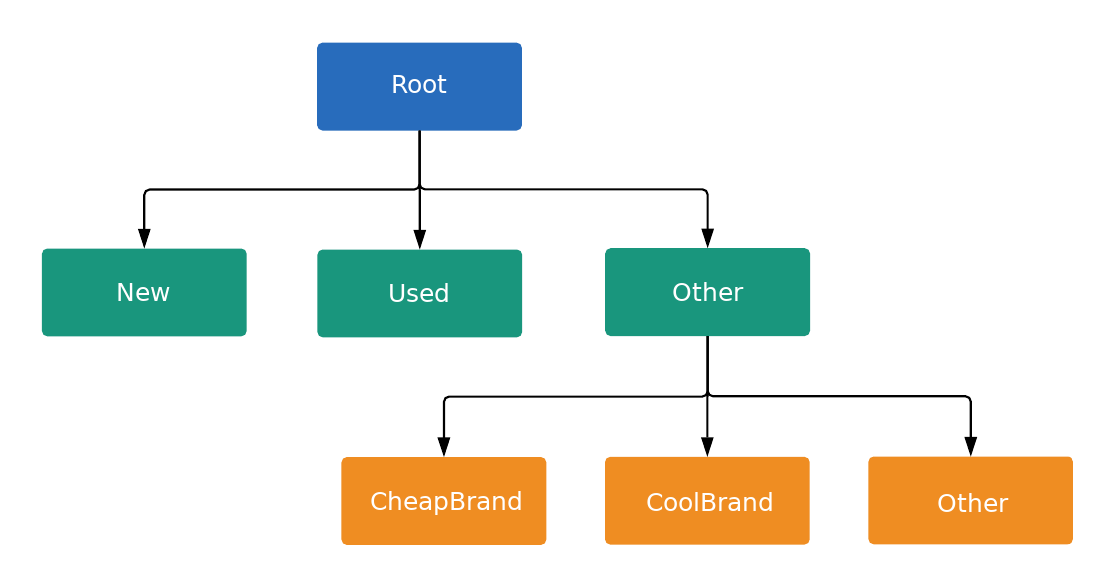
Каждый узел в дереве – это подразделение или единица, как определено в ListingGroupType. Подразделение добавляет новый уровень в дерево, а подразделения являются листьями дерева. Каждый подраздел должен быть полностью разделен, поэтому в нем должен быть узел, представляющий Другое. В примере корневой узел и узел Состояние товара: (Другое) являются подразделениями. Эта древовидная структура с подразделениями и единицами позволяет задавать ставки на уровне единиц и гарантирует, что каждый товар относится к одному и только одному узлу дерева.
Ставки можно задавать только для AdGroupCriterion, у которых для ListingGroupInfo.type задано значение UNIT.
Если для AdGroupCriterion задано значение negative (по умолчанию – false), а для ListingGroupInfo.type – UNIT, необходимо указать ставку, если стратегия назначения ставок группы объявлений требует ставок на уровне критерия (например, назначение цены за клик вручную). Например, вам нужно будет задать поле cpc_bid_micros в AdGroupCriterion. Если вы не укажете обязательную ставку для положительного узла UNIT, то получите сообщение об ошибке.
Ставки нельзя задать для AdGroupCriterion, если ListingGroupInfo.type – SUBDIVISION. Если в свойстве AdGroupCriterion для атрибута negative задано значение true, ставки не применяются, поскольку это исключение.
Узлы – это объекты класса ListingGroupInfo, содержащие поле ListingGroupType, которое указывает, являются ли узлы единицами или подразделениями. Если задать для свойства ListingGroupInfo значение listing_group объекта AdGroupCriterion, оно будет связано с объектом AdGroup.
Чтобы дерево было действительным, в нем должен быть хотя бы один узел. Такой единицей может быть корневой узел, который затем становится подразделением "Все товары". Объявления не будут показываться, пока вы не создадите действительное дерево групп предложений.
Группы предложений в кампаниях с максимальной эффективностью
Группы предложений в кампаниях с максимальной эффективностью лучше всего работают при таргетинге на группы товаров, поэтому этот вариант предпочтительнее, чем таргетинг на отдельные товары по идентификатору товара. Для группировки товаров в фиде товаров можно использовать разные параметры, например метки продавца или бренд.
Пример кода
Java
/** * Runs the example. * * @param googleAdsClient the Google Ads API client. * @param customerId the client customer ID. * @param assetGroupId the asset group id for the Performance Max campaign. * @param replaceExistingTree option to remove existing product tree from the passed in asset * group. * @throws GoogleAdsException if an API request failed with one or more service errors. */ private void runExample( GoogleAdsClient googleAdsClient, long customerId, long assetGroupId, boolean replaceExistingTree) throws Exception { String assetGroupResourceName = ResourceNames.assetGroup(customerId, assetGroupId); List<MutateOperation> operations = new ArrayList<>(); if (replaceExistingTree) { List<AssetGroupListingGroupFilter> existingListingGroupFilters = getAllExistingListingGroupFilterAssetsInAssetGroup( googleAdsClient, customerId, assetGroupResourceName); if (!existingListingGroupFilters.isEmpty()) { // A special factory object that ensures the creation of remove operations in the // correct order (child listing group filters must be removed before their parents). AssetGroupListingGroupFilterRemoveOperationFactory removeOperationFactory = new AssetGroupListingGroupFilterRemoveOperationFactory(existingListingGroupFilters); operations.addAll(removeOperationFactory.removeAll()); } } // Uses a factory to create all the MutateOperations that manipulate a specific // AssetGroup for a specific customer. The operations returned by the factory's methods // are used to construct a new tree of filters. These filters can have parent-child // relationships, and also include a special root that includes all children. // // When creating these filters, temporary IDs are used to create the hierarchy between // each of the nodes in the tree, beginning with the root listing group filter. // // The factory created below is specific to a customerId and assetGroupId. AssetGroupListingGroupFilterCreateOperationFactory createOperationFactory = new AssetGroupListingGroupFilterCreateOperationFactory( customerId, assetGroupId, TEMPORARY_ID_LISTING_GROUP_ROOT); // Creates the operation to add the root node of the tree. operations.add(createOperationFactory.createRoot()); // Creates an operation to add a leaf node for new products. ListingGroupFilterDimension newProductDimension = ListingGroupFilterDimension.newBuilder() .setProductCondition( ProductCondition.newBuilder() .setCondition(ListingGroupFilterProductCondition.NEW) .build()) .build(); operations.add( createOperationFactory.createUnit( TEMPORARY_ID_LISTING_GROUP_ROOT, createOperationFactory.nextId(), newProductDimension)); // Creates an operation to add a leaf node for used products. ListingGroupFilterDimension usedProductDimension = ListingGroupFilterDimension.newBuilder() .setProductCondition( ProductCondition.newBuilder() .setCondition(ListingGroupFilterProductCondition.USED) .build()) .build(); operations.add( createOperationFactory.createUnit( TEMPORARY_ID_LISTING_GROUP_ROOT, createOperationFactory.nextId(), usedProductDimension)); // This represents the ID of the "other" category in the ProductCondition subdivision. This ID // is saved because the node with this ID will be further partitioned, and this ID will serve as // the parent ID for subsequent child nodes of the "other" category. long otherSubdivisionId = createOperationFactory.nextId(); // Creates an operation to add a subdivision node for other products in the ProductCondition // subdivision. ListingGroupFilterDimension otherProductDimension = ListingGroupFilterDimension.newBuilder() .setProductCondition(ProductCondition.newBuilder().build()) .build(); operations.add( // Calls createSubdivision because this listing group will have children. createOperationFactory.createSubdivision( TEMPORARY_ID_LISTING_GROUP_ROOT, otherSubdivisionId, otherProductDimension)); // Creates an operation to add a leaf node for products with the brand "CoolBrand". ListingGroupFilterDimension coolBrandProductDimension = ListingGroupFilterDimension.newBuilder() .setProductBrand(ProductBrand.newBuilder().setValue("CoolBrand").build()) .build(); operations.add( createOperationFactory.createUnit( otherSubdivisionId, createOperationFactory.nextId(), coolBrandProductDimension)); // Creates an operation to add a leaf node for products with the brand "CheapBrand". ListingGroupFilterDimension cheapBrandProductDimension = ListingGroupFilterDimension.newBuilder() .setProductBrand(ProductBrand.newBuilder().setValue("CheapBrand").build()) .build(); operations.add( createOperationFactory.createUnit( otherSubdivisionId, createOperationFactory.nextId(), cheapBrandProductDimension)); // Creates an operation to add a leaf node for other products in the ProductBrand subdivision. ListingGroupFilterDimension otherBrandProductDimension = ListingGroupFilterDimension.newBuilder() .setProductBrand(ProductBrand.newBuilder().build()) .build(); operations.add( createOperationFactory.createUnit( otherSubdivisionId, createOperationFactory.nextId(), otherBrandProductDimension)); try (GoogleAdsServiceClient googleAdsServiceClient = googleAdsClient.getLatestVersion().createGoogleAdsServiceClient()) { MutateGoogleAdsRequest request = MutateGoogleAdsRequest.newBuilder() .setCustomerId(Long.toString(customerId)) .addAllMutateOperations(operations) .build(); MutateGoogleAdsResponse response = googleAdsServiceClient.mutate(request); printResponseDetails(request, response); } }
C#
/// <summary> /// Runs the code example. /// </summary> /// <param name="client">The Google Ads client.</param> /// <param name="customerId">The Google Ads customer ID.</param> /// <param name="assetGroupId">The asset group id for the Performance Max campaign.</param> /// <param name="replaceExistingTree">Option to remove existing product tree /// from the passed in asset group.</param> public void Run( GoogleAdsClient client, long customerId, long assetGroupId, bool replaceExistingTree) { GoogleAdsServiceClient googleAdsServiceClient = client.GetService(Services.V25.GoogleAdsService); string assetGroupResourceName = ResourceNames.AssetGroup(customerId, assetGroupId); // We use a factory to create all the MutateOperations that manipulate a specific // AssetGroup for a specific customer. The operations returned by the factory's methods // are used to optionally remove all AssetGroupListingGroupFilters from the tree, and // then to construct a new tree of filters. These filters can have a parent-child // relationship, and also include a special root that includes all children. // // When creating these filters, we use temporary IDs to create the hierarchy between // the root listing group filter, and the subdivisions and leave nodes beneath that. // // The factory specific to a customerId and assetGroupId is created below. AssetGroupListingGroupFilterCreateOperationFactory createOperationFactory = new AssetGroupListingGroupFilterCreateOperationFactory( customerId, assetGroupId, TEMPORARY_ID_LISTING_GROUP_ROOT ); MutateGoogleAdsRequest request = new MutateGoogleAdsRequest { CustomerId = customerId.ToString() }; if (replaceExistingTree) { List<AssetGroupListingGroupFilter> existingListingGroupFilters = GetAllExistingListingGroupFilterAssetsInAssetGroup( client, customerId, assetGroupResourceName ); if (existingListingGroupFilters.Count > 0) { // A special factory object that ensures the creation of remove operations in the // correct order (child listing group filters must be removed before their parents). AssetGroupListingGroupFilterRemoveOperationFactory removeOperationFactory = new AssetGroupListingGroupFilterRemoveOperationFactory( existingListingGroupFilters ); request.MutateOperations.AddRange(removeOperationFactory.RemoveAll()); } } request.MutateOperations.Add(createOperationFactory.CreateRoot()); request.MutateOperations.Add( createOperationFactory.CreateUnit( TEMPORARY_ID_LISTING_GROUP_ROOT, createOperationFactory.NextId(), new ListingGroupFilterDimension() { ProductCondition = new ListingGroupFilterDimension.Types.ProductCondition() { Condition = ListingGroupFilterProductCondition.New } } ) ); request.MutateOperations.Add( createOperationFactory.CreateUnit( TEMPORARY_ID_LISTING_GROUP_ROOT, createOperationFactory.NextId(), new ListingGroupFilterDimension() { ProductCondition = new ListingGroupFilterDimension.Types.ProductCondition() { Condition = ListingGroupFilterProductCondition.Used } } ) ); // We save this ID because create child nodes underneath it. long subdivisionIdConditionOther = createOperationFactory.NextId(); request.MutateOperations.Add( // We're calling CreateSubdivision because this listing group will have children. createOperationFactory.CreateSubdivision( TEMPORARY_ID_LISTING_GROUP_ROOT, subdivisionIdConditionOther, new ListingGroupFilterDimension() { // All sibling nodes must have the same dimension type. We use an empty // ProductCondition to indicate that this is an "Other" partition. ProductCondition = new ListingGroupFilterDimension.Types.ProductCondition() } ) ); request.MutateOperations.Add( createOperationFactory.CreateUnit( subdivisionIdConditionOther, createOperationFactory.NextId(), new ListingGroupFilterDimension() { ProductBrand = new ProductBrand() { Value = "CoolBrand" } } ) ); request.MutateOperations.Add( createOperationFactory.CreateUnit( subdivisionIdConditionOther, createOperationFactory.NextId(), new ListingGroupFilterDimension() { ProductBrand = new ProductBrand() { Value = "CheapBrand" } } ) ); request.MutateOperations.Add( createOperationFactory.CreateUnit( subdivisionIdConditionOther, createOperationFactory.NextId(), new ListingGroupFilterDimension() { ProductBrand = new ProductBrand() } ) ); MutateGoogleAdsResponse response = googleAdsServiceClient.Mutate(request); PrintResponseDetails(request, response); }
PHP
/** * Runs the example. * * @param GoogleAdsClient $googleAdsClient the Google Ads API client * @param int $customerId the customer ID * @param int $assetGroupId the asset group ID * @param bool $replaceExistingTree true if it should replace the existing listing group * tree on the asset group */ public static function runExample( GoogleAdsClient $googleAdsClient, int $customerId, int $assetGroupId, bool $replaceExistingTree ) { // We create all the mutate operations that manipulate a specific asset group for a specific // customer. The operations are used to optionally remove all asset group listing group // filters from the tree, and then to construct a new tree of filters. These filters can // have a parent-child relationship, and also include a special root that includes all // children. // // When creating these filters, we use temporary IDs to create the hierarchy between // the root listing group filter, and the subdivisions and leave nodes beneath that. $mutateOperations = []; if ($replaceExistingTree === true) { $existingListingGroupFilters = self::getAllExistingListingGroupFilterAssetsInAssetGroup( $googleAdsClient, $customerId, ResourceNames::forAssetGroup($customerId, $assetGroupId) ); if (count($existingListingGroupFilters) > 0) { $mutateOperations = array_merge( $mutateOperations, // Ensures the creation of remove operations in the correct order (child listing // group filters must be removed before their parents). self::createMutateOperationsForRemovingListingGroupFiltersTree( $existingListingGroupFilters ) ); } } $mutateOperations[] = self::createMutateOperationForRoot( $customerId, $assetGroupId, self::LISTING_GROUP_ROOT_TEMPORARY_ID ); // The temporary ID to be used for creating subdivisions and units. static $tempId = self::LISTING_GROUP_ROOT_TEMPORARY_ID - 1; $mutateOperations[] = self::createMutateOperationForUnit( $customerId, $assetGroupId, $tempId--, self::LISTING_GROUP_ROOT_TEMPORARY_ID, new ListingGroupFilterDimension( [ 'product_condition' => new ProductCondition( [ 'condition' => ListingGroupFilterProductCondition::PBNEW ] ) ] ) ); $mutateOperations[] = self::createMutateOperationForUnit( $customerId, $assetGroupId, $tempId--, self::LISTING_GROUP_ROOT_TEMPORARY_ID, new ListingGroupFilterDimension( [ 'product_condition' => new ProductCondition( [ 'condition' => ListingGroupFilterProductCondition::USED ] ) ] ) ); // We save this ID to create child nodes underneath it. $conditionOtherSubdivisionId = $tempId--; // We're calling createMutateOperationForSubdivision() because this listing group will // have children. $mutateOperations[] = self::createMutateOperationForSubdivision( $customerId, $assetGroupId, $conditionOtherSubdivisionId, self::LISTING_GROUP_ROOT_TEMPORARY_ID, new ListingGroupFilterDimension( [ // All sibling nodes must have the same dimension type. We use an empty // ProductCondition to indicate that this is an "Other" partition. 'product_condition' => new ProductCondition() ] ) ); $mutateOperations[] = self::createMutateOperationForUnit( $customerId, $assetGroupId, $tempId--, $conditionOtherSubdivisionId, new ListingGroupFilterDimension( ['product_brand' => new ProductBrand(['value' => 'CoolBrand'])] ) ); $mutateOperations[] = self::createMutateOperationForUnit( $customerId, $assetGroupId, $tempId--, $conditionOtherSubdivisionId, new ListingGroupFilterDimension( [ 'product_brand' => new ProductBrand(['value' => 'CheapBrand']) ] ) ); $mutateOperations[] = self::createMutateOperationForUnit( $customerId, $assetGroupId, $tempId--, $conditionOtherSubdivisionId, // All other product brands. new ListingGroupFilterDimension(['product_brand' => new ProductBrand()]) ); // Issues a mutate request to create everything and prints its information. $googleAdsServiceClient = $googleAdsClient->getGoogleAdsServiceClient(); $response = $googleAdsServiceClient->mutate( MutateGoogleAdsRequest::build($customerId, $mutateOperations) ); self::printResponseDetails($mutateOperations, $response); }
Python
def main( client: GoogleAdsClient, customer_id: str, asset_group_id: int, # Will be str for path construction replace_existing_tree: bool, ) -> None: """The main method that creates all necessary entities for the example. Args: client: an initialized GoogleAdsClient instance. customer_id: a client customer ID. asset_group_id: the asset group id for the Performance Max campaign. replace_existing_tree: option to remove existing product tree from the passed in asset group. """ googleads_service: GoogleAdsServiceClient = client.get_service( "GoogleAdsService" ) # asset_group_id is used as a string in path construction. asset_group_resource_name: str = googleads_service.asset_group_path( customer_id, str(asset_group_id) ) operations: List[MutateOperation] = [] if replace_existing_tree: # Retrieve a list of existing AssetGroupListingGroupFilters existing_listing_group_filters: List[AssetGroupListingGroupFilter] = ( get_all_existing_listing_group_filter_assets_in_asset_group( client, customer_id, asset_group_resource_name ) ) # If present, create MutateOperations to remove each # AssetGroupListingGroupFilter and add them to the list of operations. if existing_listing_group_filters: remove_operation_factory = ( AssetGroupListingGroupFilterRemoveOperationFactory( client, existing_listing_group_filters ) ) operations.extend(remove_operation_factory.remove_all()) create_operation_factory = ( AssetGroupListingGroupFilterCreateOperationFactory( client, customer_id, asset_group_id, # Pass as int, will be converted to str in __init__ _TEMPORARY_ID_LISTING_GROUP_ROOT, ) ) operations.append(create_operation_factory.create_root()) new_dimension: ListingGroupFilterDimension = client.get_type( "ListingGroupFilterDimension" ) new_dimension.product_condition.condition = ( client.enums.ListingGroupFilterProductConditionEnum.NEW ) operations.append( create_operation_factory.create_unit( _TEMPORARY_ID_LISTING_GROUP_ROOT, create_operation_factory.next_id(), new_dimension, ) ) used_dimension: ListingGroupFilterDimension = client.get_type( "ListingGroupFilterDimension" ) used_dimension.product_condition.condition = ( client.enums.ListingGroupFilterProductConditionEnum.USED ) operations.append( create_operation_factory.create_unit( _TEMPORARY_ID_LISTING_GROUP_ROOT, create_operation_factory.next_id(), used_dimension, ) ) # We save this ID because create child nodes underneath it. subdivision_id_condition_other: int = create_operation_factory.next_id() # All sibling nodes must have the same dimension type. We use an empty # product_condition to indicate that this is an "Other" partition. other_dimension: ListingGroupFilterDimension = client.get_type( "ListingGroupFilterDimension" ) # This triggers the presence of the product_condition field without # specifying any field values. This is important in order to tell the API # that this is an "other" node. other_dimension.product_condition._pb.SetInParent() # We're calling create_subdivision because this listing group will have # children. operations.append( create_operation_factory.create_subdivision( _TEMPORARY_ID_LISTING_GROUP_ROOT, subdivision_id_condition_other, other_dimension, ) ) cool_dimension: ListingGroupFilterDimension = client.get_type( "ListingGroupFilterDimension" ) cool_dimension.product_brand.value = "CoolBrand" operations.append( create_operation_factory.create_unit( subdivision_id_condition_other, create_operation_factory.next_id(), cool_dimension, ) ) cheap_dimension: ListingGroupFilterDimension = client.get_type( "ListingGroupFilterDimension" ) cheap_dimension.product_brand.value = "CheapBrand" operations.append( create_operation_factory.create_unit( subdivision_id_condition_other, create_operation_factory.next_id(), cheap_dimension, ) ) empty_dimension: ListingGroupFilterDimension = client.get_type( "ListingGroupFilterDimension" ) # This triggers the presence of the product_brand field without specifying # any field values. This is important in order to tell the API # that this is an "other" node. empty_dimension.product_brand._pb.SetInParent() operations.append( create_operation_factory.create_unit( subdivision_id_condition_other, create_operation_factory.next_id(), empty_dimension, ) ) response: MutateGoogleAdsResponse = googleads_service.mutate( customer_id=customer_id, mutate_operations=operations ) print_response_details(operations, response)
Ruby
def add_performance_max_product_listing_group_tree( customer_id, asset_group_id, replace_existing_tree) # GoogleAdsClient will read a config file from # ENV['HOME']/google_ads_config.rb when called without parameters client = Google::Ads::GoogleAds::GoogleAdsClient.new asset_group_resource_name = client.path.asset_group( customer_id, asset_group_id, ) # We use a factory to create all the MutateOperations that manipulate a # specific AssetGroup for a specific customer. The operations returned by the # factory's methods are used to optionally remove all # AssetGroupListingGroupFilters from the tree, and then to construct a new # tree of filters. These filters can have a parent-child relationship, and # also include a special root that includes all children. # # When creating these filters, we use temporary IDs to create the hierarchy # between the root listing group filter, and the subdivisions and leave nodes # beneath that. # # The factory specific to a customerId and assetGroupId is created below. create_operation_factory = AssetGroupListingGroupFilterCreateOperationFactory.new( customer_id, asset_group_id, TEMPORARY_ID_LISTING_GROUP_ROOT, ) operations = [] if replace_existing_tree existing_listing_group_filters = get_existing_listing_group_filters_in_asset_group( client, customer_id, asset_group_resource_name, ) if existing_listing_group_filters.length > 0 # A special factory object that ensures the creation of remove operations # in the correct order (child listing group filters must be removed # before their parents). remove_operation_factory = AssetGroupListingGroupFilterRemoveOperationFactory.new( existing_listing_group_filters ) operations += remove_operation_factory.remove_all(client) end end operations << create_operation_factory.create_root(client) operations << create_operation_factory.create_unit( client, TEMPORARY_ID_LISTING_GROUP_ROOT, create_operation_factory.next_id, client.resource.listing_group_filter_dimension do |dimension| dimension.product_condition = client.resource.product_condition do |condition| condition.condition = :NEW end end, ) operations << create_operation_factory.create_unit( client, TEMPORARY_ID_LISTING_GROUP_ROOT, create_operation_factory.next_id, client.resource.listing_group_filter_dimension do |dimension| dimension.product_condition = client.resource.product_condition do |condition| condition.condition = :USED end end, ) # We save this ID because we create child nodes underneath it. subdivision_id_condition_other = create_operation_factory.next_id operations << create_operation_factory.create_subdivision( client, TEMPORARY_ID_LISTING_GROUP_ROOT, subdivision_id_condition_other, client.resource.listing_group_filter_dimension do |dimension| dimension.product_condition = client.resource.product_condition do |condition| # All sibling nodes must have the same dimension type. We use an empty # ProductCondition to indicate that this is an "Other" partition. end end, ) operations << create_operation_factory.create_unit( client, subdivision_id_condition_other, create_operation_factory.next_id, client.resource.listing_group_filter_dimension do |dimension| dimension.product_brand = client.resource.product_brand do |brand| brand.value = 'CoolBrand' end end, ) operations << create_operation_factory.create_unit( client, subdivision_id_condition_other, create_operation_factory.next_id, client.resource.listing_group_filter_dimension do |dimension| dimension.product_brand = client.resource.product_brand do |brand| brand.value = 'CheapBrand' end end, ) operations << create_operation_factory.create_unit( client, subdivision_id_condition_other, create_operation_factory.next_id, client.resource.listing_group_filter_dimension do |dimension| dimension.product_brand = client.resource.product_brand do |brand| end end, ) response = client.service.google_ads.mutate( customer_id: customer_id, mutate_operations: operations, ) print_response_details(operations, response) end
Perl
sub add_performance_max_product_listing_group_tree { my ($api_client, $customer_id, $asset_group_id, $replace_existing_tree) = @_; # We create all the mutate operations that manipulate a specific asset group for # a specific customer. The operations are used to optionally remove all asset # group listing group filters from the tree, and then to construct a new tree # of filters. These filters can have a parent-child relationship, and also include # a special root that includes all children. # # When creating these filters, we use temporary IDs to create the hierarchy between # the root listing group filter, and the subdivisions and leave nodes beneath that. my $mutate_operations = []; if (defined $replace_existing_tree) { my $existing_listing_group_filters = get_all_existing_listing_group_filter_assets_in_asset_group( $api_client, $customer_id, Google::Ads::GoogleAds::V25::Utils::ResourceNames::asset_group( $customer_id, $asset_group_id )); if (scalar @$existing_listing_group_filters > 0) { push @$mutate_operations, # Ensure the creation of remove operations in the correct order (child # listing group filters must be removed before their parents). @{ create_mutate_operations_for_removing_listing_group_filters_tree( $existing_listing_group_filters)}; } } push @$mutate_operations, create_mutate_operation_for_root($customer_id, $asset_group_id, LISTING_GROUP_ROOT_TEMPORARY_ID); # The temporary ID to be used for creating subdivisions and units. my $temp_id = LISTING_GROUP_ROOT_TEMPORARY_ID - 1; push @$mutate_operations, create_mutate_operation_for_unit( $customer_id, $asset_group_id, $temp_id--, LISTING_GROUP_ROOT_TEMPORARY_ID, Google::Ads::GoogleAds::V25::Resources::ListingGroupFilterDimension->new({ productCondition => Google::Ads::GoogleAds::V25::Resources::ProductCondition->new({ condition => NEW })})); push @$mutate_operations, create_mutate_operation_for_unit( $customer_id, $asset_group_id, $temp_id--, LISTING_GROUP_ROOT_TEMPORARY_ID, Google::Ads::GoogleAds::V25::Resources::ListingGroupFilterDimension->new({ productCondition => Google::Ads::GoogleAds::V25::Resources::ProductCondition->new({ condition => USED })})); # We save this ID to create child nodes underneath it. my $condition_other_subdivision_id = $temp_id--; # We're calling create_mutate_operation_for_subdivision() because this listing # group will have children. push @$mutate_operations, create_mutate_operation_for_subdivision( $customer_id, $asset_group_id, $condition_other_subdivision_id, LISTING_GROUP_ROOT_TEMPORARY_ID, Google::Ads::GoogleAds::V25::Resources::ListingGroupFilterDimension->new({ # All sibling nodes must have the same dimension type. We use an empty # ProductCondition to indicate that this is an "Other" partition. productCondition => Google::Ads::GoogleAds::V25::Resources::ProductCondition->new({})})); push @$mutate_operations, create_mutate_operation_for_unit( $customer_id, $asset_group_id, $temp_id--, $condition_other_subdivision_id, Google::Ads::GoogleAds::V25::Resources::ListingGroupFilterDimension->new({ productBrand => Google::Ads::GoogleAds::V25::Resources::ProductBrand->new({ value => "CoolBrand" })})); push @$mutate_operations, create_mutate_operation_for_unit( $customer_id, $asset_group_id, $temp_id--, $condition_other_subdivision_id, Google::Ads::GoogleAds::V25::Resources::ListingGroupFilterDimension->new({ productBrand => Google::Ads::GoogleAds::V25::Resources::ProductBrand->new({ value => "CheapBrand" })})); push @$mutate_operations, create_mutate_operation_for_unit( $customer_id, $asset_group_id, $temp_id--, $condition_other_subdivision_id, # All other product brands. Google::Ads::GoogleAds::V25::Resources::ListingGroupFilterDimension->new({ productBrand => Google::Ads::GoogleAds::V25::Resources::ProductBrand->new({})})); # Issue a mutate request to create everything and print its information. my $response = $api_client->GoogleAdsService()->mutate({ customerId => $customer_id, mutateOperations => $mutate_operations }); print_response_details($mutate_operations, $response); return 1; }
curl
Доступные параметры для ListingDimensionInfo
В группу предложений кампании с максимальной эффективностью можно добавить несколько параметров. В кампаниях с максимальной эффективностью для розничной торговли можно использовать следующие типы ListingDimensionInfo:
ProductBrandInfoProductCategoryInfoProductChannelInfoProductConditionInfoProductCustomAttributeInfoProductItemIdInfoProductTypeInfo
Каждый ресурс содержит список поддерживаемых локализаций в поле ProductCategoryConstant.ProductCategoryLocalization.
Чтобы понять, какие данные возвращает ресурс, попробуйте пример получения констант категорий товаров.
Другие узлы единиц можно создать, передав пустой объект типов ListingDimensionInfo в ListingGroupInfo.
Временные идентификаторы
Критерии группы объектов не получают идентификаторы, пока сервер не обработает запрос mutate, в котором они создаются. Однако объект ListingGroupInfo недействителен, пока он не завершен, поэтому при создании подразделения вы также должны создать хотя бы один из его дочерних элементов и узел Other в том же запросе.
Чтобы задать parent_criterion_id для ListingGroupInfo дочерних узлов, созданных в том же запросе, что и родительский узел, можно использовать временные идентификаторы критериев. Эти идентификаторы действуют только в контексте одного запроса на изменение. В качестве временного идентификатора можно использовать любое отрицательное целое число.