

تُستخدَم مجموعات البيانات في
"حملات الأداء الأفضل" لبيع المنتجات بالتجزئة لتحديد المنتجات التي يجب تضمينها أو استبعادها
في كل مجموعة مواد عرض. وبالتالي، يتم تطبيق مجموعات البيانات على مستوى AssetGroup
باستخدام
AssetGroupListingGroupFilter
عناصر. يشبه ذلك أنواع حملات البيع بالتجزئة الأخرى التي يتم فيها تطبيق مجموعات المنتجات على مستوى AdGroup.
تتطلّب جميع مجموعات مواد العرض في "حملات الأداء الأفضل" لبيع المنتجات بالتجزئة شجرة أقسام منتجات صالحة تتألّف من عناصر AssetGroupListingGroupFilter. يمكنك استخدام شجرة بعقدة واحدة تتضمّن كل المنتجات في حساب Merchant Center لاستيفاء هذا الشرط.
يُشار إلى ذلك باسم مجموعات المنتجات في واجهة المستخدم. يمكنك إجراء تجميع باستخدام سمات متعدّدة، ما يتيح لك تضمين المنتجات أو استبعادها.
انتبه إلى الشجرة التالية، حيث تم في المستوى الأول تقسيم المنتجات حسب الحالة إلى "جديدة" و"مستعمَلة" وحالات منتجات أخرى. في المستوى الثاني، تم تقسيم المنتجات في حالات المنتجات الأخرى حسب العلامة التجارية إلى منتجات "CoolBrand" و"CheapBrand" وعلامات تجارية أخرى.
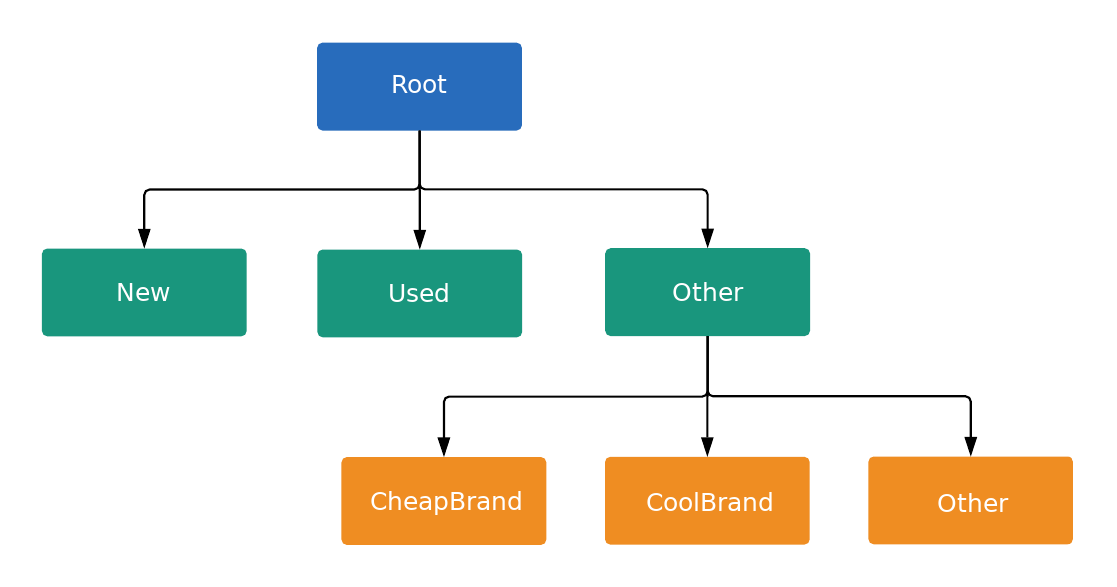
كل عقدة في الشجرة هي إما تقسيم فرعي أو وحدة، كما هو محدّد في
ListingGroupType. يقدّم التقسيم الفرعي مستوى جديدًا في الشجرة، بينما الوحدات هي أوراق الشجرة. يجب دائمًا تقسيم كل تقسيم فرعي بالكامل، لذا يجب أن يحتوي على عقدة تمثّل أخرى. في المثال، تكون العقدتان الجذر وحالة المنتج: (أخرى) تقسيمَين فرعيَين. يتيح لك هيكل الشجرة هذا الذي يتضمّن تقسيمات فرعية ووحدات ضبط عروض الأسعار على مستوى الوحدة، ويضمن أيضًا أن يندرج كل منتج ضمن عقدة وحدة واحدة فقط في الشجرة.
لا يمكنك ضبط عروض الأسعار إلا على AdGroupCriterion حيث يكون ListingGroupInfo.type المرتبط هو UNIT.
عندما يكون AdGroupCriterion مضبوطًا على negative بالقيمة التلقائية false)، ويكون ListingGroupInfo.type مضبوطًا على UNIT، يجب تقديم قيمة عرض سعر إذا كانت استراتيجية عروض أسعار المجموعة الإعلانية تتطلّب عروض أسعار على مستوى معيار الاستهداف، مثل "تكلفة النقرة اليدوية". على سبيل المثال، ستحتاج إلى ضبط الحقل cpc_bid_micros في AdGroupCriterion. إذا لم تقدّم عرض سعر مطلوبًا لعقدة UNIT إيجابية، سيظهر لك خطأ.
لا يمكن ضبط عروض الأسعار على AdGroupCriterion إذا كان ListingGroupInfo.type هو SUBDIVISION. إذا كان AdGroupCriterion مضبوطًا على negative بالقيمة true، لا تنطبق عروض الأسعار لأنّه استبعاد.
العُقد هي عناصر من فئة ListingGroupInfo
، التي تحتوي على الحقل
ListingGroupType الذي يشير إلى ما إذا كانت
العُقد وحدة أو تقسيمًا فرعيًا. سيؤدي ضبط ListingGroupInfo على listing_group
من AdGroupCriterion إلى ربطه بـ
AdGroup.
تحتاج إلى عقدة وحدة واحدة على الأقل لجعل الشجرة صالحة. يمكن أن تكون هذه الوحدة هي العقدة الجذر، التي تصبح بعد ذلك قسم "كل المنتجات". لن يتم عرض الإعلانات إلى أن تنشئ شجرة مجموعات بيانات صالحة.
مجموعات البيانات في "حملات الأداء الأفضل"
تعمل مجموعات البيانات في "حملات الأداء الأفضل" بشكل أفضل عند استهداف مجموعات من المنتجات، لذا يجب تفضيل ذلك على استهداف المنتجات الفردية حسب رقم تعريف السلعة. يمكنك استخدام سمات مختلفة، مثل التصنيفات المخصّصة أو العلامة التجارية في خلاصة منتجاتك لـ تجميع المنتجات.
مثال للرمز
جافا
/** * Runs the example. * * @param googleAdsClient the Google Ads API client. * @param customerId the client customer ID. * @param assetGroupId the asset group id for the Performance Max campaign. * @param replaceExistingTree option to remove existing product tree from the passed in asset * group. * @throws GoogleAdsException if an API request failed with one or more service errors. */ private void runExample( GoogleAdsClient googleAdsClient, long customerId, long assetGroupId, boolean replaceExistingTree) throws Exception { String assetGroupResourceName = ResourceNames.assetGroup(customerId, assetGroupId); List<MutateOperation> operations = new ArrayList<>(); if (replaceExistingTree) { List<AssetGroupListingGroupFilter> existingListingGroupFilters = getAllExistingListingGroupFilterAssetsInAssetGroup( googleAdsClient, customerId, assetGroupResourceName); if (!existingListingGroupFilters.isEmpty()) { // A special factory object that ensures the creation of remove operations in the // correct order (child listing group filters must be removed before their parents). AssetGroupListingGroupFilterRemoveOperationFactory removeOperationFactory = new AssetGroupListingGroupFilterRemoveOperationFactory(existingListingGroupFilters); operations.addAll(removeOperationFactory.removeAll()); } } // Uses a factory to create all the MutateOperations that manipulate a specific // AssetGroup for a specific customer. The operations returned by the factory's methods // are used to construct a new tree of filters. These filters can have parent-child // relationships, and also include a special root that includes all children. // // When creating these filters, temporary IDs are used to create the hierarchy between // each of the nodes in the tree, beginning with the root listing group filter. // // The factory created below is specific to a customerId and assetGroupId. AssetGroupListingGroupFilterCreateOperationFactory createOperationFactory = new AssetGroupListingGroupFilterCreateOperationFactory( customerId, assetGroupId, TEMPORARY_ID_LISTING_GROUP_ROOT); // Creates the operation to add the root node of the tree. operations.add(createOperationFactory.createRoot()); // Creates an operation to add a leaf node for new products. ListingGroupFilterDimension newProductDimension = ListingGroupFilterDimension.newBuilder() .setProductCondition( ProductCondition.newBuilder() .setCondition(ListingGroupFilterProductCondition.NEW) .build()) .build(); operations.add( createOperationFactory.createUnit( TEMPORARY_ID_LISTING_GROUP_ROOT, createOperationFactory.nextId(), newProductDimension)); // Creates an operation to add a leaf node for used products. ListingGroupFilterDimension usedProductDimension = ListingGroupFilterDimension.newBuilder() .setProductCondition( ProductCondition.newBuilder() .setCondition(ListingGroupFilterProductCondition.USED) .build()) .build(); operations.add( createOperationFactory.createUnit( TEMPORARY_ID_LISTING_GROUP_ROOT, createOperationFactory.nextId(), usedProductDimension)); // This represents the ID of the "other" category in the ProductCondition subdivision. This ID // is saved because the node with this ID will be further partitioned, and this ID will serve as // the parent ID for subsequent child nodes of the "other" category. long otherSubdivisionId = createOperationFactory.nextId(); // Creates an operation to add a subdivision node for other products in the ProductCondition // subdivision. ListingGroupFilterDimension otherProductDimension = ListingGroupFilterDimension.newBuilder() .setProductCondition(ProductCondition.newBuilder().build()) .build(); operations.add( // Calls createSubdivision because this listing group will have children. createOperationFactory.createSubdivision( TEMPORARY_ID_LISTING_GROUP_ROOT, otherSubdivisionId, otherProductDimension)); // Creates an operation to add a leaf node for products with the brand "CoolBrand". ListingGroupFilterDimension coolBrandProductDimension = ListingGroupFilterDimension.newBuilder() .setProductBrand(ProductBrand.newBuilder().setValue("CoolBrand").build()) .build(); operations.add( createOperationFactory.createUnit( otherSubdivisionId, createOperationFactory.nextId(), coolBrandProductDimension)); // Creates an operation to add a leaf node for products with the brand "CheapBrand". ListingGroupFilterDimension cheapBrandProductDimension = ListingGroupFilterDimension.newBuilder() .setProductBrand(ProductBrand.newBuilder().setValue("CheapBrand").build()) .build(); operations.add( createOperationFactory.createUnit( otherSubdivisionId, createOperationFactory.nextId(), cheapBrandProductDimension)); // Creates an operation to add a leaf node for other products in the ProductBrand subdivision. ListingGroupFilterDimension otherBrandProductDimension = ListingGroupFilterDimension.newBuilder() .setProductBrand(ProductBrand.newBuilder().build()) .build(); operations.add( createOperationFactory.createUnit( otherSubdivisionId, createOperationFactory.nextId(), otherBrandProductDimension)); try (GoogleAdsServiceClient googleAdsServiceClient = googleAdsClient.getLatestVersion().createGoogleAdsServiceClient()) { MutateGoogleAdsRequest request = MutateGoogleAdsRequest.newBuilder() .setCustomerId(Long.toString(customerId)) .addAllMutateOperations(operations) .build(); MutateGoogleAdsResponse response = googleAdsServiceClient.mutate(request); printResponseDetails(request, response); } }
#C
/// <summary> /// Runs the code example. /// </summary> /// <param name="client">The Google Ads client.</param> /// <param name="customerId">The Google Ads customer ID.</param> /// <param name="assetGroupId">The asset group id for the Performance Max campaign.</param> /// <param name="replaceExistingTree">Option to remove existing product tree /// from the passed in asset group.</param> public void Run( GoogleAdsClient client, long customerId, long assetGroupId, bool replaceExistingTree) { GoogleAdsServiceClient googleAdsServiceClient = client.GetService(Services.V25.GoogleAdsService); string assetGroupResourceName = ResourceNames.AssetGroup(customerId, assetGroupId); // We use a factory to create all the MutateOperations that manipulate a specific // AssetGroup for a specific customer. The operations returned by the factory's methods // are used to optionally remove all AssetGroupListingGroupFilters from the tree, and // then to construct a new tree of filters. These filters can have a parent-child // relationship, and also include a special root that includes all children. // // When creating these filters, we use temporary IDs to create the hierarchy between // the root listing group filter, and the subdivisions and leave nodes beneath that. // // The factory specific to a customerId and assetGroupId is created below. AssetGroupListingGroupFilterCreateOperationFactory createOperationFactory = new AssetGroupListingGroupFilterCreateOperationFactory( customerId, assetGroupId, TEMPORARY_ID_LISTING_GROUP_ROOT ); MutateGoogleAdsRequest request = new MutateGoogleAdsRequest { CustomerId = customerId.ToString() }; if (replaceExistingTree) { List<AssetGroupListingGroupFilter> existingListingGroupFilters = GetAllExistingListingGroupFilterAssetsInAssetGroup( client, customerId, assetGroupResourceName ); if (existingListingGroupFilters.Count > 0) { // A special factory object that ensures the creation of remove operations in the // correct order (child listing group filters must be removed before their parents). AssetGroupListingGroupFilterRemoveOperationFactory removeOperationFactory = new AssetGroupListingGroupFilterRemoveOperationFactory( existingListingGroupFilters ); request.MutateOperations.AddRange(removeOperationFactory.RemoveAll()); } } request.MutateOperations.Add(createOperationFactory.CreateRoot()); request.MutateOperations.Add( createOperationFactory.CreateUnit( TEMPORARY_ID_LISTING_GROUP_ROOT, createOperationFactory.NextId(), new ListingGroupFilterDimension() { ProductCondition = new ListingGroupFilterDimension.Types.ProductCondition() { Condition = ListingGroupFilterProductCondition.New } } ) ); request.MutateOperations.Add( createOperationFactory.CreateUnit( TEMPORARY_ID_LISTING_GROUP_ROOT, createOperationFactory.NextId(), new ListingGroupFilterDimension() { ProductCondition = new ListingGroupFilterDimension.Types.ProductCondition() { Condition = ListingGroupFilterProductCondition.Used } } ) ); // We save this ID because create child nodes underneath it. long subdivisionIdConditionOther = createOperationFactory.NextId(); request.MutateOperations.Add( // We're calling CreateSubdivision because this listing group will have children. createOperationFactory.CreateSubdivision( TEMPORARY_ID_LISTING_GROUP_ROOT, subdivisionIdConditionOther, new ListingGroupFilterDimension() { // All sibling nodes must have the same dimension type. We use an empty // ProductCondition to indicate that this is an "Other" partition. ProductCondition = new ListingGroupFilterDimension.Types.ProductCondition() } ) ); request.MutateOperations.Add( createOperationFactory.CreateUnit( subdivisionIdConditionOther, createOperationFactory.NextId(), new ListingGroupFilterDimension() { ProductBrand = new ProductBrand() { Value = "CoolBrand" } } ) ); request.MutateOperations.Add( createOperationFactory.CreateUnit( subdivisionIdConditionOther, createOperationFactory.NextId(), new ListingGroupFilterDimension() { ProductBrand = new ProductBrand() { Value = "CheapBrand" } } ) ); request.MutateOperations.Add( createOperationFactory.CreateUnit( subdivisionIdConditionOther, createOperationFactory.NextId(), new ListingGroupFilterDimension() { ProductBrand = new ProductBrand() } ) ); MutateGoogleAdsResponse response = googleAdsServiceClient.Mutate(request); PrintResponseDetails(request, response); }
PHP
/** * Runs the example. * * @param GoogleAdsClient $googleAdsClient the Google Ads API client * @param int $customerId the customer ID * @param int $assetGroupId the asset group ID * @param bool $replaceExistingTree true if it should replace the existing listing group * tree on the asset group */ public static function runExample( GoogleAdsClient $googleAdsClient, int $customerId, int $assetGroupId, bool $replaceExistingTree ) { // We create all the mutate operations that manipulate a specific asset group for a specific // customer. The operations are used to optionally remove all asset group listing group // filters from the tree, and then to construct a new tree of filters. These filters can // have a parent-child relationship, and also include a special root that includes all // children. // // When creating these filters, we use temporary IDs to create the hierarchy between // the root listing group filter, and the subdivisions and leave nodes beneath that. $mutateOperations = []; if ($replaceExistingTree === true) { $existingListingGroupFilters = self::getAllExistingListingGroupFilterAssetsInAssetGroup( $googleAdsClient, $customerId, ResourceNames::forAssetGroup($customerId, $assetGroupId) ); if (count($existingListingGroupFilters) > 0) { $mutateOperations = array_merge( $mutateOperations, // Ensures the creation of remove operations in the correct order (child listing // group filters must be removed before their parents). self::createMutateOperationsForRemovingListingGroupFiltersTree( $existingListingGroupFilters ) ); } } $mutateOperations[] = self::createMutateOperationForRoot( $customerId, $assetGroupId, self::LISTING_GROUP_ROOT_TEMPORARY_ID ); // The temporary ID to be used for creating subdivisions and units. static $tempId = self::LISTING_GROUP_ROOT_TEMPORARY_ID - 1; $mutateOperations[] = self::createMutateOperationForUnit( $customerId, $assetGroupId, $tempId--, self::LISTING_GROUP_ROOT_TEMPORARY_ID, new ListingGroupFilterDimension( [ 'product_condition' => new ProductCondition( [ 'condition' => ListingGroupFilterProductCondition::PBNEW ] ) ] ) ); $mutateOperations[] = self::createMutateOperationForUnit( $customerId, $assetGroupId, $tempId--, self::LISTING_GROUP_ROOT_TEMPORARY_ID, new ListingGroupFilterDimension( [ 'product_condition' => new ProductCondition( [ 'condition' => ListingGroupFilterProductCondition::USED ] ) ] ) ); // We save this ID to create child nodes underneath it. $conditionOtherSubdivisionId = $tempId--; // We're calling createMutateOperationForSubdivision() because this listing group will // have children. $mutateOperations[] = self::createMutateOperationForSubdivision( $customerId, $assetGroupId, $conditionOtherSubdivisionId, self::LISTING_GROUP_ROOT_TEMPORARY_ID, new ListingGroupFilterDimension( [ // All sibling nodes must have the same dimension type. We use an empty // ProductCondition to indicate that this is an "Other" partition. 'product_condition' => new ProductCondition() ] ) ); $mutateOperations[] = self::createMutateOperationForUnit( $customerId, $assetGroupId, $tempId--, $conditionOtherSubdivisionId, new ListingGroupFilterDimension( ['product_brand' => new ProductBrand(['value' => 'CoolBrand'])] ) ); $mutateOperations[] = self::createMutateOperationForUnit( $customerId, $assetGroupId, $tempId--, $conditionOtherSubdivisionId, new ListingGroupFilterDimension( [ 'product_brand' => new ProductBrand(['value' => 'CheapBrand']) ] ) ); $mutateOperations[] = self::createMutateOperationForUnit( $customerId, $assetGroupId, $tempId--, $conditionOtherSubdivisionId, // All other product brands. new ListingGroupFilterDimension(['product_brand' => new ProductBrand()]) ); // Issues a mutate request to create everything and prints its information. $googleAdsServiceClient = $googleAdsClient->getGoogleAdsServiceClient(); $response = $googleAdsServiceClient->mutate( MutateGoogleAdsRequest::build($customerId, $mutateOperations) ); self::printResponseDetails($mutateOperations, $response); }
Python
def main( client: GoogleAdsClient, customer_id: str, asset_group_id: int, # Will be str for path construction replace_existing_tree: bool, ) -> None: """The main method that creates all necessary entities for the example. Args: client: an initialized GoogleAdsClient instance. customer_id: a client customer ID. asset_group_id: the asset group id for the Performance Max campaign. replace_existing_tree: option to remove existing product tree from the passed in asset group. """ googleads_service: GoogleAdsServiceClient = client.get_service( "GoogleAdsService" ) # asset_group_id is used as a string in path construction. asset_group_resource_name: str = googleads_service.asset_group_path( customer_id, str(asset_group_id) ) operations: List[MutateOperation] = [] if replace_existing_tree: # Retrieve a list of existing AssetGroupListingGroupFilters existing_listing_group_filters: List[AssetGroupListingGroupFilter] = ( get_all_existing_listing_group_filter_assets_in_asset_group( client, customer_id, asset_group_resource_name ) ) # If present, create MutateOperations to remove each # AssetGroupListingGroupFilter and add them to the list of operations. if existing_listing_group_filters: remove_operation_factory = ( AssetGroupListingGroupFilterRemoveOperationFactory( client, existing_listing_group_filters ) ) operations.extend(remove_operation_factory.remove_all()) create_operation_factory = ( AssetGroupListingGroupFilterCreateOperationFactory( client, customer_id, asset_group_id, # Pass as int, will be converted to str in __init__ _TEMPORARY_ID_LISTING_GROUP_ROOT, ) ) operations.append(create_operation_factory.create_root()) new_dimension: ListingGroupFilterDimension = client.get_type( "ListingGroupFilterDimension" ) new_dimension.product_condition.condition = ( client.enums.ListingGroupFilterProductConditionEnum.NEW ) operations.append( create_operation_factory.create_unit( _TEMPORARY_ID_LISTING_GROUP_ROOT, create_operation_factory.next_id(), new_dimension, ) ) used_dimension: ListingGroupFilterDimension = client.get_type( "ListingGroupFilterDimension" ) used_dimension.product_condition.condition = ( client.enums.ListingGroupFilterProductConditionEnum.USED ) operations.append( create_operation_factory.create_unit( _TEMPORARY_ID_LISTING_GROUP_ROOT, create_operation_factory.next_id(), used_dimension, ) ) # We save this ID because create child nodes underneath it. subdivision_id_condition_other: int = create_operation_factory.next_id() # All sibling nodes must have the same dimension type. We use an empty # product_condition to indicate that this is an "Other" partition. other_dimension: ListingGroupFilterDimension = client.get_type( "ListingGroupFilterDimension" ) # This triggers the presence of the product_condition field without # specifying any field values. This is important in order to tell the API # that this is an "other" node. other_dimension.product_condition._pb.SetInParent() # We're calling create_subdivision because this listing group will have # children. operations.append( create_operation_factory.create_subdivision( _TEMPORARY_ID_LISTING_GROUP_ROOT, subdivision_id_condition_other, other_dimension, ) ) cool_dimension: ListingGroupFilterDimension = client.get_type( "ListingGroupFilterDimension" ) cool_dimension.product_brand.value = "CoolBrand" operations.append( create_operation_factory.create_unit( subdivision_id_condition_other, create_operation_factory.next_id(), cool_dimension, ) ) cheap_dimension: ListingGroupFilterDimension = client.get_type( "ListingGroupFilterDimension" ) cheap_dimension.product_brand.value = "CheapBrand" operations.append( create_operation_factory.create_unit( subdivision_id_condition_other, create_operation_factory.next_id(), cheap_dimension, ) ) empty_dimension: ListingGroupFilterDimension = client.get_type( "ListingGroupFilterDimension" ) # This triggers the presence of the product_brand field without specifying # any field values. This is important in order to tell the API # that this is an "other" node. empty_dimension.product_brand._pb.SetInParent() operations.append( create_operation_factory.create_unit( subdivision_id_condition_other, create_operation_factory.next_id(), empty_dimension, ) ) response: MutateGoogleAdsResponse = googleads_service.mutate( customer_id=customer_id, mutate_operations=operations ) print_response_details(operations, response)
Ruby
def add_performance_max_product_listing_group_tree( customer_id, asset_group_id, replace_existing_tree) # GoogleAdsClient will read a config file from # ENV['HOME']/google_ads_config.rb when called without parameters client = Google::Ads::GoogleAds::GoogleAdsClient.new asset_group_resource_name = client.path.asset_group( customer_id, asset_group_id, ) # We use a factory to create all the MutateOperations that manipulate a # specific AssetGroup for a specific customer. The operations returned by the # factory's methods are used to optionally remove all # AssetGroupListingGroupFilters from the tree, and then to construct a new # tree of filters. These filters can have a parent-child relationship, and # also include a special root that includes all children. # # When creating these filters, we use temporary IDs to create the hierarchy # between the root listing group filter, and the subdivisions and leave nodes # beneath that. # # The factory specific to a customerId and assetGroupId is created below. create_operation_factory = AssetGroupListingGroupFilterCreateOperationFactory.new( customer_id, asset_group_id, TEMPORARY_ID_LISTING_GROUP_ROOT, ) operations = [] if replace_existing_tree existing_listing_group_filters = get_existing_listing_group_filters_in_asset_group( client, customer_id, asset_group_resource_name, ) if existing_listing_group_filters.length > 0 # A special factory object that ensures the creation of remove operations # in the correct order (child listing group filters must be removed # before their parents). remove_operation_factory = AssetGroupListingGroupFilterRemoveOperationFactory.new( existing_listing_group_filters ) operations += remove_operation_factory.remove_all(client) end end operations << create_operation_factory.create_root(client) operations << create_operation_factory.create_unit( client, TEMPORARY_ID_LISTING_GROUP_ROOT, create_operation_factory.next_id, client.resource.listing_group_filter_dimension do |dimension| dimension.product_condition = client.resource.product_condition do |condition| condition.condition = :NEW end end, ) operations << create_operation_factory.create_unit( client, TEMPORARY_ID_LISTING_GROUP_ROOT, create_operation_factory.next_id, client.resource.listing_group_filter_dimension do |dimension| dimension.product_condition = client.resource.product_condition do |condition| condition.condition = :USED end end, ) # We save this ID because we create child nodes underneath it. subdivision_id_condition_other = create_operation_factory.next_id operations << create_operation_factory.create_subdivision( client, TEMPORARY_ID_LISTING_GROUP_ROOT, subdivision_id_condition_other, client.resource.listing_group_filter_dimension do |dimension| dimension.product_condition = client.resource.product_condition do |condition| # All sibling nodes must have the same dimension type. We use an empty # ProductCondition to indicate that this is an "Other" partition. end end, ) operations << create_operation_factory.create_unit( client, subdivision_id_condition_other, create_operation_factory.next_id, client.resource.listing_group_filter_dimension do |dimension| dimension.product_brand = client.resource.product_brand do |brand| brand.value = 'CoolBrand' end end, ) operations << create_operation_factory.create_unit( client, subdivision_id_condition_other, create_operation_factory.next_id, client.resource.listing_group_filter_dimension do |dimension| dimension.product_brand = client.resource.product_brand do |brand| brand.value = 'CheapBrand' end end, ) operations << create_operation_factory.create_unit( client, subdivision_id_condition_other, create_operation_factory.next_id, client.resource.listing_group_filter_dimension do |dimension| dimension.product_brand = client.resource.product_brand do |brand| end end, ) response = client.service.google_ads.mutate( customer_id: customer_id, mutate_operations: operations, ) print_response_details(operations, response) end
Perl
sub add_performance_max_product_listing_group_tree { my ($api_client, $customer_id, $asset_group_id, $replace_existing_tree) = @_; # We create all the mutate operations that manipulate a specific asset group for # a specific customer. The operations are used to optionally remove all asset # group listing group filters from the tree, and then to construct a new tree # of filters. These filters can have a parent-child relationship, and also include # a special root that includes all children. # # When creating these filters, we use temporary IDs to create the hierarchy between # the root listing group filter, and the subdivisions and leave nodes beneath that. my $mutate_operations = []; if (defined $replace_existing_tree) { my $existing_listing_group_filters = get_all_existing_listing_group_filter_assets_in_asset_group( $api_client, $customer_id, Google::Ads::GoogleAds::V25::Utils::ResourceNames::asset_group( $customer_id, $asset_group_id )); if (scalar @$existing_listing_group_filters > 0) { push @$mutate_operations, # Ensure the creation of remove operations in the correct order (child # listing group filters must be removed before their parents). @{ create_mutate_operations_for_removing_listing_group_filters_tree( $existing_listing_group_filters)}; } } push @$mutate_operations, create_mutate_operation_for_root($customer_id, $asset_group_id, LISTING_GROUP_ROOT_TEMPORARY_ID); # The temporary ID to be used for creating subdivisions and units. my $temp_id = LISTING_GROUP_ROOT_TEMPORARY_ID - 1; push @$mutate_operations, create_mutate_operation_for_unit( $customer_id, $asset_group_id, $temp_id--, LISTING_GROUP_ROOT_TEMPORARY_ID, Google::Ads::GoogleAds::V25::Resources::ListingGroupFilterDimension->new({ productCondition => Google::Ads::GoogleAds::V25::Resources::ProductCondition->new({ condition => NEW })})); push @$mutate_operations, create_mutate_operation_for_unit( $customer_id, $asset_group_id, $temp_id--, LISTING_GROUP_ROOT_TEMPORARY_ID, Google::Ads::GoogleAds::V25::Resources::ListingGroupFilterDimension->new({ productCondition => Google::Ads::GoogleAds::V25::Resources::ProductCondition->new({ condition => USED })})); # We save this ID to create child nodes underneath it. my $condition_other_subdivision_id = $temp_id--; # We're calling create_mutate_operation_for_subdivision() because this listing # group will have children. push @$mutate_operations, create_mutate_operation_for_subdivision( $customer_id, $asset_group_id, $condition_other_subdivision_id, LISTING_GROUP_ROOT_TEMPORARY_ID, Google::Ads::GoogleAds::V25::Resources::ListingGroupFilterDimension->new({ # All sibling nodes must have the same dimension type. We use an empty # ProductCondition to indicate that this is an "Other" partition. productCondition => Google::Ads::GoogleAds::V25::Resources::ProductCondition->new({})})); push @$mutate_operations, create_mutate_operation_for_unit( $customer_id, $asset_group_id, $temp_id--, $condition_other_subdivision_id, Google::Ads::GoogleAds::V25::Resources::ListingGroupFilterDimension->new({ productBrand => Google::Ads::GoogleAds::V25::Resources::ProductBrand->new({ value => "CoolBrand" })})); push @$mutate_operations, create_mutate_operation_for_unit( $customer_id, $asset_group_id, $temp_id--, $condition_other_subdivision_id, Google::Ads::GoogleAds::V25::Resources::ListingGroupFilterDimension->new({ productBrand => Google::Ads::GoogleAds::V25::Resources::ProductBrand->new({ value => "CheapBrand" })})); push @$mutate_operations, create_mutate_operation_for_unit( $customer_id, $asset_group_id, $temp_id--, $condition_other_subdivision_id, # All other product brands. Google::Ads::GoogleAds::V25::Resources::ListingGroupFilterDimension->new({ productBrand => Google::Ads::GoogleAds::V25::Resources::ProductBrand->new({})})); # Issue a mutate request to create everything and print its information. my $response = $api_client->GoogleAdsService()->mutate({ customerId => $customer_id, mutateOperations => $mutate_operations }); print_response_details($mutate_operations, $response); return 1; }
curl
السمات المتاحة لـ ListingDimensionInfo
تتوفّر سمات بيانات متعدّدة يمكن أن تكون جزءًا من مجموعة بيانات في "حملات الأداء الأفضل". يمكن استخدام أنواع ListingDimensionInfo التالية مع "حملات الأداء الأفضل" لبيع المنتجات بالتجزئة:
ProductBrandInfoProductCategoryInfoProductChannelInfoProductConditionInfoProductCustomAttributeInfoProductItemIdInfoProductTypeInfo
يتضمّن كل مصدر قائمة باللغات الموضعية المتاحة في الـ
ProductCategoryConstant.ProductCategoryLocalization
الحقل.
لفهم البيانات التي يعرضها المصدر، جرِّب مثال
Get Product Category Constants.
يمكن إنشاء عُقد وحدة أخرى من خلال تمرير عنصر فارغ من أنواع ListingDimensionInfo إلى ListingGroupInfo.
المعرّفات المؤقتة
لا يتم تخصيص أرقام تعريف لمعايير مجموعات مواد العرض إلى أن يعالج الخادم طلب التعديل الذي ينشئها. ومع ذلك، يكون ListingGroupInfo غير صالح إلى أن يكتمل، لذا في كل مرة تنشئ فيها تقسيمًا فرعيًا، يجب أيضًا إنشاء عقدة واحدة على الأقل من العُقد الفرعية وعقدة أخرى في الطلب نفسه.
لضبط parent_criterion_id في
ListingGroupInfo للعُقد الفرعية التي تم إنشاؤها
في الطلب نفسه للعقدة الرئيسية، يمكنك استخدام أرقام تعريف معايير مؤقتة. لا تنطبق أرقام التعريف هذه إلا في سياق طلب تعديل واحد. يمكن استخدام أي عدد صحيح سالب كمعرّف مؤقت.