

В розничных кампаниях Performance Max группы объявлений используются для указания того, какие товары следует включать или исключать из каждой группы активов. Таким образом, группы объявлений применяются на уровне AssetGroup с помощью объектов AssetGroupListingGroupFilter . Это аналогично другим типам розничных кампаний, в которых группы товаров применяются на уровне AdGroup .
Для всех групп активов в розничных кампаниях Performance Max требуется корректное дерево разделов товаров, состоящее из объектов AssetGroupListingGroupFilter . Для выполнения этого требования можно использовать дерево с одним узлом, включающее все товары в учетной записи Merchant Center.
В пользовательском интерфейсе это называется группами товаров . Вы можете группировать товары по нескольким параметрам, что позволяет включать или исключать товары.
Рассмотрим следующее дерево, где на первом уровне товары разделены по состоянию на «Новые», «Б/у» и «Прочие». На втором уровне товары в категории «Прочие» разделены по марке на товары «CoolBrand», «CheapBrand» и другие марки.
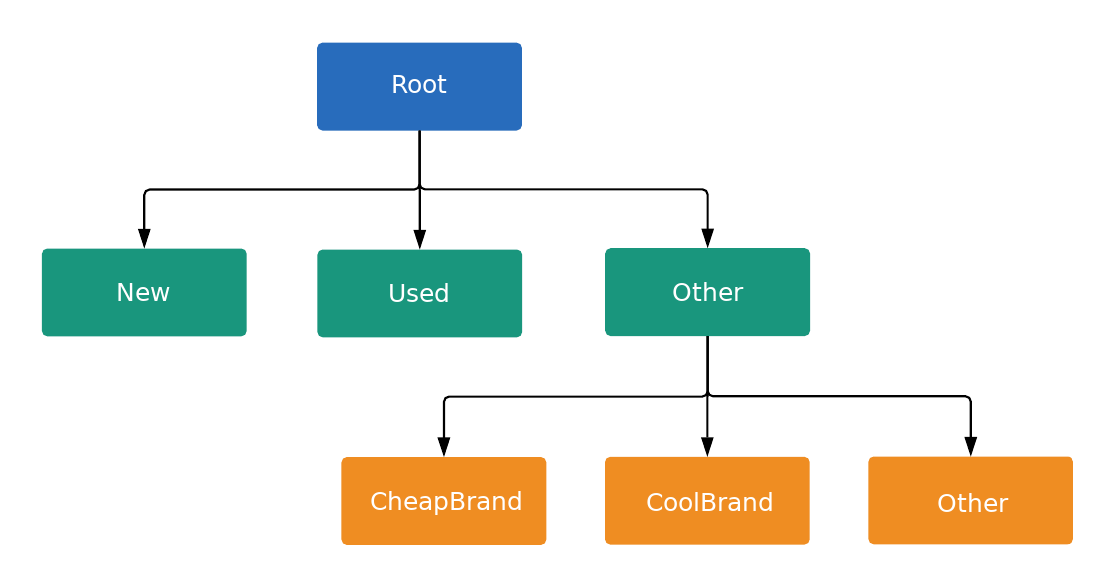
Каждый узел в дереве представляет собой либо подразделение, либо единицу, как определено параметром ListingGroupType . Подразделение вводит новый уровень в дерево, а единицы являются листьями дерева. Каждое подразделение всегда должно быть полностью разделено, поэтому оно должно содержать узел, представляющий «Другое» . В примере корневой узел и узел «Условие продукта: (Другое)» являются подразделениями. Такая древовидная структура с подразделениями и единицами позволяет устанавливать ставки на уровне единицы, а также гарантирует, что каждый продукт попадает только в один узел единицы в дереве.
Вы можете устанавливать ставки только для AdGroupCriterion , где связанный ListingGroupInfo.type имеет значение UNIT .
Если для параметра AdGroupCriterion установлено значение по умолчанию false negative значение), а для параметра ListingGroupInfo.type — UNIT , необходимо указать значение ставки, если стратегия назначения ставок для группы объявлений требует ставок на уровне критерия, например, Manual CPC. Например, вам потребуется установить поле cpc_bid_micros для параметра AdGroupCriterion . Если вы не укажете необходимую ставку для положительного узла UNIT , вы получите ошибку.
Ставки нельзя установить для AdGroupCriterion если ListingGroupInfo.type имеет SUBDIVISION . Если для AdGroupCriterion установлено значение negative равное true , ставки не применяются, поскольку это исключение.
Узлы являются объектами класса ListingGroupInfo , который содержит поле ListingGroupType , указывающее, являются ли узлы единицами или подразделениями. Установка ListingGroupInfo равным listing_group класса AdGroupCriterion свяжет его с группой объявлений AdGroup .
Для корректной работы дерева необходим как минимум один узел-единица. Эта единица может быть корневым узлом, который затем становится подразделением «Все товары». Объявления не будут показываться, пока вы не создадите корректное дерево групп объявлений.
Группы объявлений Performance Max
В кампаниях Performance Max группировка товаров наиболее эффективна при таргетировании групп товаров, поэтому этот метод предпочтительнее, чем таргетирование отдельных товаров по идентификатору. Для группировки товаров в фиде можно использовать различные параметры , такие как пользовательские метки или бренд .
Пример кода
Java
/** * Runs the example. * * @param googleAdsClient the Google Ads API client. * @param customerId the client customer ID. * @param assetGroupId the asset group id for the Performance Max campaign. * @param replaceExistingTree option to remove existing product tree from the passed in asset * group. * @throws GoogleAdsException if an API request failed with one or more service errors. */ private void runExample( GoogleAdsClient googleAdsClient, long customerId, long assetGroupId, boolean replaceExistingTree) throws Exception { String assetGroupResourceName = ResourceNames.assetGroup(customerId, assetGroupId); List<MutateOperation> operations = new ArrayList<>(); if (replaceExistingTree) { List<AssetGroupListingGroupFilter> existingListingGroupFilters = getAllExistingListingGroupFilterAssetsInAssetGroup( googleAdsClient, customerId, assetGroupResourceName); if (!existingListingGroupFilters.isEmpty()) { // A special factory object that ensures the creation of remove operations in the // correct order (child listing group filters must be removed before their parents). AssetGroupListingGroupFilterRemoveOperationFactory removeOperationFactory = new AssetGroupListingGroupFilterRemoveOperationFactory(existingListingGroupFilters); operations.addAll(removeOperationFactory.removeAll()); } } // Uses a factory to create all the MutateOperations that manipulate a specific // AssetGroup for a specific customer. The operations returned by the factory's methods // are used to construct a new tree of filters. These filters can have parent-child // relationships, and also include a special root that includes all children. // // When creating these filters, temporary IDs are used to create the hierarchy between // each of the nodes in the tree, beginning with the root listing group filter. // // The factory created below is specific to a customerId and assetGroupId. AssetGroupListingGroupFilterCreateOperationFactory createOperationFactory = new AssetGroupListingGroupFilterCreateOperationFactory( customerId, assetGroupId, TEMPORARY_ID_LISTING_GROUP_ROOT); // Creates the operation to add the root node of the tree. operations.add(createOperationFactory.createRoot()); // Creates an operation to add a leaf node for new products. ListingGroupFilterDimension newProductDimension = ListingGroupFilterDimension.newBuilder() .setProductCondition( ProductCondition.newBuilder() .setCondition(ListingGroupFilterProductCondition.NEW) .build()) .build(); operations.add( createOperationFactory.createUnit( TEMPORARY_ID_LISTING_GROUP_ROOT, createOperationFactory.nextId(), newProductDimension)); // Creates an operation to add a leaf node for used products. ListingGroupFilterDimension usedProductDimension = ListingGroupFilterDimension.newBuilder() .setProductCondition( ProductCondition.newBuilder() .setCondition(ListingGroupFilterProductCondition.USED) .build()) .build(); operations.add( createOperationFactory.createUnit( TEMPORARY_ID_LISTING_GROUP_ROOT, createOperationFactory.nextId(), usedProductDimension)); // This represents the ID of the "other" category in the ProductCondition subdivision. This ID // is saved because the node with this ID will be further partitioned, and this ID will serve as // the parent ID for subsequent child nodes of the "other" category. long otherSubdivisionId = createOperationFactory.nextId(); // Creates an operation to add a subdivision node for other products in the ProductCondition // subdivision. ListingGroupFilterDimension otherProductDimension = ListingGroupFilterDimension.newBuilder() .setProductCondition(ProductCondition.newBuilder().build()) .build(); operations.add( // Calls createSubdivision because this listing group will have children. createOperationFactory.createSubdivision( TEMPORARY_ID_LISTING_GROUP_ROOT, otherSubdivisionId, otherProductDimension)); // Creates an operation to add a leaf node for products with the brand "CoolBrand". ListingGroupFilterDimension coolBrandProductDimension = ListingGroupFilterDimension.newBuilder() .setProductBrand(ProductBrand.newBuilder().setValue("CoolBrand").build()) .build(); operations.add( createOperationFactory.createUnit( otherSubdivisionId, createOperationFactory.nextId(), coolBrandProductDimension)); // Creates an operation to add a leaf node for products with the brand "CheapBrand". ListingGroupFilterDimension cheapBrandProductDimension = ListingGroupFilterDimension.newBuilder() .setProductBrand(ProductBrand.newBuilder().setValue("CheapBrand").build()) .build(); operations.add( createOperationFactory.createUnit( otherSubdivisionId, createOperationFactory.nextId(), cheapBrandProductDimension)); // Creates an operation to add a leaf node for other products in the ProductBrand subdivision. ListingGroupFilterDimension otherBrandProductDimension = ListingGroupFilterDimension.newBuilder() .setProductBrand(ProductBrand.newBuilder().build()) .build(); operations.add( createOperationFactory.createUnit( otherSubdivisionId, createOperationFactory.nextId(), otherBrandProductDimension)); try (GoogleAdsServiceClient googleAdsServiceClient = googleAdsClient.getLatestVersion().createGoogleAdsServiceClient()) { MutateGoogleAdsRequest request = MutateGoogleAdsRequest.newBuilder() .setCustomerId(Long.toString(customerId)) .addAllMutateOperations(operations) .build(); MutateGoogleAdsResponse response = googleAdsServiceClient.mutate(request); printResponseDetails(request, response); } }
C#
/// <summary> /// Runs the code example. /// </summary> /// <param name="client">The Google Ads client.</param> /// <param name="customerId">The Google Ads customer ID.</param> /// <param name="assetGroupId">The asset group id for the Performance Max campaign.</param> /// <param name="replaceExistingTree">Option to remove existing product tree /// from the passed in asset group.</param> public void Run( GoogleAdsClient client, long customerId, long assetGroupId, bool replaceExistingTree) { GoogleAdsServiceClient googleAdsServiceClient = client.GetService(Services.V25.GoogleAdsService); string assetGroupResourceName = ResourceNames.AssetGroup(customerId, assetGroupId); // We use a factory to create all the MutateOperations that manipulate a specific // AssetGroup for a specific customer. The operations returned by the factory's methods // are used to optionally remove all AssetGroupListingGroupFilters from the tree, and // then to construct a new tree of filters. These filters can have a parent-child // relationship, and also include a special root that includes all children. // // When creating these filters, we use temporary IDs to create the hierarchy between // the root listing group filter, and the subdivisions and leave nodes beneath that. // // The factory specific to a customerId and assetGroupId is created below. AssetGroupListingGroupFilterCreateOperationFactory createOperationFactory = new AssetGroupListingGroupFilterCreateOperationFactory( customerId, assetGroupId, TEMPORARY_ID_LISTING_GROUP_ROOT ); MutateGoogleAdsRequest request = new MutateGoogleAdsRequest { CustomerId = customerId.ToString() }; if (replaceExistingTree) { List<AssetGroupListingGroupFilter> existingListingGroupFilters = GetAllExistingListingGroupFilterAssetsInAssetGroup( client, customerId, assetGroupResourceName ); if (existingListingGroupFilters.Count > 0) { // A special factory object that ensures the creation of remove operations in the // correct order (child listing group filters must be removed before their parents). AssetGroupListingGroupFilterRemoveOperationFactory removeOperationFactory = new AssetGroupListingGroupFilterRemoveOperationFactory( existingListingGroupFilters ); request.MutateOperations.AddRange(removeOperationFactory.RemoveAll()); } } request.MutateOperations.Add(createOperationFactory.CreateRoot()); request.MutateOperations.Add( createOperationFactory.CreateUnit( TEMPORARY_ID_LISTING_GROUP_ROOT, createOperationFactory.NextId(), new ListingGroupFilterDimension() { ProductCondition = new ListingGroupFilterDimension.Types.ProductCondition() { Condition = ListingGroupFilterProductCondition.New } } ) ); request.MutateOperations.Add( createOperationFactory.CreateUnit( TEMPORARY_ID_LISTING_GROUP_ROOT, createOperationFactory.NextId(), new ListingGroupFilterDimension() { ProductCondition = new ListingGroupFilterDimension.Types.ProductCondition() { Condition = ListingGroupFilterProductCondition.Used } } ) ); // We save this ID because create child nodes underneath it. long subdivisionIdConditionOther = createOperationFactory.NextId(); request.MutateOperations.Add( // We're calling CreateSubdivision because this listing group will have children. createOperationFactory.CreateSubdivision( TEMPORARY_ID_LISTING_GROUP_ROOT, subdivisionIdConditionOther, new ListingGroupFilterDimension() { // All sibling nodes must have the same dimension type. We use an empty // ProductCondition to indicate that this is an "Other" partition. ProductCondition = new ListingGroupFilterDimension.Types.ProductCondition() } ) ); request.MutateOperations.Add( createOperationFactory.CreateUnit( subdivisionIdConditionOther, createOperationFactory.NextId(), new ListingGroupFilterDimension() { ProductBrand = new ProductBrand() { Value = "CoolBrand" } } ) ); request.MutateOperations.Add( createOperationFactory.CreateUnit( subdivisionIdConditionOther, createOperationFactory.NextId(), new ListingGroupFilterDimension() { ProductBrand = new ProductBrand() { Value = "CheapBrand" } } ) ); request.MutateOperations.Add( createOperationFactory.CreateUnit( subdivisionIdConditionOther, createOperationFactory.NextId(), new ListingGroupFilterDimension() { ProductBrand = new ProductBrand() } ) ); MutateGoogleAdsResponse response = googleAdsServiceClient.Mutate(request); PrintResponseDetails(request, response); }
PHP
/** * Runs the example. * * @param GoogleAdsClient $googleAdsClient the Google Ads API client * @param int $customerId the customer ID * @param int $assetGroupId the asset group ID * @param bool $replaceExistingTree true if it should replace the existing listing group * tree on the asset group */ public static function runExample( GoogleAdsClient $googleAdsClient, int $customerId, int $assetGroupId, bool $replaceExistingTree ) { // We create all the mutate operations that manipulate a specific asset group for a specific // customer. The operations are used to optionally remove all asset group listing group // filters from the tree, and then to construct a new tree of filters. These filters can // have a parent-child relationship, and also include a special root that includes all // children. // // When creating these filters, we use temporary IDs to create the hierarchy between // the root listing group filter, and the subdivisions and leave nodes beneath that. $mutateOperations = []; if ($replaceExistingTree === true) { $existingListingGroupFilters = self::getAllExistingListingGroupFilterAssetsInAssetGroup( $googleAdsClient, $customerId, ResourceNames::forAssetGroup($customerId, $assetGroupId) ); if (count($existingListingGroupFilters) > 0) { $mutateOperations = array_merge( $mutateOperations, // Ensures the creation of remove operations in the correct order (child listing // group filters must be removed before their parents). self::createMutateOperationsForRemovingListingGroupFiltersTree( $existingListingGroupFilters ) ); } } $mutateOperations[] = self::createMutateOperationForRoot( $customerId, $assetGroupId, self::LISTING_GROUP_ROOT_TEMPORARY_ID ); // The temporary ID to be used for creating subdivisions and units. static $tempId = self::LISTING_GROUP_ROOT_TEMPORARY_ID - 1; $mutateOperations[] = self::createMutateOperationForUnit( $customerId, $assetGroupId, $tempId--, self::LISTING_GROUP_ROOT_TEMPORARY_ID, new ListingGroupFilterDimension( [ 'product_condition' => new ProductCondition( [ 'condition' => ListingGroupFilterProductCondition::PBNEW ] ) ] ) ); $mutateOperations[] = self::createMutateOperationForUnit( $customerId, $assetGroupId, $tempId--, self::LISTING_GROUP_ROOT_TEMPORARY_ID, new ListingGroupFilterDimension( [ 'product_condition' => new ProductCondition( [ 'condition' => ListingGroupFilterProductCondition::USED ] ) ] ) ); // We save this ID to create child nodes underneath it. $conditionOtherSubdivisionId = $tempId--; // We're calling createMutateOperationForSubdivision() because this listing group will // have children. $mutateOperations[] = self::createMutateOperationForSubdivision( $customerId, $assetGroupId, $conditionOtherSubdivisionId, self::LISTING_GROUP_ROOT_TEMPORARY_ID, new ListingGroupFilterDimension( [ // All sibling nodes must have the same dimension type. We use an empty // ProductCondition to indicate that this is an "Other" partition. 'product_condition' => new ProductCondition() ] ) ); $mutateOperations[] = self::createMutateOperationForUnit( $customerId, $assetGroupId, $tempId--, $conditionOtherSubdivisionId, new ListingGroupFilterDimension( ['product_brand' => new ProductBrand(['value' => 'CoolBrand'])] ) ); $mutateOperations[] = self::createMutateOperationForUnit( $customerId, $assetGroupId, $tempId--, $conditionOtherSubdivisionId, new ListingGroupFilterDimension( [ 'product_brand' => new ProductBrand(['value' => 'CheapBrand']) ] ) ); $mutateOperations[] = self::createMutateOperationForUnit( $customerId, $assetGroupId, $tempId--, $conditionOtherSubdivisionId, // All other product brands. new ListingGroupFilterDimension(['product_brand' => new ProductBrand()]) ); // Issues a mutate request to create everything and prints its information. $googleAdsServiceClient = $googleAdsClient->getGoogleAdsServiceClient(); $response = $googleAdsServiceClient->mutate( MutateGoogleAdsRequest::build($customerId, $mutateOperations) ); self::printResponseDetails($mutateOperations, $response); }
Python
def main( client: GoogleAdsClient, customer_id: str, asset_group_id: int, # Will be str for path construction replace_existing_tree: bool, ) -> None: """The main method that creates all necessary entities for the example. Args: client: an initialized GoogleAdsClient instance. customer_id: a client customer ID. asset_group_id: the asset group id for the Performance Max campaign. replace_existing_tree: option to remove existing product tree from the passed in asset group. """ googleads_service: GoogleAdsServiceClient = client.get_service( "GoogleAdsService" ) # asset_group_id is used as a string in path construction. asset_group_resource_name: str = googleads_service.asset_group_path( customer_id, str(asset_group_id) ) operations: List[MutateOperation] = [] if replace_existing_tree: # Retrieve a list of existing AssetGroupListingGroupFilters existing_listing_group_filters: List[AssetGroupListingGroupFilter] = ( get_all_existing_listing_group_filter_assets_in_asset_group( client, customer_id, asset_group_resource_name ) ) # If present, create MutateOperations to remove each # AssetGroupListingGroupFilter and add them to the list of operations. if existing_listing_group_filters: remove_operation_factory = ( AssetGroupListingGroupFilterRemoveOperationFactory( client, existing_listing_group_filters ) ) operations.extend(remove_operation_factory.remove_all()) create_operation_factory = ( AssetGroupListingGroupFilterCreateOperationFactory( client, customer_id, asset_group_id, # Pass as int, will be converted to str in __init__ _TEMPORARY_ID_LISTING_GROUP_ROOT, ) ) operations.append(create_operation_factory.create_root()) new_dimension: ListingGroupFilterDimension = client.get_type( "ListingGroupFilterDimension" ) new_dimension.product_condition.condition = ( client.enums.ListingGroupFilterProductConditionEnum.NEW ) operations.append( create_operation_factory.create_unit( _TEMPORARY_ID_LISTING_GROUP_ROOT, create_operation_factory.next_id(), new_dimension, ) ) used_dimension: ListingGroupFilterDimension = client.get_type( "ListingGroupFilterDimension" ) used_dimension.product_condition.condition = ( client.enums.ListingGroupFilterProductConditionEnum.USED ) operations.append( create_operation_factory.create_unit( _TEMPORARY_ID_LISTING_GROUP_ROOT, create_operation_factory.next_id(), used_dimension, ) ) # We save this ID because create child nodes underneath it. subdivision_id_condition_other: int = create_operation_factory.next_id() # All sibling nodes must have the same dimension type. We use an empty # product_condition to indicate that this is an "Other" partition. other_dimension: ListingGroupFilterDimension = client.get_type( "ListingGroupFilterDimension" ) # This triggers the presence of the product_condition field without # specifying any field values. This is important in order to tell the API # that this is an "other" node. other_dimension.product_condition._pb.SetInParent() # We're calling create_subdivision because this listing group will have # children. operations.append( create_operation_factory.create_subdivision( _TEMPORARY_ID_LISTING_GROUP_ROOT, subdivision_id_condition_other, other_dimension, ) ) cool_dimension: ListingGroupFilterDimension = client.get_type( "ListingGroupFilterDimension" ) cool_dimension.product_brand.value = "CoolBrand" operations.append( create_operation_factory.create_unit( subdivision_id_condition_other, create_operation_factory.next_id(), cool_dimension, ) ) cheap_dimension: ListingGroupFilterDimension = client.get_type( "ListingGroupFilterDimension" ) cheap_dimension.product_brand.value = "CheapBrand" operations.append( create_operation_factory.create_unit( subdivision_id_condition_other, create_operation_factory.next_id(), cheap_dimension, ) ) empty_dimension: ListingGroupFilterDimension = client.get_type( "ListingGroupFilterDimension" ) # This triggers the presence of the product_brand field without specifying # any field values. This is important in order to tell the API # that this is an "other" node. empty_dimension.product_brand._pb.SetInParent() operations.append( create_operation_factory.create_unit( subdivision_id_condition_other, create_operation_factory.next_id(), empty_dimension, ) ) response: MutateGoogleAdsResponse = googleads_service.mutate( customer_id=customer_id, mutate_operations=operations ) print_response_details(operations, response)
Руби
def add_performance_max_product_listing_group_tree( customer_id, asset_group_id, replace_existing_tree) # GoogleAdsClient will read a config file from # ENV['HOME']/google_ads_config.rb when called without parameters client = Google::Ads::GoogleAds::GoogleAdsClient.new asset_group_resource_name = client.path.asset_group( customer_id, asset_group_id, ) # We use a factory to create all the MutateOperations that manipulate a # specific AssetGroup for a specific customer. The operations returned by the # factory's methods are used to optionally remove all # AssetGroupListingGroupFilters from the tree, and then to construct a new # tree of filters. These filters can have a parent-child relationship, and # also include a special root that includes all children. # # When creating these filters, we use temporary IDs to create the hierarchy # between the root listing group filter, and the subdivisions and leave nodes # beneath that. # # The factory specific to a customerId and assetGroupId is created below. create_operation_factory = AssetGroupListingGroupFilterCreateOperationFactory.new( customer_id, asset_group_id, TEMPORARY_ID_LISTING_GROUP_ROOT, ) operations = [] if replace_existing_tree existing_listing_group_filters = get_existing_listing_group_filters_in_asset_group( client, customer_id, asset_group_resource_name, ) if existing_listing_group_filters.length > 0 # A special factory object that ensures the creation of remove operations # in the correct order (child listing group filters must be removed # before their parents). remove_operation_factory = AssetGroupListingGroupFilterRemoveOperationFactory.new( existing_listing_group_filters ) operations += remove_operation_factory.remove_all(client) end end operations << create_operation_factory.create_root(client) operations << create_operation_factory.create_unit( client, TEMPORARY_ID_LISTING_GROUP_ROOT, create_operation_factory.next_id, client.resource.listing_group_filter_dimension do |dimension| dimension.product_condition = client.resource.product_condition do |condition| condition.condition = :NEW end end, ) operations << create_operation_factory.create_unit( client, TEMPORARY_ID_LISTING_GROUP_ROOT, create_operation_factory.next_id, client.resource.listing_group_filter_dimension do |dimension| dimension.product_condition = client.resource.product_condition do |condition| condition.condition = :USED end end, ) # We save this ID because we create child nodes underneath it. subdivision_id_condition_other = create_operation_factory.next_id operations << create_operation_factory.create_subdivision( client, TEMPORARY_ID_LISTING_GROUP_ROOT, subdivision_id_condition_other, client.resource.listing_group_filter_dimension do |dimension| dimension.product_condition = client.resource.product_condition do |condition| # All sibling nodes must have the same dimension type. We use an empty # ProductCondition to indicate that this is an "Other" partition. end end, ) operations << create_operation_factory.create_unit( client, subdivision_id_condition_other, create_operation_factory.next_id, client.resource.listing_group_filter_dimension do |dimension| dimension.product_brand = client.resource.product_brand do |brand| brand.value = 'CoolBrand' end end, ) operations << create_operation_factory.create_unit( client, subdivision_id_condition_other, create_operation_factory.next_id, client.resource.listing_group_filter_dimension do |dimension| dimension.product_brand = client.resource.product_brand do |brand| brand.value = 'CheapBrand' end end, ) operations << create_operation_factory.create_unit( client, subdivision_id_condition_other, create_operation_factory.next_id, client.resource.listing_group_filter_dimension do |dimension| dimension.product_brand = client.resource.product_brand do |brand| end end, ) response = client.service.google_ads.mutate( customer_id: customer_id, mutate_operations: operations, ) print_response_details(operations, response) end
Perl
sub add_performance_max_product_listing_group_tree { my ($api_client, $customer_id, $asset_group_id, $replace_existing_tree) = @_; # We create all the mutate operations that manipulate a specific asset group for # a specific customer. The operations are used to optionally remove all asset # group listing group filters from the tree, and then to construct a new tree # of filters. These filters can have a parent-child relationship, and also include # a special root that includes all children. # # When creating these filters, we use temporary IDs to create the hierarchy between # the root listing group filter, and the subdivisions and leave nodes beneath that. my $mutate_operations = []; if (defined $replace_existing_tree) { my $existing_listing_group_filters = get_all_existing_listing_group_filter_assets_in_asset_group( $api_client, $customer_id, Google::Ads::GoogleAds::V25::Utils::ResourceNames::asset_group( $customer_id, $asset_group_id )); if (scalar @$existing_listing_group_filters > 0) { push @$mutate_operations, # Ensure the creation of remove operations in the correct order (child # listing group filters must be removed before their parents). @{ create_mutate_operations_for_removing_listing_group_filters_tree( $existing_listing_group_filters)}; } } push @$mutate_operations, create_mutate_operation_for_root($customer_id, $asset_group_id, LISTING_GROUP_ROOT_TEMPORARY_ID); # The temporary ID to be used for creating subdivisions and units. my $temp_id = LISTING_GROUP_ROOT_TEMPORARY_ID - 1; push @$mutate_operations, create_mutate_operation_for_unit( $customer_id, $asset_group_id, $temp_id--, LISTING_GROUP_ROOT_TEMPORARY_ID, Google::Ads::GoogleAds::V25::Resources::ListingGroupFilterDimension->new({ productCondition => Google::Ads::GoogleAds::V25::Resources::ProductCondition->new({ condition => NEW })})); push @$mutate_operations, create_mutate_operation_for_unit( $customer_id, $asset_group_id, $temp_id--, LISTING_GROUP_ROOT_TEMPORARY_ID, Google::Ads::GoogleAds::V25::Resources::ListingGroupFilterDimension->new({ productCondition => Google::Ads::GoogleAds::V25::Resources::ProductCondition->new({ condition => USED })})); # We save this ID to create child nodes underneath it. my $condition_other_subdivision_id = $temp_id--; # We're calling create_mutate_operation_for_subdivision() because this listing # group will have children. push @$mutate_operations, create_mutate_operation_for_subdivision( $customer_id, $asset_group_id, $condition_other_subdivision_id, LISTING_GROUP_ROOT_TEMPORARY_ID, Google::Ads::GoogleAds::V25::Resources::ListingGroupFilterDimension->new({ # All sibling nodes must have the same dimension type. We use an empty # ProductCondition to indicate that this is an "Other" partition. productCondition => Google::Ads::GoogleAds::V25::Resources::ProductCondition->new({})})); push @$mutate_operations, create_mutate_operation_for_unit( $customer_id, $asset_group_id, $temp_id--, $condition_other_subdivision_id, Google::Ads::GoogleAds::V25::Resources::ListingGroupFilterDimension->new({ productBrand => Google::Ads::GoogleAds::V25::Resources::ProductBrand->new({ value => "CoolBrand" })})); push @$mutate_operations, create_mutate_operation_for_unit( $customer_id, $asset_group_id, $temp_id--, $condition_other_subdivision_id, Google::Ads::GoogleAds::V25::Resources::ListingGroupFilterDimension->new({ productBrand => Google::Ads::GoogleAds::V25::Resources::ProductBrand->new({ value => "CheapBrand" })})); push @$mutate_operations, create_mutate_operation_for_unit( $customer_id, $asset_group_id, $temp_id--, $condition_other_subdivision_id, # All other product brands. Google::Ads::GoogleAds::V25::Resources::ListingGroupFilterDimension->new({ productBrand => Google::Ads::GoogleAds::V25::Resources::ProductBrand->new({})})); # Issue a mutate request to create everything and print its information. my $response = $api_client->GoogleAdsService()->mutate({ customerId => $customer_id, mutateOperations => $mutate_operations }); print_response_details($mutate_operations, $response); return 1; }
локон
Доступные размеры для ListingDimensionInfo
В группу объявлений Performance Max может входить несколько параметров объявления. Следующие типы ListingDimensionInfo можно использовать в розничных кампаниях Performance Max:
-
ProductBrandInfo -
ProductCategoryInfo -
ProductChannelInfo -
ProductConditionInfo -
ProductCustomAttributeInfo -
ProductItemIdInfo -
ProductTypeInfo
Каждый ресурс содержит список поддерживаемых локализаций в поле ProductCategoryConstant.ProductCategoryLocalization . Чтобы понять данные, возвращаемые ресурсом, попробуйте пример «Получить константы категорий товаров» .
Другие узлы-модули можно создать, передав пустой объект типа ListingDimensionInfo в ListingGroupInfo .
Временные удостоверения личности
Критериям групп активов не присваиваются идентификаторы до тех пор, пока сервер не обработает запрос на изменение, который их создает. Однако объект ListingGroupInfo считается недействительным, пока он не будет полностью сформирован, поэтому при создании подразделения необходимо также создать как минимум один из его дочерних элементов и узел Other в том же запросе.
Для установки parent_criterion_id объекта ListingGroupInfo для дочерних узлов, созданных в том же запросе, что и родительский узел, можно использовать временные идентификаторы критериев . Эти идентификаторы применяются только в контексте одного запроса на изменение. В качестве временного идентификатора можно использовать любое отрицательное целое число.