

本快速入門指南可協助您完成第一個 Google Ads API 呼叫。
核心概念
- Google Cloud 雲端專案:Google Cloud 雲端專案是建立、啟用及使用所有 Google 服務的基礎,包括管理 API 和 OAuth 2.0 API 憑證。您可以透過 Google Cloud 控制台建立一個。
- API 存取層級:您的 Google Cloud 雲端專案的 API 存取層級會控管您每天可發出的 API 呼叫次數,以及可發出 API 呼叫的環境。專案的 API 存取層級會列在專案的 Google Ads API 總覽頁面。
- Google Ads 管理員帳戶:Google Ads 管理員帳戶可用來管理其他 Google Ads 帳戶,包括 Google Ads 客戶帳戶或其他的 Google Ads 管理員帳戶。
- Google Ads 客戶帳戶:用於放送廣告的 Google Ads 帳戶,您想透過 API 呼叫指定這個帳戶。
- 客戶客戶 ID:用來識別 Google Ads 客戶帳戶的 10 位數號碼。如果您是從 Google Ads 使用者介面複製這個 ID,請務必移除連字號。
- OAuth 2.0:OAuth 2.0 是業界標準的授權通訊協定,所有 Google API 都會使用這項通訊協定。您需要服務帳戶和金鑰,才能產生 OAuth 2.0 憑證來發出 API 呼叫。
- 服務帳戶:一種特殊的 Google 帳戶類型,屬於應用程式,而不是個別使用者。用來向 Google Ads API 驗證應用程式。您需要 Google Cloud 專案才能取得服務帳戶。
- 服務帳戶金鑰:包含服務帳戶私密金鑰的 JSON 應用程式憑證檔案。用來產生 OAuth 2.0 憑證,在發出 Google Ads API API 呼叫時驗證服務帳戶。您必須具備服務帳戶,才能取得服務帳戶金鑰。
必要條件
如要發出 Google Ads API 呼叫,請完成下列步驟。
設定 Google API 控制台專案,取得 Google Ads API 存取權
Google Cloud 專案用於管理 Google API 和 OAuth 2.0 API 憑證。如要查看現有的 Google Cloud 專案或建立專案,請前往 Google Cloud 控制台。
首先,請在專案中啟用 Google Ads API:
接著,請前往 Google Ads API 總覽頁面。頁面會顯示目前的 API 存取層級。如果目前的 API 存取層級為測試帳戶存取層級,請展開「申請下一個存取層級」部分。 按照操作說明申請探索者存取層級。
完成申請後,Google 通常會自動審查您的申請,並將權限升級為「探索者存取權」。如果沒有獲得探索者存取權,請別擔心,本指南會在設定 Google Ads 客戶帳戶時,提供適當的指示。
建立服務帳戶
您需要服務帳戶和服務帳戶金鑰,才能發出 API 呼叫。如果您已使用其他 Google API,並建立 OAuth 2.0 服務帳戶和金鑰,可以略過這個步驟,重複使用現有憑證。
如何建立服務帳戶和金鑰
- 在 Google Cloud 控制台中,依序前往「選單」 >「IAM 與管理」 >「服務帳戶」。
- 選取服務帳戶。
- 依序點選「金鑰」>「新增金鑰」 >「建立新的金鑰」。
- 選取「JSON」,然後按一下「建立」。
接著,系統就會為您產生一對新的公開/私密金鑰,並以新檔案的形式下載至您的電腦中。將下載的 JSON 檔案儲存為目前使用的目錄中的
credentials.json。這個檔案是這組金鑰的唯一副本。 - 按一下 [關閉]。
設定 Google Ads 客戶帳戶
首先,請找出您要用來發出 API 呼叫的 Google Ads 帳戶。可呼叫 API 的帳戶類型取決於 Google Cloud 雲端專案的 API 存取層級。請查看 Google Ads API 總覽頁面,瞭解您的 API 存取層級。
探索者、基本和標準存取層級
您可以呼叫 Google Ads 正式版帳戶。不過,您可以按照「測試帳戶存取權」分頁中的操作說明,建立 Google Ads 測試帳戶。
測試帳戶存取層級
您的 Google Cloud 雲端專案無法用來呼叫 API,存取 Google Ads 製作帳戶。您只能對 Google Ads 測試帳戶發出 API 呼叫。
如何建立 Google Ads 測試帳戶
下列操作說明會建立 Google Ads 測試管理員帳戶,以及其下方的 Google Ads 測試廣告主帳戶。
按一下藍色按鈕,建立 Google Ads 測試管理員帳戶。 如果系統提示,請使用未連結至 Google Ads 製作管理員帳戶的 Google 帳戶登入。如果沒有,請使用該頁面的「建立帳戶」按鈕建立新的 Google 帳戶。
- 在 Google Ads 測試管理員帳戶中,建立 Google Ads 測試客戶帳戶:按一下「帳戶」>「」>「建立新帳戶」,然後填寫表單。透過 Google Ads 測試管理員帳戶建立的任何 Google Ads 帳戶,都會自動成為 Google Ads 測試帳戶。
- 視需要透過 Google Ads 頁面,在 Google Ads 測試客戶帳戶下建立幾個廣告活動。
如要對 Google Ads 客戶發出 API 呼叫,您必須授予服務帳戶 Google Ads 客戶帳戶的存取權和適當權限。如要這麼做,您必須具備客戶帳戶的管理員存取權。
如何授予服務帳戶 Google Ads 帳戶存取權
- 請先以管理員身分登入 Google Ads 帳戶。
- 依序前往「管理」>「存取權和安全性」。
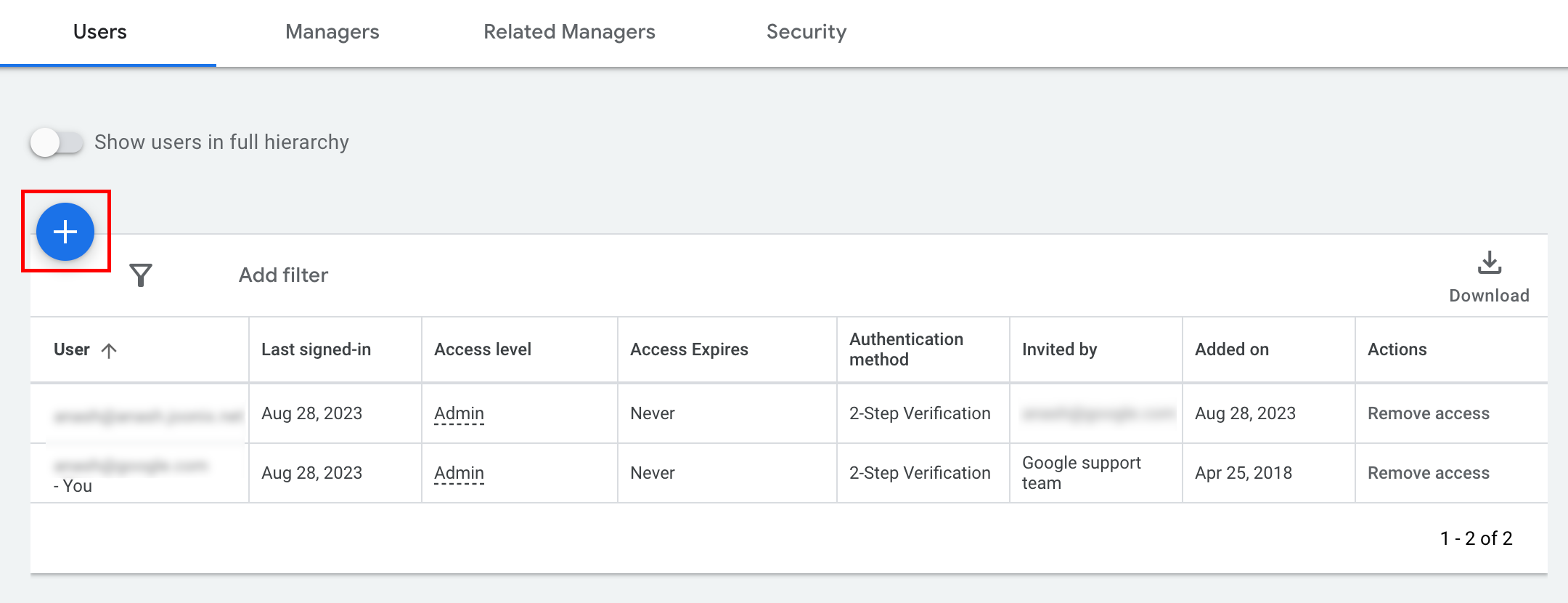
- 按一下「使用者」分頁標籤下方的 按鈕。
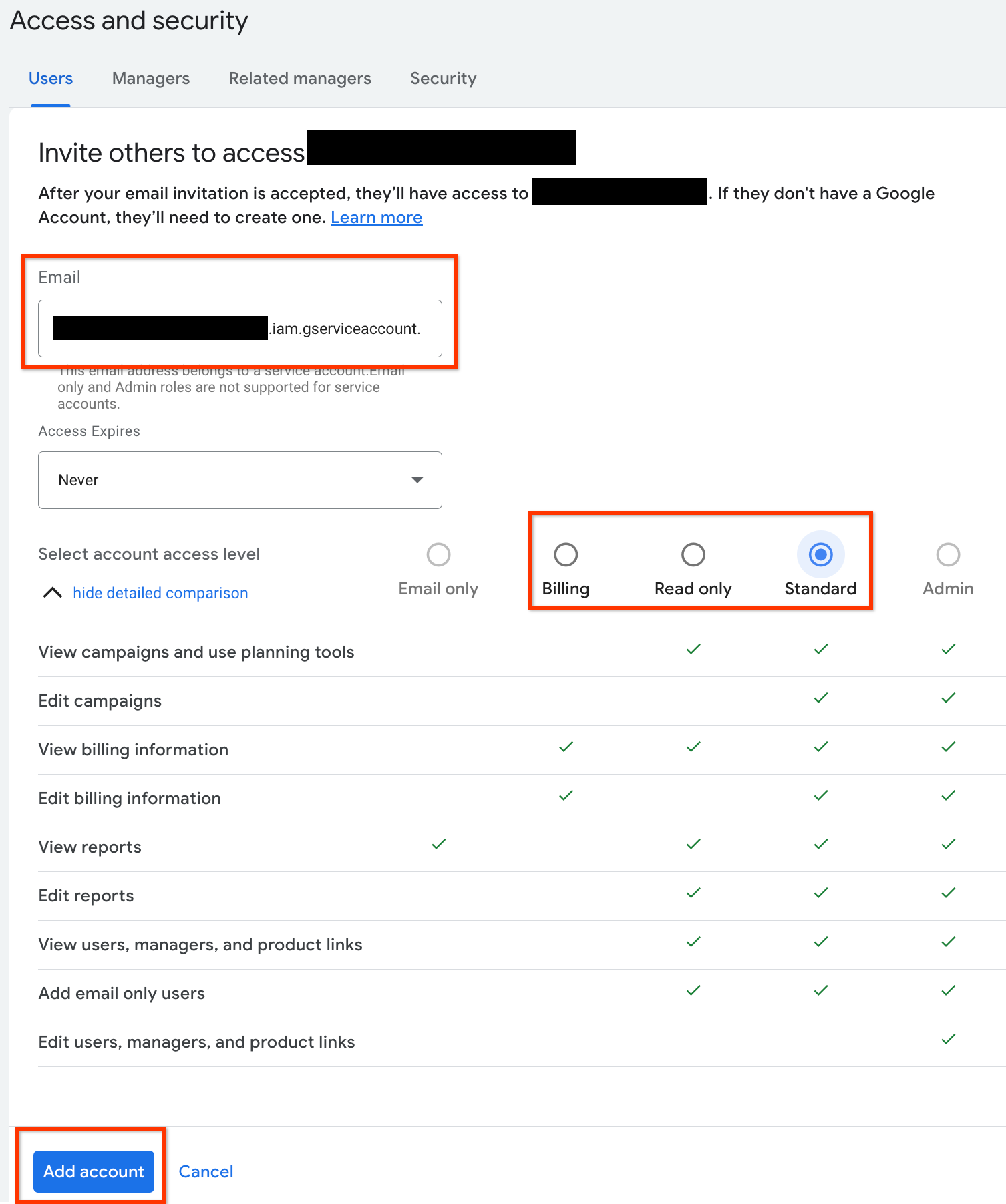
- 在「電子郵件」輸入方塊中輸入服務帳戶電子郵件地址。
選取適當的帳戶存取層級,然後按一下「新增帳戶」按鈕。請注意,服務帳戶不支援「電子郵件」存取層級。
- 服務帳戶已取得存取權。
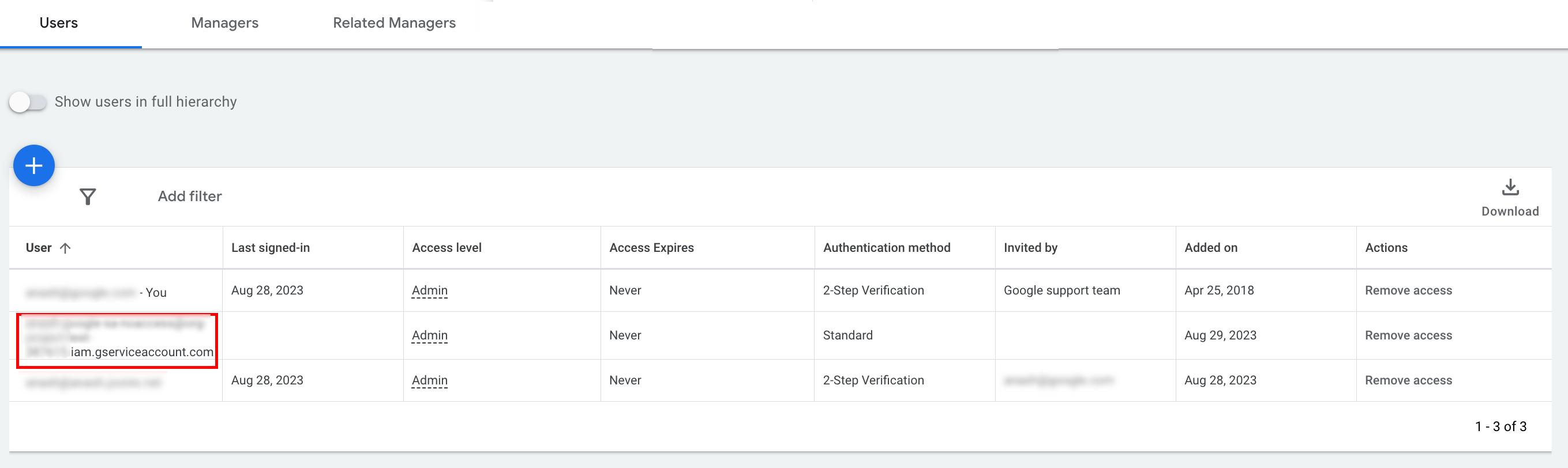
- [選用] 根據預設,您無法授予服務帳戶管理員存取權。如果 API 呼叫需要管理員存取權,您可以按照下列方式升級存取權。
- 按一下「存取層級」欄中,服務帳戶存取層級旁邊的下拉式箭頭。
- 從下拉式清單中選取「管理員」。
下載工具和用戶端程式庫
您可以選擇下載用戶端程式庫或 HTTP 用戶端,視您要如何發出 API 呼叫而定。
使用用戶端程式庫
下載並安裝您選擇的用戶端程式庫。
使用 HTTP 用戶端 (REST)
curl
下載並安裝 curl,這是透過網址傳輸資料的指令列工具。
Google Cloud CLI
按照操作說明安裝 gcloud CLI。
本指南其餘部分的說明已通過驗證,可搭配下列版本的 gcloud 工具使用,但由於應用程式行為或指令列選項有所差異,可能無法搭配舊版使用。
:~$ gcloud version
Google Cloud SDK 492.0.0
alpha 2024.09.06
beta 2024.09.06
bq 2.1.8
bundled-python3-unix 3.11.9
core 2024.09.06
enterprise-certificate-proxy 0.3.2
gcloud-crc32c 1.0.0
gsutil 5.30
發出 API 呼叫
選取偏好的用戶端,查看如何發出 API 呼叫的說明:
Java
用戶端程式庫構件會發布至 Maven Central 存放區。請按照下列步驟,將用戶端程式庫新增為專案的依附元件:
Maven 依附元件為:
<dependency>
  <groupId>com.google.api-ads</groupId>
  <artifactId>google-ads</artifactId>
  <version>46.0.0</version>
</dependency>
Gradle 依附元件為:
implementation 'com.google.api-ads:google-ads:46.0.0'
此外,我們也建議使用 Google Ads API 物料清單 (BOM) 管理依附元件版本。如需操作說明,請參閱 BOM 指南。
建立 ~/ads.properties 檔案,並加入以下內容:
api.googleads.serviceAccountSecretsPath=JSON_KEY_FILE_PATH
api.googleads.loginCustomerId=INSERT_LOGIN_CUSTOMER_ID_HERE
建立 GoogleAdsClient 物件的步驟如下:
GoogleAdsClient googleAdsClient = null;
try {
  googleAdsClient = GoogleAdsClient.newBuilder().fromPropertiesFile().build();
} catch (FileNotFoundException fnfe) {
  System.err.printf(
      "Failed to load GoogleAdsClient configuration from file. Exception: %s%n",
      fnfe);
  System.exit(1);
} catch (IOException ioe) {
  System.err.printf("Failed to create GoogleAdsClient. Exception: %s%n", ioe);
  System.exit(1);
}
接著,使用 GoogleAdsService.SearchStream 方法執行廣告活動報表,擷取帳戶中的廣告活動。
private void runExample(GoogleAdsClient googleAdsClient, long customerId) {
try (GoogleAdsServiceClient googleAdsServiceClient =
googleAdsClient.getLatestVersion().createGoogleAdsServiceClient()) {
String query = "SELECT campaign.id, campaign.name FROM campaign ORDER BY campaign.id";
// Constructs the SearchGoogleAdsStreamRequest.
SearchGoogleAdsStreamRequest request =
SearchGoogleAdsStreamRequest.newBuilder()
.setCustomerId(Long.toString(customerId))
.setQuery(query)
.build();
// Creates and issues a search Google Ads stream request that will retrieve all campaigns.
ServerStream<SearchGoogleAdsStreamResponse> stream =
googleAdsServiceClient.searchStreamCallable().call(request);
// Iterates through and prints all of the results in the stream response.
for (SearchGoogleAdsStreamResponse response : stream) {
for (GoogleAdsRow googleAdsRow : response.getResultsList()) {
System.out.printf(
"Campaign with ID %d and name '%s' was found.%n",
googleAdsRow.getCampaign().getId(), googleAdsRow.getCampaign().getName());
}
}
}
}
C#
用戶端程式庫套件會發布至 Nuget.org 存放區。首先,請將 NuGet 參照新增至 Google.Ads.GoogleAds 套件。
dotnet add package Google.Ads.GoogleAds --version 26.1.0使用相關設定建立 GoogleAdsConfig 物件,並用來建立 GoogleAdsClient 物件。
GoogleAdsConfig config = new GoogleAdsConfig()
{
    OAuth2Mode = OAuth2Flow.SERVICE_ACCOUNT,
    OAuth2SecretsJsonPath = "PATH_TO_CREDENTIALS_JSON",
    LoginCustomerId = ******
};
GoogleAdsClient client = new GoogleAdsClient(config);
接著,使用 GoogleAdsService.SearchStream 方法執行廣告活動報表,擷取帳戶中的廣告活動。本指南未涵蓋報表的詳細資訊。
public void Run(GoogleAdsClient client, long customerId)
{
// Get the GoogleAdsService.
GoogleAdsServiceClient googleAdsService = client.GetService(
Services.V25.GoogleAdsService);
// Create a query that will retrieve all campaigns.
string query = @"SELECT
campaign.id,
campaign.name,
campaign.network_settings.target_content_network
FROM campaign
ORDER BY campaign.id";
try
{
// Issue a search request.
googleAdsService.SearchStream(customerId.ToString(), query,
delegate (SearchGoogleAdsStreamResponse resp)
{
foreach (GoogleAdsRow googleAdsRow in resp.Results)
{
Console.WriteLine("Campaign with ID {0} and name '{1}' was found.",
googleAdsRow.Campaign.Id, googleAdsRow.Campaign.Name);
}
}
);
}
catch (GoogleAdsException e)
{
Console.WriteLine("Failure:");
Console.WriteLine($"Message: {e.Message}");
Console.WriteLine($"Failure: {e.Failure}");
Console.WriteLine($"Request ID: {e.RequestId}");
throw;
}
}
PHP
用戶端程式庫套件會發布至 Packagist 存放區。變更為專案的根目錄,然後執行下列指令,在專案根目錄的 vendor/ 目錄中安裝程式庫和所有依附元件。
composer require googleads/google-ads-php:33.6.0從 GitHub 存放區複製 google_ads_php.ini 檔案,並修改檔案以納入您的憑證。
[GOOGLE_ADS]
loginCustomerId = "INSERT_LOGIN_CUSTOMER_ID_HERE"

[OAUTH2]
jsonKeyFilePath = "INSERT_ABSOLUTE_PATH_TO_OAUTH2_JSON_KEY_FILE_HERE"
scopes = "https://www.googleapis.com/auth/adwords"
建立 GoogleAdsClient 物件的執行個體。
$oAuth2Credential = (new OAuth2TokenBuilder())
    ->fromFile('/path/to/google_ads_php.ini')
    ->build();

$googleAdsClient = (new GoogleAdsClientBuilder())
    ->fromFile('/path/to/google_ads_php.ini')
    ->withOAuth2Credential($oAuth2Credential)
    ->build();
接著,使用 GoogleAdsService.SearchStream 方法執行廣告活動報表,擷取帳戶中的廣告活動。
public static function runExample(GoogleAdsClient $googleAdsClient, int $customerId)
{
$googleAdsServiceClient = $googleAdsClient->getGoogleAdsServiceClient();
// Creates a query that retrieves all campaigns.
$query = 'SELECT campaign.id, campaign.name FROM campaign ORDER BY campaign.id';
// Issues a search stream request.
/** @var GoogleAdsServerStreamDecorator $stream */
$stream = $googleAdsServiceClient->searchStream(
SearchGoogleAdsStreamRequest::build($customerId, $query)
);
// Iterates over all rows in all messages and prints the requested field values for
// the campaign in each row.
foreach ($stream->iterateAllElements() as $googleAdsRow) {
/** @var GoogleAdsRow $googleAdsRow */
printf(
"Campaign with ID %d and name '%s' was found.%s",
$googleAdsRow->getCampaign()->getId(),
$googleAdsRow->getCampaign()->getName(),
PHP_EOL
);
}
}
Python
用戶端程式庫會發布在 PyPI,可使用 pip 指令安裝,如下所示:
python -m pip install google-ads==31.2.0從 GitHub 存放區複製 google-ads.yaml 檔案,並修改檔案以加入您的憑證。
login_customer_id: INSERT_LOGIN_CUSTOMER_ID_HERE
json_key_file_path: JSON_KEY_FILE_PATH_HERE
呼叫 GoogleAdsClient.load_from_storage 方法來建立 GoogleAdsClient 例項。呼叫方法時,以字串形式將 google-ads.yaml 的路徑傳遞至方法:
from google.ads.googleads.client import GoogleAdsClient
client = GoogleAdsClient.load_from_storage("path/to/google-ads.yaml")
在程式庫的記錄器中新增處理常式,告知記錄器要將記錄輸出到何處。
下列程式碼會指示程式庫的記錄器將訊息列印到控制台 (stdout)。
import logging
import sys

logger = logging.getLogger('google.ads.googleads.client')
logger.addHandler(logging.StreamHandler(sys.stdout))
接著,使用 GoogleAdsService.SearchStream 方法執行廣告活動報表,擷取帳戶中的廣告活動。
def main(client: GoogleAdsClient, customer_id: str) -> None:
ga_service: GoogleAdsServiceClient = client.get_service("GoogleAdsService")
query: str = """
SELECT
campaign.id,
campaign.name
FROM campaign
ORDER BY campaign.id"""
# Issues a search request using streaming.
stream: Iterator[SearchGoogleAdsStreamResponse] = ga_service.search_stream(
customer_id=customer_id, query=query
)
for batch in stream:
rows: List[GoogleAdsRow] = batch.results
for row in rows:
print(
f"Campaign with ID {row.campaign.id} and name "
f'"{row.campaign.name}" was found.'
)
小茹
用戶端程式庫的 Ruby Gem 會發布至 Rubygems Gem 主機網站。建議使用 bundler 安裝。在 Gemfile 中新增一行:
gem 'google-ads-googleads', '~> 43.0.0'
然後執行:
bundle install從 GitHub 存放區複製 google_ads_config.rb 檔案,並修改檔案以納入您的憑證。
Google::Ads::GoogleAds::Config.new do |c|
  c.login_customer_id = 'INSERT_LOGIN_CUSTOMER_ID_HERE'
  c.keyfile = 'JSON_KEY_FILE_PATH'
end
傳遞這個檔案的儲存路徑,建立 GoogleAdsClient 執行個體。
client = Google::Ads::GoogleAds::GoogleAdsClient.new('path/to/google_ads_config.rb')
接著,使用 GoogleAdsService.SearchStream 方法執行廣告活動報表,擷取帳戶中的廣告活動。
def get_campaigns(customer_id)
# GoogleAdsClient will read a config file from
# ENV['HOME']/google_ads_config.rb when called without parameters
client = Google::Ads::GoogleAds::GoogleAdsClient.new
responses = client.service.google_ads.search_stream(
customer_id: customer_id,
query: 'SELECT campaign.id, campaign.name FROM campaign ORDER BY campaign.id',
)
responses.each do |response|
response.results.each do |row|
puts "Campaign with ID #{row.campaign.id} and name '#{row.campaign.name}' was found."
end
end
end
Perl
這個程式庫會發布在 CPAN 上。首先,請在所選目錄中複製 google-ads-perl 存放區。
git clone https://github.com/googleads/google-ads-perl.git切換至 google-ads-perl 目錄,並在命令提示字元執行下列指令,安裝使用程式庫所需的所有依附元件。
cd google-ads-perlcpan install Module::Buildperl Build.PLperl Build installdeps
從 GitHub 存放區複製 googleads.properties 檔案,並修改檔案以納入您的憑證。
jsonKeyFilePath=JSON_KEY_FILE_PATH
loginCustomerId=INSERT_LOGIN_CUSTOMER_ID_HERE
傳遞儲存這個檔案的路徑,即可建立 Client 執行個體。
my $properties_file = "/path/to/googleads.properties";

my $api_client = Google::Ads::GoogleAds::Client->new({
  properties_file => $properties_file
});
接著,使用 GoogleAdsService.SearchStream 方法執行廣告活動報表,擷取帳戶中的廣告活動。
sub get_campaigns {
my ($api_client, $customer_id) = @_;
# Create a search Google Ads stream request that will retrieve all campaigns.
my $search_stream_request =
Google::Ads::GoogleAds::V25::Services::GoogleAdsService::SearchGoogleAdsStreamRequest
->new({
customerId => $customer_id,
query =>
"SELECT campaign.id, campaign.name FROM campaign ORDER BY campaign.id"
});
# Get the GoogleAdsService.
my $google_ads_service = $api_client->GoogleAdsService();
my $search_stream_handler =
Google::Ads::GoogleAds::Utils::SearchStreamHandler->new({
service => $google_ads_service,
request => $search_stream_request
});
# Issue a search request and process the stream response to print the requested
# field values for the campaign in each row.
$search_stream_handler->process_contents(
sub {
my $google_ads_row = shift;
printf "Campaign with ID %d and name '%s' was found.\n",
$google_ads_row->{campaign}{id}, $google_ads_row->{campaign}{name};
});
return 1;
}
curl
首先,請在 gcloud CLI 中將服務帳戶設為有效憑證。
gcloud auth login --cred-file=PATH_TO_CREDENTIALS_JSON接著,擷取 Google Ads API 的 OAuth 2.0 存取權杖。
gcloud auth \
  print-access-token \
  --scopes='https://www.googleapis.com/auth/adwords'
接著,使用 GoogleAdsService.SearchStream 方法執行廣告活動報表,擷取帳戶中的廣告活動。
curl -i -X POST https://googleads.googleapis.com/v25/customers/CUSTOMER_ID/googleAds:searchStream \
   -H "Content-Type: application/json" \
   -H "Authorization: Bearer ACCESS_TOKEN" \
   -H "developer-token: DEVELOPER_TOKEN" \
   -H "login-customer-id: LOGIN_CUSTOMER_ID" \
   --data-binary "@query.json"
query.json 的內容如下:
{
  "query": "SELECT campaign.id, campaign.name, campaign.network_settings.target_content_network FROM campaign ORDER BY campaign.id"
}
如果您在第一次呼叫時遇到錯誤,請參閱「處理 API 錯誤」一文,瞭解如何排解問題。