

ریمارکتینگ پویا به کمپین شما این امکان را میدهد که تبلیغاتی متناسب با رفتار گذشته کاربر ارائه دهد. وقتی کاربری به لیست ریمارکتینگ پویا اضافه میشود، شناسه یک دارایی نیز در پیکسل ردیابی ارائه میشود. وقتی کاربری از لیست، تبلیغی را مشاهده میکند، محتوای تبلیغ به صورت پویا از AssetSet اصلی رندر میشود.
این سند فرآیند مدیریت کمپینهای بازاریابی مجدد پویا با داراییهایی برای محتوای پویا را شرح میدهد.
داراییهایی را برای خدمت در کمپین بازاریابی مجدد پویای خود ایجاد کنید
شما میتوانید از API برای مدیریت داراییهایی که حاوی محتوای سفارشی برای تبلیغ شما هستند استفاده کنید. این Asset حاوی یک شناسه است که میتواند در پیکسل ردیابی، همراه با محتوای سفارشی برای نمایش در تبلیغ، استفاده شود.
جاوا
// Creates a DynamicEducationAsset. // See https://support.google.com/google-ads/answer/6053288?#zippy=%2Ceducation for a // detailed explanation of the field format. DynamicEducationAsset educationAsset = DynamicEducationAsset.newBuilder() // Defines meta-information about the school and program. .setSchoolName("The University of Unknown") .setAddress("Building 1, New York, 12345, USA") .setProgramName("BSc. Computer Science") .setSubject("Computer Science") .setProgramDescription("Slinging code for fun and profit!") // Sets up the program ID which is the ID that should be specified in the tracking // pixel. .setProgramId("bsc-cs-uofu") // Sets up the location ID which may additionally be specified in the tracking pixel. .setLocationId("nyc") .setImageUrl("https://gaagl.page.link/Eit5") .setAndroidAppLink("android-app://com.example.android/http/example.com/gizmos?1234") .setIosAppLink("exampleApp://content/page") .setIosAppStoreId(123L) .build(); Asset asset = Asset.newBuilder() .setDynamicEducationAsset(educationAsset) .addFinalUrls("https://www.example.com") .build(); // Creates an operation to add the asset. AssetOperation operation = AssetOperation.newBuilder().setCreate(asset).build(); // Connects to the API. try (AssetServiceClient client = googleAdsClient.getLatestVersion().createAssetServiceClient()) { // Sends the mutate request. MutateAssetsResponse response = client.mutateAssets(String.valueOf(params.customerId), ImmutableList.of(operation)); // Prints some information about the response. String resourceName = response.getResults(0).getResourceName(); System.out.printf("Created a dynamic education asset with resource name %s.%n", resourceName); return resourceName; }
سی شارپ
/// <summary> /// Creates an Asset to use in dynamic remarketing. /// </summary> /// <param name="client">The Google Ads client.</param> /// <param name="customerId">The Google Ads customer ID.</param> /// <returns>The resource name of the newly created asset.</returns> private string CreateAsset(GoogleAdsClient client, long customerId) { AssetServiceClient assetService = client.GetService(Services.V25.AssetService); // Creates a DynamicEducationAsset. // See https://support.google.com/google-ads/answer/6053288?#zippy=%2Ceducation for a // detailed explanation of the field format. DynamicEducationAsset educationAsset = new DynamicEducationAsset() { // Defines meta-information about the school and program. SchoolName = "The University of Unknown", Address = "Building 1, New York, 12345, USA", ProgramName = "BSc. Computer Science", Subject = "Computer Science", ProgramDescription = "Slinging code for fun and profit!", // Sets up the program ID which is the ID that should be specified in // the tracking pixel. ProgramId = "bsc-cs-uofu", // Sets up the location ID which may additionally be specified in the // tracking pixel. LocationId = "nyc", ImageUrl = "https://gaagl.page.link/Eit5", AndroidAppLink = "android-app://com.example.android/http/example.com/gizmos?1234", IosAppLink = "exampleApp://content/page", IosAppStoreId = 123L }; Asset asset = new Asset() { DynamicEducationAsset = educationAsset, // The final_urls list must not be empty FinalUrls = { "https://www.example.com" } }; // Creates an operation to add the asset. AssetOperation operation = new AssetOperation() { Create = asset }; // Sends the mutate request. MutateAssetsResponse response = assetService.MutateAssets(customerId.ToString(), new[] { operation }); // Prints some information about the response. string resourceName = response.Results[0].ResourceName; Console.Write($"Created a dynamic education asset with resource name {resourceName}."); return resourceName; }
پی اچ پی
// Creates a dynamic education asset. // See https://support.google.com/google-ads/answer/6053288?#zippy=%2Ceducation for a // detailed explanation of the field format. $dynamicEducationAsset = new DynamicEducationAsset([ // Defines meta-information about the school and program. 'school_name' => 'The University of Unknown', 'address' => 'Building 1, New York, 12345, USA', 'program_name' => 'BSc. Computer Science', 'subject' => 'Computer Science', 'program_description' => 'Slinging code for fun and profit!', // Sets up the program ID which is the ID that should be specified in the tracking // pixel. 'program_id' => 'bsc-cs-uofu', // Sets up the location ID which may additionally be specified in the tracking pixel. 'location_id' => 'nyc', 'image_url' => 'https://gaagl.page.link/Eit5', 'android_app_link' => 'android-app://com.example.android/http/example.com/gizmos?1234', 'ios_app_link' => 'exampleApp://content/page', 'ios_app_store_id' => 123 ]); // Wraps the dynamic education asset in an asset. $asset = new Asset([ 'dynamic_education_asset' => $dynamicEducationAsset, 'final_urls' => ['https://www.example.com'] ]); // Creates an asset operation. $assetOperation = new AssetOperation(); $assetOperation->setCreate($asset); // Issues a mutate request to add the asset and prints its information. $assetServiceClient = $googleAdsClient->getAssetServiceClient(); $response = $assetServiceClient->mutateAssets( MutateAssetsRequest::build($customerId, [$assetOperation]) ); $assetResourceName = $response->getResults()[0]->getResourceName(); printf( "Created a dynamic education asset with resource name: '%s'.%s", $assetResourceName, PHP_EOL ); return $assetResourceName;
پایتون
def create_asset(client: GoogleAdsClient, customer_id: str) -> str: """Creates a DynamicEducationAsset. See https://support.google.com/google-ads/answer/6053288?#zippy=%2Ceducation for a detailed explanation of the field format. Args: client: an initialized GoogleAdsClient instance. customer_id: a client customer ID. Returns: The resource name for an asset. """ # Creates an operation to add the asset. operation: AssetOperation = client.get_type("AssetOperation") asset: Asset = operation.create # The final_urls list must not be empty asset.final_urls.append("https://www.example.com") education_asset: DynamicEducationAsset = asset.dynamic_education_asset # Defines meta-information about the school and program. education_asset.school_name = "The University of Unknown" education_asset.address = "Building 1, New York, 12345, USA" education_asset.program_name = "BSc. Computer Science" education_asset.subject = "Computer Science" education_asset.program_description = "Slinging code for fun and profit!" # Sets up the program ID which is the ID that should be specified in the # tracking pixel. education_asset.program_id = "bsc-cs-uofu" # Sets up the location ID which may additionally be specified in the # tracking pixel. education_asset.location_id = "nyc" education_asset.image_url = "https://gaagl.page.link/Eit5" education_asset.android_app_link = ( "android-app://com.example.android/http/example.com/gizmos?1234" ) education_asset.ios_app_link = "exampleApp://content/page" education_asset.ios_app_store_id = 123 asset_service: AssetServiceClient = client.get_service("AssetService") response: MutateAssetsResponse = asset_service.mutate_assets( customer_id=customer_id, operations=[operation] ) resource_name: str = response.results[0].resource_name print( f"Created a dynamic education asset with resource name '{resource_name}'" ) return resource_name
روبی
def create_asset(client, customer_id) # Creates a DynamicEducationAsset. # See https://support.google.com/google-ads/answer/6053288?#zippy=%2Ceducation for a # detailed explanation of the field format. # Creates an operation to add the asset. operation = client.operation.create_resource.asset do |asset| asset.final_urls << 'https://www.example.com' asset.dynamic_education_asset = client.resource.dynamic_education_asset do |dea| # Defines meta-information about the school and program. dea.school_name = 'The University of Unknown' dea.address = 'Building 1, New York, 12345, USA' dea.program_name = 'BSc. Computer Science' dea.subject = 'Computer Science' dea.program_description = 'Slinging code for fun and profit!' # Sets up the program ID which is the ID that should be specified in the # tracking pixel. dea.program_id = 'bsc-cs-uofu' # Sets up the location ID which may additionally be specified in the # tracking pixel. dea.location_id = 'nyc' dea.image_url = 'https://gaagl.page.link/Eit5' dea.android_app_link = 'android-app://com.example.android/http/example.com/gizmos?1234' dea.ios_app_link = 'exampleApp://content/page' dea.ios_app_store_id = 123 end end # Sends the mutate request. response = client.service.asset.mutate_assets( customer_id: customer_id, operations: [operation], ) resource_name = response.results.first.resource_name puts "Created a dynamic education asset with resource name '#{resource_name}'" resource_name end
پرل
# Create a DynamicEducationAsset. # See https://support.google.com/google-ads/answer/6053288?#zippy=%2Ceducation # for a detailed explanation of the field format. my $education_asset = Google::Ads::GoogleAds::V25::Common::DynamicEducationAsset->new({ # Define meta-information about the school and program. schoolName => "The University of Unknown", address => "Building 1, New York, 12345, USA", programName => "BSc. Computer Science", subject => "Computer Science", programDescription => "Slinging code for fun and profit!", # Set up the program ID which is the ID that should be specified in the # tracking pixel. programId => "bsc-cs-uofu", # Set up the location ID which may additionally be specified in the tracking pixel. locationId => "nyc", imageUrl => "https://gaagl.page.link/Eit5", androidAppLink => "android-app://com.example.android/http/example.com/gizmos?1234", iosAppLink => "exampleApp://content/page", iosAppStoreId => 123 }); my $asset = Google::Ads::GoogleAds::V25::Resources::Asset->new({ dynamicEducationAsset => $education_asset, finalUrls => ["https://www.example.com"]}); # Create an operation to add the asset. my $operation = Google::Ads::GoogleAds::V25::Services::AssetService::AssetOperation->new({ create => $asset }); # Send the mutate request. my $response = $api_client->AssetService()->mutate({ customerId => $customer_id, operations => [$operation]}); # Print some information about the response. my $resource_name = $response->{results}[0]{resourceName}; printf "Created a dynamic education asset with resource name '%s'.\n", $resource_name; return $resource_name;
حلقه زدن
داراییها را در یک AssetSet بستهبندی کنید
یک AssetSet مجموعهای از اشیاء Asset را نشان میدهد که میتوانند برای بازاریابی مجدد پویا در یک کمپین خاص استفاده شوند. یک AssetSet میتواند با بسیاری از کمپینها مرتبط شود که میتوانند در صورت نیاز از همان گروه از Assetها دوباره استفاده کنند. این مشابه نحوهای است که رابط کاربری Google Ads به شما امکان میدهد "تغذیه داده" را برای یک کمپین بازاریابی مجدد پویا مشخص کنید.
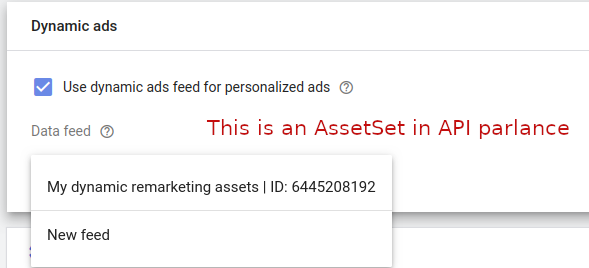
اولین قدم ایجاد یک AssetSet جدید برای نگهداری داراییهایتان است.
جاوا
// Creates an AssetSet which will be used to link the dynamic remarketing assets to a campaign. AssetSet assetSet = AssetSet.newBuilder() .setName("My dynamic remarketing assets " + CodeSampleHelper.getPrintableDateTime()) .setType(AssetSetType.DYNAMIC_EDUCATION) .build(); // Creates an operation to add the link. AssetSetOperation operation = AssetSetOperation.newBuilder().setCreate(assetSet).build(); try (AssetSetServiceClient serviceClient = googleAdsClient.getLatestVersion().createAssetSetServiceClient()) { // Sends the mutate request. MutateAssetSetsResponse response = serviceClient.mutateAssetSets( String.valueOf(params.customerId), ImmutableList.of(operation)); // Prints some information about the response. String resourceName = response.getResults(0).getResourceName(); System.out.printf("Created asset set with resource name %s.%n", resourceName); return resourceName; }
سی شارپ
/// <summary> /// Creates the asset set. /// </summary> /// <param name="client">The Google Ads client.</param> /// <param name="customerId">The Google Ads customer ID.</param> /// <returns>The resource name of the asset set.</returns> private string CreateAssetSet(GoogleAdsClient client, long customerId) { AssetSetServiceClient assetSetService = client.GetService( Services.V25.AssetSetService); // Creates an AssetSet which will be used to link the dynamic remarketing assets // to a campaign. AssetSet assetSet = new AssetSet() { Name = "My dynamic remarketing assets " + ExampleUtilities.GetRandomString(), Type = AssetSetType.DynamicEducation }; // Creates an operation to add the link. AssetSetOperation operation = new AssetSetOperation() { Create = assetSet }; // Sends the mutate request. MutateAssetSetsResponse response = assetSetService.MutateAssetSets( customerId.ToString(), new[] { operation }); // Prints some information about the response. string resourceName = response.Results[0].ResourceName; Console.WriteLine($"Created asset set with resource name {resourceName}."); return resourceName; }
پی اچ پی
// Creates an asset set which will be used to link the dynamic remarketing assets to a // campaign. $assetSet = new AssetSet([ 'name' => 'My dynamic remarketing assets ' . Helper::getPrintableDatetime(), 'type' => AssetSetType::DYNAMIC_EDUCATION ]); // Creates an asset set operation. $assetSetOperation = new AssetSetOperation(); $assetSetOperation->setCreate($assetSet); // Issues a mutate request to add the asset set and prints its information. $assetSetServiceClient = $googleAdsClient->getAssetSetServiceClient(); $response = $assetSetServiceClient->mutateAssetSets( MutateAssetSetsRequest::build($customerId, [$assetSetOperation]) ); $assetSetResourceName = $response->getResults()[0]->getResourceName(); printf( "Created an asset set with resource name: '%s'.%s", $assetSetResourceName, PHP_EOL ); return $assetSetResourceName;
پایتون
def create_asset_set(client: GoogleAdsClient, customer_id: str) -> str: """Creates an AssetSet. The AssetSet will be used to link the dynamic remarketing assets to a campaign. Args: client: an initialized GoogleAdsClient instance. customer_id: a client customer ID. Returns: The resource name for an asset set. """ # Creates an operation to create the asset set. operation: AssetSetOperation = client.get_type("AssetSetOperation") asset_set: AssetSet = operation.create asset_set.name = f"My dynamic remarketing assets {datetime.now()}" asset_set.type_ = client.enums.AssetSetTypeEnum.DYNAMIC_EDUCATION asset_set_service: AssetSetServiceClient = client.get_service( "AssetSetService" ) response: MutateAssetSetsResponse = asset_set_service.mutate_asset_sets( customer_id=customer_id, operations=[operation] ) resource_name: str = response.results[0].resource_name print(f"Created asset set with resource name '{resource_name}'") return resource_name
روبی
def create_asset_set(client, customer_id) # Creates an AssetSet which will be used to link the dynamic remarketing assets to a campaign. # Creates an operation to add the asset set. operation = client.operation.create_resource.asset_set do |asset_set| asset_set.name = "My dynamic remarketing assets #{Time.now}" asset_set.type = :DYNAMIC_EDUCATION end # Sends the mutate request. response = client.service.asset_set.mutate_asset_sets( customer_id: customer_id, operations: [operation], ) resource_name = response.results.first.resource_name puts "Created asset set with resource name '#{resource_name}'" resource_name end
پرل
# Create an AssetSet which will be used to link the dynamic remarketing assets # to a campaign. my $asset_set = Google::Ads::GoogleAds::V25::Resources::AssetSet->new({ name => "My dynamic remarketing assets #" . uniqid(), type => DYNAMIC_EDUCATION }); # Create an operation to add the AssetSet. my $operation = Google::Ads::GoogleAds::V25::Services::AssetSetService::AssetSetOperation-> new({ create => $asset_set }); # Send the mutate request. my $response = $api_client->AssetSetService()->mutate({ customerId => $customer_id, operations => [$operation]}); # Print some information about the response. my $resource_name = $response->{results}[0]{resourceName}; printf "Created asset set with resource name '%s'.\n", $resource_name; return $resource_name;
حلقه زدن
در مرحله بعد، داراییها را با استفاده از AssetSetAsset به AssetSet مرتبط کنید.
جاوا
AssetSetAsset assetSetAsset = AssetSetAsset.newBuilder() .setAsset(assetResourceName) .setAssetSet(assetSetResourceName) .build(); // Creates an operation to add the link. AssetSetAssetOperation operation = AssetSetAssetOperation.newBuilder().setCreate(assetSetAsset).build(); try (AssetSetAssetServiceClient client = googleAdsClient.getLatestVersion().createAssetSetAssetServiceClient()) { // Sends the mutate request. // Note this is the point that the API will enforce uniqueness of the // DynamicEducationAsset.product_id field. You can have any number of assets with the same // product_id, however, only one Asset is allowed per AssetSet with the same product ID. MutateAssetSetAssetsResponse response = client.mutateAssetSetAssets( String.valueOf(params.customerId), ImmutableList.of(operation)); // Prints some information about the response. String resourceName = response.getResults(0).getResourceName(); System.out.printf("Created AssetSetAsset link with resource name %s.%n", resourceName); }
سی شارپ
/// <summary> /// Adds an Asset to an AssetSet by creating an AssetSetAsset link. /// </summary> /// <param name="client">The Google Ads client.</param> /// <param name="customerId">The Google Ads customer ID.</param> /// <param name="assetResourceName">Name of the asset resource.</param> /// <param name="assetSetResourceName">Name of the asset set resource.</param> private void AddAssetsToAssetSet(GoogleAdsClient client, long customerId, string assetResourceName, string assetSetResourceName) { AssetSetAssetServiceClient assetSetAssetService = client.GetService( Services.V25.AssetSetAssetService); AssetSetAsset assetSetAsset = new AssetSetAsset() { Asset = assetResourceName, AssetSet = assetSetResourceName }; // Creates an operation to add the link. AssetSetAssetOperation operation = new AssetSetAssetOperation() { Create = assetSetAsset }; // Sends the mutate request. // Note this is the point that the API will enforce uniqueness of the // DynamicEducationAsset.program_id field. You can have any number of // assets with the same program_id, however, only one Asset is allowed // per AssetSet with the same program ID. MutateAssetSetAssetsResponse response = assetSetAssetService.MutateAssetSetAssets( customerId.ToString(), new[] { operation }); // Prints some information about the response. string resourceName = response.Results[0].ResourceName; Console.WriteLine($"Created AssetSetAsset link with resource name {resourceName}."); }
پی اچ پی
// Creates an asset set asset. $assetSetAsset = new AssetSetAsset([ 'asset' => $assetResourceName, 'asset_set' => $assetSetResourceName ]); // Creates an asset set asset operation. $assetSetAssetOperation = new AssetSetAssetOperation(); $assetSetAssetOperation->setCreate($assetSetAsset); // Issues a mutate request to add the asset set asset and prints its information. // Note this is the point that the API will enforce uniqueness of the // DynamicEducationAsset::program_id field. You can have any number of assets with the same // program_id, however, only one asset is allowed per asset set with the same product ID. $assetSetAssetServiceClient = $googleAdsClient->getAssetSetAssetServiceClient(); $response = $assetSetAssetServiceClient->mutateAssetSetAssets( MutateAssetSetAssetsRequest::build($customerId, [$assetSetAssetOperation]) ); printf( "Created asset set asset link with resource name: '%s'.%s", $response->getResults()[0]->getResourceName(), PHP_EOL );
پایتون
def add_assets_to_asset_set( client: GoogleAdsClient, asset_resource_name: str, asset_set_resource_name: str, customer_id: str, ) -> None: """Adds an Asset to an AssetSet by creating an AssetSetAsset link. Args: client: an initialized GoogleAdsClient instance. asset_set_resource_name; the resource name for an asset set. asset_resource_name; the resource name for an asset. customer_id: a client customer ID. """ # Creates an operation to add the asset set asset. operation: AssetSetAssetOperation = client.get_type( "AssetSetAssetOperation" ) asset_set_asset: AssetSetAsset = operation.create asset_set_asset.asset = asset_resource_name asset_set_asset.asset_set = asset_set_resource_name asset_set_asset_service: AssetSetAssetServiceClient = client.get_service( "AssetSetAssetService" ) # Note this is the point that the API will enforce uniqueness of the # DynamicEducationAsset.program_id field. You can have any number of assets # with the same program ID, however, only one asset is allowed per asset set # with the same program ID. response: MutateAssetSetAssetsResponse = ( asset_set_asset_service.mutate_asset_set_assets( customer_id=customer_id, operations=[operation] ) ) resource_name: str = response.results[0].resource_name print(f"Created asset set asset link with resource name '{resource_name}'")
روبی
def add_assets_to_asset_set(client, asset_resource_name, asset_set_resource_name, customer_id) # Creates an operation to add the asset set asset. operation = client.operation.create_resource.asset_set_asset do |asa| asa.asset = asset_resource_name asa.asset_set = asset_set_resource_name end # Sends the mutate request. # # Note this is the point that the API will enforce uniqueness of the # DynamicEducationAsset.program_id field. You can have any number of assets # with the same program ID, however, only one asset is allowed per asset set # with the same program ID. response = client.service.asset_set_asset.mutate_asset_set_assets( customer_id: customer_id, operations: [operation], ) resource_name = response.results.first.resource_name puts "Created asset set asset link with resource name '#{resource_name}'" end
پرل
my $asset_set_asset = Google::Ads::GoogleAds::V25::Resources::AssetSetAsset->new({ asset => $asset_resource_name, assetSet => $asset_set_resource_name }); # Create an operation to add the link. my $operation = Google::Ads::GoogleAds::V25::Services::AssetSetAssetService::AssetSetAssetOperation ->new({ create => $asset_set_asset }); # Send the mutate request. # Note this is the point that the API will enforce uniqueness of the # DynamicEducationAsset.programId field. You can have any number of assets # with the same programId, however, only one Asset is allowed per AssetSet # with the same program ID. my $response = $api_client->AssetSetAssetService()->mutate({ customerId => $customer_id, operations => [$operation]}); # Print some information about the response. my $resource_name = $response->{results}[0]{resourceName}; printf "Created AssetSetAsset link with resource name '%s'.\n", $resource_name;
حلقه زدن
با استفاده از CampaignAssetSet، مجموعه داراییها (AssetSet) را به کمپین خود پیوند دهید.
حالا که یک AssetSet حاوی محتوای پویای خود دارید، آمادهاید تا آن را به یک کمپین پیوند دهید تا داراییها بتوانند شروع به ارائه خدمات کنند. این کار با ایجاد یک CampaignAssetSet انجام میشود.
جاوا
// Creates a CampaignAssetSet representing the link between an AssetSet and a Campaign. CampaignAssetSet campaignAssetSet = CampaignAssetSet.newBuilder() .setCampaign(ResourceNames.campaign(params.customerId, params.campaignId)) .setAssetSet(assetSetResourceName) .build(); // Creates an operation to add the CampaignAssetSet. CampaignAssetSetOperation operation = CampaignAssetSetOperation.newBuilder().setCreate(campaignAssetSet).build(); // Creates an API connection. try (CampaignAssetSetServiceClient client = googleAdsClient.getLatestVersion().createCampaignAssetSetServiceClient()) { // Issues the mutate request. MutateCampaignAssetSetsResponse response = client.mutateCampaignAssetSets( String.valueOf(params.customerId), ImmutableList.of(operation)); String resourceName = response.getResults(0).getResourceName(); System.out.printf("Created a CampaignAssetSet with resource name %s.%n", resourceName); }
سی شارپ
/// <summary> /// Links an AssetSet to Campaign by creating a CampaignAssetSet. /// </summary> /// <param name="client">The Google Ads client.</param> /// <param name="customerId">The Google Ads customer ID.</param> /// <param name="campaignId">ID of the campaign to which the asset is linked. Specify a /// campaign type which supports dynamic remarketing, such as Display.</param> /// <param name="assetSetResourceName">Name of the asset set resource.</param> private void LinkAssetSetToCampaign(GoogleAdsClient client, long customerId, long campaignId, string assetSetResourceName) { CampaignAssetSetServiceClient campaignAssetSetService = client.GetService( Services.V25.CampaignAssetSetService); // Creates a CampaignAssetSet representing the link between an AssetSet and a Campaign. CampaignAssetSet campaignAssetSet = new CampaignAssetSet() { Campaign = ResourceNames.Campaign(customerId, campaignId), AssetSet = assetSetResourceName }; // Creates an operation to add the CampaignAssetSet. CampaignAssetSetOperation operation = new CampaignAssetSetOperation() { Create = campaignAssetSet }; // Issues the mutate request. MutateCampaignAssetSetsResponse response = campaignAssetSetService.MutateCampaignAssetSets( customerId.ToString(), new[] { operation }); string resourceName = response.Results[0].ResourceName; Console.WriteLine($"Created a CampaignAssetSet with resource name {resourceName}."); }
پی اچ پی
// Creates a campaign asset set representing the link between an asset set and a campaign. $campaignAssetSet = new CampaignAssetSet([ 'asset_set' => $assetSetResourceName, 'campaign' => ResourceNames::forCampaign($customerId, $campaignId) ]); // Creates a campaign asset set operation. $campaignAssetSetOperation = new CampaignAssetSetOperation(); $campaignAssetSetOperation->setCreate($campaignAssetSet); // Issues a mutate request to add the campaign asset set and prints its information. $campaignAssetSetServiceClient = $googleAdsClient->getCampaignAssetSetServiceClient(); $response = $campaignAssetSetServiceClient->mutateCampaignAssetSets( MutateCampaignAssetSetsRequest::build($customerId, [$campaignAssetSetOperation]) ); printf( "Created a campaign asset set with resource name: '%s'.%s", $response->getResults()[0]->getResourceName(), PHP_EOL );
پایتون
def link_asset_set_to_campaign( client: GoogleAdsClient, asset_set_resource_name: str, customer_id: str, campaign_id: str, ) -> None: """Creates a CampaignAssetSet. The CampaignAssetSet represents the link between an AssetSet and a Campaign. Args: client: an initialized GoogleAdsClient instance. asset_set_resource_name; the resource name for an asset set. customer_id: a client customer ID. campaign_id: the ID for a campaign of a type that supports dynamic remarketing, such as Display. """ googleads_service: GoogleAdsServiceClient = client.get_service( "GoogleAdsService" ) # Creates an operation to add the campaign asset set. operation: CampaignAssetSetOperation = client.get_type( "CampaignAssetSetOperation" ) campaign_asset_set: CampaignAssetSet = operation.create campaign_asset_set.campaign = googleads_service.campaign_path( customer_id, campaign_id ) campaign_asset_set.asset_set = asset_set_resource_name campaign_asset_set_service: CampaignAssetSetServiceClient = ( client.get_service("CampaignAssetSetService") ) response: MutateCampaignAssetSetsResponse = ( campaign_asset_set_service.mutate_campaign_asset_sets( customer_id=customer_id, operations=[operation] ) ) resource_name: str = response.results[0].resource_name print(f"Created a campaign asset set with resource name '{resource_name}'")
روبی
def link_asset_set_to_campaign(client, asset_set_resource_name, customer_id, campaign_id) # Creates a CampaignAssetSet representing the link between an AssetSet and a Campaign. # Creates an operation to add the campaign asset set. operation = client.operation.create_resource.campaign_asset_set do |cas| cas.campaign = client.path.campaign(customer_id, campaign_id) cas.asset_set = asset_set_resource_name end # Issues the mutate request. response = client.service.campaign_asset_set.mutate_campaign_asset_sets( customer_id: customer_id, operations: [operation], ) resource_name = response.results.first.resource_name puts "Created a campaign asset set with resource name '#{resource_name}'" end
پرل
# Create a CampaignAssetSet representing the link between an AssetSet and a Campaign. my $campaign_asset_set = Google::Ads::GoogleAds::V25::Resources::CampaignAssetSet->new({ campaign => Google::Ads::GoogleAds::V25::Utils::ResourceNames::campaign( $customer_id, $campaign_id ), assetSet => $asset_set_resource_name }); # Create an operation to add the CampaignAssetSet. my $operation = Google::Ads::GoogleAds::V25::Services::CampaignAssetSetService::CampaignAssetSetOperation ->new({ create => $campaign_asset_set }); # Issue the mutate request. my $response = $api_client->CampaignAssetSetService()->mutate({ customerId => $customer_id, operations => [$operation]}); # Print some information about the response. my $resource_name = $response->{results}[0]{resourceName}; printf "Created a CampaignAssetSet with resource name '%s'.\n", $resource_name;
حلقه زدن
هدف قرار دادن یک لیست کاربری
وقتی کمپین خود را با یک فید بازاریابی مجدد پویا تنظیم کردید، میتوانید آن را با یک UserList هدف قرار دهید. این فهرست کاربری باید با شناسههای پویای موجود در پیکسل ردیابی ایجاد شده باشد.
جاوا
private void attachUserList( GoogleAdsClient googleAdsClient, long customerId, String adGroupResourceName, long userListId) { String userListResourceName = ResourceNames.userList(customerId, userListId); // Creates the ad group criterion that targets the user list. AdGroupCriterion adGroupCriterion = AdGroupCriterion.newBuilder() .setAdGroup(adGroupResourceName) .setUserList(UserListInfo.newBuilder().setUserList(userListResourceName).build()) .build(); // Creates the ad group criterion operation. AdGroupCriterionOperation operation = AdGroupCriterionOperation.newBuilder().setCreate(adGroupCriterion).build(); // Creates the ad group criterion service client. try (AdGroupCriterionServiceClient adGroupCriterionServiceClient = googleAdsClient.getLatestVersion().createAdGroupCriterionServiceClient()) { // Adds the ad group criterion. MutateAdGroupCriteriaResponse response = adGroupCriterionServiceClient.mutateAdGroupCriteria( Long.toString(customerId), ImmutableList.of(operation)); System.out.printf( "Created ad group criterion with resource name '%s'.%n", response.getResults(0).getResourceName()); } }
سی شارپ
private void AttachUserList(GoogleAdsClient client, long customerId, string adGroupResourceName, long userListId) { // Creates the ad group criterion service client. AdGroupCriterionServiceClient adGroupCriterionServiceClient = client.GetService (Services.V25.AdGroupCriterionService); string userListResourceName = ResourceNames.UserList(customerId, userListId); // Creates the ad group criterion that targets the user list. AdGroupCriterion adGroupCriterion = new AdGroupCriterion() { AdGroup = adGroupResourceName, UserList = new UserListInfo() { UserList = userListResourceName } }; // Creates the ad group criterion operation. AdGroupCriterionOperation operation = new AdGroupCriterionOperation() { Create = adGroupCriterion }; // Adds the ad group criterion. MutateAdGroupCriteriaResponse response = adGroupCriterionServiceClient .MutateAdGroupCriteria(customerId.ToString(), new[] { operation }); Console.WriteLine("Created ad group criterion with resource name " + $"'{response.Results.First().ResourceName}'."); }
پی اچ پی
private static function attachUserList( GoogleAdsClient $googleAdsClient, int $customerId, string $adGroupResourceName, int $userListId ) { // Creates the ad group criterion that targets the user list. $adGroupCriterion = new AdGroupCriterion([ 'ad_group' => $adGroupResourceName, 'user_list' => new UserListInfo([ 'user_list' => ResourceNames::forUserList($customerId, $userListId) ]) ]); // Creates an ad group criterion operation. $adGroupCriterionOperation = new AdGroupCriterionOperation(); $adGroupCriterionOperation->setCreate($adGroupCriterion); // Issues a mutate request to add the ad group criterion. $adGroupCriterionServiceClient = $googleAdsClient->getAdGroupCriterionServiceClient(); $response = $adGroupCriterionServiceClient->mutateAdGroupCriteria( MutateAdGroupCriteriaRequest::build($customerId, [$adGroupCriterionOperation]) ); /** @var AdGroupCriterion $addedAdGroupCriterion */ $addedAdGroupCriterion = $response->getResults()[0]; printf( "Created ad group criterion with resource name '%s'.%s", $addedAdGroupCriterion->getResourceName(), PHP_EOL ); }
پایتون
def attach_user_list( client: GoogleAdsClient, customer_id: str, ad_group_resource_name: str, user_list_id: int, ) -> None: """Targets a user list with an ad group. Args: client: An initialized GoogleAds client. customer_id: The Google Ads customer ID. ad_group_resource_name: The resource name of the target ad group. user_list_id: The ID of the user list to target for remarketing. """ # Get the AdGroupCriterionService client. ad_group_criterion_service: AdGroupCriterionServiceClient = ( client.get_service("AdGroupCriterionService") ) # Create an ad group criterion operation and set the ad group criterion # values. ad_group_criterion_operation: AdGroupCriterionOperation = client.get_type( "AdGroupCriterionOperation" ) ad_group_criterion: AdGroupCriterion = ad_group_criterion_operation.create ad_group_criterion.ad_group = ad_group_resource_name ad_group_criterion.user_list.user_list = client.get_service( "UserListService" ).user_list_path(customer_id, str(user_list_id)) # Issue a mutate request to add the ad group criterion. ad_group_criterion_response: MutateAdGroupCriteriaResponse = ( ad_group_criterion_service.mutate_ad_group_criteria( customer_id=customer_id, operations=[ad_group_criterion_operation] ) ) print( "Created ad group criterion with resource name " f"'{ad_group_criterion_response.results[0].resource_name}'." )
روبی
def attach_user_list(client, customer_id, ad_group_resource_name, user_list_id) user_list_resource_name = client.path.user_list(customer_id, user_list_id) # Creates the ad group criterion that targets the user list. ad_group_criterion = client.resource.ad_group_criterion do |agc| agc.ad_group = ad_group_resource_name agc.user_list = client.resource.user_list_info do |ul| ul.user_list = user_list_resource_name end end # Creates the ad group criterion operation. op = client.operation.create_resource.ad_group_criterion(ad_group_criterion) response = client.service.ad_group_criterion.mutate_ad_group_criteria( customer_id: customer_id, operations: [op] ) puts "Created ad group criterion: #{response.results.first.resource_name}" end
پرل
sub attach_user_list { my ($api_client, $customer_id, $ad_group_resource_name, $user_list_id) = @_; # Create the ad group criterion that targets the user list. my $ad_group_criterion = Google::Ads::GoogleAds::V25::Resources::AdGroupCriterion->new({ adGroup => $ad_group_resource_name, userList => Google::Ads::GoogleAds::V25::Common::UserListInfo->new({ userList => Google::Ads::GoogleAds::V25::Utils::ResourceNames::user_list( $customer_id, $user_list_id )})}); # Create an ad group criterion operation. my $ad_group_criterion_operation = Google::Ads::GoogleAds::V25::Services::AdGroupCriterionService::AdGroupCriterionOperation ->new({create => $ad_group_criterion}); # Issue a mutate request to add the ad group criterion. my $ad_group_criteria_response = $api_client->AdGroupCriterionService()->mutate({ customerId => $customer_id, operations => [$ad_group_criterion_operation]}); printf "Created ad group criterion with resource name '%s'.\n", $ad_group_criteria_response->{results}[0]{resourceName}; }
حلقه زدن
گزارشها را برای کمپین بازاریابی مجدد پویای خود دانلود کنید
برای حفظ برابری ویژگیها با تنظیمات قدیمی مبتنی بر فید که هیچ آمار سطح FeedItem نداشت، هیچ گزارشی برای داراییهای موجود در کمپینهای بازاریابی مجدد پویا در دسترس نیست. گزارشدهی برای داراییهای بازاریابی مجدد پویا میتواند در نسخه بعدی اضافه شود.
شناسههای ردیابی دارایی را مشخص کنید
حداقل دو شناسه در هر دارایی ریمارکتینگ پویا وجود دارد. هر نوع دارایی ریمارکتینگ پویا، شناسه منحصر به فرد خود را تعریف میکند.
برای مثال، در مورد DynamicEducationAsset ، باید dynamic_education_asset.program_id و در صورت تمایل dynamic_education_asset.location_id در پیکسل ردیابی مشخص کنید.
asset.id در پیکسل ردیابی مشخص نکنید زیرا این مورد خارج از API تبلیغات گوگل هیچ معنایی ندارد.