

コンバージョンを記録するには、Google 広告コンバージョン アカウントでコンバージョン トラッキングを有効にする必要があります。このガイドでは、コンバージョン トラッキングが有効になっているかどうかを確認する方法、有効になっていない場合に有効にする方法、既存のコンバージョン アクションに関する情報を取得する方法について説明します。
ほとんどのコンバージョン アクションでは、トラッキングを行うために追加の手順が必要になります。さまざまなコンバージョン アクションのタイプとその要件について詳しくは、コンバージョン アクションのカテゴリとコンバージョン アクションを作成するをご覧ください。
同意を提供する準備をする
コンバージョン データまたはユーザーデータをインポートする際は、コンバージョン データを Google と共有する権限があることを確認する必要があります。これは、次のいずれかの方法で行います。
- アカウント単位のデフォルトの同意設定を構成します。Google 広告の管理画面で、[ツール] > [データ マネージャー] > [同意設定] > [デフォルトの同意設定] をクリックします。
- インポートされた各コンバージョンまたはユーザーデータ ペイロード(
ClickConversion.consent、CallConversion.consent、UserData.consentなど)に同意フィールドを設定します。
コンバージョンをトラッキングするようにウェブサイトを設定する
ウェブサイト コンバージョンをトラッキングする場合や、リードの拡張コンバージョンを実装する場合は、まずウェブサイトのタグ設定を行います。リードの拡張コンバージョン用に Google タグを設定するの手順に沿って設定するか、リードの拡張コンバージョン用に Google タグ マネージャーを設定するの手順に沿って Google タグ マネージャーを使用します。
Google 広告コンバージョン アカウントでコンバージョン トラッキングを有効にする
アカウントのコンバージョン トラッキングの設定を確認し、コンバージョン アクションを作成または取得する手順は次のとおりです。
コンバージョン トラッキングを有効にする手順
コンバージョン トラッキングの設定に関する情報を取得する
アカウントのコンバージョン トラッキングの設定を確認し、コンバージョン トラッキングが有効になっていることを確認するには、ConversionTrackingSetting の Customer リソースをクエリします。GoogleAdsService.SearchStream を使用して次のクエリを発行します。
SELECT
  customer.conversion_tracking_setting.google_ads_conversion_customer,
  customer.conversion_tracking_setting.conversion_tracking_status,
  customer.conversion_tracking_setting.conversion_tracking_id,
  customer.conversion_tracking_setting.cross_account_conversion_tracking_id
FROM customer
google_ads_conversion_customer フィールドは、このクライアントのコンバージョンを作成、管理する Google 広告アカウントを示します。クロスアカウント コンバージョン トラッキングを使用しているお客様の場合は、MCC アカウントの ID です。Google 広告のコンバージョンのお客様 ID は、コンバージョンを作成、管理するための Google Ads API リクエストで customer_id として指定する必要があります。このフィールドは、コンバージョン トラッキングが有効になっていない場合でも入力されます。
conversion_tracking_status フィールドは、コンバージョン トラッキングが有効になっているかどうか、アカウントでクロスアカウント コンバージョン トラッキングが使用されているかどうかを示します。
Google 広告のコンバージョン顧客でコンバージョン アクションを作成する
conversion_tracking_status の値が NOT_CONVERSION_TRACKED の場合、アカウントでコンバージョン トラッキングが有効になっていません。次の例のように、Google 広告コンバージョン アカウントで 1 つ以上の ConversionAction を作成して、コンバージョン トラッキングを有効にします。または、有効にするコンバージョン タイプについて、コンバージョン トラッキングの設定に関する Google 広告ヘルプセンターの記事の手順に沿って、UI でコンバージョン アクションを作成することもできます。
Google Ads API を介して送信された場合、拡張コンバージョンは自動的に有効になりますが、Google 広告の管理画面から無効にできます。
サンプルコード
Java
private void runExample(GoogleAdsClient googleAdsClient, long customerId) { // Creates a ConversionAction. ConversionAction conversionAction = ConversionAction.newBuilder() // Note that conversion action names must be unique. If a conversion action already // exists with the specified conversion_action_name the create operation will fail with // a ConversionActionError.DUPLICATE_NAME error. .setName("Earth to Mars Cruises Conversion #" + getPrintableDateTime()) .setCategory(ConversionActionCategory.DEFAULT) .setType(ConversionActionType.WEBPAGE) .setStatus(ConversionActionStatus.ENABLED) .setViewThroughLookbackWindowDays(15L) .setValueSettings( ValueSettings.newBuilder() .setDefaultValue(23.41) .setAlwaysUseDefaultValue(true) .build()) .build(); // Creates the operation. ConversionActionOperation operation = ConversionActionOperation.newBuilder().setCreate(conversionAction).build(); try (ConversionActionServiceClient conversionActionServiceClient = googleAdsClient.getLatestVersion().createConversionActionServiceClient()) { MutateConversionActionsResponse response = conversionActionServiceClient.mutateConversionActions( Long.toString(customerId), Collections.singletonList(operation)); System.out.printf("Added %d conversion actions:%n", response.getResultsCount()); for (MutateConversionActionResult result : response.getResultsList()) { System.out.printf( "New conversion action added with resource name: '%s'%n", result.getResourceName()); } } }
C#
public void Run(GoogleAdsClient client, long customerId) { // Get the ConversionActionService. ConversionActionServiceClient conversionActionService = client.GetService(Services.V26.ConversionActionService); // Note that conversion action names must be unique. // If a conversion action already exists with the specified name the create operation // will fail with a ConversionAction.DUPLICATE_NAME error. string ConversionActionName = "Earth to Mars Cruises Conversion #" + ExampleUtilities.GetRandomString(); // Add a conversion action. ConversionAction conversionAction = new ConversionAction() { Name = ConversionActionName, Category = ConversionActionCategory.Default, Type = ConversionActionType.Webpage, Status = ConversionActionStatus.Enabled, ViewThroughLookbackWindowDays = 15, ValueSettings = new ConversionAction.Types.ValueSettings() { DefaultValue = 23.41, AlwaysUseDefaultValue = true } }; // Create the operation. ConversionActionOperation operation = new ConversionActionOperation() { Create = conversionAction }; try { // Create the conversion action. MutateConversionActionsResponse response = conversionActionService.MutateConversionActions(customerId.ToString(), new ConversionActionOperation[] { operation }); // Display the results. foreach (MutateConversionActionResult newConversionAction in response.Results) { Console.WriteLine($"New conversion action with resource name = " + $"'{newConversionAction.ResourceName}' was added."); } } catch (GoogleAdsException e) { Console.WriteLine("Failure:"); Console.WriteLine($"Message: {e.Message}"); Console.WriteLine($"Failure: {e.Failure}"); Console.WriteLine($"Request ID: {e.RequestId}"); throw; } }
PHP
public static function runExample(GoogleAdsClient $googleAdsClient, int $customerId) { // Creates a conversion action. $conversionAction = new ConversionAction( [ // Note that conversion action names must be unique. // If a conversion action already exists with the specified conversion_action_name // the create operation will fail with a ConversionActionError.DUPLICATE_NAME error. 'name' => 'Earth to Mars Cruises Conversion #' . Helper::getPrintableDatetime(), 'category' => ConversionActionCategory::PBDEFAULT, 'type' => ConversionActionType::WEBPAGE, 'status' => ConversionActionStatus::ENABLED, 'view_through_lookback_window_days' => 15, 'value_settings' => new ValueSettings( [ 'default_value' => 23.41, 'always_use_default_value' => true ] ) ] ); // Creates a conversion action operation. $conversionActionOperation = new ConversionActionOperation(); $conversionActionOperation->setCreate($conversionAction); // Issues a mutate request to add the conversion action. $conversionActionServiceClient = $googleAdsClient->getConversionActionServiceClient(); $response = $conversionActionServiceClient->mutateConversionActions( MutateConversionActionsRequest::build($customerId, [$conversionActionOperation]) ); printf("Added %d conversion actions:%s", $response->getResults()->count(), PHP_EOL); foreach ($response->getResults() as $addedConversionAction) { /** * @var ConversionAction $addedConversionAction */ printf( "New conversion action added with resource name: '%s'%s", $addedConversionAction->getResourceName(), PHP_EOL ); } }
Python
def main(client: GoogleAdsClient, customer_id: str) -> None: conversion_action_service: ConversionActionServiceClient = ( client.get_service("ConversionActionService") ) # Create the operation. conversion_action_operation: ConversionActionOperation = client.get_type( "ConversionActionOperation" ) # Create conversion action. conversion_action: ConversionAction = conversion_action_operation.create # Note that conversion action names must be unique. If a conversion action # already exists with the specified conversion_action_name, the create # operation will fail with a ConversionActionError.DUPLICATE_NAME error. conversion_action.name = f"Earth to Mars Cruises Conversion {uuid.uuid4()}" conversion_action.type_ = ( client.enums.ConversionActionTypeEnum.UPLOAD_CLICKS ) conversion_action.category = ( client.enums.ConversionActionCategoryEnum.DEFAULT ) conversion_action.status = client.enums.ConversionActionStatusEnum.ENABLED conversion_action.view_through_lookback_window_days = 15 # Create a value settings object. value_settings: ConversionAction.ValueSettings = ( conversion_action.value_settings ) value_settings.default_value = 15.0 value_settings.always_use_default_value = True # Add the conversion action. conversion_action_response: MutateConversionActionsResponse = ( conversion_action_service.mutate_conversion_actions( customer_id=customer_id, operations=[conversion_action_operation], ) ) print( "Created conversion action " f'"{conversion_action_response.results[0].resource_name}".' )
Ruby
def add_conversion_action(customer_id) # GoogleAdsClient will read a config file from # ENV['HOME']/google_ads_config.rb when called without parameters client = Google::Ads::GoogleAds::GoogleAdsClient.new # Add a conversion action. conversion_action = client.resource.conversion_action do |ca| ca.name = "Earth to Mars Cruises Conversion #{(Time.new.to_f * 100).to_i}" ca.type = :UPLOAD_CLICKS ca.category = :DEFAULT ca.status = :ENABLED ca.view_through_lookback_window_days = 15 # Create a value settings object. ca.value_settings = client.resource.value_settings do |vs| vs.default_value = 15 vs.always_use_default_value = true end end # Create the operation. conversion_action_operation = client.operation.create_resource.conversion_action(conversion_action) # Add the ad group ad. response = client.service.conversion_action.mutate_conversion_actions( customer_id: customer_id, operations: [conversion_action_operation], ) puts "New conversion action with resource name = #{response.results.first.resource_name}." end
Perl
sub add_conversion_action { my ($api_client, $customer_id) = @_; # Note that conversion action names must be unique. # If a conversion action already exists with the specified conversion_action_name, # the create operation fails with error ConversionActionError.DUPLICATE_NAME. my $conversion_action_name = "Earth to Mars Cruises Conversion #" . uniqid(); # Create a conversion action. my $conversion_action = Google::Ads::GoogleAds::V26::Resources::ConversionAction->new({ name => $conversion_action_name, category => DEFAULT, type => WEBPAGE, status => ENABLED, viewThroughLookbackWindowDays => 15, valueSettings => Google::Ads::GoogleAds::V26::Resources::ValueSettings->new({ defaultValue => 23.41, alwaysUseDefaultValue => "true" })}); # Create a conversion action operation. my $conversion_action_operation = Google::Ads::GoogleAds::V26::Services::ConversionActionService::ConversionActionOperation ->new({create => $conversion_action}); # Add the conversion action. my $conversion_actions_response = $api_client->ConversionActionService()->mutate({ customerId => $customer_id, operations => [$conversion_action_operation]}); printf "New conversion action added with resource name: '%s'.\n", $conversion_actions_response->{results}[0]{resourceName}; return 1; }
curl
type が正しい ConversionActionType 値に設定されていることを確認します。Google Ads API でコンバージョン アクションを作成する方法について詳しくは、コンバージョン アクションを作成するをご覧ください。
既存のコンバージョン アクションを取得する
既存のコンバージョン アクションの詳細は、次のクエリを発行して取得できます。リクエストの顧客 ID が、先ほど特定した Google 広告のコンバージョン顧客に設定されていること、コンバージョン アクション タイプが正しい ConversionActionType 値に設定されていることを確認します。
SELECT
  conversion_action.id,
  conversion_action.resource_name,
  conversion_action.name,
  conversion_action.type,
  conversion_action.category,
  conversion_action.status
FROM conversion_action

WHERE conversion_action.type = 'INSERT_CONVERSION_ACTION_TYPE'
クロスアカウント コンバージョン トラッキング
クロスアカウント コンバージョン トラッキングを使用すると、Google 広告アカウントは、コンバージョンを発生させた広告を配信した可能性のある他のアカウントに代わってコンバージョンをインポートできます。これにより、インポート リクエストを行うアカウントを統合できるため、統合を簡素化できます。
Google Ads API でクロスアカウント コンバージョン トラッキングを有効にする
Google Ads API を使用すると、クライアント アカウントの作成時または更新時に、クロス コンバージョン トラッキングを有効にできます。
Customer リソースで、conversion_tracking_setting.google_ads_conversion_customer フィールドを、クライアント アカウントに代わってコンバージョン アクションを管理する MCC アカウントのリソース名に設定します。
クライアント アカウントのコンバージョン顧客を変更するリクエストは、クライアントの新しいコンバージョン顧客となる MCC アカウントから送信する必要があります。これを行うには、login-customer-id をマネージャー アカウント ID に設定します。
クロスアカウント コンバージョン トラッキングを有効にする場合や、既存のクライアント アカウントのコンバージョン トラッキング マネージャーを切り替える場合は、UI でこの変更を行う場合と同じ注意事項が適用されます。詳細は以下のとおりです。
- クライアント アカウントは、新しいコンバージョン トラッキング マネージャーのデフォルトのコンバージョン値のルールとデフォルトの顧客ライフサイクル目標を採用します。
- 特定のコンバージョン アクションをターゲットにしているキャンペーンは、コンバージョン マネージャー アカウントのデフォルトのコンバージョン目標を使用するように切り替わります。特定のコンバージョン アクションをターゲットに設定し続けると、クライアント アカウントとマネージャー アカウントで目標が異なる場合があるため、動作に一貫性がなくなる可能性があります。キャンペーンが適切な目標に合わせて最適化されていることを確認してください。
- アカウントが複数の MCC アカウントに属している場合、使用できるのは 1 つの MCC アカウントのコンバージョン アクションのみです。コンバージョン トラッキング アカウントが指定されていない場合、アカウントはデフォルトで自身をコンバージョン トラッキング アカウントとして使用します。
複数のアカウントにコンバージョンをインポートする
クロスアカウント トラッキングが有効になっている場合、クライアント アカウントと MCC アカウントは、広告配信中アカウントに代わってコンバージョンをインポートできます。これにより、インポート ロジックを簡素化できます。インポート時にコンバージョンごとに配信アカウントを特定する必要がなくなり、アカウント ツリーから 1 つのアカウントを選択してすべてのコンバージョンをインポートできます。
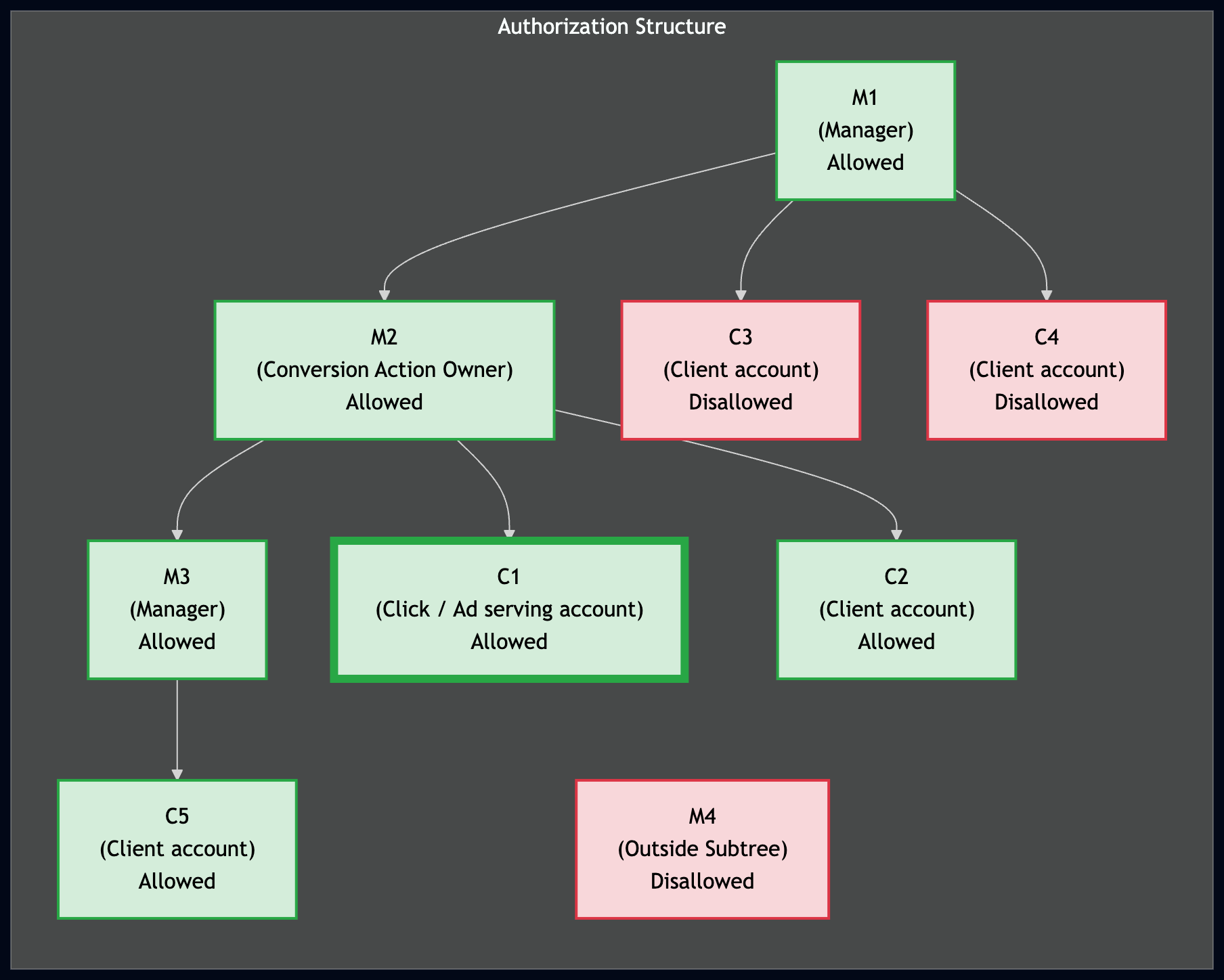
コンバージョンを正常にアップロードするには、アップロードするアカウントにコンバージョン アクションへのアクセス権が必要です。クロスアカウント トラッキングの階層では、アップロード元のアカウントが、アカウント ツリー内のコンバージョン アクションの所有者の親(マネージャー)または子孫である場合、そのアクションにアクセスできます。
次の図は、コンバージョンのインポートの認可構造を示しています。ここで、C1 はコンバージョンを発生させた広告を配信したクライアント アカウント、M2 はコンバージョン アクションの所有者であり、C1 のコンバージョン トラッキングの親です。緑色でハイライト表示されているアカウントは C1 の代わりにコンバージョンをインポートできますが、赤色でハイライト表示されているアカウントはインポートできません。
コンバージョン アクションを作成する
コンバージョンを測定するには、トラッキングするコンバージョン アクションの type に ConversionAction を設定します。たとえば、オンライン購入と電話では、異なるコンバージョン アクションが必要です。
API で新しいコンバージョン アクションを設定する最適な方法は、コンバージョン アクションの追加コード例を使用することです。このサンプルは、バックグラウンド認証タスクをすべて処理し、ConversionAction の作成手順を説明します。
ほとんどのコンバージョン アクションでは、トラッキングのために追加の手順が必要になります。たとえば、ウェブサイトでのコンバージョンをトラッキングするには、ウェブサイトのコンバージョン ページにタグと呼ばれるコード スニペットを追加する必要があります。他のコンバージョン アクション タイプの詳細な要件については、コンバージョンの種類に関する Google 広告ヘルプセンターの記事をご覧ください。
クロスアカウント コンバージョン トラッキングを使用している場合、ConversionActionService は次のコンバージョン アクションを返します。
- クロスアカウント コンバージョン トラッキングのためにアカウントで使用される MCC アカウントによって定義されたすべてのコンバージョン アクション
- システム定義のアクションや、マネージャーが所有するアクションなど、お客様が統計情報を蓄積したすべてのコンバージョン アクション(マネージャーが後でリンクを解除した場合も含む)
- お客様がご自身のアカウントで定義したすべてのアクション
- リンクされた Google アナリティクスのプロパティで作成されたアナリティクス コンバージョン。これには、Google 広告にインポートされていないアナリティクス コンバージョン(ステータスが
HIDDEN)のアクションも含まれます。
サンプルコード
次のコード例は、新しいコンバージョン アクションを作成するプロセスを示しています。具体的には、type を UPLOAD_CLICKS に設定してコンバージョン アクションを作成します。また、category を DEFAULT に設定します。
次のデフォルト設定が適用されます。
Google Ads API では
primary_for_goalフィールドが自動的に設定されますが、このフィールドを明示的に設定して、コンバージョン目標と組み合わせた場合に、コンバージョン アクションがアカウントのレポートと入札にどのように影響するかを制御できます。Google Ads API は、
counting_typeを自動的にMANY_PER_CLICKに設定します。詳しくは、コンバージョンのカウント方法についてをご覧ください。Google Ads API では、
attribution_model_settingsフィールドをAttributionModelのGOOGLE_SEARCH_ATTRIBUTION_DATA_DRIVEN値に設定することで、アトリビューション モデルをデータドリブンに設定します。アトリビューション モデルについて詳しくは、アトリビューション モデルについてをご覧ください。
Java
private void runExample(GoogleAdsClient googleAdsClient, long customerId) { // Creates a ConversionAction. ConversionAction conversionAction = ConversionAction.newBuilder() // Note that conversion action names must be unique. If a conversion action already // exists with the specified conversion_action_name the create operation will fail with // a ConversionActionError.DUPLICATE_NAME error. .setName("Earth to Mars Cruises Conversion #" + getPrintableDateTime()) .setCategory(ConversionActionCategory.DEFAULT) .setType(ConversionActionType.WEBPAGE) .setStatus(ConversionActionStatus.ENABLED) .setViewThroughLookbackWindowDays(15L) .setValueSettings( ValueSettings.newBuilder() .setDefaultValue(23.41) .setAlwaysUseDefaultValue(true) .build()) .build(); // Creates the operation. ConversionActionOperation operation = ConversionActionOperation.newBuilder().setCreate(conversionAction).build(); try (ConversionActionServiceClient conversionActionServiceClient = googleAdsClient.getLatestVersion().createConversionActionServiceClient()) { MutateConversionActionsResponse response = conversionActionServiceClient.mutateConversionActions( Long.toString(customerId), Collections.singletonList(operation)); System.out.printf("Added %d conversion actions:%n", response.getResultsCount()); for (MutateConversionActionResult result : response.getResultsList()) { System.out.printf( "New conversion action added with resource name: '%s'%n", result.getResourceName()); } } }
C#
public void Run(GoogleAdsClient client, long customerId) { // Get the ConversionActionService. ConversionActionServiceClient conversionActionService = client.GetService(Services.V26.ConversionActionService); // Note that conversion action names must be unique. // If a conversion action already exists with the specified name the create operation // will fail with a ConversionAction.DUPLICATE_NAME error. string ConversionActionName = "Earth to Mars Cruises Conversion #" + ExampleUtilities.GetRandomString(); // Add a conversion action. ConversionAction conversionAction = new ConversionAction() { Name = ConversionActionName, Category = ConversionActionCategory.Default, Type = ConversionActionType.Webpage, Status = ConversionActionStatus.Enabled, ViewThroughLookbackWindowDays = 15, ValueSettings = new ConversionAction.Types.ValueSettings() { DefaultValue = 23.41, AlwaysUseDefaultValue = true } }; // Create the operation. ConversionActionOperation operation = new ConversionActionOperation() { Create = conversionAction }; try { // Create the conversion action. MutateConversionActionsResponse response = conversionActionService.MutateConversionActions(customerId.ToString(), new ConversionActionOperation[] { operation }); // Display the results. foreach (MutateConversionActionResult newConversionAction in response.Results) { Console.WriteLine($"New conversion action with resource name = " + $"'{newConversionAction.ResourceName}' was added."); } } catch (GoogleAdsException e) { Console.WriteLine("Failure:"); Console.WriteLine($"Message: {e.Message}"); Console.WriteLine($"Failure: {e.Failure}"); Console.WriteLine($"Request ID: {e.RequestId}"); throw; } }
PHP
public static function runExample(GoogleAdsClient $googleAdsClient, int $customerId) { // Creates a conversion action. $conversionAction = new ConversionAction( [ // Note that conversion action names must be unique. // If a conversion action already exists with the specified conversion_action_name // the create operation will fail with a ConversionActionError.DUPLICATE_NAME error. 'name' => 'Earth to Mars Cruises Conversion #' . Helper::getPrintableDatetime(), 'category' => ConversionActionCategory::PBDEFAULT, 'type' => ConversionActionType::WEBPAGE, 'status' => ConversionActionStatus::ENABLED, 'view_through_lookback_window_days' => 15, 'value_settings' => new ValueSettings( [ 'default_value' => 23.41, 'always_use_default_value' => true ] ) ] ); // Creates a conversion action operation. $conversionActionOperation = new ConversionActionOperation(); $conversionActionOperation->setCreate($conversionAction); // Issues a mutate request to add the conversion action. $conversionActionServiceClient = $googleAdsClient->getConversionActionServiceClient(); $response = $conversionActionServiceClient->mutateConversionActions( MutateConversionActionsRequest::build($customerId, [$conversionActionOperation]) ); printf("Added %d conversion actions:%s", $response->getResults()->count(), PHP_EOL); foreach ($response->getResults() as $addedConversionAction) { /** * @var ConversionAction $addedConversionAction */ printf( "New conversion action added with resource name: '%s'%s", $addedConversionAction->getResourceName(), PHP_EOL ); } }
Python
def main(client: GoogleAdsClient, customer_id: str) -> None: conversion_action_service: ConversionActionServiceClient = ( client.get_service("ConversionActionService") ) # Create the operation. conversion_action_operation: ConversionActionOperation = client.get_type( "ConversionActionOperation" ) # Create conversion action. conversion_action: ConversionAction = conversion_action_operation.create # Note that conversion action names must be unique. If a conversion action # already exists with the specified conversion_action_name, the create # operation will fail with a ConversionActionError.DUPLICATE_NAME error. conversion_action.name = f"Earth to Mars Cruises Conversion {uuid.uuid4()}" conversion_action.type_ = ( client.enums.ConversionActionTypeEnum.UPLOAD_CLICKS ) conversion_action.category = ( client.enums.ConversionActionCategoryEnum.DEFAULT ) conversion_action.status = client.enums.ConversionActionStatusEnum.ENABLED conversion_action.view_through_lookback_window_days = 15 # Create a value settings object. value_settings: ConversionAction.ValueSettings = ( conversion_action.value_settings ) value_settings.default_value = 15.0 value_settings.always_use_default_value = True # Add the conversion action. conversion_action_response: MutateConversionActionsResponse = ( conversion_action_service.mutate_conversion_actions( customer_id=customer_id, operations=[conversion_action_operation], ) ) print( "Created conversion action " f'"{conversion_action_response.results[0].resource_name}".' )
Ruby
def add_conversion_action(customer_id) # GoogleAdsClient will read a config file from # ENV['HOME']/google_ads_config.rb when called without parameters client = Google::Ads::GoogleAds::GoogleAdsClient.new # Add a conversion action. conversion_action = client.resource.conversion_action do |ca| ca.name = "Earth to Mars Cruises Conversion #{(Time.new.to_f * 100).to_i}" ca.type = :UPLOAD_CLICKS ca.category = :DEFAULT ca.status = :ENABLED ca.view_through_lookback_window_days = 15 # Create a value settings object. ca.value_settings = client.resource.value_settings do |vs| vs.default_value = 15 vs.always_use_default_value = true end end # Create the operation. conversion_action_operation = client.operation.create_resource.conversion_action(conversion_action) # Add the ad group ad. response = client.service.conversion_action.mutate_conversion_actions( customer_id: customer_id, operations: [conversion_action_operation], ) puts "New conversion action with resource name = #{response.results.first.resource_name}." end
Perl
sub add_conversion_action { my ($api_client, $customer_id) = @_; # Note that conversion action names must be unique. # If a conversion action already exists with the specified conversion_action_name, # the create operation fails with error ConversionActionError.DUPLICATE_NAME. my $conversion_action_name = "Earth to Mars Cruises Conversion #" . uniqid(); # Create a conversion action. my $conversion_action = Google::Ads::GoogleAds::V26::Resources::ConversionAction->new({ name => $conversion_action_name, category => DEFAULT, type => WEBPAGE, status => ENABLED, viewThroughLookbackWindowDays => 15, valueSettings => Google::Ads::GoogleAds::V26::Resources::ValueSettings->new({ defaultValue => 23.41, alwaysUseDefaultValue => "true" })}); # Create a conversion action operation. my $conversion_action_operation = Google::Ads::GoogleAds::V26::Services::ConversionActionService::ConversionActionOperation ->new({create => $conversion_action}); # Add the conversion action. my $conversion_actions_response = $api_client->ConversionActionService()->mutate({ customerId => $customer_id, operations => [$conversion_action_operation]}); printf "New conversion action added with resource name: '%s'.\n", $conversion_actions_response->{results}[0]{resourceName}; return 1; }
curl
この例は、クライアント ライブラリの Remarketing フォルダと、コード例のコレクション(コンバージョン アクションの追加のコード例)で確認できます。
ConversionActionService.MutateConversionActions フィールド リファレンス
ConversionActionService で MutateConversionActions を使用して、Google 広告のコンバージョン顧客のコンバージョン アクションを作成、更新、削除します。
POST https://googleads.googleapis.com/v26/customers/{customer_id}/conversionActions:mutate
次の表に、MutateConversionActionsRequest の最上位のリクエスト フィールドとオペレーション フィールドを示します。
| フィールド | 要件 | 説明 |
|---|---|---|
customer_id |
必須 | Google 広告コンバージョンのお客様(google_ads_conversion_customer)の 10 桁の ID(string)。ハイフンは含めません。 |
partial_failure |
省略可 | true(bool)の場合、有効なオペレーションが実行され、失敗したオペレーションは partial_failure_error でエラーを返します。デフォルトは false です。 |
validate_only |
省略可 | true(bool)の場合、ミューテーションを実行せずにリクエストを検証します。 |
response_content_type |
省略可 | ResponseContentType。レスポンスで resource_name のみを返すか(RESOURCE_NAME_ONLY、デフォルト)、ミューテーションされた ConversionAction オブジェクトを返すか(MUTABLE_RESOURCE)を制御します。 |
operations[].create |
必須(作成時) | 作成する ConversionAction リソース。resource_name は想定されていません。 |
operations[].update |
必須(更新時) | 更新する ConversionAction リソース(ConversionActionOperation に resource_name と兄弟 update_mask を含める必要があります)。 |
operations[].update_mask |
必須(更新時) | ConversionActionOperation(update の兄弟、ConversionAction 内にネストされていない)の FieldMask(snake_case 内の変更された ConversionAction フィールドパスのカンマ区切りリスト。REST JSON updateMask は snake_case または camelCase を受け入れますが、gRPC とクライアント ライブラリには snake_case が必要です)。 |
operations[].remove |
必須(削除時) | 削除するコンバージョン アクションのリソース名(customers/{customer_id}/conversionActions/{action_id})。 |
operations[].create または operations[].update で ConversionAction を構成する場合は、次のフィールド要件と可変性の制約に注意してください(タイプ固有のルールについては、検証をご覧ください)。
ConversionAction フィールド |
要件と可変性 | 説明 |
|---|---|---|
name |
必須(変更可能) | コンバージョン顧客アカウント内で一意の表示名(string)。 |
type |
create(IMMUTABLE)で必須 |
ConversionActionType(WEBPAGE、UPLOAD_CLICKS、UPLOAD_CALLS、AD_CALL、WEBSITE_CALL など)。 |
category |
省略可(変更可能) | ConversionActionCategory(DEFAULT、PURCHASE、SUBMIT_LEAD_FORM、SIGNUP、PHONE_CALL_LEAD など)。デフォルトは DEFAULT です。 |
status |
省略可(変更可) | ConversionActionStatus(ENABLED、REMOVED、または HIDDEN)。デフォルトは ENABLED です。 |
primary_for_goal |
省略可(変更可能) | bool: 標準の顧客とキャンペーンのコンバージョン目標でアクションを入札可能にするかどうかを制御します(注: CustomConversionGoal リソースではこの設定は無視されます)。デフォルト値は true です。 |
counting_type |
省略可(変更可) | ConversionActionCountingType(MANY_PER_CLICK デフォルト、または ONE_PER_CLICK)。 |
value_settings |
省略可(変更可) | ValueSettings(default_value、default_currency_code、always_use_default_value)。 |
attribution_model_settings |
省略可(変更可能) | AttributionModelSettings(attribution_model: GOOGLE_SEARCH_ATTRIBUTION_DATA_DRIVEN デフォルトまたは GOOGLE_ADS_LAST_CLICK)。 |
click_through_lookback_window_days |
省略可(変更可能) | int64 クリックスルー ルックバック ウィンドウ(日数)(ほとんどのタイプでは 1~90、通話タイプでは 1~60)。 |
view_through_lookback_window_days |
省略可(変更可) | int64 のビュースルー ルックバック ウィンドウ(日数)。ほとんどのタイプで 1~30。コールタイプでは未設定。 |
phone_call_duration_seconds |
呼び出しタイプのみ(変更可能) | int64 最小通話時間(秒単位)(0~10000)。 |
app_id |
アプリタイプのみ(作成後は変更不可) | モバイルアプリの識別子(string)。アプリ コンバージョン アクションの create でのみ設定できます。 |
include_in_conversions_metric |
ミューテーションでは読み取り専用 | 直接変更することはできません。代わりに primary_for_goal を構成してください。 |
tag_snippets[] |
OUTPUT_ONLY |
ウェブサイト トラッキング コード スニペット(TagSnippet)が WEBPAGE 個のコンバージョン アクションに入力されました。 |
REST リクエストとレスポンスの構造
REST で ConversionAction を作成または更新するには、POST リクエストを ConversionActionService.MutateConversionActions に送信します。既存のコンバージョン アクションを更新する場合は、update の兄弟としてオペレーション オブジェクトに updateMask を指定します。
POST https://googleads.googleapis.com/v26/customers/{customer_id}/conversionActions:mutate
{
  "operations": [
    {
      "create": {
        "name": "Earth to Mars Cruise Conversion",
        "type": "UPLOAD_CLICKS",
        "category": "DEFAULT",
        "status": "ENABLED",
        "primaryForGoal": true,
        "countingType": "ONE_PER_CLICK",
        "clickThroughLookbackWindowDays": "60",
        "valueSettings": {
          "defaultValue": 23.41,
          "defaultCurrencyCode": "USD",
          "alwaysUseDefaultValue": true
        }
      }
    },
    {
      "updateMask": "primary_for_goal,value_settings.default_value",
      "update": {
        "resourceName": "customers/{customer_id}/conversionActions/6666666666",
        "primaryForGoal": false,
        "valueSettings": {
          "defaultValue": 45.00
        }
      }
    }
  ]
}
成功すると、results[] に MutateConversionActionResult エントリが返されます。
{
  "results": [
    {
      "resourceName": "customers/{customer_id}/conversionActions/7777777777"
    },
    {
      "resourceName": "customers/{customer_id}/conversionActions/6666666666"
    }
  ]
}
GAQL を使用してコンバージョン アクションの設定とタグスニペットを検査する
コンバージョン トラッキングを有効にする手順に記載されている基本的なクエリに加えて、GoogleAdsService.SearchStream を使用して conversion_action リソースをクエリし、primary_for_goal、アトリビューション モデルのステータス、ルックバック ウィンドウ、値の設定、ウェブサイトの tag_snippets を確認できます。
SELECT
  conversion_action.id,
  conversion_action.resource_name,
  conversion_action.name,
  conversion_action.type,
  conversion_action.category,
  conversion_action.status,
  conversion_action.primary_for_goal,
  conversion_action.counting_type,
  conversion_action.click_through_lookback_window_days,
  conversion_action.view_through_lookback_window_days,
  conversion_action.value_settings.default_value,
  conversion_action.value_settings.default_currency_code,
  conversion_action.value_settings.always_use_default_value,
  conversion_action.attribution_model_settings.attribution_model,
  conversion_action.attribution_model_settings.data_driven_model_status,
  conversion_action.tag_snippets
FROM conversion_action
WHERE conversion_action.status = 'ENABLED'
検証
Google 広告と Google 広告 API はさまざまなコンバージョン アクションをサポートしているため、一部の検証ルールはアクションの type に基づいて異なります。
コンバージョン アクションを作成する際によくあるエラーは、DUPLICATE_NAME です。コンバージョン アクションごとに一意の名前を使用していることを確認してください。
ConversionAction フィールドを設定する際のヒントをいくつかご紹介します。
- すべての列挙型フィールド
- 列挙型フィールドを
UNKNOWNに設定しようとすると、RequestError.INVALID_ENUM_VALUEエラーが発生します。 app_idapp_id属性は不変であり、新しいアプリ コンバージョンを作成するときにのみ設定できます。attribution_model_settings- これを非推奨のオプションに設定すると、
CANNOT_SET_RULE_BASED_ATTRIBUTION_MODELSエラーが発生します。Google 広告はGOOGLE_ADS_LAST_CLICKとGOOGLE_SEARCH_ATTRIBUTION_DATA_DRIVENのみをサポートしています。 click_through_lookback_window_daysこの属性を許可された範囲外の値に設定すると、
RangeError.TOO_LOWエラーまたはRangeError.TOO_HIGHエラーが発生します。この属性は、
AD_CALLまたはWEBSITE_CALLコンバージョン アクションの場合、1 ~ 60 日の範囲で指定する必要があります。他のほとんどのコンバージョン アクションでは、1 ~ 90 日の範囲で指定できます。include_in_conversions_metriccreateオペレーションまたはupdateオペレーションでこの値を設定すると、FieldError.IMMUTABLE_FIELDエラーで失敗します。代わりに、コンバージョン目標ガイドの説明に沿ってprimary_for_goalを設定してください。phone_call_duration_seconds通話以外のコンバージョン アクションでこの属性を設定しようとすると、
FieldError.VALUE_MUST_BE_UNSETエラーが発生します。typetype属性は不変であり、新しいコンバージョンを作成するときにのみ設定できます。typeがUNKNOWNと等しいコンバージョン アクションを更新すると、MutateError.MUTATE_NOT_ALLOWEDエラーが発生します。value_settingsWEBSITE_CALLまたはAD_CALLコンバージョン アクションのvalue_settingsでは、always_use_default_valueをtrueに設定する必要があります。この値の作成または更新時にfalseの値を指定すると、INVALID_VALUEエラーが発生します。view_through_lookback_window_daysこの属性を許容範囲外の値に設定すると、
RangeError.TOO_LOWまたはRangeError.TOO_HIGHエラーが発生します。ほとんどのコンバージョン アクションでは、1 ~ 30 日の範囲で指定できます。この属性は、
AD_CALLまたはWEBSITE_CALLコンバージョン アクションには設定できません。値を指定すると、VALUE_MUST_BE_UNSETエラーが発生します。