

Page Summary
-
This guide explains how to structure requests to create and update Performance Max campaigns using the Google Ads API.
-
Standard Performance Max campaigns require a set of resources including Campaign Budget, Campaign, Asset Groups, Asset Group Assets, and Assets, with specific requirements for campaigns with brand guidelines.
-
Performance Max campaigns for retail have unique asset group creation methods and require Campaign Budget, Campaign with ShoppingSettings, AssetGroup, and AssetGroupListingGroupFilter.
-
A distinction exists between invalid states, where a campaign is not eligible to serve due to configuration, and invalid requests, which are rejected by the API because they would lead to an invalid state.
-
When using bulk mutate requests, operations must be ordered such that referenced resources are created before resources that reference them to avoid errors.
This guide details many of the intricacies of structuring requests that create and update Performance Max campaigns. It can be a useful resource as you design your integration. This guide explains how requests that mutate Performance Max campaigns are processed and can be a companion resource to the Performance Max troubleshooting guide and the Performance Max batch processing guide.
Create Performance Max campaigns
In the Google Ads API, Performance Max campaign entities are represented as a combination of several unique resources.
Standard Performance Max campaigns
Standard Performance Max campaigns require a minimum set of resources in order to serve.
- Campaign budget
- Campaign
- Campaign assets (for campaigns with brand guidelines enabled only)
- Asset groups
- Asset group assets
- Assets
For campaigns with brand guidelines
enabled, the operations to create Campaign and the required CampaignAsset
resources must be included in a single request, and the CampaignAsset
resources must meet the minimum asset requirements and specifications.
It is important to note that the operations to create AssetGroup and
AssetGroupAsset entities must be included together in a single request, and
the AssetGroupAsset resources must combine to meet all
minimum asset requirements and specifications; see how this is
different for retail campaigns.
Requests to create an AssetGroup without all required AssetGroupAsset
entities result in an error; see
Invalid state versus invalid requests
for more context.
There are different options when it comes to structuring requests that create Performance Max campaigns. The decision as to how to group operations and structure requests depends largely on your objectives and infrastructure.
- Create the
CampaignBudget,Campaign,AssetandCampaignAssetresources in separate requests prior to creating theAssetGroupandAssetGroupAssetresources. (For campaigns with brand guidelines enabled, theCampaignand the requiredCampaignAssetresources must be included together in a single request) - Include all of these resources in a single mutate request.
While you can successfully create the CampaignBudget, Campaign, Asset and
CampaignAsset resources in separate prior requests, the Performance Max
campaign won't be eligible to serve until the AssetGroup and AssetGroupAsset
resources are created as well.
Minimum requirements for a valid serving Performance Max campaign
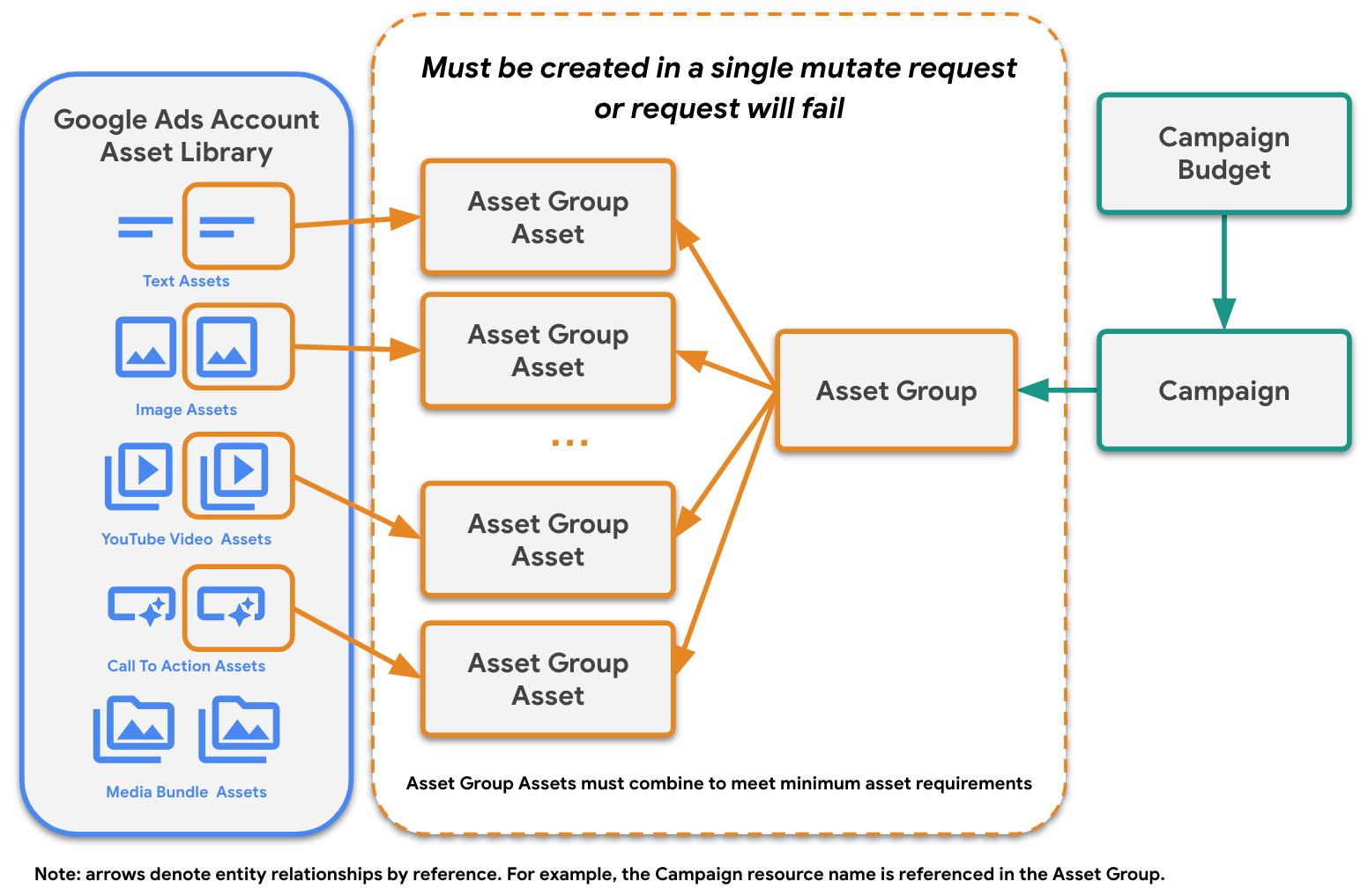
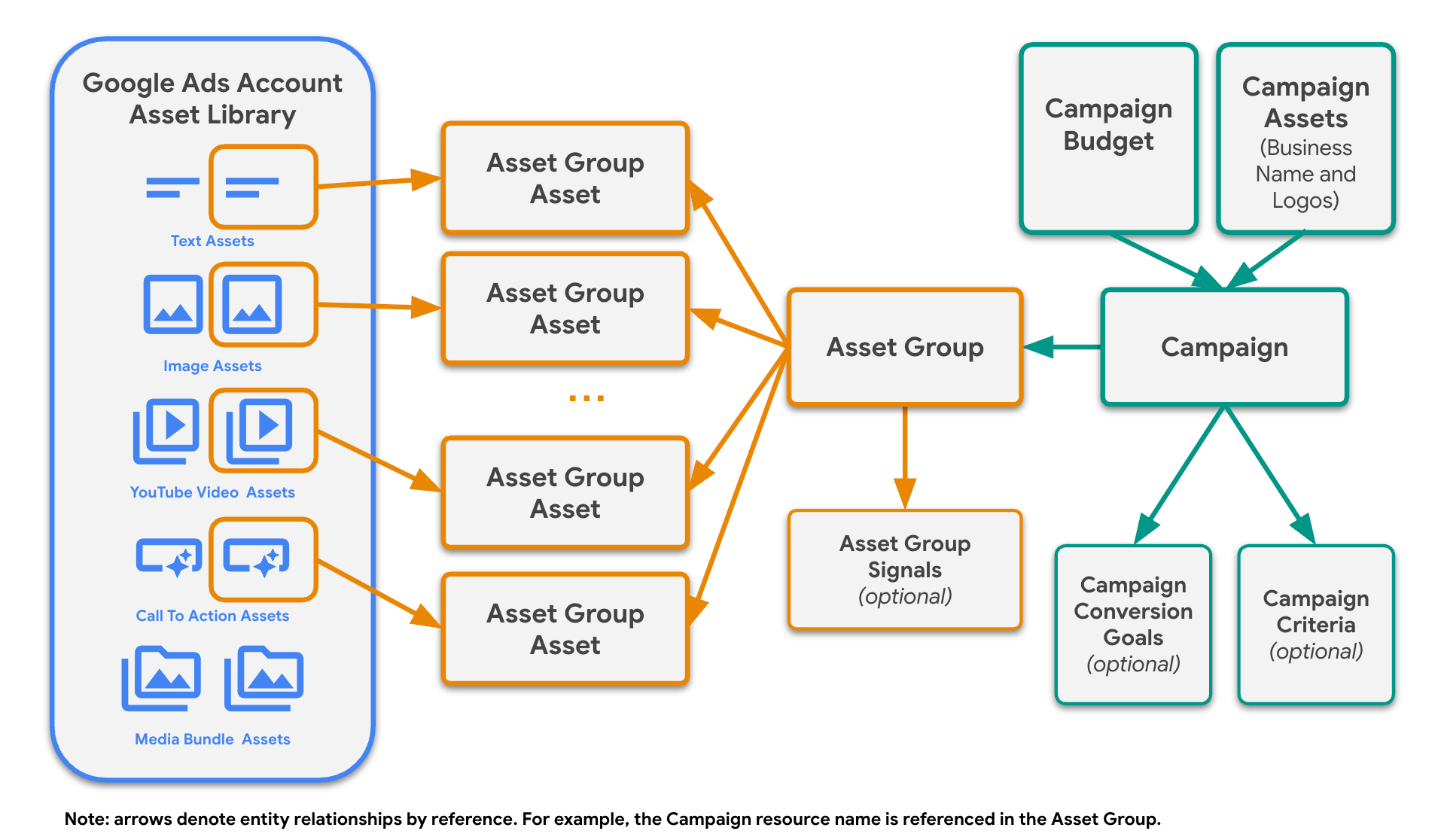
You can further customize your Performance Max campaigns by creating additional resources as shown in the diagram.
You can include operations to create AssetGroupSignal resources in the same
request that creates the AssetGroup and AssetGroupAsset resources.
Alternatively, you can create AssetGroupSignal entities in a separate request
following the creation of the AssetGroup.
Performance Max campaign with additional options
Performance Max campaigns for retail
Retail campaigns are unique in that there are two discrete ways to create asset groups that result in a valid serving campaign:
- Asset groups without custom assets (or with only HTML5
MEDIA_BUNDLEassets) - Asset groups that contain all required assets (preferred)
When you choose to exclude assets from asset groups, Google automatically uses the assets provided in your linked Merchant Center account to create ads. However, we recommend providing assets to reach across all inventory. Performance Max retail campaigns require the following minimum set of resources in order to serve:
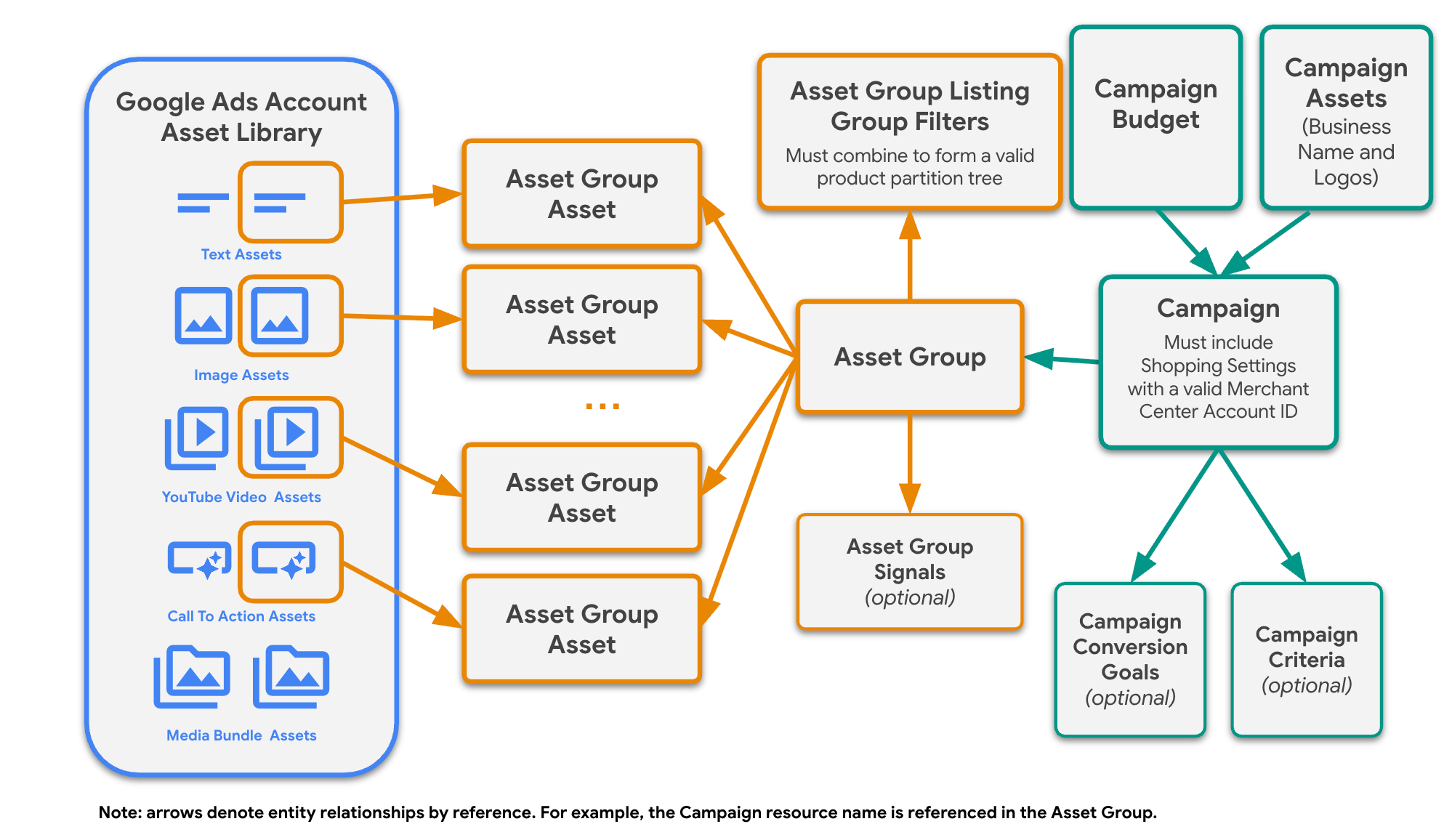
CampaignBudgetCampaign(with populatedShoppingSetting)AssetGroupAssetGroupListingGroupFilter
The Campaign.shopping_setting field must be populated in retail campaigns. In
addition, any final_urls listed in an AssetGroup must match the website
domain associated with the Merchant Center account ID specified in
Campaign.shopping_setting. Finally, each AssetGroup must
have an associated, valid product listing group tree composed of one or more
AssetGroupListingGroupFilter resources. At a minimum, you must create a single
node tree to account for all products in your specified Merchant Center feed.
Each of these resources can be created separately or in a single request. However, the campaign won't be eligible to serve until all of these resources have been created correctly.
Minimum requirements for a valid serving Performance Max retail campaign

Performance Max retail campaigns can use all of the options available to
standard Performance Max campaigns, including creating asset group signals,
campaign conversion goals, and campaign criteria. If you choose to add custom
assets (other than HTML5 MEDIA_BUNDLE assets) to an AssetGroup when creating
the AssetGroup resource, your request must meet all
minimum asset requirements (including campaign-level brand assets
if brand guidelines are enabled). In other words, include either no custom
assets or all required assets.
Performance Max retail campaign with additional options
Invalid state versus invalid requests
When working with Performance Max campaigns in the Google Ads API, there is an important distinction between invalid states and invalid requests.
- Invalid state
- The campaign is not eligible to serve because of how it is configured. For
example, you can create a standalone
Campaignresource with anadvertising_channel_typeofPERFORMANCE_MAX. Although the request to create the campaign succeeds, it is not eligible to serve until you add at least oneAssetGroupto the campaign. If your requests succeed but your campaign or asset groups are not serving, you can useCampaignPrimaryStatus,CampaignPrimaryStatusReason,AssetGroupPrimaryStatus, andAssetGroupPrimaryStatusReasonto determine the reason, as detailed in the troubleshooting guide. - Invalid request
- A request that wouldn't succeed because it would put the campaign or
resource into an invalid state. For example, the Google Ads API throws an error if you
try to create an
AssetGroupfor a non-retail campaign (other than Local Services Performance Max campaigns) without including the minimum required assets. This is why you must include anAssetGroupand itsAssetGroupAssetresources in the same request. This also means that all of yourAssetGroupAssetresources must meet the correct specifications for a givenfield_typeto prevent the entire request from failing.
Group operations with mutate requests
Performance Max campaigns are composed of multiple resources, and you have the
option to create these separate resources in unique requests or in a single
bulk mutate request. However, AssetGroups and
associated AssetGroupAssets in standard Performance Max campaigns must be
created in a single atomic request as already noted.
Your campaign is not eligible to serve until you've successfully created all of the required resources noted throughout this guide. When issuing separate requests, use the actual resource names of referenced resources in subsequent requests. When issuing bulk mutate requests containing multiple operations use resource names formed with the use of temporary IDs.
Order of operations
Regardless of whether you use a bulk mutate request to create a Performance Max campaign, you must order your requests and operations such that you never reference a resource before it is created. In the case of bulk mutate requests, this means ordering the operations in such a way that referenced resources are listed before the resources that reference them.
If you choose to create Asset resources in the same bulk mutate request that
creates an AssetGroup and its AssetGroupAsset resources, all of the
AssetOperations should come before all of the AssetGroupAssetOperations, as
demonstrated in the diagram.
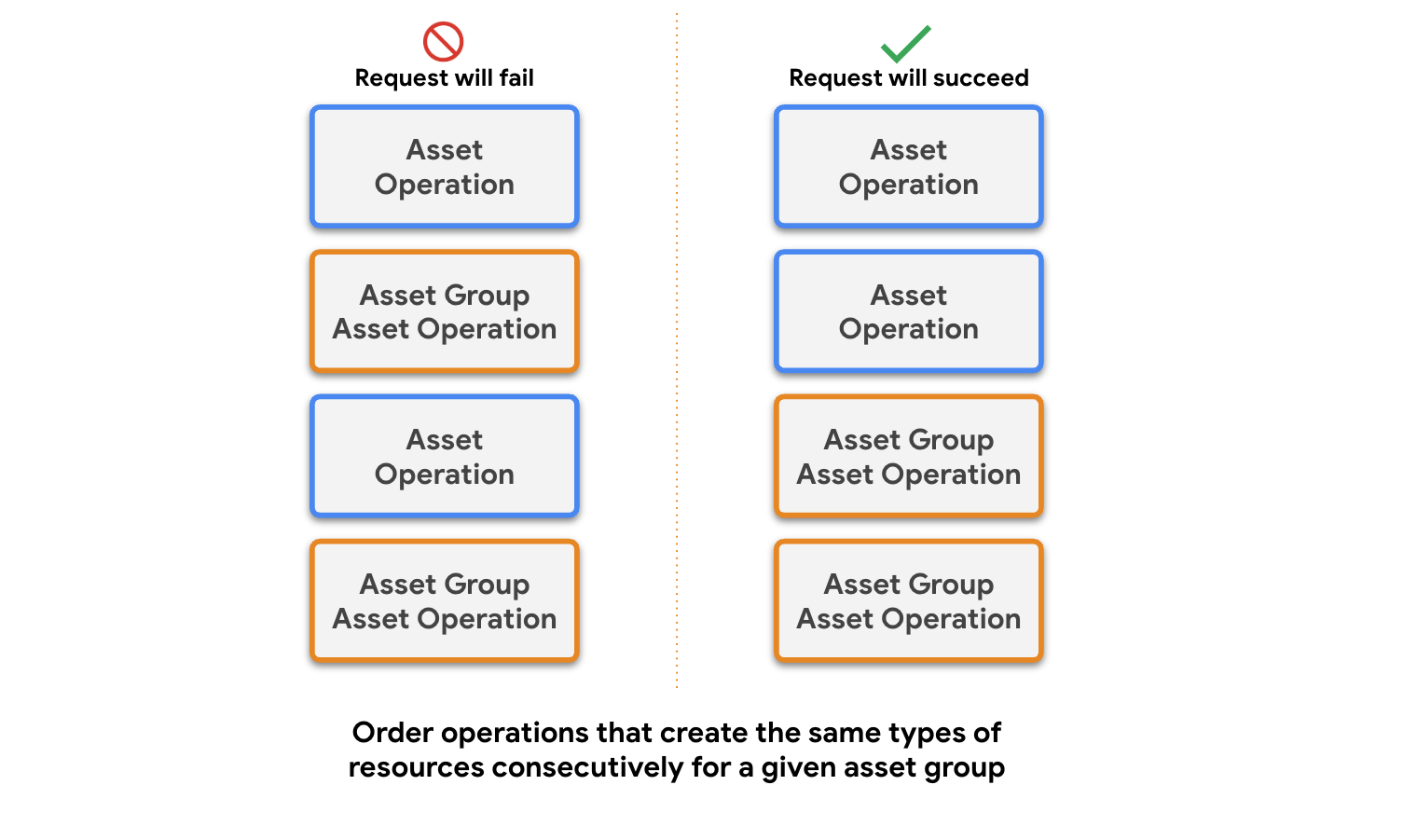
The Google Ads server batches consecutive AssetGroupAssetOperations together
and evaluates whether an AssetGroup meets minimum asset requirements following
the last operation in that group. If you alternate between AssetOperations
and AssetGroupAssetOperations in your request, the API server will evaluate
minimum asset requirements after the first AssetGroupAssetOperation and
return an error without proceeding with the rest of the operations in the
request. As a result, none of the assets in the request would be added to your
Google Ads account. Furthermore, neither the AssetGroup nor any of the associated
AssetGroupAsset resources would be created.
Update asset groups
After you've created a valid AssetGroup, you can't issue subsequent requests
that would leave an asset group below the
minimum asset requirements. Any such request throws an error. For
example, if you create an AssetGroup with a single MARKETING_IMAGE (the
minimum requirement), a request to remove only that MARKETING_IMAGE
AssetGroupAsset returns an error. In Performance Max retail campaigns,
however, you can return an AssetGroup to relying on Google Merchant Center
auto-generated assets by removing all custom AssetGroupAsset links in a single
request.
For asset groups in Performance Max retail campaigns created without any
associated custom assets, subsequent requests to link custom assets (other than
HTML5 MEDIA_BUNDLE assets) must ensure at least one final_urls is set on the
AssetGroup (populating it first if originally omitted) and must provide all
minimum required assets (including campaign-level brand assets if
brand guidelines are enabled) in a single atomic request. Don't link optional
assets such as YOUTUBE_VIDEO alone or add assets incrementally across separate
requests. Linking only optional custom assets leaves the asset group in an
unsupported state that blocks edits in the Google Ads UI. For details, see
Link asset groups to assets in Performance Max retail campaigns.