

คู่มือเริ่มใช้งานฉบับย่อนี้จะช่วยคุณทำการเรียก API ครั้งแรกไปยัง Google Ads API
แนวคิดสำคัญ
- โปรเจ็กต์ Google Cloud: โปรเจ็กต์ Google Cloud เป็นพื้นฐานสำหรับการสร้าง เปิดใช้ และใช้บริการทั้งหมดของ Google รวมถึงการจัดการ API และข้อมูลเข้าสู่ระบบ OAuth 2.0 API คุณสร้างโปรเจ็กต์ได้จากคอนโซล Google Cloud
- ระดับการเข้าถึง API: ระดับการเข้าถึง API ของโปรเจ็กต์ที่อยู่ในระบบคลาวด์ Google Cloud จะควบคุมจำนวนการเรียก API ที่คุณทำได้ต่อวันและสภาพแวดล้อมที่คุณทำการเรียก API ได้ ระดับการเข้าถึง API ของโปรเจ็กต์จะแสดงอยู่ในหน้าภาพรวม Google Ads API ของโปรเจ็กต์
- บัญชีดูแลจัดการ Google Ads: บัญชีดูแลจัดการ Google Ads ใช้เพื่อจัดการบัญชี Google Ads อื่นๆ ซึ่งอาจเป็นกลุ่มบัญชีลูกค้า Google Ads หรือบัญชีดูแลจัดการ Google Ads อื่นๆ
- บัญชีลูกค้า Google Ads: บัญชี Google Ads ที่ใช้แสดงโฆษณาที่คุณต้องการกำหนดเป้าหมายด้วยการเรียก API
- รหัสลูกค้าของผู้ใช้บริการของลูกค้า: หมายเลข 10 หลักที่ระบุบัญชีลูกค้า Google Ads หากคุณคัดลอกรหัสนี้จาก UI ของ Google Ads โปรดนำขีดกลางออก
- OAuth 2.0: OAuth 2.0 เป็นโปรโตคอลมาตรฐานอุตสาหกรรมสำหรับการให้สิทธิ์ ซึ่ง Google APIs ทั้งหมดใช้ คุณต้องมีบัญชีบริการและคีย์เพื่อสร้างข้อมูลเข้าสู่ระบบ OAuth 2.0 เพื่อทำการเรียก API
- บัญชีบริการ: บัญชี Google ประเภทพิเศษที่เป็นของแอปพลิเคชันของคุณ ไม่ใช่ของผู้ใช้แต่ละราย ซึ่งใช้เพื่อตรวจสอบสิทธิ์แอปพลิเคชันของคุณใน Google Ads API คุณต้องมีโปรเจ็กต์ Google Cloud เพื่อรับบัญชีบริการ
- คีย์บัญชีบริการ: ไฟล์ข้อมูลเข้าสู่ระบบของแอป JSON ที่มีคีย์ส่วนตัวสำหรับบัญชีบริการ ซึ่งใช้เพื่อสร้างข้อมูลเข้าสู่ระบบ OAuth 2.0 เพื่อตรวจสอบสิทธิ์บัญชีบริการเมื่อทำการเรียก Google Ads API คุณต้องมีบัญชีบริการเพื่อรับคีย์บัญชีบริการ
ข้อกำหนดเบื้องต้น
หากต้องการเรียกใช้ Google Ads API คุณควรทำตามขั้นตอนต่อไปนี้
กำหนดค่าโปรเจ็กต์ที่อยู่ในระบบคลาวด์สำหรับการเข้าถึง Google Ads API
โปรเจ็กต์ Google Cloud ใช้สำหรับจัดการ Google APIs และข้อมูลเข้าสู่ระบบ OAuth 2.0 API คุณสามารถค้นหาโปรเจ็กต์ Google Cloud ที่มีอยู่หรือสร้างโปรเจ็กต์ใหม่ได้โดยไปที่คอนโซล Google Cloud
เริ่มต้นด้วยการเปิดใช้ Google Ads API ในโปรเจ็กต์โดยทำดังนี้
จากนั้นไปที่หน้าภาพรวม Google Ads API หน้านี้จะแสดงระดับการเข้าถึง API ปัจจุบันของคุณ หากระดับการเข้าถึง API ปัจจุบันของคุณคือทดสอบ ให้ขยายส่วนอัปเกรดระดับการเข้าถึง ทำตามวิธีการเพื่อสมัครรับสิทธิ์เข้าถึงระดับ Explorer
เมื่อคุณสมัครเสร็จแล้ว Google จะตรวจสอบการสมัครโดยอัตโนมัติและอัปเกรดเป็น Explorer ในกรณีส่วนใหญ่ หากคุณไม่ได้รับสิทธิ์เข้าถึง Explorer ก็ไม่ต้องกังวล คู่มือนี้จะให้คำแนะนำที่เหมาะสมเมื่อกำหนดค่าบัญชีลูกค้า Google Ads
สร้างบัญชีบริการ
คุณต้องมีบัญชีบริการและคีย์บัญชีบริการเพื่อเรียก API หากคุณใช้ Google API อื่นอยู่แล้วและได้สร้างบัญชีบริการและคีย์ OAuth 2.0 ไว้แล้ว คุณสามารถข้ามขั้นตอนนี้และใช้ข้อมูลเข้าสู่ระบบที่มีอยู่ซ้ำได้
วิธีสร้างบัญชีบริการและคีย์
- ในคอนโซล Google Cloud ให้ไปที่เมนู > IAM และผู้ดูแลระบบ > บัญชีบริการ
- เลือกบัญชีบริการ
- คลิกคีย์ > เพิ่มคีย์ > สร้างคีย์ใหม่
- เลือก JSON แล้วคลิกสร้าง
ระบบจะสร้างคู่คีย์สาธารณะ/ส่วนตัวใหม่และดาวน์โหลดลงในเครื่องเป็นไฟล์ใหม่ บันทึกไฟล์ JSON ที่ดาวน์โหลดเป็น
credentials.jsonในไดเรกทอรีที่ใช้งานอยู่ ไฟล์นี้เป็นสำเนาเดียวของคีย์นี้ อย่าคอมมิตcredentials.jsonไปยังการควบคุมเวอร์ชัน (เช่น เพิ่มลงในไฟล์.gitignore) - คลิกปิด
กำหนดค่าบัญชีลูกค้า Google Ads
เริ่มต้นด้วยการระบุบัญชี Google Ads ที่คุณจะเรียก API ประเภทบัญชีที่คุณเรียก API ได้จะขึ้นอยู่กับระดับการเข้าถึง API ของโปรเจ็กต์ Google Cloud ตรวจสอบหน้าภาพรวม Google Ads API เพื่อดูระดับการเข้าถึง API
ระดับการเข้าถึงแบบ Explorer, พื้นฐาน และมาตรฐาน
คุณสามารถเรียกใช้บัญชีเวอร์ชันที่ใช้งานจริงของ Google Ads ได้ อย่างไรก็ตาม คุณสามารถสร้างบัญชีทดสอบ Google Ads ได้โดยทำตามวิธีการในแท็บสิทธิ์เข้าถึงเพื่อทดสอบ หากจำเป็น
ทดสอบการเข้าถึง
คุณไม่สามารถใช้โปรเจ็กต์ Google Cloud เพื่อเรียก API ไปยังบัญชีเวอร์ชันที่ใช้งานจริงของ Google Ads คุณจะเรียก API ได้กับบัญชีทดสอบ Google Ads เท่านั้น
วิธีสร้างบัญชีทดสอบ Google Ads
วิธีการต่อไปนี้จะสร้างบัญชีดูแลจัดการทดสอบ Google Ads และบัญชีผู้ลงโฆษณาทดสอบ Google Ads ภายใต้บัญชีดูแลจัดการดังกล่าว
คลิกปุ่มสีน้ำเงินเพื่อสร้างบัญชีดูแลจัดการ Google Ads ทดสอบ หากได้รับข้อความแจ้ง ให้ลงชื่อเข้าใช้ด้วยบัญชี Google ที่ไม่ได้ลิงก์กับบัญชีดูแลจัดการเวอร์ชันที่ใช้งานจริงของ Google Ads หากยังไม่มี ให้ใช้ปุ่มสร้างบัญชีในหน้านั้นเพื่อสร้างบัญชี Google ใหม่
- ขณะอยู่ในบัญชีดูแลจัดการทดสอบของ Google Ads ให้สร้างบัญชีลูกค้าทดสอบของ Google Ads โดยคลิกบัญชี > > สร้างบัญชีใหม่ แล้วกรอกแบบฟอร์ม บัญชี Google Ads ที่คุณสร้างจากบัญชีดูแลจัดการทดสอบ Google Ads จะเป็นบัญชีทดสอบ Google Ads โดยอัตโนมัติ
- (ไม่บังคับ) สร้างแคมเปญ 2-3 รายการในบัญชีลูกค้าทดสอบ Google Ads จากหน้า Google Ads
หากต้องการเรียก API ไปยังลูกค้า Google Ads คุณต้องให้สิทธิ์เข้าถึงและสิทธิ์ที่เหมาะสมแก่บัญชีบริการในบัญชีลูกค้า Google Ads โดยคุณต้องมีสิทธิ์เข้าถึงระดับผู้ดูแลระบบในบัญชีลูกค้าจึงจะดำเนินการนี้ได้
วิธีให้สิทธิ์เข้าถึงบัญชี Google Ads แก่บัญชีบริการ
- เริ่มต้นด้วยการลงชื่อเข้าใช้บัญชี Google Ads ในฐานะผู้ดูแลระบบ
- ไปที่ผู้ดูแลระบบ > การเข้าถึงและความปลอดภัย
- คลิกปุ่ม ใต้แท็บผู้ใช้
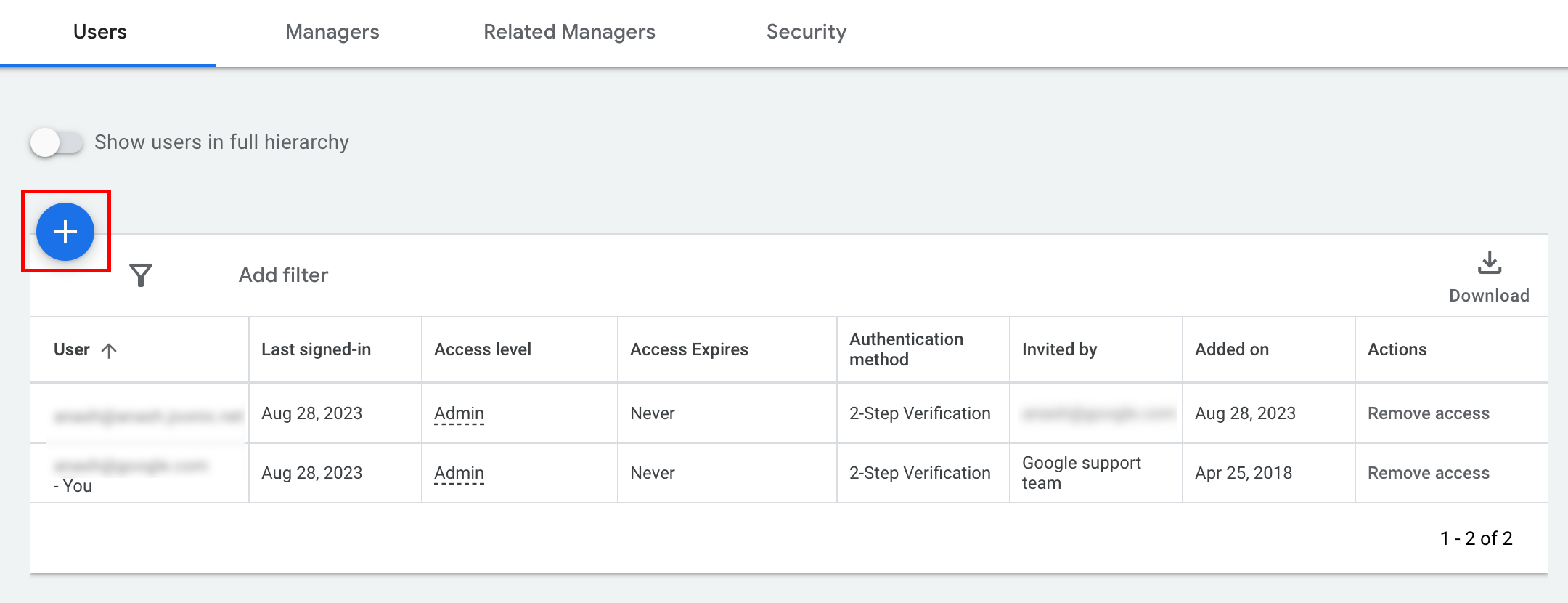
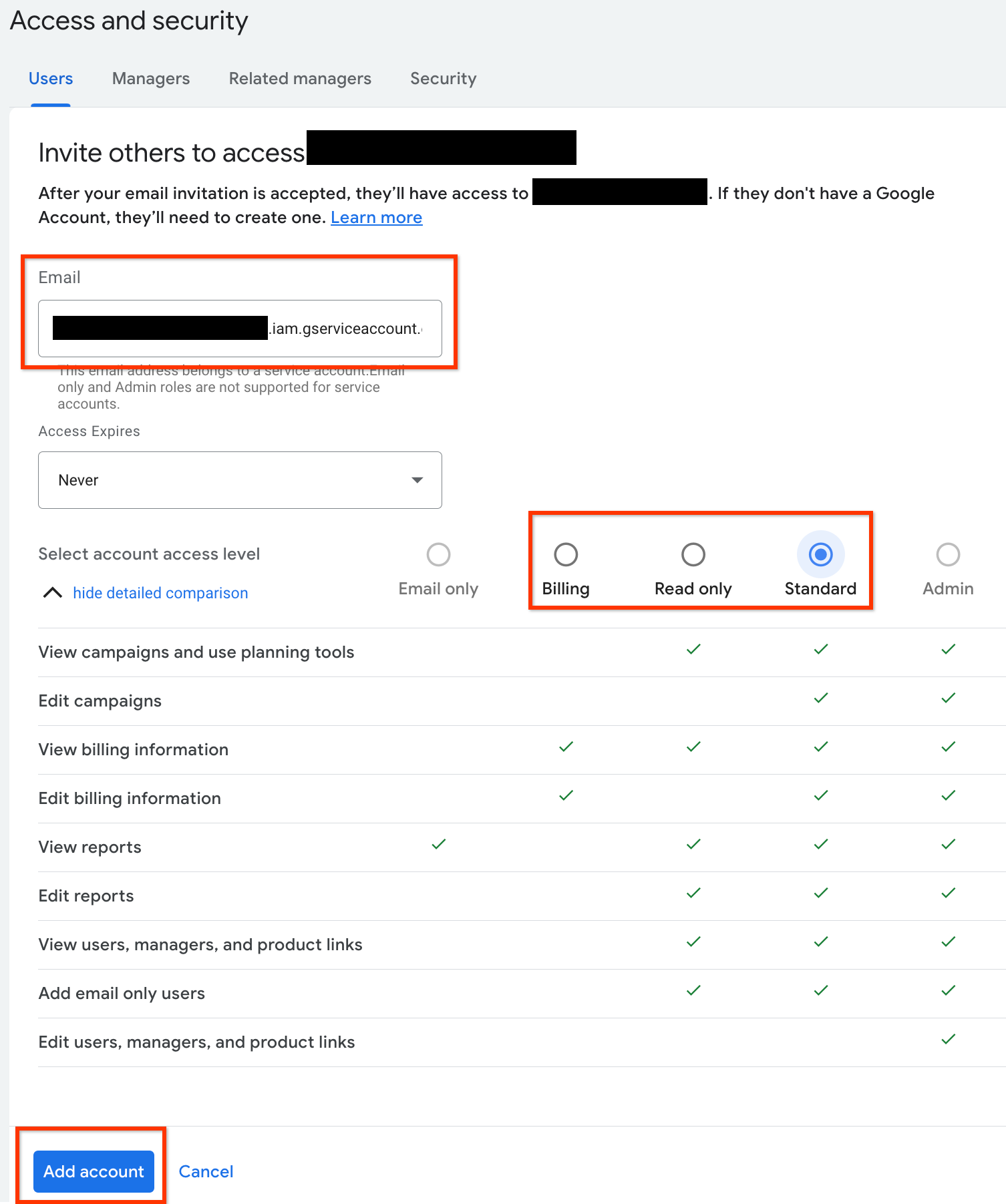
- พิมพ์อีเมลของบัญชีบริการลงในช่องป้อนข้อมูลอีเมล
เลือกระดับการเข้าถึงบัญชีที่เหมาะสม แล้วคลิกปุ่มเพิ่มบัญชี โปรดทราบว่าระบบไม่รองรับระดับการเข้าถึงอีเมลสำหรับบัญชีบริการ
- บัญชีบริการได้รับสิทธิ์เข้าถึง
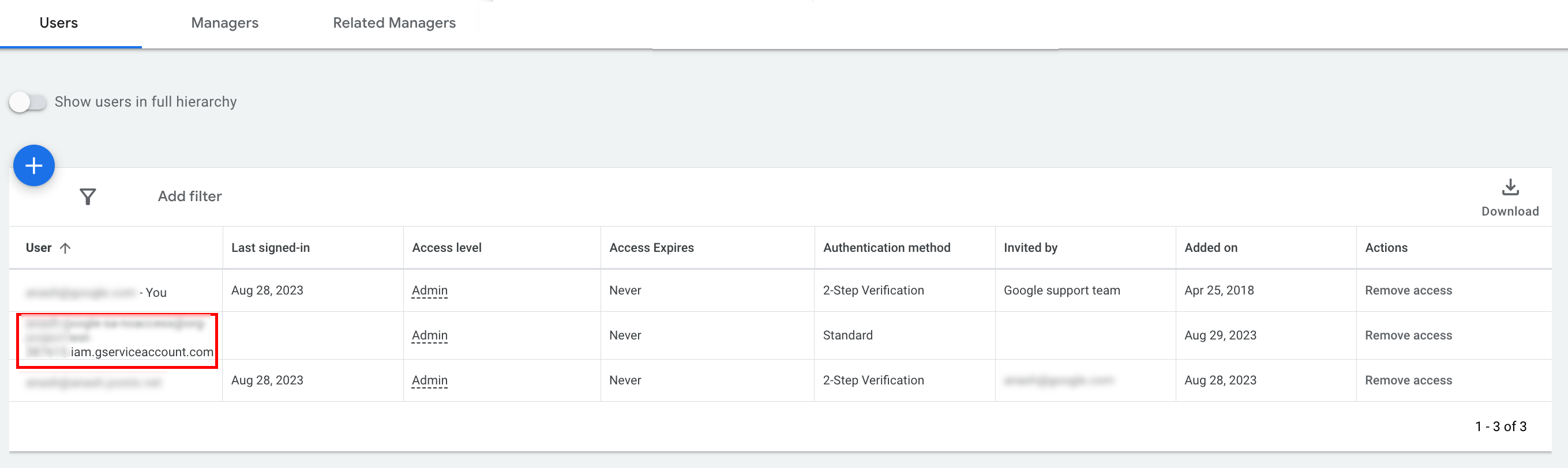
- [ไม่บังคับ] คุณไม่สามารถให้สิทธิ์เข้าถึงระดับผู้ดูแลระบบแก่บัญชีบริการในระหว่างการตั้งค่าเริ่มต้น หากการเรียก API ต้องใช้สิทธิ์เข้าถึงระดับผู้ดูแลระบบ คุณสามารถอัปเกรดสิทธิ์เข้าถึงได้ดังนี้
- คลิกลูกศรแบบเลื่อนลงข้างระดับการเข้าถึงของบัญชีบริการในคอลัมน์ระดับการเข้าถึง
- เลือกผู้ดูแลระบบจากรายการแบบเลื่อนลง
ดาวน์โหลดเครื่องมือและไลบรารีของไคลเอ็นต์
คุณเลือกได้ว่าจะดาวน์โหลดไลบรารีของไคลเอ็นต์หรือไคลเอ็นต์ HTTP โดยขึ้นอยู่กับวิธีที่คุณต้องการเรียก API
ใช้ไลบรารีของไคลเอ็นต์
ดาวน์โหลดและติดตั้งไลบรารีของไคลเอ็นต์ที่ต้องการ
ใช้ไคลเอ็นต์ HTTP (REST)
curl
ดาวน์โหลดและติดตั้ง curl ซึ่งเป็นเครื่องมือบรรทัดคำสั่งสำหรับโอนข้อมูลผ่าน URL
อินเทอร์เฟซบรรทัดคำสั่งของ Google Cloud
ทำตามคู่มือการติดตั้ง Google Cloud CLI เพื่อติดตั้ง gcloud CLI
วิธีการในส่วนที่เหลือของคู่มือนี้ได้รับการยืนยันแล้วว่าใช้ได้กับเครื่องมือ gcloud เวอร์ชันต่อไปนี้ และอาจใช้ไม่ได้กับเวอร์ชันก่อนหน้าเนื่องจากลักษณะการทำงานของแอปพลิเคชันหรือตัวเลือกบรรทัดคำสั่งที่แตกต่างกัน
:~$ gcloud version
Google Cloud SDK 492.0.0
alpha 2024.09.06
beta 2024.09.06
bq 2.1.8
bundled-python3-unix 3.11.9
core 2024.09.06
enterprise-certificate-proxy 0.3.2
gcloud-crc32c 1.0.0
gsutil 5.30
ทำการเรียก API
เลือกไคลเอ็นต์ที่ต้องการเพื่อดูวิธีการเรียก API
Java
อาร์ติแฟกต์ไลบรารีของไคลเอ็นต์จะเผยแพร่ไปยังที่เก็บ Maven Central
หากต้องการจัดการเวอร์ชันทรัพยากร Dependency และป้องกันความขัดแย้ง โปรดดูคู่มือ Bill of Materials (BOM) ของ Google Ads API
หากไม่ได้ใช้ BOM ให้เพิ่มไลบรารีของไคลเอ็นต์ลงในโปรเจ็กต์โดยตรงโดยใช้เครื่องมือสร้างอย่างใดอย่างหนึ่งต่อไปนี้
Maven: เพิ่มทรัพยากร Dependency ต่อไปนี้ลงในไฟล์ pom.xml
<dependency>
  <groupId>com.google.api-ads</groupId>
  <artifactId>google-ads</artifactId>
  <version>48.1.0</version>
</dependency>
Gradle: เพิ่มทรัพยากร Dependency ต่อไปนี้ลงในไฟล์ build.gradle
implementation 'com.google.api-ads:google-ads:48.1.0'
สร้างไฟล์ ads.properties ในไดเรกทอรีหลัก (~/ads.properties ใน Linux และ macOS หรือ %USERPROFILE%\ads.properties ใน Windows) โดยมีเนื้อหาต่อไปนี้
api.googleads.serviceAccountSecretsPath=JSON_KEY_FILE_PATH
api.googleads.loginCustomerId=INSERT_LOGIN_CUSTOMER_ID_HERE
ก่อนส่งคำขอ API ให้สร้างอินสแตนซ์ GoogleAdsClient โดยค่าเริ่มต้น fromPropertiesFile() จะโหลดข้อมูลเข้าสู่ระบบจากไฟล์ ads.properties ที่อยู่ในไดเรกทอรีหลักของคุณ
GoogleAdsClient googleAdsClient;
try {
  googleAdsClient = GoogleAdsClient.newBuilder().fromPropertiesFile().build();
} catch (IOException e) {
  System.err.printf("Failed to create GoogleAdsClient: %s%n", e);
  throw new RuntimeException("Initialization failed", e);
}
ถัดไป ให้เรียกใช้รายงานแคมเปญโดยใช้ GoogleAdsService.SearchStream เพื่อสตรีมชุดผลลัพธ์ขนาดใหญ่อย่างมีประสิทธิภาพและดึงข้อมูลแคมเปญในบัญชี
private void runExample(GoogleAdsClient googleAdsClient, long customerId) {
try (GoogleAdsServiceClient googleAdsServiceClient =
googleAdsClient.getLatestVersion().createGoogleAdsServiceClient()) {
String query = "SELECT campaign.id, campaign.name FROM campaign ORDER BY campaign.id";
// Constructs the SearchGoogleAdsStreamRequest.
SearchGoogleAdsStreamRequest request =
SearchGoogleAdsStreamRequest.newBuilder()
.setCustomerId(Long.toString(customerId))
.setQuery(query)
.build();
// Creates and issues a search Google Ads stream request that will retrieve all campaigns.
ServerStream<SearchGoogleAdsStreamResponse> stream =
googleAdsServiceClient.searchStreamCallable().call(request);
// Iterates through and prints all of the results in the stream response.
for (SearchGoogleAdsStreamResponse response : stream) {
for (GoogleAdsRow googleAdsRow : response.getResultsList()) {
System.out.printf(
"Campaign with ID %d and name '%s' was found.%n",
googleAdsRow.getCampaign().getId(), googleAdsRow.getCampaign().getName());
}
}
}
}
C#
แพ็กเกจไลบรารีของไคลเอ็นต์จะเผยแพร่ไปยังที่เก็บ NuGet.org
เริ่มต้นด้วยการเพิ่มการอ้างอิงแพ็กเกจ NuGet ไปยังแพ็กเกจ Google.Ads.GoogleAds
dotnet add package Google.Ads.GoogleAds --version 27.6.0หากต้องการเรียก API ให้สร้างออบเจ็กต์ GoogleAdsConfig จากการตั้งค่าการกำหนดค่า (เช่น appsettings.json, ตัวแปรสภาพแวดล้อม หรือการตั้งค่าที่กำหนดเอง) แล้วส่งออบเจ็กต์ดังกล่าวเพื่อเริ่มต้นอินสแตนซ์ GoogleAdsClient ดังนี้
GoogleAdsConfig config = new GoogleAdsConfig()
{
    OAuth2Mode = OAuth2Flow.SERVICE_ACCOUNT,
    OAuth2SecretsJsonPath = "JSON_KEY_FILE_PATH",
    LoginCustomerId = "INSERT_LOGIN_CUSTOMER_ID_HERE"
};
GoogleAdsClient client = new GoogleAdsClient(config);
ถัดไป ให้เรียกใช้รายงานแคมเปญโดยใช้เมธอด GoogleAdsService.SearchStream เพื่อดึงข้อมูลแคมเปญในบัญชี คู่มือนี้ไม่ครอบคลุมรายละเอียดของการรายงาน
public void Run(GoogleAdsClient client, long customerId)
{
// Get the GoogleAdsService.
GoogleAdsServiceClient googleAdsService = client.GetService(
Services.V26.GoogleAdsService);
// Create a query that will retrieve all campaigns.
string query = @"SELECT
campaign.id,
campaign.name,
campaign.network_settings.target_content_network
FROM campaign
ORDER BY campaign.id";
try
{
// Issue a search request.
googleAdsService.SearchStream(customerId.ToString(), query,
delegate (SearchGoogleAdsStreamResponse resp)
{
foreach (GoogleAdsRow googleAdsRow in resp.Results)
{
Console.WriteLine("Campaign with ID {0} and name '{1}' was found.",
googleAdsRow.Campaign.Id, googleAdsRow.Campaign.Name);
}
}
);
}
catch (GoogleAdsException e)
{
Console.WriteLine("Failure:");
Console.WriteLine($"Message: {e.Message}");
Console.WriteLine($"Failure: {e.Failure}");
Console.WriteLine($"Request ID: {e.RequestId}");
throw;
}
}
PHP
แพ็กเกจไลบรารีของไคลเอ็นต์จะเผยแพร่ไปยังที่เก็บ Packagist
ตรวจสอบว่าคุณได้ติดตั้ง PHP เวอร์ชันที่เข้ากันได้และ Composer แล้ว จากนั้นเปลี่ยนเป็นไดเรกทอรีรากของโปรเจ็กต์ แล้วเรียกใช้คำสั่งต่อไปนี้เพื่อติดตั้งไลบรารีและทรัพยากร Dependency ในไดเรกทอรี vendor/ ของโปรเจ็กต์
composer require googleads/google-ads-php:35.3.0ทำสำเนาไฟล์ google_ads_php.ini จากที่เก็บ GitHub, บันทึกไว้ในไดเรกทอรีหน้าแรกหรือไดเรกทอรีรากของโปรเจ็กต์ แล้วแก้ไขเพื่อใส่ข้อมูลเข้าสู่ระบบของคุณ
[GOOGLE_ADS]
loginCustomerId = "INSERT_LOGIN_CUSTOMER_ID_HERE"

[OAUTH2]
jsonKeyFilePath = "JSON_KEY_FILE_PATH"
scopes = "https://www.googleapis.com/auth/adwords"
สร้างอินสแตนซ์ GoogleAdsClient โดยใช้ไฟล์การกำหนดค่า google_ads_php.ini ดังนี้
use Google\Ads\GoogleAds\Lib\OAuth2TokenBuilder;
use Google\Ads\GoogleAds\Lib\V26\GoogleAdsClientBuilder;

$oauth2Credential = (new OAuth2TokenBuilder())
    ->fromFile('/path/to/google_ads_php.ini')
    ->build();

$googleAdsClient = (new GoogleAdsClientBuilder())
    ->fromFile('/path/to/google_ads_php.ini')
    ->withOAuth2Credential($oauth2Credential)
    ->build();
ถัดไป ให้เรียกใช้รายงานแคมเปญโดยใช้เมธอด GoogleAdsService.SearchStream เพื่อดึงข้อมูลแคมเปญในบัญชี
public static function runExample(GoogleAdsClient $googleAdsClient, int $customerId)
{
$googleAdsServiceClient = $googleAdsClient->getGoogleAdsServiceClient();
// Creates a query that retrieves all campaigns.
$query = 'SELECT campaign.id, campaign.name FROM campaign ORDER BY campaign.id';
// Issues a search stream request.
/** @var GoogleAdsServerStreamDecorator $stream */
$stream = $googleAdsServiceClient->searchStream(
SearchGoogleAdsStreamRequest::build($customerId, $query)
);
// Iterates over all rows in all messages and prints the requested field values for
// the campaign in each row.
foreach ($stream->iterateAllElements() as $googleAdsRow) {
/** @var GoogleAdsRow $googleAdsRow */
printf(
"Campaign with ID %d and name '%s' was found.%s",
$googleAdsRow->getCampaign()->getId(),
$googleAdsRow->getCampaign()->getName(),
PHP_EOL
);
}
}
Python
ไลบรารีของไคลเอ็นต์ Google Ads API สำหรับ Python มีการเผยแพร่ใน PyPI ตรวจสอบว่าคุณได้ติดตั้ง Python เวอร์ชันที่รองรับแล้ว จากนั้นติดตั้งไลบรารีโดยใช้ pip
python -m pip install google-ads==35.0.0หากต้องการตรวจสอบสิทธิ์การเรียก API ให้กำหนดค่าไฟล์ google-ads.yaml ดังนี้
- ดาวน์โหลดสำเนาไฟล์ตัวอย่าง
google-ads.yamlจากที่เก็บ GitHub - บันทึกไฟล์ในไดเรกทอรีหน้าแรก (
~/google-ads.yaml) หรือเส้นทางที่กำหนดเอง เปิด
google-ads.yamlและอัปเดตเพื่อรวมข้อมูลเข้าสู่ระบบของคุณlogin_customer_id: INSERT_LOGIN_CUSTOMER_ID_HERE json_key_file_path: JSON_KEY_FILE_PATHกำหนดค่าการบันทึกก่อนเริ่มต้นไคลเอ็นต์เพื่อให้ไลบรารีบันทึกคำเตือนเกี่ยวกับการเริ่มต้นหรือการกำหนดค่า ตัวอย่างต่อไปนี้จะกำหนดค่าตัวบันทึกของไลบรารีเพื่อแสดงบันทึก
INFOไปยังเอาต์พุตมาตรฐาน (stdout)
import logging
import sys

logger = logging.getLogger("google.ads.googleads.client")
logger.setLevel(logging.INFO)
logger.addHandler(logging.StreamHandler(sys.stdout))
สร้างอินสแตนซ์ GoogleAdsClient โดยเรียกใช้เมธอด GoogleAdsClient.load_from_storage และส่งเส้นทางไปยังไฟล์ google-ads.yaml ดังนี้
from google.ads.googleads.client import GoogleAdsClient

client = GoogleAdsClient.load_from_storage("path/to/google-ads.yaml")
หากคุณละเว้นอาร์กิวเมนต์เส้นทาง load_from_storage() จะค้นหาไฟล์การกำหนดค่าในไดเรกทอรีหน้าแรก (~/google-ads.yaml) โดยค่าเริ่มต้น
ถัดไป ให้เรียกใช้รายงานแคมเปญโดยใช้เมธอด GoogleAdsService.SearchStream เพื่อดึงข้อมูลแคมเปญในบัญชี
def main(client: GoogleAdsClient, customer_id: str) -> None:
ga_service: GoogleAdsServiceClient = client.get_service("GoogleAdsService")
query: str = """
SELECT
campaign.id,
campaign.name
FROM campaign
ORDER BY campaign.id"""
# Issues a search request using streaming.
stream: Iterator[SearchGoogleAdsStreamResponse] = ga_service.search_stream(
customer_id=customer_id, query=query
)
for batch in stream:
rows: List[GoogleAdsRow] = batch.results
for row in rows:
print(
f"Campaign with ID {row.campaign.id} and name "
f'"{row.campaign.name}" was found.'
)
Ruby
Ruby Gems สำหรับไลบรารีของไคลเอ็นต์จะเผยแพร่ใน RubyGems ตรวจสอบว่าคุณได้ติดตั้ง Ruby เวอร์ชันที่รองรับแล้ว และใช้ Bundler เพื่อติดตั้งไลบรารี ดังนี้
เพิ่ม Gem ลงใน
Gemfileของแอปพลิเคชันgem 'google-ads-googleads', '~> 46.1.0'ติดตั้ง Gem โดยเรียกใช้คำสั่งต่อไปนี้
bundle install
วิธีกำหนดค่าข้อมูลเข้าสู่ระบบ
- คัดลอกไฟล์
google_ads_config.rbตัวอย่างจากที่เก็บ GitHub - บันทึกไฟล์ในไดเรกทอรีรากของโปรเจ็กต์หรือไดเรกทอรีหน้าแรก (
~) เปิด
google_ads_config.rbและแทนที่ค่าตัวยึดตำแหน่งด้วยข้อมูลเข้าสู่ระบบ Google Ads API ดังนี้Google::Ads::GoogleAds::Config.new do |c| c.login_customer_id = 'INSERT_LOGIN_CUSTOMER_ID_HERE' c.keyfile = 'JSON_KEY_FILE_PATH' endสร้างอินสแตนซ์
GoogleAdsClientโดยส่งเส้นทางไปยังไฟล์การกำหนดค่า (google_ads_config.rb) ดังนี้
client = Google::Ads::GoogleAds::GoogleAdsClient.new(
  'path/to/google_ads_config.rb'
)
ถัดไป ให้เรียกใช้รายงานแคมเปญโดยใช้เมธอด GoogleAdsService.SearchStream เพื่อดึงข้อมูลแคมเปญในบัญชี
def get_campaigns(customer_id)
# GoogleAdsClient will read a config file from
# ENV['HOME']/google_ads_config.rb when called without parameters
client = Google::Ads::GoogleAds::GoogleAdsClient.new
responses = client.service.google_ads.search_stream(
customer_id: customer_id,
query: 'SELECT campaign.id, campaign.name FROM campaign ORDER BY campaign.id',
)
responses.each do |response|
response.results.each do |row|
puts "Campaign with ID #{row.campaign.id} and name '#{row.campaign.name}' was found."
end
end
end
Perl
ไลบรารีของไคลเอ็นต์ Perl มีให้บริการใน CPAN และต้องใช้ Perl 5.28 ขึ้นไป รวมถึงเครื่องมือจัดการแพ็กเกจ cpan หรือ cpanm
โคลนที่เก็บ
google-ads-perlในไดเรกทอรีที่ต้องการโดยใช้คำสั่งต่อไปนี้git clone https://github.com/googleads/google-ads-perl.gitเปลี่ยนเป็นไดเรกทอรี
google-ads-perlและเรียกใช้คำสั่งต่อไปนี้เพื่อติดตั้งทรัพยากร Dependency ที่จำเป็นและสร้างไลบรารีcd google-ads-perl cpan install Module::Build perl Build.PL perl Build installdeps perl Build perl Build install
วิธีกำหนดค่าข้อมูลเข้าสู่ระบบ
คัดลอกไฟล์การกำหนดค่าตัวอย่าง
googleads.propertiesจากที่เก็บ GitHub ไปยังไดเรกทอรีหลัก (~/googleads.properties) โดยทำดังนี้cp googleads.properties ~/googleads.propertiesแก้ไข
~/googleads.propertiesเพื่อใส่ข้อมูลเข้าสู่ระบบของคุณjsonKeyFilePath=JSON_KEY_FILE_PATH loginCustomerId=INSERT_LOGIN_CUSTOMER_ID_HEREสร้างอินสแตนซ์
Clientโดยส่งเส้นทางไปยังไฟล์googleads.propertiesที่กำหนดค่าไว้ (เช่น~/googleads.properties) ดังนี้
my $api_client = Google::Ads::GoogleAds::Client->new({
  properties_file => "/path/to/googleads.properties"
});
ถัดไป ให้เรียกใช้รายงานแคมเปญโดยใช้เมธอด GoogleAdsService.SearchStream เพื่อดึงข้อมูลแคมเปญในบัญชี
sub get_campaigns {
my ($api_client, $customer_id) = @_;
# Create a search Google Ads stream request that will retrieve all campaigns.
my $search_stream_request =
Google::Ads::GoogleAds::V26::Services::GoogleAdsService::SearchGoogleAdsStreamRequest
->new({
customerId => $customer_id,
query =>
"SELECT campaign.id, campaign.name FROM campaign ORDER BY campaign.id"
});
# Get the GoogleAdsService.
my $google_ads_service = $api_client->GoogleAdsService();
my $search_stream_handler =
Google::Ads::GoogleAds::Utils::SearchStreamHandler->new({
service => $google_ads_service,
request => $search_stream_request
});
# Issue a search request and process the stream response to print the requested
# field values for the campaign in each row.
$search_stream_handler->process_contents(
sub {
my $google_ads_row = shift;
printf "Campaign with ID %d and name '%s' was found.\n",
$google_ads_row->{campaign}{id}, $google_ads_row->{campaign}{name};
});
return 1;
}
เมื่อดำเนินการ สคริปต์จะสตรีมแถวที่ตรงกันและพิมพ์รหัสและชื่อของแต่ละแคมเปญในบัญชี
curl
เริ่มต้นด้วยการตั้งค่าบัญชีบริการเป็นข้อมูลเข้าสู่ระบบที่ใช้งานอยู่ใน gcloud CLI
gcloud auth login --cred-file=JSON_KEY_FILE_PATHถัดไป ให้ดึงข้อมูลโทเค็นเพื่อการเข้าถึง OAuth 2.0 สำหรับ Google Ads API
gcloud auth \
  print-access-token \
  --scopes='https://www.googleapis.com/auth/adwords'
สร้างไฟล์ชื่อ query.json ที่มีคำขอ Google Ads Query Language (GAQL) ดังนี้
{
  "query": "SELECT campaign.id, campaign.name, campaign.network_settings.target_content_network FROM campaign ORDER BY campaign.id"
}
เรียกใช้รายงานแคมเปญโดยใช้เมธอด GoogleAdsService.SearchStream เพื่อดึงข้อมูลแคมเปญในบัญชี
curl -i -X POST \
  https://googleads.googleapis.com/v26/customers/CUSTOMER_ID/googleAds:searchStream \
  -H "Content-Type: application/json" \
  -H "Authorization: Bearer ACCESS_TOKEN" \
  -H "login-customer-id: LOGIN_CUSTOMER_ID" \
--data-binary "@query.json"หากพบข้อผิดพลาดเมื่อทำการเรียกครั้งแรก โปรดดูคำแนะนำในการแก้ปัญหาที่หัวข้อจัดการข้อผิดพลาดของ API