
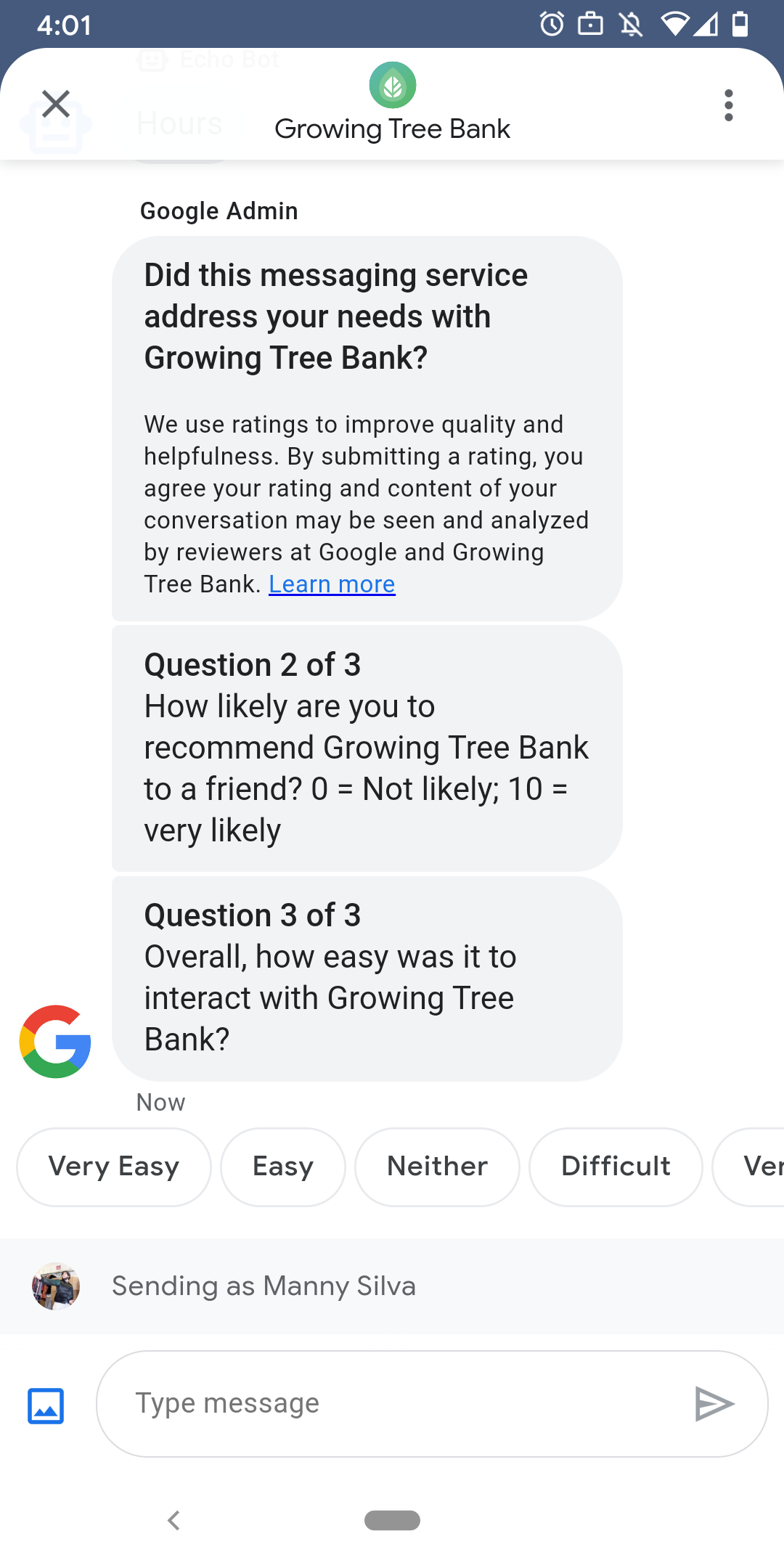
כדי לוודא שהמשתמשים נהנים מאינטראקציות מספקות עם הנציג שלכם, Google שולחת למשתמשים סקרים אחרי שהם מסיימים שיחות עם הנציג. אם רוצים לאסוף נתונים בתזמון שונה, למשל בסוף שיחה, אפשר לשלוח סקרים בהקשר של שיחה. הסקרים מוצגים בשיחה ומאפשרים למשתמשים לספק משוב באמצעות מגוון אפשרויות, בהתאם לשאלה.
התזמון של סקרים שמופעלים על ידי Google תלוי בזמינות של הסוכן לשליחת הודעות:
| זמינות | תזמון הסקר |
|---|---|
| בוט בלבד | 30 דקות אחרי ההודעה האחרונה |
| אנושי בלבד | 24 שעות עסקיות אחרי ההודעה האחרונה |
| בוט ואדם | 24 שעות עסקיות אחרי ההודעה האחרונה |
אם יש פחות מ-24 שעות פעילות ב-7 הימים הבאים, נשתמש ב-24 שעות במקום זאת.
אפשר לשלוח סקר אחד לכל שיחה כל 24 שעות. אם אתם שולחים סקר בשיחה לפני Google, Google לא שולחת סקר בשיחה הזו. אם הנציג שולח כמה סקרים באותה שיחה תוך 24 שעות, פרוטוקול Business Messages ינסה לשלוח למשתמש רק את הסקר הראשון.
בפעם הבאה שמשתמש יתחיל שיחה עם הנציג אחרי השלמת הסקר, הנציג יציג הודעת פתיחה. אם משתמש לא מגיב לסקר, תוקף הסקר יפוג אחרי 7 ימים, ובשיחה הבאה עם המשתמש תופיע הודעת ברכה.
אם משתמש שולח הודעה שלא קשורה לסקר בזמן שהסקר פעיל בשיחה, פרוטוקול Business Messages מבטל את הסקר ושולח את ההודעה של המשתמש ל-webhook של הנציג.
גם אם לא תשלחו סקרים למשתמשים, הסוכן שלכם עדיין יקבל את תוצאות הסקרים של Google ב-webhook שלכם, והוא צריך לקבל ולעבד אותן בהתאם.
שאלות
הסקרים יכולים לכלול עד חמש שאלות, שמחולקות לשלוש קטגוריות: חובה, תבנית ומותאמת אישית. סקר תמיד כולל את השאלה הנדרשת, ואז מוצגות עד שתי שאלות מתבנית, ואז מוצגות עד שתי שאלות מותאמות אישית.
שאלה שחובה לענות עליה
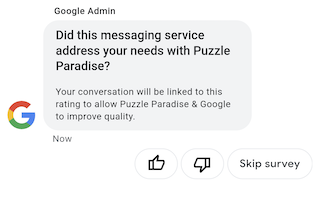
השאלה הנדרשת מותאמת לשפה המקומית בכל האזורים שבהם יש תמיכה ב'הודעות לעסקים'. המשתמשים יכולים להגיב באמצעות סימון לייק או דיסלייק.
השאלה הנדרשת: "האם שירות ההודעות הזה נתן מענה לצרכים שלך מול AGENT_NAME?"
שאלות בתבנית
שאלות מוכנות מראש הן שאלות אופציונליות שמוגדרות על ידי Google ועוברות לוקליזציה בכל הלוקאלים שנתמכים ב-Business Messages. סקר יכול לכלול עד שתי שאלות מתבנית. פורמטים של תשובות משתמשים משתנים בהתאם לשאלה.
שאלות לדוגמה בתבנית
- איך הייתה עבורך חוויית שליחת ההודעות אל AGENT_NAME?
- מה הסיכוי שהחברים שלך יקבלו ממך המלצה על AGENT_NAME?
- מה הסיכוי שבפעם הבאה שיהיה לך צורך לדבר עם AGENT_NAME זה יהיה באמצעות הודעות?
- באופן כללי, עד כמה היה לך קל לתקשר עם AGENT_NAME?
- באיזו מידה האמירה הבאה נכונה מבחינתך: הייתה לי אפשרות לטפל בבעיה בקלות מול AGENT_NAME.
- מה שביעות הרצון הכוללת שלך מנציג/ת התמיכה?
- האם שיחת הצ'אט הזו עזרה לך להימנע משיחה אל AGENT_NAME?
כדי לראות רשימה של כל השאלות הזמינות בתבנית ולקבל את מזהי התבניות,
- פותחים את Business Communications Developer Console ונכנסים באמצעות חשבון Google של Business Messages.
- בוחרים את הנציג.
- בחלונית הניווט הימנית, לוחצים על סקר.
שאלות מותאמות אישית
בכל סקר אפשר לכלול עד שתי שאלות מותאמות אישית. אם מציינים שאלה בהתאמה אישית, צריך לכלול גרסאות של השאלה לכל לוקאל שהסוכן תומך בו. צריך לציין גרסה של כל שאלה עבור הלוקאל שמוגדר כברירת מחדל. אם משתמש מקבל סקר אבל הוא נמצא באזור שאין בו גרסה מוגדרת של שאלה מותאמת אישית, השאלה מוצגת כמו שהיא מוגדרת באזור ברירת המחדל של הנציג.
התשובות לשאלות בהתאמה אישית תומכות בטקסט נפרד ובנתוני פוסטבק, בדומה לתשובות מוכנות מראש.
התאמה אישית של סקר
כדי להתאים אישית את הסקר לסוכן,
- פותחים את Business Communications Developer Console ונכנסים באמצעות חשבון Google של Business Messages.
- בוחרים את הנציג.
- בחלונית הניווט הימנית, לוחצים על סקר.
- אפשר להוסיף לסקר עד שתי שאלות מתוך התבנית.
- לוחצים על יצירת שאלה בהתאמה אישית כדי להוסיף שאלות מותאמות אישית לסקר.
אפשרויות העיצוב והערכים מפורטות במאמר בנושא surveyConfig.
שליחת סקר
כדי לשלוח סקר, מריצים את הפקודה הבאה. מחליפים את CONVERSATION_ID במזהה של השיחה שאליה רוצים לשלוח את הסקר, ואת SURVEY_ID במזהה ייחודי של הסקר.
cURL
# Copyright 2021 Google LLC # # Licensed under the Apache License, Version 2.0 (the "License"); # you may not use this file except in compliance with the License. # You may obtain a copy of the License at # https://www.apache.org/licenses/LICENSE-2.0 # Unless required by applicable law or agreed to in writing, software # distributed under the License is distributed on an "AS IS" BASIS, # WITHOUT WARRANTIES OR CONDITIONS OF ANY KIND, either express or implied. # See the License for the specific language governing permissions and # limitations under the License. # This code sends a survey to the user: # Read more: https://developers.google.com/business-communications/business-messages/guides/how-to/message/surveys?hl=en # Replace the __CONVERSATION_ID__ with a conversation id that you can send messages to # Make sure a service account key file exists at ./service_account_key.json curl -X POST "https://businessmessages.googleapis.com/v1/conversations/__CONVERSATION_ID__/surveys?surveyId=f4bd7576-6c2e-4674-9db4-d697166f63ce" \ -H "Content-Type: application/json" \ -H "User-Agent: curl/business-messages" \ -H "$(oauth2l header --json ./service_account_key.json businessmessages)"
Node.js
/** * This code sends a survey to the user: * Read more: https://developers.google.com/business-communications/business-messages/guides/how-to/message/surveys?hl=en * * This code is based on the https://github.com/google-business-communications/nodejs-businessmessages Node.js * Business Messages client library. */ /** * Edit the values below: */ const PATH_TO_SERVICE_ACCOUNT_KEY = './service_account_key.json'; const CONVERSATION_ID = 'EDIT_HERE'; const businessmessages = require('businessmessages'); const uuidv4 = require('uuid').v4; const {google} = require('googleapis'); // Initialize the Business Messages API const bmApi = new businessmessages.businessmessages_v1.Businessmessages({}); // Set the scope that we need for the Business Messages API const scopes = [ 'https://www.googleapis.com/auth/businessmessages', ]; // Set the private key to the service account file const privatekey = require(PATH_TO_SERVICE_ACCOUNT_KEY); /** * Posts a survey to the Business Messages API. * * @param {string} conversationId The unique id for this user and agent. */ async function sendSurvey(conversationId) { const authClient = await initCredentials(); // Create the payload for creating a new survey const apiParams = { auth: authClient, parent: 'conversations/' + conversationId, surveyId: uuidv4(), resource: {} }; // Call the message create function using the // Business Messages client library bmApi.conversations.surveys.create(apiParams, {auth: authClient}, (err, response) => { console.log(err); console.log(response); }); } /** * Initializes the Google credentials for calling the * Business Messages API. */ async function initCredentials() { // configure a JWT auth client const authClient = new google.auth.JWT( privatekey.client_email, null, privatekey.private_key, scopes, ); return new Promise(function(resolve, reject) { // authenticate request authClient.authorize(function(err, tokens) { if (err) { reject(false); } else { resolve(authClient); } }); }); } sendSurvey(CONVERSATION_ID);
Java
import com.google.api.client.googleapis.services.AbstractGoogleClientRequest; import com.google.api.client.http.HttpBackOffUnsuccessfulResponseHandler; import com.google.api.client.http.HttpRequest; import com.google.api.client.googleapis.auth.oauth2.GoogleCredential; import com.google.api.client.googleapis.javanet.GoogleNetHttpTransport; import com.google.api.client.http.HttpTransport; import com.google.api.client.json.jackson2.JacksonFactory; import com.google.api.client.util.ExponentialBackOff; import com.google.api.services.businessmessages.v1.Businessmessages; import com.google.api.services.businessmessages.v1.model.*; import java.io.FileInputStream; import java.util.Arrays; import java.util.UUID; class SendSurveySnippet { /** * Initializes credentials used by the Business Messages API. */ private static Businessmessages.Builder getBusinessMessagesBuilder() { Businessmessages.Builder builder = null; try { GoogleCredential credential = GoogleCredential .fromStream(new FileInputStream("PATH_TO_SERVICE_ACCOUNT_KEY")); credential = credential.createScoped(Arrays.asList( "https://www.googleapis.com/auth/businessmessages")); credential.refreshToken(); HttpTransport httpTransport = GoogleNetHttpTransport.newTrustedTransport(); JacksonFactory jsonFactory = JacksonFactory.getDefaultInstance(); // Create instance of the Business Messages API builder = new Businessmessages .Builder(httpTransport, jsonFactory, null) .setApplicationName("Sample Application"); // Set the API credentials and endpoint builder.setHttpRequestInitializer(credential); } catch (Exception e) { e.printStackTrace(); } return builder; } public static void main(String args[]) { try { String conversationId = "CONVERSATION_ID"; // Create client library reference Businessmessages.Builder builder = getBusinessMessagesBuilder(); // Create a new survey to send to the user associated with the conversationId Businessmessages.Conversations.Surveys.Create request = bmBuilder.build().conversations().surveys() .create("conversations/" + conversationId, new BusinessMessagesSurvey()); request.setSurveyId(UUID.randomUUID().toString()); // Setup retries with exponential backoff HttpRequest httpRequest = ((AbstractGoogleClientRequest) request).buildHttpRequest(); httpRequest.setUnsuccessfulResponseHandler(new HttpBackOffUnsuccessfulResponseHandler( new ExponentialBackOff())); // Execute request httpRequest.execute(); } catch (Exception e) { e.printStackTrace(); } } }
Python
"""This code sends a survey to the user. Read more: https://developers.google.com/business-communications/business-messages/guides/how-to/message/surveys?hl=en This code is based on the https://github.com/google-business-communications/python-businessmessages Python Business Messages client library. """ import uuid from businessmessages import businessmessages_v1_client as bm_client from businessmessages.businessmessages_v1_messages import BusinessmessagesConversationsSurveysCreateRequest from businessmessages.businessmessages_v1_messages import BusinessMessagesSurvey from oauth2client.service_account import ServiceAccountCredentials # Edit the values below: path_to_service_account_key = './service_account_key.json' conversation_id = 'EDIT_HERE' credentials = ServiceAccountCredentials.from_json_keyfile_name( path_to_service_account_key, scopes=['https://www.googleapis.com/auth/businessmessages']) client = bm_client.BusinessmessagesV1(credentials=credentials) # Create the survey request survey_request = BusinessmessagesConversationsSurveysCreateRequest( surveyId=str(uuid.uuid4().int), parent='conversations/' + conversation_id, businessMessagesSurvey=BusinessMessagesSurvey()) # Send the survey bm_client.BusinessmessagesV1.ConversationsSurveysService( client=client).Create(request=survey_request)
אפשרויות העיצוב והערכים מפורטות במאמר בנושא conversations.surveys.
קבלת תגובות לסקר
כשמשתמש משיב על שאלה בסקר, הנציג מקבל את התשובה ב-webhook שלו. קבלת תשובות לסקר ועיבוד שלהן מתבצעים באותו אופן שבו מקבלים הודעות.
לכל השאלות בסקר יש אותו ערך surveyResponse.survey. אם הסקר כולל כמה שאלות, צריך לוודא שהתשתית שלכם מקבלת כמה תשובות עם אותו ערך surveyResponse.survey ומזהה שאלות ספציפיות לפי השדה surveyResponse.surveyQuestionId.
ערכי הטקסט של התשובות לסקר מופיעים בגיליון surveyResponse.questionResponseText. לשאלות חובה ולשאלות מתוך תבנית, פרוטוקול Business Messages מחזיר תגובה של לייק בתור VERY_SATISFIED ותגובה של דיסלייק בתור VERY_DISSATISFIED. אם תשובה לשאלה מותאמת אישית כוללת אמוג'י, מומלץ להסתמך על surveyResponse.questionResponsePostbackData ולא לנסות לנתח את ערך ה-Unicode.
תשובות לסקר מופיעות בפורמט הבא.
{
  "agent": "brands/BRAND_ID/agents/AGENT_ID",
  "sendTime": "SEND_TIME",
  "conversationId": "CONVERSATION_ID",
  "requestId": "REQUEST_ID",
  "surveyResponse": {
    "survey": "conversations/CONVERSATION_ID/surveys/SURVEY_ID",
    "rating": "SURVEY_RATING",
    "createTime": "CREATE_TIME",
    "surveyQuestionId": "QUESTION_ID",
    "questionResponseText": "RESPONSE_TEXT",
    "questionResponsePostbackData": "RESPONSE_POSTBACK_DATA",
    "questionType": "QUESTION_TYPE",
    "questionIndex": QUESTION_INDEX,
    "totalQuestionCount": TOTAL_QUESTION_COUNT,
    "surveyTriggerSource": "TRIGGER_SOURCE"
  }
}
אפשרויות העיצוב והערכים מפורטות במאמרים בנושא UserMessage וSurveyResponse.