
Después de recibir un mensaje de un usuario, puedes enviar una respuesta para continuar la conversación. Puedes enviar mensajes a un usuario hasta 30 días después de su último mensaje.
Los agentes se comunican con los usuarios enviando y recibiendo mensajes. Para enviar mensajes a los usuarios, tu agente envía solicitudes de mensajes a Mensajes de Negocios.
Para enviar un mensaje, debes enviar una solicitud HTTP POST a la API de Business Messages que incluya lo siguiente:
- Un ID de mensaje único
- El ID de la conversación
- el contenido del mensaje
Cuando la API de Business Messages envía tu mensaje al usuario, devuelve un objeto 200 OK. Si faltan valores obligatorios en tu mensaje, la API devuelve un error 400. Si el mensaje usa credenciales no válidas, la API devuelve un error 401.
Usa la página de registros de la consola para desarrolladores de Business Communications para depurar problemas de entrega de mensajes.
Estrategia de resguardo
Si el dispositivo de un usuario no admite un mensaje que intentas enviar, por ejemplo, si un usuario no admite respuestas sugeridas, la API devuelve un error 400 (FAILED
PRECONDITION). Sin embargo, puedes evitar los tipos de mensajes no admitidos especificando texto fallback para cada mensaje que envíes. Si especificas fallbacktext, la API devuelve una respuesta 200 OK, incluso si el dispositivo del usuario no admite el tipo de mensaje.
Si un usuario recibe un mensaje que su dispositivo no admite, pero que incluye texto de fallback, el dispositivo mostrará el texto de fallback. Este comportamiento te permite continuar la conversación de forma proactiva sin interrumpir su flujo ni dedicar tiempo adicional a procesar un error de 400
(FAILED PRECONDITION) y a identificar un mensaje alternativo.
El texto de fallback para cualquier mensaje determinado debe reflejar la función del mensaje.
Por ejemplo:
- En el caso de los mensajes con respuestas o acciones sugeridas, incluye el texto del mensaje en el texto de
fallbacky brinda orientación sobre las opciones que tienen los usuarios para continuar la conversación. - En el caso de las tarjetas enriquecidas o los carruseles, incluye el título y la descripción en el texto
fallback, y agrega vínculos a imágenes o sitios web.
Para insertar saltos de línea en el texto de fallback, usa \n o \r\n.
Texto alternativo de prueba
Antes de lanzar un agente, puedes probar cómo aparece el texto de resguardo en una conversación. Para ello, envía un mensaje con el parámetro de URL forceFallback establecido en true. Cuando fuerzas el texto de resguardo, la conversación ignora el contenido principal del mensaje (texto y una sugerencia de Abrir URL en el siguiente ejemplo) y, en su lugar, muestra el texto de resguardo.
cURL
# Copyright 2021 Google LLC # # Licensed under the Apache License, Version 2.0 (the "License"); # you may not use this file except in compliance with the License. # You may obtain a copy of the License at # https://www.apache.org/licenses/LICENSE-2.0 # Unless required by applicable law or agreed to in writing, software # distributed under the License is distributed on an "AS IS" BASIS, # WITHOUT WARRANTIES OR CONDITIONS OF ANY KIND, either express or implied. # See the License for the specific language governing permissions and # limitations under the License. # This code sends a text message to the user with a fallback text. # Read more: https://developers.google.com/business-communications/business-messages/guides/how-to/message/send?hl=en#fallback_strategy # Replace the __CONVERSATION_ID__ with a conversation id that you can send messages to # Make sure a service account key file exists at ./service_account_key.json curl -X POST \ "https://businessmessages.googleapis.com/v1/conversations/__CONVERSATION_ID__/messages?forceFallback=true" \ -H "Content-Type: application/json" \ -H "User-Agent: curl/business-messages" \ -H "$(oauth2l header --json ./service_account_key.json businessmessages)" \ -d "{ 'messageId': '$(uuidgen)', 'text': 'Hello world!', 'fallback': 'Hello, world!\n\nSay \"Hello\" at https://www.growingtreebank.com', 'suggestions': [ { 'action': { 'text': 'Hello', 'postbackData': 'hello-formal', 'openUrlAction': { 'url': 'https://www.growingtreebank.com', } }, }, ], 'representative': { 'avatarImage': 'https://developers.google.com/identity/images/g-logo.png', 'displayName': 'Chatbot', 'representativeType': 'BOT' } }"
Node.js
/** * This code sends a text message to the user with a fallback text. * Read more: https://developers.google.com/business-communications/business-messages/guides/how-to/message/send?hl=en#fallback_strategy * * This code is based on the https://github.com/google-business-communications/nodejs-businessmessages Node.js * Business Messages client library. */ /** * Edit the values below: */ const PATH_TO_SERVICE_ACCOUNT_KEY = './service_account_key.json'; const CONVERSATION_ID = 'EDIT_HERE'; const businessmessages = require('businessmessages'); const uuidv4 = require('uuid').v4; const {google} = require('googleapis'); // Initialize the Business Messages API const bmApi = new businessmessages.businessmessages_v1.Businessmessages({}); // Set the scope that we need for the Business Messages API const scopes = [ 'https://www.googleapis.com/auth/businessmessages', ]; // Set the private key to the service account file const privatekey = require(PATH_TO_SERVICE_ACCOUNT_KEY); /** * Posts a message to the Business Messages API defaulting to the fallback text. * * @param {string} conversationId The unique id for this user and agent. * @param {string} message The message text to send the user. * @param {string} representativeType A value of BOT or HUMAN. */ async function sendMessage(conversationId, message, representativeType) { const authClient = await initCredentials(); // Create the payload for sending a message const apiParams = { auth: authClient, parent: 'conversations/' + conversationId, forceFallback: true, // Force usage of the fallback text resource: { messageId: uuidv4(), representative: { representativeType: representativeType, }, text: message, fallback: 'This is the fallback text' }, }; // Call the message create function using the // Business Messages client library bmApi.conversations.messages.create(apiParams, {auth: authClient}, (err, response) => { console.log(err); console.log(response); }); } /** * Initializes the Google credentials for calling the * Business Messages API. */ async function initCredentials() { // configure a JWT auth client const authClient = new google.auth.JWT( privatekey.client_email, null, privatekey.private_key, scopes, ); return new Promise(function(resolve, reject) { // authenticate request authClient.authorize(function(err, tokens) { if (err) { reject(false); } else { resolve(authClient); } }); }); } sendMessage(CONVERSATION_ID, 'BOT');
Java
import com.google.api.client.googleapis.services.AbstractGoogleClientRequest; import com.google.api.client.http.HttpBackOffUnsuccessfulResponseHandler; import com.google.api.client.http.HttpRequest; import com.google.api.client.googleapis.auth.oauth2.GoogleCredential; import com.google.api.client.googleapis.javanet.GoogleNetHttpTransport; import com.google.api.client.http.HttpTransport; import com.google.api.client.json.jackson2.JacksonFactory; import com.google.api.client.util.ExponentialBackOff; import com.google.api.services.businessmessages.v1.Businessmessages; import com.google.api.services.businessmessages.v1.model.*; import java.io.FileInputStream; import java.util.Arrays; import java.util.UUID; class TestFallbackTestSnippet { /** * Initializes credentials used by the Business Messages API. */ private static Businessmessages.Builder getBusinessMessagesBuilder() { Businessmessages.Builder builder = null; try { GoogleCredential credential = GoogleCredential .fromStream(new FileInputStream("PATH_TO_SERVICE_ACCOUNT_KEY")); credential = credential.createScoped(Arrays.asList( "https://www.googleapis.com/auth/businessmessages")); credential.refreshToken(); HttpTransport httpTransport = GoogleNetHttpTransport.newTrustedTransport(); JacksonFactory jsonFactory = JacksonFactory.getDefaultInstance(); // Create instance of the Business Messages API builder = new Businessmessages .Builder(httpTransport, jsonFactory, null) .setApplicationName("Sample Application"); // Set the API credentials and endpoint builder.setHttpRequestInitializer(credential); } catch (Exception e) { e.printStackTrace(); } return builder; } public static void main(String args[]) { try { String conversationId = "CONVERSATION_ID"; // Create client library reference Businessmessages.Builder builder = getBusinessMessagesBuilder(); // Create a basic text message with fallback text BusinessMessagesMessage message = new BusinessMessagesMessage() .setMessageId(UUID.randomUUID().toString()) .setFallback("This is the fallback text") .setText("MESSAGE_TEXT") .setRepresentative(new BusinessMessagesRepresentative() .setRepresentativeType("TYPE")); // Create message request Businessmessages.Conversations.Messages.Create messageRequest = builder.build().conversations().messages() .create("conversations/" + conversationId, message); // Force usage of the fallback text messageRequest.setForceFallback(true); // Setup retries with exponential backoff HttpRequest httpRequest = ((AbstractGoogleClientRequest) messageRequest).buildHttpRequest(); httpRequest.setUnsuccessfulResponseHandler(new HttpBackOffUnsuccessfulResponseHandler( new ExponentialBackOff())); // Execute request httpRequest.execute(); } catch (Exception e) { e.printStackTrace(); } } }
Python
"""This code sends a text message to the user with a fallback text. Read more: https://developers.google.com/business-communications/business-messages/guides/how-to/message/send?hl=en#fallback_strategy This code is based on the https://github.com/google-business-communications/python-businessmessages Python Business Messages client library. """ import uuid from businessmessages import businessmessages_v1_client as bm_client from businessmessages.businessmessages_v1_messages import BusinessmessagesConversationsMessagesCreateRequest from businessmessages.businessmessages_v1_messages import BusinessMessagesMessage from businessmessages.businessmessages_v1_messages import BusinessMessagesRepresentative from oauth2client.service_account import ServiceAccountCredentials # Edit the values below: path_to_service_account_key = './service_account_key.json' conversation_id = 'EDIT_HERE' credentials = ServiceAccountCredentials.from_json_keyfile_name( path_to_service_account_key, scopes=['https://www.googleapis.com/auth/businessmessages']) client = bm_client.BusinessmessagesV1(credentials=credentials) representative_type_as_string = 'BOT' if representative_type_as_string == 'BOT': representative_type = BusinessMessagesRepresentative.RepresentativeTypeValueValuesEnum.BOT else: representative_type = BusinessMessagesRepresentative.RepresentativeTypeValueValuesEnum.HUMAN # Create message with fallback text message = BusinessMessagesMessage( messageId=str(uuid.uuid4().int), fallback='This is the fallback text', representative=BusinessMessagesRepresentative( representativeType=representative_type ), text='This is a sample text') # Create the message request, force usage of the fallback text create_request = BusinessmessagesConversationsMessagesCreateRequest( businessMessagesMessage=message, forceFallback=True, parent='conversations/' + conversation_id) # Send the message bm_client.BusinessmessagesV1.ConversationsMessagesService( client=client).Create(request=create_request)
Para obtener más información, consulta Message.
Representantes
Cuando tu agente envía un mensaje, debes especificar un representante: la persona o la automatización que redactó el mensaje. Business Messages admite representantes de HUMAN y BOT.
Especifica un representante de BOT cuando cualquier tipo de automatización redacte un mensaje, ya sea que la automatización sea un contestador automático que les indique a los usuarios su lugar en una fila, un agente complejo de comprensión del lenguaje natural que tenga acceso dinámico a los detalles del usuario o cualquier otra cosa. Los mensajes con representantes de BOT aparecen con un ícono pequeño  que ayuda a establecer las expectativas de los usuarios sobre los tipos de interacciones en las que pueden participar.
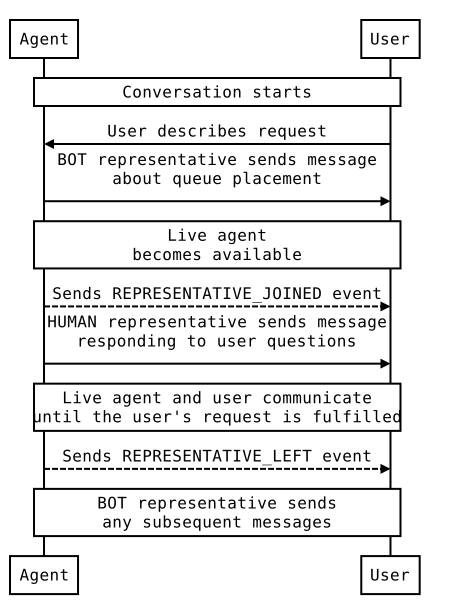
Especifica un representante de HUMAN solo cuando un agente humano redacte un mensaje.
Antes de enviar mensajes desde un representante de HUMAN, envía un REPRESENTATIVE_JOINED
evento para que los usuarios sepan que pueden enviar mensajes más complejos o de formato libre. Después de enviar el último mensaje de un representante de HUMAN, envía un evento de REPRESENTATIVE_LEFT para volver a establecer las expectativas del usuario.
Por ejemplo, si un usuario inicia una conversación con tu agente y le envías un mensaje automático en el que le indicas que debe esperar a un agente en vivo en un plazo de dos minutos, ese mensaje debe enviarse desde un representante de BOT. Antes de que se una el agente en vivo, envía un evento REPRESENTATIVE_JOINED. Todos los mensajes del agente en vivo deben etiquetarse como provenientes de un representante de HUMAN. Cuando el agente en vivo salga de la conversación, envía un evento REPRESENTATIVE_LEFT. Todos los mensajes posteriores deben provenir de un representante de BOT, a menos que otro agente en vivo se una a la conversación.
Consulta Transferencia del bot a un agente en vivo para ver una conversación de ejemplo y el código para realizar la transición entre los representantes BOT y HUMAN.
Ya sea que un representante sea BOT o HUMAN, puedes especificar un nombre visible y un avatar para el representante. Los usuarios pueden ver tanto los nombres visibles como los avatares.
Las imágenes de avatar deben tener un tamaño de 1,024 x 1,024 px y un máximo de 50 KB, y deben especificarse como URLs disponibles públicamente. Si no proporcionas una imagen de avatar, se usará el logotipo del agente para el avatar del representante.
Texto
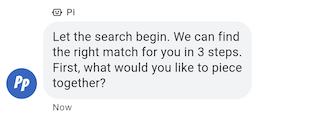
Los mensajes más simples están hechos de texto. Los mensajes de texto son más adecuados para comunicar información sin necesidad de elementos visuales, interacciones complejas o respuestas.
Ejemplo
El siguiente código envía un mensaje de texto simple. Para obtener información de referencia, consulta conversations.messages.create.
cURL
# Copyright 2021 Google LLC # # Licensed under the Apache License, Version 2.0 (the "License"); # you may not use this file except in compliance with the License. # You may obtain a copy of the License at # https://www.apache.org/licenses/LICENSE-2.0 # Unless required by applicable law or agreed to in writing, software # distributed under the License is distributed on an "AS IS" BASIS, # WITHOUT WARRANTIES OR CONDITIONS OF ANY KIND, either express or implied. # See the License for the specific language governing permissions and # limitations under the License. # This code sends a text message to the user. # Read more: https://developers.google.com/business-communications/business-messages/guides/how-to/message/send?hl=en#text # Replace the __CONVERSATION_ID__ with a conversation id that you can send messages to # Make sure a service account key file exists at ./service_account_key.json curl -X POST "https://businessmessages.googleapis.com/v1/conversations/__CONVERSATION_ID__/messages" \ -H "Content-Type: application/json" \ -H "User-Agent: curl/business-messages" \ -H "$(oauth2l header --json ./service_account_key.json businessmessages)" \ -d "{ 'messageId': '$(uuidgen)', 'text': 'Hello world!', 'representative': { 'avatarImage': 'https://developers.google.com/identity/images/g-logo.png', 'displayName': 'Chatbot', 'representativeType': 'BOT' } }"
Node.js
/** * This code sends a text message to the user. * Read more: https://developers.google.com/business-communications/business-messages/guides/how-to/message/send?hl=en#text * * This code is based on the https://github.com/google-business-communications/nodejs-businessmessages Node.js * Business Messages client library. */ /** * Edit the values below: */ const PATH_TO_SERVICE_ACCOUNT_KEY = './service_account_key.json'; const CONVERSATION_ID = 'EDIT_HERE'; const businessmessages = require('businessmessages'); const uuidv4 = require('uuid').v4; const {google} = require('googleapis'); // Initialize the Business Messages API const bmApi = new businessmessages.businessmessages_v1.Businessmessages({}); // Set the scope that we need for the Business Messages API const scopes = [ 'https://www.googleapis.com/auth/businessmessages', ]; // Set the private key to the service account file const privatekey = require(PATH_TO_SERVICE_ACCOUNT_KEY); /** * Posts a text message to the Business Messages API. * * @param {string} conversationId The unique id for this user and agent. * @param {string} message The message text to send the user. * @param {string} representativeType A value of BOT or HUMAN. */ async function sendMessage(conversationId, message, representativeType) { const authClient = await initCredentials(); // Create the payload for sending a message const apiParams = { auth: authClient, parent: 'conversations/' + conversationId, resource: { messageId: uuidv4(), representative: { representativeType: representativeType, }, text: message, }, }; // Call the message create function using the // Business Messages client library bmApi.conversations.messages.create(apiParams, {auth: authClient}, (err, response) => { console.log(err); console.log(response); }); } /** * Initializes the Google credentials for calling the * Business Messages API. */ async function initCredentials() { // configure a JWT auth client const authClient = new google.auth.JWT( privatekey.client_email, null, privatekey.private_key, scopes, ); return new Promise(function(resolve, reject) { // authenticate request authClient.authorize(function(err, tokens) { if (err) { reject(false); } else { resolve(authClient); } }); }); } sendMessage(CONVERSATION_ID, 'This is a test message', 'BOT');
Java
import com.google.api.client.googleapis.services.AbstractGoogleClientRequest; import com.google.api.client.http.HttpBackOffUnsuccessfulResponseHandler; import com.google.api.client.http.HttpRequest; import com.google.api.client.googleapis.auth.oauth2.GoogleCredential; import com.google.api.client.googleapis.javanet.GoogleNetHttpTransport; import com.google.api.client.http.HttpTransport; import com.google.api.client.json.jackson2.JacksonFactory; import com.google.api.client.util.ExponentialBackOff; import com.google.api.services.businessmessages.v1.Businessmessages; import com.google.api.services.businessmessages.v1.model.*; import java.io.FileInputStream; import java.util.Arrays; import java.util.UUID; class SendTextMessageSnippet { /** * Initializes credentials used by the Business Messages API. */ private static Businessmessages.Builder getBusinessMessagesBuilder() { Businessmessages.Builder builder = null; try { GoogleCredential credential = GoogleCredential .fromStream(new FileInputStream("PATH_TO_SERVICE_ACCOUNT_KEY")); credential = credential.createScoped(Arrays.asList( "https://www.googleapis.com/auth/businessmessages")); credential.refreshToken(); HttpTransport httpTransport = GoogleNetHttpTransport.newTrustedTransport(); JacksonFactory jsonFactory = JacksonFactory.getDefaultInstance(); // Create instance of the Business Messages API builder = new Businessmessages .Builder(httpTransport, jsonFactory, null) .setApplicationName("Sample Application"); // Set the API credentials and endpoint builder.setHttpRequestInitializer(credential); } catch (Exception e) { e.printStackTrace(); } return builder; } public static void main(String args[]) { try { String conversationId = "CONVERSATION_ID"; // Create client library reference Businessmessages.Builder builder = getBusinessMessagesBuilder(); // Create a basic text message BusinessMessagesMessage message = new BusinessMessagesMessage() .setMessageId(UUID.randomUUID().toString()) .setText("MESSAGE_TEXT") .setRepresentative(new BusinessMessagesRepresentative() .setRepresentativeType("TYPE")); // Create message request Businessmessages.Conversations.Messages.Create messageRequest = builder.build().conversations().messages() .create("conversations/" + conversationId, message); // Setup retries with exponential backoff HttpRequest httpRequest = ((AbstractGoogleClientRequest) messageRequest).buildHttpRequest(); httpRequest.setUnsuccessfulResponseHandler(new HttpBackOffUnsuccessfulResponseHandler( new ExponentialBackOff())); // Execute request httpRequest.execute(); } catch (Exception e) { e.printStackTrace(); } } }
Python
"""This code sends a text message to the user. Read more: https://developers.google.com/business-communications/business-messages/guides/how-to/message/send?hl=en#text This code is based on the https://github.com/google-business-communications/python-businessmessages Python Business Messages client library. """ import uuid from businessmessages import businessmessages_v1_client as bm_client from businessmessages.businessmessages_v1_messages import BusinessmessagesConversationsMessagesCreateRequest from businessmessages.businessmessages_v1_messages import BusinessMessagesMessage from businessmessages.businessmessages_v1_messages import BusinessMessagesRepresentative from oauth2client.service_account import ServiceAccountCredentials # Edit the values below: path_to_service_account_key = './service_account_key.json' conversation_id = 'EDIT_HERE' credentials = ServiceAccountCredentials.from_json_keyfile_name( path_to_service_account_key, scopes=['https://www.googleapis.com/auth/businessmessages']) client = bm_client.BusinessmessagesV1(credentials=credentials) representative_type_as_string = 'BOT' if representative_type_as_string == 'BOT': representative_type = BusinessMessagesRepresentative.RepresentativeTypeValueValuesEnum.BOT else: representative_type = BusinessMessagesRepresentative.RepresentativeTypeValueValuesEnum.HUMAN # Create a text message message = BusinessMessagesMessage( messageId=str(uuid.uuid4().int), representative=BusinessMessagesRepresentative( representativeType=representative_type ), text='This is a sample text') # Create the message request create_request = BusinessmessagesConversationsMessagesCreateRequest( businessMessagesMessage=message, parent='conversations/' + conversation_id) # Send the message bm_client.BusinessmessagesV1.ConversationsMessagesService( client=client).Create(request=create_request)
Texto enriquecido
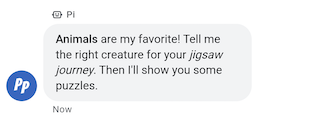
Los mensajes de texto con containsRichText configurado como true pueden incluir formato básico de Markdown. Puedes incluir hipervínculos o aplicar negrita o cursiva al texto. En la siguiente tabla, se muestran algunos ejemplos válidos:
| Formato | Caracteres | Texto sin formato | Texto renderizado |
|---|---|---|---|
| Negrita | ** |
**Some text** |
Some text |
| Cursiva | * |
*Some text* |
Some text |
| Hipervínculo | []() |
[Click here](https://www.example.com) |
Haz clic aquí |
| Salto de línea | \n
|
Line one\nLine two
|
Línea uno Línea dos |
El formato debe seguir algunas reglas adicionales:
- Todos los vínculos deben comenzar con
https://ohttp://. - Se pueden anidar diferentes tipos de formato, pero no superponerse.
- Se permiten saltos de línea con
\nen cualquier parte del mensaje, pero no se muestran los saltos de línea al final del mensaje. - Para mostrar normalmente cualquiera de los caracteres reservados (
*,\,[o]), debes agregarles un prefijo con un carácter de barra diagonal inversa (\).
Los mensajes con formato no válido no se envían y muestran un mensaje de error sobre Markdown no válido. En la siguiente tabla, se muestran algunos ejemplos más válidos y no válidos según las reglas anteriores:
| Texto sin formato | Validez | Texto renderizado |
|---|---|---|
[Click here](www.example.com) |
No válido. El vínculo no comienza con http:// o https://. |
No se renderiza. |
[**Click here**](https://www.example.com) |
Válida Se permite el anidamiento. | Haz clic aquí |
**This is [not** valid](https://www.example.com) |
No válido. No se permite el formato superpuesto. | No se renderiza. |
** Some bold text ** |
No válido. No se permiten espacios en blanco finales dentro de **. |
No se renderiza. |
Citation below\* |
Válida Se aplica el escape al carácter *. |
Cita a continuación* |
Ejemplo
El siguiente código envía un mensaje de texto enriquecido. Para obtener información de referencia, consulta conversations.messages.create.
cURL
# Copyright 2021 Google LLC # # Licensed under the Apache License, Version 2.0 (the "License"); # you may not use this file except in compliance with the License. # You may obtain a copy of the License at # https://www.apache.org/licenses/LICENSE-2.0 # Unless required by applicable law or agreed to in writing, software # distributed under the License is distributed on an "AS IS" BASIS, # WITHOUT WARRANTIES OR CONDITIONS OF ANY KIND, either express or implied. # See the License for the specific language governing permissions and # limitations under the License. # This code sends a rich text to the user with a fallback text. # Read more: https://developers.google.com/business-communications/business-messages/guides/how-to/message/send?hl=en#rich_text # Replace the __CONVERSATION_ID__ with a conversation id that you can send messages to # Make sure a service account key file exists at ./service_account_key.json curl -X POST "https://businessmessages.googleapis.com/v1/conversations/__CONVERSATION_ID__/messages" \ -H "Content-Type: application/json" \ -H "User-Agent: curl/business-messages" \ -H "$(oauth2l header --json ./service_account_key.json businessmessages)" \ -d "{ 'messageId': '$(uuidgen)', 'fallback': 'Hello, check out this link https://www.google.com.', 'text': 'Hello, here is some **bold text**, *italicized text*, and a [link](https://www.google.com).', 'containsRichText': 'true', 'representative': { 'avatarImage': 'https://developers.google.com/identity/images/g-logo.png', 'displayName': 'Chatbot', 'representativeType': 'BOT' } }"
Node.js
/** * This code sends a rich text to the user with a fallback text. * Read more: https://developers.google.com/business-communications/business-messages/guides/how-to/message/send?hl=en#rich_text * * This code is based on the https://github.com/google-business-communications/nodejs-businessmessages Node.js * Business Messages client library. */ /** * Edit the values below: */ const PATH_TO_SERVICE_ACCOUNT_KEY = './service_account_key.json'; const CONVERSATION_ID = 'EDIT_HERE'; const businessmessages = require('businessmessages'); const uuidv4 = require('uuid').v4; const {google} = require('googleapis'); // Initialize the Business Messages API const bmApi = new businessmessages.businessmessages_v1.Businessmessages({}); // Set the scope that we need for the Business Messages API const scopes = [ 'https://www.googleapis.com/auth/businessmessages', ]; // Set the private key to the service account file const privatekey = require(PATH_TO_SERVICE_ACCOUNT_KEY); /** * Posts a rich text message using markdown to the Business Messages API. * * @param {string} conversationId The unique id for this user and agent. * @param {string} representativeType A value of BOT or HUMAN. */ async function sendMessage(conversationId, message, representativeType) { const authClient = await initCredentials(); // Create the payload for sending a rich text message const apiParams = { auth: authClient, parent: 'conversations/' + conversationId, resource: { messageId: uuidv4(), representative: { representativeType: representativeType, }, containsRichText: true, // Force this message to be processed as rich text text: 'Hello, here is some **bold text**, *italicized text*, and a [link](https://www.google.com).', fallback: 'Hello, check out this link https://www.google.com.' }, }; // Call the message create function using the // Business Messages client library bmApi.conversations.messages.create(apiParams, {auth: authClient}, (err, response) => { console.log(err); console.log(response); }); } /** * Initializes the Google credentials for calling the * Business Messages API. */ async function initCredentials() { // configure a JWT auth client const authClient = new google.auth.JWT( privatekey.client_email, null, privatekey.private_key, scopes, ); return new Promise(function(resolve, reject) { // authenticate request authClient.authorize(function(err, tokens) { if (err) { reject(false); } else { resolve(authClient); } }); }); } sendMessage(CONVERSATION_ID, 'BOT');
Java
import com.google.api.client.googleapis.services.AbstractGoogleClientRequest; import com.google.api.client.http.HttpBackOffUnsuccessfulResponseHandler; import com.google.api.client.http.HttpRequest; import com.google.api.client.googleapis.auth.oauth2.GoogleCredential; import com.google.api.client.googleapis.javanet.GoogleNetHttpTransport; import com.google.api.client.http.HttpTransport; import com.google.api.client.json.jackson2.JacksonFactory; import com.google.api.client.util.ExponentialBackOff; import com.google.api.services.businessmessages.v1.Businessmessages; import com.google.api.services.businessmessages.v1.model.*; import java.io.FileInputStream; import java.util.Arrays; import java.util.UUID; class SendRichTextMessageSnippet { /** * Initializes credentials used by the Business Messages API. */ private static Businessmessages.Builder getBusinessMessagesBuilder() { Businessmessages.Builder builder = null; try { GoogleCredential credential = GoogleCredential .fromStream(new FileInputStream("PATH_TO_SERVICE_ACCOUNT_KEY")); credential = credential.createScoped(Arrays.asList( "https://www.googleapis.com/auth/businessmessages")); credential.refreshToken(); HttpTransport httpTransport = GoogleNetHttpTransport.newTrustedTransport(); JacksonFactory jsonFactory = JacksonFactory.getDefaultInstance(); // Create instance of the Business Messages API builder = new Businessmessages .Builder(httpTransport, jsonFactory, null) .setApplicationName("Sample Application"); // Set the API credentials and endpoint builder.setHttpRequestInitializer(credential); } catch (Exception e) { e.printStackTrace(); } return builder; } public static void main(String args[]) { try { String conversationId = "CONVERSATION_ID"; // Create client library reference Businessmessages.Builder builder = getBusinessMessagesBuilder(); // Create a rich text message BusinessMessagesMessage message = new BusinessMessagesMessage() .setMessageId(UUID.randomUUID().toString()) .setContainsRichText(true) // Force this message to be processed as rich text .setText("Hello, here is some **bold text**, *italicized text*, and a [link](https://www.google.com).") .setFallback("Hello, check out this link https://www.google.com.") .setRepresentative(new BusinessMessagesRepresentative() .setRepresentativeType("TYPE")); // Create message request Businessmessages.Conversations.Messages.Create messageRequest = builder.build().conversations().messages() .create("conversations/" + conversationId, message); // Setup retries with exponential backoff HttpRequest httpRequest = ((AbstractGoogleClientRequest) messageRequest).buildHttpRequest(); httpRequest.setUnsuccessfulResponseHandler(new HttpBackOffUnsuccessfulResponseHandler( new ExponentialBackOff())); // Execute request httpRequest.execute(); } catch (Exception e) { e.printStackTrace(); } } }
Python
"""This code sends a rich text to the user with a fallback text. Read more: https://developers.google.com/business-communications/business-messages/guides/how-to/message/send?hl=en#rich_text This code is based on the https://github.com/google-business-communications/python-businessmessages Python Business Messages client library. """ import uuid from businessmessages import businessmessages_v1_client as bm_client from businessmessages.businessmessages_v1_messages import BusinessmessagesConversationsMessagesCreateRequest from businessmessages.businessmessages_v1_messages import BusinessMessagesMessage from businessmessages.businessmessages_v1_messages import BusinessMessagesRepresentative from oauth2client.service_account import ServiceAccountCredentials # Edit the values below: path_to_service_account_key = './service_account_key.json' conversation_id = 'EDIT_HERE' credentials = ServiceAccountCredentials.from_json_keyfile_name( path_to_service_account_key, scopes=['https://www.googleapis.com/auth/businessmessages']) client = bm_client.BusinessmessagesV1(credentials=credentials) representative_type_as_string = 'BOT' if representative_type_as_string == 'BOT': representative_type = BusinessMessagesRepresentative.RepresentativeTypeValueValuesEnum.BOT else: representative_type = BusinessMessagesRepresentative.RepresentativeTypeValueValuesEnum.HUMAN # Create a rich text message with fallback text message = BusinessMessagesMessage( messageId=str(uuid.uuid4().int), fallback='Hello, check out this link https://www.google.com.', containsRichText=True, # Force this message to be processed as rich text representative=BusinessMessagesRepresentative( representativeType=representative_type ), text='Hello, here is some **bold text**, *italicized text*, and a [link](https://www.google.com).') # Create the message request create_request = BusinessmessagesConversationsMessagesCreateRequest( businessMessagesMessage=message, parent='conversations/' + conversation_id) # Send the message bm_client.BusinessmessagesV1.ConversationsMessagesService( client=client).Create(request=create_request)
Imágenes
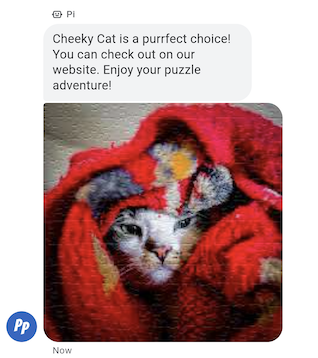
Envía una imagen a un usuario en un mensaje.
Puedes enviar un mensaje de imagen con las URLs de la imagen y su miniatura.
Ejemplo
El siguiente código envía una imagen. Para conocer las opciones de formato y valores, consulta conversations.messages.create y Image.
cURL
# Copyright 2021 Google LLC # # Licensed under the Apache License, Version 2.0 (the "License"); # you may not use this file except in compliance with the License. # You may obtain a copy of the License at # https://www.apache.org/licenses/LICENSE-2.0 # Unless required by applicable law or agreed to in writing, software # distributed under the License is distributed on an "AS IS" BASIS, # WITHOUT WARRANTIES OR CONDITIONS OF ANY KIND, either express or implied. # See the License for the specific language governing permissions and # limitations under the License. # This code sends an image to the user with a fallback text. # Read more: https://developers.google.com/business-communications/business-messages/guides/how-to/message/send?hl=en#images # Replace the __CONVERSATION_ID__ with a conversation id that you can send messages to # Make sure a service account key file exists at ./service_account_key.json curl -X POST "https://businessmessages.googleapis.com/v1/conversations/__CONVERSATION_ID__/messages" \ -H "Content-Type: application/json" \ -H "User-Agent: curl/business-messages" \ -H "$(oauth2l header --json ./service_account_key.json businessmessages)" \ -d "{ 'messageId': '$(uuidgen)', 'representative': { 'avatarImage': 'https://developers.google.com/identity/images/g-logo.png', 'displayName': 'Chatbot', 'representativeType': 'BOT' }, 'fallback': 'Hello, world!\nAn image has been sent with Business Messages.', 'image': { 'contentInfo':{ 'altText': 'Image alternative text', 'fileUrl': 'https://storage.googleapis.com/kitchen-sink-sample-images/cute-dog.jpg', 'forceRefresh': 'false' } }, }"
Node.js
/** * This code sends an image to the user with a fallback text. * Read more: https://developers.google.com/business-communications/business-messages/guides/how-to/message/send?hl=en#images * * This code is based on the https://github.com/google-business-communications/nodejs-businessmessages Node.js * Business Messages client library. */ /** * Edit the values below: */ const PATH_TO_SERVICE_ACCOUNT_KEY = './service_account_key.json'; const CONVERSATION_ID = 'EDIT_HERE'; const businessmessages = require('businessmessages'); const uuidv4 = require('uuid').v4; const {google} = require('googleapis'); // Initialize the Business Messages API const bmApi = new businessmessages.businessmessages_v1.Businessmessages({}); // Set the scope that we need for the Business Messages API const scopes = [ 'https://www.googleapis.com/auth/businessmessages', ]; // Set the private key to the service account file const privatekey = require(PATH_TO_SERVICE_ACCOUNT_KEY); /** * Posts an image message to the Business Messages API. * * @param {string} conversationId The unique id for this user and agent. * @param {string} representativeType A value of BOT or HUMAN. */ async function sendMessage(conversationId, representativeType) { const authClient = await initCredentials(); if (authClient) { // Create the payload for sending an image message const apiParams = { auth: authClient, parent: 'conversations/' + conversationId, resource: { messageId: uuidv4(), representative: { representativeType: representativeType, }, fallback: 'Hello, world!\n An image has been sent with Business Messages.', image: { contentInfo: { altText: 'Some alternative text', fileUrl: 'https://www.google.com/images/branding/googlelogo/2x/googlelogo_color_272x92dp.png', forceRefresh: true, }, }, }, }; // Call the message create function using the // Business Messages client library bmApi.conversations.messages.create(apiParams, {auth: authClient}, (err, response) => { console.log(err); console.log(response); }); } else { console.log('Authentication failure.'); } } /** * Initializes the Google credentials for calling the * Business Messages API. */ async function initCredentials() { // configure a JWT auth client const authClient = new google.auth.JWT( privatekey.client_email, null, privatekey.private_key, scopes, ); return new Promise(function(resolve, reject) { // authenticate request authClient.authorize(function(err, tokens) { if (err) { reject(false); } else { resolve(authClient); } }); }); } sendMessage(CONVERSATION_ID, 'BOT');
Java
import com.google.api.client.googleapis.services.AbstractGoogleClientRequest; import com.google.api.client.http.HttpBackOffUnsuccessfulResponseHandler; import com.google.api.client.http.HttpRequest; import com.google.api.client.googleapis.auth.oauth2.GoogleCredential; import com.google.api.client.googleapis.javanet.GoogleNetHttpTransport; import com.google.api.client.http.HttpTransport; import com.google.api.client.json.jackson2.JacksonFactory; import com.google.api.client.util.ExponentialBackOff; import com.google.api.services.businessmessages.v1.Businessmessages; import com.google.api.services.businessmessages.v1.model.*; import com.google.communications.businessmessages.v1.MediaHeight; import java.io.FileInputStream; import java.util.Arrays; import java.util.UUID; class SendImageMessageSnippet { /** * Initializes credentials used by the Business Messages API. */ private static Businessmessages.Builder getBusinessMessagesBuilder() { Businessmessages.Builder builder = null; try { GoogleCredential credential = GoogleCredential .fromStream(new FileInputStream("PATH_TO_SERVICE_ACCOUNT_KEY")); credential = credential.createScoped(Arrays.asList( "https://www.googleapis.com/auth/businessmessages")); credential.refreshToken(); HttpTransport httpTransport = GoogleNetHttpTransport.newTrustedTransport(); JacksonFactory jsonFactory = JacksonFactory.getDefaultInstance(); // Create instance of the Business Messages API builder = new Businessmessages .Builder(httpTransport, jsonFactory, null) .setApplicationName("Sample Application"); // Set the API credentials and endpoint builder.setHttpRequestInitializer(credential); } catch (Exception e) { e.printStackTrace(); } return builder; } public static void main(String args[]) { try { String conversationId = "CONVERSATION_ID"; // Create client library reference Businessmessages.Builder builder = getBusinessMessagesBuilder(); // Create an Image BusinessMessagesMessage message = new BusinessMessagesMessage() .setMessageId(UUID.randomUUID().toString()) .setRepresentative(representative) .setImage(new BusinessMessagesImage() .setContentInfo( new BusinessMessagesContentInfo() .setFileUrl("FILE_URL") .setAltText("ALT_TEXT") .setForceRefresh("FORCE_REFRESH") )); // Create message request Businessmessages.Conversations.Messages.Create messageRequest = builder.build().conversations().messages() .create("conversations/" + conversationId, message); // Setup retries with exponential backoff HttpRequest httpRequest = ((AbstractGoogleClientRequest) messageRequest).buildHttpRequest(); httpRequest.setUnsuccessfulResponseHandler(new HttpBackOffUnsuccessfulResponseHandler( new ExponentialBackOff())); // Execute request httpRequest.execute(); } catch (Exception e) { e.printStackTrace(); } } }
Python
"""This code sends an image to the user with a fallback text. Read more: https://developers.google.com/business-communications/business-messages/guides/how-to/message/send?hl=en#images This code is based on the https://github.com/google-business-communications/python-businessmessages Python Business Messages client library. """ import uuid from businessmessages import businessmessages_v1_client as bm_client from businessmessages.businessmessages_v1_messages import BusinessMessagesContentInfo from businessmessages.businessmessages_v1_messages import BusinessmessagesConversationsMessagesCreateRequest from businessmessages.businessmessages_v1_messages import BusinessMessagesImage from businessmessages.businessmessages_v1_messages import BusinessMessagesMessage from businessmessages.businessmessages_v1_messages import BusinessMessagesRepresentative from oauth2client.service_account import ServiceAccountCredentials # Edit the values below: path_to_service_account_key = './service_account_key.json' conversation_id = 'EDIT_HERE' image_file_url = 'EDIT_HERE' credentials = ServiceAccountCredentials.from_json_keyfile_name( path_to_service_account_key, scopes=['https://www.googleapis.com/auth/businessmessages']) client = bm_client.BusinessmessagesV1(credentials=credentials) representative_type_as_string = 'BOT' if representative_type_as_string == 'BOT': representative_type = BusinessMessagesRepresentative.RepresentativeTypeValueValuesEnum.BOT else: representative_type = BusinessMessagesRepresentative.RepresentativeTypeValueValuesEnum.HUMAN # Create an image message with fallback text message = BusinessMessagesMessage( messageId=str(uuid.uuid4().int), representative=BusinessMessagesRepresentative( representativeType=representative_type ), fallback='Hello, world!\nAn image has been sent with Business Messages.', image=BusinessMessagesImage( contentInfo=BusinessMessagesContentInfo( altText='Alternative text', fileUrl=image_file_url, forceRefresh=True ) )) # Create the message request create_request = BusinessmessagesConversationsMessagesCreateRequest( businessMessagesMessage=message, parent='conversations/' + conversation_id) # Send the message bm_client.BusinessmessagesV1.ConversationsMessagesService( client=client).Create(request=create_request)
Respuestas sugeridas
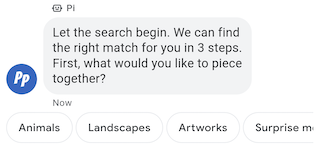
Las respuestas sugeridas guían a los usuarios en las conversaciones proporcionándoles respuestas a las que tu agente sabe cómo reaccionar.
Cuando un usuario presiona una respuesta sugerida, tu agente recibe un mensaje que contiene el texto de la respuesta y los datos de notificación de conversión.
Las respuestas sugeridas tienen un máximo de 25 caracteres, y los mensajes, un máximo de 13 sugerencias.
Ejemplo
El siguiente código envía texto con dos respuestas sugeridas. Para conocer las opciones de formato y valores, consulta conversations.messages.create y SuggestedReply.
cURL
# Copyright 2021 Google LLC # # Licensed under the Apache License, Version 2.0 (the "License"); # you may not use this file except in compliance with the License. # You may obtain a copy of the License at # https://www.apache.org/licenses/LICENSE-2.0 # Unless required by applicable law or agreed to in writing, software # distributed under the License is distributed on an "AS IS" BASIS, # WITHOUT WARRANTIES OR CONDITIONS OF ANY KIND, either express or implied. # See the License for the specific language governing permissions and # limitations under the License. # This code sends a text mesage to the user with suggested replies. # Read more: https://developers.google.com/business-communications/business-messages/guides/how-to/message/send?hl=en#suggested_replies # Replace the __CONVERSATION_ID__ with a conversation id that you can send messages to # Make sure a service account key file exists at ./service_account_key.json curl -X POST "https://businessmessages.googleapis.com/v1/conversations/__CONVERSATION_ID__/messages" \ -H "Content-Type: application/json" \ -H "User-Agent: curl/business-messages" \ -H "$(oauth2l header --json ./service_account_key.json businessmessages)" \ -d "{ 'messageId': '$(uuidgen)', 'text': 'Hello, world!', 'fallback': 'Hello, world!\n\nReply with \"Hello\" or \"Hi!\"', 'suggestions': [ { 'reply': { 'text': 'Hello', 'postbackData': 'hello-formal', }, }, { 'reply': { 'text': 'Hi!', 'postbackData': 'hello-informal', }, }, ], 'representative': { 'avatarImage': 'https://developers.google.com/identity/images/g-logo.png', 'displayName': 'Chatbot', 'representativeType': 'BOT' }, }"
Node.js
/** * This code sends a text mesage to the user with suggested replies. * Read more: https://developers.google.com/business-communications/business-messages/guides/how-to/message/send?hl=en#suggested_replies * * This code is based on the https://github.com/google-business-communications/nodejs-businessmessages Node.js * Business Messages client library. */ /** * Edit the values below: */ const PATH_TO_SERVICE_ACCOUNT_KEY = './service_account_key.json'; const CONVERSATION_ID = 'EDIT_HERE'; const businessmessages = require('businessmessages'); const uuidv4 = require('uuid').v4; const {google} = require('googleapis'); // Initialize the Business Messages API const bmApi = new businessmessages.businessmessages_v1.Businessmessages({}); // Set the scope that we need for the Business Messages API const scopes = [ 'https://www.googleapis.com/auth/businessmessages', ]; // Set the private key to the service account file const privatekey = require(PATH_TO_SERVICE_ACCOUNT_KEY); /** * Posts a message of "Hello, world!" to the Business Messages API along with two suggested replies. * * @param {string} conversationId The unique id for this user and agent. * @param {string} representativeType A value of BOT or HUMAN. */ async function sendMessage(conversationId, representativeType) { const authClient = await initCredentials(); // Create a text message with two suggested replies const apiParams = { auth: authClient, parent: 'conversations/' + conversationId, resource: { messageId: uuidv4(), representative: { representativeType: representativeType, }, fallback: 'Hello, world!\n\nReply with "Hello" or "Hi!"', text: 'Hello, world!', suggestions: [ { reply: { text: 'Hello', postbackData: 'hello-formal', }, }, { reply: { text: 'Hello', postbackData: 'hello-informal', }, }, ], }, }; // Call the message create function using the // Business Messages client library bmApi.conversations.messages.create(apiParams, {auth: authClient}, (err, response) => { console.log(err); console.log(response); }); } /** * Initializes the Google credentials for calling the * Business Messages API. */ async function initCredentials() { // configure a JWT auth client const authClient = new google.auth.JWT( privatekey.client_email, null, privatekey.private_key, scopes, ); return new Promise(function(resolve, reject) { // authenticate request authClient.authorize(function(err, tokens) { if (err) { reject(false); } else { resolve(authClient); } }); }); } sendMessage(CONVERSATION_ID, 'BOT');
Java
import com.google.api.client.googleapis.services.AbstractGoogleClientRequest; import com.google.api.client.http.HttpBackOffUnsuccessfulResponseHandler; import com.google.api.client.http.HttpRequest; import com.google.api.client.googleapis.auth.oauth2.GoogleCredential; import com.google.api.client.googleapis.javanet.GoogleNetHttpTransport; import com.google.api.client.http.HttpTransport; import com.google.api.client.json.jackson2.JacksonFactory; import com.google.api.client.util.ExponentialBackOff; import com.google.api.services.businessmessages.v1.Businessmessages; import com.google.api.services.businessmessages.v1.model.*; import java.io.FileInputStream; import java.util.Arrays; import java.util.UUID; class SendSuggestedReplySnippet { /** * Initializes credentials used by the Business Messages API. */ private static Businessmessages.Builder getBusinessMessagesBuilder() { Businessmessages.Builder builder = null; try { GoogleCredential credential = GoogleCredential .fromStream(new FileInputStream("PATH_TO_SERVICE_ACCOUNT_KEY")); credential = credential.createScoped(Arrays.asList( "https://www.googleapis.com/auth/businessmessages")); credential.refreshToken(); HttpTransport httpTransport = GoogleNetHttpTransport.newTrustedTransport(); JacksonFactory jsonFactory = JacksonFactory.getDefaultInstance(); // Create instance of the Business Messages API builder = new Businessmessages .Builder(httpTransport, jsonFactory, null) .setApplicationName("Sample Application"); // Set the API credentials and endpoint builder.setHttpRequestInitializer(credential); } catch (Exception e) { e.printStackTrace(); } return builder; } public static void main(String args[]) { try { String conversationId = "CONVERSATION_ID"; // Create client library reference Businessmessages.Builder builder = getBusinessMessagesBuilder(); // Create a text message with two suggested replies BusinessMessagesMessage message = new BusinessMessagesMessage() .setMessageId(UUID.randomUUID().toString()) .setText("Hello, world!") .setFallback("Hello, world!\n\nReply with \"Hello\" or \"Hi!\"") .setSuggestions(Arrays.asList( new BusinessMessagesSuggestion() .setReply(new BusinessMessagesSuggestedReply() .setText("Hello").setPostbackData("hello-formal") ), new BusinessMessagesSuggestion() .setReply(new BusinessMessagesSuggestedReply() .setText("Hi!").setPostbackData("hello-informal") )) ) .setRepresentative(new BusinessMessagesRepresentative() .setRepresentativeType("TYPE")); // Create message request Businessmessages.Conversations.Messages.Create messageRequest = builder.build().conversations().messages() .create("conversations/" + conversationId, message); // Setup retries with exponential backoff HttpRequest httpRequest = ((AbstractGoogleClientRequest) messageRequest).buildHttpRequest(); httpRequest.setUnsuccessfulResponseHandler(new HttpBackOffUnsuccessfulResponseHandler( new ExponentialBackOff())); // Execute request httpRequest.execute(); } catch (Exception e) { e.printStackTrace(); } } }
Python
"""This code sends a text mesage to the user with suggested replies. Read more: https://developers.google.com/business-communications/business-messages/guides/how-to/message/send?hl=en#suggested_replies This code is based on the https://github.com/google-business-communications/python-businessmessages Python Business Messages client library. """ import uuid from businessmessages import businessmessages_v1_client as bm_client from businessmessages.businessmessages_v1_messages import BusinessmessagesConversationsMessagesCreateRequest from businessmessages.businessmessages_v1_messages import BusinessMessagesMessage from businessmessages.businessmessages_v1_messages import BusinessMessagesRepresentative from businessmessages.businessmessages_v1_messages import BusinessMessagesSuggestedReply from businessmessages.businessmessages_v1_messages import BusinessMessagesSuggestion from oauth2client.service_account import ServiceAccountCredentials # Edit the values below: path_to_service_account_key = './service_account_key.json' conversation_id = 'EDIT_HERE' credentials = ServiceAccountCredentials.from_json_keyfile_name( path_to_service_account_key, scopes=['https://www.googleapis.com/auth/businessmessages']) client = bm_client.BusinessmessagesV1(credentials=credentials) representative_type_as_string = 'BOT' if representative_type_as_string == 'BOT': representative_type = BusinessMessagesRepresentative.RepresentativeTypeValueValuesEnum.BOT else: representative_type = BusinessMessagesRepresentative.RepresentativeTypeValueValuesEnum.HUMAN # Create a text message with two suggested replies and fallback text message = BusinessMessagesMessage( messageId=str(uuid.uuid4().int), representative=BusinessMessagesRepresentative( representativeType=representative_type ), text='Hello, world!', fallback='Hello, world!\n\nReply with \"Hello\" or \"Hi!\"', suggestions=[ BusinessMessagesSuggestion( reply=BusinessMessagesSuggestedReply( text='Hello', postbackData='hello-formal') ), BusinessMessagesSuggestion( reply=BusinessMessagesSuggestedReply( text='Hi!', postbackData='hello-informal') ) ]) # Create the message request create_request = BusinessmessagesConversationsMessagesCreateRequest( businessMessagesMessage=message, parent='conversations/' + conversation_id) # Send the message bm_client.BusinessmessagesV1.ConversationsMessagesService( client=client).Create(request=create_request)
Acciones sugeridas
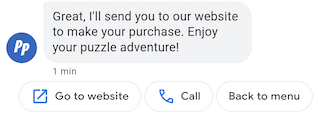
Las acciones sugeridas guían a los usuarios a través de las conversaciones aprovechando la funcionalidad nativa de sus dispositivos. Cuando un usuario presiona una acción sugerida, tu agente recibe un mensaje que contiene el texto y los datos de devolución de llamada de la acción.
Las acciones sugeridas tienen un máximo de 25 caracteres, y un mensaje tiene un máximo de 13 sugerencias.
Para conocer las opciones de formato y valores, consulta conversations.messages.create y SuggestedAction.
Acción de abrir URL
Con la acción Open URL, tu agente sugiere una URL para que el usuario la abra. Si una app está registrada como controlador predeterminado de la URL, se abrirá la app en su lugar y el ícono de la acción será el ícono de la app. Las acciones de abrir URL solo admiten URLs con protocolos HTTP y HTTPS. No se admiten otros protocolos (como mailto).
El siguiente código envía texto con una acción de abrir URL. Para conocer las opciones de formato y valores, consulta OpenUrlAction.
cURL
# Copyright 2021 Google LLC # # Licensed under the Apache License, Version 2.0 (the "License"); # you may not use this file except in compliance with the License. # You may obtain a copy of the License at # https://www.apache.org/licenses/LICENSE-2.0 # Unless required by applicable law or agreed to in writing, software # distributed under the License is distributed on an "AS IS" BASIS, # WITHOUT WARRANTIES OR CONDITIONS OF ANY KIND, either express or implied. # See the License for the specific language governing permissions and # limitations under the License. # This code sends a text mesage to the user with a suggestion action toopen a URL # and a fallback text. # Read more: https://developers.google.com/business-communications/business-messages/guides/how-to/message/send?hl=en#open_url_action # Replace the __CONVERSATION_ID__ with a conversation id that you can send messages to # Make sure a service account key file exists at ./service_account_key.json curl -X POST "https://businessmessages.googleapis.com/v1/conversations/__CONVERSATION_ID__/messages" \ -H "Content-Type: application/json" \ -H "User-Agent: curl/business-messages" \ -H "$(oauth2l header --json ./service_account_key.json businessmessages)" \ -d "{ 'messageId': '$(uuidgen)', 'text': 'Hello world!', 'fallback': 'Hello, world!\n\nSay \"Hello\" at https://www.growingtreebank.com', 'suggestions': [ { 'action': { 'text': 'Hello', 'postbackData': 'hello-formal', 'openUrlAction': { 'url': 'https://www.growingtreebank.com', } }, }, ], 'representative': { 'avatarImage': 'https://developers.google.com/identity/images/g-logo.png', 'displayName': 'Chatbot', 'representativeType': 'BOT' }, }"
Node.js
/** * This code sends a text mesage to the user with a suggestion action toopen a URL * and a fallback text. * Read more: https://developers.google.com/business-communications/business-messages/guides/how-to/message/send?hl=en#open_url_action * * This code is based on the https://github.com/google-business-communications/nodejs-businessmessages Node.js * Business Messages client library. */ /** * Edit the values below: */ const PATH_TO_SERVICE_ACCOUNT_KEY = './service_account_key.json'; const CONVERSATION_ID = 'EDIT_HERE'; const businessmessages = require('businessmessages'); const uuidv4 = require('uuid').v4; const {google} = require('googleapis'); // Initialize the Business Messages API const bmApi = new businessmessages.businessmessages_v1.Businessmessages({}); // Set the scope that we need for the Business Messages API const scopes = [ 'https://www.googleapis.com/auth/businessmessages', ]; // Set the private key to the service account file const privatekey = require(PATH_TO_SERVICE_ACCOUNT_KEY); /** * Posts a message with an open URL action to the Business Messages API. * * @param {string} conversationId The unique id for this user and agent. * @param {string} representativeType A value of BOT or HUMAN. */ async function sendMessage(conversationId, representativeType) { const authClient = await initCredentials(); if (authClient) { // Create the payload for sending a message along with an open url action const apiParams = { auth: authClient, parent: 'conversations/' + conversationId, resource: { messageId: uuidv4(), representative: { representativeType: representativeType, }, fallback: 'Hello, world!\n\nSay \"Hello\" at https://www.growingtreebank.com', text: 'Hello world!', suggestions: [ { action: { text: 'Hello', postbackData: 'hello-formal', openUrlAction: { url: 'https://www.growingtreebank.com', }, }, }, ], }, }; // Call the message create function using the // Business Messages client library bmApi.conversations.messages.create(apiParams, {auth: authClient}, (err, response) => { console.log(err); console.log(response); }); } else { console.log('Authentication failure.'); } } /** * Initializes the Google credentials for calling the * Business Messages API. */ async function initCredentials() { // configure a JWT auth client const authClient = new google.auth.JWT( privatekey.client_email, null, privatekey.private_key, scopes, ); return new Promise(function(resolve, reject) { // authenticate request authClient.authorize(function(err, tokens) { if (err) { reject(false); } else { resolve(authClient); } }); }); } sendMessage(CONVERSATION_ID, 'BOT');
Java
import com.google.api.client.googleapis.services.AbstractGoogleClientRequest; import com.google.api.client.http.HttpBackOffUnsuccessfulResponseHandler; import com.google.api.client.http.HttpRequest; import com.google.api.client.googleapis.auth.oauth2.GoogleCredential; import com.google.api.client.googleapis.javanet.GoogleNetHttpTransport; import com.google.api.client.http.HttpTransport; import com.google.api.client.json.jackson2.JacksonFactory; import com.google.api.client.util.ExponentialBackOff; import com.google.api.services.businessmessages.v1.Businessmessages; import com.google.api.services.businessmessages.v1.model.*; import java.io.FileInputStream; import java.util.Arrays; import java.util.UUID; class SendSuggestedActionSnippet { /** * Initializes credentials used by the Business Messages API. */ private static Businessmessages.Builder getBusinessMessagesBuilder() { Businessmessages.Builder builder = null; try { GoogleCredential credential = GoogleCredential .fromStream(new FileInputStream("PATH_TO_SERVICE_ACCOUNT_KEY")); credential = credential.createScoped(Arrays.asList( "https://www.googleapis.com/auth/businessmessages")); credential.refreshToken(); HttpTransport httpTransport = GoogleNetHttpTransport.newTrustedTransport(); JacksonFactory jsonFactory = JacksonFactory.getDefaultInstance(); // Create instance of the Business Messages API builder = new Businessmessages .Builder(httpTransport, jsonFactory, null) .setApplicationName("Sample Application"); // Set the API credentials and endpoint builder.setHttpRequestInitializer(credential); } catch (Exception e) { e.printStackTrace(); } return builder; } public static void main(String args[]) { try { String conversationId = "CONVERSATION_ID"; // Create client library reference Businessmessages.Builder builder = getBusinessMessagesBuilder(); // Create a text message with an open url action BusinessMessagesMessage message = new BusinessMessagesMessage() .setMessageId(UUID.randomUUID().toString()) .setText("Hello world!") .setFallback("Hello, world!\n\nSay \"Hello\" at https://www.growingtreebank.com") .setSuggestions(Arrays.asList(new BusinessMessagesSuggestion() .setAction(new BusinessMessagesSuggestedAction() .setText("Hello").setPostbackData("hello-formal") .setOpenUrlAction( new BusinessMessagesOpenUrlAction().setUrl("https://www.growingtreebank.com")) )) ) .setRepresentative(new BusinessMessagesRepresentative() .setRepresentativeType("TYPE")); // Create message request Businessmessages.Conversations.Messages.Create messageRequest = builder.build().conversations().messages() .create("conversations/" + conversationId, message); // Setup retries with exponential backoff HttpRequest httpRequest = ((AbstractGoogleClientRequest) messageRequest).buildHttpRequest(); httpRequest.setUnsuccessfulResponseHandler(new HttpBackOffUnsuccessfulResponseHandler( new ExponentialBackOff())); // Execute request httpRequest.execute(); } catch (Exception e) { e.printStackTrace(); } } }
Python
"""This code sends a text mesage to the user with a suggestion action to open a URL. Read more: https://developers.google.com/business-communications/business-messages/guides/how-to/message/send?hl=en#open_url_action This code is based on the https://github.com/google-business-communications/python-businessmessages Python Business Messages client library. """ import uuid from businessmessages import businessmessages_v1_client as bm_client from businessmessages.businessmessages_v1_messages import BusinessmessagesConversationsMessagesCreateRequest from businessmessages.businessmessages_v1_messages import BusinessMessagesMessage from businessmessages.businessmessages_v1_messages import BusinessMessagesOpenUrlAction from businessmessages.businessmessages_v1_messages import BusinessMessagesRepresentative from businessmessages.businessmessages_v1_messages import BusinessMessagesSuggestedAction from businessmessages.businessmessages_v1_messages import BusinessMessagesSuggestion from oauth2client.service_account import ServiceAccountCredentials # Edit the values below: path_to_service_account_key = './service_account_key.json' conversation_id = 'EDIT_HERE' credentials = ServiceAccountCredentials.from_json_keyfile_name( path_to_service_account_key, scopes=['https://www.googleapis.com/auth/businessmessages']) client = bm_client.BusinessmessagesV1(credentials=credentials) representative_type_as_string = 'BOT' if representative_type_as_string == 'BOT': representative_type = BusinessMessagesRepresentative.RepresentativeTypeValueValuesEnum.BOT else: representative_type = BusinessMessagesRepresentative.RepresentativeTypeValueValuesEnum.HUMAN # Create a text message with an open url action and fallback text message = BusinessMessagesMessage( messageId=str(uuid.uuid4().int), representative=BusinessMessagesRepresentative( representativeType=representative_type ), text='Hello, world!', fallback='Hello, world!\n\nReply with \"Hello\" or \"Hi!\"', suggestions=[ BusinessMessagesSuggestion( action=BusinessMessagesSuggestedAction( text='Hello', postbackData='hello-formal', openUrlAction=BusinessMessagesOpenUrlAction( url='https://www.growingtreebank.com')) ), ]) # Create the message request create_request = BusinessmessagesConversationsMessagesCreateRequest( businessMessagesMessage=message, parent='conversations/' + conversation_id) # Send the message bm_client.BusinessmessagesV1.ConversationsMessagesService( client=client).Create(request=create_request)
Acción de marcar
La acción Dial sugiere un número de teléfono para que el usuario lo marque. Cuando un usuario presiona un chip de sugerencia de acción de marcado, se abre la app de marcador predeterminada del usuario con el número de teléfono especificado prepropagado.
El siguiente código envía texto con una acción de marcado. Para conocer las opciones de formato y valores, consulta DialAction.
cURL
# Copyright 2021 Google LLC # # Licensed under the Apache License, Version 2.0 (the "License"); # you may not use this file except in compliance with the License. # You may obtain a copy of the License at # https://www.apache.org/licenses/LICENSE-2.0 # Unless required by applicable law or agreed to in writing, software # distributed under the License is distributed on an "AS IS" BASIS, # WITHOUT WARRANTIES OR CONDITIONS OF ANY KIND, either express or implied. # See the License for the specific language governing permissions and # limitations under the License. # This code sends a text mesage to the user with a suggestion action to dial # a phone number and a fallback text. # Read more: https://developers.google.com/business-communications/business-messages/guides/how-to/message/send?hl=en#dial_action # Replace the __CONVERSATION_ID__ with a conversation id that you can send messages to # Make sure a service account key file exists at ./service_account_key.json curl -X POST "https://businessmessages.googleapis.com/v1/conversations/__CONVERSATION_ID__/messages" \ -H "Content-Type: application/json" \ -H "User-Agent: curl/business-messages" \ -H "$(oauth2l header --json ./service_account_key.json businessmessages)" \ -d "{ 'messageId': '$(uuidgen)', 'text': 'Contact support for help with this issue.', 'fallback': 'Give us a call at +12223334444.', 'suggestions': [ { 'action': { 'text': 'Call support', 'postbackData': 'call-support', 'dialAction': { 'phoneNumber': '+12223334444', } }, }, ], 'representative': { 'avatarImage': 'https://developers.google.com/identity/images/g-logo.png', 'displayName': 'Chatbot', 'representativeType': 'BOT' }, }"
Node.js
/** * This code sends a text mesage to the user with a suggestion action to dial * a phone number and a fallback text. * Read more: https://developers.google.com/business-communications/business-messages/guides/how-to/message/send?hl=en#dial_action * * This code is based on the https://github.com/google-business-communications/nodejs-businessmessages Node.js * Business Messages client library. */ /** * Edit the values below: */ const PATH_TO_SERVICE_ACCOUNT_KEY = './service_account_key.json'; const CONVERSATION_ID = 'EDIT_HERE'; const businessmessages = require('businessmessages'); const uuidv4 = require('uuid').v4; const {google} = require('googleapis'); // Initialize the Business Messages API const bmApi = new businessmessages.businessmessages_v1.Businessmessages({}); // Set the scope that we need for the Business Messages API const scopes = [ 'https://www.googleapis.com/auth/businessmessages', ]; // Set the private key to the service account file const privatekey = require(PATH_TO_SERVICE_ACCOUNT_KEY); /** * Posts a message with a dial suggested action to the Business Messages API. * * @param {string} conversationId The unique id for this user and agent. * @param {string} representativeType A value of BOT or HUMAN. */ async function sendMessage(conversationId, representativeType) { const authClient = await initCredentials(); if (authClient) { // Create the payload for sending a message along with a dial action const apiParams = { auth: authClient, parent: 'conversations/' + conversationId, resource: { messageId: uuidv4(), representative: { representativeType: representativeType, }, fallback: 'Give us a call at +12223334444.', text: 'Contact support for help with this issue.', suggestions: [ { action: { text: 'Call support', postbackData: 'call-support', dialAction: { phoneNumber: '+12223334444', }, }, }, ], }, }; // Call the message create function using the // Business Messages client library bmApi.conversations.messages.create(apiParams, {auth: authClient}, (err, response) => { console.log(err); console.log(response); }); } else { console.log('Authentication failure.'); } } /** * Initializes the Google credentials for calling the * Business Messages API. */ async function initCredentials() { // configure a JWT auth client const authClient = new google.auth.JWT( privatekey.client_email, null, privatekey.private_key, scopes, ); return new Promise(function(resolve, reject) { // authenticate request authClient.authorize(function(err, tokens) { if (err) { reject(false); } else { resolve(authClient); } }); }); } sendMessage(CONVERSATION_ID, 'BOT');
Java
import com.google.api.client.googleapis.services.AbstractGoogleClientRequest; import com.google.api.client.http.HttpBackOffUnsuccessfulResponseHandler; import com.google.api.client.http.HttpRequest; import com.google.api.client.googleapis.auth.oauth2.GoogleCredential; import com.google.api.client.googleapis.javanet.GoogleNetHttpTransport; import com.google.api.client.http.HttpTransport; import com.google.api.client.json.jackson2.JacksonFactory; import com.google.api.client.util.ExponentialBackOff; import com.google.api.services.businessmessages.v1.Businessmessages; import com.google.api.services.businessmessages.v1.model.*; import java.io.FileInputStream; import java.util.Arrays; import java.util.UUID; class SendDialActionSnippet { /** * Initializes credentials used by the Business Messages API. */ private static Businessmessages.Builder getBusinessMessagesBuilder() { Businessmessages.Builder builder = null; try { GoogleCredential credential = GoogleCredential .fromStream(new FileInputStream("PATH_TO_SERVICE_ACCOUNT_KEY")); credential = credential.createScoped(Arrays.asList( "https://www.googleapis.com/auth/businessmessages")); credential.refreshToken(); HttpTransport httpTransport = GoogleNetHttpTransport.newTrustedTransport(); JacksonFactory jsonFactory = JacksonFactory.getDefaultInstance(); // Create instance of the Business Messages API builder = new Businessmessages .Builder(httpTransport, jsonFactory, null) .setApplicationName("Sample Application"); // Set the API credentials and endpoint builder.setHttpRequestInitializer(credential); } catch (Exception e) { e.printStackTrace(); } return builder; } public static void main(String args[]) { try { String conversationId = "CONVERSATION_ID"; // Create client library reference Businessmessages.Builder builder = getBusinessMessagesBuilder(); // Create a text message with a dial action BusinessMessagesMessage message = new BusinessMessagesMessage() .setMessageId(UUID.randomUUID().toString()) .setText("Contact support for help with this issue.") .setFallback("Give us a call at +12223334444.") .setSuggestions(Arrays.asList(new BusinessMessagesSuggestion() .setAction(new BusinessMessagesSuggestedAction() .setText("Call support").setPostbackData("call-support") .setDialAction( new BusinessMessagesDialAction().setPhoneNumber("+12223334444")) ))) .setRepresentative(new BusinessMessagesRepresentative() .setRepresentativeType("TYPE")); // Create message request Businessmessages.Conversations.Messages.Create messageRequest = builder.build().conversations().messages() .create("conversations/" + conversationId, message); // Setup retries with exponential backoff HttpRequest httpRequest = ((AbstractGoogleClientRequest) messageRequest).buildHttpRequest(); httpRequest.setUnsuccessfulResponseHandler(new HttpBackOffUnsuccessfulResponseHandler( new ExponentialBackOff())); // Execute request httpRequest.execute(); } catch (Exception e) { e.printStackTrace(); } } }
Python
"""Sends a text mesage to the user with a suggestion action to dial a phone number. Read more: https://developers.google.com/business-communications/business-messages/guides/how-to/message/send?hl=en#dial_action This code is based on the https://github.com/google-business-communications/python-businessmessages Python Business Messages client library. """ import uuid from businessmessages import businessmessages_v1_client as bm_client from businessmessages.businessmessages_v1_messages import BusinessmessagesConversationsMessagesCreateRequest from businessmessages.businessmessages_v1_messages import BusinessMessagesDialAction from businessmessages.businessmessages_v1_messages import BusinessMessagesMessage from businessmessages.businessmessages_v1_messages import BusinessMessagesRepresentative from businessmessages.businessmessages_v1_messages import BusinessMessagesSuggestedAction from businessmessages.businessmessages_v1_messages import BusinessMessagesSuggestion from oauth2client.service_account import ServiceAccountCredentials # Edit the values below: path_to_service_account_key = './service_account_key.json' conversation_id = 'EDIT_HERE' credentials = ServiceAccountCredentials.from_json_keyfile_name( path_to_service_account_key, scopes=['https://www.googleapis.com/auth/businessmessages']) client = bm_client.BusinessmessagesV1(credentials=credentials) representative_type_as_string = 'BOT' if representative_type_as_string == 'BOT': representative_type = BusinessMessagesRepresentative.RepresentativeTypeValueValuesEnum.BOT else: representative_type = BusinessMessagesRepresentative.RepresentativeTypeValueValuesEnum.HUMAN # Create a text message with a dial action and fallback text message = BusinessMessagesMessage( messageId=str(uuid.uuid4().int), representative=BusinessMessagesRepresentative( representativeType=representative_type ), text='Contact support for help with this issue.', fallback='Give us a call at +12223334444.', suggestions=[ BusinessMessagesSuggestion( action=BusinessMessagesSuggestedAction( text='Call support', postbackData='call-support', dialAction=BusinessMessagesDialAction( phoneNumber='+12223334444')) ), ]) # Create the message request create_request = BusinessmessagesConversationsMessagesCreateRequest( businessMessagesMessage=message, parent='conversations/' + conversation_id) # Send the message bm_client.BusinessmessagesV1.ConversationsMessagesService( client=client).Create(request=create_request)
Sugerencia de solicitud de autenticación
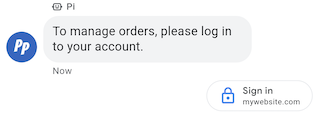
La sugerencia de solicitud de autenticación les pide a los usuarios que accedan a una aplicación compatible con OAuth 2.0 y pasen códigos de autenticación para confirmar los datos de la cuenta y habilitar experiencias del usuario personalizadas y flujos de conversación detallados. Consulta Autentica con OAuth.
Ejemplo
El siguiente código envía texto con una sugerencia de solicitud de autenticación. Para conocer las opciones de formato y valores, consulta conversations.messages.create y Suggestion.
cURL
# Copyright 2021 Google LLC # # Licensed under the Apache License, Version 2.0 (the "License"); # you may not use this file except in compliance with the License. # You may obtain a copy of the License at # https://www.apache.org/licenses/LICENSE-2.0 # Unless required by applicable law or agreed to in writing, software # distributed under the License is distributed on an "AS IS" BASIS, # WITHOUT WARRANTIES OR CONDITIONS OF ANY KIND, either express or implied. # See the License for the specific language governing permissions and # limitations under the License. # This code sends a text message to the user with an authentication request suggestion # that allows the user to authenticate with OAuth. It also has a fallback text. # Read more: https://developers.google.com/business-communications/business-messages/guides/how-to/message/send?hl=en#authentication-request-suggestion # Replace the __CONVERSATION_ID__ with a conversation id that you can send messages to # Make sure a service account key file exists at ./service_account_key.json # Replace the __CLIENT_ID__ # Replace the __CODE_CHALLENGE__ # Replace the __SCOPE__ curl -X POST "https://businessmessages.googleapis.com/v1/conversations/__CONVERSATION_ID__/messages" \ -H "Content-Type: application/json" \ -H "User-Agent: curl/business-messages" \ -H "$(oauth2l header --json ./service_account_key.json businessmessages)" \ -d "{ 'messageId': '$(uuidgen)', 'text': 'Sign in to continue the conversation.', 'fallback': 'Visit support.growingtreebank.com to continue.', 'suggestions': [ { 'authenticationRequest': { 'oauth': { 'clientId': '__CLIENT_ID__', 'codeChallenge': '__CODE_CHALLENGE__', 'scopes': [ '__SCOPE__', ], }, }, }, ], 'representative': { 'avatarImage': 'https://developers.google.com/identity/images/g-logo.png', 'displayName': 'Chatbot', 'representativeType': 'BOT' } }"
Node.js
/** * This code sends a text message to the user with an authentication request suggestion * that allows the user to authenticate with OAuth. It also has a fallback text. * Read more: https://developers.google.com/business-communications/business-messages/guides/how-to/message/send?hl=en#authentication-request-suggestion * * This code is based on the https://github.com/google-business-communications/nodejs-businessmessages Node.js * Business Messages client library. */ /** * Before continuing, learn more about the prerequisites for authenticating * with OAuth at: https://developers.google.com/business-communications/business-messages/guides/how-to/integrate/oauth?hl=en * * Edit the values below: */ const PATH_TO_SERVICE_ACCOUNT_KEY = './service_account_key.json'; const CONVERSATION_ID = 'EDIT_HERE'; const OAUTH_CLIENT_ID = 'EDIT_HERE'; const OAUTH_CODE_CHALLENGE = 'EDIT_HERE'; const OAUTH_SCOPE = 'EDIT_HERE'; const businessmessages = require('businessmessages'); const uuidv4 = require('uuid').v4; const {google} = require('googleapis'); // Initialize the Business Messages API const bmApi = new businessmessages.businessmessages_v1.Businessmessages({}); // Set the scope that we need for the Business Messages API const scopes = [ 'https://www.googleapis.com/auth/businessmessages', ]; // Set the private key to the service account file const privatekey = require(PATH_TO_SERVICE_ACCOUNT_KEY); /** * Posts a message to the Business Messages API along with an authentication request. * * @param {string} conversationId The unique id for this user and agent. * @param {string} representativeType A value of BOT or HUMAN. */ async function sendMessage(conversationId, representativeType) { const authClient = await initCredentials(); if (authClient) { // Create the payload for sending a message along with an authentication request const apiParams = { auth: authClient, parent: 'conversations/' + conversationId, resource: { messageId: uuidv4(), representative: { representativeType: representativeType, }, fallback: 'Visit support.growingtreebank.com to continue.', text: 'Sign in to continue the conversation.', suggestions: [ { authenticationRequest: { oauth: { clientId: OAUTH_CLIENT_ID, codeChallenge: OAUTH_CODE_CHALLENGE, scopes: [OAUTH_SCOPE] } } }, ], }, }; // Call the message create function using the // Business Messages client library bmApi.conversations.messages.create(apiParams, {auth: authClient}, (err, response) => { console.log(err); console.log(response); }); } else { console.log('Authentication failure.'); } } /** * Initializes the Google credentials for calling the * Business Messages API. */ async function initCredentials() { // configure a JWT auth client const authClient = new google.auth.JWT( privatekey.client_email, null, privatekey.private_key, scopes, ); return new Promise(function(resolve, reject) { // authenticate request authClient.authorize(function(err, tokens) { if (err) { reject(false); } else { resolve(authClient); } }); }); } sendMessage(CONVERSATION_ID, 'BOT');
Java
import com.google.api.client.googleapis.services.AbstractGoogleClientRequest; import com.google.api.client.http.HttpBackOffUnsuccessfulResponseHandler; import com.google.api.client.http.HttpRequest; import com.google.api.client.googleapis.auth.oauth2.GoogleCredential; import com.google.api.client.googleapis.javanet.GoogleNetHttpTransport; import com.google.api.client.http.HttpTransport; import com.google.api.client.json.jackson2.JacksonFactory; import com.google.api.client.util.ExponentialBackOff; import com.google.api.services.businessmessages.v1.Businessmessages; import com.google.api.services.businessmessages.v1.model.*; import java.io.FileInputStream; import java.util.Arrays; import java.util.UUID; class SendAuthenticationRequestSuggestionSnippet { /** * Initializes credentials used by the Business Messages API. */ private static Businessmessages.Builder getBusinessMessagesBuilder() { Businessmessages.Builder builder = null; try { GoogleCredential credential = GoogleCredential .fromStream(new FileInputStream("PATH_TO_SERVICE_ACCOUNT_KEY")); credential = credential.createScoped(Arrays.asList( "https://www.googleapis.com/auth/businessmessages")); credential.refreshToken(); HttpTransport httpTransport = GoogleNetHttpTransport.newTrustedTransport(); JacksonFactory jsonFactory = JacksonFactory.getDefaultInstance(); // Create instance of the Business Messages API builder = new Businessmessages .Builder(httpTransport, jsonFactory, null) .setApplicationName("Sample Application"); // Set the API credentials and endpoint builder.setHttpRequestInitializer(credential); } catch (Exception e) { e.printStackTrace(); } return builder; } public static void main(String args[]) { try { String conversationId = "CONVERSATION_ID"; // Create client library reference Businessmessages.Builder builder = getBusinessMessagesBuilder(); // Create a text message with an authentication request BusinessMessagesMessage message = new BusinessMessagesMessage() .setMessageId(UUID.randomUUID().toString()) .setText("Would you like to chat with a live agent?") .setFallback("Would you like to chat with a live agent?") .setSuggestions(Arrays.asList(new BusinessMessagesSuggestion() .setAuthenticationRequest(new BusinessMessagesAuthenticationRequest() .setOauth(new BusinessMessagesAuthenticationRequestOauth() .setClientId("CLIENT_ID") .setCodeChallenge("CODE_CHALLENGE") .setScopes(Arrays.asList("SCOPE")) ))) ) .setRepresentative(new BusinessMessagesRepresentative() .setRepresentativeType("TYPE")); // Create message request Businessmessages.Conversations.Messages.Create messageRequest = builder.build().conversations().messages() .create("conversations/" + conversationId, message); // Setup retries with exponential backoff HttpRequest httpRequest = ((AbstractGoogleClientRequest) messageRequest).buildHttpRequest(); httpRequest.setUnsuccessfulResponseHandler(new HttpBackOffUnsuccessfulResponseHandler( new ExponentialBackOff())); // Execute request httpRequest.execute(); } catch (Exception e) { e.printStackTrace(); } } }
Python
"""Sends a text message to the user with an authentication request suggestion. It allows the user to authenticate with OAuth and has a fallback text. Read more: https://developers.google.com/business-communications/business-messages/guides/how-to/message/send?hl=en#authentication-request-suggestion This code is based on the https://github.com/google-business-communications/python-businessmessages Python Business Messages client library. """ import uuid from businessmessages import businessmessages_v1_client as bm_client from businessmessages.businessmessages_v1_messages import BusinessMessagesAuthenticationRequest from businessmessages.businessmessages_v1_messages import BusinessMessagesAuthenticationRequestOauth from businessmessages.businessmessages_v1_messages import BusinessmessagesConversationsMessagesCreateRequest from businessmessages.businessmessages_v1_messages import BusinessMessagesMessage from businessmessages.businessmessages_v1_messages import BusinessMessagesRepresentative from businessmessages.businessmessages_v1_messages import BusinessMessagesSuggestion from oauth2client.service_account import ServiceAccountCredentials # Before continuing, learn more about the prerequisites for authenticating # with OAuth at: https://developers.google.com/business-communications/business-messages/guides/how-to/integrate/oauth?hl=en # Edit the values below: path_to_service_account_key = './service_account_key.json' conversation_id = 'EDIT_HERE' oauth_client_id = 'EDIT_HERE' oauth_code_challenge = 'EDIT_HERE' oauth_scope = 'EDIT_HERE' credentials = ServiceAccountCredentials.from_json_keyfile_name( path_to_service_account_key, scopes=['https://www.googleapis.com/auth/businessmessages']) client = bm_client.BusinessmessagesV1(credentials=credentials) representative_type_as_string = 'BOT' if representative_type_as_string == 'BOT': representative_type = BusinessMessagesRepresentative.RepresentativeTypeValueValuesEnum.BOT else: representative_type = BusinessMessagesRepresentative.RepresentativeTypeValueValuesEnum.HUMAN # Create a text message with an authentication request message = BusinessMessagesMessage( messageId=str(uuid.uuid4().int), representative=BusinessMessagesRepresentative( representativeType=representative_type ), text='Sign in to continue the conversation.', fallback='Visit support.growingtreebank.com to continue.', suggestions=[ BusinessMessagesSuggestion( authenticationRequest=BusinessMessagesAuthenticationRequest( oauth=BusinessMessagesAuthenticationRequestOauth( clientId=oauth_client_id, codeChallenge=oauth_code_challenge, scopes=[oauth_scope]) ) ), ] ) # Create the message request create_request = BusinessmessagesConversationsMessagesCreateRequest( businessMessagesMessage=message, parent='conversations/' + conversation_id) # Send the message bm_client.BusinessmessagesV1.ConversationsMessagesService( client=client).Create(request=create_request)
Sugerencia de solicitud de agente humano

La sugerencia de solicitud de agente humano te permite guiar a los usuarios para que interactúen con representantes humanos durante interacciones complejas o cuando tu automatización no puede controlar una solicitud del usuario.
Los usuarios pueden solicitar un agente humano en cualquier momento de una conversación desde el menú de desbordamiento. Esta sugerencia les brinda a los agentes una forma de sugerir interacciones con representantes humanos de manera programática según el contexto de la conversación. Tu agente siempre debe estar listo para responder a un evento solicitado por un agente en vivo, incluso si no envió una sugerencia de solicitud de agente en vivo.
Cuando los usuarios presionan una sugerencia de solicitud de agente humano, se activa un evento de solicitud de agente humano.
Ejemplo
El siguiente código envía texto con una sugerencia de solicitud de agente en vivo. Para conocer las opciones de formato y valores, consulta conversations.messages.create y Suggestion.
cURL
# Copyright 2021 Google LLC # # Licensed under the Apache License, Version 2.0 (the "License"); # you may not use this file except in compliance with the License. # You may obtain a copy of the License at # https://www.apache.org/licenses/LICENSE-2.0 # Unless required by applicable law or agreed to in writing, software # distributed under the License is distributed on an "AS IS" BASIS, # WITHOUT WARRANTIES OR CONDITIONS OF ANY KIND, either express or implied. # See the License for the specific language governing permissions and # limitations under the License. # This code sends a text message to the user with a Live agent request suggestion # that allows the user to connect with a Live agent. # Read more: https://developers.google.com/business-communications/business-messages/guides/how-to/message/send?hl=en#live_agent_request_suggestion # Replace the __CONVERSATION_ID__ with a conversation id that you can send messages to # Make sure a service account key file exists at ./service_account_key.json curl -X POST "https://businessmessages.googleapis.com/v1/conversations/__CONVERSATION_ID__/messages" \ -H "Content-Type: application/json" \ -H "User-Agent: curl/business-messages" \ -H "$(oauth2l header --json ./service_account_key.json businessmessages)" \ -d "{ 'messageId': '$(uuidgen)', 'text': 'Would you like to chat with a live agent?', 'fallback': 'Would you like to chat with a live agent?', 'suggestions': [ { 'liveAgentRequest': {}, }, ], 'representative': { 'avatarImage': 'https://developers.google.com/identity/images/g-logo.png', 'displayName': 'Chatbot', 'representativeType': 'BOT' }, }"
Node.js
/** * This code sends a text message to the user with a Live agent request suggestion * that allows the user to connect with a Live agent. * Read more: https://developers.google.com/business-communications/business-messages/guides/how-to/message/send?hl=en#live_agent_request_suggestion * * This code is based on the https://github.com/google-business-communications/nodejs-businessmessages Node.js * Business Messages client library. */ /** * Edit the values below: */ const PATH_TO_SERVICE_ACCOUNT_KEY = './service_account_key.json'; const CONVERSATION_ID = 'EDIT_HERE'; const businessmessages = require('businessmessages'); const uuidv4 = require('uuid').v4; const {google} = require('googleapis'); // Initialize the Business Messages API const bmApi = new businessmessages.businessmessages_v1.Businessmessages({}); // Set the scope that we need for the Business Messages API const scopes = [ 'https://www.googleapis.com/auth/businessmessages', ]; // Set the private key to the service account file const privatekey = require(PATH_TO_SERVICE_ACCOUNT_KEY); /** * Posts a message with a live agent request action to the Business Messages API. * * @param {string} conversationId The unique id for this user and agent. */ async function sendMessage(conversationId) { const authClient = await initCredentials(); if (authClient) { // Create the payload for sending a message along with a request for live agent action const apiParams = { auth: authClient, parent: 'conversations/' + conversationId, resource: { messageId: uuidv4(), representative: { representativeType: 'BOT', // Must be sent from a BOT representative }, fallback: 'Would you like to chat with a live agent?', text: 'Would you like to chat with a live agent?', suggestions: [ { liveAgentRequest: {} }, ], }, }; // Call the message create function using the // Business Messages client library bmApi.conversations.messages.create(apiParams, {auth: authClient}, (err, response) => { console.log(err); console.log(response); }); } else { console.log('Authentication failure.'); } } /** * Initializes the Google credentials for calling the * Business Messages API. */ async function initCredentials() { // configure a JWT auth client const authClient = new google.auth.JWT( privatekey.client_email, null, privatekey.private_key, scopes, ); return new Promise(function(resolve, reject) { // authenticate request authClient.authorize(function(err, tokens) { if (err) { reject(false); } else { resolve(authClient); } }); }); } sendMessage(CONVERSATION_ID);
Java
import com.google.api.client.googleapis.services.AbstractGoogleClientRequest; import com.google.api.client.http.HttpBackOffUnsuccessfulResponseHandler; import com.google.api.client.http.HttpRequest; import com.google.api.client.googleapis.auth.oauth2.GoogleCredential; import com.google.api.client.googleapis.javanet.GoogleNetHttpTransport; import com.google.api.client.http.HttpTransport; import com.google.api.client.json.jackson2.JacksonFactory; import com.google.api.client.util.ExponentialBackOff; import com.google.api.services.businessmessages.v1.Businessmessages; import com.google.api.services.businessmessages.v1.model.*; import java.io.FileInputStream; import java.util.Arrays; import java.util.UUID; class SendLiveAgentRequestSuggestionSnippet { /** * Initializes credentials used by the Business Messages API. */ private static Businessmessages.Builder getBusinessMessagesBuilder() { Businessmessages.Builder builder = null; try { GoogleCredential credential = GoogleCredential .fromStream(new FileInputStream("PATH_TO_SERVICE_ACCOUNT_KEY")); credential = credential.createScoped(Arrays.asList( "https://www.googleapis.com/auth/businessmessages")); credential.refreshToken(); HttpTransport httpTransport = GoogleNetHttpTransport.newTrustedTransport(); JacksonFactory jsonFactory = JacksonFactory.getDefaultInstance(); // Create instance of the Business Messages API builder = new Businessmessages .Builder(httpTransport, jsonFactory, null) .setApplicationName("Sample Application"); // Set the API credentials and endpoint builder.setHttpRequestInitializer(credential); } catch (Exception e) { e.printStackTrace(); } return builder; } public static void main(String args[]) { try { String conversationId = "CONVERSATION_ID"; // Create client library reference Businessmessages.Builder builder = getBusinessMessagesBuilder(); // Create a text message with a live request action BusinessMessagesMessage message = new BusinessMessagesMessage() .setMessageId(UUID.randomUUID().toString()) .setText("Would you like to chat with a live agent?") .setFallback("Would you like to chat with a live agent?") .setSuggestions(Arrays.asList(new BusinessMessagesSuggestion() .setLiveAgentRequest(new BusinessMessagesLiveAgentRequest())) ) .setRepresentative(new BusinessMessagesRepresentative() .setRepresentativeType("BOT")); // Must be sent from a BOT representative // Create message request Businessmessages.Conversations.Messages.Create messageRequest = builder.build().conversations().messages() .create("conversations/" + conversationId, message); // Setup retries with exponential backoff HttpRequest httpRequest = ((AbstractGoogleClientRequest) messageRequest).buildHttpRequest(); httpRequest.setUnsuccessfulResponseHandler(new HttpBackOffUnsuccessfulResponseHandler( new ExponentialBackOff())); // Execute request httpRequest.execute(); } catch (Exception e) { e.printStackTrace(); } } }
Python
"""Sends a text message to the user with a Live agent request suggestion. It allows the user to connect with a Live agent. Read more: https://developers.google.com/business-communications/business-messages/guides/how-to/message/send?hl=en#live_agent_request_suggestion This code is based on the https://github.com/google-business-communications/python-businessmessages Python Business Messages client library. """ import uuid from businessmessages import businessmessages_v1_client as bm_client from businessmessages.businessmessages_v1_messages import BusinessmessagesConversationsMessagesCreateRequest from businessmessages.businessmessages_v1_messages import BusinessMessagesLiveAgentRequest from businessmessages.businessmessages_v1_messages import BusinessMessagesMessage from businessmessages.businessmessages_v1_messages import BusinessMessagesRepresentative from businessmessages.businessmessages_v1_messages import BusinessMessagesSuggestion from oauth2client.service_account import ServiceAccountCredentials # Edit the values below: path_to_service_account_key = './service_account_key.json' conversation_id = 'EDIT_HERE' credentials = ServiceAccountCredentials.from_json_keyfile_name( path_to_service_account_key, scopes=['https://www.googleapis.com/auth/businessmessages']) client = bm_client.BusinessmessagesV1(credentials=credentials) # Create a text message with a live agent request action and fallback text # Follow instructions at https://developers.google.com/business-communications/business-messages/guides/how-to/message/send?hl=en#live_agent_request_suggestion message = BusinessMessagesMessage( messageId=str(uuid.uuid4().int), representative=BusinessMessagesRepresentative( # Must be sent from a BOT representative representativeType=BusinessMessagesRepresentative.RepresentativeTypeValueValuesEnum.BOT ), text='Would you like to chat with a live agent?', fallback='Would you like to chat with a live agent?', suggestions=[ BusinessMessagesSuggestion( liveAgentRequest=BusinessMessagesLiveAgentRequest() ) ]) # Create the message request create_request = BusinessmessagesConversationsMessagesCreateRequest( businessMessagesMessage=message, parent='conversations/' + conversation_id) # Send the message bm_client.BusinessmessagesV1.ConversationsMessagesService( client=client).Create(request=create_request)
Tarjetas enriquecidas
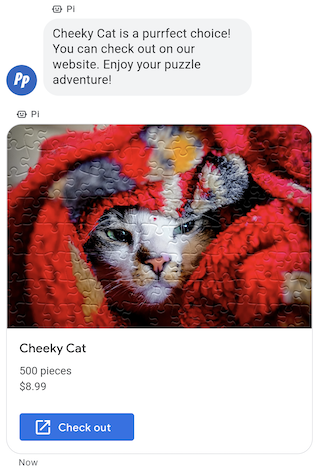
Cuando necesites enviar un conjunto de información, contenido multimedia o sugerencias relacionados, debes enviar una tarjeta enriquecida. Las tarjetas enriquecidas permiten que tu agente envíe varias unidades de información en un solo mensaje.
Las tarjetas enriquecidas pueden contener los siguientes elementos:
- Contenido multimedia (JPG, JPEG o PNG, máximo 5 MB)
- Miniatura de medios (JPG, JPEG o PNG, máximo de 25 KB)
- Título (máximo 200 caracteres)
- Descripción (máximo 2,000 caracteres)
- Una lista de respuestas sugeridas y acciones sugeridas (máximo 4)
Una tarjeta enriquecida puede contener cualquiera de los elementos enumerados o todos ellos, pero debe contener al menos contenido multimedia o un título para ser válida. Una tarjeta enriquecida puede contener un máximo de cuatro acciones y respuestas sugeridas.
Tu agente puede enviar varias tarjetas enriquecidas juntas en un carrusel de tarjetas enriquecidas.
Ejemplo
El siguiente código envía una tarjeta enriquecida con una imagen y respuestas sugeridas. Para conocer las opciones de formato y valores, consulta conversations.messages.create y RichCard.
cURL
# Copyright 2021 Google LLC # # Licensed under the Apache License, Version 2.0 (the "License"); # you may not use this file except in compliance with the License. # You may obtain a copy of the License at # https://www.apache.org/licenses/LICENSE-2.0 # Unless required by applicable law or agreed to in writing, software # distributed under the License is distributed on an "AS IS" BASIS, # WITHOUT WARRANTIES OR CONDITIONS OF ANY KIND, either express or implied. # See the License for the specific language governing permissions and # limitations under the License. # This code sends a rich card to the user with a fallback text. # Read more: https://developers.google.com/business-communications/business-messages/guides/how-to/message/send?hl=en#rich-cards # Replace the __CONVERSATION_ID__ with a conversation id that you can send messages to # Make sure a service account key file exists at ./service_account_key.json curl -X POST "https://businessmessages.googleapis.com/v1/conversations/__CONVERSATION_ID__/messages" \ -H "Content-Type: application/json" \ -H "User-Agent: curl/business-messages" \ -H "$(oauth2l header --json ./service_account_key.json businessmessages)" \ -d "{ 'messageId': '$(uuidgen)', 'representative': { 'avatarImage': 'https://developers.google.com/identity/images/g-logo.png', 'displayName': 'Chatbot', 'representativeType': 'BOT' }, 'fallback': 'Hello, world!\nSent with Business Messages\n\nReply with \"Suggestion #1\" or \"Suggestion #2\"', 'richCard': { 'standaloneCard': { 'cardContent': { 'title': 'Hello, world!', 'description': 'Sent with Business Messages.', 'media': { 'height': 'TALL', 'contentInfo':{ 'altText': 'Google logo', 'fileUrl': 'https://www.google.com/images/branding/googlelogo/2x/googlelogo_color_272x92dp.png', 'forceRefresh': 'false' } }, 'suggestions': [ { 'reply': { 'text': 'Suggestion #1', 'postbackData': 'suggestion_1' } }, { 'reply': { 'text': 'Suggestion #2', 'postbackData': 'suggestion_2' } } ] } } } }"
Node.js
/** * This code sends a rich card to the user with a fallback text. * Read more: https://developers.google.com/business-communications/business-messages/guides/how-to/message/send?hl=en#rich-cards * * This code is based on the https://github.com/google-business-communications/nodejs-businessmessages Node.js * Business Messages client library. */ /** * Edit the values below: */ const PATH_TO_SERVICE_ACCOUNT_KEY = './service_account_key.json'; const CONVERSATION_ID = 'EDIT_HERE'; const businessmessages = require('businessmessages'); const uuidv4 = require('uuid').v4; const {google} = require('googleapis'); // Initialize the Business Messages API const bmApi = new businessmessages.businessmessages_v1.Businessmessages({}); // Set the scope that we need for the Business Messages API const scopes = [ 'https://www.googleapis.com/auth/businessmessages', ]; // Set the private key to the service account file const privatekey = require(PATH_TO_SERVICE_ACCOUNT_KEY); /** * Posts a rich card message to the Business Messages API. * * @param {string} conversationId The unique id for this user and agent. * @param {string} representativeType A value of BOT or HUMAN. */ async function sendMessage(conversationId, representativeType) { const authClient = await initCredentials(); if (authClient) { // Create the payload for sending a rich card message with two suggested replies const apiParams = { auth: authClient, parent: 'conversations/' + conversationId, resource: { messageId: uuidv4(), representative: { representativeType: representativeType, }, fallback: 'Hello, world!\nSent with Business Messages\n\nReply with \"Suggestion #1\" or \"Suggestion #2\"', richCard: { standaloneCard: { cardContent: { title: 'Hello, world!', description: 'Sent with Business Messages.', media: { height: 'TALL', contentInfo: { altText: 'Google logo', fileUrl: 'https://www.google.com/images/branding/googlelogo/2x/googlelogo_color_272x92dp.png', forceRefresh: false, }, }, suggestions: [ { reply: { text: 'Suggestion #1', postbackData: 'suggestion_1', }, }, { reply: { text: 'Suggestion #2', postbackData: 'suggestion_2', }, }, ], }, }, }, }, }; // Call the message create function using the // Business Messages client library bmApi.conversations.messages.create(apiParams, {auth: authClient}, (err, response) => { console.log(err); console.log(response); }); } else { console.log('Authentication failure.'); } } /** * Initializes the Google credentials for calling the * Business Messages API. */ async function initCredentials() { // configure a JWT auth client const authClient = new google.auth.JWT( privatekey.client_email, null, privatekey.private_key, scopes, ); return new Promise(function(resolve, reject) { // authenticate request authClient.authorize(function(err, tokens) { if (err) { reject(false); } else { resolve(authClient); } }); }); } sendMessage(CONVERSATION_ID, 'BOT');
Java
import com.google.api.client.googleapis.services.AbstractGoogleClientRequest; import com.google.api.client.http.HttpBackOffUnsuccessfulResponseHandler; import com.google.api.client.http.HttpRequest; import com.google.api.client.googleapis.auth.oauth2.GoogleCredential; import com.google.api.client.googleapis.javanet.GoogleNetHttpTransport; import com.google.api.client.http.HttpTransport; import com.google.api.client.json.jackson2.JacksonFactory; import com.google.api.client.util.ExponentialBackOff; import com.google.api.services.businessmessages.v1.Businessmessages; import com.google.api.services.businessmessages.v1.model.*; import com.google.communications.businessmessages.v1.MediaHeight; import java.io.FileInputStream; import java.util.Arrays; import java.util.UUID; class SendRichCardMessageSnippet { /** * Initializes credentials used by the Business Messages API. */ private static Businessmessages.Builder getBusinessMessagesBuilder() { Businessmessages.Builder builder = null; try { GoogleCredential credential = GoogleCredential .fromStream(new FileInputStream("PATH_TO_SERVICE_ACCOUNT_KEY")); credential = credential.createScoped(Arrays.asList( "https://www.googleapis.com/auth/businessmessages")); credential.refreshToken(); HttpTransport httpTransport = GoogleNetHttpTransport.newTrustedTransport(); JacksonFactory jsonFactory = JacksonFactory.getDefaultInstance(); // Create instance of the Business Messages API builder = new Businessmessages .Builder(httpTransport, jsonFactory, null) .setApplicationName("Sample Application"); // Set the API credentials and endpoint builder.setHttpRequestInitializer(credential); } catch (Exception e) { e.printStackTrace(); } return builder; } public static void main(String args[]) { try { String conversationId = "CONVERSATION_ID"; // Create client library reference Businessmessages.Builder builder = getBusinessMessagesBuilder(); // Create a rich card with two suggested replies BusinessMessagesMessage message = new BusinessMessagesMessage() .setMessageId(UUID.randomUUID().toString()) .setFallback("Hello, world!\nSent with Business Messages\n\nReply with \"Suggestion #1\" or \"Suggestion #2\"") .setRichCard(new BusinessMessagesRichCard() .setStandaloneCard(new BusinessMessagesStandaloneCard() .setCardContent( new BusinessMessagesCardContent() .setTitle("Hello, world!") .setDescription("Sent with Business Messages.") .setSuggestions(Arrays.asList( new BusinessMessagesSuggestion() .setReply(new BusinessMessagesSuggestedReply() .setText("Suggestion #1").setPostbackData("suggestion_1") ), new BusinessMessagesSuggestion() .setReply(new BusinessMessagesSuggestedReply() .setText("Suggestion #2").setPostbackData("suggestion_2") )) ) .setMedia(new BusinessMessagesMedia() .setHeight(MediaHeight.MEDIUM.toString()) .setContentInfo( new BusinessMessagesContentInfo() .setAltText("Google logo") .setFileUrl("https://www.google.com/images/branding/googlelogo/2x/googlelogo_color_272x92dp.png") .setForceRefresh(false) )) ))) .setRepresentative(new BusinessMessagesRepresentative() .setRepresentativeType("TYPE")); // Create message request Businessmessages.Conversations.Messages.Create messageRequest = builder.build().conversations().messages() .create("conversations/" + conversationId, message); // Setup retries with exponential backoff HttpRequest httpRequest = ((AbstractGoogleClientRequest) messageRequest).buildHttpRequest(); httpRequest.setUnsuccessfulResponseHandler(new HttpBackOffUnsuccessfulResponseHandler( new ExponentialBackOff())); // Execute request httpRequest.execute(); } catch (Exception e) { e.printStackTrace(); } } }
Python
"""This code sends a rich card to the user with a fallback text. Read more: https://developers.google.com/business-communications/business-messages/guides/how-to/message/send?hl=en#rich-cards This code is based on the https://github.com/google-business-communications/python-businessmessages Python Business Messages client library. """ import uuid from businessmessages import businessmessages_v1_client as bm_client from businessmessages.businessmessages_v1_messages import BusinessMessagesCardContent from businessmessages.businessmessages_v1_messages import BusinessMessagesContentInfo from businessmessages.businessmessages_v1_messages import BusinessmessagesConversationsMessagesCreateRequest from businessmessages.businessmessages_v1_messages import BusinessMessagesMedia from businessmessages.businessmessages_v1_messages import BusinessMessagesMessage from businessmessages.businessmessages_v1_messages import BusinessMessagesRepresentative from businessmessages.businessmessages_v1_messages import BusinessMessagesRichCard from businessmessages.businessmessages_v1_messages import BusinessMessagesStandaloneCard from businessmessages.businessmessages_v1_messages import BusinessMessagesSuggestedReply from businessmessages.businessmessages_v1_messages import BusinessMessagesSuggestion from oauth2client.service_account import ServiceAccountCredentials # Edit the values below: path_to_service_account_key = './service_account_key.json' conversation_id = 'EDIT_HERE' credentials = ServiceAccountCredentials.from_json_keyfile_name( path_to_service_account_key, scopes=['https://www.googleapis.com/auth/businessmessages']) client = bm_client.BusinessmessagesV1(credentials=credentials) representative_type_as_string = 'BOT' if representative_type_as_string == 'BOT': representative_type = BusinessMessagesRepresentative.RepresentativeTypeValueValuesEnum.BOT else: representative_type = BusinessMessagesRepresentative.RepresentativeTypeValueValuesEnum.HUMAN # Create a rich card message with two suggested replies and fallback text message = BusinessMessagesMessage( messageId=str(uuid.uuid4().int), representative=BusinessMessagesRepresentative( representativeType=representative_type ), fallback='Hello, world!\nSent with Business Messages\n\nReply with \"Suggestion #1\" or \"Suggestion #2\"', richCard=BusinessMessagesRichCard( standaloneCard=BusinessMessagesStandaloneCard( cardContent=BusinessMessagesCardContent( title='Hello, world!', description='Sent with Business Messages.', suggestions=[ BusinessMessagesSuggestion( reply=BusinessMessagesSuggestedReply( text='Suggestion #1', postbackData='suggestion_1') ), BusinessMessagesSuggestion( reply=BusinessMessagesSuggestedReply( text='Suggestion #2', postbackData='suggestion_2') ) ], media=BusinessMessagesMedia( height=BusinessMessagesMedia.HeightValueValuesEnum.TALL, contentInfo=BusinessMessagesContentInfo( altText='Google logo', fileUrl='https://www.google.com/images/branding/googlelogo/2x/googlelogo_color_272x92dp.png', forceRefresh=False )) )))) # Create the message request create_request = BusinessmessagesConversationsMessagesCreateRequest( businessMessagesMessage=message, parent='conversations/' + conversation_id) # Send the message bm_client.BusinessmessagesV1.ConversationsMessagesService( client=client).Create(request=create_request)
Carruseles de tarjeta enriquecida
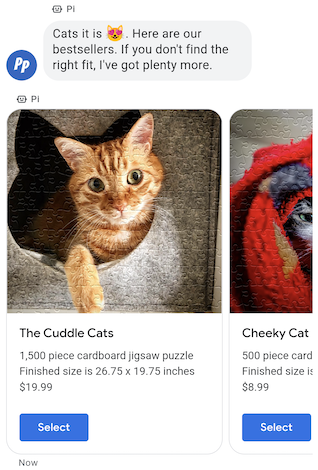
Cuando necesites presentarle a un usuario varias opciones para elegir, usa un carrusel de tarjetas enriquecidas. Los carruseles encadenan varias tarjetas enriquecidas, lo que permite a los usuarios comparar elementos y reaccionar a cada uno de forma individual.
Los carruseles pueden contener un mínimo de dos y un máximo de diez tarjetas enriquecidas. Las tarjetas enriquecidas dentro de los carruseles deben cumplir con los requisitos generales de las tarjetas enriquecidas en cuanto a contenido y altura.
Ejemplo
El siguiente código envía un carrusel de tarjetas enriquecidas. Para conocer las opciones de formato y valores, consulta conversations.messages.create y RichCard.
cURL
# Copyright 2021 Google LLC # # Licensed under the Apache License, Version 2.0 (the "License"); # you may not use this file except in compliance with the License. # You may obtain a copy of the License at # https://www.apache.org/licenses/LICENSE-2.0 # Unless required by applicable law or agreed to in writing, software # distributed under the License is distributed on an "AS IS" BASIS, # WITHOUT WARRANTIES OR CONDITIONS OF ANY KIND, either express or implied. # See the License for the specific language governing permissions and # limitations under the License. # This code sends to the user a carousel with rich cards and a fallback text. # Read more: https://developers.google.com/business-communications/business-messages/guides/how-to/message/send?hl=en#rich-card-carousels # Replace the __CONVERSATION_ID__ with a conversation id that you can send messages to # Make sure a service account key file exists at ./service_account_key.json curl -X POST "https://businessmessages.googleapis.com/v1/conversations/__CONVERSATION_ID__/messages" \ -H "Content-Type: application/json" \ -H "User-Agent: curl/business-messages" \ -H "$(oauth2l header --json ./service_account_key.json businessmessages)" \ -d "{ 'messageId': '$(uuidgen)', 'representative': { 'avatarImage': 'https://developers.google.com/identity/images/g-logo.png', 'displayName': 'Chatbot', 'representativeType': 'BOT' }, 'fallback': 'Card #1\nThe description for card #1\n\nCard #2\nThe description for card #2\n\nReply with \"Card #1\" or \"Card #2\"', 'richCard': { 'carouselCard': { 'cardWidth': 'MEDIUM', 'cardContents': [ { 'title': 'Card #1', 'description': 'The description for card #1', 'suggestions': [ { 'reply': { 'text': 'Card #1', 'postbackData': 'card_1' } } ], 'media': { 'height': 'MEDIUM', 'contentInfo': { 'fileUrl': 'https://storage.googleapis.com/kitchen-sink-sample-images/cute-dog.jpg', 'forceRefresh': 'false', } } }, { 'title': 'Card #2', 'description': 'The description for card #2', 'suggestions': [ { 'reply': { 'text': 'Card #2', 'postbackData': 'card_2' } } ], 'media': { 'height': 'MEDIUM', 'contentInfo': { 'fileUrl': 'https://storage.googleapis.com/kitchen-sink-sample-images/elephant.jpg', 'forceRefresh': 'false', } } } ] } } }"
Node.js
/** * This code sends to the user a carousel with rich cards and a fallback text. * Read more: https://developers.google.com/business-communications/business-messages/guides/how-to/message/send?hl=en#rich-card-carousels * * This code is based on the https://github.com/google-business-communications/nodejs-businessmessages Node.js * Business Messages client library. */ /** * Edit the values below: */ const PATH_TO_SERVICE_ACCOUNT_KEY = './service_account_key.json'; const CONVERSATION_ID = 'EDIT_HERE'; const businessmessages = require('businessmessages'); const uuidv4 = require('uuid').v4; const {google} = require('googleapis'); // Initialize the Business Messages API const bmApi = new businessmessages.businessmessages_v1.Businessmessages({}); // Set the scope that we need for the Business Messages API const scopes = [ 'https://www.googleapis.com/auth/businessmessages', ]; // Set the private key to the service account file const privatekey = require(PATH_TO_SERVICE_ACCOUNT_KEY); /** * Posts a carousel card message to the Business Messages API. * * @param {string} conversationId The unique id for this user and agent. * @param {string} representativeType A value of BOT or HUMAN. */ async function sendMessage(conversationId, representativeType) { const authClient = await initCredentials(); if (authClient) { // Create the payload for sending carousel message // with two cards and a suggested reply for each card const apiParams = { auth: authClient, parent: 'conversations/' + conversationId, resource: { messageId: uuidv4(), representative: { representativeType: representativeType, }, fallback: 'Card #1\nThe description for card #1\n\nCard #2\nThe description for card #2\n\nReply with \"Card #1\" or \"Card #2\"', richCard: { carouselCard: { cardWidth: 'MEDIUM', cardContents: [ { title: 'Card #1', description: 'The description for card #1', suggestions: [ { reply: { text: 'Card #1', postbackData: 'card_1' } } ], media: { height: 'MEDIUM', contentInfo: { fileUrl: 'https://storage.googleapis.com/kitchen-sink-sample-images/cute-dog.jpg', forceRefresh: 'false', } } }, { title: 'Card #2', description: 'The description for card #2', suggestions: [ { reply: { text: 'Card #2', postbackData: 'card_2' } } ], media: { height: 'MEDIUM', contentInfo: { fileUrl: 'https://storage.googleapis.com/kitchen-sink-sample-images/elephant.jpg', forceRefresh: 'false', } } } ] } } }, }; // Call the message create function using the // Business Messages client library bmApi.conversations.messages.create(apiParams, {auth: authClient}, (err, response) => { console.log(err); console.log(response); }); } else { console.log('Authentication failure.'); } } /** * Initializes the Google credentials for calling the * Business Messages API. */ async function initCredentials() { // configure a JWT auth client const authClient = new google.auth.JWT( privatekey.client_email, null, privatekey.private_key, scopes, ); return new Promise(function(resolve, reject) { // authenticate request authClient.authorize(function(err, tokens) { if (err) { reject(false); } else { resolve(authClient); } }); }); } sendMessage(CONVERSATION_ID, 'BOT');
Java
import com.google.api.client.googleapis.services.AbstractGoogleClientRequest; import com.google.api.client.http.HttpBackOffUnsuccessfulResponseHandler; import com.google.api.client.http.HttpRequest; import com.google.api.client.googleapis.auth.oauth2.GoogleCredential; import com.google.api.client.googleapis.javanet.GoogleNetHttpTransport; import com.google.api.client.http.HttpTransport; import com.google.api.client.json.jackson2.JacksonFactory; import com.google.api.client.util.ExponentialBackOff; import com.google.api.services.businessmessages.v1.Businessmessages; import com.google.api.services.businessmessages.v1.model.*; import com.google.communications.businessmessages.v1.MediaHeight; import java.io.FileInputStream; import java.util.Arrays; import java.util.UUID; class SendRichCardCarouselMessage { /** * Initializes credentials used by the Business Messages API. */ private static Businessmessages.Builder getBusinessMessagesBuilder() { Businessmessages.Builder builder = null; try { GoogleCredential credential = GoogleCredential .fromStream(new FileInputStream("PATH_TO_SERVICE_ACCOUNT_KEY")); credential = credential.createScoped(Arrays.asList( "https://www.googleapis.com/auth/businessmessages")); credential.refreshToken(); HttpTransport httpTransport = GoogleNetHttpTransport.newTrustedTransport(); JacksonFactory jsonFactory = JacksonFactory.getDefaultInstance(); // Create instance of the Business Messages API builder = new Businessmessages .Builder(httpTransport, jsonFactory, null) .setApplicationName("Sample Application"); // Set the API credentials and endpoint builder.setHttpRequestInitializer(credential); } catch (Exception e) { e.printStackTrace(); } return builder; } public static void main(String args[]) { try { String conversationId = "CONVERSATION_ID"; // Create client library reference Businessmessages.Builder builder = getBusinessMessagesBuilder(); // Create a rich card with two suggested replies BusinessMessagesMessage message = new BusinessMessagesMessage() .setMessageId(UUID.randomUUID().toString()) .setFallback("Hello, world!\nSent with Business Messages\n\nReply with \"Suggestion #1\" or \"Suggestion #2\"") .setRichCard(new BusinessMessagesRichCard() .setCarouselCard(new BusinessMessagesCarouselCard().setCardWidth("MEDIUM") .setCardContents(Arrays.asList( new BusinessMessagesCardContent() .setTitle("Card #1") .setDescription("The description for card #1") .setSuggestions(Arrays.asList(new BusinessMessagesSuggestion() .setReply(new BusinessMessagesSuggestedReply() .setText("Card #1").setPostbackData("card_1") ))) .setMedia(new BusinessMessagesMedia() .setHeight(MediaHeight.MEDIUM.toString()) .setContentInfo(new BusinessMessagesContentInfo() .setFileUrl("https://storage.googleapis.com/kitchen-sink-sample-images/cute-dog.jpg"))), new BusinessMessagesCardContent() .setTitle("Card #2") .setDescription("The description for card #2") .setSuggestions(Arrays.asList(new BusinessMessagesSuggestion() .setReply(new BusinessMessagesSuggestedReply() .setText("Card #2").setPostbackData("card_2") ))) .setMedia(new BusinessMessagesMedia() .setHeight(MediaHeight.MEDIUM.toString()) .setContentInfo(new BusinessMessagesContentInfo() .setFileUrl("https://storage.googleapis.com/kitchen-sink-sample-images/elephant.jpg"))) ) ))) .setRepresentative(new BusinessMessagesRepresentative() .setRepresentativeType("TYPE")); // Create message request Businessmessages.Conversations.Messages.Create messageRequest = builder.build().conversations().messages() .create("conversations/" + conversationId, message); // Setup retries with exponential backoff HttpRequest httpRequest = ((AbstractGoogleClientRequest) messageRequest).buildHttpRequest(); httpRequest.setUnsuccessfulResponseHandler(new HttpBackOffUnsuccessfulResponseHandler( new ExponentialBackOff())); // Execute request httpRequest.execute(); } catch (Exception e) { e.printStackTrace(); } } }
Python
"""This code sends to the user a carousel with rich cards and a fallback text. Read more: https://developers.google.com/business-communications/business-messages/guides/how-to/message/send?hl=en#rich-card-carousels This code is based on the https://github.com/google-business-communications/python-businessmessages Python Business Messages client library. """ import uuid from businessmessages import businessmessages_v1_client as bm_client from businessmessages.businessmessages_v1_messages import BusinessMessagesCardContent from businessmessages.businessmessages_v1_messages import BusinessMessagesCarouselCard from businessmessages.businessmessages_v1_messages import BusinessMessagesContentInfo from businessmessages.businessmessages_v1_messages import BusinessmessagesConversationsMessagesCreateRequest from businessmessages.businessmessages_v1_messages import BusinessMessagesMedia from businessmessages.businessmessages_v1_messages import BusinessMessagesMessage from businessmessages.businessmessages_v1_messages import BusinessMessagesRepresentative from businessmessages.businessmessages_v1_messages import BusinessMessagesRichCard from businessmessages.businessmessages_v1_messages import BusinessMessagesSuggestedReply from businessmessages.businessmessages_v1_messages import BusinessMessagesSuggestion from oauth2client.service_account import ServiceAccountCredentials # Edit the values below: path_to_service_account_key = './service_account_key.json' conversation_id = 'EDIT_HERE' credentials = ServiceAccountCredentials.from_json_keyfile_name( path_to_service_account_key, scopes=['https://www.googleapis.com/auth/businessmessages']) client = bm_client.BusinessmessagesV1(credentials=credentials) representative_type_as_string = 'BOT' if representative_type_as_string == 'BOT': representative_type = BusinessMessagesRepresentative.RepresentativeTypeValueValuesEnum.BOT else: representative_type = BusinessMessagesRepresentative.RepresentativeTypeValueValuesEnum.HUMAN # Create a carousel message with two cards and a suggested reply for each card # and fallback text message = BusinessMessagesMessage( messageId=str(uuid.uuid4().int), representative=BusinessMessagesRepresentative( representativeType=representative_type ), fallback='Card #1\nThe description for card #1\n\nCard #2\nThe description for card #2\n\nReply with \"Card #1\" or \"Card #2\"', richCard=BusinessMessagesRichCard( carouselCard=BusinessMessagesCarouselCard( cardWidth=BusinessMessagesCarouselCard.CardWidthValueValuesEnum.MEDIUM, cardContents=[ BusinessMessagesCardContent( title='Card #1', description='The description for card #1', suggestions=[ BusinessMessagesSuggestion( reply=BusinessMessagesSuggestedReply( text='Card #1', postbackData='card_1') ) ], media=BusinessMessagesMedia( height=BusinessMessagesMedia.HeightValueValuesEnum.MEDIUM, contentInfo=BusinessMessagesContentInfo( fileUrl='https://storage.googleapis.com/kitchen-sink-sample-images/cute-dog.jpg', forceRefresh=False))), BusinessMessagesCardContent( title='Card #2', description='The description for card #2', suggestions=[ BusinessMessagesSuggestion( reply=BusinessMessagesSuggestedReply( text='Card #2', postbackData='card_2') ) ], media=BusinessMessagesMedia( height=BusinessMessagesMedia.HeightValueValuesEnum.MEDIUM, contentInfo=BusinessMessagesContentInfo( fileUrl='https://storage.googleapis.com/kitchen-sink-sample-images/elephant.jpg', forceRefresh=False))) ]))) # Create the message request create_request = BusinessmessagesConversationsMessagesCreateRequest( businessMessagesMessage=message, parent='conversations/' + conversation_id) # Send the message bm_client.BusinessmessagesV1.ConversationsMessagesService( client=client).Create(request=create_request)