Servizio Tasks
Mantieni tutto organizzato con le raccolte
Salva e classifica i contenuti in base alle tue preferenze.
Il servizio Tasks ti consente di utilizzare l'API Tasks in Google Apps Script. Questa API
consente agli utenti di gestire le proprie attività in Gmail.
Per informazioni dettagliate su questo servizio, consulta la
documentazione di riferimento dell'API Tasks.
Come tutti i servizi avanzati in Apps Script, il servizio
Tasks utilizza gli stessi oggetti, metodi e parametri dell'API pubblica. Per saperne di più, consulta
Come vengono determinate le firme dei metodi.
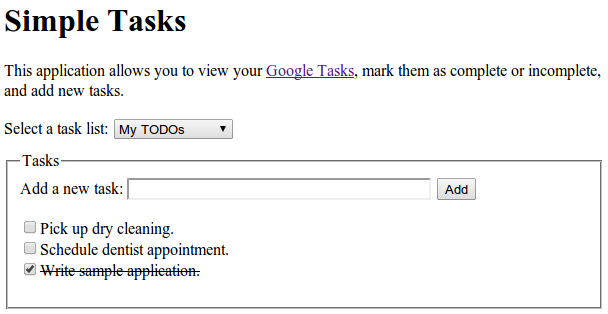
L'applicazione web di esempio Simple Tasks mostra come utilizzare
il servizio Tasks per le operazioni di lettura e scrittura. Puoi visualizzare il codice sorgente completo nel nostro repository GitHub.
Codice di esempio
Il seguente codice campione utilizza la versione 1 dell'API.
Elenca elenchi di attività
Questo esempio elenca gli elenchi di attività nel tuo account.
/** * Lists the titles and IDs of tasksList. * @see https://developers.google.com/tasks/reference/rest/v1/tasklists/list */functionlistTaskLists(){try{// Returns all the authenticated user's task lists.consttaskLists=Tasks.Tasklists.list();// If taskLists are available then print all tasklists.if(!taskLists.items){console.log("No task lists found.");return;}// Print the tasklist title and tasklist id.for(leti=0;i < taskLists.items.length;i++){consttaskList=taskLists.items[i];console.log('Task list with title "%s" and ID "%s" was found.',taskList.title,taskList.id,);}}catch(err){// TODO (developer) - Handle exception from Task APIconsole.log("Failed with an error %s ",err.message);}}
Elenca attività
Questo esempio elenca le attività all'interno di un determinato elenco di attività.
/** * Lists task items for a provided tasklist ID. * @param {string} taskListId The tasklist ID. * @see https://developers.google.com/tasks/reference/rest/v1/tasks/list */functionlistTasks(taskListId){try{// List the task items of specified tasklist using taskList id.consttasks=Tasks.Tasks.list(taskListId);// If tasks are available then print all task of given tasklists.if(!tasks.items){console.log("No tasks found.");return;}// Print the task title and task id of specified tasklist.for(leti=0;i < tasks.items.length;i++){consttask=tasks.items[i];console.log('Task with title "%s" and ID "%s" was found.',task.title,task.id,);}}catch(err){// TODO (developer) - Handle exception from Task APIconsole.log("Failed with an error %s",err.message);}}
Aggiungi attività
Questo esempio aggiunge una nuova attività a un elenco di attività.
/** * Adds a task to a tasklist. * @param {string} taskListId The tasklist to add to. * @see https://developers.google.com/tasks/reference/rest/v1/tasks/insert */functionaddTask(taskListId){// Task details with title and notes for inserting new tasklettask={title:"Pick up dry cleaning",notes:"Remember to get this done!",};try{// Call insert method with taskDetails and taskListId to insert Task to specified tasklist.task=Tasks.Tasks.insert(task,taskListId);// Print the Task ID of created task.console.log('Task with ID "%s" was created.',task.id);}catch(err){// TODO (developer) - Handle exception from Tasks.insert() of Task APIconsole.log("Failed with an error %s",err.message);}}
[[["Facile da capire","easyToUnderstand","thumb-up"],["Il problema è stato risolto","solvedMyProblem","thumb-up"],["Altra","otherUp","thumb-up"]],[["Mancano le informazioni di cui ho bisogno","missingTheInformationINeed","thumb-down"],["Troppo complicato/troppi passaggi","tooComplicatedTooManySteps","thumb-down"],["Obsoleti","outOfDate","thumb-down"],["Problema di traduzione","translationIssue","thumb-down"],["Problema relativo a esempi/codice","samplesCodeIssue","thumb-down"],["Altra","otherDown","thumb-down"]],["Ultimo aggiornamento 2026-05-05 UTC."],[],[]]