

Thành phần Điểm đánh dấu vị trí
Thành phần Điểm đánh dấu địa điểm cho phép bạn tạo chú thích có thể tuỳ chỉnh cho bản đồ để hiển thị thông tin chính về Địa điểm ngay trên bản đồ. Bạn có thể hiển thị nội dung như điểm xếp hạng, loại địa điểm, trạng thái mở hoặc đóng cửa, khoảng giá hoặc văn bản tuỳ chỉnh của một địa điểm (ví dụ: nhãn do AI tạo hoặc số hành trình). Điều này giúp người dùng khám phá bản đồ một cách hiệu quả hơn mà không cần nhấn vào thẻ địa điểm chi tiết.
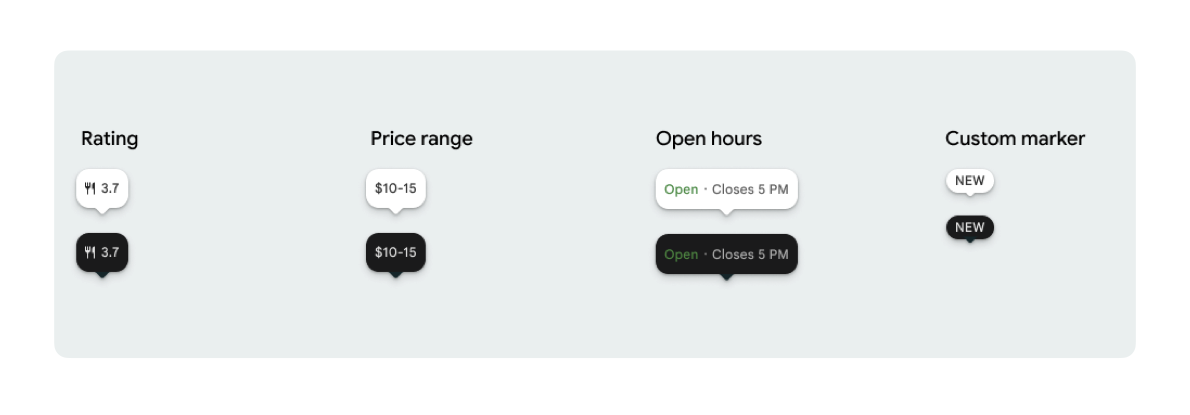
Bạn có thể hiển thị một biểu tượng điểm đánh dấu và văn bản điểm đánh dấu (không bắt buộc) cho mỗi PlaceMarker.
Các biểu tượng có sẵn là:
Type: Loại địa điểm.None: Không có biểu tượng.
Rating: Điểm xếp hạng.PriceRange: Khoảng giá (ví dụ: 10 – 20 USD).OpenStatus: Doanh nghiệp có đang mở cửa hay không.Custom: Văn bản tuỳ chỉnh (ví dụ: "PHỔ BIẾN").
Tham chiếu địa điểm bằng Mã địa điểm (PlaceId), tên tài nguyên (ResourceName) hoặc toạ độ địa lý (Coordinates).
Yêu cầu về việc hiển thị và ghi công
Khi các điểm đánh dấu trên bản đồ trong Places UI Kit xuất hiện, các điểm đánh dấu này không được xuất hiện riêng lẻ. Các thành phần này phải có tính tương tác và mở một Thành phần chi tiết về địa điểm hoặc Hộp đèn được liên kết khi người dùng nhấp hoặc nhấn để cung cấp thông tin bắt buộc về thương hiệu của Google, thông tin ghi nhận đóng góp và quy trình Báo cáo vấn đề.
Hãy xem các yêu cầu về việc ghi công ảnh và bài đánh giá trong trường hợp không gian bị hạn chế.
Ví dụ về điểm đánh dấu
Chúng tôi cung cấp các hàm @Composable Jetpack Compose để loại bỏ chi phí chung của trình bao bọc View-to-Compose và tránh các vấn đề về sự không khớp giao diện.
Tuỳ chỉnh điểm đánh dấu cơ bản
Ví dụ về mã sau đây minh hoạ các chế độ tuỳ chỉnh cơ bản cho điểm đánh dấu vị trí, bao gồm cả việc ẩn mỏ bong bóng thoại hình tam giác cho điểm đánh dấu mặc định.
Kotlin
import androidx.compose.runtime.Composable
import com.google.android.libraries.places.compose.PlaceMarker
import com.google.android.libraries.places.compose.marker.MarkerIcon
import com.google.android.libraries.places.compose.marker.MarkerText
import com.google.android.libraries.places.compose.PlaceReference

@Composable
fun DefaultMarker() {
    PlaceMarker(
        reference = PlaceReference.PlaceId("PLACE_ID"),
        icon = MarkerIcon.None,
        beakPresence = false, // remove beak
    )
}

@Composable
fun RatingMarker() {
    PlaceMarker(
        reference = PlaceReference.PlaceId("PLACE_ID"),
        icon = MarkerIcon.None,
        text = MarkerText.Rating
    )
}

@Composable
fun TypeAndRatingMarker() {
    PlaceMarker(
        reference = PlaceReference.PlaceId("PLACE_ID"),
        icon = MarkerIcon.Type,
        text = MarkerText.Rating

    )
}

@Composable
fun PriceRangeMarker() {
    PlaceMarker(
        reference = PlaceReference.ResourceName("places/PLACE_RESOURCE_NAME"),
        icon = MarkerIcon.None,
        text = MarkerText.PriceRange
    )
}

@Composable
fun OpenStatusMarker() {
   PlaceMarker(
       reference = PlaceReference.Coordinates(latitude = 37.7749, longitude = -122.4194),
        icon = MarkerIcon.None,
        text = MarkerText.OpenStatus
   )
}

@Composable
fun CustomTextMarker() {
    PlaceMarker(
        reference = PlaceReference.PlaceId("PLACE_ID"),
        icon = MarkerIcon.None,
        // Custom text accepts a String to display a number (e.g. "3") or text (e.g. "NEW")
        text = MarkerText.Custom("NEW")
    )
}
Tạo trình theo dõi lượt nhấp
Bạn có thể cung cấp một lệnh gọi lại onClick để kích hoạt các thao tác tuỳ chỉnh khi người dùng nhấn vào một điểm đánh dấu độc lập. Tuy nhiên, khi điểm đánh dấu được kết xuất trên bản đồ (ví dụ: bên trong một MarkerComposable), các sự kiện nhấn sẽ bị bản đồ chặn. Trong trường hợp này, bạn phải sử dụng trình xử lý onClick của MarkerComposable thay vì trình xử lý của điểm đánh dấu.
Ví dụ về mã sau đây cho thấy cách sử dụng trình xử lý onClick của MarkerComposable.
Kotlin
import android.util.Log
import androidx.compose.runtime.Composable
import com.google.android.libraries.places.compose.PlaceMarker
import com.google.android.libraries.places.compose.marker.MarkerIcon
import com.google.android.libraries.places.compose.PlaceReference


/**
 * PlaceMarker used outside of a map (e.g. in a list, bottom sheet, or custom overlay).
 *
 * There is no host component that provides a default click behavior here, so PlaceMarker's own
 * `onClick` is the only way for a developer to react to a tap. This is why `onClick` must stay
 * on the PlaceMarker API.
 */
@Composable
fun ClickableMarkerWithCustomConfig() {
   PlaceMarker(
       reference = PlaceReference.PlaceId("PLACE_ID"),
       icon = MarkerIcon.Type,

       onClick = { place ->
           openPlaceCard(place.id) // developer might want to open the place card
           Log.i("PlacesMarker", "Marker was tapped by user!")
       }
   )
}

/**
 * PlaceMarker used as the content of a MarkerComposable on a GoogleMap.
 *
 * MarkerComposable does NOT add PlaceMarker to the touch-input hierarchy: it snapshots the
 * composable into a bitmap and hands that bitmap to the Maps renderer as the marker icon. The
 * rendered marker is a map object, not a Compose node, so:
 *
 *   - PlaceMarker's own `onClick` would never be invoked here (no touch events ever reach it).
 *   - The tap is delivered by the Maps SDK to MarkerComposable's `onClick`, which is the only
 *     click entry point on a map.
 *
 * Accordingly, the state-based `PlaceMarker(state = ...)` overload used below deliberately does
 * not expose an `onClick` parameter, so the correct handler is the only one available.
 */
@Composable
fun PlaceMarkerOnMap(markerState: PlaceMarkerState) {
  GoogleMap(
    modifier = Modifier.fillMaxSize(),
    cameraPositionState = rememberCameraPositionState(),
  ) {
    markerState.location?.let { position ->
      MarkerComposable(
        state = rememberUpdatedMarkerState(position = position),
        // this is the click handler for the map use case.
        onClick = {
          markerState.place?.let { place -> openPlaceCard(place.id) }
          true // consume the event
        },
      ) {
        PlaceMarker(state = markerState)
      }
    }
  }
}
Xử lý trạng thái tải và lệnh gọi lại
Ví dụ về mã sau đây minh hoạ cách cung cấp các lệnh gọi lại để xử lý lỗi kết xuất hoặc lỗi thiếu dữ liệu.
Kotlin
import android.util.Log
import androidx.compose.runtime.Composable
import com.google.android.libraries.places.compose.PlaceMarker
import com.google.android.libraries.places.compose.marker.MarkerIcon
import com.google.android.libraries.places.compose.PlaceReference

@Composable
fun StatusHandlingMarker() {
    PlaceMarker(
        reference = PlaceReference.PlaceId("PLACE_ID"),
        icon = MarkerIcon.Type,
        // Triggered when attribute data is successfully fetched and the marker is rendered.
        // Returns a minimal Place object with ID, location (LatLng), and viewport fields set.
        onMarkerLoaded = { place ->
            Log.i("PlacesMarker", "Marker successfully loaded for place ID: ${place.id}")
        },
        // Triggered when data fetching fails or required attribute data is missing for the place.
        // Returns an optional Place object and an Exception describing the root cause.
        onMarkerLoadFailed = { place, exception ->
            Log.e("PlacesMarker", "Failed to load marker for place ID: ${place?.id}", exception)
        }
    )
}
Sử dụng PlaceMarkerState để đặt điểm đánh dấu trên bản đồ
Đối tượng Địa điểm được trả về cùng với vị trí và khung hiển thị để giúp bạn quyết định vị trí đặt điểm đánh dấu.
Kotlin
// Step 1: Obtain configured handle in a single 1-line call (PlaceMarker mounted internally)
val markerState = rememberPlaceMarkerState(
  reference = PlaceReference.PlaceId(placeId),
  icon = MarkerIcon.Type
)

// Step 2: Pass PlaceMarkerState.location and PlaceMarker(state = PlaceMarkerState) directly to the map marker
GoogleMap(...) {
  markerState.location?.let { position ->
    MarkerComposable(
      state = rememberMarkerState(position = position),
      onClick = {
        markerState.place?.let { place ->
          // Handle marker click
        }
        true
      }
    ) {
      PlaceMarker(state = markerState) // Render marker UI content directly on map canvas
    }
  }
}
Điều chỉnh tỷ lệ điểm đánh dấu thành kích thước tuỳ chỉnh
Kotlin
// Off the map: scale with a one-line modifier.
// Modifier.scale is a draw-time transform, so the bubble, beak, icon and text all scale together.
@Composable
fun ScaledMarker() {
  PlaceMarker(
    reference = PlaceReference.PlaceId(placeId),
    icon = MarkerIcon.Type,
    text = MarkerText.Rating,
    modifier = Modifier.scale(2.1f),
  )
}

// On the map: scale by overriding LocalDensity.
// MarkerComposable snapshots its content into a marker bitmap sized to the measured layout bounds.
// Modifier.scale does not change those bounds, so the marker would be clipped and blurry. Scaling
// the density re-measures every dp and sp inside the marker, so the bitmap, the layout bounds and
// the map hit target all grow with it.
@Composable
fun ScaledMarkerOnMap(markerState: PlaceMarkerState) {
  val density = LocalDensity.current
  val scaledDensity = remember(density) {
    Density(density = density.density * 2.1f, fontScale = density.fontScale * 2.1f)
  }
  GoogleMap(...) {
    markerState.location?.let { position ->
      MarkerComposable(
        state = rememberUpdatedMarkerState(position = position),
        anchor = Offset(0.5f, 1.0f),
      ) {
        CompositionLocalProvider(LocalDensity provides scaledDensity) {
          PlaceMarker(state = markerState)
        }
      }
    }
  }
}