
AltitudeMode is the property that defines a map element's vertical placement.
It determines if an object is rendered relative to the terrain, relative to
above-ground features (like buildings), or at an absolute height above sea
level.
AltitudeMode is the property that determines where elements that you add to
the 3D map, such as markers, polylines, polygons, and models, are rendered
relative to the earth's surface. Additionally, AltitudeMode controls where
the camera is positioned during flyTo and flyAround animations.
The following guide provides information on using AltitudeMode effectively,
and considerations for factors that impact how elements are rendered.
Digital elevation models
Feature placement is governed by two underlying Digital Elevation Models (DEMs) accessible in the API:
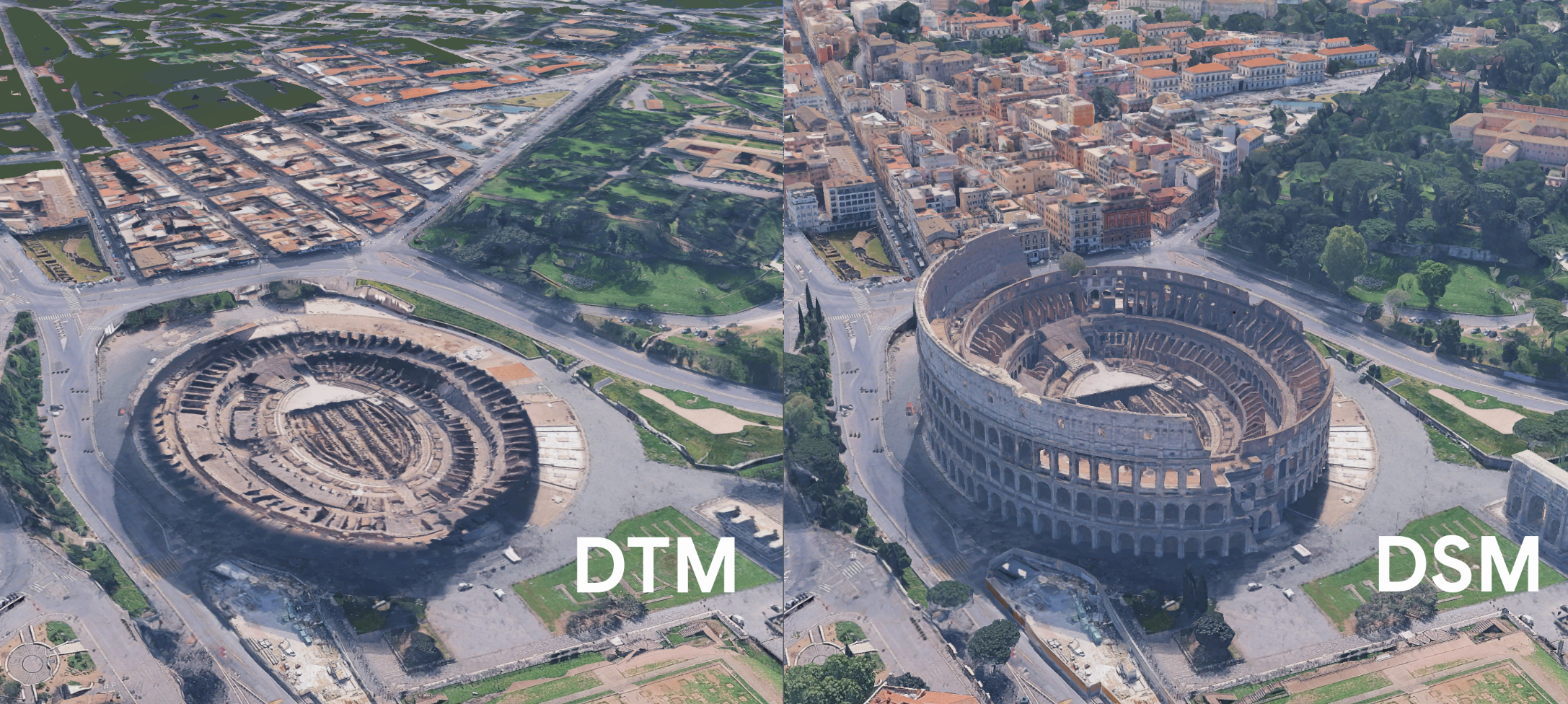
- Digital Terrain Model (DTM) / "Ground": A "bare-earth" view showing the elevation of the underlying terrain, with above-ground objects removed.
- Digital Surface Model (DSM) / "Mesh": A surface representation that includes terrain elevation plus above-ground features like buildings and trees.
The following image shows the difference between the DTM and DSM renderings of an urban area:
AltitudeMode options
The choice of AltitudeMode determines how the feature's altitude value (if
supplied) is interpreted relative to the digital elevation models.
ABSOLUTE: Renders the object relative to the mean sea level, calculated using EGM96.CLAMP_TO_GROUND: Renders the object directly on the DTM (Ground), ignoring any provided altitude and following the terrain.RELATIVE_TO_GROUND: Renders the object relative to the DTM (Ground) surface.RELATIVE_TO_MESH: Renders the object relative to the DSM (Mesh)—the highest surface, including ground, buildings, and water.
The following sample lets you change the a polyline's AltitudeMode to observe
how various modes impact the polyline's rendering on complex geometry in a
semi-urban setting:
Altitude values in relative modes
When using relative modes (RELATIVE_TO_GROUND or RELATIVE_TO_MESH), the
supplied altitude value is an offset from the chosen base surface, not a fixed
height above sea level. For example, an altitude of 100 will place the feature
100 meters above the DTM or DSM.
If the feature data doesn't include an altitude, a relative mode like
RELATIVE_TO_MESH will place the feature directly on top of the mesh/surface.
However, for polylines and polygons, the connections between points will be
straight lines, which might cause the line to pass through the mesh between
points if you don't use interpolation.
Next steps
- Read the Architecture Center
topic for a more in-depth
overview of
AltitudeMode, including information onAltitudeModeand markers.