
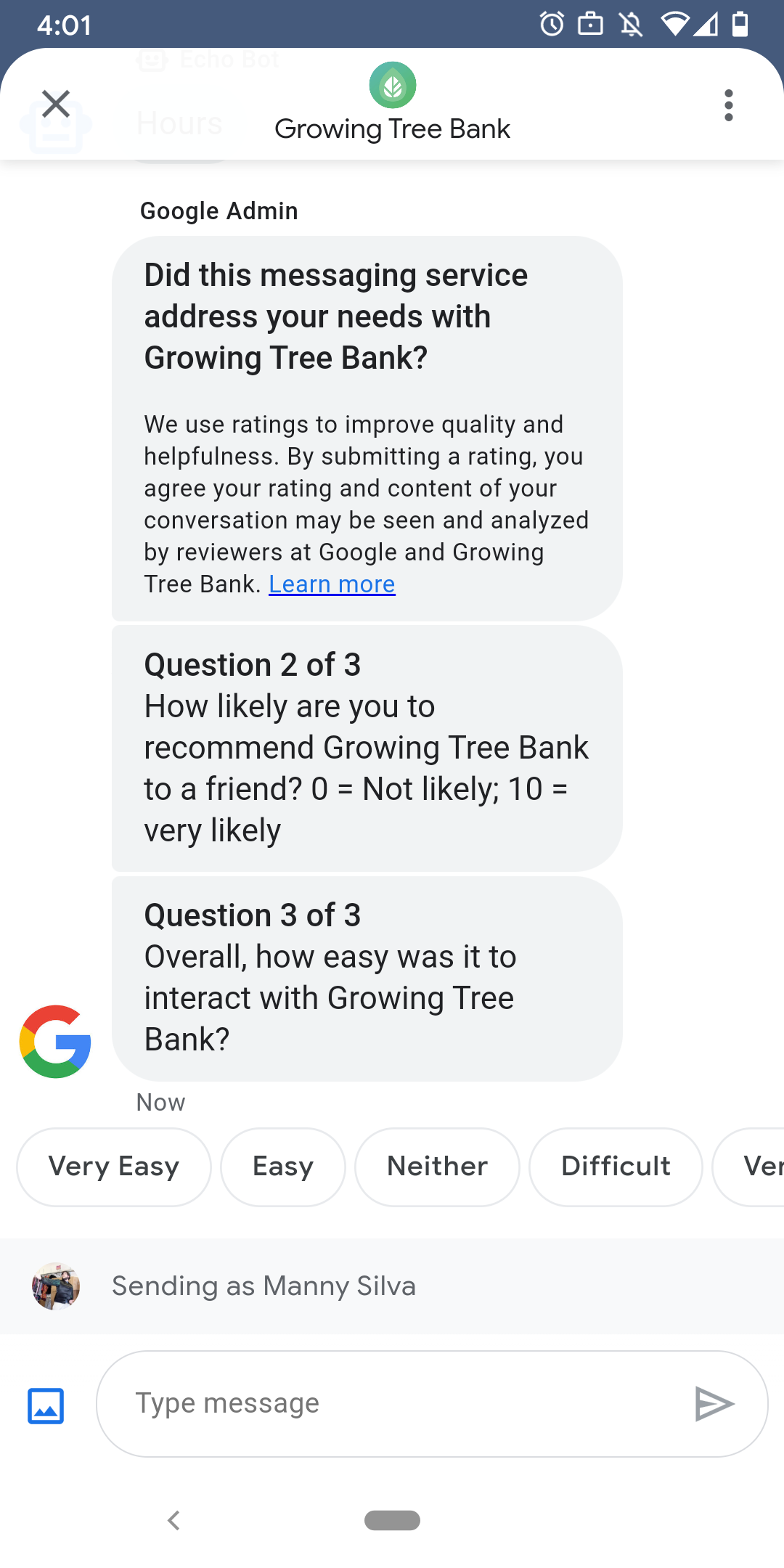
為確保使用者與代理程式的互動體驗良好,Google 會在使用者與代理程式結束對話後,傳送問卷調查給使用者。如要在不同時間點收集資料 (例如對話結束時),可以在對話中傳送問卷調查。問卷調查會顯示在對話中,使用者可根據問題透過各種選項提供意見回饋。
Google 觸發問卷調查的時間取決於服務專員的訊息服務時間:
| 可用性 | 問卷調查時間 |
|---|---|
| 僅限機器人 | 最後一則訊息傳送後 30 分鐘 |
| 僅限真人 | 最後一則訊息傳送後的 24 個營業時間 |
| 機器人和真人 | 最後一則訊息傳送後的 24 個營業時間 |
如果未來 7 天的營業時間少於 24 小時,系統會改用 24 小時。
每 24 小時只能在每場對話中傳送一份問卷調查。如果你在 Google 傳送問卷調查前,先在對話中傳送問卷調查,Google 就不會傳送問卷調查到該對話。如果代理程式在 24 小時內於同一則對話中傳送多份問卷調查,Business Messages 只會嘗試將第一份問卷調查傳送給使用者。
下次使用者完成問卷調查後與服務專員展開對話時,服務專員會顯示問候語。如果使用者未回應問卷調查,問卷調查會在 7 天後失效,使用者下次對話時會看到問候訊息。
如果使用者在對話中進行問卷調查時傳送與問卷調查無關的訊息,Google 商家即時通訊會取消問卷調查,並將使用者的訊息傳送至服務專員的 Webhook。
如果您未向使用者傳送問卷調查,您的代理程式仍會收到 Google 問卷調查結果 (透過 Webhook),並應接受及相應處理。
問題
問卷調查最多可包含五個問題,分為三類:必填、範本和自訂。問卷調查一律會包含必填問題,然後顯示最多兩個範本問題,最後顯示最多兩個自訂問題。
必答問題
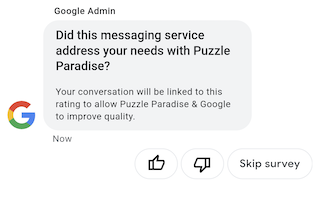
系統會將必填問題翻譯成 Business Messages 支援的所有語言。使用者可以選取「喜歡」或「不喜歡」圖示來回應。
必填問題:「這項訊息服務是否符合你與『AGENT_NAME』的通訊需求?」
範本問題
範本問題是 Google 定義的問題,可選擇是否使用,並已翻譯成 Business Messages 支援的所有語言。問卷最多可包含兩個範本問題。使用者回覆格式會因問題而異。
範本問題包括
- 你對之前傳送訊息給「AGENT_NAME」的體驗滿意嗎?
- 你可能會向好友推薦「AGENT_NAME」嗎?
- 下次想與「AGENT_NAME」聯絡時,你可能會選擇傳送訊息嗎?
- 整體來說,與「AGENT_NAME」互動的過程還算容易嗎?
- 你同意或不同意以下敘述:「AGENT_NAME」可協助我輕鬆解決問題。
- 請就你對支援服務專員的整體滿意度評分。
- 這場即時通訊工作階段是否幫得上你的忙,讓你不必撥打電話給「AGENT_NAME」?
如要查看所有可用的範本問題清單並取得範本 ID,請按照下列步驟操作:
- 開啟 Business Communications 開發人員控制台,然後登入 Business Messages Google 帳戶。
- 選擇代理程式。
- 在左側導覽區中,按一下「問卷調查」。
自訂問題
問卷最多可包含兩個自訂問題。如果指定自訂問題,請為代理程式支援的每個語言代碼提供問題版本。您必須為預設語言代碼指定每個問題的版本。如果使用者收到問卷調查,但所在地區沒有指定版本的自訂問題,系統會以代理程式預設語言代碼定義的問題顯示。
自訂問題的回覆支援個別文字和回傳資料,與建議回覆類似。
自訂問卷調查
如要為代理程式自訂問卷調查,請按照下列步驟操作:
- 開啟 Business Communications 開發人員控制台,然後登入 Business Messages Google 帳戶。
- 選擇代理程式。
- 在左側導覽區中,按一下「問卷調查」。
- 問卷最多可新增兩個範本問題。
- 按一下「建立自訂問題」,即可在問卷調查中新增自訂問題。
如需格式和值選項,請參閱 surveyConfig。
傳送問卷調查
如要傳送問卷調查,請執行下列指令。將 CONVERSATION_ID 替換為要傳送問卷調查的對話 ID,並將 SURVEY_ID 替換為問卷調查的專屬 ID。
cURL
# Copyright 2021 Google LLC # # Licensed under the Apache License, Version 2.0 (the "License"); # you may not use this file except in compliance with the License. # You may obtain a copy of the License at # https://www.apache.org/licenses/LICENSE-2.0 # Unless required by applicable law or agreed to in writing, software # distributed under the License is distributed on an "AS IS" BASIS, # WITHOUT WARRANTIES OR CONDITIONS OF ANY KIND, either express or implied. # See the License for the specific language governing permissions and # limitations under the License. # This code sends a survey to the user: # Read more: https://developers.google.com/business-communications/business-messages/guides/how-to/message/surveys?hl=en # Replace the __CONVERSATION_ID__ with a conversation id that you can send messages to # Make sure a service account key file exists at ./service_account_key.json curl -X POST "https://businessmessages.googleapis.com/v1/conversations/__CONVERSATION_ID__/surveys?surveyId=f4bd7576-6c2e-4674-9db4-d697166f63ce" \ -H "Content-Type: application/json" \ -H "User-Agent: curl/business-messages" \ -H "$(oauth2l header --json ./service_account_key.json businessmessages)"
Node.js
/** * This code sends a survey to the user: * Read more: https://developers.google.com/business-communications/business-messages/guides/how-to/message/surveys?hl=en * * This code is based on the https://github.com/google-business-communications/nodejs-businessmessages Node.js * Business Messages client library. */ /** * Edit the values below: */ const PATH_TO_SERVICE_ACCOUNT_KEY = './service_account_key.json'; const CONVERSATION_ID = 'EDIT_HERE'; const businessmessages = require('businessmessages'); const uuidv4 = require('uuid').v4; const {google} = require('googleapis'); // Initialize the Business Messages API const bmApi = new businessmessages.businessmessages_v1.Businessmessages({}); // Set the scope that we need for the Business Messages API const scopes = [ 'https://www.googleapis.com/auth/businessmessages', ]; // Set the private key to the service account file const privatekey = require(PATH_TO_SERVICE_ACCOUNT_KEY); /** * Posts a survey to the Business Messages API. * * @param {string} conversationId The unique id for this user and agent. */ async function sendSurvey(conversationId) { const authClient = await initCredentials(); // Create the payload for creating a new survey const apiParams = { auth: authClient, parent: 'conversations/' + conversationId, surveyId: uuidv4(), resource: {} }; // Call the message create function using the // Business Messages client library bmApi.conversations.surveys.create(apiParams, {auth: authClient}, (err, response) => { console.log(err); console.log(response); }); } /** * Initializes the Google credentials for calling the * Business Messages API. */ async function initCredentials() { // configure a JWT auth client const authClient = new google.auth.JWT( privatekey.client_email, null, privatekey.private_key, scopes, ); return new Promise(function(resolve, reject) { // authenticate request authClient.authorize(function(err, tokens) { if (err) { reject(false); } else { resolve(authClient); } }); }); } sendSurvey(CONVERSATION_ID);
Java
import com.google.api.client.googleapis.services.AbstractGoogleClientRequest; import com.google.api.client.http.HttpBackOffUnsuccessfulResponseHandler; import com.google.api.client.http.HttpRequest; import com.google.api.client.googleapis.auth.oauth2.GoogleCredential; import com.google.api.client.googleapis.javanet.GoogleNetHttpTransport; import com.google.api.client.http.HttpTransport; import com.google.api.client.json.jackson2.JacksonFactory; import com.google.api.client.util.ExponentialBackOff; import com.google.api.services.businessmessages.v1.Businessmessages; import com.google.api.services.businessmessages.v1.model.*; import java.io.FileInputStream; import java.util.Arrays; import java.util.UUID; class SendSurveySnippet { /** * Initializes credentials used by the Business Messages API. */ private static Businessmessages.Builder getBusinessMessagesBuilder() { Businessmessages.Builder builder = null; try { GoogleCredential credential = GoogleCredential .fromStream(new FileInputStream("PATH_TO_SERVICE_ACCOUNT_KEY")); credential = credential.createScoped(Arrays.asList( "https://www.googleapis.com/auth/businessmessages")); credential.refreshToken(); HttpTransport httpTransport = GoogleNetHttpTransport.newTrustedTransport(); JacksonFactory jsonFactory = JacksonFactory.getDefaultInstance(); // Create instance of the Business Messages API builder = new Businessmessages .Builder(httpTransport, jsonFactory, null) .setApplicationName("Sample Application"); // Set the API credentials and endpoint builder.setHttpRequestInitializer(credential); } catch (Exception e) { e.printStackTrace(); } return builder; } public static void main(String args[]) { try { String conversationId = "CONVERSATION_ID"; // Create client library reference Businessmessages.Builder builder = getBusinessMessagesBuilder(); // Create a new survey to send to the user associated with the conversationId Businessmessages.Conversations.Surveys.Create request = bmBuilder.build().conversations().surveys() .create("conversations/" + conversationId, new BusinessMessagesSurvey()); request.setSurveyId(UUID.randomUUID().toString()); // Setup retries with exponential backoff HttpRequest httpRequest = ((AbstractGoogleClientRequest) request).buildHttpRequest(); httpRequest.setUnsuccessfulResponseHandler(new HttpBackOffUnsuccessfulResponseHandler( new ExponentialBackOff())); // Execute request httpRequest.execute(); } catch (Exception e) { e.printStackTrace(); } } }
Python
"""This code sends a survey to the user. Read more: https://developers.google.com/business-communications/business-messages/guides/how-to/message/surveys?hl=en This code is based on the https://github.com/google-business-communications/python-businessmessages Python Business Messages client library. """ import uuid from businessmessages import businessmessages_v1_client as bm_client from businessmessages.businessmessages_v1_messages import BusinessmessagesConversationsSurveysCreateRequest from businessmessages.businessmessages_v1_messages import BusinessMessagesSurvey from oauth2client.service_account import ServiceAccountCredentials # Edit the values below: path_to_service_account_key = './service_account_key.json' conversation_id = 'EDIT_HERE' credentials = ServiceAccountCredentials.from_json_keyfile_name( path_to_service_account_key, scopes=['https://www.googleapis.com/auth/businessmessages']) client = bm_client.BusinessmessagesV1(credentials=credentials) # Create the survey request survey_request = BusinessmessagesConversationsSurveysCreateRequest( surveyId=str(uuid.uuid4().int), parent='conversations/' + conversation_id, businessMessagesSurvey=BusinessMessagesSurvey()) # Send the survey bm_client.BusinessmessagesV1.ConversationsSurveysService( client=client).Create(request=survey_request)
如需格式和值選項,請參閱 conversations.surveys。
接收問卷調查回覆
使用者回覆問卷調查中的問題時,代理程式會在 Webhook 收到回覆。接收及處理問卷調查回覆的方式,與接收訊息相同。
問卷調查中的所有問題都具有相同的 surveyResponse.survey 值。如果問卷調查包含多個問題,請確保基礎架構接受具有相同 surveyResponse.survey 值的多個回覆,並透過 surveyResponse.surveyQuestionId 欄位識別個別問題。
問卷調查回覆的文字值會顯示在 surveyResponse.questionResponseText 中。如果是必填問題和範本問題,Business Messages 會將按讚回覆傳回為 VERY_SATISFIED,按倒讚回覆則傳回為 VERY_DISSATISFIED。如果自訂問題的回覆包含表情符號,建議使用 surveyResponse.questionResponsePostbackData,而非嘗試剖析 Unicode 值。
問卷調查回覆的格式如下。
{
  "agent": "brands/BRAND_ID/agents/AGENT_ID",
  "sendTime": "SEND_TIME",
  "conversationId": "CONVERSATION_ID",
  "requestId": "REQUEST_ID",
  "surveyResponse": {
    "survey": "conversations/CONVERSATION_ID/surveys/SURVEY_ID",
    "rating": "SURVEY_RATING",
    "createTime": "CREATE_TIME",
    "surveyQuestionId": "QUESTION_ID",
    "questionResponseText": "RESPONSE_TEXT",
    "questionResponsePostbackData": "RESPONSE_POSTBACK_DATA",
    "questionType": "QUESTION_TYPE",
    "questionIndex": QUESTION_INDEX,
    "totalQuestionCount": TOTAL_QUESTION_COUNT,
    "surveyTriggerSource": "TRIGGER_SOURCE"
  }
}
如需格式和值選項,請參閱 UserMessage 和 SurveyResponse。