
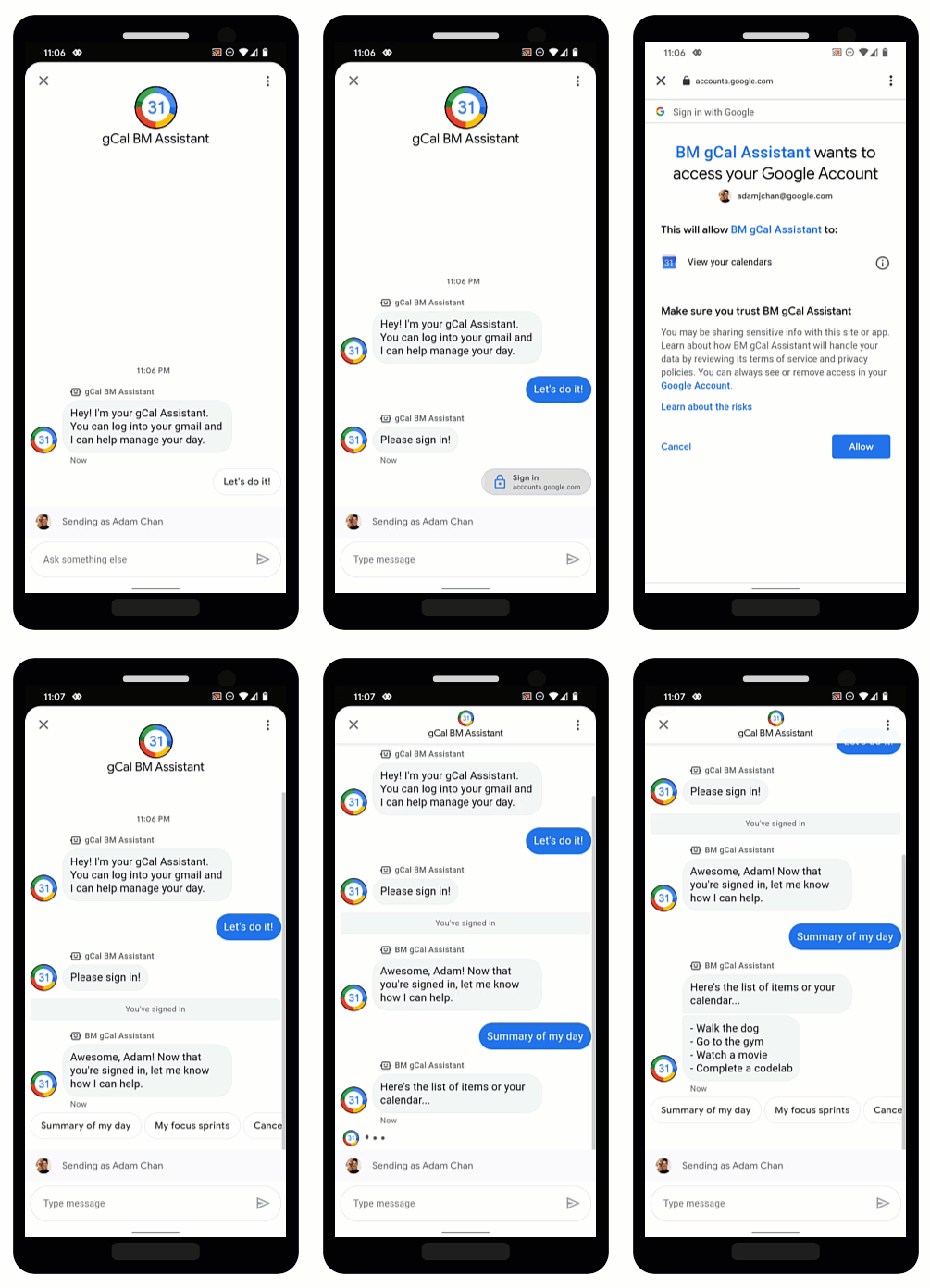
פרוטוקול OAuth מאפשר לסוכנים לאמת את זהות המשתמשים ולספק מידע מותאם אישית בשיחות בצורה מאובטחת. כדי לחסוך זמן לסוכנים אנושיים, סוכנים וירטואליים יכולים לגשת לנתוני משתמשים באמצעות כניסה של המשתמשים לספק OAuth מהימן, ולספק תשובות מהירות באמצעות אוטומציה.
Business Messages תומך ב-OAuth 2.0 באמצעות ההצעה לשליחת בקשת אימות, שמבקשת מהמשתמשים להיכנס לספק OAuth שהגדרתם עבור הנציג. אחרי שהמשתמש נכנס בהצלחה, Business Messages מעביר קוד הרשאה בחזרה לנציג כהודעה.
אחרי שמקבלים את קוד ההרשאה מספק ה-OAuth, אפשר לבצע אינטגרציה עם ה-API שלו ולתמוך בתהליכי שיחה שנדרש בהם מידע על זהות המשתמש. חשוב לזכור שלכל שירות שאתם משתמשים בו יש תנאי שימוש משלו.
הגדרת OAuth לסוכן
כדי להפעיל את ההצעה לשליחת בקשת אימות לנציג, צריך קודם להגדיר OAuth.
כדי לציין הגדרת OAuth, שולחים בקשת PATCH באמצעות Business Communications API כדי לעדכן את השדה endpointUrl של הסוכן.
אחרי שמציינים את כתובת ה-URL של נקודת הקצה, צריך לשמור את כתובות ה-URI של ההפניה האוטומטית של הנציג ולעדכן את כתובות ה-URI של ההפניה האוטומטית בפרטים של ספק OAuth.
דרישות מוקדמות
תצטרכו את הפריטים הבאים:
- ספק OAuth שתואם למפרט OAuth 2.0
- הנתיב למפתח של חשבון השירות בפרויקט GCP במכונת הפיתוח
הנציג
name(לדוגמה, brands/12345/agents/67890)אם אתם לא יודעים את
nameשל הסוכן, תוכלו לעיין במאמר איך מציגים רשימה של כל הסוכנים של מותג.כתובת ה-URL של נקודת הקצה שבה המשתמשים נכנסים לספק OAuth
שליחת הבקשה לעדכון
כדי לעדכן את הסוכן, מריצים את הפקודה הבאה. מחליפים את המשתנים בערכים שזיהיתם בדרישות המוקדמות.
curl -X PATCH \
"https://businesscommunications.googleapis.com/v1/brands/BRAND_ID/agents/AGENT_ID?updateMask=businessMessagesAgent.authorizationConfig" \
-H "Content-Type: application/json" \
-H "User-Agent: curl/business-communications" \
-H "$(oauth2l header --json PATH_TO_SERVICE_ACCOUNT_KEY businesscommunications)" \
-d "{
    'businessMessagesAgent': {
        'authorizationConfig': {
            'endpointUrl': 'ENDPOINT_URL',
        },
    },
}"
עדכון כתובות URI להפניה אוטומטית
אחרי שמגדירים את OAuth לסוכן, צריך להוסיף לספק OAuth ארבע כתובות URI להפניה אוטומטית:
https://business.google.com/callbackhttps://business.google.com/callback?https://business.google.com/message?az-intent-type=1https://business.google.com/message?az-intent-type=1&
צריך לכלול את כל כתובות ה-URL להפניה אוטומטית בפרטי ספק ה-OAuth.
התהליך לעדכון כתובות ה-URI להפניה אוטומטית משתנה בהתאם לספק OAuth. אפשר לקבל הוראות מהספק.
אחרי שמגדירים OAuth לנציג, אפשר לאמת משתמשים באמצעות ההצעה לבקשת אימות.
אימות משתמש
אחרי שמגדירים OAuth לסוכן, אפשר להציע למשתמשים להיכנס באמצעות ההצעה לבקשת אימות.
דרישות מוקדמות
תצטרכו את הפריטים הבאים:
- הנתיב למפתח של חשבון השירות בפרויקט GCP במכונת הפיתוח
הנציג
name(לדוגמה, brands/12345/agents/67890)אם אתם לא יודעים את
nameשל הסוכן, תוכלו לעיין במאמר איך מציגים רשימה של כל הסוכנים של מותג.מזהה הלקוח מספק ה-OAuth
דרישות לאתגר קוד מספק OAuth
היקפי הרשאות מספק ה-OAuth
שליחת ההצעה לבקשת אימות
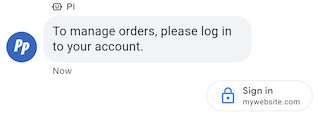
כדי לאמת משתמש,
- יוצרים את המחרוזות של מאמת הקוד ואתגר הקוד לבקשת OAuth. כדאי לעיין בדרישות ובאפשרויות של ספק ה-OAuth.
- שליחת הודעה עם ההצעה לבקשת אימות.
cURL
# Copyright 2021 Google LLC # # Licensed under the Apache License, Version 2.0 (the "License"); # you may not use this file except in compliance with the License. # You may obtain a copy of the License at # https://www.apache.org/licenses/LICENSE-2.0 # Unless required by applicable law or agreed to in writing, software # distributed under the License is distributed on an "AS IS" BASIS, # WITHOUT WARRANTIES OR CONDITIONS OF ANY KIND, either express or implied. # See the License for the specific language governing permissions and # limitations under the License. # This code sends a text message to the user with an authentication request suggestion # that allows the user to authenticate with OAuth. It also has a fallback text. # Read more: https://developers.google.com/business-communications/business-messages/guides/how-to/message/send?hl=en#authentication-request-suggestion # Replace the __CONVERSATION_ID__ with a conversation id that you can send messages to # Make sure a service account key file exists at ./service_account_key.json # Replace the __CLIENT_ID__ # Replace the __CODE_CHALLENGE__ # Replace the __SCOPE__ curl -X POST "https://businessmessages.googleapis.com/v1/conversations/__CONVERSATION_ID__/messages" \ -H "Content-Type: application/json" \ -H "User-Agent: curl/business-messages" \ -H "$(oauth2l header --json ./service_account_key.json businessmessages)" \ -d "{ 'messageId': '$(uuidgen)', 'text': 'Sign in to continue the conversation.', 'fallback': 'Visit support.growingtreebank.com to continue.', 'suggestions': [ { 'authenticationRequest': { 'oauth': { 'clientId': '__CLIENT_ID__', 'codeChallenge': '__CODE_CHALLENGE__', 'scopes': [ '__SCOPE__', ], }, }, }, ], 'representative': { 'avatarImage': 'https://developers.google.com/identity/images/g-logo.png', 'displayName': 'Chatbot', 'representativeType': 'BOT' } }"
Node.js
/** * This code sends a text message to the user with an authentication request suggestion * that allows the user to authenticate with OAuth. It also has a fallback text. * Read more: https://developers.google.com/business-communications/business-messages/guides/how-to/message/send?hl=en#authentication-request-suggestion * * This code is based on the https://github.com/google-business-communications/nodejs-businessmessages Node.js * Business Messages client library. */ /** * Before continuing, learn more about the prerequisites for authenticating * with OAuth at: https://developers.google.com/business-communications/business-messages/guides/how-to/integrate/oauth?hl=en * * Edit the values below: */ const PATH_TO_SERVICE_ACCOUNT_KEY = './service_account_key.json'; const CONVERSATION_ID = 'EDIT_HERE'; const OAUTH_CLIENT_ID = 'EDIT_HERE'; const OAUTH_CODE_CHALLENGE = 'EDIT_HERE'; const OAUTH_SCOPE = 'EDIT_HERE'; const businessmessages = require('businessmessages'); const uuidv4 = require('uuid').v4; const {google} = require('googleapis'); // Initialize the Business Messages API const bmApi = new businessmessages.businessmessages_v1.Businessmessages({}); // Set the scope that we need for the Business Messages API const scopes = [ 'https://www.googleapis.com/auth/businessmessages', ]; // Set the private key to the service account file const privatekey = require(PATH_TO_SERVICE_ACCOUNT_KEY); /** * Posts a message to the Business Messages API along with an authentication request. * * @param {string} conversationId The unique id for this user and agent. * @param {string} representativeType A value of BOT or HUMAN. */ async function sendMessage(conversationId, representativeType) { const authClient = await initCredentials(); if (authClient) { // Create the payload for sending a message along with an authentication request const apiParams = { auth: authClient, parent: 'conversations/' + conversationId, resource: { messageId: uuidv4(), representative: { representativeType: representativeType, }, fallback: 'Visit support.growingtreebank.com to continue.', text: 'Sign in to continue the conversation.', suggestions: [ { authenticationRequest: { oauth: { clientId: OAUTH_CLIENT_ID, codeChallenge: OAUTH_CODE_CHALLENGE, scopes: [OAUTH_SCOPE] } } }, ], }, }; // Call the message create function using the // Business Messages client library bmApi.conversations.messages.create(apiParams, {auth: authClient}, (err, response) => { console.log(err); console.log(response); }); } else { console.log('Authentication failure.'); } } /** * Initializes the Google credentials for calling the * Business Messages API. */ async function initCredentials() { // configure a JWT auth client const authClient = new google.auth.JWT( privatekey.client_email, null, privatekey.private_key, scopes, ); return new Promise(function(resolve, reject) { // authenticate request authClient.authorize(function(err, tokens) { if (err) { reject(false); } else { resolve(authClient); } }); }); } sendMessage(CONVERSATION_ID, 'BOT');
Python
"""Sends a text message to the user with an authentication request suggestion. It allows the user to authenticate with OAuth and has a fallback text. Read more: https://developers.google.com/business-communications/business-messages/guides/how-to/message/send?hl=en#authentication-request-suggestion This code is based on the https://github.com/google-business-communications/python-businessmessages Python Business Messages client library. """ import uuid from businessmessages import businessmessages_v1_client as bm_client from businessmessages.businessmessages_v1_messages import BusinessMessagesAuthenticationRequest from businessmessages.businessmessages_v1_messages import BusinessMessagesAuthenticationRequestOauth from businessmessages.businessmessages_v1_messages import BusinessmessagesConversationsMessagesCreateRequest from businessmessages.businessmessages_v1_messages import BusinessMessagesMessage from businessmessages.businessmessages_v1_messages import BusinessMessagesRepresentative from businessmessages.businessmessages_v1_messages import BusinessMessagesSuggestion from oauth2client.service_account import ServiceAccountCredentials # Before continuing, learn more about the prerequisites for authenticating # with OAuth at: https://developers.google.com/business-communications/business-messages/guides/how-to/integrate/oauth?hl=en # Edit the values below: path_to_service_account_key = './service_account_key.json' conversation_id = 'EDIT_HERE' oauth_client_id = 'EDIT_HERE' oauth_code_challenge = 'EDIT_HERE' oauth_scope = 'EDIT_HERE' credentials = ServiceAccountCredentials.from_json_keyfile_name( path_to_service_account_key, scopes=['https://www.googleapis.com/auth/businessmessages']) client = bm_client.BusinessmessagesV1(credentials=credentials) representative_type_as_string = 'BOT' if representative_type_as_string == 'BOT': representative_type = BusinessMessagesRepresentative.RepresentativeTypeValueValuesEnum.BOT else: representative_type = BusinessMessagesRepresentative.RepresentativeTypeValueValuesEnum.HUMAN # Create a text message with an authentication request message = BusinessMessagesMessage( messageId=str(uuid.uuid4().int), representative=BusinessMessagesRepresentative( representativeType=representative_type ), text='Sign in to continue the conversation.', fallback='Visit support.growingtreebank.com to continue.', suggestions=[ BusinessMessagesSuggestion( authenticationRequest=BusinessMessagesAuthenticationRequest( oauth=BusinessMessagesAuthenticationRequestOauth( clientId=oauth_client_id, codeChallenge=oauth_code_challenge, scopes=[oauth_scope]) ) ), ] ) # Create the message request create_request = BusinessmessagesConversationsMessagesCreateRequest( businessMessagesMessage=message, parent='conversations/' + conversation_id) # Send the message bm_client.BusinessmessagesV1.ConversationsMessagesService( client=client).Create(request=create_request)
- כשהמשתמש מקיש על ההצעה ונכנס לחשבון, מתקבלת הודעה ב-webhook של הסוכן. מאחזרים את קוד ההרשאה מהשדה
authenticationResponse.code.
אחרי שתקבלו את ההודעה, תוכלו להחליף את קוד ההרשאה ואת קוד האימות באסימון גישה מספק OAuth. אפשר לגשת לנתוני המשתמש באמצעות טוקן הגישה.
דוגמה לשיחה עם אימות, כולל דוגמאות קוד, מופיעה במאמר בנושא אימות המשתמש.