
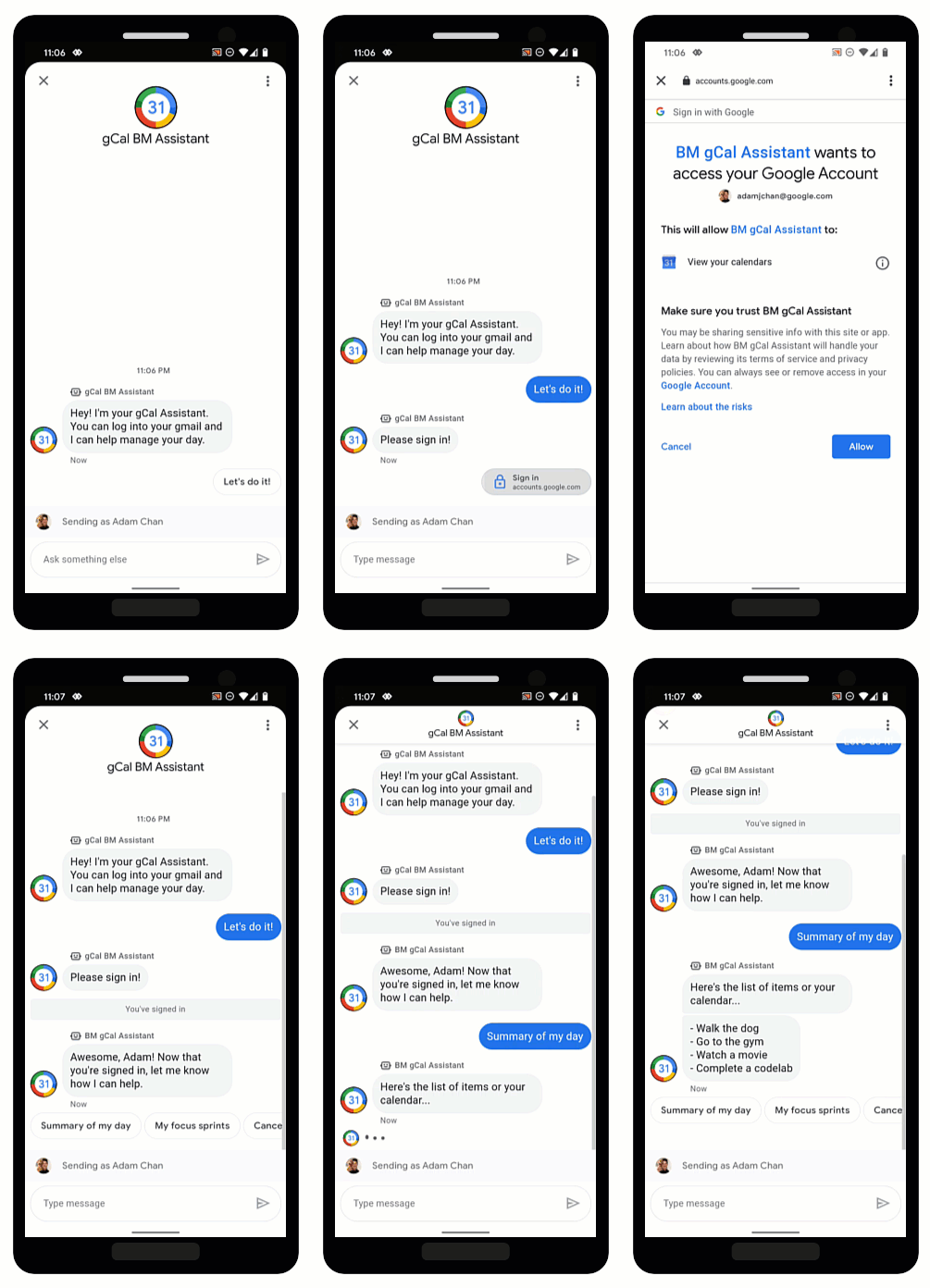
OAuth cho phép các tác nhân xác minh danh tính người dùng và cung cấp thông tin được cá nhân hoá trong các cuộc trò chuyện một cách an toàn. Bằng cách yêu cầu người dùng đăng nhập vào một nhà cung cấp OAuth đáng tin cậy, các tác nhân có thể truy cập vào dữ liệu người dùng để đưa ra câu trả lời nhanh chóng thông qua quy trình tự động hoá và tiết kiệm thời gian cho các tác nhân hỗ trợ trực tiếp.
Business Messages hỗ trợ OAuth 2.0 bằng Đề xuất yêu cầu xác thực. Đề xuất này nhắc người dùng đăng nhập vào một trình cung cấp OAuth mà bạn định cấu hình cho tác nhân. Sau khi người dùng đăng nhập thành công, Business Messages sẽ chuyển mã uỷ quyền trở lại cho nhân viên hỗ trợ dưới dạng một tin nhắn.
Sau khi có mã uỷ quyền từ nhà cung cấp OAuth, bạn có thể tích hợp với các API của họ và hỗ trợ các luồng trò chuyện yêu cầu thông tin nhận dạng người dùng. Xin lưu ý rằng mỗi dịch vụ mà bạn tương tác đều có điều khoản sử dụng riêng.
Định cấu hình OAuth cho một tác nhân
Để bật tính năng Đề xuất yêu cầu xác thực cho một nhân viên hỗ trợ, trước tiên, bạn cần định cấu hình OAuth.
Để chỉ định một cấu hình OAuth, bạn thực hiện yêu cầu PATCH bằng Business Communications API để cập nhật trường endpointUrl của tác nhân.
Sau khi chỉ định URL điểm cuối, bạn cần lưu trữ URI chuyển hướng cho nhân viên hỗ trợ và cập nhật URI chuyển hướng trong thông tin của nhà cung cấp OAuth.
Điều kiện tiên quyết
Bạn cần có những thứ sau:
- Một nhà cung cấp OAuth tuân theo quy cách OAuth 2.0
- Đường dẫn đến khoá tài khoản dịch vụ của dự án GCP trên máy phát triển
Nhân viên hỗ trợ
name(ví dụ: "brands/12345/agents/67890")Nếu bạn không biết
namecủa nhân viên hỗ trợ, hãy xem phần Liệt kê tất cả nhân viên hỗ trợ cho một thương hiệu.URL điểm cuối nơi người dùng đăng nhập vào nhà cung cấp OAuth
Gửi yêu cầu cập nhật
Để cập nhật tác nhân, hãy chạy lệnh sau. Thay thế các biến bằng các giá trị mà bạn đã xác định trong phần Điều kiện tiên quyết.
curl -X PATCH \
"https://businesscommunications.googleapis.com/v1/brands/BRAND_ID/agents/AGENT_ID?updateMask=businessMessagesAgent.authorizationConfig" \
-H "Content-Type: application/json" \
-H "User-Agent: curl/business-communications" \
-H "$(oauth2l header --json PATH_TO_SERVICE_ACCOUNT_KEY businesscommunications)" \
-d "{
    'businessMessagesAgent': {
        'authorizationConfig': {
            'endpointUrl': 'ENDPOINT_URL',
        },
    },
}"
Cập nhật URI chuyển hướng
Bây giờ, sau khi định cấu hình OAuth cho tác nhân, bạn cần thêm 4 URI chuyển hướng vào nhà cung cấp OAuth:
https://business.google.com/callbackhttps://business.google.com/callback?https://business.google.com/message?az-intent-type=1https://business.google.com/message?az-intent-type=1&
Bạn phải thêm tất cả URL chuyển hướng vào thông tin nhà cung cấp OAuth.
Quy trình cập nhật URI chuyển hướng sẽ khác nhau tuỳ theo nhà cung cấp OAuth. Hãy tham khảo nhà cung cấp OAuth của bạn để biết hướng dẫn.
Giờ đây, khi đã định cấu hình OAuth cho nhân viên hỗ trợ, bạn có thể xác thực người dùng bằng Đề xuất yêu cầu xác thực.
Xác thực người dùng
Sau khi định cấu hình OAuth cho một tác nhân, bạn có thể nhắc người dùng đăng nhập bằng Đề xuất yêu cầu xác thực.
Điều kiện tiên quyết
Bạn cần có những thứ sau:
- Đường dẫn đến khoá tài khoản dịch vụ của dự án GCP trên máy phát triển
Nhân viên hỗ trợ
name(ví dụ: "brands/12345/agents/67890")Nếu bạn không biết
namecủa nhân viên hỗ trợ, hãy xem phần Liệt kê tất cả nhân viên hỗ trợ cho một thương hiệu.Mã ứng dụng của nhà cung cấp OAuth
Yêu cầu về thử thách mã của nhà cung cấp OAuth
Phạm vi của nhà cung cấp OAuth
Gửi đề xuất yêu cầu xác thực
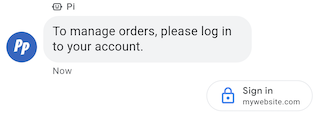
Để xác thực người dùng,
- Tạo chuỗi trình xác minh mã và chuỗi thử thách mã cho yêu cầu OAuth. Hãy tham khảo nhà cung cấp OAuth của bạn để biết các yêu cầu và lựa chọn.
- Gửi tin nhắn có đề xuất Yêu cầu xác thực.
cURL
# Copyright 2021 Google LLC # # Licensed under the Apache License, Version 2.0 (the "License"); # you may not use this file except in compliance with the License. # You may obtain a copy of the License at # https://www.apache.org/licenses/LICENSE-2.0 # Unless required by applicable law or agreed to in writing, software # distributed under the License is distributed on an "AS IS" BASIS, # WITHOUT WARRANTIES OR CONDITIONS OF ANY KIND, either express or implied. # See the License for the specific language governing permissions and # limitations under the License. # This code sends a text message to the user with an authentication request suggestion # that allows the user to authenticate with OAuth. It also has a fallback text. # Read more: https://developers.google.com/business-communications/business-messages/guides/how-to/message/send?hl=en#authentication-request-suggestion # Replace the __CONVERSATION_ID__ with a conversation id that you can send messages to # Make sure a service account key file exists at ./service_account_key.json # Replace the __CLIENT_ID__ # Replace the __CODE_CHALLENGE__ # Replace the __SCOPE__ curl -X POST "https://businessmessages.googleapis.com/v1/conversations/__CONVERSATION_ID__/messages" \ -H "Content-Type: application/json" \ -H "User-Agent: curl/business-messages" \ -H "$(oauth2l header --json ./service_account_key.json businessmessages)" \ -d "{ 'messageId': '$(uuidgen)', 'text': 'Sign in to continue the conversation.', 'fallback': 'Visit support.growingtreebank.com to continue.', 'suggestions': [ { 'authenticationRequest': { 'oauth': { 'clientId': '__CLIENT_ID__', 'codeChallenge': '__CODE_CHALLENGE__', 'scopes': [ '__SCOPE__', ], }, }, }, ], 'representative': { 'avatarImage': 'https://developers.google.com/identity/images/g-logo.png', 'displayName': 'Chatbot', 'representativeType': 'BOT' } }"
Node.js
/** * This code sends a text message to the user with an authentication request suggestion * that allows the user to authenticate with OAuth. It also has a fallback text. * Read more: https://developers.google.com/business-communications/business-messages/guides/how-to/message/send?hl=en#authentication-request-suggestion * * This code is based on the https://github.com/google-business-communications/nodejs-businessmessages Node.js * Business Messages client library. */ /** * Before continuing, learn more about the prerequisites for authenticating * with OAuth at: https://developers.google.com/business-communications/business-messages/guides/how-to/integrate/oauth?hl=en * * Edit the values below: */ const PATH_TO_SERVICE_ACCOUNT_KEY = './service_account_key.json'; const CONVERSATION_ID = 'EDIT_HERE'; const OAUTH_CLIENT_ID = 'EDIT_HERE'; const OAUTH_CODE_CHALLENGE = 'EDIT_HERE'; const OAUTH_SCOPE = 'EDIT_HERE'; const businessmessages = require('businessmessages'); const uuidv4 = require('uuid').v4; const {google} = require('googleapis'); // Initialize the Business Messages API const bmApi = new businessmessages.businessmessages_v1.Businessmessages({}); // Set the scope that we need for the Business Messages API const scopes = [ 'https://www.googleapis.com/auth/businessmessages', ]; // Set the private key to the service account file const privatekey = require(PATH_TO_SERVICE_ACCOUNT_KEY); /** * Posts a message to the Business Messages API along with an authentication request. * * @param {string} conversationId The unique id for this user and agent. * @param {string} representativeType A value of BOT or HUMAN. */ async function sendMessage(conversationId, representativeType) { const authClient = await initCredentials(); if (authClient) { // Create the payload for sending a message along with an authentication request const apiParams = { auth: authClient, parent: 'conversations/' + conversationId, resource: { messageId: uuidv4(), representative: { representativeType: representativeType, }, fallback: 'Visit support.growingtreebank.com to continue.', text: 'Sign in to continue the conversation.', suggestions: [ { authenticationRequest: { oauth: { clientId: OAUTH_CLIENT_ID, codeChallenge: OAUTH_CODE_CHALLENGE, scopes: [OAUTH_SCOPE] } } }, ], }, }; // Call the message create function using the // Business Messages client library bmApi.conversations.messages.create(apiParams, {auth: authClient}, (err, response) => { console.log(err); console.log(response); }); } else { console.log('Authentication failure.'); } } /** * Initializes the Google credentials for calling the * Business Messages API. */ async function initCredentials() { // configure a JWT auth client const authClient = new google.auth.JWT( privatekey.client_email, null, privatekey.private_key, scopes, ); return new Promise(function(resolve, reject) { // authenticate request authClient.authorize(function(err, tokens) { if (err) { reject(false); } else { resolve(authClient); } }); }); } sendMessage(CONVERSATION_ID, 'BOT');
Python
"""Sends a text message to the user with an authentication request suggestion. It allows the user to authenticate with OAuth and has a fallback text. Read more: https://developers.google.com/business-communications/business-messages/guides/how-to/message/send?hl=en#authentication-request-suggestion This code is based on the https://github.com/google-business-communications/python-businessmessages Python Business Messages client library. """ import uuid from businessmessages import businessmessages_v1_client as bm_client from businessmessages.businessmessages_v1_messages import BusinessMessagesAuthenticationRequest from businessmessages.businessmessages_v1_messages import BusinessMessagesAuthenticationRequestOauth from businessmessages.businessmessages_v1_messages import BusinessmessagesConversationsMessagesCreateRequest from businessmessages.businessmessages_v1_messages import BusinessMessagesMessage from businessmessages.businessmessages_v1_messages import BusinessMessagesRepresentative from businessmessages.businessmessages_v1_messages import BusinessMessagesSuggestion from oauth2client.service_account import ServiceAccountCredentials # Before continuing, learn more about the prerequisites for authenticating # with OAuth at: https://developers.google.com/business-communications/business-messages/guides/how-to/integrate/oauth?hl=en # Edit the values below: path_to_service_account_key = './service_account_key.json' conversation_id = 'EDIT_HERE' oauth_client_id = 'EDIT_HERE' oauth_code_challenge = 'EDIT_HERE' oauth_scope = 'EDIT_HERE' credentials = ServiceAccountCredentials.from_json_keyfile_name( path_to_service_account_key, scopes=['https://www.googleapis.com/auth/businessmessages']) client = bm_client.BusinessmessagesV1(credentials=credentials) representative_type_as_string = 'BOT' if representative_type_as_string == 'BOT': representative_type = BusinessMessagesRepresentative.RepresentativeTypeValueValuesEnum.BOT else: representative_type = BusinessMessagesRepresentative.RepresentativeTypeValueValuesEnum.HUMAN # Create a text message with an authentication request message = BusinessMessagesMessage( messageId=str(uuid.uuid4().int), representative=BusinessMessagesRepresentative( representativeType=representative_type ), text='Sign in to continue the conversation.', fallback='Visit support.growingtreebank.com to continue.', suggestions=[ BusinessMessagesSuggestion( authenticationRequest=BusinessMessagesAuthenticationRequest( oauth=BusinessMessagesAuthenticationRequestOauth( clientId=oauth_client_id, codeChallenge=oauth_code_challenge, scopes=[oauth_scope]) ) ), ] ) # Create the message request create_request = BusinessmessagesConversationsMessagesCreateRequest( businessMessagesMessage=message, parent='conversations/' + conversation_id) # Send the message bm_client.BusinessmessagesV1.ConversationsMessagesService( client=client).Create(request=create_request)
- Khi người dùng nhấn vào đề xuất và đăng nhập thành công, bạn sẽ nhận một thông báo tại webhook của tác nhân. Truy xuất mã uỷ quyền từ trường
authenticationResponse.code.
Sau khi nhận được thông báo, bạn có thể trao đổi mã uỷ quyền và trình xác minh mã để lấy mã truy cập từ nhà cung cấp OAuth. Bạn có thể truy cập vào dữ liệu người dùng bằng mã truy cập.
Để xem một cuộc trò chuyện mẫu có xác thực, bao gồm cả mã mẫu, hãy xem phần Xác thực người dùng.