
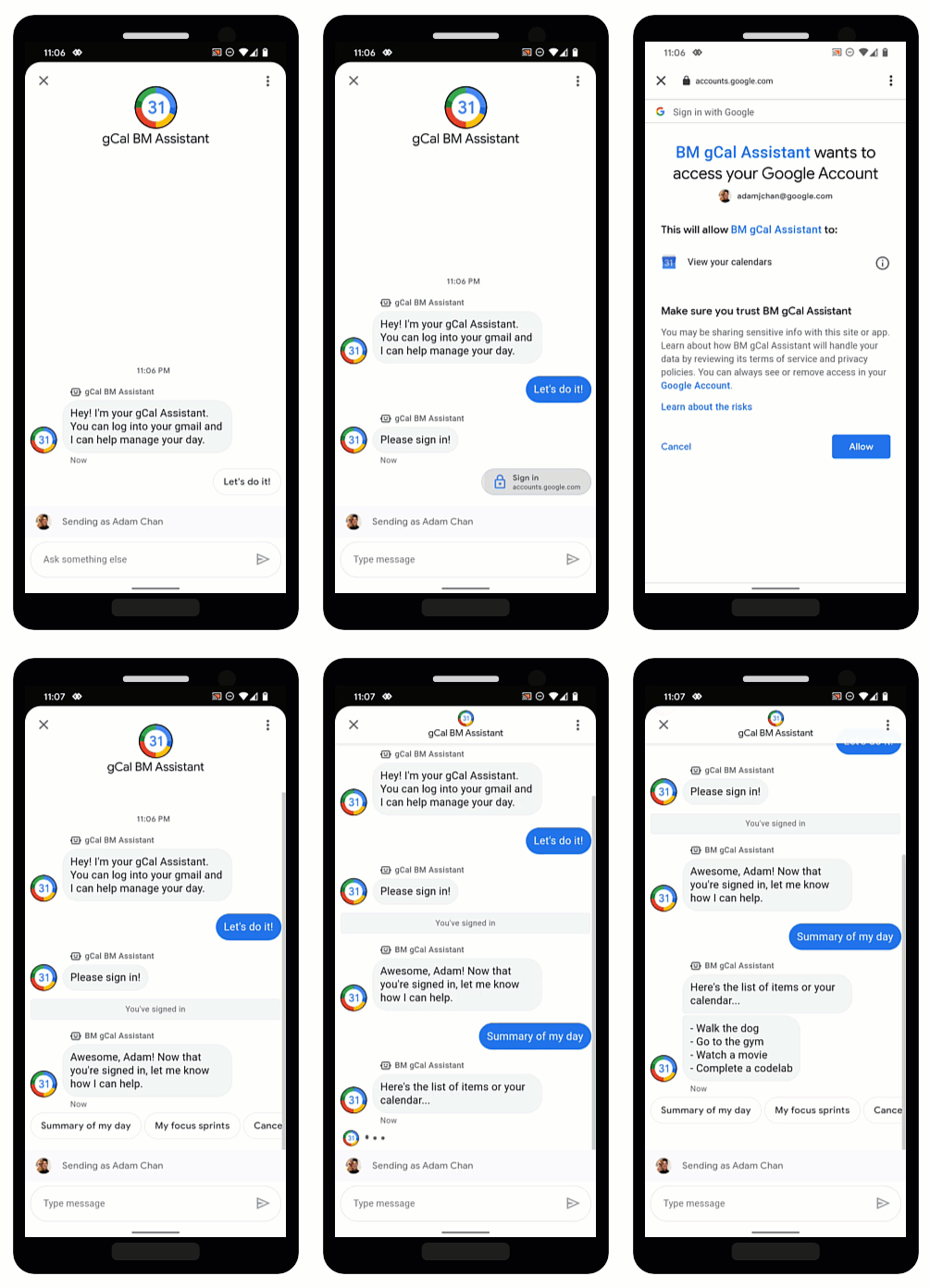
OAuth 允许代理以安全的方式验证用户身份,并在对话中提供个性化信息。通过让用户登录受信任的 OAuth 提供商,代理可以访问用户数据,这些数据有助于通过自动化提供快速解答,并为真人代理节省时间。
Business Messages 支持 OAuth 2.0 和“身份验证请求 ”建议, 后者会提示用户登录您为代理配置的 OAuth 提供商。 用户成功登录后,Business Messages 会将授权代码作为消息传递回代理。
获得 OAuth 提供商的授权代码后,您可以与他们的 API 集成,并支持需要用户身份信息的对话流程。请注意,您与之互动的每项服务都有自己的使用条款。
为代理配置 OAuth
如需为代理启用“身份验证请求”建议,您需要先配置 OAuth。
如需指定 OAuth 配置,您可以使用 Business Communications
API
发出 PATCH 请求,以更新代理的 endpointUrl 字段。
指定端点网址后,您需要为代理存储重定向 URI,并在 OAuth 提供商的信息中更新重定向 URI。
前提条件
您需要以下项:
- 遵循 OAuth 2.0 规范的 OAuth 提供商
- 开发机器上的 GCP 项目的服务账号密钥的路径
代理
name(例如“brands/12345/agents/67890”)如果您不知道代理的
name,请参阅 列出品牌的所有代理。用户登录 OAuth 提供商的端点网址
发送更新请求
如需更新代理,请运行以下命令。将变量替换为您在前提条件中确定的值 。
curl -X PATCH \
"https://businesscommunications.googleapis.com/v1/brands/BRAND_ID/agents/AGENT_ID?updateMask=businessMessagesAgent.authorizationConfig" \
-H "Content-Type: application/json" \
-H "User-Agent: curl/business-communications" \
-H "$(oauth2l header --json PATH_TO_SERVICE_ACCOUNT_KEY businesscommunications)" \
-d "{
    'businessMessagesAgent': {
        'authorizationConfig': {
            'endpointUrl': 'ENDPOINT_URL',
        },
    },
}"
更新重定向 URI
现在,您已为代理配置 OAuth,接下来需要在 OAuth 提供商中添加四个重定向 URI:
https://business.google.com/callbackhttps://business.google.com/callback?https://business.google.com/message?az-intent-type=1https://business.google.com/message?az-intent-type=1&
您必须在 OAuth 提供商信息中添加所有重定向网址。
更新重定向 URI 的过程因 OAuth 提供商而异。请参阅 OAuth 提供商的说明。
现在,您已为代理配置 OAuth,可以使用 “身份验证请求” 建议对用户进行身份验证 用户。
对用户进行身份验证
为代理配置 OAuth 后,您可以使用 “身份验证请求” 建议提示用户登录。
前提条件
您需要以下项:
- 开发机器上的 GCP 项目的服务账号密钥的路径
代理
name(例如“brands/12345/agents/67890”)如果您不知道代理的
name,请参阅 列出品牌的所有代理。OAuth 提供商提供的客户端 ID
OAuth 提供商提供的代码质询要求
OAuth 提供商提供的范围
发送“身份验证请求”建议
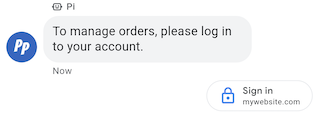
如需对用户进行身份验证,请执行以下操作:
- 为 OAuth 请求生成代码验证程序和代码质询字符串。 如需了解相关要求和选项,请参阅 OAuth 提供方。
- 发送包含“身份验证请求”建议的消息。
cURL
# Copyright 2021 Google LLC # # Licensed under the Apache License, Version 2.0 (the "License"); # you may not use this file except in compliance with the License. # You may obtain a copy of the License at # https://www.apache.org/licenses/LICENSE-2.0 # Unless required by applicable law or agreed to in writing, software # distributed under the License is distributed on an "AS IS" BASIS, # WITHOUT WARRANTIES OR CONDITIONS OF ANY KIND, either express or implied. # See the License for the specific language governing permissions and # limitations under the License. # This code sends a text message to the user with an authentication request suggestion # that allows the user to authenticate with OAuth. It also has a fallback text. # Read more: https://developers.google.com/business-communications/business-messages/guides/how-to/message/send?hl=en#authentication-request-suggestion # Replace the __CONVERSATION_ID__ with a conversation id that you can send messages to # Make sure a service account key file exists at ./service_account_key.json # Replace the __CLIENT_ID__ # Replace the __CODE_CHALLENGE__ # Replace the __SCOPE__ curl -X POST "https://businessmessages.googleapis.com/v1/conversations/__CONVERSATION_ID__/messages" \ -H "Content-Type: application/json" \ -H "User-Agent: curl/business-messages" \ -H "$(oauth2l header --json ./service_account_key.json businessmessages)" \ -d "{ 'messageId': '$(uuidgen)', 'text': 'Sign in to continue the conversation.', 'fallback': 'Visit support.growingtreebank.com to continue.', 'suggestions': [ { 'authenticationRequest': { 'oauth': { 'clientId': '__CLIENT_ID__', 'codeChallenge': '__CODE_CHALLENGE__', 'scopes': [ '__SCOPE__', ], }, }, }, ], 'representative': { 'avatarImage': 'https://developers.google.com/identity/images/g-logo.png', 'displayName': 'Chatbot', 'representativeType': 'BOT' } }"
Node.js
/** * This code sends a text message to the user with an authentication request suggestion * that allows the user to authenticate with OAuth. It also has a fallback text. * Read more: https://developers.google.com/business-communications/business-messages/guides/how-to/message/send?hl=en#authentication-request-suggestion * * This code is based on the https://github.com/google-business-communications/nodejs-businessmessages Node.js * Business Messages client library. */ /** * Before continuing, learn more about the prerequisites for authenticating * with OAuth at: https://developers.google.com/business-communications/business-messages/guides/how-to/integrate/oauth?hl=en * * Edit the values below: */ const PATH_TO_SERVICE_ACCOUNT_KEY = './service_account_key.json'; const CONVERSATION_ID = 'EDIT_HERE'; const OAUTH_CLIENT_ID = 'EDIT_HERE'; const OAUTH_CODE_CHALLENGE = 'EDIT_HERE'; const OAUTH_SCOPE = 'EDIT_HERE'; const businessmessages = require('businessmessages'); const uuidv4 = require('uuid').v4; const {google} = require('googleapis'); // Initialize the Business Messages API const bmApi = new businessmessages.businessmessages_v1.Businessmessages({}); // Set the scope that we need for the Business Messages API const scopes = [ 'https://www.googleapis.com/auth/businessmessages', ]; // Set the private key to the service account file const privatekey = require(PATH_TO_SERVICE_ACCOUNT_KEY); /** * Posts a message to the Business Messages API along with an authentication request. * * @param {string} conversationId The unique id for this user and agent. * @param {string} representativeType A value of BOT or HUMAN. */ async function sendMessage(conversationId, representativeType) { const authClient = await initCredentials(); if (authClient) { // Create the payload for sending a message along with an authentication request const apiParams = { auth: authClient, parent: 'conversations/' + conversationId, resource: { messageId: uuidv4(), representative: { representativeType: representativeType, }, fallback: 'Visit support.growingtreebank.com to continue.', text: 'Sign in to continue the conversation.', suggestions: [ { authenticationRequest: { oauth: { clientId: OAUTH_CLIENT_ID, codeChallenge: OAUTH_CODE_CHALLENGE, scopes: [OAUTH_SCOPE] } } }, ], }, }; // Call the message create function using the // Business Messages client library bmApi.conversations.messages.create(apiParams, {auth: authClient}, (err, response) => { console.log(err); console.log(response); }); } else { console.log('Authentication failure.'); } } /** * Initializes the Google credentials for calling the * Business Messages API. */ async function initCredentials() { // configure a JWT auth client const authClient = new google.auth.JWT( privatekey.client_email, null, privatekey.private_key, scopes, ); return new Promise(function(resolve, reject) { // authenticate request authClient.authorize(function(err, tokens) { if (err) { reject(false); } else { resolve(authClient); } }); }); } sendMessage(CONVERSATION_ID, 'BOT');
Python
"""Sends a text message to the user with an authentication request suggestion. It allows the user to authenticate with OAuth and has a fallback text. Read more: https://developers.google.com/business-communications/business-messages/guides/how-to/message/send?hl=en#authentication-request-suggestion This code is based on the https://github.com/google-business-communications/python-businessmessages Python Business Messages client library. """ import uuid from businessmessages import businessmessages_v1_client as bm_client from businessmessages.businessmessages_v1_messages import BusinessMessagesAuthenticationRequest from businessmessages.businessmessages_v1_messages import BusinessMessagesAuthenticationRequestOauth from businessmessages.businessmessages_v1_messages import BusinessmessagesConversationsMessagesCreateRequest from businessmessages.businessmessages_v1_messages import BusinessMessagesMessage from businessmessages.businessmessages_v1_messages import BusinessMessagesRepresentative from businessmessages.businessmessages_v1_messages import BusinessMessagesSuggestion from oauth2client.service_account import ServiceAccountCredentials # Before continuing, learn more about the prerequisites for authenticating # with OAuth at: https://developers.google.com/business-communications/business-messages/guides/how-to/integrate/oauth?hl=en # Edit the values below: path_to_service_account_key = './service_account_key.json' conversation_id = 'EDIT_HERE' oauth_client_id = 'EDIT_HERE' oauth_code_challenge = 'EDIT_HERE' oauth_scope = 'EDIT_HERE' credentials = ServiceAccountCredentials.from_json_keyfile_name( path_to_service_account_key, scopes=['https://www.googleapis.com/auth/businessmessages']) client = bm_client.BusinessmessagesV1(credentials=credentials) representative_type_as_string = 'BOT' if representative_type_as_string == 'BOT': representative_type = BusinessMessagesRepresentative.RepresentativeTypeValueValuesEnum.BOT else: representative_type = BusinessMessagesRepresentative.RepresentativeTypeValueValuesEnum.HUMAN # Create a text message with an authentication request message = BusinessMessagesMessage( messageId=str(uuid.uuid4().int), representative=BusinessMessagesRepresentative( representativeType=representative_type ), text='Sign in to continue the conversation.', fallback='Visit support.growingtreebank.com to continue.', suggestions=[ BusinessMessagesSuggestion( authenticationRequest=BusinessMessagesAuthenticationRequest( oauth=BusinessMessagesAuthenticationRequestOauth( clientId=oauth_client_id, codeChallenge=oauth_code_challenge, scopes=[oauth_scope]) ) ), ] ) # Create the message request create_request = BusinessmessagesConversationsMessagesCreateRequest( businessMessagesMessage=message, parent='conversations/' + conversation_id) # Send the message bm_client.BusinessmessagesV1.ConversationsMessagesService( client=client).Create(request=create_request)
- 当用户点按建议并成功登录后,您
会收到代理的
Webhook 中的一条消息。从
authenticationResponse.code字段中检索授权代码。
收到消息后,您可以向 OAuth 提供商交换授权代码和代码验证程序,以获取访问令牌。您可以使用访问令牌访问用户数据。
如需查看包含身份验证的对话示例(包括代码示例),请参阅 对用户进行 身份验证。