
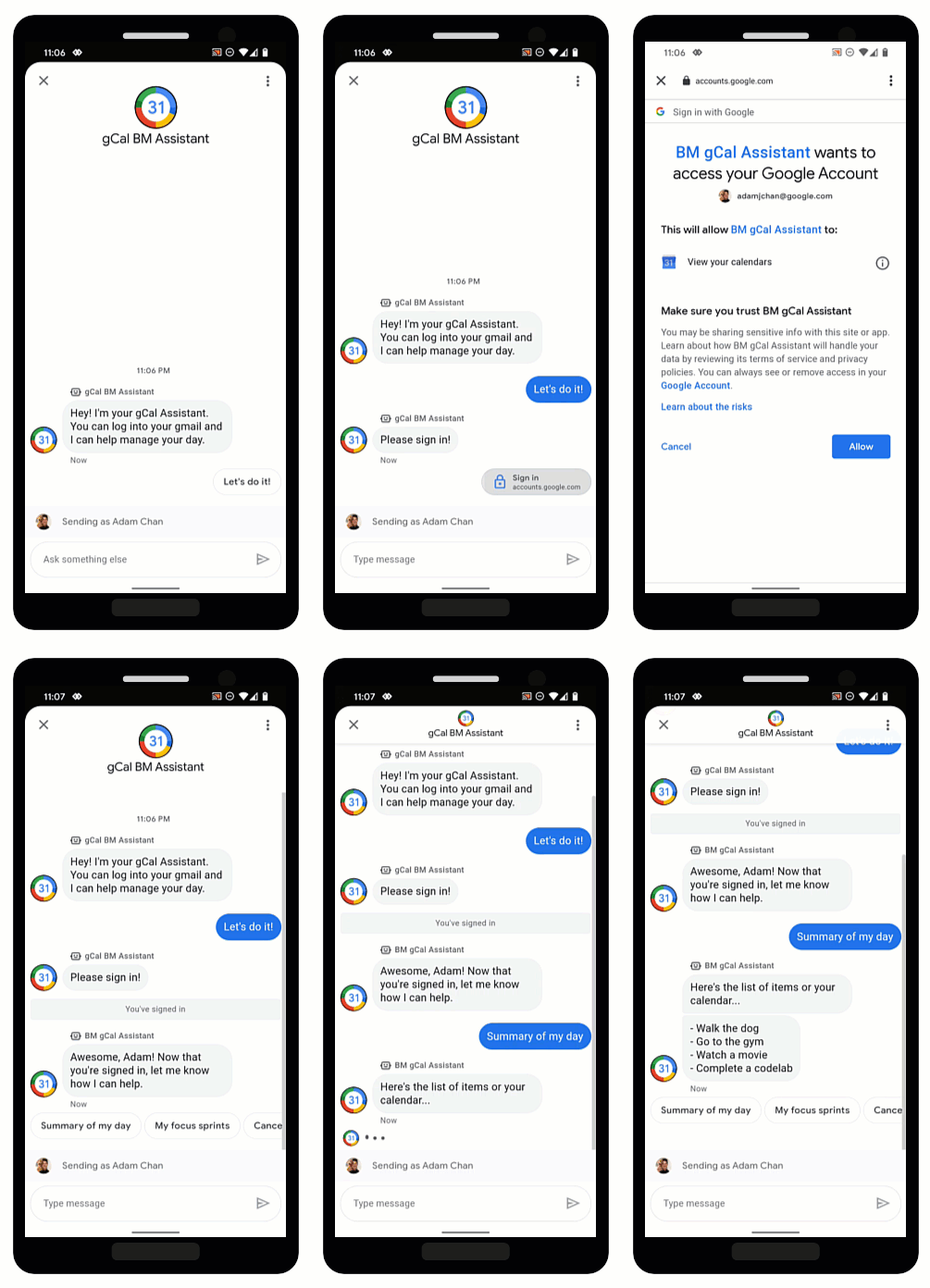
OAuth consente agli agenti di verificare l'identità degli utenti e di fornire informazioni personalizzate nelle conversazioni in modo sicuro. Se gli utenti accedono a un provider OAuth attendibile, gli agenti possono accedere ai dati degli utenti che possono contribuire a fornire risposte rapide tramite l'automazione e risparmiare tempo per gli agenti live.
Business Messages supporta OAuth 2.0 con il suggerimento di richiesta di autenticazione, che chiede agli utenti di accedere a un provider OAuth configurato per l'agente. Dopo l'accesso riuscito dell'utente, Business Messages restituisce un codice di autorizzazione all'agente come messaggio.
Una volta ottenuto il codice di autorizzazione dal provider OAuth, puoi integrarti con le sue API e supportare i flussi di conversazione che richiedono informazioni sull'identità dell'utente. Tieni presente che ogni servizio con cui interagisci ha i propri termini di utilizzo.
Configura OAuth per un agente
Per abilitare il suggerimento di richiesta di autenticazione per un agente, devi prima configurare OAuth.
Per specificare una configurazione OAuth, effettua una richiesta PATCH
con l'API Business Communications
per aggiornare il campo endpointUrl dell'agente.
Dopo aver specificato l'URL dell'endpoint, devi memorizzare gli URI di reindirizzamento per il tuo agente e aggiornarli nelle informazioni del tuo provider OAuth.
Prerequisiti
Ti servono i seguenti elementi:
- Un provider OAuth che segue la specifica OAuth 2.0
- Percorso della chiave del service account del progetto GCP sulla macchina di sviluppo
L'agente
name(ad esempio, "brands/12345/agents/67890")Se non conosci l'
namedell'agente, consulta Elencare tutti gli agenti per un brand.L'URL dell'endpoint in cui gli utenti accedono al provider OAuth
Inviare la richiesta di aggiornamento
Per aggiornare l'agente, esegui questo comando. Sostituisci le variabili con i valori che hai identificato in Prerequisiti.
curl -X PATCH \
"https://businesscommunications.googleapis.com/v1/brands/BRAND_ID/agents/AGENT_ID?updateMask=businessMessagesAgent.authorizationConfig" \
-H "Content-Type: application/json" \
-H "User-Agent: curl/business-communications" \
-H "$(oauth2l header --json PATH_TO_SERVICE_ACCOUNT_KEY businesscommunications)" \
-d "{
    'businessMessagesAgent': {
        'authorizationConfig': {
            'endpointUrl': 'ENDPOINT_URL',
        },
    },
}"
Aggiorna gli URI di reindirizzamento
Ora che OAuth è configurato per l'agente, devi aggiungere quattro URI di reindirizzamento al tuo provider OAuth:
https://business.google.com/callbackhttps://business.google.com/callback?https://business.google.com/message?az-intent-type=1https://business.google.com/message?az-intent-type=1&
Devi includere tutti gli URL di reindirizzamento nelle informazioni del tuo provider OAuth.
La procedura per aggiornare gli URI di reindirizzamento varia in base al provider OAuth. Per istruzioni, rivolgiti al tuo provider OAuth.
Ora che OAuth è configurato per il tuo agente, puoi autenticare gli utenti con il suggerimento Richiesta di autenticazione.
Autenticare un utente
Dopo aver configurato OAuth per un agente, puoi chiedere agli utenti di accedere con il suggerimento Richiesta di autenticazione.
Prerequisiti
Ti servono i seguenti elementi:
- Percorso della chiave del service account del progetto GCP sulla macchina di sviluppo
L'agente
name(ad esempio, "brands/12345/agents/67890")Se non conosci l'
namedell'agente, consulta Elencare tutti gli agenti per un brand.ID client del tuo provider OAuth
Requisiti della sfida del codice del tuo provider OAuth
Ambiti del tuo provider OAuth
Inviare il suggerimento per la richiesta di autenticazione
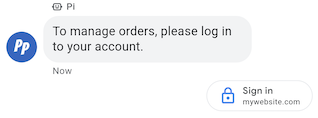
Per autenticare un utente:
- Genera le stringhe di verifica del codice e di verifica della richiesta per la richiesta OAuth. Per requisiti e opzioni, consulta il tuo fornitore OAuth.
- Invia un messaggio con il suggerimento Richiesta di autenticazione.
cURL
# Copyright 2021 Google LLC # # Licensed under the Apache License, Version 2.0 (the "License"); # you may not use this file except in compliance with the License. # You may obtain a copy of the License at # https://www.apache.org/licenses/LICENSE-2.0 # Unless required by applicable law or agreed to in writing, software # distributed under the License is distributed on an "AS IS" BASIS, # WITHOUT WARRANTIES OR CONDITIONS OF ANY KIND, either express or implied. # See the License for the specific language governing permissions and # limitations under the License. # This code sends a text message to the user with an authentication request suggestion # that allows the user to authenticate with OAuth. It also has a fallback text. # Read more: https://developers.google.com/business-communications/business-messages/guides/how-to/message/send?hl=en#authentication-request-suggestion # Replace the __CONVERSATION_ID__ with a conversation id that you can send messages to # Make sure a service account key file exists at ./service_account_key.json # Replace the __CLIENT_ID__ # Replace the __CODE_CHALLENGE__ # Replace the __SCOPE__ curl -X POST "https://businessmessages.googleapis.com/v1/conversations/__CONVERSATION_ID__/messages" \ -H "Content-Type: application/json" \ -H "User-Agent: curl/business-messages" \ -H "$(oauth2l header --json ./service_account_key.json businessmessages)" \ -d "{ 'messageId': '$(uuidgen)', 'text': 'Sign in to continue the conversation.', 'fallback': 'Visit support.growingtreebank.com to continue.', 'suggestions': [ { 'authenticationRequest': { 'oauth': { 'clientId': '__CLIENT_ID__', 'codeChallenge': '__CODE_CHALLENGE__', 'scopes': [ '__SCOPE__', ], }, }, }, ], 'representative': { 'avatarImage': 'https://developers.google.com/identity/images/g-logo.png', 'displayName': 'Chatbot', 'representativeType': 'BOT' } }"
Node.js
/** * This code sends a text message to the user with an authentication request suggestion * that allows the user to authenticate with OAuth. It also has a fallback text. * Read more: https://developers.google.com/business-communications/business-messages/guides/how-to/message/send?hl=en#authentication-request-suggestion * * This code is based on the https://github.com/google-business-communications/nodejs-businessmessages Node.js * Business Messages client library. */ /** * Before continuing, learn more about the prerequisites for authenticating * with OAuth at: https://developers.google.com/business-communications/business-messages/guides/how-to/integrate/oauth?hl=en * * Edit the values below: */ const PATH_TO_SERVICE_ACCOUNT_KEY = './service_account_key.json'; const CONVERSATION_ID = 'EDIT_HERE'; const OAUTH_CLIENT_ID = 'EDIT_HERE'; const OAUTH_CODE_CHALLENGE = 'EDIT_HERE'; const OAUTH_SCOPE = 'EDIT_HERE'; const businessmessages = require('businessmessages'); const uuidv4 = require('uuid').v4; const {google} = require('googleapis'); // Initialize the Business Messages API const bmApi = new businessmessages.businessmessages_v1.Businessmessages({}); // Set the scope that we need for the Business Messages API const scopes = [ 'https://www.googleapis.com/auth/businessmessages', ]; // Set the private key to the service account file const privatekey = require(PATH_TO_SERVICE_ACCOUNT_KEY); /** * Posts a message to the Business Messages API along with an authentication request. * * @param {string} conversationId The unique id for this user and agent. * @param {string} representativeType A value of BOT or HUMAN. */ async function sendMessage(conversationId, representativeType) { const authClient = await initCredentials(); if (authClient) { // Create the payload for sending a message along with an authentication request const apiParams = { auth: authClient, parent: 'conversations/' + conversationId, resource: { messageId: uuidv4(), representative: { representativeType: representativeType, }, fallback: 'Visit support.growingtreebank.com to continue.', text: 'Sign in to continue the conversation.', suggestions: [ { authenticationRequest: { oauth: { clientId: OAUTH_CLIENT_ID, codeChallenge: OAUTH_CODE_CHALLENGE, scopes: [OAUTH_SCOPE] } } }, ], }, }; // Call the message create function using the // Business Messages client library bmApi.conversations.messages.create(apiParams, {auth: authClient}, (err, response) => { console.log(err); console.log(response); }); } else { console.log('Authentication failure.'); } } /** * Initializes the Google credentials for calling the * Business Messages API. */ async function initCredentials() { // configure a JWT auth client const authClient = new google.auth.JWT( privatekey.client_email, null, privatekey.private_key, scopes, ); return new Promise(function(resolve, reject) { // authenticate request authClient.authorize(function(err, tokens) { if (err) { reject(false); } else { resolve(authClient); } }); }); } sendMessage(CONVERSATION_ID, 'BOT');
Python
"""Sends a text message to the user with an authentication request suggestion. It allows the user to authenticate with OAuth and has a fallback text. Read more: https://developers.google.com/business-communications/business-messages/guides/how-to/message/send?hl=en#authentication-request-suggestion This code is based on the https://github.com/google-business-communications/python-businessmessages Python Business Messages client library. """ import uuid from businessmessages import businessmessages_v1_client as bm_client from businessmessages.businessmessages_v1_messages import BusinessMessagesAuthenticationRequest from businessmessages.businessmessages_v1_messages import BusinessMessagesAuthenticationRequestOauth from businessmessages.businessmessages_v1_messages import BusinessmessagesConversationsMessagesCreateRequest from businessmessages.businessmessages_v1_messages import BusinessMessagesMessage from businessmessages.businessmessages_v1_messages import BusinessMessagesRepresentative from businessmessages.businessmessages_v1_messages import BusinessMessagesSuggestion from oauth2client.service_account import ServiceAccountCredentials # Before continuing, learn more about the prerequisites for authenticating # with OAuth at: https://developers.google.com/business-communications/business-messages/guides/how-to/integrate/oauth?hl=en # Edit the values below: path_to_service_account_key = './service_account_key.json' conversation_id = 'EDIT_HERE' oauth_client_id = 'EDIT_HERE' oauth_code_challenge = 'EDIT_HERE' oauth_scope = 'EDIT_HERE' credentials = ServiceAccountCredentials.from_json_keyfile_name( path_to_service_account_key, scopes=['https://www.googleapis.com/auth/businessmessages']) client = bm_client.BusinessmessagesV1(credentials=credentials) representative_type_as_string = 'BOT' if representative_type_as_string == 'BOT': representative_type = BusinessMessagesRepresentative.RepresentativeTypeValueValuesEnum.BOT else: representative_type = BusinessMessagesRepresentative.RepresentativeTypeValueValuesEnum.HUMAN # Create a text message with an authentication request message = BusinessMessagesMessage( messageId=str(uuid.uuid4().int), representative=BusinessMessagesRepresentative( representativeType=representative_type ), text='Sign in to continue the conversation.', fallback='Visit support.growingtreebank.com to continue.', suggestions=[ BusinessMessagesSuggestion( authenticationRequest=BusinessMessagesAuthenticationRequest( oauth=BusinessMessagesAuthenticationRequestOauth( clientId=oauth_client_id, codeChallenge=oauth_code_challenge, scopes=[oauth_scope]) ) ), ] ) # Create the message request create_request = BusinessmessagesConversationsMessagesCreateRequest( businessMessagesMessage=message, parent='conversations/' + conversation_id) # Send the message bm_client.BusinessmessagesV1.ConversationsMessagesService( client=client).Create(request=create_request)
- Quando l'utente tocca il suggerimento e accede correttamente, tu
ricevi un
messaggio nel webhook del tuo agente. Recupera il codice di autorizzazione dal campo
authenticationResponse.code.
Una volta ricevuto il messaggio, puoi scambiare il codice di autorizzazione e il codice di verifica con un token di accesso dal tuo fornitore OAuth. Puoi accedere ai dati utente con il token di accesso.
Per una conversazione di esempio con autenticazione, inclusi esempi di codice, consulta la pagina Autenticare l'utente.