
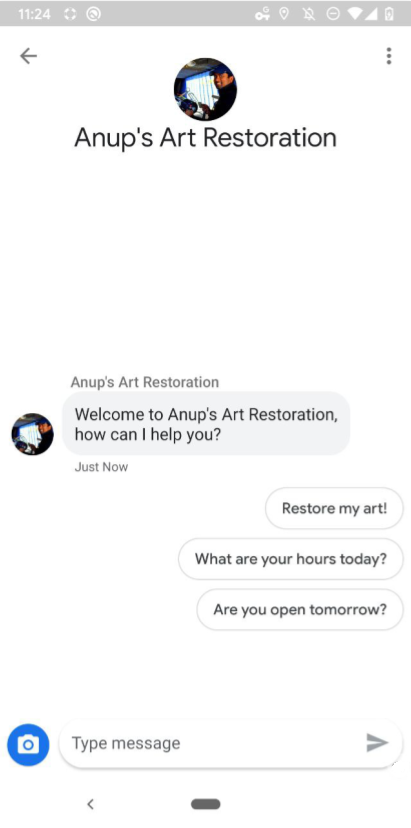
Business Messages 에이전트와의 대화에서 환영 메시지는 상호작용의 분위기를 설정합니다. 또한 사용자에게 에이전트가 할 수 있는 작업을 알려주므로 사용자의 질문과 기대치를 형성합니다.
사용자가 대화를 열 때마다 에이전트가 환영 메시지를 보냅니다. 에이전트는 대화 시작 도구를 표시하여 사용자를 알려진 경로 또는 자주 사용되는 경로로 안내할 수도 있습니다.
사용자가 에이전트 운영 시간 외에 대화를 시작하려고 하면 에이전트가 오프라인 메시지를 표시합니다. 이 메시지를 사용하여 대체 채널을 공유하거나 다음 단계를 제안할 수 있습니다. 이러한 설정을 활용하면 에이전트의 안정성과 유용성을 높일 수 있습니다.
에이전트 및 위치 수준 설정
에이전트 또는 위치 수준에서 대화 설정을 지정할 수 있습니다.
상담사 수준: 이러한 대화 설정은 모든 진입점에서 상담사와의 모든 대화에 적용됩니다.
상담사 수준의 환영 메시지는 'Bridgepoint Runners에 문의해 주셔서 감사합니다...'로 시작할 수 있습니다. 대화 시작은 회사 전체의 활동이나 정보에 초점을 맞출 수 있습니다.
위치 수준: 이러한 설정은 에이전트 수준 설정을 재정의하며
PLACESHEET및MAPS진입점을 통한 해당 위치와의 대화에만 적용됩니다.위치 수준 환영 메시지는 'Amphitheatre Pkwy에 있는 Bridgepoint Runners에 문의해 주셔서 감사합니다...'로 시작할 수 있습니다. 대화 시작은 위치 기반 작업이나 정보에 중점을 둘 수 있습니다. 오프라인 메시지에는 다음 영업일이 언급될 수 있습니다.
언어
상담사와 위치는 지원하는 언어에 대해 별도의 설정을 지정할 수 있습니다. 예를 들어 에이전트는 'en' 언어에 대한 환영 메시지를 영어로 지정하고 'es' 언어에 대한 환영 메시지를 스페인어로 지정할 수 있습니다. 비즈니스 메시지는 사용자 기기에서 보고된 언어와 에이전트 또는 위치에 대화 설정이 있는 언어 간의 일치 여부를 확인합니다.
이 언어 일치는 각 메시지의 resolvedLocale 필드에 보고됩니다. 확인된 언어 일치에 가중치를 부여하는 에이전트 또는 위치의 defaultLocale를 지정할 수 있습니다. 현지화 및 언어를 참고하세요.
비즈니스 메시지는 확인된 언어를 사용하여 적용할 대화 설정을 결정합니다.
환영 메시지
상담사와 사용자 간 대화의 첫 번째 메시지는 상담사의 환영 메시지입니다. 환영 메시지는 사용자가 새 대화를 시작하면 자동으로 표시됩니다. 좋은 환영 메시지는 사용자가 에이전트와 상호작용할 때의 기대치를 설정합니다. 환영 메시지를 수정하려면 대화형 설정 업데이트를 참고하세요.
대화 주제
좋은 환영 메시지는 상담사의 기능을 개략적으로 설명하고 개방형인 반면, 좋은 대화 시작 문구는 사용자를 자주 묻는 질문이나 알려진 기능으로 안내합니다.
대화 시작문은 추천 답장이 세로로 나열된 형태로 표시되며 환영 메시지 바로 뒤에 삽입됩니다. 사용자가 대화 시작 문구를 탭하면 에이전트는 시작 문구를 지정할 때 설정한 사전 정의된 콘텐츠와 콜백 데이터를 수신합니다.
상담사가 특정 요청에 대한 자동화된 기능을 지원하는 경우 대화 시작이 해당 요청에 매핑되어 자동화에 알려진 입력을 사용하고 답변할 준비가 된 실제 상담사에게 자유 형식 사용자 질문을 보낼 수 있습니다.
상담사는 최대 5개의 대화 시작을 사용할 수 있으며 각 시작은 최대 35자(영문 기준)까지 사용할 수 있습니다.
대화 시작 문구를 추가하거나 수정하려면 대화 설정 업데이트를 참고하세요.
오프라인 메시지
사용자가 에이전트의 운영 시간 (MessagingAvailability에 의해 정의됨) 외에 에이전트와 대화를 시작하면 사용자에게 에이전트의 오프라인 메시지가 표시됩니다. 오프라인 메시지를 트리거할 때는 실제 상담사의 응대 가능 여부만 고려됩니다. 봇 담당자만 있는 상담사는 항상 환영 메시지를 보냅니다. 좋은 오프라인 메시지
- 상담사가 통화할 수 없는 이유를 공유합니다.
- 사용자에게 적절한 다음 단계 또는 대체 연락 채널을 안내합니다.
- 환영 메시지 및 대화 시작 질문의 어조와 일치
잘못된 오프라인 메시지
'죄송합니다. 영업시간이 아닙니다.'
좋은 오프라인 메시지
'현재는 운영시간이 아닙니다. 내일 오전 8시에 다시 이용할 수 있습니다. 긴급한 지원이 필요한 경우 지원팀(+12223334444 또는 support@gtb.com)에 문의하세요."
오프라인 메시지를 수정하려면 대화 설정 업데이트를 참고하세요.
대화 설정 업데이트
환영 메시지 또는 대화 시작 도구를 관리하려면 Business Communications API를 사용하여 PATCH 요청을 보내 에이전트 또는 위치의 conversationalSettings 필드를 업데이트합니다.
conversationalSettings 필드를 업데이트할 때는 ConversationalSetting 객체의 모든 필드 값을 포함해야 합니다. 업데이트 요청은 하위 필드를 포함하여 수정하는 모든 필드의 콘텐츠를 덮어씁니다. 예를 들어 환영 메시지를 수정하는 요청을 하지만 대화 시작을 포함하지 않으면 요청으로 인해 이전 대화 시작이 삭제됩니다.
기본 요건
대화형 설정을 업데이트하려면 다음 항목이 필요합니다.
- 개발 머신에 있는 GCP 프로젝트의 서비스 계정 키 경로
- 설정을 업데이트할 언어
상담사 수준 설정의 경우 상담사
name(예: 'brands/12345/agents/67890')에이전트의
name를 모르는 경우 브랜드의 모든 에이전트 나열을 참고하세요.위치 수준 설정의 경우 위치
name(예: 'brands/12345/locations/67890')위치의
name를 모르는 경우 브랜드의 모든 위치 나열을 참고하세요.업데이트할 언어(2글자 ISO 639-1 언어 코드)
새 환영 메시지
개인정보처리방침 URL
(선택사항) 대화 시작을 위한 텍스트
(선택사항) 대화 시작을 위한 포스트백 데이터
(선택사항) 새 오프라인 메시지
현재 conversationalSettings 값을 모르는 경우 상담사 정보 가져오기 및 위치 정보 가져오기를 참고하세요.
업데이트 요청 보내기
에이전트 또는 위치를 업데이트하려면 다음 명령어를 실행합니다. 변수를 기본 요건에서 확인한 값으로 바꿉니다.
대화 시작을 원하지 않는 경우 conversationStarters 및 모든 하위 필드를 생략하세요.
에이전트 수준 설정
cURL
# This code updates the conversational settings of a Business Messages agent. # Read more: https://developers.google.com/business-communications/business-messages/reference/business-communications/rest/v1/brands.agents/patch # Replace the __BRAND_ID__, __AGENT_ID__ and __LOCALE__ # Make sure a service account key file exists at ./service_account_key.json curl -X PATCH \ "https://businesscommunications.googleapis.com/v1/brands/__BRAND_ID__/agents/__AGENT_ID__?updateMask=businessMessagesAgent.conversationalSettings.__LOCALE__" \ -H "Content-Type: application/json" \ -H "User-Agent: curl/business-communications" \ -H "$(oauth2l header --json ./service_account_key.json businesscommunications)" \ -d '{ "businessMessagesAgent": { "conversationalSettings": { "__LOCALE__": { "welcomeMessage": { "text": "My first welcome message" }, "offlineMessage": { "text": "My first offline message" }, "privacyPolicy": { "url": "https://www.your-company-website.com/privacy" }, "conversationStarters": [ { "suggestion": { "reply": { "text": "Suggestion 1", "postbackData": "post_back_suggestion_1" } } } ] } } } }'
Node.js
/** * This code snippet updates the conversationalSettings of a Business Messages agent. * Read more: https://developers.google.com/business-communications/business-messages/reference/business-communications/rest/v1/brands.agents/patch * * This code is based on the https://github.com/google-business-communications/nodejs-businesscommunications Node.js * Business Communications client library. */ /** * Edit the values below: */ const BRAND_ID = 'EDIT_HERE'; const AGENT_ID = 'EDIT_HERE'; const LOCALE = 'en'; const PATH_TO_SERVICE_ACCOUNT_KEY = './service_account_key.json'; const businesscommunications = require('businesscommunications'); const {google} = require('googleapis'); // Initialize the Business Communications API const bcApi = new businesscommunications.businesscommunications_v1.Businesscommunications({}); // Set the scope that we need for the Business Communications API const scopes = [ 'https://www.googleapis.com/auth/businesscommunications', ]; // Set the private key to the service account file const privatekey = require(PATH_TO_SERVICE_ACCOUNT_KEY); async function main() { const authClient = await initCredentials(); const agentName = 'brands/' + BRAND_ID + '/agents/' + AGENT_ID; if (authClient) { // Setup the parameters for the API call const apiParams = { auth: authClient, name: agentName, updateMask: 'businessMessagesAgent.conversationalSettings.' + LOCALE, resource: { businessMessagesAgent: { conversationalSettings: { [LOCALE]: { privacyPolicy: { url: 'https://www.your-company-website.com/privacy' }, welcomeMessage: { text: 'My updated welcome message' }, offlineMessage: { text: 'My updated offline message' }, conversationStarters: [ { suggestion: { reply: { 'text': 'Suggestion 2', 'postbackData': 'post_back_suggestion_2', }, }, } ], }, } } } }; bcApi.brands.agents.patch(apiParams, {}, (err, response) => { if (err !== undefined && err !== null) { console.dir(err); } else { // Agent found console.log(response.data); } }); } else { console.log('Authentication failure.'); } } /** * Initializes the Google credentials for calling the * Business Messages API. */ async function initCredentials() { // Configure a JWT auth client const authClient = new google.auth.JWT( privatekey.client_email, null, privatekey.private_key, scopes, ); return new Promise(function(resolve, reject) { // Authenticate request authClient.authorize(function(err, tokens) { if (err) { reject(false); } else { resolve(authClient); } }); }); } main();
자바
import com.google.api.client.googleapis.auth.oauth2.GoogleCredential;
import com.google.api.client.googleapis.javanet.GoogleNetHttpTransport;
import com.google.api.client.http.HttpTransport;
import com.google.api.client.json.jackson2.JacksonFactory;
import com.google.api.services.businesscommunications.v1.BusinessCommunications;
import com.google.api.services.businesscommunications.v1.model.*;
import com.google.common.collect.ImmutableMap;
import java.io.FileInputStream;
import java.util.Arrays;

class Main {
  /**
   * Initializes credentials used by the Business Communications API.
   */
  private static BusinessCommunications.Builder getBusinessCommunicationsBuilder() {
    BusinessCommunications.Builder builder = null;
    try {
      GoogleCredential credential = GoogleCredential
            .fromStream(new FileInputStream("PATH_TO_SERVICE_ACCOUNT_KEY"));

      credential = credential.createScoped(Arrays.asList(
          "https://www.googleapis.com/auth/businesscommunications"));

      credential.refreshToken();

      HttpTransport httpTransport = GoogleNetHttpTransport.newTrustedTransport();
      JacksonFactory jsonFactory = JacksonFactory.getDefaultInstance();

      // Create instance of the Business Communications API
      builder = new BusinessCommunications
          .Builder(httpTransport, jsonFactory, null)
          .setApplicationName(credential.getServiceAccountProjectId());

      // Set the API credentials and endpoint
      builder.setHttpRequestInitializer(credential);
    } catch (Exception e) {
      e.printStackTrace();
    }

    return builder;
  }

  public static void main(String args[]) {
    try {
      // Create client library reference
      BusinessCommunications.Builder builder = getBusinessCommunicationsBuilder();

      String agentName = "brands/BRAND_ID/agents/AGENT_ID";

      Agent agent = new Agent().setBusinessMessagesAgent(
          new BusinessMessagesAgent().setConversationalSettings(ImmutableMap.of("LOCALE",
              new ConversationalSetting()
                  .setPrivacyPolicy(new PrivacyPolicy().setUrl("PRIVACY_POLICY_URL"))
                  .setWelcomeMessage(new WelcomeMessage().setText("WELCOME_MESSAGE"))
                  .setOfflineMessage(new OfflineMessage().setText("OFFLINE_MESSAGE"))
                  .setConversationStarters(Arrays.asList(
                      new ConversationStarters().setSuggestion(new Suggestion()
                          .setReply(new SuggestedReply()
                              .setText("REPLY_TEXT")
                              .setPostbackData("POSTBACK_DATA"))),
                      )))));

      BusinessCommunications.Brands.Agents.Patch request = builder
          .build().brands().agents().patch(agentName, agent);

      request.setUpdateMask("businessMessagesAgent.conversationalSettings.LOCALE");

      Agent updatedAgent = request.execute();
      System.out.println(updatedAgent.toPrettyString());
    } catch (Exception e) {
      e.printStackTrace();
    }
  }
}
Python
"""This code updates the conversational settings of a Business Messages agent. Read more: https://developers.google.com/business-communications/business-messages/reference/business-communications/rest/v1/brands.agents/patch This code is based on the https://github.com/google-business-communications/python-businessmessages Python Business Messages client library. """ from oauth2client.service_account import ServiceAccountCredentials from businesscommunications.businesscommunications_v1_client import BusinesscommunicationsV1 from businesscommunications.businesscommunications_v1_messages import ( Agent, BusinessMessagesAgent, ConversationStarters, ConversationalSetting, OfflineMessage, PrivacyPolicy, WelcomeMessage, NegativeBotFeedbackMessage, BusinesscommunicationsBrandsAgentsPatchRequest, ) # Edit the values below: BRAND_ID = 'EDIT_HERE' AGENT_ID = 'EDIT_HERE' SCOPES = ['https://www.googleapis.com/auth/businesscommunications'] SERVICE_ACCOUNT_FILE = './service_account_key.json' credentials = ServiceAccountCredentials.from_json_keyfile_name( SERVICE_ACCOUNT_FILE, scopes=SCOPES) client = BusinesscommunicationsV1(credentials=credentials) agents_service = BusinesscommunicationsV1.BrandsAgentsService(client) agent_name = 'brands/' + BRAND_ID + '/agents/' + AGENT_ID agent=Agent( businessMessagesAgent=BusinessMessagesAgent( conversationalSettings=BusinessMessagesAgent.ConversationalSettingsValue( additionalProperties=[BusinessMessagesAgent.ConversationalSettingsValue.AdditionalProperty( key='en', value=ConversationalSetting( privacyPolicy=PrivacyPolicy(url='https://www.your-company-website.com/privacy'), welcomeMessage=WelcomeMessage(text='Welcome to Business Messages'), offlineMessage=OfflineMessage(text='This is an offline message'), conversationStarters=[ ConversationStarters( suggestion=Suggestion( reply=SuggestedReply(text='Option 1', postbackData='option_1') ) )] ) ) ] ) ) ) updated_agent = agents_service.Patch( BusinesscommunicationsBrandsAgentsPatchRequest( agent=agent, name=agent_name, updateMask='businessMessagesAgent.conversationalSettings.en' ) ) print(updated_agent)
위치 수준 설정
# This code updates the agent interaction of a bot and human representatives. # Read more: https://developers.google.com/business-communications/business-messages/reference/business-communications/rest/v1/brands.locations/patch # Replace the __BRAND_ID__, __AGENT_ID__, __LOCATION_ID__, __LOCALE__ # Make sure a service account key file exists at ./service_account_key.json curl -X PATCH \ "https://businesscommunications.googleapis.com/v1/brands/__BRAND_ID__/locations/__LOCATION_ID__?updateMask=conversationalSettings.__LOCALE__" \ -H "Content-Type: application/json" \ -H "User-Agent: curl/business-communications" \ -H "$(oauth2l header --json ./service_account_key.json businesscommunications)" \ -d '{ "conversationalSettings": { "__LOCALE__": { "welcomeMessage": { "text": "My second welcome message" }, "offlineMessage": { "text": "My second offline message" }, "privacyPolicy": { "url": "https://www.your-company-website.com/privacy" }, "conversationStarters": [ { "suggestion": { "reply": { "text": "Suggestion 2", "postbackData": "post_back_suggestion_2" } } } ] } } }'
형식 및 값 정보는 brands.agents.patch, brands.locations.patch, ConversationalSetting을 참고하세요.
예
에이전트 수준 설정
curl -X PATCH \
"https://businesscommunications.googleapis.com/v1/brands/BRAND_ID/agents/AGENT_ID?updateMask=businessMessagesAgent.conversationalSettings.en" \
-H "Content-Type: application/json" \
-H "User-Agent: curl/business-communications" \
-H "$(oauth2l header --json PATH_TO_SERVICE_ACCOUNT_KEY businesscommunications)" \
-d "{
    'businessMessagesAgent': {
        'conversationalSettings': {
            'en': {
                'welcomeMessage': {
                    'text': 'Thanks for contacting Growing Tree Bank. What can I help with today?',
                },
                'offlineMessage': {
                    'text': 'We\'re closed for the night. Please reach out to us again tomorrow.',
                },
                'privacyPolicy': {
                    'url': 'https://www.growingtreebank.com/privacy',
                },
                'conversationStarters': [
                    {
                        'suggestion': {
                            'reply': {
                                'text': 'Set up an account',
                                'postbackData': 'new-account',
                            },
                        },
                    },
                    {
                        'suggestion': {
                            'reply': {
                                'text': 'Look up account information',
                                'postbackData': 'account-lookup',
                            },
                        },
                    },
                ],
            },
        },
    },
}"
위치 수준 설정
curl -X PATCH \
"https://businesscommunications.googleapis.com/v1/brands/12345/locations/67890?updateMask=conversationalSettings.en" \
-H "Content-Type: application/json" \
-H "User-Agent: curl/business-communications" \
-H "$(oauth2l header --json /path/to/service/account/key businesscommunications)" \
-d "{
    'conversationalSettings': {
        'en': {
            'welcomeMessage': {
                'text': 'Thanks for contacting Growing Tree Bank on Amphitheatre Pkwy. What can I help with today?',
            },
            'offlineMessage': {
                'text': 'We\'re closed for the night. Please reach out to us again tomorrow.',
            },
            'privacyPolicy': {
                'url': 'https://www.growingtreebank.com/privacy',
            },
            'conversationStarters': [
                {
                    'suggestion': {
                        'reply': {
                            'text': 'What are your hours?',
                            'postbackData': 'hours',
                        },
                    },
                },
                {
                    'suggestion': {
                        'reply': {
                            'text': 'Set up an account',
                            'postbackData': 'new-account',
                        },
                    },
                },
                {
                    'suggestion': {
                        'reply': {
                            'text': 'Look up account information',
                            'postbackData': 'account-lookup',
                        },
                    },
                },
                {
                    'suggestion': {
                        'action': {
                            'text': 'Call us',
                            'postbackData': 'call',
                            'dialAction': {
                              'phoneNumber': '+12223334444',
                            },
                        },
                    },
                },
            ],
        },
    },
}"