
在與 Business Messages 服務專員的對話中,歡迎訊息會決定互動的基調。此外,使用者也能瞭解代理程式的功能,進而調整問題和期望。
使用者每次開啟對話時,代理都會傳送歡迎訊息。代理程式也可以顯示對話啟動器,引導使用者前往已知或常用的路徑。
如果使用者嘗試在服務專員的服務時間外發起對話,服務專員會顯示離線訊息,您可以藉此提供其他管道或建議後續步驟。運用這些設定,即可提高代理程式的可靠性和可用性。
代理商和地點層級設定
您可以在代理商或地點層級指定對話設定。
代理程式層級: 這些對話設定適用於所有進入點,與代理程式進行的所有對話。
服務專員層級的歡迎訊息開頭可能是「感謝聯絡 Bridgepoint Runners...」開場白可以著重於全公司範圍的行動或資訊。
地點層級:這些設定會覆寫服務專員層級的設定,且只會套用至透過
PLACESHEET和MAPS進入點與該地點進行的對話。位置層級的歡迎訊息開頭可能為「感謝您聯絡 Amphitheatre Pkwy 的 Bridgepoint Runners...」開場白可以著重於位置資訊相關工作或資訊。離線訊息可能會說明下次營業時間。
語言代碼
服務專員和地點可以為支援的語言代碼指定不同的設定。舉例來說,服務專員可能會為「en」語言代碼指定英文的歡迎訊息,並為「es」語言代碼指定西班牙文的歡迎訊息。如果代理商或地點有任何對話設定,商家訊息會比對使用者裝置回報的語言代碼和這些語言代碼。
每則訊息的 resolvedLocale 欄位都會回報這個相符的語言代碼。您可以指定服務專員或地點的 defaultLocale,這會加權解析的語言代碼比對結果。請參閱「本地化和語言代碼」。
商家訊息會根據已解析的語言代碼,決定要套用哪些對話設定。
歡迎訊息
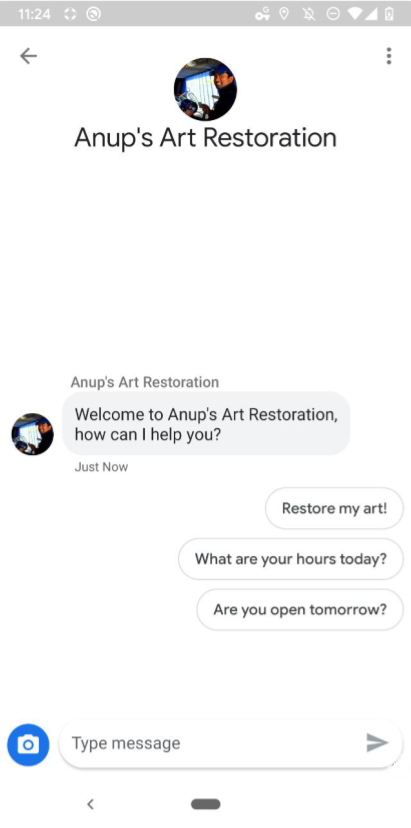
服務專員與使用者對話的第一則訊息,就是服務專員的歡迎訊息。使用者開始新對話後,系統會自動顯示歡迎訊息。良好的歡迎訊息可讓使用者瞭解與服務專員互動時會有哪些情況。如要編輯歡迎訊息,請參閱「更新對話設定」。
對話開場白
好的歡迎訊息會從高層次涵蓋代理程式的功能,並採用開放式問法,而好的對話開頭則會引導使用者提出常見問題或使用已知功能。
對話開頭句會緊接在歡迎訊息後,並以垂直堆疊的方式顯示建議回覆。使用者輕觸對話啟動器時,代理程式會收到您指定啟動器時設定的預先定義內容和回傳資料。
如果代理程式支援特定要求的自動化功能,對話啟動器可能會對應至這些要求,讓您依賴已知的自動化輸入內容,並將任意形式的使用者問題傳送給準備好回答的真人服務專員。
每個代理程式最多可有 5 個對話啟動器,每個啟動器最多可有 35 個字元。
如要新增或編輯對話啟動器,請參閱「更新對話設定」。
離線訊息
如果使用者在非服務時間與服務專員進行對話 (服務時間由 MessagingAvailability 定義),就會收到服務專員的離線訊息。觸發離線訊息時,系統只會考量真人代表的服務時間。如果服務專員只有機器人代表,一律會傳送歡迎訊息。優質的離線訊息
- 說明專員無法提供服務的原因
- 指示使用者採取適當的後續步驟,或提供其他聯絡管道
- 與歡迎訊息和開場白的語氣一致
不當的離線訊息
「抱歉,我們已打烊。」
良好的離線訊息
「現在已經打烊,我們會在明天上午 8 點開始提供服務。如需緊急協助,請撥打 +12223334444 或傳送電子郵件至 support@gtb.com 與支援團隊聯絡。"
如要編輯離線訊息,請參閱「更新對話設定」。
更新對話設定
如要管理歡迎訊息或對話啟動器,請使用 Business Communications API 傳送 PATCH 要求,更新代理程式或地點的 conversationalSettings 欄位。
更新 conversationalSettings 欄位時,必須在 ConversationalSetting 物件中加入所有欄位的值。更新要求會覆寫您編輯的所有欄位內容,包括任何子欄位。舉例來說,如果您要求修改歡迎訊息,但未加入對話開頭,系統就會移除先前的對話開頭。
必要條件
更新對話設定前,請確認您具備:
- 開發機器上 GCP 專案服務帳戶金鑰的路徑
- 要更新設定的語言代碼
如為代理程式層級設定,請使用代理程式
name(例如「brands/12345/agents/67890」)如果您不知道代理程式的
name,請參閱「列出品牌的全部代理程式」。位置層級設定:位置
name(例如「brands/12345/locations/67890」)如不知道地點的
name,請參閱「列出品牌的全部地點」。要更新的語言代碼,為兩個字元的 ISO 639-1 語言代碼
新歡迎訊息
隱私權政策網址
(選用) 對話開場白文字
(選用) 對話開頭句的回傳資料
(選用) 新的離線訊息
如果您不知道目前的 conversationalSettings 值,請參閱「取得代理程式資訊」和「取得位置資訊」。
傳送更新要求
如要更新代理程式或位置,請執行下列指令。將變數換成您在「必要條件」中識別的值。
如不想提供對話開頭,請省略 conversationStarters 和所有子欄位。
代理人層級設定
cURL
# This code updates the conversational settings of a Business Messages agent. # Read more: https://developers.google.com/business-communications/business-messages/reference/business-communications/rest/v1/brands.agents/patch # Replace the __BRAND_ID__, __AGENT_ID__ and __LOCALE__ # Make sure a service account key file exists at ./service_account_key.json curl -X PATCH \ "https://businesscommunications.googleapis.com/v1/brands/__BRAND_ID__/agents/__AGENT_ID__?updateMask=businessMessagesAgent.conversationalSettings.__LOCALE__" \ -H "Content-Type: application/json" \ -H "User-Agent: curl/business-communications" \ -H "$(oauth2l header --json ./service_account_key.json businesscommunications)" \ -d '{ "businessMessagesAgent": { "conversationalSettings": { "__LOCALE__": { "welcomeMessage": { "text": "My first welcome message" }, "offlineMessage": { "text": "My first offline message" }, "privacyPolicy": { "url": "https://www.your-company-website.com/privacy" }, "conversationStarters": [ { "suggestion": { "reply": { "text": "Suggestion 1", "postbackData": "post_back_suggestion_1" } } } ] } } } }'
Node.js
/** * This code snippet updates the conversationalSettings of a Business Messages agent. * Read more: https://developers.google.com/business-communications/business-messages/reference/business-communications/rest/v1/brands.agents/patch * * This code is based on the https://github.com/google-business-communications/nodejs-businesscommunications Node.js * Business Communications client library. */ /** * Edit the values below: */ const BRAND_ID = 'EDIT_HERE'; const AGENT_ID = 'EDIT_HERE'; const LOCALE = 'en'; const PATH_TO_SERVICE_ACCOUNT_KEY = './service_account_key.json'; const businesscommunications = require('businesscommunications'); const {google} = require('googleapis'); // Initialize the Business Communications API const bcApi = new businesscommunications.businesscommunications_v1.Businesscommunications({}); // Set the scope that we need for the Business Communications API const scopes = [ 'https://www.googleapis.com/auth/businesscommunications', ]; // Set the private key to the service account file const privatekey = require(PATH_TO_SERVICE_ACCOUNT_KEY); async function main() { const authClient = await initCredentials(); const agentName = 'brands/' + BRAND_ID + '/agents/' + AGENT_ID; if (authClient) { // Setup the parameters for the API call const apiParams = { auth: authClient, name: agentName, updateMask: 'businessMessagesAgent.conversationalSettings.' + LOCALE, resource: { businessMessagesAgent: { conversationalSettings: { [LOCALE]: { privacyPolicy: { url: 'https://www.your-company-website.com/privacy' }, welcomeMessage: { text: 'My updated welcome message' }, offlineMessage: { text: 'My updated offline message' }, conversationStarters: [ { suggestion: { reply: { 'text': 'Suggestion 2', 'postbackData': 'post_back_suggestion_2', }, }, } ], }, } } } }; bcApi.brands.agents.patch(apiParams, {}, (err, response) => { if (err !== undefined && err !== null) { console.dir(err); } else { // Agent found console.log(response.data); } }); } else { console.log('Authentication failure.'); } } /** * Initializes the Google credentials for calling the * Business Messages API. */ async function initCredentials() { // Configure a JWT auth client const authClient = new google.auth.JWT( privatekey.client_email, null, privatekey.private_key, scopes, ); return new Promise(function(resolve, reject) { // Authenticate request authClient.authorize(function(err, tokens) { if (err) { reject(false); } else { resolve(authClient); } }); }); } main();
Java
import com.google.api.client.googleapis.auth.oauth2.GoogleCredential;
import com.google.api.client.googleapis.javanet.GoogleNetHttpTransport;
import com.google.api.client.http.HttpTransport;
import com.google.api.client.json.jackson2.JacksonFactory;
import com.google.api.services.businesscommunications.v1.BusinessCommunications;
import com.google.api.services.businesscommunications.v1.model.*;
import com.google.common.collect.ImmutableMap;
import java.io.FileInputStream;
import java.util.Arrays;

class Main {
  /**
   * Initializes credentials used by the Business Communications API.
   */
  private static BusinessCommunications.Builder getBusinessCommunicationsBuilder() {
    BusinessCommunications.Builder builder = null;
    try {
      GoogleCredential credential = GoogleCredential
            .fromStream(new FileInputStream("PATH_TO_SERVICE_ACCOUNT_KEY"));

      credential = credential.createScoped(Arrays.asList(
          "https://www.googleapis.com/auth/businesscommunications"));

      credential.refreshToken();

      HttpTransport httpTransport = GoogleNetHttpTransport.newTrustedTransport();
      JacksonFactory jsonFactory = JacksonFactory.getDefaultInstance();

      // Create instance of the Business Communications API
      builder = new BusinessCommunications
          .Builder(httpTransport, jsonFactory, null)
          .setApplicationName(credential.getServiceAccountProjectId());

      // Set the API credentials and endpoint
      builder.setHttpRequestInitializer(credential);
    } catch (Exception e) {
      e.printStackTrace();
    }

    return builder;
  }

  public static void main(String args[]) {
    try {
      // Create client library reference
      BusinessCommunications.Builder builder = getBusinessCommunicationsBuilder();

      String agentName = "brands/BRAND_ID/agents/AGENT_ID";

      Agent agent = new Agent().setBusinessMessagesAgent(
          new BusinessMessagesAgent().setConversationalSettings(ImmutableMap.of("LOCALE",
              new ConversationalSetting()
                  .setPrivacyPolicy(new PrivacyPolicy().setUrl("PRIVACY_POLICY_URL"))
                  .setWelcomeMessage(new WelcomeMessage().setText("WELCOME_MESSAGE"))
                  .setOfflineMessage(new OfflineMessage().setText("OFFLINE_MESSAGE"))
                  .setConversationStarters(Arrays.asList(
                      new ConversationStarters().setSuggestion(new Suggestion()
                          .setReply(new SuggestedReply()
                              .setText("REPLY_TEXT")
                              .setPostbackData("POSTBACK_DATA"))),
                      )))));

      BusinessCommunications.Brands.Agents.Patch request = builder
          .build().brands().agents().patch(agentName, agent);

      request.setUpdateMask("businessMessagesAgent.conversationalSettings.LOCALE");

      Agent updatedAgent = request.execute();
      System.out.println(updatedAgent.toPrettyString());
    } catch (Exception e) {
      e.printStackTrace();
    }
  }
}
Python
"""This code updates the conversational settings of a Business Messages agent. Read more: https://developers.google.com/business-communications/business-messages/reference/business-communications/rest/v1/brands.agents/patch This code is based on the https://github.com/google-business-communications/python-businessmessages Python Business Messages client library. """ from oauth2client.service_account import ServiceAccountCredentials from businesscommunications.businesscommunications_v1_client import BusinesscommunicationsV1 from businesscommunications.businesscommunications_v1_messages import ( Agent, BusinessMessagesAgent, ConversationStarters, ConversationalSetting, OfflineMessage, PrivacyPolicy, WelcomeMessage, NegativeBotFeedbackMessage, BusinesscommunicationsBrandsAgentsPatchRequest, ) # Edit the values below: BRAND_ID = 'EDIT_HERE' AGENT_ID = 'EDIT_HERE' SCOPES = ['https://www.googleapis.com/auth/businesscommunications'] SERVICE_ACCOUNT_FILE = './service_account_key.json' credentials = ServiceAccountCredentials.from_json_keyfile_name( SERVICE_ACCOUNT_FILE, scopes=SCOPES) client = BusinesscommunicationsV1(credentials=credentials) agents_service = BusinesscommunicationsV1.BrandsAgentsService(client) agent_name = 'brands/' + BRAND_ID + '/agents/' + AGENT_ID agent=Agent( businessMessagesAgent=BusinessMessagesAgent( conversationalSettings=BusinessMessagesAgent.ConversationalSettingsValue( additionalProperties=[BusinessMessagesAgent.ConversationalSettingsValue.AdditionalProperty( key='en', value=ConversationalSetting( privacyPolicy=PrivacyPolicy(url='https://www.your-company-website.com/privacy'), welcomeMessage=WelcomeMessage(text='Welcome to Business Messages'), offlineMessage=OfflineMessage(text='This is an offline message'), conversationStarters=[ ConversationStarters( suggestion=Suggestion( reply=SuggestedReply(text='Option 1', postbackData='option_1') ) )] ) ) ] ) ) ) updated_agent = agents_service.Patch( BusinesscommunicationsBrandsAgentsPatchRequest( agent=agent, name=agent_name, updateMask='businessMessagesAgent.conversationalSettings.en' ) ) print(updated_agent)
位置層級設定
# This code updates the agent interaction of a bot and human representatives. # Read more: https://developers.google.com/business-communications/business-messages/reference/business-communications/rest/v1/brands.locations/patch # Replace the __BRAND_ID__, __AGENT_ID__, __LOCATION_ID__, __LOCALE__ # Make sure a service account key file exists at ./service_account_key.json curl -X PATCH \ "https://businesscommunications.googleapis.com/v1/brands/__BRAND_ID__/locations/__LOCATION_ID__?updateMask=conversationalSettings.__LOCALE__" \ -H "Content-Type: application/json" \ -H "User-Agent: curl/business-communications" \ -H "$(oauth2l header --json ./service_account_key.json businesscommunications)" \ -d '{ "conversationalSettings": { "__LOCALE__": { "welcomeMessage": { "text": "My second welcome message" }, "offlineMessage": { "text": "My second offline message" }, "privacyPolicy": { "url": "https://www.your-company-website.com/privacy" }, "conversationStarters": [ { "suggestion": { "reply": { "text": "Suggestion 2", "postbackData": "post_back_suggestion_2" } } } ] } } }'
如需格式和值資訊,請參閱brands.agents.patch、brands.locations.patch 和ConversationalSetting。
範例
代理人層級設定
curl -X PATCH \
"https://businesscommunications.googleapis.com/v1/brands/BRAND_ID/agents/AGENT_ID?updateMask=businessMessagesAgent.conversationalSettings.en" \
-H "Content-Type: application/json" \
-H "User-Agent: curl/business-communications" \
-H "$(oauth2l header --json PATH_TO_SERVICE_ACCOUNT_KEY businesscommunications)" \
-d "{
    'businessMessagesAgent': {
        'conversationalSettings': {
            'en': {
                'welcomeMessage': {
                    'text': 'Thanks for contacting Growing Tree Bank. What can I help with today?',
                },
                'offlineMessage': {
                    'text': 'We\'re closed for the night. Please reach out to us again tomorrow.',
                },
                'privacyPolicy': {
                    'url': 'https://www.growingtreebank.com/privacy',
                },
                'conversationStarters': [
                    {
                        'suggestion': {
                            'reply': {
                                'text': 'Set up an account',
                                'postbackData': 'new-account',
                            },
                        },
                    },
                    {
                        'suggestion': {
                            'reply': {
                                'text': 'Look up account information',
                                'postbackData': 'account-lookup',
                            },
                        },
                    },
                ],
            },
        },
    },
}"
位置層級設定
curl -X PATCH \
"https://businesscommunications.googleapis.com/v1/brands/12345/locations/67890?updateMask=conversationalSettings.en" \
-H "Content-Type: application/json" \
-H "User-Agent: curl/business-communications" \
-H "$(oauth2l header --json /path/to/service/account/key businesscommunications)" \
-d "{
    'conversationalSettings': {
        'en': {
            'welcomeMessage': {
                'text': 'Thanks for contacting Growing Tree Bank on Amphitheatre Pkwy. What can I help with today?',
            },
            'offlineMessage': {
                'text': 'We\'re closed for the night. Please reach out to us again tomorrow.',
            },
            'privacyPolicy': {
                'url': 'https://www.growingtreebank.com/privacy',
            },
            'conversationStarters': [
                {
                    'suggestion': {
                        'reply': {
                            'text': 'What are your hours?',
                            'postbackData': 'hours',
                        },
                    },
                },
                {
                    'suggestion': {
                        'reply': {
                            'text': 'Set up an account',
                            'postbackData': 'new-account',
                        },
                    },
                },
                {
                    'suggestion': {
                        'reply': {
                            'text': 'Look up account information',
                            'postbackData': 'account-lookup',
                        },
                    },
                },
                {
                    'suggestion': {
                        'action': {
                            'text': 'Call us',
                            'postbackData': 'call',
                            'dialAction': {
                              'phoneNumber': '+12223334444',
                            },
                        },
                    },
                },
            ],
        },
    },
}"