
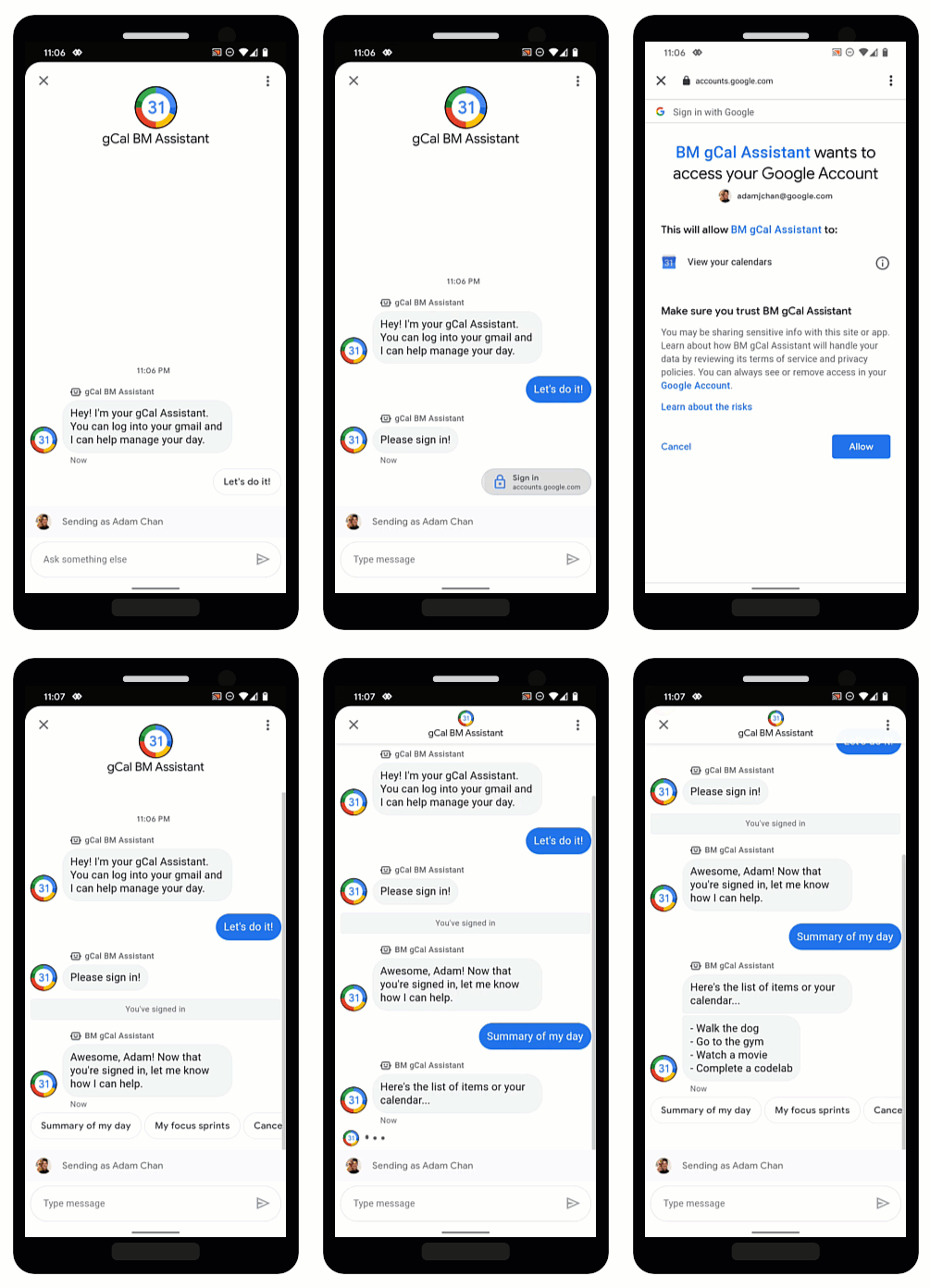
OAuth を使用すると、エージェントはユーザーの身元を確認し、会話でパーソナライズされた情報を安全に提供できます。ユーザーが信頼できる OAuth プロバイダにログインすることで、エージェントはユーザーデータにアクセスし、自動化によって迅速な回答を提供して、ライブ エージェントの時間を節約できます。
ビジネス メッセージは、OAuth 2.0 認証リクエスト の候補を使用して、 ユーザーがエージェント用に構成した OAuth プロバイダにログインできるようにします。 ユーザーが正常にログインすると、ビジネス メッセージは認証コードをメッセージとしてエージェントに返します。
OAuth プロバイダから認証コードを取得したら、そのプロバイダの API と統合して、ユーザー ID 情報が必要な会話フローをサポートできます。やり取りする各サービスには、独自の利用規約があることに注意してください。
エージェントの OAuth を構成する
エージェントの認証リクエストの候補を有効にするには、まず OAuth を構成する必要があります。
OAuth 構成を指定するには、PATCH リクエスト
をビジネス コミュニケーション
API
で行い、エージェントの endpointUrl フィールドを更新します。
エンドポイント URL を指定したら、エージェントのリダイレクト URI を保存し、OAuth プロバイダの情報でリダイレクト URI を更新する必要があります。
前提条件
次のものが必要です。
- OAuth 2.0 仕様に準拠した OAuth プロバイダ
- 開発マシン上の GCP プロジェクトのサービス アカウント キーのパス
エージェントの
name(例: "brands/12345/agents/67890")エージェントの
nameがわからない場合は、ブランドのすべてのエージェントを一覧表示するをご覧ください。ユーザーが OAuth プロバイダにログインするエンドポイント URL
更新リクエストを送信する
エージェントを更新するには、次のコマンドを実行します。変数は、 前提条件で特定した値に置き換えます。
curl -X PATCH \
"https://businesscommunications.googleapis.com/v1/brands/BRAND_ID/agents/AGENT_ID?updateMask=businessMessagesAgent.authorizationConfig" \
-H "Content-Type: application/json" \
-H "User-Agent: curl/business-communications" \
-H "$(oauth2l header --json PATH_TO_SERVICE_ACCOUNT_KEY businesscommunications)" \
-d "{
    'businessMessagesAgent': {
        'authorizationConfig': {
            'endpointUrl': 'ENDPOINT_URL',
        },
    },
}"
リダイレクト URI を更新する
エージェントの OAuth が構成されたので、OAuth プロバイダに次の 4 つのリダイレクト URI を追加する必要があります。
https://business.google.com/callbackhttps://business.google.com/callback?https://business.google.com/message?az-intent-type=1https://business.google.com/message?az-intent-type=1&
OAuth プロバイダの情報には、すべてのリダイレクト URL を含める必要があります。
リダイレクト URI を更新するプロセスは、OAuth プロバイダによって異なります。手順については、OAuth プロバイダをご覧ください。
エージェントの OAuth が構成されたので、認証リクエスト の候補を使用してユーザーを認証 できます。
ユーザーを認証する
エージェントの OAuth を構成したら、 認証リクエスト の候補を使用してユーザーにログインを求めることができます。
前提条件
次のものが必要です。
- 開発マシン上の GCP プロジェクトのサービス アカウント キーのパス
エージェントの
name(例: "brands/12345/agents/67890")エージェントの
nameがわからない場合は、ブランドのすべてのエージェントを一覧表示するをご覧ください。OAuth プロバイダのクライアント ID
OAuth プロバイダのコードチャレンジ要件
OAuth プロバイダのスコープ
認証リクエストの候補を送信する
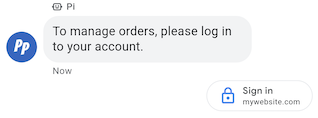
ユーザーを認証するには:
- OAuth リクエストのコード検証ツールとコードチャレンジ文字列を生成します。 要件とオプションについては、OAuth プロバイダをご覧ください。
- 認証リクエストの候補を含むメッセージを送信します。
cURL
# Copyright 2021 Google LLC # # Licensed under the Apache License, Version 2.0 (the "License"); # you may not use this file except in compliance with the License. # You may obtain a copy of the License at # https://www.apache.org/licenses/LICENSE-2.0 # Unless required by applicable law or agreed to in writing, software # distributed under the License is distributed on an "AS IS" BASIS, # WITHOUT WARRANTIES OR CONDITIONS OF ANY KIND, either express or implied. # See the License for the specific language governing permissions and # limitations under the License. # This code sends a text message to the user with an authentication request suggestion # that allows the user to authenticate with OAuth. It also has a fallback text. # Read more: https://developers.google.com/business-communications/business-messages/guides/how-to/message/send?hl=en#authentication-request-suggestion # Replace the __CONVERSATION_ID__ with a conversation id that you can send messages to # Make sure a service account key file exists at ./service_account_key.json # Replace the __CLIENT_ID__ # Replace the __CODE_CHALLENGE__ # Replace the __SCOPE__ curl -X POST "https://businessmessages.googleapis.com/v1/conversations/__CONVERSATION_ID__/messages" \ -H "Content-Type: application/json" \ -H "User-Agent: curl/business-messages" \ -H "$(oauth2l header --json ./service_account_key.json businessmessages)" \ -d "{ 'messageId': '$(uuidgen)', 'text': 'Sign in to continue the conversation.', 'fallback': 'Visit support.growingtreebank.com to continue.', 'suggestions': [ { 'authenticationRequest': { 'oauth': { 'clientId': '__CLIENT_ID__', 'codeChallenge': '__CODE_CHALLENGE__', 'scopes': [ '__SCOPE__', ], }, }, }, ], 'representative': { 'avatarImage': 'https://developers.google.com/identity/images/g-logo.png', 'displayName': 'Chatbot', 'representativeType': 'BOT' } }"
Node.js
/** * This code sends a text message to the user with an authentication request suggestion * that allows the user to authenticate with OAuth. It also has a fallback text. * Read more: https://developers.google.com/business-communications/business-messages/guides/how-to/message/send?hl=en#authentication-request-suggestion * * This code is based on the https://github.com/google-business-communications/nodejs-businessmessages Node.js * Business Messages client library. */ /** * Before continuing, learn more about the prerequisites for authenticating * with OAuth at: https://developers.google.com/business-communications/business-messages/guides/how-to/integrate/oauth?hl=en * * Edit the values below: */ const PATH_TO_SERVICE_ACCOUNT_KEY = './service_account_key.json'; const CONVERSATION_ID = 'EDIT_HERE'; const OAUTH_CLIENT_ID = 'EDIT_HERE'; const OAUTH_CODE_CHALLENGE = 'EDIT_HERE'; const OAUTH_SCOPE = 'EDIT_HERE'; const businessmessages = require('businessmessages'); const uuidv4 = require('uuid').v4; const {google} = require('googleapis'); // Initialize the Business Messages API const bmApi = new businessmessages.businessmessages_v1.Businessmessages({}); // Set the scope that we need for the Business Messages API const scopes = [ 'https://www.googleapis.com/auth/businessmessages', ]; // Set the private key to the service account file const privatekey = require(PATH_TO_SERVICE_ACCOUNT_KEY); /** * Posts a message to the Business Messages API along with an authentication request. * * @param {string} conversationId The unique id for this user and agent. * @param {string} representativeType A value of BOT or HUMAN. */ async function sendMessage(conversationId, representativeType) { const authClient = await initCredentials(); if (authClient) { // Create the payload for sending a message along with an authentication request const apiParams = { auth: authClient, parent: 'conversations/' + conversationId, resource: { messageId: uuidv4(), representative: { representativeType: representativeType, }, fallback: 'Visit support.growingtreebank.com to continue.', text: 'Sign in to continue the conversation.', suggestions: [ { authenticationRequest: { oauth: { clientId: OAUTH_CLIENT_ID, codeChallenge: OAUTH_CODE_CHALLENGE, scopes: [OAUTH_SCOPE] } } }, ], }, }; // Call the message create function using the // Business Messages client library bmApi.conversations.messages.create(apiParams, {auth: authClient}, (err, response) => { console.log(err); console.log(response); }); } else { console.log('Authentication failure.'); } } /** * Initializes the Google credentials for calling the * Business Messages API. */ async function initCredentials() { // configure a JWT auth client const authClient = new google.auth.JWT( privatekey.client_email, null, privatekey.private_key, scopes, ); return new Promise(function(resolve, reject) { // authenticate request authClient.authorize(function(err, tokens) { if (err) { reject(false); } else { resolve(authClient); } }); }); } sendMessage(CONVERSATION_ID, 'BOT');
Python
"""Sends a text message to the user with an authentication request suggestion. It allows the user to authenticate with OAuth and has a fallback text. Read more: https://developers.google.com/business-communications/business-messages/guides/how-to/message/send?hl=en#authentication-request-suggestion This code is based on the https://github.com/google-business-communications/python-businessmessages Python Business Messages client library. """ import uuid from businessmessages import businessmessages_v1_client as bm_client from businessmessages.businessmessages_v1_messages import BusinessMessagesAuthenticationRequest from businessmessages.businessmessages_v1_messages import BusinessMessagesAuthenticationRequestOauth from businessmessages.businessmessages_v1_messages import BusinessmessagesConversationsMessagesCreateRequest from businessmessages.businessmessages_v1_messages import BusinessMessagesMessage from businessmessages.businessmessages_v1_messages import BusinessMessagesRepresentative from businessmessages.businessmessages_v1_messages import BusinessMessagesSuggestion from oauth2client.service_account import ServiceAccountCredentials # Before continuing, learn more about the prerequisites for authenticating # with OAuth at: https://developers.google.com/business-communications/business-messages/guides/how-to/integrate/oauth?hl=en # Edit the values below: path_to_service_account_key = './service_account_key.json' conversation_id = 'EDIT_HERE' oauth_client_id = 'EDIT_HERE' oauth_code_challenge = 'EDIT_HERE' oauth_scope = 'EDIT_HERE' credentials = ServiceAccountCredentials.from_json_keyfile_name( path_to_service_account_key, scopes=['https://www.googleapis.com/auth/businessmessages']) client = bm_client.BusinessmessagesV1(credentials=credentials) representative_type_as_string = 'BOT' if representative_type_as_string == 'BOT': representative_type = BusinessMessagesRepresentative.RepresentativeTypeValueValuesEnum.BOT else: representative_type = BusinessMessagesRepresentative.RepresentativeTypeValueValuesEnum.HUMAN # Create a text message with an authentication request message = BusinessMessagesMessage( messageId=str(uuid.uuid4().int), representative=BusinessMessagesRepresentative( representativeType=representative_type ), text='Sign in to continue the conversation.', fallback='Visit support.growingtreebank.com to continue.', suggestions=[ BusinessMessagesSuggestion( authenticationRequest=BusinessMessagesAuthenticationRequest( oauth=BusinessMessagesAuthenticationRequestOauth( clientId=oauth_client_id, codeChallenge=oauth_code_challenge, scopes=[oauth_scope]) ) ), ] ) # Create the message request create_request = BusinessmessagesConversationsMessagesCreateRequest( businessMessagesMessage=message, parent='conversations/' + conversation_id) # Send the message bm_client.BusinessmessagesV1.ConversationsMessagesService( client=client).Create(request=create_request)
- ユーザーが候補をタップして正常にログインすると、エージェントの webhook でメッセージを受信します。
authenticationResponse.codeフィールドから認証コードを取得します。
メッセージを受信したら、OAuth プロバイダから認証コードとコード検証ツールをアクセス トークンと交換できます。アクセス トークンを使用してユーザーデータにアクセスできます。
コードサンプルなど、認証を含む会話のサンプルについては、 ユーザーを認証する をご覧ください。