
Overview
When dealing with large datasets, passing raw data directly through the model causes problems: it slows responses, inflates token costs, and introduces reasoning errors. RMI data can span millions of rows, so letting the agent query an unbounded amount and ingest it all for analysis is expensive in tokens and bloats the context window, degrading the agent's performance on every subsequent turn.
For example, a query over the RMI historical_travel_time table can return
thousands of road-segment rows. Putting the full result set back into the
conversation history slows every later turn, inflates cost, and distracts the
model from synthesizing the final answer.
Prompt instructions alone can't resolve these issues. The only reliable approach is to intercept tool calls and route large data payloads outside the model's context window.
ADK tool callbacks
ADK provides callback hooks to intercept tool execution. To handle large result
sets, use after_tool_callback:
before_tool_callback(tool, args, tool_context): Runs after the model selects a tool, but before the tool executes.after_tool_callback(tool, args, tool_context, tool_response): Runs after the tool finishes, but before the result goes back to the model. Use it to modify the tool response.
The callback receives a tool_context object with access to session state.
This lets you store large datasets in background memory across conversation
turns without putting them into the model's prompt.
# root_agent = llm_agent.Agent(
#     ...,
#     after_tool_callback=stash_and_truncate_results,
# )
Post-execution truncation and stashing
Objective: Show the model a small sample of query results for decision-making, while saving the complete dataset for final output.
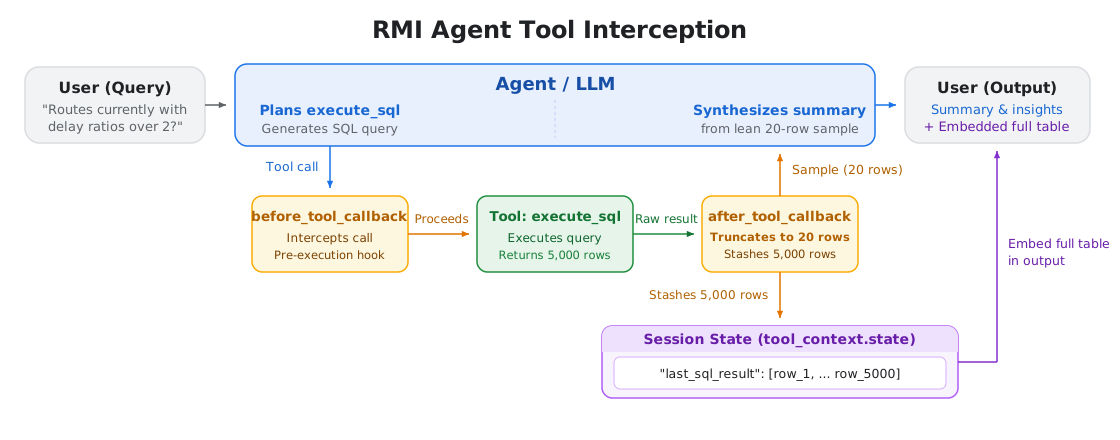
For the RMI agent, an after_tool_callback intercepts execute_sql results,
saves the full list of rows in session state, and returns a short sample along
with the total row count:
def stash_and_truncate_results(tool, args, tool_context, tool_response):
  if tool.name == "execute_sql" and "rows" in tool_response:
    rows = tool_response["rows"]
    tool_context.state["last_sql_result"] = rows      # keep everything
    tool_response["total_rows_fetched"] = len(rows)
    tool_response["rows"] = rows[:SAMPLE_LIMIT]        # show a sample
    tool_response["message"] = (
        f"Showing {SAMPLE_LIMIT} of {len(rows)} rows. "
        "Full result stashed in background state."
    )
  return tool_response
Returning a sample cuts down input tokens across all future turns, lowering costs and response times. It also prevents large query results from crowding the context window and harming the model's ability to follow instructions.
Make sure your agent prompt explicitly explains that tools return a sample by design. Without this context, the model can become confused by partial data, wasting compute and reasoning tokens trying to reconcile missing records or launching redundant tool calls to fetch the rest.
Example: Handling a large result set
- The user asks "What are routes that have delay ratios over 2 right now?"
- The agent's query against
historical_travel_timereturns thousands of rows. - The
after_tool_callbacksaves the complete result in session state and returns only a small sample plus the total row count. - The model reasons over that sample to compose its summary.
- The application or downstream tools read the full dataset directly from session state to render the complete table or export for the user.
Key takeaways
- Keep large payloads out of prompts: Store large datasets in session state rather than passing them back and forth through prompt history.
- Truncate large tool outputs: Use
after_tool_callbackto return small samples to the model while saving full results in session state. - Inform the model about samples: Add a prompt rule explaining that results are sampled to prevent model confusion, wasted reasoning tokens, and redundant tool calls.
Next steps
- ADK callbacks reference: Read the official ADK Callbacks guide for details on model, agent, and tool-level interception.
Contributors
Nathaniel Thomas | Software Engineering Intern, Google Maps Platform