
Conventional business to business lead generation often relies on purchasing static directories or industry lists to define territory potential. However, these static points of interest (POI) datasets go stale almost immediately. Because they often lack up-to-date operational status or granular place type categorization, field sales teams risk wasting valuable time chasing businesses that are permanently closed, miscategorized, or irrelevant to their ideal customer profile.
This guide provides a workflow to bridge that gap using Places Insights and the Places API. By mapping your current book of business to the Place IDs, you can use BigQuery to isolate every operational business in a territory that isn't already in your customer relationship management (CRM) database. This guide shows you how to build that exclusion engine to deliver a hyper-targeted, verified lead list to your field reps.
Example Application
Consider a Point of Sale (POS) provider planning a field sales expansion in New
York City. Typically, the organization would pull a report on the
total food and beverage establishments per zip code. This approach carries the
risk of sales reps relying on stale data, like permanently closed locations, or
irrelevant leads, such as a private catering kitchen without a storefront.
Imagine instead a modernized approach using Places Insights, which leverages
Google Maps' global scale and up-to-date data validated across multiple sources.
Places Insights supports nearly 500 place categories and over 70 attributes,
allowing you to refine your prospects with high precision based on specific
business types (like scandinavian_restaurant), store hours, and service
offerings (such as accepts_credit_cards). By cross-referencing Places Insights
with your internal CRM, you can provide your sales team with a hyper-targeted
list of high-potential, uncontacted prospective customers.
Solution Workflow
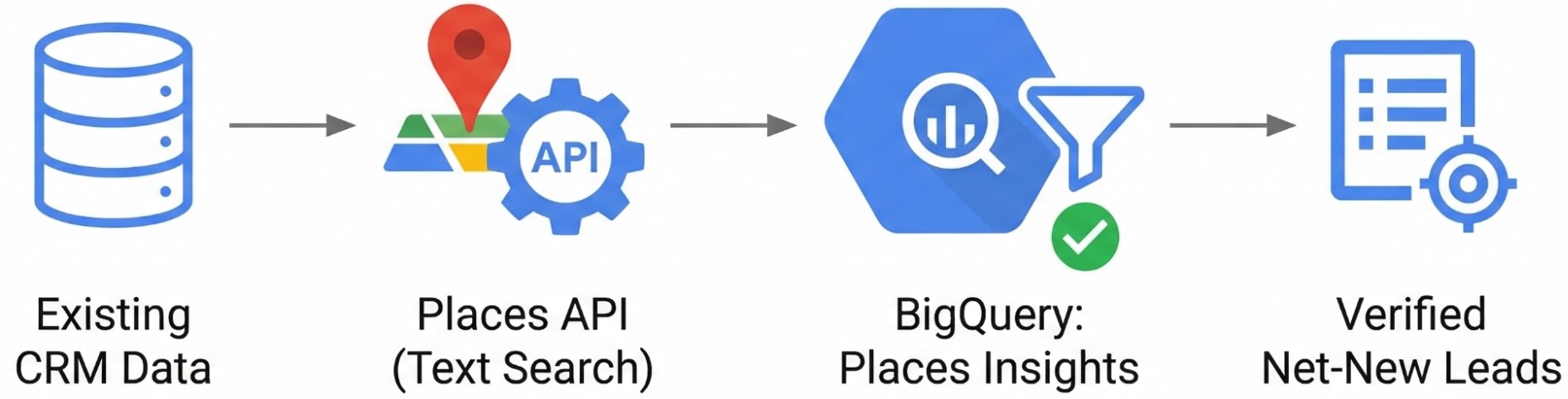
This guide provides a technical framework to create a dynamic "Leads Map" that automatically filters out your current book of business, leaving only net-new, operational leads for your sales team to pursue.
The Four-Step Architecture
- Define your Target Place Types: Map your ideal customer profiles to Place Types.
- Identify High-Potential Areas: Execute Places Count functions in BigQuery to generate density heat maps of operational target businesses.
- Normalize CRM Data to Place IDs: Process unstructured CRM records through a data-cleansing pipeline, utilizing the Address Validation, Geocoding, and Places APIs, to find the Place IDs for your existing customers.
- Perform Whitespace Exclusion: Join your CRM Place IDs against your Places Insights data in BigQuery to dynamically filter out existing customers and output a net-new lead list.
Prerequisites
Before you begin, ensure you have the following:
Google Cloud Project:
- A Google Cloud project with billing enabled.
Data Access:
- Places Insights subscription in BigQuery.
- Your own CRM dataset (e.g., a BigQuery table) containing existing customer business names and addresses to act as your exclusion list.
Google Maps Platform:
- An API Key.
- The following APIs enabled for your key:
IAM Permissions:
- Ensure your user or service account has the following IAM
roles to execute
queries and manage your dataset:
Role ID BigQuery Data Editor roles/bigquery.dataEditorBigQuery User roles/bigquery.user
- Ensure your user or service account has the following IAM
roles to execute
queries and manage your dataset:
Cost Awareness:
- This tutorial uses billable Google Cloud components. Be aware of
potential costs related to:
- BigQuery: Charged for compute slots used or data processed during query execution.
- Places Insights: Charged based on query usage.
- Google Maps Platform: Charged per request for the Address Validation API, Geocoding API, and Text Search API.
- This tutorial uses billable Google Cloud components. Be aware of
potential costs related to:
Step 1: Define your Target Place Types
Places Insights supports almost 500 place categories and over 70 attributes (such as store hours, payment types, and operational status). Querying the entire dataset indiscriminately is inefficient and costly.
As a foundational step, use an LLM like Gemini to translate your internal customer profiles into Place Types, used when building a query for Places Insights. This macro-level taxonomy definition ensures your subsequent BigQuery searches are highly targeted, reducing compute processing overhead.
For example, if you are designing a workflow for a point of sale system, you can provide Gemini with the list of Place types and use the following prompt:
"Act as a market analyst. Out of the supported Google Maps Place Types, which are the primary targets for a point of sale system provider? Justify your decision."
Based on this prompt, Gemini would analyze the taxonomy and return a targeted
subset of relevant place types to use in your BigQuery types filter:
| Main Category | Justification | Key Place Types |
|---|---|---|
| Food and Drink | Requires fast transaction processing, table management, order ticketing, and tip handling. | restaurant, bar, cafe, coffee_shop |
| Shopping | Needs robust inventory tracking, barcode scanning, return processing, and loyalty integrations. | clothing_store, grocery_store, supermarket, convenience_store |
| Services and Health & Wellness | Requires integrated appointment booking, scheduling, customer profiles, and commission tracking. | hair_salon, beauty_salon, spa, massage |
| Entertainment, Recreation, and Sports | Demands rapid handling of customer rushes, digital ticket scanning, and fast concession sales. | movie_theater, amusement_park, bowling_alley, stadium |
For the purposes of this guide, we are going to focus on the suggested place types for the Food and Drink category.
Step 2: Extract Business Counts to Identify High-Potential Areas
To pinpoint areas of opportunity, you first need a macro-view of business
density. You can achieve this by executing Places Count
functions
(such as
PLACES_COUNT_PER_H3
or
PLACES_COUNT_PER_GEO)
in BigQuery.
While you can query the dataset directly, Places Count functions are predefined,
optimized SQL queries that don't enforce the standard aggregation threshold of
5 minimum places (Standard direct queries will omit rows with 1–4 businesses;
however, these functions allow you to see exactly where even a single prospect
exists). Crucially, these functions return an array of up to 250 Place IDs per
geographic area using the sample_place_ids column. This provides both the
statistical heat map for your territory planners and the foundational
identifiers needed for lead generation.
The following query demonstrates how to dynamically retrieve a complex polygon
(the entire boundary of New York City) using a public dataset, and then passing
that geography into the Places Count function. By utilizing the H3 spatial index
at a broader resolution (8) across the city, you can generate a macro-level
density map.
Furthermore, by selecting all columns (SELECT *), the function returns the
geography column, a polygon representing the H3 cell. This lets you
immediately import your BigQuery results into business intelligence tools (like
Looker Studio) to create filled
map visualizations that visually reveal market hotspots.
-- Illustrative logic: Extracting target business counts per H3 cell across New York City
DECLARE geo GEOGRAPHY;

-- Get the geography for New York City using the Overture Maps public dataset
SET geo = (SELECT geometry FROM `bigquery-public-data.overture_maps.division_area`
  WHERE country = 'US' AND subtype = 'locality' AND names.primary = 'New York' LIMIT 1);

SELECT *
FROM `YOUR_PROJECT_NAME.places_insights___us.PLACES_COUNT_PER_H3`(
  JSON_OBJECT(
      'geography', geo,
      'h3_resolution', 8,
      'types',['restaurant', 'bar', 'cafe', 'coffee_shop'],
      'business_status', ['OPERATIONAL']
  )
)
ORDER BY count DESC;
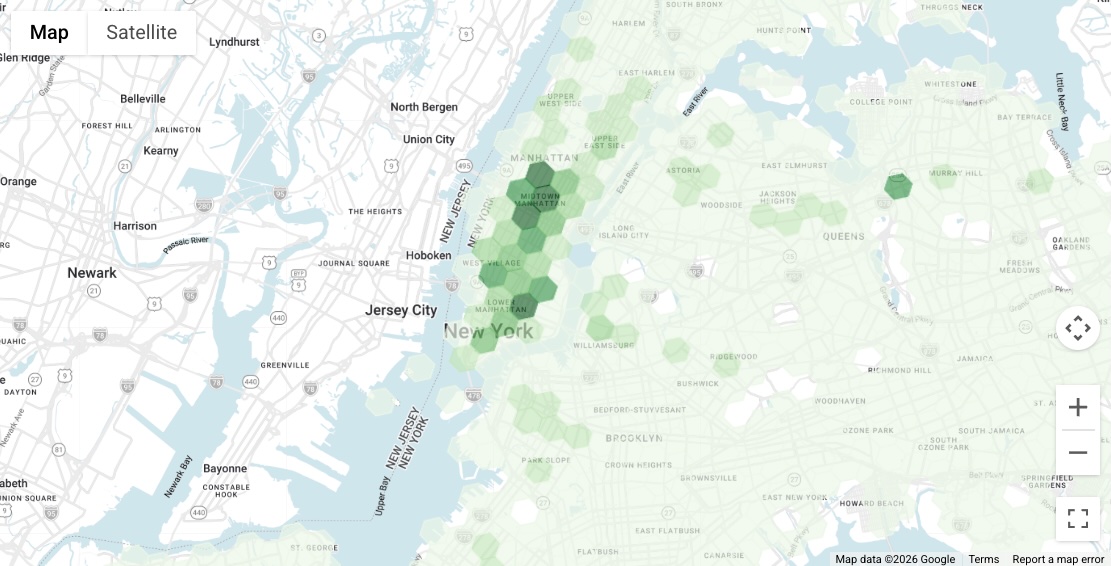
As seen in the resulting visualization, there are distinctly high-density areas of target businesses throughout Manhattan. For the remainder of this document, we will zoom in and focus our lead generation efforts on one of these high-potential zones: the area near Union Square.
Step 3: Normalize your CRM Data to Place IDs
To perform an exclusion analysis, you first need to translate your CRM records into Place IDs. Since CRM data is often unstructured, passing raw text into search APIs yields poor match rates. Use this two-step pipeline to cleanse addresses, account for regional API coverage, and guarantee you extract the correct Establishment Place IDs for BigQuery.
Assume you have the following 5 restaurant customers in your CRM located in New York City:
| Place Name | Address |
|---|---|
| Boucherie Union Square | 225 Park Ave S, New York, NY 10003, United States |
| Gramercy Tavern | 42 E 20th St, New York, NY 10003, United States |
| Barn Joo Union Square | 35 Union Square W, New York, NY 10003, United States |
| LOS TACOS No.1 | 200 Park Ave S, New York, NY 10003, United States |
| Union Square Cafe | 101 E 19th St, New York, NY 10003, United States |
Because these records consist of unstructured text, you cannot join them directly against Places Insights data in BigQuery. Instead, process each row through the following pipeline to standardize the text and extract the Place ID.
Step 3a: Address Cleansing and Direct Matching
Standardize your address data first. Choose your API based on the target country:
Option 1: Address Validation API
For supported
regions,
pass the concatenated CRM Business Name and Address into the API. Inspect the
response's result.geocode.placeTypes array:
- Establishment Match: If it contains
establishmentorpoint_of_interest, the API successfully resolved the business. Append thisplaceIdto your dataset and move to the next CRM record. No further API calls are needed for this entry. - Non-Establishment Match: If it does not contain those business types,
the API couldn't definitively confirm the business entity. The returned
Place ID represents a geographic feature (such as a building, street, or
city). Don't use this Place ID for BigQuery, as it will fail your exclusion
joins. Instead, save the
result.address.formattedAddressand proceed to Step 3b.
Option 2: Geocoding API
For regions not supported by Address Validation, pass only the CRM Address into
the Geocoding API. Don't include the business name, as the Geocoding API may
return unpredictable results. Extract the resulting formattedAddress and
proceed to Step 3b.
Advanced Architecture: Handling Unstructured Data with LLMs
If your CRM data is extremely poor, such as business names and addresses mixed into a single free-text notes field, pre-process the records with an LLM like Gemini. You can prompt Gemini to cleanly parse the business name from the location before feeding them into this pipeline.
Step 3b: Resolve the Business Entity
If Step 3a only returns a cleansed address, concatenate it with the original CRM Business Name and pass it to the Text Search API. Standardizing the address first significantly improves your match rate.
To optimize for performance and cost, use a Field Mask (X-Goog-FieldMask:
places.id) and set "pageSize": 1 to ensure only the top match Place ID is
returned.
Example Text Search Request:
curl -X POST -d '{
  "textQuery" : "Gramercy Tavern 42 E 20th St, New York, NY 10003-1324, USA",
  "pageSize": 1
}' \
-H 'Content-Type: application/json' -H 'X-Goog-Api-Key: YOUR_API_KEY' \
-H 'X-Goog-FieldMask: places.id' \
'https://places.googleapis.com/v1/places:searchText'
Pipeline Output
After processing your CRM records through this two-step pipeline, whether the ID
was successfully extracted in Step 3a or resolved using Text Search in Step 3b,
your final goal is to append a new place_id column to your dataset. This
resulting table is now ready to be uploaded into BigQuery as your exclusion
list.
| Place Name | Address | Place ID |
|---|---|---|
| Boucherie Union Square | 225 Park Ave S, New York, NY 10003, United States | ChIJc1Vf7KFZwokR1YL2Rn9oxi8 |
| Gramercy Tavern | 42 E 20th St, New York, NY 10003, United States | ChIJvSQIgqFZwokRFYQbJdzceSs |
| Barn Joo Union Square | 35 Union Square W, New York, NY 10003, United States | ChIJQ7XpyqNZwokRQpVfvGEViWM |
| LOS TACOS No.1 | 200 Park Ave S, New York, NY 10003, United States | ChIJFZh0PABZwokRVzoJu0o-mLY |
| Union Square Cafe | 101 E 19th St, New York, NY 10003, United States | ChIJxTHke6JZwokRCLWVd99eDBw |
Step 4: Perform Whitespace Exclusion Analysis in BigQuery
With your existing customers mapped to Place IDs, use the Places Count functions to find the net-new leads.
In this example, we will search for operational target businesses (restaurants,
bars, cafes, and coffee shops) within an 850-meter radius of Union Square
(40.73595, -73.99043). To get a more granular view for street-level routing, we
will increase the PLACES_COUNT_PER_H3 function to resolution 10.
Because the function returns the Place IDs as an array in the sample_place_ids
column, we must UNNEST the array to put each prospective business on its own
row. Then, we perform a LEFT JOIN against our known customer Place IDs.
To prove the exclusion logic works for this demonstration, the query below uses
a CASE statement to flag the results rather than filtering them out entirely.
It also explicitly sorts the existing customers to the very top of the results
table so you can verify they were successfully matched.
The SQL Query
WITH existing_customers AS (
  -- 1. Simulate the uploaded CRM table
  SELECT * FROM UNNEST([
    'ChIJc1Vf7KFZwokR1YL2Rn9oxi8', -- Boucherie Union Square
    'ChIJvSQIgqFZwokRFYQbJdzceSs', -- Gramercy Tavern
    'ChIJQ7XpyqNZwokRQpVfvGEViWM', -- Barn Joo Union Square
    'ChIJFZh0PABZwokRVzoJu0o-mLY', -- LOS TACOS No.1
    'ChIJxTHke6JZwokRCLWVd99eDBw'  -- Union Square Cafe
  ]) AS place_id
),

target_area_businesses AS (
  -- 2. Query Places Insights for target businesses in the radius
  SELECT
    h3_cell_index,
    place_id
  FROM `places_insights___us.PLACES_COUNT_PER_H3`(
    JSON_OBJECT(
      'geography', ST_GEOGPOINT(-73.99043, 40.73595),
      'geography_radius', 850,
      'h3_resolution', 10,
      'types',['restaurant', 'bar', 'cafe', 'coffee_shop'],
      'business_status', ['OPERATIONAL']
    )
  ),
  UNNEST(sample_place_ids) AS place_id
)

-- 3. The "Proof" Output: Flag them instead of filtering them out
SELECT
  t.h3_cell_index,
  t.place_id,
  -- Flag whether the LEFT JOIN found a match in the CRM table
  CASE
    WHEN e.place_id IS NOT NULL THEN 'Existing Customer (To Be Excluded)'
    ELSE 'Net-New Lead'
  END AS lead_status,
  CONCAT('https://www.google.com/maps/search/?api=1&query=Place&query_place_id=', t.place_id) AS actionable_maps_url
FROM target_area_businesses t
LEFT JOIN existing_customers e
  ON t.place_id = e.place_id
ORDER BY
  -- Explicitly sort the existing customers to the top (0 comes before 1)
  CASE WHEN e.place_id IS NOT NULL THEN 0 ELSE 1 END ASC;
Query Results
Here is an excerpt of the query output, showing how the existing customers are successfully identified and separated from the net-new leads within the same granular H3 cells.
Notice how the query utilizes a CONCAT statement to construct a
cross-platform Maps URL, using the
place_id. This automatically generates the actionable_maps_url column,
providing your sales team with an instant, clickable link to load the exact
business in the Google Maps mobile app or a browser.
h3_cell_index |
place_id |
lead_status |
actionable_maps_url |
|---|---|---|---|
| 8a2a100d2767fff | ChIJQ7XpyqNZwokRQpVfvGEViWM | Existing Customer (To Be Excluded) | https://www.google.com/maps/search/?api=1&query=Place&query_place_id=ChIJQ7XpyqNZwokRQpVfvGEViWM |
| 8a2a100d20effff | ChIJvSQIgqFZwokRFYQbJdzceSs | Existing Customer (To Be Excluded) | https://www.google.com/maps/search/?api=1&query=Place&query_place_id=ChIJvSQIgqFZwokRFYQbJdzceSs |
| 8a2a100d2397fff | ChIJc1Vf7KFZwokR1YL2Rn9oxi8 | Existing Customer (To Be Excluded) | https://www.google.com/maps/search/?api=1&query=Place&query_place_id=ChIJc1Vf7KFZwokR1YL2Rn9oxi8 |
| 8a2a100d2397fff | ChIJFZh0PABZwokRVzoJu0o-mLY | Existing Customer (To Be Excluded) | https://www.google.com/maps/search/?api=1&query=Place&query_place_id=ChIJFZh0PABZwokRVzoJu0o-mLY |
| 8a2a100d23b7fff | ChIJxTHke6JZwokRCLWVd99eDBw | Existing Customer (To Be Excluded) | https://www.google.com/maps/search/?api=1&query=Place&query_place_id=ChIJxTHke6JZwokRCLWVd99eDBw |
| 8a2a1072c96ffff | ChIJ6atD-WRZwokRULgcZ4TWin8 | Net-New Lead | https://www.google.com/maps/search/?api=1&query=Place&query_place_id=ChIJ6atD-WRZwokRULgcZ4TWin8 |
| 8a2a1072c96ffff | ChIJ09yg-llZwokRKAgp0jg6TCU | Net-New Lead | https://www.google.com/maps/search/?api=1&query=Place&query_place_id=ChIJ09yg-llZwokRKAgp0jg6TCU |
Visualize Leads with the Places UI Kit
Instead of providing a raw Maps URL, you can pass the place_ids directly into
the Places UI
Kit
to build a rich, internal lead-generation dashboard for your sales team.
Available across platforms, you can drop in the prebuilt components for
Web,
Android,
and
iOS.
These components automatically display rich POI data, like photos, ratings, and
operational hours, without requiring you to write frontend UI code or handle API
responses manually.
Data Limits
The Places Count functions return a maximum of 250 Place IDs per geographic cell
in the sample_place_ids array. If an area is extremely dense, your generated
lead list for that specific cell will be capped at 250. To ensure you capture
all leads in highly dense markets, consider the following strategies:
- Use specific query filters: Instead of grouping multiple types into one query (like the example above), run separate queries for each individual place type.
- Reduce the spatial scope: Decrease the overall search area using a
smaller
geography_radius, or divide the area into smaller, more granular buckets by increasing the H3 resolution (up to resolution 11). - Adjusting Resolution by Density: When analyzing territories with varying
population densities, dynamically adjust your search size to avoid hitting
the 250 Place ID limit. Use a broader H3 resolution (e.g., 6 or 7) or a
larger
geography_radiusin rural areas where businesses are spread out. Conversely, use a highly granular resolution (e.g., 10 or 11) in dense urban areas to ensure you capture every prospective lead without truncating your list.
Production Query
Once you verify that the existing customers are successfully identified, you can
revert to the production version of the query. Replace the final SELECT
block with the following WHERE clause to permanently filter out your existing
book of business:
SELECT
  t.h3_cell_index,
  t.place_id,
  CONCAT('https://www.google.com/maps/search/?api=1&query=Place&query_place_id=', t.place_id) AS actionable_maps_url
FROM target_area_businesses t
LEFT JOIN existing_customers e
  ON t.place_id = e.place_id
WHERE e.place_id IS NULL; -- Filters out the CRM matches
Architectural Governance and Compliance
To maintain a higher-performance and compliant system, adhere to these standards:
- Place IDs as your Persistent Identifier: Aside from Place ID, Google Maps Terms of Service prohibits storing or caching of the individual POI data returned from the Places API (such as phone numbers and contact details).Use Place IDs as your persistent identifier for recurring whitespace analysis.
- Ensure Attribute Freshness with Real-time API calls: Use Place IDs to make "just-in-time" calls to the Place Details API to make sure that your sales person has the most up-to-date business and contact information for the place. Alternatively, as demonstrated in the query output, you can dynamically construct Google Maps URLs to provide your sales team with direct links out to the business profiles on Google Maps.
Conclusion
By standardizing on the Place ID as your primary key, you successfully bridged the gap between high-level market analysis and actionable, ground-level sales operations. This architecture bypasses the inaccuracies of conventional population-based targeting, utilizes serverless data warehousing for heavy computational joins, and strictly adheres to cost-management and compliance best practices at the API layer.
Next Actions
- Request access to the Places Insights sample dataset.
- Subscribe to the Places Insights dataset using BigQuery data exchange listings to access the sample or full country data.
- Review the filter parameters reference to fine-tune your BigQuery SQL queries based on business attributes and types.
- Implement dynamic Places API lookups in your CRM or sales routing application to expose up-to-date, compliant contact details for the generated net-new leads.
Contributors
- Henrik Valve | DevX Engineer