
Places Count functions are predefined SQL queries that run in BigQuery and are the recommended way of querying the Places Insights dataset to retrieve exact counts and Place IDs. While you can also query the dataset directly, the two query methods handle privacy thresholds and search areas:
Places Count functions can return any counts, including 0, but enforce a minimum search area of 40.0 meters by 40.0 meters (1600 m2) (40.0 meters by 40.0 meters / 1,600 m²). Functions also return Place IDs, which can be used to look up information about individual Places, and support historical POI analysis across past monthly snapshots using optional date filters.
Place dataset queries can only return counts 5 and above (omitting low counts of 0–4 to preserve differential privacy), but enforce no limitations on the size of the search area.
Unless you need to perform complex spatial analysis, we recommend starting with
Places Count functions such as
PLACES_COUNT_PER_H3.
It provides immediate spatial density insights across standardized grid cells,
returns Place IDs for ground-truth inspection, and is purpose-built for
geospatial feature engineering and ML models.
Select the optimal Places Count function
Places Insights supports several spatial functions. For optimized query execution, parallel processing, and batch scalability, we recommend using the following functions:
PLACES_COUNT_PER_H3: Returns a BigQuery table of place counts per H3 cell. This function is recommended for regional density analysis and choropleth heatmapping.-
PLACES_COUNT_V2: Returns a table containing place counts and sample Place IDs. This function accepts a table parameter containing your input geographies. By passing an entire table directly, the BigQuery execution engine can distribute the workload and process spatial intersections in parallel, enabling highly efficient batch processing for large-scale analysis. -
PLACES_COUNT_PER_TYPE_V2: Returns a table of place counts and sample Place IDs, categorized by place type. Similar toPLACES_COUNT_V2, passing your input geographies as a table parameter allows BigQuery to natively parallelize spatial intersections across large datasets. -
PLACES_COUNT_CHANGE: Returns a table of place counts plus added and removed Place IDs between two given months. Similar toPLACES_COUNT_V2, passing your input geographies as a table parameter allows BigQuery to natively parallelize spatial intersections across large datasets.
Along with place counts, these functions also return up to 250 Place IDs per element of the response.
Place IDs can be used with:
Execute queries with Places Count functions
Use the following format to call the functions: [project name
(optional)].[table name].[function name].
If you changed the linked dataset name when setting up Places Insights, then use your custom name instead of the default table names. You can also optionally include your project name. If one isn't included, the query defaults to the active project.
For example:
PROJECT_NAME.places_insights___us.PLACES_COUNT_V2
Use a
JSON_OBJECT
to pass arguments to the function.
Filter query results using case-sensitive parameters
The Places Count functions support many filters to refine your search. These
parameters (for example, price_level or types) are case-sensitive and must
match the parameter names exactly. For a full list of options, see the
filter parameters reference.
Query historical snapshots with snapshot_date
By default, Places Count functions query the most recent data snapshot available.
To analyze places data as it existed during a specific past month, add the
optional snapshot_date parameter to your JSON_OBJECT.
- Format:
YYYY-MM(for example,'2026-07'). - Default: If omitted, the function automatically queries the latest snapshot.
The following example queries restaurant counts around your search areas as recorded in the July 2026 snapshot:
SELECT * FROM `PROJECT_NAME.places_insights___us.PLACES_COUNT_V2`(
  TABLE `PROJECT_NAME.YOUR_DATASET.my_search_areas`,
  JSON_OBJECT(
      'geography_radius', 1000, -- Radius in meters
      'business_status', ['OPERATIONAL'],
      'types', ["restaurant"],
      'snapshot_date', '2026-07' -- Optional historical snapshot month
  )
);
In the next example, you apply filters to limit the search by minimum user
rating, price level, business status, and whether the restaurant allows dogs,
using the PLACES_COUNT_V2 function.
First, use your input geography table or prepare one with the chosen geographies:
-- Create a table for the input geographies
CREATE TABLE `PROJECT_NAME.YOUR_DATASET.my_search_areas` AS (
  SELECT
    '1' AS geo_id, -- Unique identifier
    ST_GEOGPOINT(-73.9857, 40.7484) AS geo -- Empire State Building
  UNION ALL
  SELECT
    '2' AS geo_id, -- Unique identifier
    ST_GEOGPOINT(-73.9851, 40.7580) AS geo -- Times Square
);
Next, call PLACES_COUNT_V2 with the table and the JSON object containing the
filters. The search radius is included in the JSON filters and will be applied
around each point in the my_search_areas table.
SELECT * FROM `PROJECT_NAME.places_insights___us.PLACES_COUNT_V2`(
  TABLE `PROJECT_NAME.YOUR_DATASET.my_search_areas`,
  JSON_OBJECT(
      'geography_radius', 1000, -- Radius in meters around each point in 'geo'
      'business_status', ['OPERATIONAL'],
      'types', ["restaurant"],
      'min_rating', 1.3,
      'price_level', ['PRICE_LEVEL_INEXPENSIVE', 'PRICE_LEVEL_MODERATE'],
      'allows_dogs', TRUE
      )
);
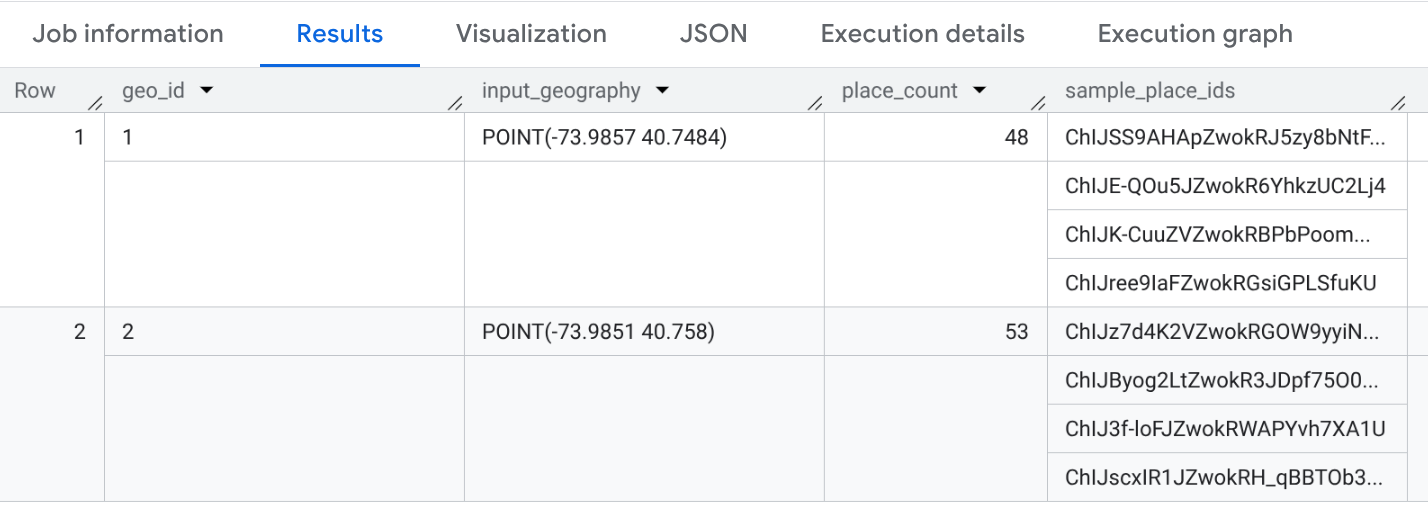
Example: Query restaurant counts and brand locations with PLACES_COUNT_V2
The following example uses the PLACES_COUNT_V2 function with the custom input
geography table my_search_areas to return the number of operational
restaurants within 1000 meters of the Empire State Building and Times Square in
New York City in July 2026:
SELECT * FROM `PROJECT_NAME.places_insights___us.PLACES_COUNT_V2`(
  TABLE `PROJECT_NAME.YOUR_DATASET.my_search_areas`,
  JSON_OBJECT(
      'geography_radius', 1000, -- Radius in meters
      'business_status', ['OPERATIONAL'],
      'types', ["restaurant"],
      'snapshot_date', '2026-07'
      )
);
The response is a BigQuery table that contains the geo_id, the geography, the
count, and a sample of Place IDs.
The following example uses the PLACES_COUNT_V2 function to filter by specific
brand IDs. In this example, we filter for Starbucks locations using the brand ID
"1413758728321880760".
To find the brand IDs for the brands you want to filter by, query the brands
table for your dataset (for example, places_insights___us.brands). For more
information on the brands dataset, see Write a query using brands
data.
For example, to find the brand ID for "Starbucks":
SELECT id, name
FROM `PROJECT_NAME.places_insights___us.brands`
WHERE name = "Starbucks"
After obtaining the brand IDs, you can use them in the brand_ids filter as
shown in the following query:
SELECT * FROM `PROJECT_NAME.places_insights___us.PLACES_COUNT_V2`(
  TABLE `PROJECT_NAME.YOUR_DATASET.my_search_areas`,
  JSON_OBJECT(
      'geography_radius', 1000, -- Radius in meters
      'business_status', ['OPERATIONAL'],
      'brand_ids', ["1413758728321880760"]
      )
);
Visualize query output with Google Cloud tools
Analysis and business intelligence tools help you discover insights from your BigQuery data. BigQuery supports several Google and third-party data visualization tools that you can use to analyze the results of your functions on Places Insights data.
For an example of visualizing the results of a function, see Visualize results inside the PLACES_COUNT_PER_H3 reference. For more information on visualizing Places Insights results, see Visualize query results.
Function limitations and requirements
Places Count functions have the following limitations and requirements:
- The functions only support
COUNTinsights. - A minimum search area of 40.0 meters by 40.0 meters (1600 m2) (40.0 meters by 40.0 meters / 1,600 m²) is required.
- Parameter Input Size Limit: The JSON object passed as a parameter to the
functions is limited to 1 MB. The impact of this limit depends on the
function version:
- For V2 functions (
PLACES_COUNT_V2,PLACES_COUNT_PER_TYPE_V2,PLACES_COUNT_CHANGE), this limit applies only to the filters JSON object. Since geographies are provided separately using a table parameter, these functions can scale to a much larger number of input geographies without reaching the JSON size limit. - For
PLACES_COUNT_PER_H3,PLACES_COUNT,PLACES_COUNT_PER_TYPE, andPLACES_COUNT_PER_GEO, this limit applies to the entire JSON object, including all geography definitions. This may limit the number of geographies that can be processed in a single call.
- For V2 functions (
- No support for filtering by Place ID or address component.
- You can only access the Places Count functions for the cities and countries you have subscribed to. See Set up Places Insights for dataset access.
- Filter parameters (for example,
geographyortypes) are case-sensitive and must match the parameter names exactly, or the query will fail.