

רכיב מתקדם של פרטי מקום
הגרסה המתקדמת של הרכיב Place Details (פרטי מקום) מציעה את אותן תכונות כמו Places Details Essentials (פרטי מקום – הגרסה הבסיסית). בנוסף, אפשר להגדיר את לחצני הפעולה של הרכיב ולהחיל אפשרויות חיפוש וסינון על הביקורות והמדיה שמוצגות.
תמיכה מובנית ב-Jetpack Compose
Places UI Kit מספק פונקציות של Jetpack Compose @Composable ל-AdvancedPlaceDetailsCompact. הרכיבים הקומפוזביליים האלה משתמשים במצב שהועבר, בתמיכה מובנית במאפייני שינוי וב-DSL של משבצות שמותאם ל-Compose.
בדוגמת הקוד הבאה אפשר לראות איך משתמשים בפונקציה שאפשר להרכיב ממנה פריסה אנכית.
Kotlin
import android.util.Log
import androidx.compose.foundation.layout.fillMaxWidth
import androidx.compose.foundation.layout.padding
import androidx.compose.material3.MaterialTheme
import androidx.compose.material3.Text
import androidx.compose.runtime.Composable
import androidx.compose.ui.Modifier
import androidx.compose.ui.graphics.painter.Painter
import androidx.compose.ui.unit.dp
import com.google.android.libraries.places.api.model.Place
import com.google.android.libraries.places.compose.AdvancedPlaceDetailsCompact
import com.google.android.libraries.places.compose.PlaceReference
import com.google.android.libraries.places.compose.action.CornerAction
import com.google.android.libraries.places.compose.action.MainAction
import com.google.android.libraries.places.compose.Orientation

@Composable
fun SampleAdvancedPlaceDetailsCompactCard(
    placeId: String,
    bookmarkIcon: Painter,
    onSavePlaceClicked: (Place) -> Unit
) {
    AdvancedPlaceDetailsCompact(
        // defines the place to be displayed
        reference = PlaceReference.PlaceId(placeId),
        // defines the orientation
        orientation = Orientation.VERTICAL,
        // defines custom styling
        modifier = Modifier
            .fillMaxWidth()
            .padding(16.dp),
        preferTruncation = true,
        enableLightbox = true,
        mainActions = { place ->
            listOf(
                MainAction.OpenDirections(),
                MainAction.OpenWebsite(),
                MainAction.Call()
            )
        },
        // action button configuration
        cornerActions = { place ->
            listOf(
                CornerAction.Custom(
                    icon = bookmarkIcon,
                    text = "Save Place",
                    onClick = { onSavePlaceClicked(place) }
                )
            )
        },
        onPlaceLoaded = { place ->
            Log.d("Places", "Successfully loaded place: ${place.id}")
        },
        onPlaceLoadFailed = { exception ->
            Log.e("Places", "Failed to load place", exception)
        }
    ) {
        // --- Slot: Injected directly above the place name ---
        basicSectionTop {
            Text(
                text = "Featured in 'Top 10 Coffee Shops in SF'",
                style = MaterialTheme.typography.labelSmall,
                color = MaterialTheme.colorScheme.secondary,
                modifier = Modifier.padding(top = 4.dp, bottom = 2.dp)
            )
        }

        // --- Slot: Injected directly below the action buttons ---
        basicSectionBottom {
            Text(
                text = "Notes: Great quiet atmosphere for meetings.",
                style = MaterialTheme.typography.bodySmall,
                color = MaterialTheme.colorScheme.onSurfaceVariant
            )
        }
    }
}
הגדרות מתקדמות של פרטי מקום
כדי לקבל גישה לתכונות המתקדמות, צריך להשתמש בלחצן AdvancedPlaceDetailsFragment או בלחצן AdvancedPlaceDetailsCompactFragment.
הגדרת לחצני פעולה
משתמשים בממשק PlaceActionProvider של AdvancedPlaceDetailsFragment או של AdvancedPlaceDetailsCompactFragment כדי להגדיר ולהתאים אישית לחצני פעולה.
אם אתם משתמשים בפונקציות @composable, אתם יכולים להשתמש בפונקציות lambda mainActions ו-cornerActions כדי להגדיר לחצני פעולה.
דרישות לייחוס חזותי
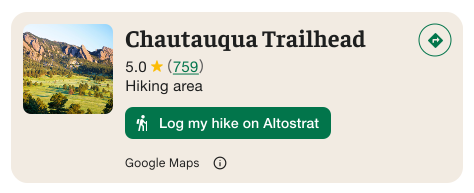
חשוב: עליכם להבהיר למשתמשי הקצה מתי כפתור פעולה מותאם אישית ישתף מידע על המשתמשים עם צד שלישי שאינו Google. דרישות לגבי שיוך חזותי
בדוגמה שמשמאל מוצגת תמונה מותאמת אישית שמבהירה שפרטי המשתמש יישלחו אל Altostrat.
שימוש באפשרויות חיפוש וסינון
אפשר להשתמש במחלקות SearchMediaOptions ו-SearchReviewsOptions של AdvancedPlaceDetailsFragment או AdvancedPlaceDetailsCompactFragment כדי להפעיל חיפוש וסינון של מדיה או ביקורות.
אם אתם משתמשים בפונקציות @composable, אתם יכולים להשתמש ב-com.google.android.libraries.places.compose.search.SearchMediaOptions כדי להפעיל חיפוש וסינון של מדיה או ביקורות.
יצירת משבצות תוכן בהתאמה אישית
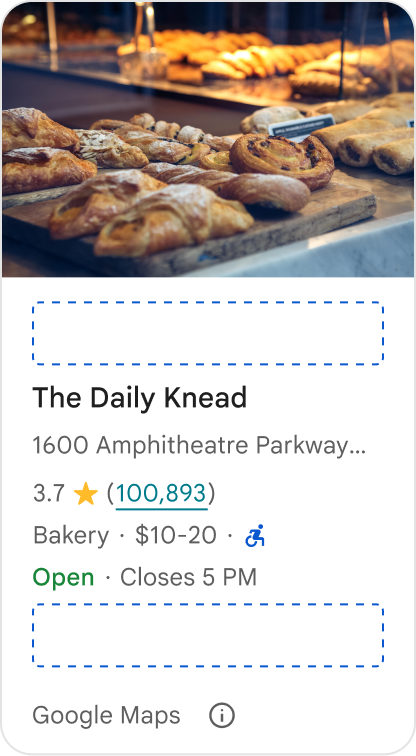
משבצות תוכן בהתאמה אישית מאפשרות לכם להוסיף תוכן משלכם (כמו סיכומים שנוצרו על ידי AI, חותמות זמן של מסלול נסיעה או תגים בהתאמה אישית) ישירות לאזורי פריסה מוגדרים מראש.
דרישות שיוך והצעות לתוכן במשבצות תוכן
כשמציבים משבצת תוכן בהתאמה אישית, הגילוי הנאות מתעדכן באופן אוטומטי כדי להבהיר איזה תוכן מסופק על ידי Google ואיזה תוכן מסופק על ידי צדדים שלישיים.
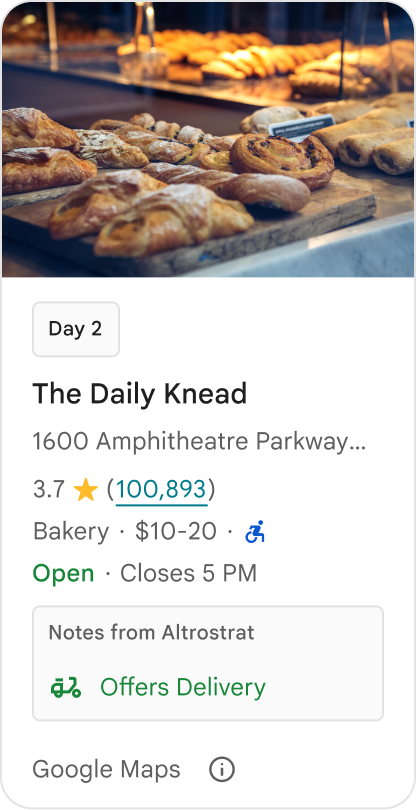
מומלץ
חשוב לשמור על היררכיה חזותית ברורה בין פרטי המקום ב-Google לבין התוכן המותאם אישית, כדי למנוע אי בהירות לגבי מקור המידע.
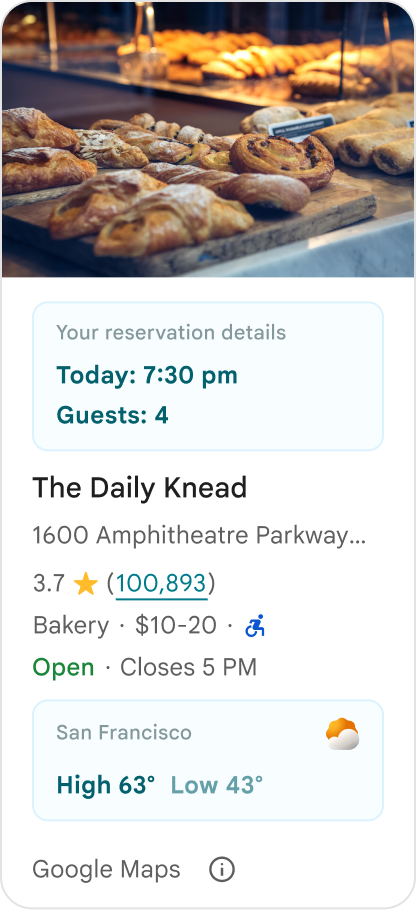
מומלץ
כדאי להציג תובנות מותאמות למיקום ולמטרות המיידיות של המשתמשים. תוכן מותאם אישית כמו חלונות הזמנה בזמן אמת או זמינות נוכחית עוזר למשתמשים לקבל החלטות מהירות יותר ומבוססות יותר.
לא מומלץ
אל תשכפלו פרטים קיימים במקום ב-Google, כמו דירוגים, ביקורות או שעות פעילות, גם אם הסתרתם את התוכן ש-Google סיפקה. הפעולה הזו עלולה לבלבל את המשתמשים לגבי המקור של התוכן והאם הוא מגיע מ-Google או מצד שלישי.
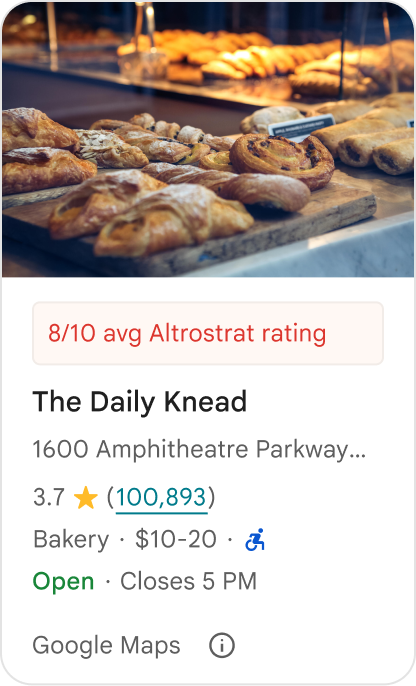
לא מומלץ
אסור להציג טענות או תגים ללא ציון מקור (לדוגמה, 'המלצה מובילה!') שאפשר לטעות ולחשוב שהם אישורים רשמיים של Google. בתוכן מותאם אישית צריך לציין במפורש את המקור שלו.
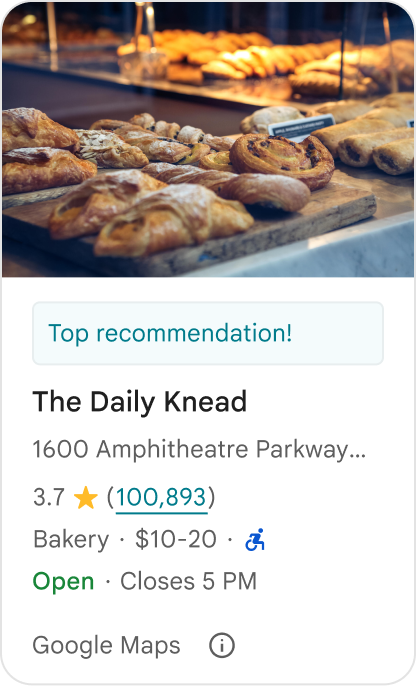
לא מומלץ
אסור לכלול מודעות, טקסט שיווקי, הנחות שיווקיות או הנחיות להרשמה בתוך מאגרי מיקומים מותאמים אישית.
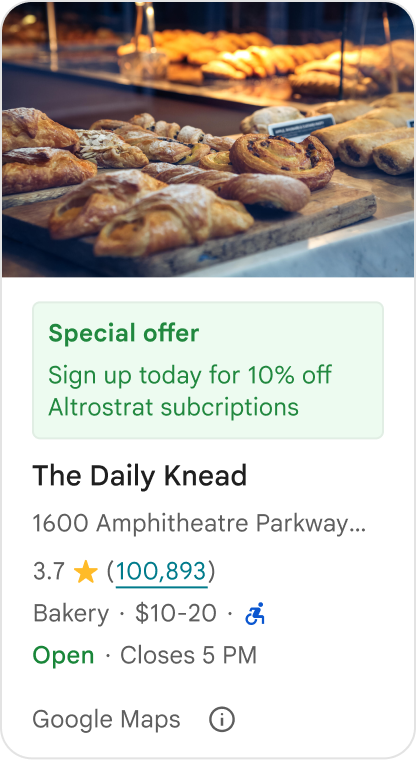
כדי להוסיף תוכן מותאם אישית, משתמשים בקוד AdvancedPlaceDetailsCompact קומפוזבילי. משתמשים ב-basicSectionTop או ב-basicSectionBottom כדי לציין את מיקום התוכן.
דוגמאות ל-Place Details מתקדמים
התאמה אישית של לחצני פעולה
אפשר להשתמש בממשק PlaceActionProvider כדי לקבוע אילו פעולות יהיו זמינות לכל מקום.
Kotlin
class PlaceDetailsWidgetTestActivity : BaseActivity() {

// simplified example of starting the fragment
fun setupPPDFragment() {
   fullWidgetSelectedContent = AdvancedPlaceDetailsFragment.ALL_CONTENT.toMutableList()
   AdvancedPlaceDetailsFragment.newInstance(fullWidgetSelectedContent, Orientation.VERTICAL)
   supportFragmentManager
      .beginTransaction()
      .replace(R.id.fragment_container, fragment!!)
      .commitNow()
}

// you can set the callback elsewhere, but this is the ideal callback spot
override fun onAttachFragment(fragment: Fragment) {
    super.onAttachFragment(fragment)
    when (fragment) {
      is PlaceActionController -> setPlaceActionProvider(fragment)
    }
}

// have this callback return an empty list to hide all buttons
// if this callback isn't set, default buttons appear
 private fun setPlaceActionProvider(fragment: PlaceActionController) {
    fragment.setPlaceActionProvider(
        object : PlaceActionProvider {
        override fun getMainPlaceActions(place: Place): List<PlaceAction> = buildList {
            // predefined actions can be mixed in with custom ones
            add(PlaceAction.OPEN_IN_MAPS)

            // example of button with both text label and icon
            add(
              PlaceAction.builder()
                .setLabelTextResId(R.string.custom_action)
                .setIconResId(R.drawable.gs_custom_action_icon)
                .setContentDescriptionResId(R.string.custom_action_description)
                .setOnClickListener { /* todo perform action */ }
                .build()
            )

            // icon only button
            add(
              PlaceAction.builder()
                .setIconResId(R.drawable.custom_action_icon_2)
                .setContentDescriptionResId(R.string.custom_action_description_2)
                .setOnClickListener { /* todo perform action */}
                .build()
            )

            // text label only button
            add(
              PlaceAction.builder()
                .setLabelTextResId(R.string.custom_action_3)
                .setContentDescriptionResId(R.string.custom_action_description_2)
                .setOnClickListener {/* todo perform action */ }
                .build()
            )
          }

         /**
         You can also specify whether corner buttons should appear.
         For either callback, returning an empty list results in no buttons appearing
         */
         override fun getCornerPlaceActions(place: Place): List<PlaceAction> {
           return emptyList()
         }

        override fun addPlaceActionsChangedListener(
          listener: PlaceActionProvider.OnChangedListener
        ) {
          // in this example, just one listener and widget
          this@HostAppActivity.listener = listener
        }

        override fun removePlaceActionsChangedListener(
          listener: PlaceActionProvider.OnChangedListener
        ) {
          // if there are multiple listeners, remove only the provided listener
          this@HostAppActivity.listener = null
        }
      })
  }
}
הוספת פעולות מוגדרות מראש ופעולות בהתאמה אישית
בדוגמה הזו מוסף מתג שמאפשר למשתמשים לסמן מקום כמועדף או לבטל את הסימון שלו כמועדף.
Kotlin
private var listener: PlaceActionProvider.OnChangedListener? = null

private fun setPlaceActionProvider(fragment: PlaceActionController) {
    fragment.setPlaceActionProvider(
      object : PlaceActionProvider {
        private var placeFavorited = false

        override fun getMainPlaceActions(place: Place): List<PlaceAction> {
          val buttonList = mutableListOf<PlaceAction>()

          if (placeFavorited) {
            buttonList.add(
              PlaceAction.builder()
                .setLabelTextResId(R.string.place_details_button_config_favorite)
                .setIconResId(R.drawable.gs_web_vd_theme_24)
                .setOnClickListener {
                  placeFavorited = !placeFavorited
                  refreshButtonConfigs()
                }
                .build()
            )
          } else {
            buttonList.add(
              PlaceAction.builder()
                .setLabelTextResId(R.string.place_details_button_config_unfavorite)
                .setIconResId(R.drawable.gs_web_vd_theme_24)
                .setOnClickListener {
                  placeFavorited = !placeFavorited
                  refreshButtonConfigs()
                }
                .build()
            )
          }

          return buttonList
        }

        override fun addPlaceActionsChangedListener(
          listener: PlaceActionProvider.OnChangedListener
        ) {
          this@PlaceDetailsWidgetTestActivity.listener = listener
        }

        override fun removePlaceActionsChangedListener(
          listener: PlaceActionProvider.OnChangedListener
        ) {
          // if there are multiple listeners, remove only the provided listener
          this@PlaceDetailsWidgetTestActivity.listener = null
        }
      }
    )
  }

private fun refreshButtonConfigs() {
    listener?.onPlaceActionsChanged()
}
שימוש בלחצנים רגילים שהוגדרו מראש
ליצור לחצני פעולה שמבצעים פעולות רגילות שהוגדרו על ידי Google.
Kotlin
  override fun getMainPlaceActions(place: Place): List<PlaceAction> {
    val buttonList = mutableListOf<PlaceAction>()
// these buttons will have different background and text color than user-created buttons.
    // Text and icon button
    buttonList.add(PlaceAction.OPEN_IN_MAPS)
    // Icon-only buttons not enabled for main action buttons
    // Use of kotlin extension to do the same.  see
    PlaceAction.OPEN_IN_MAPS {
       setIconResId(0)
     }

    return buttonList
  }
סינון ביקורות ותמונות וסרטונים
דוגמת קוד זו מציגה רק מדיה וביקורות שבהם מוזכרים המילים 'ספגטי' ו'טעים'.
Kotlin
    import com.google.android.libraries.places.widget.AdvancedPlaceDetailsFragment
    import com.google.android.libraries.places.widget.model.SearchMediaOptions
    import com.google.android.libraries.places.widget.model.SearchReviewsOptions
    import com.google.android.libraries.places.widget.model.Orientation
    import com.google.android.libraries.places.R

     // 1. Create options using the Java builders (called from Kotlin)
    val mediaOptions = SearchMediaOptions.builder()
        .setQuery("spaghetti")
        .setRankPreference(SearchMediaOptions.RankPreference.MOST_RELEVANT)
        .build()

    val reviewOptions = SearchReviewsOptions.builder()
        .setQuery("tasty")
        .setRankPreference(SearchReviewsOptions.RankPreference.NEWEST)
        .build()

    // 2. Create the fragment
    val fragment = AdvancedPlaceDetailsFragment.newInstance(
        AdvancedPlaceDetailsFragment.STANDARD_CONTENT,
        Orientation.VERTICAL,
        R.style.PlacesMaterialTheme
    )

    // 3. Apply options to the fragment
    fragment.applySearchMediaOptions(mediaOptions)
    fragment.applySearchReviewsOptions(reviewOptions)
יצירת משבצות תוכן
Kotlin
import androidx.compose.material3.MaterialTheme
import androidx.compose.material3.Text
import androidx.compose.runtime.Composable
import com.google.android.libraries.places.compose.AdvancedPlaceDetailsCompact
import com.google.android.libraries.places.compose.PlaceReference

@Composable
fun ItineraryPlaceCard(placeId: String) {
    AdvancedPlaceDetailsCompact(
        reference = PlaceReference.PlaceId(placeId)
    ) {
        // Slot: Injected directly above the place name
        basicSectionTop {
            Text(
                text = "Day 2 • 2:30 PM",
                style = MaterialTheme.typography.labelSmall,
                color = MaterialTheme.colorScheme.primary
            )
        }

        // Slot: Injected directly below the main action buttons
        basicSectionBottom {
            NotesCard(
                notes = "Great quiet atmosphere for morning meetings. Famous for house-roasted pour-overs."
            )
        }
    }
}