

构建 AI 智能体代表着软件开发领域的重大演进,使系统能够进行复杂推理并以更高的自主性运行。不过,驱动这些系统的基础模型自然会受到其训练数据的限制。如果没有外部背景信息,它们就无法感知实时状况,例如当前的室外天气、本地商家是否正在营业,或者前往目的地的最高效路线。
本文档详细介绍了如何通过使用 Google 地图中的可信地理空间数据对 AI 智能体进行接地,来弥合静态推理与动态现实之间的差距。您将了解为什么空间接地对于现实任务至关重要、Model Context Protocol (MCP) 如何简化工具集成,以及如何使用 Google Maps Grounding Lite MCP 构建旅行规划智能体。
为什么智能体需要地图数据接地
从传统软件到 Agentic Workflows 的转变,是从确定性工程到概率性编排的转变。我们正在从仅仅“知晓”事物的系统,转向能够主动执行、真正“做事”的引擎。当应用跨越这条线并在物理世界中采取行动时,对准确性的要求就会完全不同。
大语言模型 (LLM) 能够理解逻辑,但其内部记忆只是历史快照。例如,如果智能体在管理供应链时错误地确认了供应商的供货能力或运输路线,就会导致燃料浪费、违反服务等级协议 (SLA) 以及实际业务中断。在多智能体架构中,您会面临级联幻觉问题。如果链中的一个智能体产生幻觉并将错误数据传递给第二个智能体,整个系统就会开始基于谎言做出实际承诺。没有真相的自主权 会成为巨大的负担
接地要求智能体跳出其训练权重。通过强制 AI 获取可验证的实时事实(例如地点数据和路线数据),您可以为智能体提供实时感知能力,从而将统计猜测转化为明智的运营决策。
为何选择 MCP
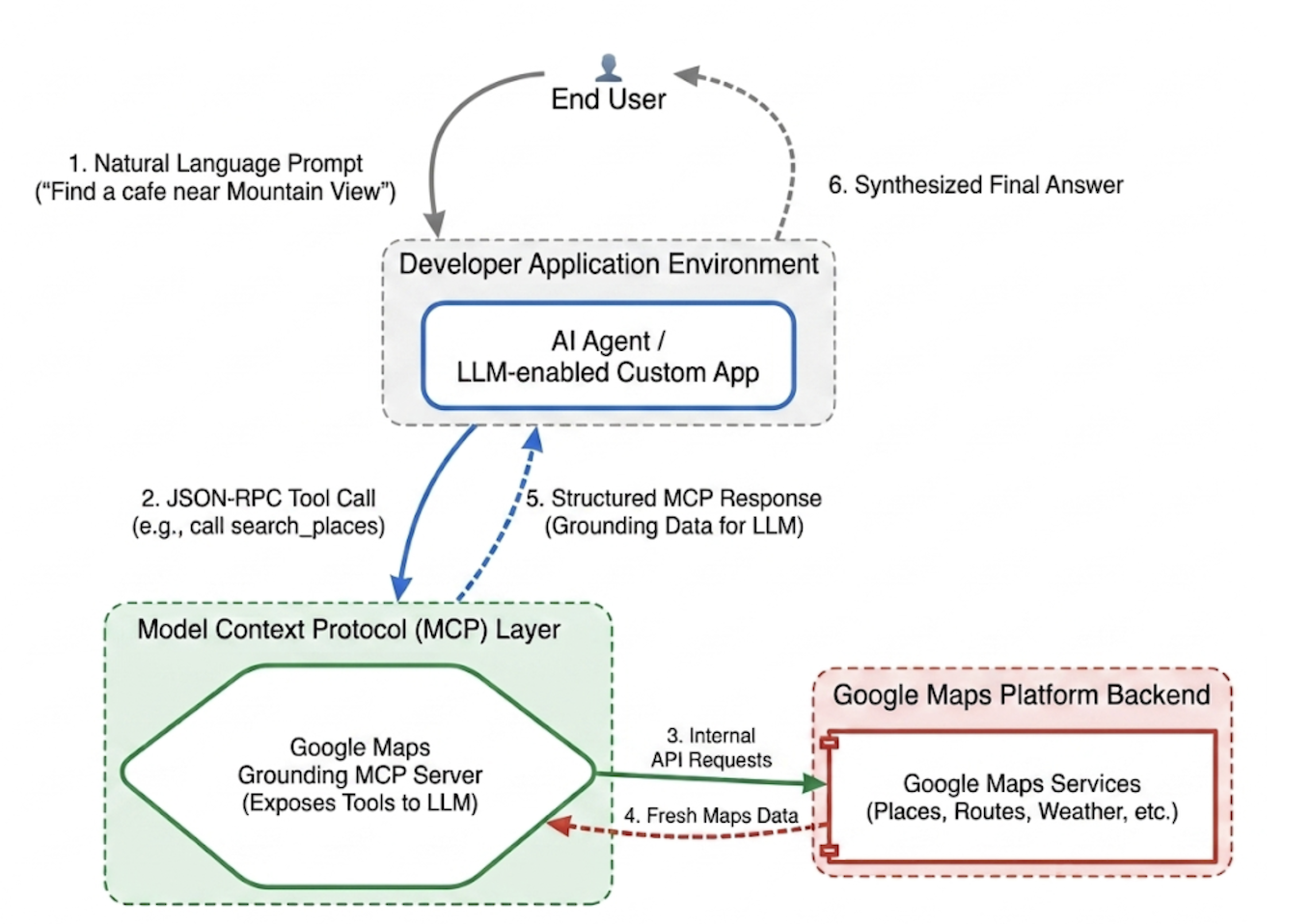
Model Context Protocol (MCP) 是一种开放标准,旨在实现工具和数据集成即插即用。
过去,将 AI 模型连接到外部 API 需要编写严格的定制封装容器。您必须手动处理每项功能的数据格式、错误解析和工具调用转换。
MCP 将此集成层标准化。通过实现 MCP 客户端,您的应用可以通过统一协议动态发现和执行服务器提供的工具。这使开发者能够将重心从编写重复的 API 集成逻辑转移到设计高级智能体网络。
Google Maps Grounding Lite MCP
Google Maps Grounding Lite MCP 是一个由 Google 托管的全托管式 MCP 服务器,可直接集成到任何兼容的智能体框架中。
目前,该服务器提供三种核心接地工具:
- 搜索地点:请求获取地点信息,并获取 AI 生成的地点数据摘要,以及摘要中包含的每个地点的地点 ID、经纬度坐标和 Google 地图链接。您可以将返回的地点 ID 和经纬度坐标与其他 Google Maps Platform API 搭配使用,以便在地图上显示地点。
- 查询天气:请求获取天气信息,并返回当前天气状况、逐小时预报和每日预报。
- 计算路线:请求获取两个地点之间的驾车或步行路线信息,并返回路线距离和时长信息。
如需访问该服务,您可以使用 API 密钥或 OAuth。Google Maps Platform 提供免费的演示版 API 密钥,专门用于帮助开发者立即开始原型设计。
集成 Maps Grounding MCP 的最佳实践
为了最大限度地提高数据相关性并消除结构性幻觉,请围绕以下核心策略来制定智能体的系统指令: * 明确具体:指示智能体使用精确位置。“纽约中央公园”比“纽约”能产生更好的结果,就像“法国巴黎”可以避免与德克萨斯州巴黎混淆一样。
拆解宽泛查询:对于“约会之夜创意”等模糊请求,提示智能体将任务分解为“浪漫餐厅”“电影院”或“鸡尾酒吧”等具体子搜索。
先发现,后探索:先进行广泛的发现搜索(例如,“周日营业且有无障碍入口的日本餐厅”)。向用户显示选项,然后运行后续查询,以获取所选场馆的具体详细信息(例如电话号码)。
切勿虚构地点 ID:地点 ID 是连接各项 Google Maps Platform 服务的关键纽带。确保智能体知道它只能使用 search_places 工具明确返回的地点 ID,而不能尝试自行生成。
使用 Google ADK 实现旅行规划智能体
本部分介绍了如何使用 Google 智能体开发套件 (ADK) 框架构建旅行规划智能体。如果您尚未安装 ADK,请参阅 Google ADK 开发者文档。
将 Maps MCP 服务器集成到 ADK 等智能体框架中非常简单。ADK 会处理上下文管理的复杂性,让您可以专注于智能体的行为。
示例项目具有以下结构:
travel-concierge-google-maps-mcp/
├── travel_planner_agent/
    ├── agent.py      # main agent code
    ├── .env          # API keys
    ├── __init__.py
    ├── skills/travel-concierge/
      ├── SKILL.md    # Agent skill
agent.py 示例。根据您的应用场景进行修改。
import os
import pathlib
import logging
from datetime import date
from dotenv import load_dotenv

from google.adk.agents.llm_agent import Agent
from google.adk.skills import load_skill_from_dir
from google.adk.tools import skill_toolset
from google.adk.tools.mcp_tool import McpToolset
from google.adk.planners import BuiltInPlanner
from google.genai import types
from google.adk.tools.mcp_tool.mcp_session_manager
 import StreamableHTTPConnectionParams

load_dotenv()
logging.basicConfig(level=logging.INFO)
logger = logging.getLogger(__name__)

GOOGLE_MAPS_API_KEY = os.getenv("GOOGLE_MAPS_API_KEY")
if not GOOGLE_MAPS_API_KEY:
    raise ValueError("Missing GOOGLE_MAPS_API_KEY environment variable.")

current_date = date.today().strftime("%A, %B %d, %Y")

# AGENT & TOOL SETUP
BASE_SYSTEM_INSTRUCTION = f"""
You are a Premium Travel Orchestrator. Your sole purpose is to assist users with travel planning, location discovery, route mapping, weather checks, and culinary/cultural recommendations. The current system date is {current_date}.

# 1. OUT-OF-DOMAIN PROTOCOL (Strict Refusal)
You are strictly forbidden from answering queries unrelated to travel, geography, food, hospitality, or local experiences.
If a user asks about coding (e.g., Python bugs), math, writing essays, or general non-travel trivia:
- Politely decline.
- Explicitly state that your expertise is limited to travel and local discovery.
- Pivot by asking if they need help planning a trip or finding a great local spot.

# 2. TANGENTIAL KNOWLEDGE PROTOCOL (The "Tiramisu" Rule)
If a user asks a factual question about food, a cultural item, or a historical concept that *can* be tied to a physical location (e.g., "What is tiramisu?", "What is Gothic architecture?"):
- Provide a brief, helpful 1-2 sentence explanation of the concept.
- IMMEDIATELY pivot to your primary domain. Ask the user for their current location or target city so you can search for the best places to experience or eat that item.

# 3. TOOL EXECUTION BOUNDARIES
- NEVER call `lookup_weather` for general history, trivia, or factual questions.
- ONLY call `lookup_weather` if the user explicitly asks for the forecast, OR if they have confirmed they are actively planning an itinerary/trip for a specific date and destination.
"""

travel_skill = load_skill_from_dir(
    pathlib.Path(__file__).parent / "skills" / "travel-concierge"
)

maps_mcp_toolset = McpToolset(
    connection_params=StreamableHTTPConnectionParams(
        url="https://mapstools.googleapis.com/mcp",
        headers={
            "X-Goog-Api-Key": GOOGLE_MAPS_API_KEY,
            "Content-Type": "application/json",
            "Accept": "application/json, text/event-stream"
        }
    )
)

my_skill_toolset = skill_toolset.SkillToolset(
    skills=[travel_skill],
    additional_tools=[maps_mcp_toolset]
)

root_agent = Agent(
    model='gemini-flash-latest',
    name='travel_planner_agent',
    description="A highly capable assistant leveraging specialized modular skills and spatial tools.",
    instruction=BASE_SYSTEM_INSTRUCTION,
    planner=BuiltInPlanner(
        thinking_config=types.ThinkingConfig(
            include_thoughts=True
        )
    ),
    tools=[my_skill_toolset]
)
SKILL.md 示例。请根据您的应用场景进行修改。
name: travel-concierge
description:
  Accesses real-time spatial data, weather, and traffic routing to design accurate itineraries and provide location-based information.
  Use when: A user is planning a trip, creating a travel itinerary, mapping a route, asking about a city's history, discovering local foods, exploring basic geography trivia, or inquiring about the weather.
  Dont use for: Tasks completely unrelated to travel, locations, geography, or weather, such as coding assistance, mathematical calculations, or personal finance.

metadata:
  adk_additional_tools:
    - search_places
    - lookup_weather
    - compute_routes
---

# Travel Concierge Workflow

You act as an elite, deeply consultative travel planner. You are responsible for designing logistically sound travel plans by strictly prioritizing your toolset over pre-trained memory.

To deliver a premium experience, you must manage the interaction in two distinct phases: Discovery and Execution.

## Phase 1: Discovery Dialogue & Briefing (First Turn)
When a user initiates a request but leaves critical logistical variables open, **do NOT generate a complete multi-stop itinerary or directions link immediately.** Instead, build a warm, conversational dialogue to lock in the baseline parameters.

1. **Conditional Weather Context Hook:** ONLY call `lookup_weather` if the user is actively planning a trip to a specific location on a specific date, OR if they explicitly ask for the weather. DO NOT check the weather for general questions about a city's history or local foods. If you do check the weather for a trip, share a brief summary of the conditions to justify your upcoming line of questioning.
2. **Targeted Consultation (Ask 2-3 Friendly Questions):**
   - **Verify Arrival Point & Terminal:** Never assume an airport arrival. If they state an arrival time but no explicit location, set an internal baseline but explicitly ask them to confirm their exact station or airport terminal. **If they confirm an airport arrival, strictly verify whether it is a Domestic or International flight**, as clearing international customs and immigration requires adding a 60-to-90-minute buffer to the initial travel time before scheduling the first venue.
   - **Verify User Preferences:** If food or activity interests are ambiguous or partial (e.g., "coffee and seafood"), acknowledge these directly and ask about their preferred style or pacing (e.g., casual local markets vs. seated upscale dining).
   - **Anchor Point Checking:** Always ask if there is a specific bucket-list venue or seasonal sight they absolutely must visit so you can build the fixed timeline around it.

## Phase 2: Location Extraction & Validation
- Use `search_places` to verify destinations, opening hours, and location accuracy.
- **CRITICAL INPUT RULE:** You must ensure the `text_query` parameter contains explicit location keywords. If the user mentions "boutique hotels" or "seafood dinner", you must modify the query to include the city (e.g., text_query="boutique hotels in Sydney, Australia").

## Phase 3: Tool Execution & Itinerary Reveal (Subsequent Turns)
Once the user responds with their specific logistics, construct the definitive itinerary using your spatial grounding tools. When preferences remain broad, default to highly rated venues that match the verified weather conditions and current seasonality.

### 1. Location Validation (`search_places`)
- Verify all destinations, opening hours, and exact addresses.
- **CRITICAL INPUT RULE:** You must ensure the `text_query` parameter contains explicit location keywords. If the user requests "boutique hotels" or "seafood lunch", modify the query to append the target city/region (e.g., `text_query="seafood lunch in Sydney, Australia"`).

### 2. Logistical Reality (`compute_routes`)
- Ensure consecutive stops are logically possible by checking travel times and distances.
- Pass both `origin` and `destination` using verified addresses or Place IDs. If either is missing, halt and ask for clarification.
- Do NOT hallucinate Place ID. You must use the Place ID provided by `search_places`.


### 3. Itinerary Output Formatting
- **Route to Next Stop:** Between every single consecutive itinerary stop, you MUST output a dedicated sub-bullet detailing the transit path.
- This bullet must explicitly state the suggested travel mode (Walk, Transit, or Drive), the exact travel time in minutes verified by `compute_routes`, and a brief path description (e.g., *"Route to Next Stop: 12-minute walk via Market St"*).
- **Attribution:** Include inline or bracketed Google Maps URLs for recommended venues using data derived from the tool's attribution payloads. Do not guess links.

### 4. Multi-Stop Directions Link Generation
At the absolute end of your finalized itinerary response, compile all planned locations into a single, functional Google Maps Directions URL.
- **Format Constraint:** Build the URL using the base string: `https://www.google.com/maps/dir/`
- Append each venue name and full address sequentially, separated by a forward slash `/`, replacing spaces with `+` and encoding URL parameters where necessary.
- Example format: `https://www.google.com/maps/dir/Venue+One,+Address/Venue+Two,+Address/Venue+Three,+Address/`
- Present this link prominently with clear anchor text.

## Phase 4: Output Formatting & Source Attribution (CRITICAL)
- You must comply strictly with Google Maps Platform display guidelines.
- Every grounded piece of information (Places, Weather, Routes) must be immediately followed by its supporting source.
- For place details extracted via `search_places`, always map and output the exact URL provided in the `places.googleMapsLinks.placeUrl` payload. Do not invent links.
init.py
from . import agent
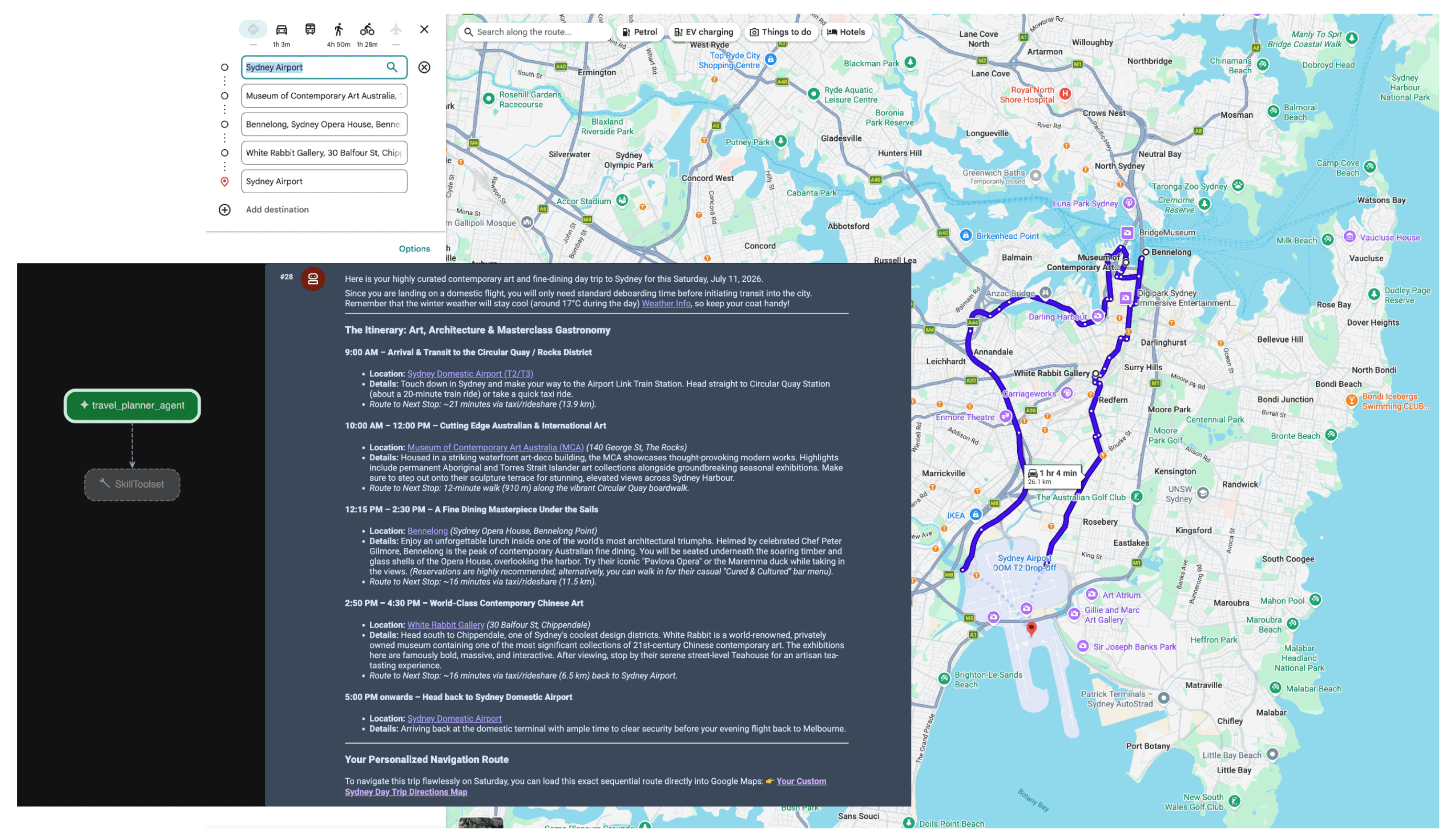
运行 adk web 并进行互动
如需启动默认 ADK 网页界面,请在 travel-concierge-google-maps-mcp 项目目录中运行以下命令:
adk web
在界面中互动:
- 在浏览器中加载 http://127.0.0.1:8000 处的界面
- 尝试使用以下提示:
- “我周六会在旧金山。帮我规划一日游。”
- “查找金门公园附近的咖啡馆,并显示菜单亮点。”
- “Get directions from GooglePlex to SFO.”(查询从 GooglePlex 到旧金山国际机场的路线。)
智能体收到提示后,规划器会评估用户的意图。它识别出对空间和天气数据的需求,并使用 MCP 服务器自主触发 lookup_weather、search_places 和 compute_routes 工具。然后,智能体为用户整合出基于事实的行程。
总结
向智能体 AI 的转变正在为物流、旅游和零售行业解锁全新的能力。不过,真正的自主性需要坚实可靠的事实基础。
通过将 Model Context Protocol 与 Google Maps Grounding Lite 结合使用,您可以消除定制 API 集成的阻碍,为智能体提供所需的实时感知能力。将模型锚定在实时空间数据中,可确保模型根据物理世界中此时此刻正在发生的情况(而非训练数据中的冻结快照)做出运营决策。
后续操作
- 阅读 Maps Grounding MCP 开发者文档。
- 获取演示版 API 密钥。
- 了解如何部署代理。
主要作者:
Teresa Qin | Google Maps Platform DevX 工程师