
Page Summary
-
The
ui.Chart.imagemodule provides functions for creating charts from reducedImageobjects. -
The choice of function determines how data is arranged for the chart's x-axis, y-axis, and series.
-
ui.Chart.image.byRegionplots reduction regions on the x-axis and band names as series. -
ui.Chart.image.regionsplots bands on the x-axis and features defining regions as series. -
ui.Chart.image.byClassplots data bands on the x-axis with unique class band values as series. -
ui.Chart.image.histogramgenerates frequency histograms for selected band values within a region.
The ui.Chart.image module contains a set of functions for reducing Image
objects by region(s) and rendering charts from the results. The choice of
function dictates the arrangement of data in the chart, i.e., what defines
x- and y-axis values and what defines the series. Use the following function
descriptions and examples to determine the best function and chart type for
your purpose.
Chart functions
Use the following plot diagrams as a visual guide to understand how each function arranges image region reduction results in a chart; i.e., what elements define x values, y values, and series.
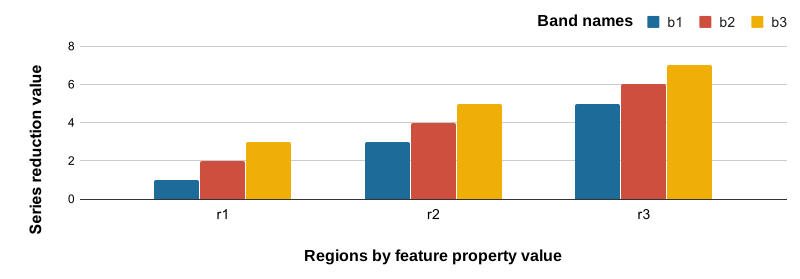
Reduction regions are plotted along the x-axis, labeled by values of a selected feature property. Series are defined by band names whose region reduction results are plotted along the y-axis.
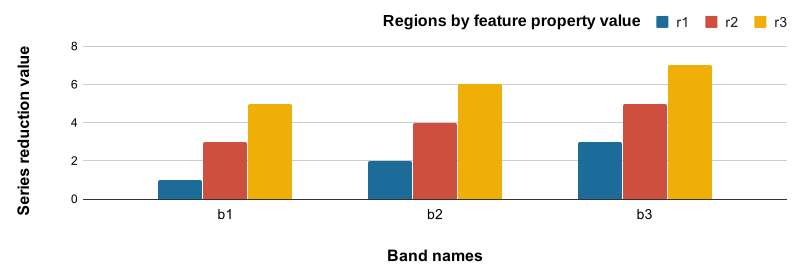
Bands are plotted along the x-axis. Series are labeled by values of a feature property. Reduction of the region defined by the geometry of respective series features are plotted along the y-axis.
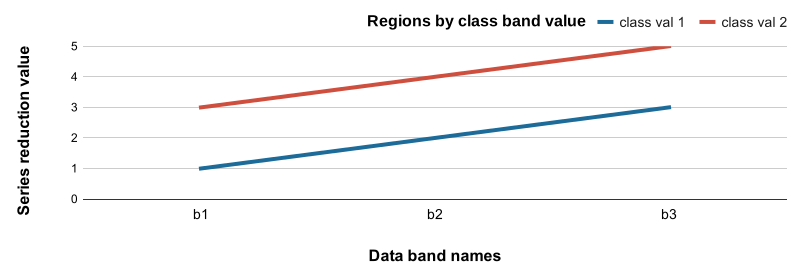
Data bands are plotted along the x-axis. Series are represented by unique values in a class band. Y-axis position is defined by region reduction results for pixels composing each series.
Frequency histogram for values of selected bands.
- X-axis: histogram buckets for values of selected bands
- Y-axis: frequency of pixels qualified for each histogram bucket
Example data
The following examples rely on a FeatureCollection composed of three
ecoregion features that define regions by which to reduce image data. The
Image data are PRISM climate normals, where bands describe climate variables
per month; e.g., July precipitation or January mean temperature.
Learn how this asset was created.
ui.Chart.image.byRegion
Column chart
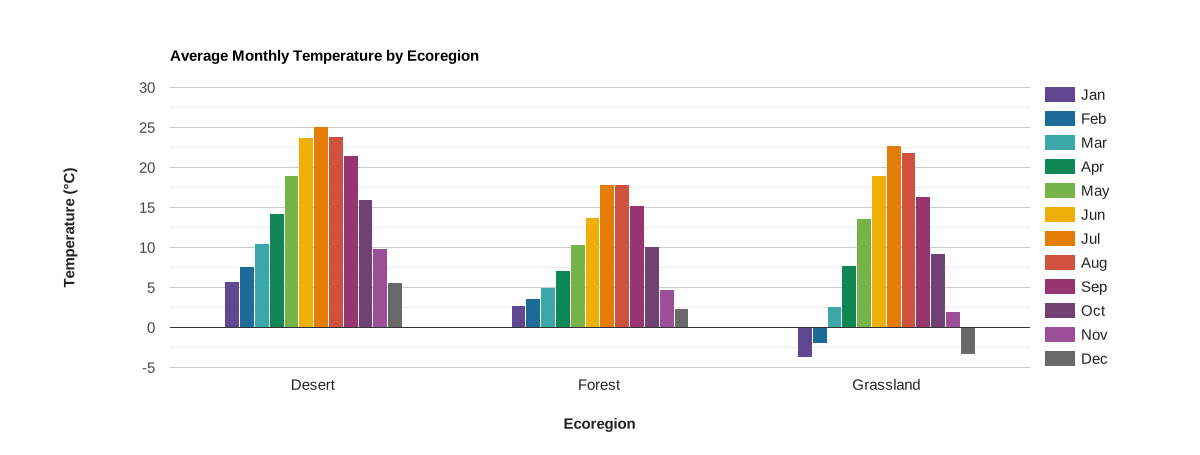
In this example, image bands representing average monthly temperature are reduced to the mean among pixels intersecting each of three ecoregions. The results are plotted as columns per month by ecoregion, where column height indicates the respective mean monthly temperature.
Code Editor (JavaScript)
// Import the example feature collection.
var ecoregions = ee.FeatureCollection('projects/google/charts_feature_example');

// Load PRISM climate normals image collection; convert images to bands.
var normClim = ee.ImageCollection('OREGONSTATE/PRISM/Norm81m').toBands();

// Define the chart and print it to the console.
var chart =
    ui.Chart.image
        .byRegion({
          image: normClim.select('[0-9][0-9]_tmean'),
          regions: ecoregions,
          reducer: ee.Reducer.mean(),
          scale: 500,
          xProperty: 'label'
        })
        .setSeriesNames([
          'Jan', 'Feb', 'Mar', 'Apr', 'May', 'Jun', 'Jul', 'Aug', 'Sep', 'Oct',
          'Nov', 'Dec'
        ])
        .setChartType('ColumnChart')
        .setOptions({
          title: 'Average Monthly Temperature by Ecoregion',
          hAxis:
              {title: 'Ecoregion', titleTextStyle: {italic: false, bold: true}},
          vAxis: {
            title: 'Temperature (°C)',
            titleTextStyle: {italic: false, bold: true}
          },
          colors: [
            '604791', '1d6b99', '39a8a7', '0f8755', '76b349', 'f0af07',
            'e37d05', 'cf513e', '96356f', '724173', '9c4f97', '696969'
          ]
        });
print(chart);
Bar chart
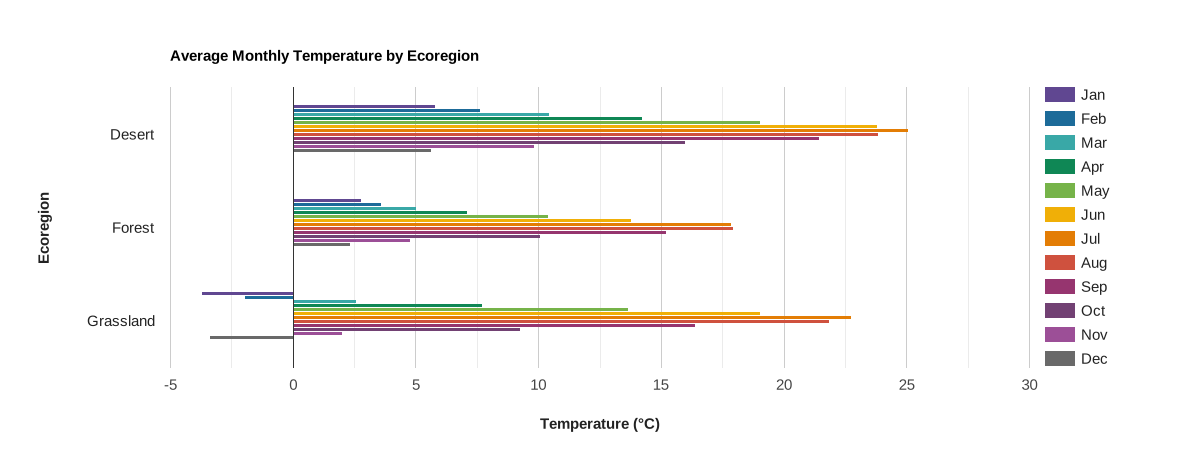
The previous column chart can be rendered as a bar chart by
changing the .setChartType() input from 'ColumnChart' to 'BarChart'.
var chart =
    ui.Chart.image
        .byRegion({
          image: normClim.select('[0-9][0-9]_tmean'),
          regions: ecoregions,
          reducer: ee.Reducer.mean(),
          scale: 500,
          xProperty: 'label'
        })
        .setSeriesNames([
          'Jan', 'Feb', 'Mar', 'Apr', 'May', 'Jun', 'Jul', 'Aug', 'Sep', 'Oct',
          'Nov', 'Dec'
        ])
        .setChartType('BarChart')
        .setOptions({
          title: 'Average Monthly Temperature by Ecoregion',
          hAxis: {
            title: 'Temperature (°C)',
            titleTextStyle: {italic: false, bold: true}
          },
          vAxis:
              {title: 'Ecoregion', titleTextStyle: {italic: false, bold: true}},
          colors: [
            '604791', '1d6b99', '39a8a7', '0f8755', '76b349', 'f0af07',
            'e37d05', 'cf513e', '96356f', '724173', '9c4f97', '696969'
          ]
        });
Stacked column chart
The isStacked chart option specifies whether chart columns are stacked or not.
Several options
are provided for stacking. The following examples demonstrate the use of the
'absolute' and 'relative' options.
Absolute
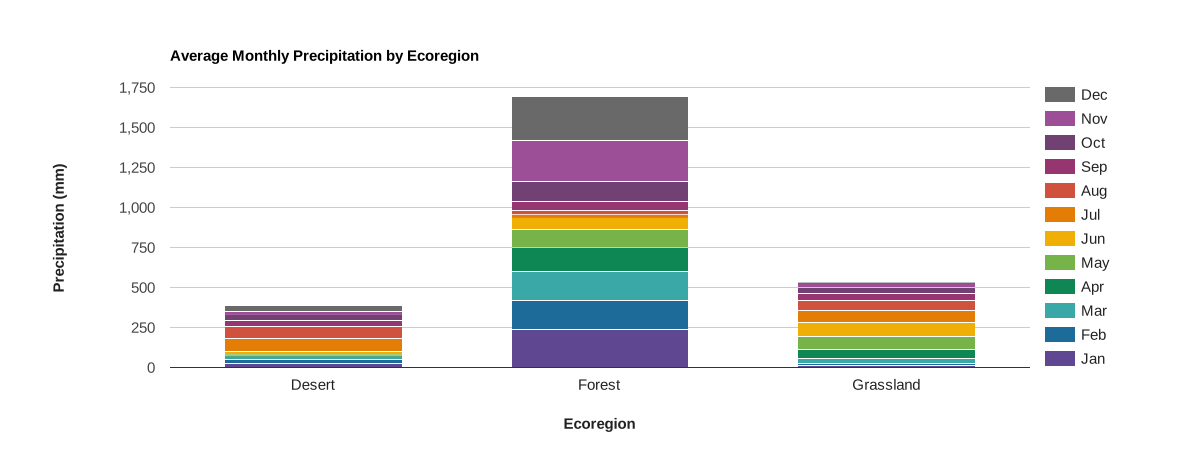
An absolute stacked bar chart relates the total of a numeric variable
by increments of a contributing categorical variable series. For instance, in
this example, total precipitation is plotted as the accumulation of monthly
precipitation over a year, by ecoregion. Monthly precipitation totals are
derived from image bands, where each band represents a grid of average total
precipitation for a given month, reduced to the mean of the pixels intersecting
each of three ecoregions. The isStacked chart option is set to 'absolute' to
format the results as absolute values.
Code Editor (JavaScript)
// Import the example feature collection.
var ecoregions = ee.FeatureCollection('projects/google/charts_feature_example');

// Load PRISM climate normals image collection; convert images to bands.
var normClim = ee.ImageCollection('OREGONSTATE/PRISM/Norm81m').toBands();

// Define the chart and print it to the console.
var chart =
    ui.Chart.image
        .byRegion({
          image: normClim.select('[0-9][0-9]_ppt'),
          regions: ecoregions,
          reducer: ee.Reducer.mean(),
          scale: 500,
          xProperty: 'label'
        })
        .setSeriesNames([
          'Jan', 'Feb', 'Mar', 'Apr', 'May', 'Jun', 'Jul', 'Aug', 'Sep', 'Oct',
          'Nov', 'Dec'
        ])
        .setChartType('ColumnChart')
        .setOptions({
          title: 'Average Monthly Precipitation by Ecoregion',
          hAxis:
              {title: 'Ecoregion', titleTextStyle: {italic: false, bold: true}},
          vAxis: {
            title: 'Precipitation (mm)',
            titleTextStyle: {italic: false, bold: true}
          },
          colors: [
            '604791', '1d6b99', '39a8a7', '0f8755', '76b349', 'f0af07',
            'e37d05', 'cf513e', '96356f', '724173', '9c4f97', '696969'
          ],
          isStacked: 'absolute'
        });
print(chart);
Relative
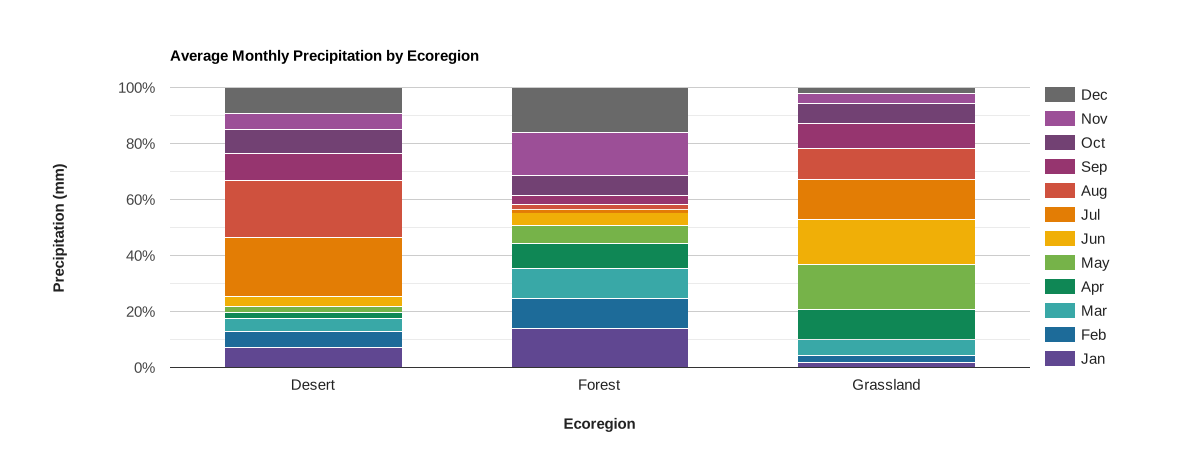
Convert the previous absolute stacked bar chart to a relative
stacked bar chart by changing the isStacked chart option from 'absolute' to
'relative'. A relative stacked bar chart relates the proportion of
contributing categorical variable series to the total of a numeric variable.
For instance, in this example, monthly precipitation is plotted as a proportion
of the annual total precipitation, by ecoregion.
var chart =
    ui.Chart.image
        .byRegion({
          image: normClim.select('[0-9][0-9]_ppt'),
          regions: ecoregions,
          reducer: ee.Reducer.mean(),
          scale: 500,
          xProperty: 'label'
        })
        .setSeriesNames([
          'Jan', 'Feb', 'Mar', 'Apr', 'May', 'Jun', 'Jul', 'Aug', 'Sep', 'Oct',
          'Nov', 'Dec'
        ])
        .setChartType('ColumnChart')
        .setOptions({
          title: 'Average Monthly Precipitation by Ecoregion',
          hAxis:
              {title: 'Ecoregion', titleTextStyle: {italic: false, bold: true}},
          vAxis: {
            title: 'Precipitation (mm)',
            titleTextStyle: {italic: false, bold: true}
          },
          colors: [
            '604791', '1d6b99', '39a8a7', '0f8755', '76b349', 'f0af07',
            'e37d05', 'cf513e', '96356f', '724173', '9c4f97', '696969'
          ],
          isStacked: 'relative'
        });
Scatter chart
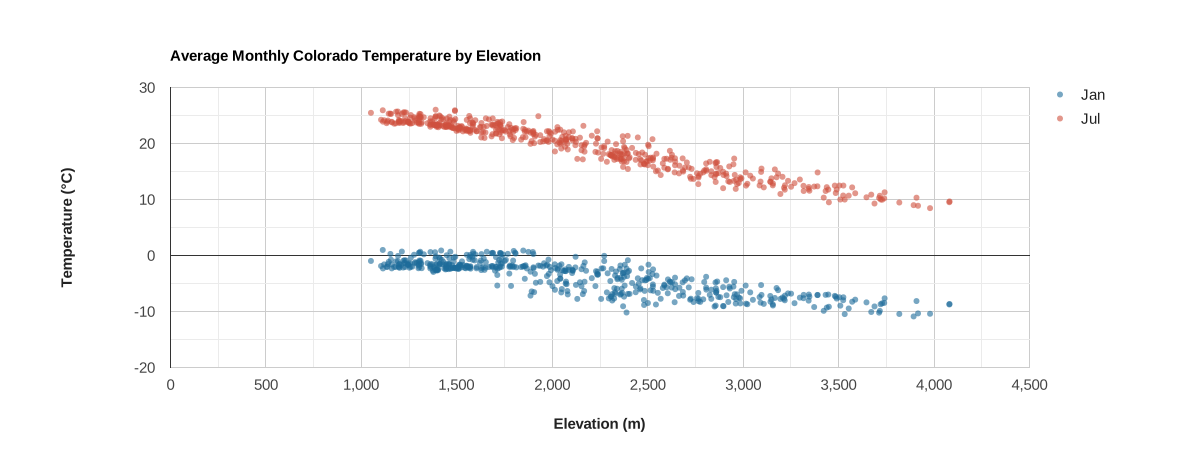
Mean January and July temperatures for a random sample of locations in
the state of Colorado are plotted as a function of elevation. A DEM is sampled
using the sample function which returns a FeatureCollection with a geometry
and elevation property. The resulting FeatureCollection is then used as the
argument to the regions parameter of the ui.Chart.image.byRegion function.
Series are defined by selected bands of the input climate normals image.
Code Editor (JavaScript)
// Load SRTM elevation data.
var elev = ee.Image('CGIAR/SRTM90_V4').select('elevation');

// Subset Colorado from the TIGER States feature collection.
var colorado = ee.FeatureCollection('TIGER/2018/States')
                   .filter(ee.Filter.eq('NAME', 'Colorado'));

// Draw a random sample of elevation points from within Colorado.
var samp = elev.sample(
    {region: colorado, scale: 30, numPixels: 500, geometries: true});

// Load PRISM climate normals image collection; convert images to bands.
var normClim = ee.ImageCollection('OREGONSTATE/PRISM/Norm81m').toBands();

// Define the chart and print it to the console.
var chart = ui.Chart.image
                .byRegion({
                  image: normClim.select(['01_tmean', '07_tmean']),
                  regions: samp,
                  reducer: ee.Reducer.mean(),
                  scale: 500,
                  xProperty: 'elevation'
                })
                .setSeriesNames(['Jan', 'Jul'])
                .setChartType('ScatterChart')
                .setOptions({
                  title: 'Average Monthly Colorado Temperature by Elevation',
                  hAxis: {
                    title: 'Elevation (m)',
                    titleTextStyle: {italic: false, bold: true}
                  },
                  vAxis: {
                    title: 'Temperature (°C)',
                    titleTextStyle: {italic: false, bold: true}
                  },
                  pointSize: 4,
                  dataOpacity: 0.6,
                  colors: ['1d6b99', 'cf513e'],
                });
print(chart);
Combo chart
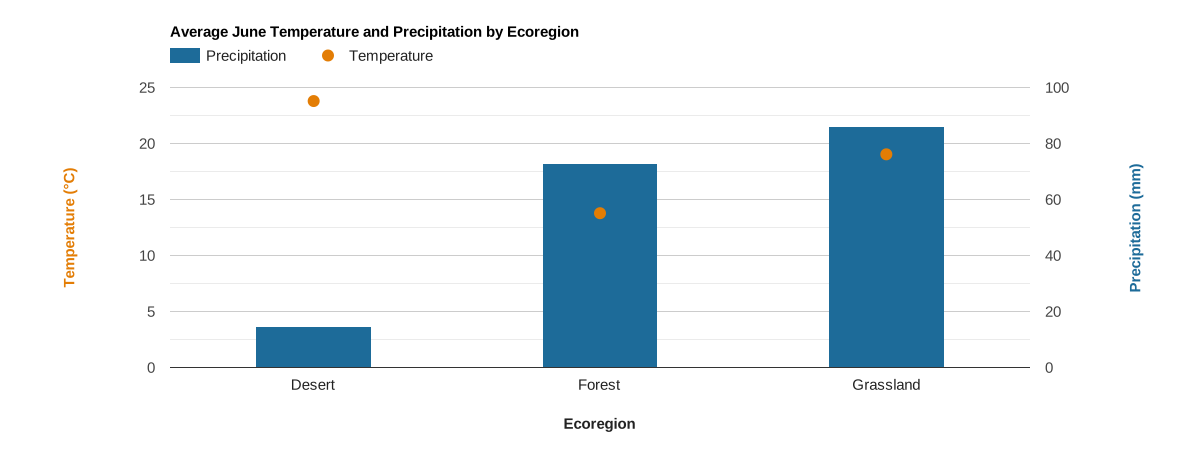
For three ecoregions in a ee.FeatureCollection, the respective mean
temperature and precipitation for June are plotted. The results are derived from
the region reduction of an image where each band is a grid of climate normals
describing monthly precipitation and temperature; bands
representing June temperature and precipitation are subset. Since precipitation
and temperature are in different units,
two y-axes
are used by setting series and vAxes options. Note the use of the
series.targetAxisIndex option to define which variable is plotted to the right
and left y-axis. Series-specific symbols (points and columns) are used to more
easily distinguish the two variables as having different units.
Code Editor (JavaScript)
// Import the example feature collection.
var ecoregions = ee.FeatureCollection('projects/google/charts_feature_example');

// Load PRISM climate normals image collection; convert images to bands.
var normClim = ee.ImageCollection('OREGONSTATE/PRISM/Norm81m').toBands();

// Define the chart and print it to the console.
var chart =
    ui.Chart.image
        .byRegion({
          image: normClim.select(['06_tmean', '06_ppt']),
          regions: ecoregions,
          reducer: ee.Reducer.mean(),
          scale: 500,
          xProperty: 'label'
        })
        .setSeriesNames(['Precipitation', 'Temperature'])
        .setChartType('ColumnChart')
        .setOptions({
          title: 'Average June Temperature and Precipitation by Ecoregion',
          series: {
            0: {targetAxisIndex: 1, type: 'bar', color: '1d6b99'},
            1: {
              targetAxisIndex: 0,
              type: 'line',
              lineWidth: 0,
              pointSize: 10,
              color: 'e37d05'
            }
          },
          hAxis:
              {title: 'Ecoregion', titleTextStyle: {italic: false, bold: true}},
          vAxes: {
            0: {
              title: 'Temperature (°C)',
              baseline: 0,
              titleTextStyle: {italic: false, bold: true, color: 'e37d05'}
            },
            1: {
              title: 'Precipitation (mm)',
              titleTextStyle: {italic: false, bold: true, color: '1d6b99'}
            },
          },
          bar: {groupWidth: '40%'},
        });
print(chart);
ui.Chart.image.regions
Example setup
The ui.Chart.image.regions function accepts a list that allows
you to control the label and order of band names along the x-axis by
assigning numerical values to them. The following charts use this
option to set band names as month labels and sort them in chronological
order for average monthly precipitation.
Column chart
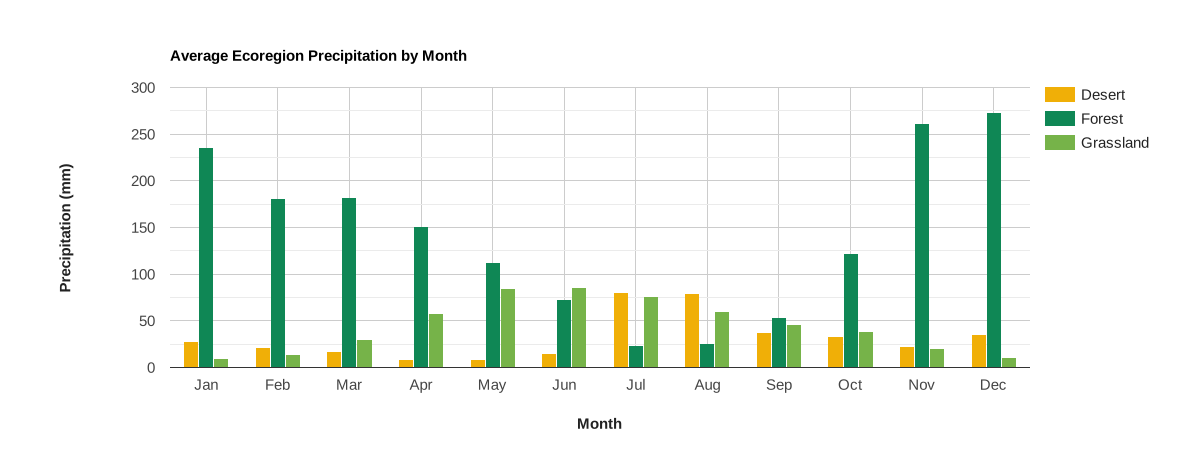
This chart shows total average precipitation per month for three ecoregions.
The results are derived from the region reduction of an image where each band is
a grid of average total precipitation for a given month. Bands are plotted
along the x-axis and regions define the series. Note the client-side operations
used to define inputs for the xLabels and ticks chart options for
custom arrangement of the x-axis; client operations are required because options
provided to the setOptions function must be client-side objects
(see Client vs. Server to understand the distinction). To
convert to a bar chart, use 'BarChart' as the .setChartType() input.
Code Editor (JavaScript)
// Import the example feature collection.
var ecoregions = ee.FeatureCollection('projects/google/charts_feature_example');

// Load PRISM climate normals image collection, convert images to bands, and
// subset precipitation bands.
var precip = ee.ImageCollection('OREGONSTATE/PRISM/Norm81m')
                 .toBands()
                 .select('[0-9][0-9]_ppt');

// Define a dictionary that associates band names with values and labels.
var precipInfo = {
  '01_ppt': {v: 1, f: 'Jan'},
  '02_ppt': {v: 2, f: 'Feb'},
  '03_ppt': {v: 3, f: 'Mar'},
  '04_ppt': {v: 4, f: 'Apr'},
  '05_ppt': {v: 5, f: 'May'},
  '06_ppt': {v: 6, f: 'Jun'},
  '07_ppt': {v: 7, f: 'Jul'},
  '08_ppt': {v: 8, f: 'Aug'},
  '09_ppt': {v: 9, f: 'Sep'},
  '10_ppt': {v: 10, f: 'Oct'},
  '11_ppt': {v: 11, f: 'Nov'},
  '12_ppt': {v: 12, f: 'Dec'}
};

// Organize precipitation information into objects for defining x values and
// their tick labels. Note that chart options provided to the .setOptions()
// function must be client-side objects, which is why a client-side for
// loop is used to iteratively populate lists from the above dictionary.
var xPropVals = [];    // List to codify x-axis band names as values.
var xPropLabels = [];  // Holds dictionaries that label codified x-axis values.
for (var key in precipInfo) {
  xPropVals.push(precipInfo[key].v);
  xPropLabels.push(precipInfo[key]);
}

// Define the chart and print it to the console.
var chart = ui.Chart.image
                .regions({
                  image: precip,
                  regions: ecoregions,
                  reducer: ee.Reducer.mean(),
                  scale: 5e3,
                  seriesProperty: 'label',
                  xLabels: xPropVals
                })
                .setChartType('ColumnChart')
                .setOptions({
                  title: 'Average Ecoregion Precipitation by Month',
                  hAxis: {
                    title: 'Month',
                    titleTextStyle: {italic: false, bold: true},
                    ticks: xPropLabels
                  },
                  vAxis: {
                    title: 'Precipitation (mm)',
                    titleTextStyle: {italic: false, bold: true}
                  },
                  colors: ['f0af07', '0f8755', '76b349'],
                });
print(chart);
Line chart
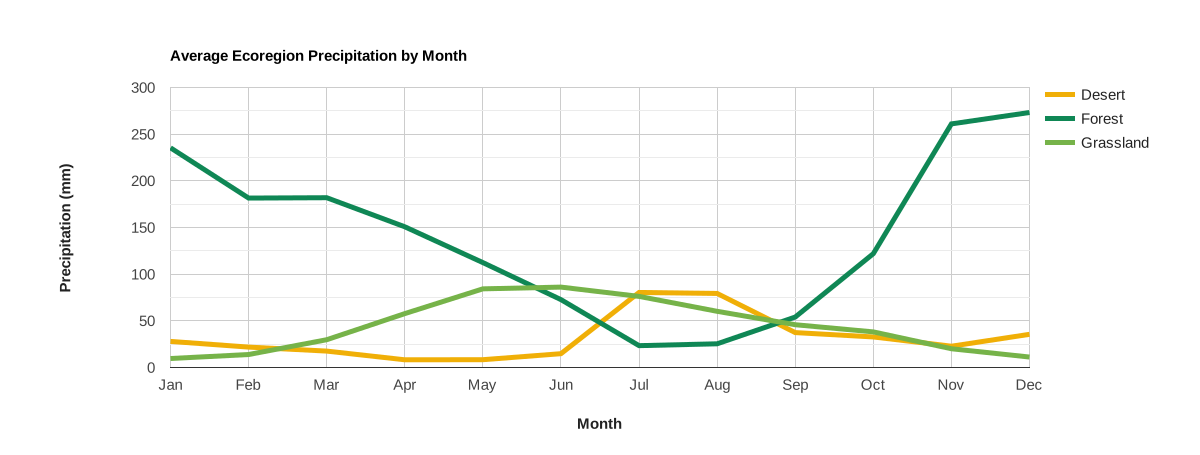
The previous column chart can be rendered as a line chart by
changing the .setChartType() input from 'ColumnChart' to 'LineChart'.
var chart = ui.Chart.image
                .regions({
                  image: precip,
                  regions: ecoregions,
                  reducer: ee.Reducer.mean(),
                  scale: 500,
                  seriesProperty: 'label',
                  xLabels: xPropVals
                })
                .setChartType('LineChart')
                .setOptions({
                  title: 'Average Ecoregion Precipitation by Month',
                  hAxis: {
                    title: 'Month',
                    titleTextStyle: {italic: false, bold: true},
                    ticks: xPropLabels
                  },
                  vAxis: {
                    title: 'Precipitation (mm)',
                    titleTextStyle: {italic: false, bold: true}
                  },
                  colors: ['f0af07', '0f8755', '76b349'],
                  lineSize: 5
                });
Area chart
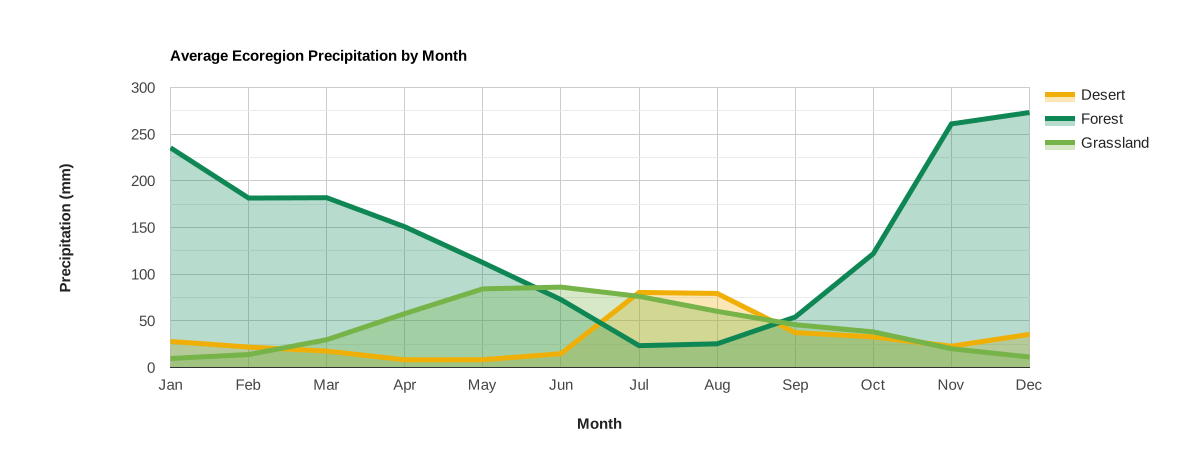
The previous column chart can be rendered as an area chart by
changing the .setChartType() input from 'ColumnChart' to 'AreaChart'.
var chart = ui.Chart.image
                .regions({
                  image: precip,
                  regions: ecoregions,
                  reducer: ee.Reducer.mean(),
                  scale: 500,
                  seriesProperty: 'label',
                  xLabels: xPropVals
                })
                .setChartType('AreaChart')
                .setOptions({
                  title: 'Average Ecoregion Precipitation by Month',
                  hAxis: {
                    title: 'Month',
                    titleTextStyle: {italic: false, bold: true},
                    ticks: xPropLabels
                  },
                  vAxis: {
                    title: 'Precipitation (mm)',
                    titleTextStyle: {italic: false, bold: true}
                  },
                  colors: ['f0af07', '0f8755', '76b349'],
                  lineSize: 5
                });
Pie chart
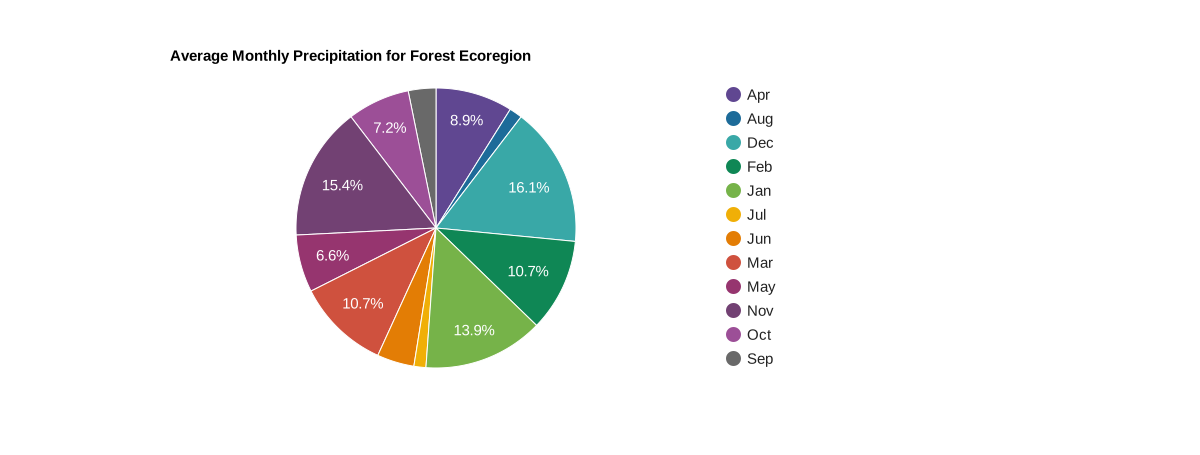
Average monthly precipitation is displayed as a proportion of the average total annual precipitation for a forest ecoregion. Image bands representing monthly precipitation are subset from a climate normals dataset and reduced to the mean of pixels intersecting the ecoregion.
Code Editor (JavaScript)
// Import the example feature collection, subset the forest ecoregion.
var forest = ee.FeatureCollection('projects/google/charts_feature_example')
                 .filter(ee.Filter.eq('label', 'Forest'));

// Load PRISM climate normals image collection, convert images to bands.
var normClim = ee.ImageCollection('OREGONSTATE/PRISM/Norm81m').toBands();

// Define x-axis labels to replace default band names.
var monthNames = [
  'Jan', 'Feb', 'Mar', 'Apr', 'May', 'Jun', 'Jul', 'Aug', 'Sep', 'Oct', 'Nov',
  'Dec'
];

// Define the chart and print it to the console.
var chart = ui.Chart.image
                .regions({
                  image: normClim.select('[0-9][0-9]_ppt'),
                  regions: forest,
                  reducer: ee.Reducer.mean(),
                  scale: 5e3,
                  seriesProperty: 'label',
                  xLabels: monthNames
                })
                .setChartType('PieChart')
                .setOptions({
                  title: 'Average Monthly Precipitation for Forest Ecoregion',
                  colors: [
                    '604791', '1d6b99', '39a8a7', '0f8755', '76b349', 'f0af07',
                    'e37d05', 'cf513e', '96356f', '724173', '9c4f97', '696969'
                  ]
                });
print(chart);
Donut chart
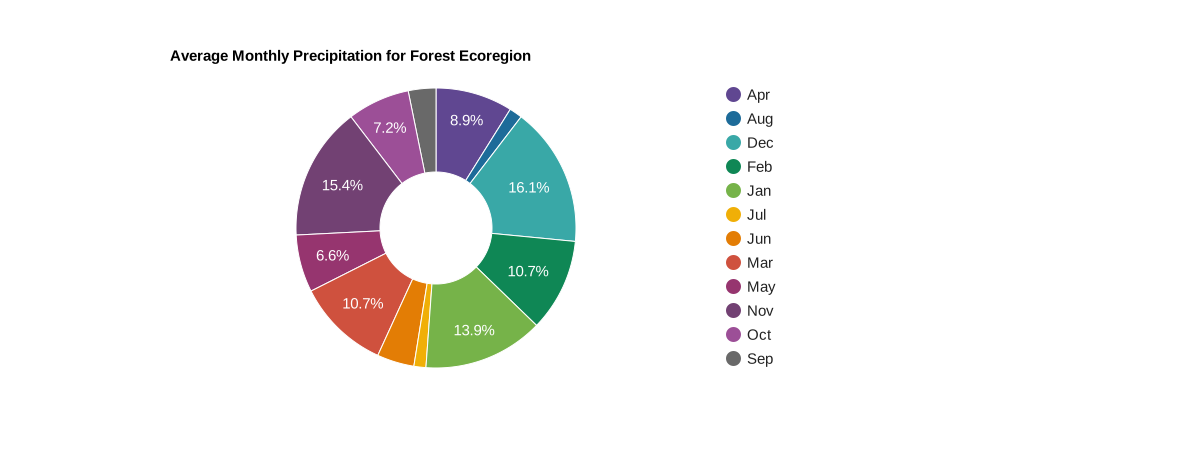
Convert the pie chart example to a donut chart by setting the
pieHole
chart option. Try 0.4 and 0.6 as initial values.
var chart = ui.Chart.image
                .regions({
                  image: normClim.select('[0-9][0-9]_ppt'),
                  regions: forest,
                  reducer: ee.Reducer.mean(),
                  scale: 5e3,
                  seriesProperty: 'label',
                  xLabels: monthNames
                })
                .setChartType('PieChart')
                .setOptions({
                  title: 'Average Monthly Precipitation for Forest Ecoregion',
                  colors: [
                    '604791', '1d6b99', '39a8a7', '0f8755', '76b349', 'f0af07',
                    'e37d05', 'cf513e', '96356f', '724173', '9c4f97', '696969'
                  ],
                  pieHole: 0.4
                });
ui.Chart.image.byClass
Line chart
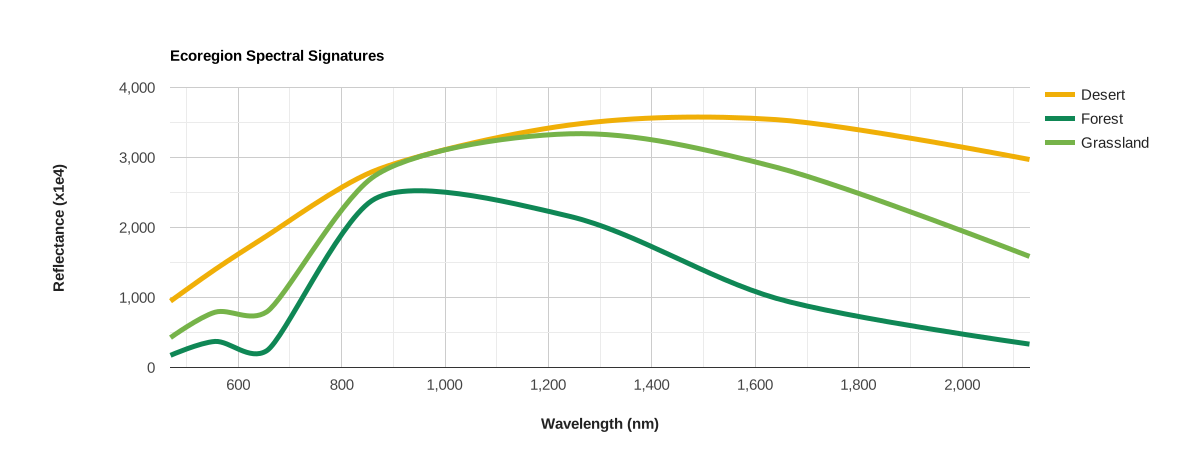
The ui.Chart.image.byClass function plots band value statistics for
pixels within classified regions of a "class band". In this example, it is used
to display the spectral profile of three ecoregions. Ecoregion features are
rasterized and added as a band to a MODIS surface reflectance (SR) image. For
each ecoregion class and reflectance band, the respective pixel mean is
calculated and plotted to the y-axis. The central wavelengths of the MODIS SR
bands define the x-axis ticks and labels. Note that the
curveType
line chart option is set as 'function' to smooth the lines.
Code Editor (JavaScript)
// Import the example feature collection.
var ecoregions = ee.FeatureCollection('projects/google/charts_feature_example');

// Convert ecoregion feature collection to a classified image.
var regionsBand =
    ecoregions
        .reduceToImage({properties: ['value'], reducer: ee.Reducer.first()})
        .rename('class');

// Define a MODIS surface reflectance composite.
var modisSr = ee.ImageCollection('MODIS/006/MOD09A1')
                  .filter(ee.Filter.date('2018-06-01', '2018-09-01'))
                  .select('sur_refl_b0[0-7]')
                  .mean();

// Reorder reflectance bands by ascending wavelength and
// add the classified ecoregions image as a band to the SR collection and
var modisSrClass = modisSr.select([2, 3, 0, 1, 4, 5, 6]).addBands(regionsBand);

// Define a list of MODIS SR wavelengths for x-axis labels.
var wavelengths = [469, 555, 655, 858, 1240, 1640, 2130];

// Define the chart and print it to the console.
var chart = ui.Chart.image
                .byClass({
                  image: modisSrClass,
                  classBand: 'class',
                  region: ecoregions,
                  reducer: ee.Reducer.mean(),
                  scale: 500,
                  classLabels: ['Desert', 'Forest', 'Grassland'],
                  xLabels: wavelengths
                })
                .setChartType('ScatterChart')
                .setOptions({
                  title: 'Ecoregion Spectral Signatures',
                  hAxis: {
                    title: 'Wavelength (nm)',
                    titleTextStyle: {italic: false, bold: true},
                    viewWindow: {min: wavelengths[0], max: wavelengths[6]}
                  },
                  vAxis: {
                    title: 'Reflectance (x1e4)',
                    titleTextStyle: {italic: false, bold: true}
                  },
                  colors: ['f0af07', '0f8755', '76b349'],
                  pointSize: 0,
                  lineSize: 5,
                  curveType: 'function'
                });
print(chart);
ui.Chart.image.histogram
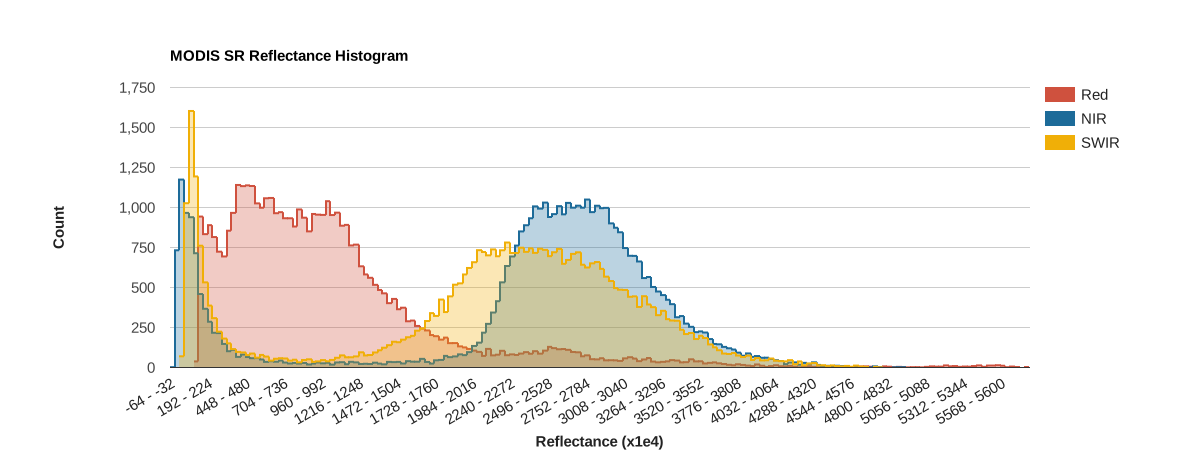
A histogram of pixel values within a region surrounding Salt Lake City, Utah, USA are displayed for three MODIS surface reflectance bands.
Code Editor (JavaScript)
// Define a MODIS surface reflectance composite.
var modisSr = ee.ImageCollection('MODIS/006/MOD09A1')
                  .filter(ee.Filter.date('2018-06-01', '2018-09-01'))
                  .select(['sur_refl_b01', 'sur_refl_b02', 'sur_refl_b06'])
                  .mean();

// Define a region to calculate histogram for.
var histRegion = ee.Geometry.Rectangle([-112.60, 40.60, -111.18, 41.22]);

// Define the chart and print it to the console.
var chart =
    ui.Chart.image.histogram({image: modisSr, region: histRegion, scale: 500})
        .setSeriesNames(['Red', 'NIR', 'SWIR'])
        .setOptions({
          title: 'MODIS SR Reflectance Histogram',
          hAxis: {
            title: 'Reflectance (x1e4)',
            titleTextStyle: {italic: false, bold: true},
          },
          vAxis:
              {title: 'Count', titleTextStyle: {italic: false, bold: true}},
          colors: ['cf513e', '1d6b99', 'f0af07']
        });
print(chart);