
Page Summary
-
The
ui.Chart.array.valuesfunction can be used to create charts fromee.Arrayandee.Listobjects. -
This function allows plotting data extracted from image bands, image metadata, and derived values through reductions and mapped functions.
-
Scatter plots and line plots can be generated to visualize relationships between variables or show trends along a transect.
-
The examples demonstrate how to create charts for spectral band relationships, elevation profiles, metadata analysis, and mathematical functions using Earth Engine data structures.
The ui.Chart.array.values function provides a method for rendering charts
from ee.Array and ee.List objects.
The following examples rely on array and list data generated by reduction of
image bands and image metadata using the ee.Reducer.toList() reducer. Note
that any set of lists and/or arrays having the same length along a given axis
can be plotted by ui.Chart.array.values.
ee.Array region scatter plot
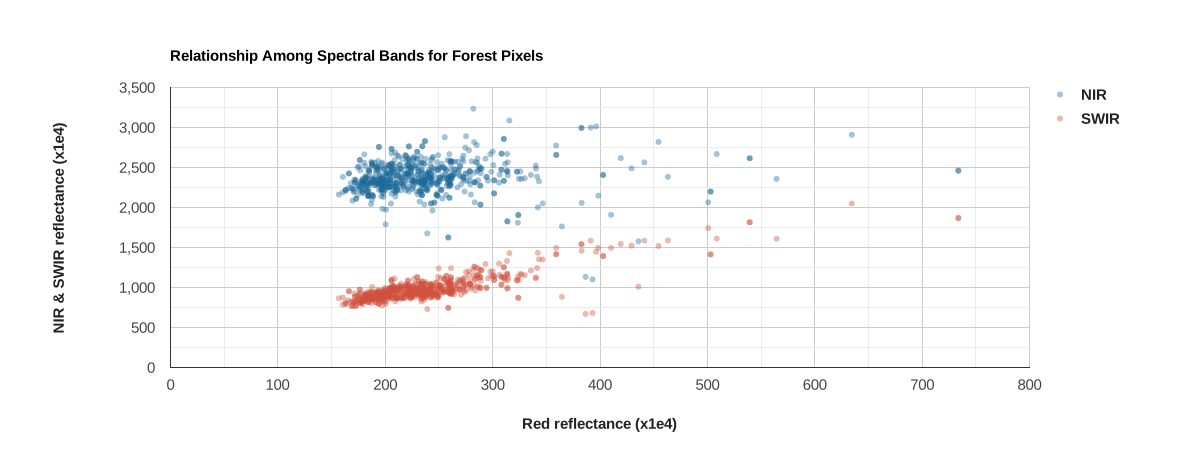
Image region reduction by ee.Reducer.toList() produces a
dictionary of pixel value lists, one for each band in a given image. Here, it
is used to extract red, NIR, and SWIR reflectance value lists from a MODIS image
for pixels intersecting a forested ecoregion. Red reflectance values are plotted
to the x-axis, NIR and SWIR values are plotted to the y-axis.
The projects/google/charts_feature_example asset, used in this example to delineate a forested ecoregion, was developed for demonstration purposes. It is a collection of three ecoregion polygons with properties describing climate normals.
Code Editor (JavaScript)
// Import the example feature collection and subset the forest feature.
var forest = ee.FeatureCollection('projects/google/charts_feature_example')
                 .filter(ee.Filter.eq('label', 'Forest'));

// Define a MODIS surface reflectance composite.
var modisSr = ee.ImageCollection('MODIS/006/MOD09A1')
                  .filter(ee.Filter.date('2018-06-01', '2018-09-01'))
                  .select('sur_refl_b0[0-7]')
                  .mean();

// Reduce MODIS reflectance bands by forest region; get a dictionary with
// band names as keys, pixel values as lists.
var pixelVals = modisSr.reduceRegion(
    {reducer: ee.Reducer.toList(), geometry: forest.geometry(), scale: 2000});

// Convert NIR and SWIR value lists to an array to be plotted along the y-axis.
var yValues = pixelVals.toArray(['sur_refl_b02', 'sur_refl_b06']);

// Get the red band value list; to be plotted along the x-axis.
var xValues = ee.List(pixelVals.get('sur_refl_b01'));

// Define the chart and print it to the console.
var chart = ui.Chart.array.values({array: yValues, axis: 1, xLabels: xValues})
                .setSeriesNames(['NIR', 'SWIR'])
                .setOptions({
                  title: 'Relationship Among Spectral Bands for Forest Pixels',
                  colors: ['1d6b99', 'cf513e'],
                  pointSize: 4,
                  dataOpacity: 0.4,
                  hAxis: {
                    'title': 'Red reflectance (x1e4)',
                    titleTextStyle: {italic: false, bold: true}
                  },
                  vAxis: {
                    'title': 'Reflectance (x1e4)',
                    titleTextStyle: {italic: false, bold: true}
                  }
                });
print(chart);
ee.List region scatter plot
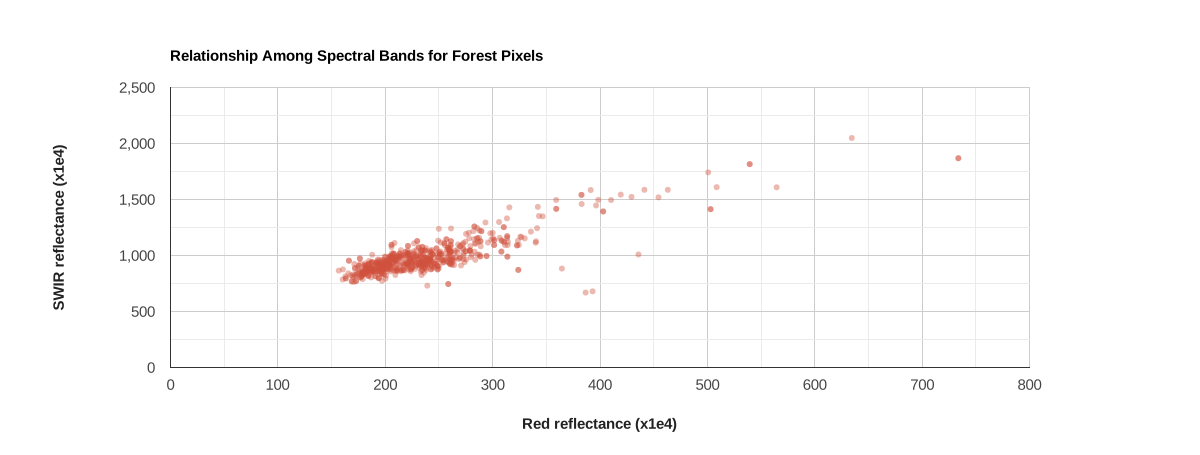
Two list objects can be plotted using the ui.Chart.array.values function.
Building off the previous example, x- and y-axis
value lists representing red and SWIR reflectance are rendered as a scatter
plot.
Code Editor (JavaScript)
// Get Red and SWIR value lists; to be plotted along x and y axes, respectively.
// Note that the pixelVals object is defined in the previous code block.
var x = ee.List(pixelVals.get('sur_refl_b01'));
var y = ee.List(pixelVals.get('sur_refl_b06'));

// Define the chart and print it to the console.
var chart = ui.Chart.array.values({array: y, axis: 0, xLabels: x}).setOptions({
  title: 'Relationship Among Spectral Bands for Forest Pixels',
  colors: ['cf513e'],
  hAxis: {
    title: 'Red reflectance (x1e4)',
    titleTextStyle: {italic: false, bold: true}
  },
  vAxis: {
    title: 'SWIR reflectance (x1e4)',
    titleTextStyle: {italic: false, bold: true}
  },
  pointSize: 4,
  dataOpacity: 0.4,
  legend: {position: 'none'},
});
print(chart);
ee.List transect line plot
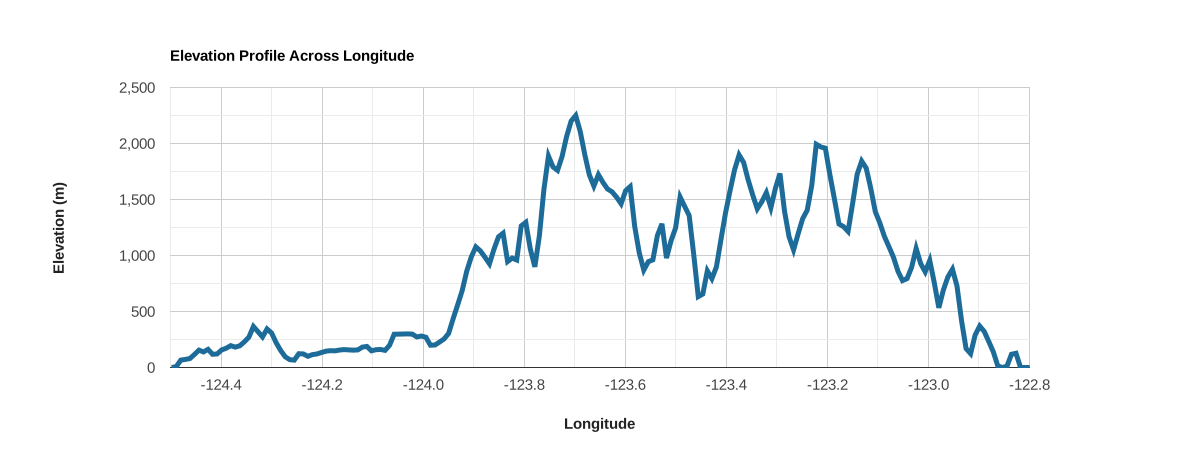
Image region reduction by ee.Reducer.toList() produces a dictionary of
pixel value lists, one for each image band. If the region is a line, as in this
case, a geographic transect can be generated when latitude and
longitude bands are included as bands in the image of interest. Here, longitude
and elevation pixel value lists from along the transect line are extracted as
separate variables and plotted to the x- and y-axes, respectively.
Code Editor (JavaScript)
// Define a line across the Olympic Peninsula, USA.
var transect = ee.Geometry.LineString([[-122.8, 47.8], [-124.5, 47.8]]);

// Define a pixel coordinate image.
var latLonImg = ee.Image.pixelLonLat();

// Import a digital surface model and add latitude and longitude bands.
var elevImg =
    ee.Image('NASA/NASADEM_HGT/001').select('elevation').addBands(latLonImg);

// Reduce elevation and coordinate bands by transect line; get a dictionary with
// band names as keys, pixel values as lists.
var elevTransect = elevImg.reduceRegion({
  reducer: ee.Reducer.toList(),
  geometry: transect,
  scale: 1000,
});

// Get longitude and elevation value lists from the reduction dictionary.
var lon = ee.List(elevTransect.get('longitude'));
var elev = ee.List(elevTransect.get('elevation'));

// Sort the longitude and elevation values by ascending longitude.
var lonSort = lon.sort(lon);
var elevSort = elev.sort(lon);

// Define the chart and print it to the console.
var chart = ui.Chart.array.values({array: elevSort, axis: 0, xLabels: lonSort})
                .setOptions({
                  title: 'Elevation Profile Across Longitude',
                  hAxis: {
                    title: 'Longitude',
                    viewWindow: {min: -124.50, max: -122.8},
                    titleTextStyle: {italic: false, bold: true}
                  },
                  vAxis: {
                    title: 'Elevation (m)',
                    titleTextStyle: {italic: false, bold: true}
                  },
                  colors: ['1d6b99'],
                  lineSize: 5,
                  pointSize: 0,
                  legend: {position: 'none'}
                });
print(chart);
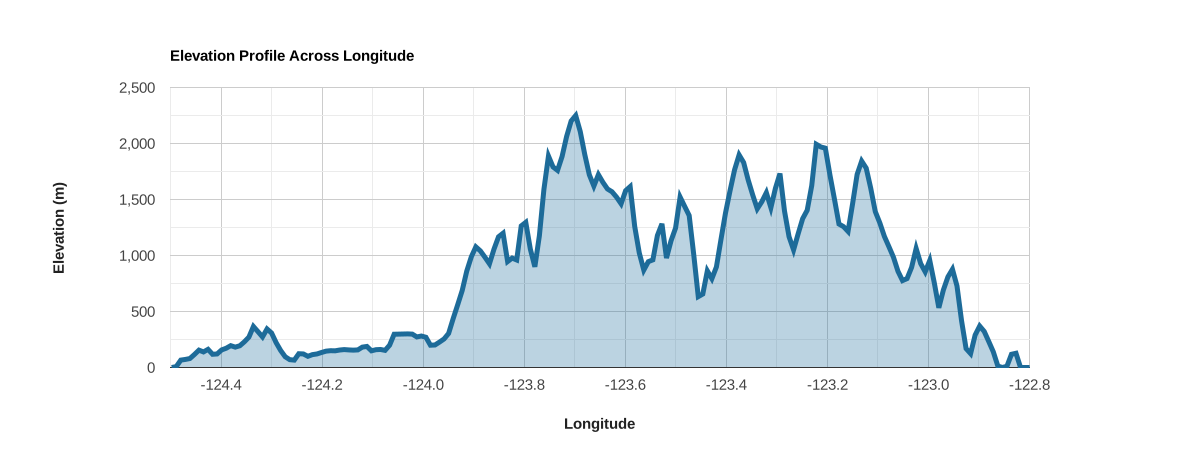
Apply .setChartType('AreaChart') to add shading under the line:
print(chart.setChartType('AreaChart'));
ee.List metadata scatter plot
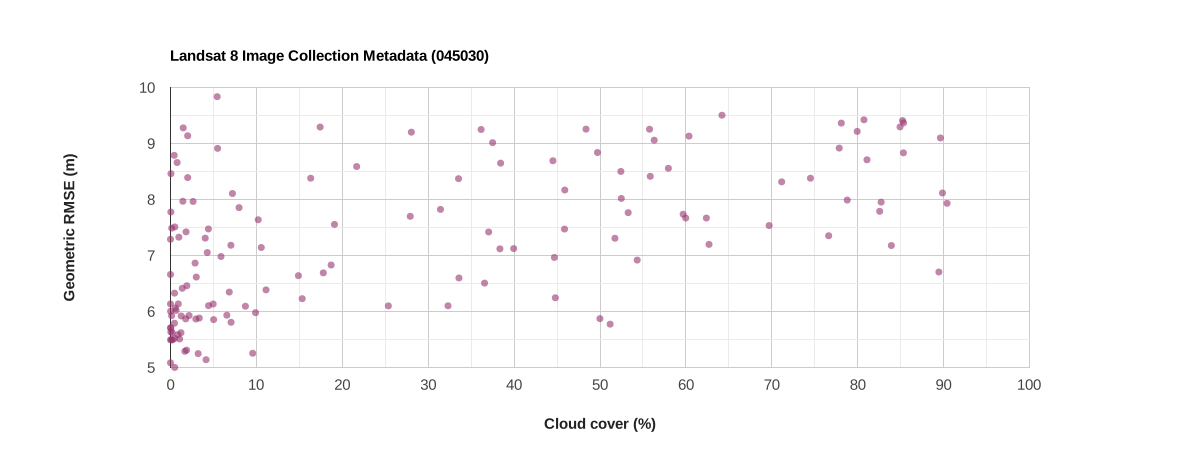
Collection property reduction by ee.Reducer.toList() produces a
dictionary of property value lists, one for each selected property. Here, cloud
cover and geometric RMSE property lists are generated from a set of Landsat 8
images as separate variables. The cloud cover variable is plotted along the
x-axis and geometric RMSE along the y-axis.
Code Editor (JavaScript)
// Import a Landsat 8 collection and filter to a single path/row.
var col = ee.ImageCollection('LANDSAT/LC08/C02/T1_L2')
              .filter(ee.Filter.expression('WRS_PATH ==  45 && WRS_ROW == 30'));

// Reduce image properties to a series of lists; one for each selected property.
var propVals = col.reduceColumns({
                    reducer: ee.Reducer.toList().repeat(2),
                    selectors: ['CLOUD_COVER', 'GEOMETRIC_RMSE_MODEL']
                  })
                   .get('list');

// Get selected image property value lists; to be plotted along x and y axes.
var x = ee.List(ee.List(propVals).get(0));
var y = ee.List(ee.List(propVals).get(1));

// Define the chart and print it to the console.
var chart = ui.Chart.array.values({array: y, axis: 0, xLabels: x})
                .setChartType('ScatterChart')
                .setOptions({
                  title: 'Landsat 8 Image Collection Metadata (045030)',
                  colors: ['96356f'],
                  hAxis: {
                    title: 'Cloud cover (%)',
                    titleTextStyle: {italic: false, bold: true}
                  },
                  vAxis: {
                    title: 'Geometric RMSE (m)',
                    titleTextStyle: {italic: false, bold: true}
                  },
                  pointSize: 5,
                  dataOpacity: 0.6,
                  legend: {position: 'none'},
                });
print(chart);
ee.List mapped function scatter & line plot
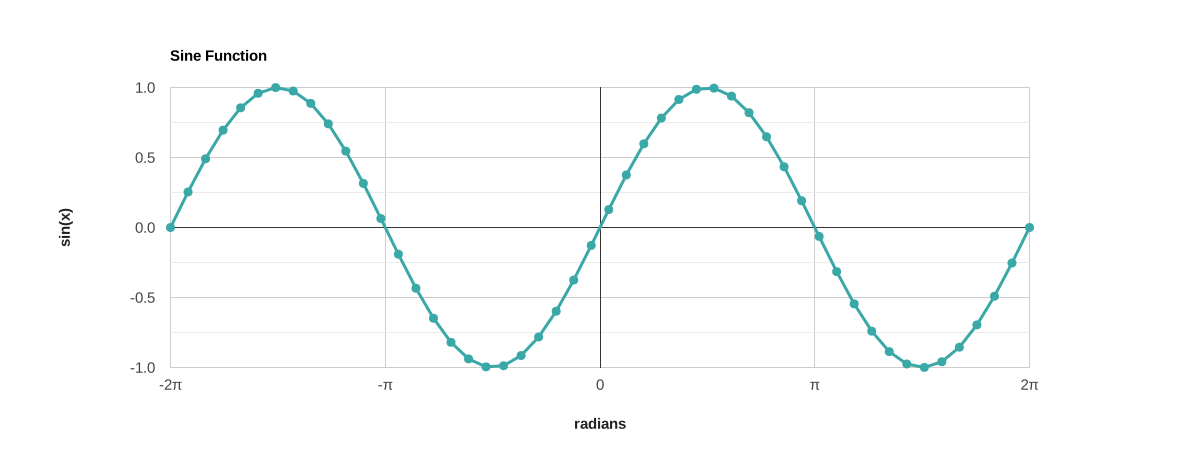
Map a function over a list of x values to calculate a corresponding list of y
values. Here, the sin() function is mapped over a list of x-axis values to
produce a corresponding list of y-axis values. A sample of the sine wave is
shown when the x and y lists are plotted.
Code Editor (JavaScript)
// Define a sequence from -2pi to +2pi in 50 increments.
var start = -2 * Math.PI;
var end = 2 * Math.PI;
var points = ee.List.sequence(start, end, null, 50);

// Evaluate the sin() function for each value in the points sequence.
var values = points.map(function(val) {
  return ee.Number(val).sin();
});

// Define the chart and print it to the console.
var chart = ui.Chart.array.values({array: values, axis: 0, xLabels: points})
                .setOptions({
                  title: 'Sine Function',
                  hAxis: {
                    title: 'radians',
                    viewWindowMode: 'maximized',
                    ticks: [
                      {v: start, f: '-2π'},
                      {v: -Math.PI, f: '-π'},
                      {v: 0, f: '0'},
                      {v: Math.PI, f: 'π'},
                      {v: end, f: '2π'}
                    ],
                    titleTextStyle: {italic: false, bold: true}
                  },
                  vAxis: {
                    title: 'sin(x)',
                    titleTextStyle: {italic: false, bold: true}
                  },
                  colors: ['39a8a7'],
                  lineWidth: 3,
                  pointSize: 7,
                  viewWindow: {min: start, max: end},
                  legend: {position: 'none'}
                });
print(chart);