
Page Summary
-
A webhook is a URL endpoint where the RBM platform sends messages and events via HTTPS POST requests.
-
Webhooks can be configured at either the partner level, applying to all agents, or at the agent level for individual agents with distinct behavior.
-
To configure an agent webhook, use the Business Communications Developer Console to set the URL and note the
clientTokenfor verifying incoming messages. -
You must verify incoming messages by comparing the
X-Goog-Signatureheader with a hash generated using the message body and yourclientToken. -
It is crucial to design your webhook to process RBM events asynchronously to handle high rates of notifications and avoid delivery failures, which trigger a backoff and retry mechanism that lasts up to 7 days.
A webhook is a partner-specified URL where the RCS for Business platform posts messages and events. This URL acts as an endpoint that receives HTTPS POST requests containing data about the events. This means that data is sent to your application securely over HTTPS.
A webhook URL might look something like this:
https://[your company name].com/api/rbm-events.
Once you configure your webhook, you can start receiving messages and events.
Partner webhooks and agent webhooks
You can configure your webhook either at the partner level or at the agent level.
- Your partner webhook applies to every agent you maintain. If your agents have similar behavior, or if you only have one agent, use the partner webhook.
- Agent webhooks apply to individual agents. If you operate multiple agents with distinct behavior, you can set a different webhook for each agent.
If you've configured both a partner webhook and an agent webhook, the agent webhook takes precedence on its specific agent, while the partner webhook applies to any agents that don't have their own webhook.
Configure an agent webhook
You receive messages sent to your agent at your partner webhook. If you want messages for a specific agent to arrive at a different webhook instead, set an agent webhook.
- Open the RCS for Business Developer Console and sign in with your RCS for Business partner Google Account.
- Click your agent.
- Click Integrations.
In the Webhook section, click Configure.
- In Webhook endpoint, enter your webhook URL beginning with "https://".
- In Client token, specify your
clientTokenvalue. You need it to verify that messages you receive are coming from Google.
Set up your webhook to accept
POSTrequests with a JSON payload that includesclientTokenandsecretparameters.{ "clientToken":"YOURCLIENTTOKEN", "secret":"YOURSECRET" }To validate the request, your endpoint must return an HTTP
200 OKstatus code with the raw string value of thesecretparameter in the response body.Sample webhook configuration
For example, if your webhook receives a
POSTrequest with the following body content:{ "clientToken":"YOURCLIENTTOKEN", "secret":"YOURSECRET" }
Then your webhook should confirm the
clientTokenvalue and, ifclientTokenis correct, return a200 OKresponse withYOURSECRETas the response body:// clientToken from Configure const myClientToken = "YOURCLIENTTOKEN"; // Example endpoint app.post("/rbm-webhook", (req, res) => { // Use the X-Goog-Webhook-Type header to route requests const webhookType = req.header('X-Goog-Webhook-Type'); if (webhookType === 'verification') { const msg = req.body; if (msg.clientToken === myClientToken) { res.status(200).send(msg.secret); return; } } res.send(400); // Handle other webhook types });
In the Developer Console, click Verify. After you click Verify, Google sends a
POSTrequest to your webhook with theclientTokenandsecretas parameters within the body of the request. When RCS for Business verifies your webhook, the dialog closes.
Identify request types
To identify the request type for all requests coming to your webhook, use the
X-Goog-Webhook-Type header.
The header can have the following values:
verification: Used for the initial endpoint verification process.message_callback: Used for message-related events, such as typing or delivery notifications and incoming messages from users.agent_callback: Used for agent-specific administrative events, such as agent launch state changes.
Verify incoming messages
Because webhooks can receive messages from any sender, you should verify that Google sent incoming messages before processing message content.
To verify that Google sent a message you received, follow these steps:
- Extract the message's
X-Goog-Signatureheader. This is a hashed, base64-encoded copy of the message body payload. - Base-64-decode the RCS for Business payload in the
message.bodyelement of the request. - Using your webhook's client token (which you specified when you set up your webhook) as a key, create a SHA512 HMAC of the bytes of the base-64 decoded message payload and base64-encode the result.
- Compare the
X-Goog-Signaturehash with the hash you created.- If the hashes match, you've confirmed that Google sent the message.
If the hashes don't match, check your hashing process on a known-good message.
If your hashing process is working correctly and you receive a message that you believe was fraudulently sent to you, contact us.
Node.js
  if ((requestBody.hasOwnProperty('message')) && (requestBody.message.hasOwnProperty('data'))) {
    // Validate the received hash to ensure the message came from Google RBM
    const headerHash = req.header('X-Goog-Signature');
    const userEventString = Buffer.from(requestBody.message.data, 'base64');
    const hmac = crypto.createHmac('sha512', myClientToken);
    const genHash = hmac.update(userEventString).digest('base64');

    if (headerHash === genHash) {
      const userEvent = JSON.parse(userEventString);
      const webhookType = req.header('X-Goog-Webhook-Type');

      // Route based on the header type
      if (webhookType === 'message_callback') {
        handleMessage(userEvent);
      } else if (webhookType === 'agent_callback') {
        handleAgentEvent(userEvent);
      }
    } else {
      console.log('Hash mismatch - ignoring message');
      res.sendStatus(401);
      return;
    }
  }

  res.sendStatus(200);
Message handling
Returning anything other than 200 OK from a webhook is considered a delivery
failure.
Developers must be mindful that sending messages at high rates will
generate webhook notifications at high rates and must design their code to
handle notifications at the expected rate. It is important for developers to
consider situations that may cause failure responses - including 500 responses
from their web container, timeouts, or upstream failures. Things to consider
include:
- Verify that your DDoS protections are configured to handle the expected rate of webhook notifications.
- Confirm that resources such as database connection pools don't run out and
produce timeouts or
500responses.
Developers should design their systems so the processing of RBM events occurs
asynchronously and doesn't prevent the webhook from returning 200 OK.
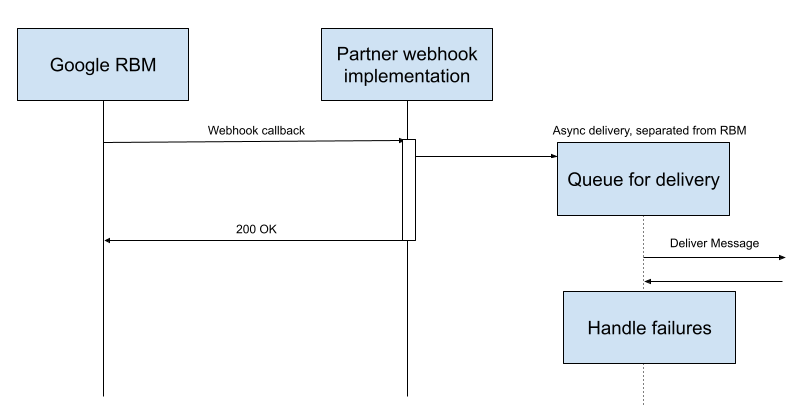
It is important to not process the RBM event within the webhook itself. Any error or delay during processing may impact the webhook return code:
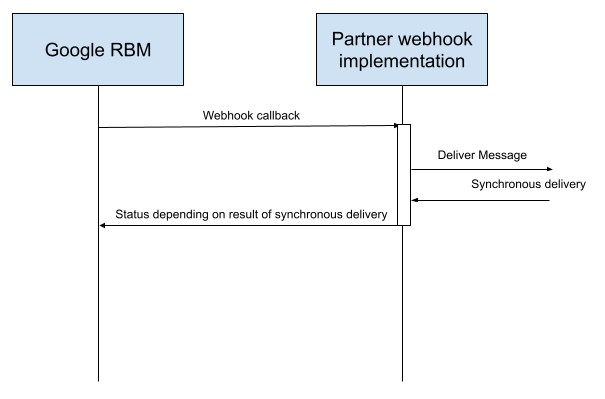
Behavior on delivery failure
If your webhook returns anything other than a 200 OK status, the RCS for
Business platform uses a backoff and retry mechanism to redeliver the data. This
means the system progressively increases the delay between each delivery
attempt, eventually reaching a maximum frequency of one retry every 10 minutes
for each pending message. The retry cycle continues for seven days, after which
the message is permanently deleted.
Implications of agent-level webhooks
RCS for Business queues messages for a partner on one queue. All agents under a single partner account share a single queue. Because of this, a failure in one webhook can block the entire queue, preventing user events for all agents from reaching the partner.
Several unacknowledged messages can cause a massive spike in retry events. For example, if an agent doesn't acknowledge 1,600 delivery receipts, and the retry frequency reaches the 10-minute limit, it can generate approximately 230,000 potential errors per day:
1,600 messages × 6 retries per hour × 24 hours per day = approximately 230,000 errors per day
This volume of retries can block the shared Pub/Sub queue and cause significant delays in receiving user events for all campaigns of a partner.
Best practices
To secure the reliability of your production traffic and avoid queue blockers, follow these best practices:
- Return 200 OK immediately: The webhook should receive the message,
store it in a local queue, and return a
200 OKresponse in under five seconds. - Decouple processing: Use separate background workers to process message logic from the local queue.
- Monitor test agents: Treat development agents as production agents, because they can also block the shared partner queue if they fail.
- Dedicated accounts for testing: Preferably use one developer account for production agents and a dedicated developer account for test agents.
- Verify Google traffic: Use Reverse DNS or the
X-Goog-Signatureheader rather than fixed IP allowlisting, as Google uses dynamic anycast IPs. For more information on manual verification and identifying Google IP ranges, see the Verify Google requests documentation and specifically JSON files for user-triggered fetchers and Google user-triggered fetchers.
Next steps
Once you configure your webhook, your agent can receive messages from your test devices. Send a message to validate your setup.