

如果您有可生成实时出价 (RTB) 信号的信号提供商 SDK,则可以开发安全信号适配器,让 Google Mobile Ads SDK (Legacy) 从您的 SDK 收集信号。
Google Mobile Ads SDK (Legacy) 将您的信号转发给选定的参与使用 Authorized Buyers 的买方和参与公开出价的买方。
下图展示了安全信号收集的请求-响应生命周期:
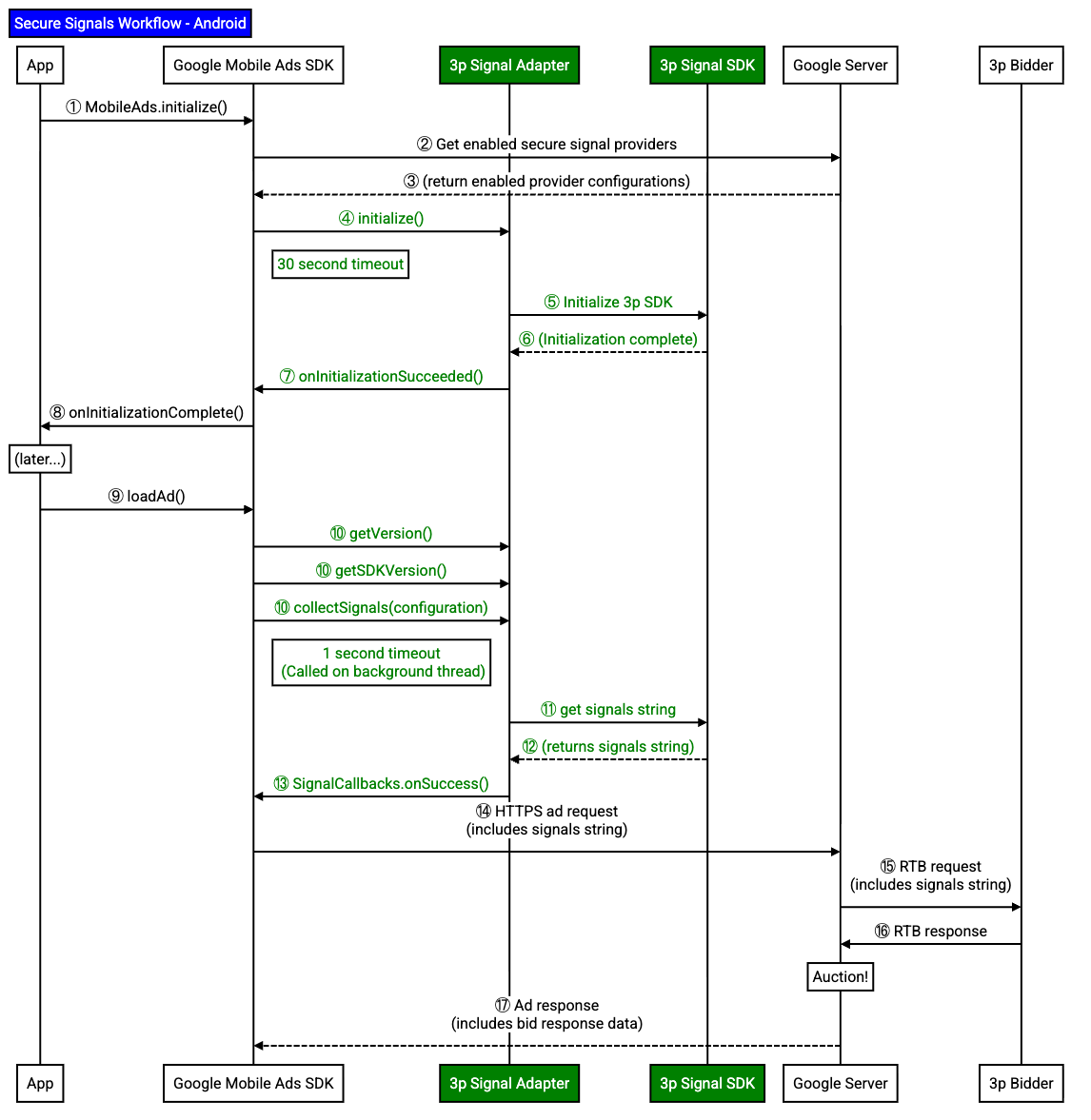
安全信号适配器负责适配器初始化和信号收集。
实现安全信号适配器
为 Google Mobile Ads SDK (Legacy) 实现安全信号适配器,以从您的 SDK 收集信号。
本指南介绍了如何通过扩展 RtbAdapter 抽象类来实现安全信号适配器。
以下示例扩展了 RtbAdapter 抽象类:
Java
public class SampleAdapterSnippets extends RtbAdapter {
初始化适配器
当 Google Mobile Ads SDK (Legacy) 实例化安全信号适配器时,Google Mobile Ads SDK (Legacy) 会调用 initialize() 方法。使用此方法初始化 SDK。
当 SDK 完全初始化并准备好让 Google Mobile Ads SDK (Legacy) 收集信号时,请调用 InitializationCompleteCallback 回调。
如果安全信号适配器不回调,Google Mobile Ads SDK (Legacy) 就不会从安全信号适配器收集信号。
以下示例调用完成回调,以通知 Google Mobile Ads SDK (Legacy) 您的 SDK 已成功初始化:
Java
@Override
public void initialize(
Context context,
InitializationCompleteCallback initializationCompleteCallback,
List<MediationConfiguration> configurations) {
// Add your SDK initialization logic here.
// Invoke the InitializationCompleteCallback once initialization completes.
initializationCompleteCallback.onInitializationSucceeded();
}
报告适配器和 SDK 版本
您的安全信号适配器必须同时报告适配器版本和 SDK 版本。Google Mobile Ads SDK (Legacy) 使用这些版本进行报告和问题排查。
如果您的 SDK 在同一二进制文件中实现了此适配器,则可以为适配器和 SDK 版本返回相同的版本。
以下示例会返回安全信号适配器的版本:
Java
@Override
public VersionInfo getVersionInfo() {
// If your SDK implements this adapter in the same binary, return
// the same version as your SDK.
// return getSDKVersionInfo();
// If you built a separate binary for this adapter, return
// the adapter's version here.
int major = 4;
int minor = 5;
int micro = 6;
return new VersionInfo(major, minor, micro);
}
以下示例返回了安全信号适配器所交互的 SDK 版本:
Java
将 SDK_VERSION_STRING 替换为您的 SDK 版本字符串。
收集信号
在每次广告请求中,Google Mobile Ads SDK (Legacy) 都会在后台线程中同时从所有适配器收集信号。
以下示例通过调用 SignalCallbacks.onSuccess() 方法,收集信号并将其返回给 Google Mobile Ads SDK (Legacy):
Java
将 SAMPLE_SIGNAL_PLACEHOLDER 替换为您的安全信号字符串。
信号收集必须在一秒内完成。如果信号收集时间超过 1 秒,请考虑在初始化适配器时,在安全信号适配器或 SDK 中缓存信号。
如果安全信号适配器无法收集信号,请将错误传递给 signalCallbacks.onFailure() 方法。
混淆信号
当您与出价方和甄选合作伙伴共享安全信号时,必须对信号进行混淆处理。