


API веб-просмотра для рекламы предоставляет тегам в вашем WebView сигналы приложения, что помогает улучшить монетизацию для издателей, предоставивших контент, и защитить рекламодателей от спама. Эти сигналы приложения, такие как идентификатор приложения и версия приложения, помогают активировать сценарии использования отчетов и таргетинга внутри приложения, которые в противном случае доступны только для трафика приложения.
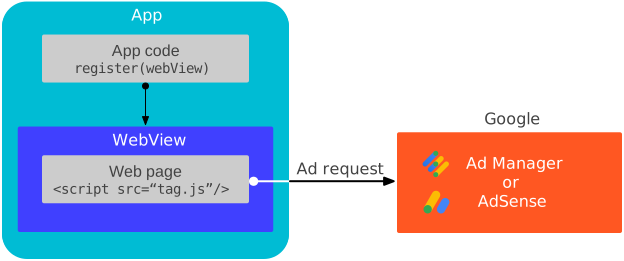
Как это работает
Взаимодействие с Google Mobile Ads SDK происходит только в ответ на рекламные события, инициированные любым из следующих факторов:
SDK добавляет обработчики сообщений к зарегистрированному WebView для отслеживания этих рекламных событий. Для лучшего понимания принципа работы ознакомьтесь с исходным кодом тестовой страницы.
Предварительные требования
- Версия Google Mobile Ads SDK 20.6.0 или выше.
Android API уровня 21 или выше.
Добавьте следующий тег
<meta-data>в файлAndroidManifest.xmlчтобы обойти проверкуAPPLICATION_ID. Если вы пропустите этот шаг и не укажете тег<meta-data>, Google Mobile Ads SDK выдаст исключениеIllegalStateExceptionпри запуске приложения.<!-- Bypass APPLICATION_ID check for web view APIs for ads --> <meta-data android:name="com.google.android.gms.ads.INTEGRATION_MANAGER" android:value="webview"/>
Зарегистрируйте веб-представление
Вызовите registerWebView() в основном потоке, чтобы установить связь с обработчиками JavaScript в коде AdSense или теге Google Publisher внутри каждого экземпляра WebView . Это следует сделать как можно раньше, например, в методе onCreate() вашего MainActivity .
Котлин
import android.webkit.CookieManager
import android.webkit.WebView
import com.google.android.gms.ads.MobileAds

class MainActivity : AppCompatActivity() {
  lateinit var webView: WebView

  override fun onCreate(savedInstanceState: Bundle?) {
    super.onCreate(savedInstanceState)
    setContentView(R.layout.activity_main)
    webView = findViewById(R.id.webview)

    // Let the web view accept third-party cookies.
    CookieManager.getInstance().setAcceptThirdPartyCookies(webView, true)
    // Let the web view use JavaScript.
    webView.settings.javaScriptEnabled = true
    // Let the web view access local storage.
    webView.settings.domStorageEnabled = true
    // Let HTML videos play automatically.
    webView.settings.mediaPlaybackRequiresUserGesture = false

    // Register the web view.
    MobileAds.registerWebView(webView)
  }
}
Java
import android.webkit.CookieManager;
import android.webkit.WebView;
import com.google.android.gms.ads.MobileAds;

public class MainActivity extends AppCompatActivity {
  private WebView webView;

  @Override
  protected void onCreate(Bundle savedInstanceState) {
    super.onCreate(savedInstanceState);
    setContentView(R.layout.activity_main);
    webView = findViewById(R.id.webview);

    // Let the web view accept third-party cookies.
    CookieManager.getInstance().setAcceptThirdPartyCookies(webView, true);
    // Let the web view use JavaScript.
    webView.getSettings().setJavaScriptEnabled(true);
    // Let the web view access local storage.
    webView.getSettings().setDomStorageEnabled(true);
    // Let HTML videos play automatically.
    webView.getSettings().setMediaPlaybackRequiresUserGesture(false);

    // Register the web view.
    MobileAds.registerWebView(webView);
  }
}
Проверьте свою интеграцию
Прежде чем использовать собственный URL-адрес, рекомендуем загрузить следующий URL-адрес для проверки интеграции:
https://google.github.io/webview-ads/test/#api-for-ads-tests
При соблюдении следующих условий тестовая ссылка отображает зеленые индикаторы состояния, что означает успешную интеграцию:
-
WebViewподключенный к Google Mobile Ads SDK
Следующие шаги
- Сбор согласия в
WebView. API веб-просмотров для рекламы не передает согласие, собранное в контексте мобильного приложения с использованием фреймворков соответствия IAB TCF v2.0 или IAB CCPA, на теги в ваших веб-просмотрах. Если вы заинтересованы в реализации единого потока согласия как владелец какWebView, так и соответствующего монетизируемого веб-контента, используйте свою платформу управления согласием для сбора согласия в контекстеWebView.