

רכיב Place Markers (סמני מקומות)
רכיב סמני המקומות מאפשר לכם ליצור הערות מותאמות אישית במפה שמציגות מידע מרכזי על המקום ישירות במפה. אתם יכולים להציג תוכן כמו דירוג של מקום, סוג המקום, סטטוס הפתיחה או הסגירה, טווח המחירים או טקסט מותאם אישית (לדוגמה, תווית שנוצרה על ידי AI או מספר מסלול). כך המשתמשים יכולים לקבל מידע רב יותר על המפה בלי ללחוץ על כרטיס מקום מפורט.
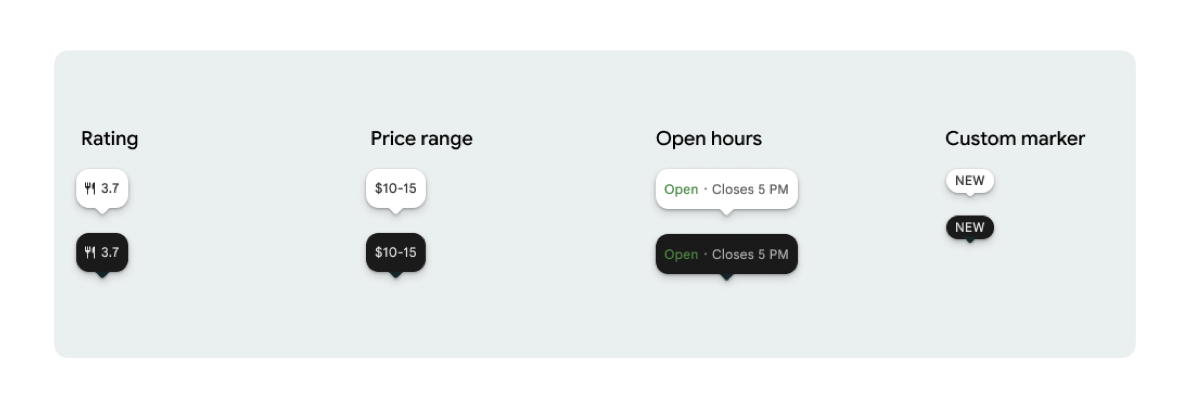
אפשר להציג סמל אחד של סמן וטקסט אופציונלי של סמן לכל PlaceMarker.
הסמלים הזמינים הם:
-
Type: סוג המקום. -
None: אין סמל.
-
Rating: ניקוד הדירוג. -
PriceRange: טווח מחירים (לדוגמה, $10-20). -
OpenStatus: האם העסק פתוח או סגור. -
Custom: טקסט בהתאמה אישית (לדוגמה, 'פופולרי').
מפנים למקום באמצעות מזהה מקום (PlaceId), שם משאב (ResourceName) או קואורדינטות גיאוגרפיות (Coordinates).
דרישות לגבי הצגה ושיוך
כשסמני המפה של ערכת ממשק המשתמש של Places מוצגים, הם לא יכולים להופיע בנפרד. הם צריכים להיות אינטראקטיביים, וכשלוחצים עליהם או מקישים עליהם הם צריכים לפתוח רכיב משויך של פרטי מקום או חלון קופץ כדי לספק את המיתוג הנדרש של Google, את השיוך לתורם ואת תהליכי העבודה של 'דיווח על בעיה'.
במקרים שבהם יש מגבלות מקום, אפשר לעיין בדרישות שלנו לגבי שיוך תמונות וביקורות.
דוגמאות לשימוש ב-Place Marker
אנחנו מספקים פונקציות של Jetpack Compose @Composable כדי למנוע תקורה של View-to-Compose wrapper ולמנוע בעיות של חוסר התאמה בין ערכות נושא.
התאמה אישית בסיסית של סמנים
בדוגמת הקוד הבאה אפשר לראות התאמות אישיות בסיסיות של סמני מיקום, כולל הסתרה של החלק המשולש של בועת הדיבור בסמן ברירת המחדל.
Kotlin
import androidx.compose.runtime.Composable
import com.google.android.libraries.places.compose.PlaceMarker
import com.google.android.libraries.places.compose.marker.MarkerIcon
import com.google.android.libraries.places.compose.marker.MarkerText
import com.google.android.libraries.places.compose.PlaceReference

@Composable
fun DefaultMarker() {
    PlaceMarker(
        reference = PlaceReference.PlaceId("PLACE_ID"),
        icon = MarkerIcon.None,
        beakPresence = false, // remove beak
    )
}

@Composable
fun RatingMarker() {
    PlaceMarker(
        reference = PlaceReference.PlaceId("PLACE_ID"),
        icon = MarkerIcon.None,
        text = MarkerText.Rating
    )
}

@Composable
fun TypeAndRatingMarker() {
    PlaceMarker(
        reference = PlaceReference.PlaceId("PLACE_ID"),
        icon = MarkerIcon.Type,
        text = MarkerText.Rating

    )
}

@Composable
fun PriceRangeMarker() {
    PlaceMarker(
        reference = PlaceReference.ResourceName("places/PLACE_RESOURCE_NAME"),
        icon = MarkerIcon.None,
        text = MarkerText.PriceRange
    )
}

@Composable
fun OpenStatusMarker() {
   PlaceMarker(
       reference = PlaceReference.Coordinates(latitude = 37.7749, longitude = -122.4194),
        icon = MarkerIcon.None,
        text = MarkerText.OpenStatus
   )
}

@Composable
fun CustomTextMarker() {
    PlaceMarker(
        reference = PlaceReference.PlaceId("PLACE_ID"),
        icon = MarkerIcon.None,
        // Custom text accepts a String to display a number (e.g. "3") or text (e.g. "NEW")
        text = MarkerText.Custom("NEW")
    )
}
יצירת רכיב click listener
אפשר לספק קריאה חוזרת (callback) של onClick כדי להפעיל פעולות מותאמות אישית כשמקישים על סמן עצמאי. עם זאת, כשהסמן מעובד במפה (למשל, בתוך MarkerComposable), אירועי הקשה נחסמים על ידי המפה. במקרה כזה, צריך להשתמש ב-handler של MarkerComposable onClick במקום ב-handler של הסמן.
בדוגמת הקוד הבאה מוצג איך להשתמש ב-handler של onClick ב-MarkerComposable.
Kotlin
import android.util.Log
import androidx.compose.runtime.Composable
import com.google.android.libraries.places.compose.PlaceMarker
import com.google.android.libraries.places.compose.marker.MarkerIcon
import com.google.android.libraries.places.compose.PlaceReference


/**
 * PlaceMarker used outside of a map (e.g. in a list, bottom sheet, or custom overlay).
 *
 * There is no host component that provides a default click behavior here, so PlaceMarker's own
 * `onClick` is the only way for a developer to react to a tap. This is why `onClick` must stay
 * on the PlaceMarker API.
 */
@Composable
fun ClickableMarkerWithCustomConfig() {
   PlaceMarker(
       reference = PlaceReference.PlaceId("PLACE_ID"),
       icon = MarkerIcon.Type,

       onClick = { place ->
           openPlaceCard(place.id) // developer might want to open the place card
           Log.i("PlacesMarker", "Marker was tapped by user!")
       }
   )
}

/**
 * PlaceMarker used as the content of a MarkerComposable on a GoogleMap.
 *
 * MarkerComposable does NOT add PlaceMarker to the touch-input hierarchy: it snapshots the
 * composable into a bitmap and hands that bitmap to the Maps renderer as the marker icon. The
 * rendered marker is a map object, not a Compose node, so:
 *
 *   - PlaceMarker's own `onClick` would never be invoked here (no touch events ever reach it).
 *   - The tap is delivered by the Maps SDK to MarkerComposable's `onClick`, which is the only
 *     click entry point on a map.
 *
 * Accordingly, the state-based `PlaceMarker(state = ...)` overload used below deliberately does
 * not expose an `onClick` parameter, so the correct handler is the only one available.
 */
@Composable
fun PlaceMarkerOnMap(markerState: PlaceMarkerState) {
  GoogleMap(
    modifier = Modifier.fillMaxSize(),
    cameraPositionState = rememberCameraPositionState(),
  ) {
    markerState.location?.let { position ->
      MarkerComposable(
        state = rememberUpdatedMarkerState(position = position),
        // this is the click handler for the map use case.
        onClick = {
          markerState.place?.let { place -> openPlaceCard(place.id) }
          true // consume the event
        },
      ) {
        PlaceMarker(state = markerState)
      }
    }
  }
}
טיפול בסטטוס הטעינה ובקריאות חוזרות (callback)
בדוגמת הקוד הבאה מוצגות פונקציות קריאה חוזרת לטיפול בשגיאות שקשורות לעיבוד או לנתונים חסרים.
Kotlin
import android.util.Log
import androidx.compose.runtime.Composable
import com.google.android.libraries.places.compose.PlaceMarker
import com.google.android.libraries.places.compose.marker.MarkerIcon
import com.google.android.libraries.places.compose.PlaceReference

@Composable
fun StatusHandlingMarker() {
    PlaceMarker(
        reference = PlaceReference.PlaceId("PLACE_ID"),
        icon = MarkerIcon.Type,
        // Triggered when attribute data is successfully fetched and the marker is rendered.
        // Returns a minimal Place object with ID, location (LatLng), and viewport fields set.
        onMarkerLoaded = { place ->
            Log.i("PlacesMarker", "Marker successfully loaded for place ID: ${place.id}")
        },
        // Triggered when data fetching fails or required attribute data is missing for the place.
        // Returns an optional Place object and an Exception describing the root cause.
        onMarkerLoadFailed = { place, exception ->
            Log.e("PlacesMarker", "Failed to load marker for place ID: ${place?.id}", exception)
        }
    )
}
שימוש ב-PlaceMarkerState להצבת סמנים במפה
אובייקט המקום מוחזר עם מיקום ואזור תצוגה, כדי לעזור לכם להחליט איפה להציב את הסמן.
Kotlin
// Step 1: Obtain configured handle in a single 1-line call (PlaceMarker mounted internally)
val markerState = rememberPlaceMarkerState(
  reference = PlaceReference.PlaceId(placeId),
  icon = MarkerIcon.Type
)

// Step 2: Pass PlaceMarkerState.location and PlaceMarker(state = PlaceMarkerState) directly to the map marker
GoogleMap(...) {
  markerState.location?.let { position ->
    MarkerComposable(
      state = rememberMarkerState(position = position),
      onClick = {
        markerState.place?.let { place ->
          // Handle marker click
        }
        true
      }
    ) {
      PlaceMarker(state = markerState) // Render marker UI content directly on map canvas
    }
  }
}
שינוי הגודל של סמן בסולם לגודל מותאם אישית
Kotlin
// Off the map: scale with a one-line modifier.
// Modifier.scale is a draw-time transform, so the bubble, beak, icon and text all scale together.
@Composable
fun ScaledMarker() {
  PlaceMarker(
    reference = PlaceReference.PlaceId(placeId),
    icon = MarkerIcon.Type,
    text = MarkerText.Rating,
    modifier = Modifier.scale(2.1f),
  )
}

// On the map: scale by overriding LocalDensity.
// MarkerComposable snapshots its content into a marker bitmap sized to the measured layout bounds.
// Modifier.scale does not change those bounds, so the marker would be clipped and blurry. Scaling
// the density re-measures every dp and sp inside the marker, so the bitmap, the layout bounds and
// the map hit target all grow with it.
@Composable
fun ScaledMarkerOnMap(markerState: PlaceMarkerState) {
  val density = LocalDensity.current
  val scaledDensity = remember(density) {
    Density(density = density.density * 2.1f, fontScale = density.fontScale * 2.1f)
  }
  GoogleMap(...) {
    markerState.location?.let { position ->
      MarkerComposable(
        state = rememberUpdatedMarkerState(position = position),
        anchor = Offset(0.5f, 1.0f),
      ) {
        CompositionLocalProvider(LocalDensity provides scaledDensity) {
          PlaceMarker(state = markerState)
        }
      }
    }
  }
}