

หน้านี้แสดงวิธีเข้าถึงชุดข้อมูลแบบเป็นโปรแกรมและจัดสไตล์ฟีเจอร์ของชุดข้อมูล รวมถึงอธิบายตัวอย่างการจัดสไตล์สำหรับฟีเจอร์ข้อมูลตามเรขาคณิตของจุด รูปหลายเหลี่ยม และเส้นประกอบ
การจัดรูปแบบตามข้อมูลสําหรับชุดข้อมูลจะแสดงผลฟีเจอร์ข้อมูลตามพิกัดละติจูดและลองจิจูดที่ระบุจากไฟล์ข้อมูลเชิงพื้นที่ที่ใช้สร้างชุดข้อมูล
ตัวอย่างการจัดรูปแบบข้อมูลจุด
ตัวอย่างนี้แสดงแนวทางการจัดรูปแบบฟีเจอร์ข้อมูลตามเรขาคณิตของจุด
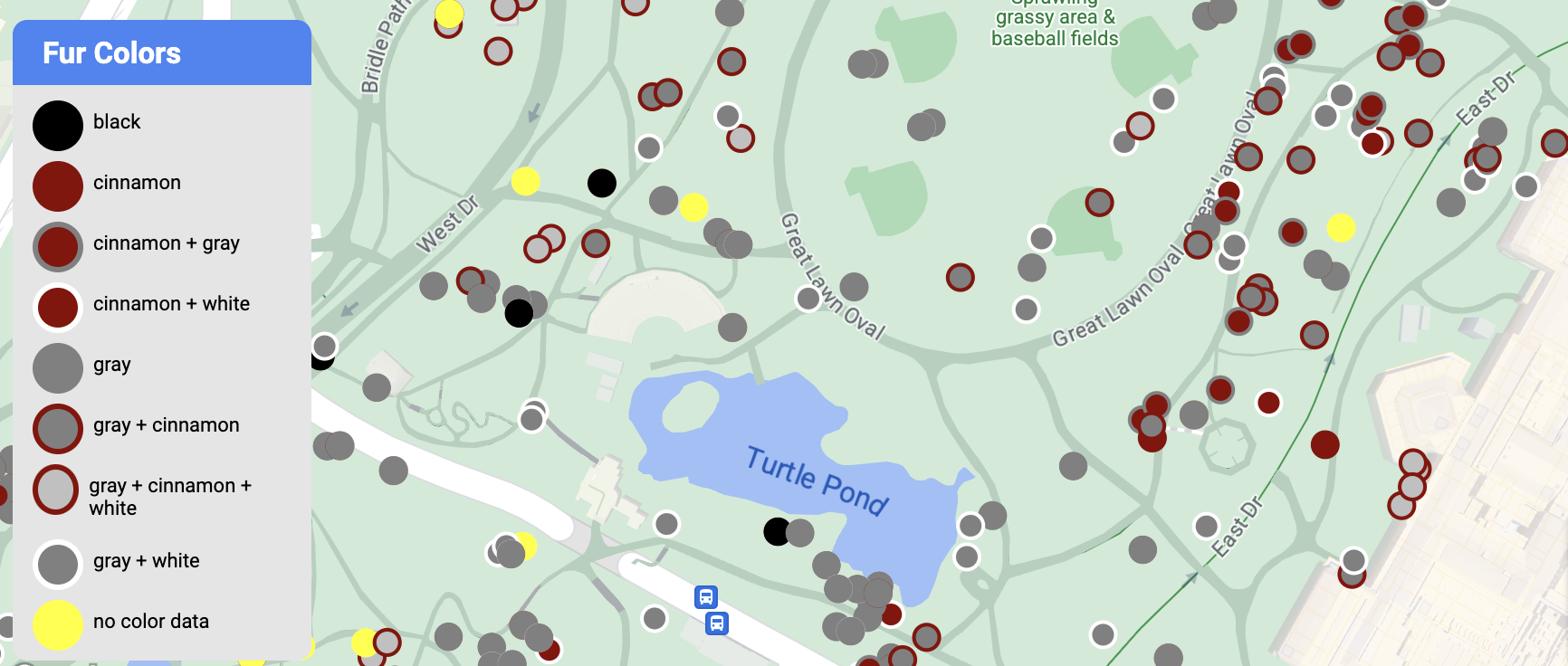
เกี่ยวกับชุดข้อมูล
ชุดข้อมูลที่ใช้ในตัวอย่างนี้เป็นผลลัพธ์จากการสำรวจกระรอกในปี 2018 ในเซ็นทรัลพาร์ก นครนิวยอร์ก ในข้อความที่ตัดตอนมาจากไฟล์ข้อมูล CSV ต่อไปนี้ คอลัมน์ x และ y ใช้สำหรับภูมิศาสตร์ มีคอลัมน์ LatLng รวมอยู่ด้วย แต่ไม่ได้ใช้ในตัวอย่างนี้เนื่องจากชุดข้อมูลรองรับเฉพาะรูปแบบ WKT หากคอลัมน์ชื่อ WKT ดูข้อมูลเพิ่มเติมเกี่ยวกับรูปแบบที่รองรับสำหรับสถานที่ตั้งได้ที่ข้อกำหนดของ CSV
ชุดข้อมูลการสำรวจกระรอกมีจุดข้อมูลที่หลากหลายและน่าสนใจเกี่ยวกับสีขนและพฤติกรรมของกระรอกที่สังเกตได้ (อย่าลืมเลื่อนในแนวนอนเพื่อดูข้อมูลทั้งหมด)
| X | Y | UniqueSquirrelID | เฮกตาร์ | Shift | วันที่ | Hectare SquirrelNumber | อายุ | PrimaryFurColor | HighlightFurColor | CombinationofPrimaryandHighlightColor | Colornotes | ตำแหน่ง | การวัด AboveGroundSighter | SpecificLocation | กำลังทำงาน | การไล่ตาม | การปีนเขา | รับประทานอาหาร | การเก็บของป่า | กิจกรรมอื่นๆ | Kuks | Quaas | เสียงคราง | Tailflags | Tailtwitches | แนวทาง | เฉยๆ | Runsfrom | OtherInteractions | LatLng |
|---|---|---|---|---|---|---|---|---|---|---|---|---|---|---|---|---|---|---|---|---|---|---|---|---|---|---|---|---|---|---|
| -73.9561344937861 | 40.7940823884086 | 37F-PM-1014-03 | 37F | PM | 10142018 | 3 | + | เท็จ | เท็จ | เท็จ | เท็จ | เท็จ | เท็จ | เท็จ | เท็จ | เท็จ | เท็จ | เท็จ | เท็จ | เท็จ | POINT (-73.9561344937861 40.7940823884086) | |||||||||
| -73.9688574691102 | 40.7837825208444 | 21B-AM-1019-04 | 21B | AM | 10192018 | 4 | + | เท็จ | เท็จ | เท็จ | เท็จ | เท็จ | เท็จ | เท็จ | เท็จ | เท็จ | เท็จ | เท็จ | เท็จ | เท็จ | POINT (-73.9688574691102 40.7837825208444) | |||||||||
| -73.9742811484852 | 40.775533619083 | 11B-PM-1014-08 | 1.1 หมื่นล้าน | PM | 10142018 | 8 | เทา | เทา+ | เหนือพื้นดิน | 10 | เท็จ | จริง | เท็จ | เท็จ | เท็จ | เท็จ | เท็จ | เท็จ | เท็จ | เท็จ | เท็จ | เท็จ | เท็จ | POINT (-73.97428114848522 40.775533619083) | ||||||
| -73.9596413903948 | 40.7903128889029 | 32E-PM-1017-14 | 32E | PM | 10172018 | 14 | ผู้ใหญ่ | เทา | เทา+ | ไม่ได้เลือกรายการใดเป็นหลัก เลือกสีเทาเป็นไฮไลต์ ทำการปรับเปลี่ยนตามที่ผู้บริหารต้องการ | เท็จ | เท็จ | เท็จ | จริง | จริง | เท็จ | เท็จ | เท็จ | เท็จ | เท็จ | เท็จ | เท็จ | จริง | POINT (-73.9596413903948 40.7903128889029) | ||||||
| -73.9702676472613 | 40.7762126854894 | 13E-AM-1017-05 | 13E | AM | 10172018 | 5 | ผู้ใหญ่ | เทา | ซินนามอน | เทา+ซินนามอน | เหนือพื้นดิน | บนตอไม้ | เท็จ | เท็จ | เท็จ | เท็จ | จริง | เท็จ | เท็จ | เท็จ | เท็จ | เท็จ | เท็จ | เท็จ | เท็จ | POINT (-73.9702676472613 40.7762126854894) | ||||
| -73.9683613516225 | 40.7725908847499 | 11H-AM-1010-03 | 11H | AM | 10102018 | 3 | ผู้ใหญ่ | ซินนามอน | ขาว | น้ำตาลซินนามอน+ขาว | เท็จ | เท็จ | เท็จ | เท็จ | จริง | เท็จ | เท็จ | เท็จ | เท็จ | จริง | เท็จ | จริง | เท็จ | POINT (-73.9683613516225 40.7725908847499) | ||||||
| -73.9541201789795 | 40.7931811701082 | 36H-AM-1010-02 | 36H | AM | 10102018 | 2 | ผู้ใหญ่ | เทา | เทา+ | just outside hectare | ระนาบพื้น | เท็จ | เท็จ | เท็จ | เท็จ | เท็จ | จริง | เท็จ | เท็จ | เท็จ | เท็จ | เท็จ | เท็จ | เท็จ | เท็จ | POINT (-73.9541201789795 40.7931811701082) |
จัดรูปแบบฟีเจอร์ข้อมูลจุด
โค้ดในตัวอย่างนี้ใช้แนวทางในการจัดรูปแบบสีเติมและสีเส้นขอบสำหรับแต่ละจุดตามแอตทริบิวต์ CombinationofPrimaryandHighlightColor ซึ่งรวมสีขนหลักและสีขนรองสำหรับกระรอกแต่ละตัว
Kotlin
private fun styleDatasetsLayer() {

  // Create the style factory function.
  val styleFactory = FeatureLayer.StyleFactory { feature: Feature ->

      // Set default colors to to yellow and point radius to 8.
      var fillColor = Color.YELLOW
      var strokeColor = Color.YELLOW
      var pointRadius = 8F
      // Check if the feature is an instance of DatasetFeature.
      if (feature is DatasetFeature) {

        val furColors: MutableMap<String, String> = feature.getDatasetAttributes()
        // Determine CombinationofPrimaryandHighlightColor attribute.
        val furColor = furColors!!["CombinationofPrimaryandHighlightColor"]
        when (furColor) {
          "Black+" -> {
            fillColor = Color.BLACK
            strokeColor= Color.BLACK
          }
          "Cinnamon+" ->  {
            fillColor = -0x750000
            strokeColor= -0x750000
          }
          "Cinnamon+Gray" -> {
            fillColor = -0x750000
            strokeColor= -0x750000
            pointRadius = 6F
          }
          "Cinnamon+White" -> {
            fillColor = -0x750000
            strokeColor= Color.WHITE
            pointRadius = 6F
          }
          "Gray+" -> fillColor = Color.GRAY
          "Gray+Cinnamon" -> {
            fillColor = Color.GRAY
            strokeColor= -0x750000
            pointRadius = 6F
          }
          "Gray+Cinnamon, White" -> {
            fillColor = Color.LTGRAY
            strokeColor= -0x750000
            pointRadius = 6F
          }
          "Gray+White" -> {
            fillColor = Color.GRAY
            strokeColor= Color.WHITE
            pointRadius = 6F
          }
        }
        return@StyleFactory FeatureStyle.Builder()
          .fillColor(fillColor)
          .strokeColor(strokeColor)
          .pointRadius(pointRadius)
          .build()
      }
    return@StyleFactory null
  }

  // Apply the style factory function to the feature layer.
  datasetLayer?.setFeatureStyle(styleFactory)
}
Java
private void styleDatasetsLayer() {

  // Create the style factory function.
  FeatureLayer.StyleFactory styleFactory = (Feature feature) -> {

    // Check if the feature is an instance of DatasetFeature.
    if (feature instanceof DatasetFeature) {

      // Determine CombinationofPrimaryandHighlightColor attribute.
      Map<String, String> furColors = ((DatasetFeature) feature).getDatasetAttributes();
      String furColor = furColors.get("CombinationofPrimaryandHighlightColor");
      // Set default colors to to yellow and point radius to 8.
      int fillColor = Color.YELLOW;
      int strokeColor = Color.YELLOW;
      int pointRadius = 8;
      switch (furColor) {
        case "Black+":
          fillColor = Color.BLACK;
          strokeColor = Color.BLACK;
          break;
        case "Cinnamon+":
          fillColor = 0xff8b0000;
          strokeColor = 0xff8b0000;
          break;
        case "Cinnamon+Gray":
          fillColor = 0xff8b0000;
          strokeColor = Color.GRAY;
          pointRadius = 6;
          break;
        case "Cinnamon+White":
          fillColor = 0xff8b0000;
          strokeColor = Color.WHITE;
          pointRadius = 6;
          break;
        case "Gray+":
          fillColor = Color.GRAY;
          strokeColor = Color.GRAY;
          break;
        case "Gray+Cinnamon":
          fillColor = Color.GRAY;
          strokeColor = 0xff8b0000;
          pointRadius = 6;
          break;
        case "Gray+Cinnamon, White":
          fillColor = Color.LTGRAY;
          strokeColor = 0xff8b0000;
          pointRadius = 6;
          break;
        case "Gray+White":
          fillColor = Color.GRAY;
          strokeColor = Color.WHITE;
          pointRadius = 6;
          break;
        default:
          fillColor = Color.YELLOW;
          strokeColor = Color.YELLOW;
          pointRadius = 8;
      }
      return new FeatureStyle.Builder()
        .fillColor(fillColor)
        .strokeColor(strokeColor)
        .pointRadius(pointRadius)
        .build();
    }
    return null;
  };

  // Apply the style factory function to the feature layer.
  datasetLayer.setFeatureStyle(styleFactory);
}
ตัวอย่างการจัดรูปแบบข้อมูลรูปหลายเหลี่ยม
ตัวอย่างนี้แสดงแนวทางการจัดรูปแบบฟีเจอร์ข้อมูลที่อิงตามเรขาคณิตรูปหลายเหลี่ยม
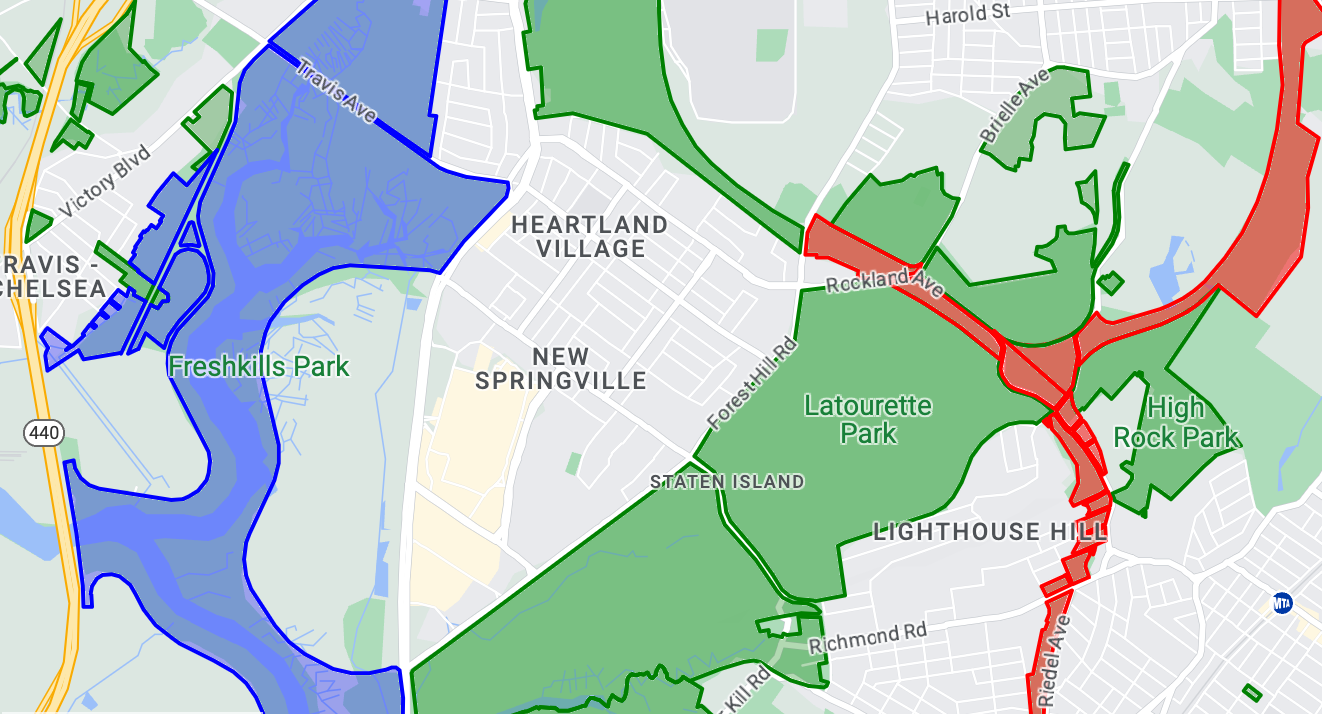
เกี่ยวกับชุดข้อมูล
ชุดข้อมูลที่ใช้ในตัวอย่างนี้แสดงสวนสาธารณะในนิวยอร์กซิตี้ ข้อความที่ตัดตอนมาจากไฟล์ GeoJSON ของชุดข้อมูลต่อไปนี้แสดงรายการฟีเจอร์ตัวแทน
{
  "type": "Feature",
  "properties": {
    "jurisdiction": "DPR",
    "mapped": "False",
    "zipcode": "11356",
    "acres": "0.05",
    "location": "College Pl., College Pt. Blvd., bet. 11 Ave. and 12 Ave.",
    "nys_assembly": "27",
    "councildistrict": "19",
    "url": "http://www.nycgovparks.org/parks/Q042/",
    "typecategory": "Triangle/Plaza",
    "us_congress": "14",
    "eapply": "Poppenhusen Park",
    "parentid": "Q-07",
    "gispropnum": "Q042",
    "retired": "false",
    "communityboard": "407",
    "objectid": "6248",
    "globalid": "F4810079-CBB9-4BE7-BBFA-B3C0C35D5DE5",
    "name311": "Poppenhusen Park",
    "department": "Q-07",
    "pip_ratable": "true",
    "subcategory": "Sitting Area/Triangle/Mall",
    "precinct": "109",
    "permit": "true",
    "acquisitiondate": null,
    "omppropid": "Q042",
    "gisobjid": "100000301",
    "signname": "Poppenhusen Park",
    "address": null,
    "permitparent": "Q-07",
    "class": "PARK",
    "nys_senate": "11",
    "permitdistrict": "Q-07",
    "borough": "Q",
    "waterfront": "false"
  },
  "geometry": {
    "type": "MultiPolygon",
    "coordinates": [
      [
        [
          [
            -73.84575702371716,
            40.78796240884273
          ],
          [
            -73.84593393292693,
            40.78796857347548
          ],
          [
            -73.84577256469657,
            40.787651355629556
          ],
          [
            -73.84575702371716,
            40.78796240884273
          ]
        ]
      ]
    ]
  }
},
จัดรูปแบบฟีเจอร์ข้อมูลรูปหลายเหลี่ยม
โค้ดในตัวอย่างนี้ใช้การลงสีพิเศษกับฟีเจอร์ข้อมูลที่เชื่อมโยงกับ typecategory ของ "Undeveloped" หรือ "Parkway" และลงสีฟีเจอร์อื่นๆ ทั้งหมดเป็นสีเขียว
Kotlin
private fun styleDatasetsLayer() {

    // Create the style factory function.
    val styleFactory = FeatureLayer.StyleFactory { feature: Feature ->

        // Check if the feature is an instance of DatasetFeature.
        if (feature is DatasetFeature) {
          // Determine the value of the typecategory attribute.
          val typeCategories: MutableMap<String, String> = feature.getDatasetAttributes()
          val typeCategory = typeCategories!!["typecategory"]
          // Set default colors to green.
          var fillColor = 0x4000ff00
          var strokeColor = 0xff00ff00
          when (typeCategory) {
            "Undeveloped" -> {
              // Color undeveloped areas blue.
              fillColor = 0x400000ff
              strokeColor = 0x400000ff
            }
            "Parkway" -> {
              // Color parkway areas red.
              fillColor = 0x40ff0000
              strokeColor = 0x40ff0000
            }
            else -> {
              // Color all other areas green.
              fillColor = 0x4000ff00
              strokeColor = 0xff00ff00
            }
          }
          return@StyleFactory FeatureStyle.Builder()
            .fillColor(fillColor)
            .strokeColor(strokeColor)
            .strokeWidth(2F)
            .build()
        }
        return@StyleFactory null
    }

    // Apply the style factory function to the feature layer.
    datasetLayer?.setFeatureStyle(styleFactory)
}
Java
private void styleDatasetsLayer() {

    // Create the style factory function.
    FeatureLayer.StyleFactory styleFactory = (Feature feature) -> {

      // Check if the feature is an instance of DatasetFeature.
      if (feature instanceof DatasetFeature) {

        // Determine the value of the typecategory attribute.
        Map<String, String> typeCategories = ((DatasetFeature) feature).getDatasetAttributes();
        String typeCategory = typeCategories.get("typecategory");
        // Set default colors to green.
        int fillColor = 0x4000ff00;
        int strokeColor = 0xff00ff00;
        switch (typeCategory) {
          case "Undeveloped":
            // Color undeveloped areas blue.
            fillColor = 0x400000ff;
            strokeColor = 0xff0000ff;
            break;
          case "Parkway":
            // Color parkway areas red.
            fillColor = 0x40ff0000;
            strokeColor = 0xffff0000;
            break;
          default:
            // Color all other areas green.
            fillColor = 0x4000ff00;
            strokeColor = 0xff00ff00;
        }
        return new FeatureStyle.Builder()
          .fillColor(fillColor)
          .strokeColor(strokeColor)
          .strokeWidth(2)
          .build();
      }
      return null;
    };

    // Apply the style factory function to the feature layer.
    datasetLayer.setFeatureStyle(styleFactory);
}
ตัวอย่างการจัดรูปแบบข้อมูลเส้นประกอบ
ตัวอย่างนี้แสดงแนวทางการจัดรูปแบบฟีเจอร์ข้อมูลที่อิงตามเรขาคณิตของเส้นประกอบ
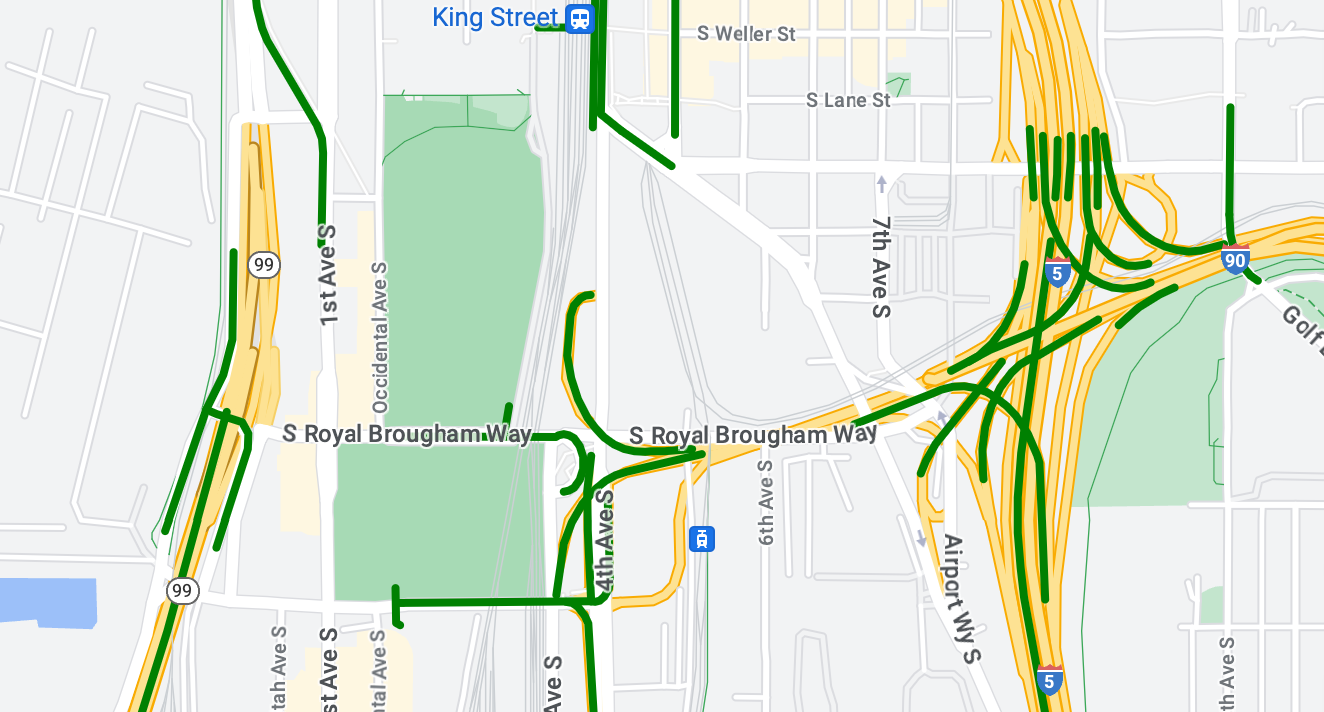
เกี่ยวกับชุดข้อมูล
ชุดข้อมูลที่ใช้ในตัวอย่างนี้แสดงสะพานในพื้นที่ซีแอตเทิล ข้อความที่ตัดตอนมาจากไฟล์ GeoJSON ของชุดข้อมูลต่อไปนี้แสดงรายการฟีเจอร์ตัวแทน
{
  "type": "Feature",
  "properties": {
      "OBJECTID": 1,
      "COMPTYPE": 66,
      "COMPKEY": 515774,
      "HANSEGKEY": 489781,
      "UNITID": "BRG-935",
      "UNITTYPE": " ",
      "BRGUNITID": "BRG-935",
      "UNITDESC_BRG": "YALE AVE BR REV LANE OC                                                                                                                                                                                                                                        ",
      "UNITDESC_SEG": "HOWELL ST ON RP BETWEEN HOWELL ST AND I5 SB                                                                                                                                                                                                                    ",
      "INSTDATE": null,
      "EXPDATE": null,
      "STATUS": " ",
      "STATUSDT": null,
      "CONDITION": " ",
      "CONDDT": null,
      "OWN": " ",
      "LSTVERIFY": null,
      "MAINTBY": " ",
      "ADDBY": "GARCIAA",
      "ADDDTTM": "2010-01-21T00:00:00Z",
      "MODBY": null,
      "MODDTTM": null,
      "BR_NBR": 935,
      "BR_CODE": " 935",
      "BR_TYPE": "ST",
      "BR_NAME": "YALE AVE BR REV LANE OC",
      "BR_FACILITIES": "YALE AVE-SR 5 ON RAMP",
      "BR_FEATURES": "SR 5 REV LANE",
      "BR_RATING": 0,
      "BR_INSET": 1,
      "BR_GEO": "DT",
      "BR_OWNER": "DOT",
      "BR_OWNER_NAME": "State of Washington",
      "GEOBASID": 0,
      "XGEOBASID": 0,
      "GISSEGKEY": 489781,
      "EARTHQUAKE_RESPONSE_TEAM": " ",
      "SHAPE_Length": 220.11891836147655
  },
  "geometry": {
      "type": "LineString",
      "coordinates": [
          [
              -122.329201929090928,
              47.616910448708538
          ],
          [
              -122.329206483407461,
              47.616976719821004
          ],
          [
              -122.32921802149356,
              47.617042137515213
          ],
          [
              -122.329236413912909,
              47.617105967923777
          ],
          [
              -122.329261454336034,
              47.617167494985758
          ],
          [
              -122.329292861855023,
              47.617226028479571
          ],
          [
              -122.329330284134699,
              47.617280911766009
          ],
          [
              -122.329373301365223,
              47.617331529154569
          ],
          [
              -122.329421430971635,
              47.617377312810319
          ],
          [
              -122.329474133027375,
              47.617417749124023
          ],
          [
              -122.32953081631139,
              47.617452384473893
          ]
      ]
  }
},
จัดรูปแบบฟีเจอร์ข้อมูลเส้นประกอบ
ข้อมูลโค้ดต่อไปนี้ใช้สไตล์เดียวกันกับฟีเจอร์ข้อมูลทั้งหมดโดยตรง
Kotlin
private fun styleDatasetsLayer() {

  // Create the style factory function.
  val styleFactory = FeatureLayer.StyleFactory { feature: Feature ->

    // Check if the feature is an instance of DatasetFeature.
    if (feature is DatasetFeature) {

      return@StyleFactory FeatureStyle.Builder()
        // Define a style with green stroke with a width of 4.
        .strokeColor(0xff00ff00.toInt())
        .strokeWidth(4F)
        .build()
    }
    return@StyleFactory null
  }

  // Apply the style factory function to the feature layer.
  datasetLayer?.setFeatureStyle(styleFactory)
}
Java
private void styleDatasetsLayer() {

  // Create the style factory function.
  FeatureLayer.StyleFactory styleFactory = (Feature feature) -> {

    // Check if the feature is an instance of DatasetFeature.
    if (feature instanceof DatasetFeature) {

      return new FeatureStyle.Builder()
        // Define a style with green stroke with a width of 4.
        .strokeColor(0xff00ff00)
        .strokeWidth(4)
        .build();
    }
    return null;
  };

  // Apply the style factory function to the feature layer.
  datasetLayer.setFeatureStyle(styleFactory);
}