

Trang này hướng dẫn cách truy cập vào một tập dữ liệu theo phương thức lập trình và tạo kiểu cho các đối tượng của tập dữ liệu đó, đồng thời hướng dẫn các ví dụ về cách tạo kiểu cho các đối tượng dữ liệu dựa trên hình học điểm, đa giác và hình nhiều đường.
Tính năng định kiểu dựa trên dữ liệu cho tập dữ liệu sẽ hiển thị các đối tượng dữ liệu dựa trên toạ độ vĩ độ và kinh độ được cung cấp từ tệp dữ liệu không gian địa lý dùng để tạo tập dữ liệu.
Ví dụ về cách định kiểu dữ liệu điểm
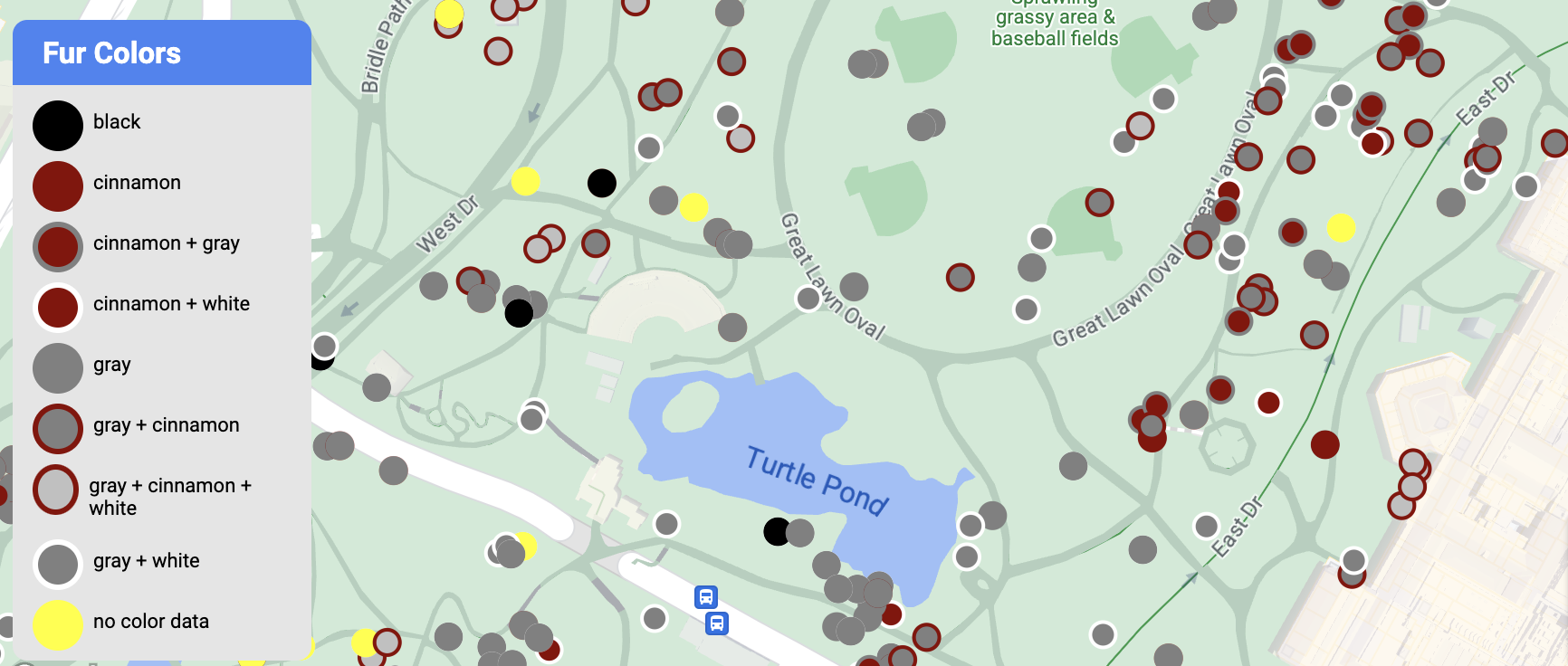
Ví dụ này cho thấy một phương pháp tạo kiểu cho các đối tượng dữ liệu dựa trên hình học điểm.
Giới thiệu về tập dữ liệu
Tập dữ liệu được dùng trong ví dụ này là kết quả của một cuộc khảo sát năm 2018 về loài sóc ở Công viên Trung tâm, Thành phố New York. Trong đoạn trích sau đây từ tệp dữ liệu CSV,
các cột x và y được dùng cho địa lý; cột LatLng được đưa vào, nhưng
không được dùng trong ví dụ này vì tập dữ liệu chỉ hỗ trợ
định dạng WKT
nếu cột có tên là WKT. Để biết thêm thông tin về các định dạng được hỗ trợ cho vị trí, hãy xem Yêu cầu đối với tệp CSV.
Tập dữ liệu điều tra dân số sóc chứa nhiều điểm dữ liệu khác nhau liên quan đến màu lông và hành vi của sóc (hãy nhớ cuộn theo chiều ngang để xem tất cả).
| X | Có | UniqueSquirrelID | Hecta | Shift | Ngày | Hecta SquirrelNumber | Độ tuổi | PrimaryFurColor | HighlightFurColor | CombinationofPrimaryandHighlightColor | Colornotes | Thông tin vị trí | Đo lường AboveGroundSighter | SpecificLocation | Đang chạy | Chasing | Leo núi | Ăn | Tìm kiếm thức ăn | Hoạt động khác | Kuks | Quaas | Tiếng rên rỉ | Tailflags | Tailtwitches | Phương pháp | Trung lập | Runsfrom | OtherInteractions | LatLng |
|---|---|---|---|---|---|---|---|---|---|---|---|---|---|---|---|---|---|---|---|---|---|---|---|---|---|---|---|---|---|---|
| -73.9561344937861 | 40.7940823884086 | 37F-PM-1014-03 | 37F | CH | 10142018 | 3 | + | false | false | false | false | false | false | false | false | false | false | false | false | false | POINT (-73.9561344937861 40.7940823884086) | |||||||||
| -73.9688574691102 | 40.7837825208444 | 21B-AM-1019-04 | 21 tỷ | SA | 10192018 | 4 | + | false | false | false | false | false | false | false | false | false | false | false | false | false | POINT (-73.9688574691102 40.7837825208444) | |||||||||
| -73.9742811484852 | 40.775533619083 | 11B-PM-1014-08 | 11 tỷ | CH | 10142018 | 8 | Xám | Xám+ | Above Ground | 10 | false | true | false | false | false | false | false | false | false | false | false | false | false | POINT (-73.97428114848522 40.775533619083) | ||||||
| -73.9596413903948 | 40.7903128889029 | 32E-PM-1017-14 | 32E | CH | 10172018 | 14 | Người lớn | Xám | Xám+ | Chưa chọn mục nào làm mục chính. Đã chọn màu xám làm màu đánh dấu. Điều chỉnh theo quyết định của ban điều hành. | false | false | false | true | true | false | false | false | false | false | false | false | true | POINT (-73.9596413903948 40.7903128889029) | ||||||
| -73.9702676472613 | 40.7762126854894 | 13E-AM-1017-05 | 13E | SA | 10172018 | 5 | Người lớn | Xám | Cây quế | Xám + Quế | Above Ground | trên gốc cây | false | false | false | false | true | false | false | false | false | false | false | false | false | POINT (-73.9702676472613 40.7762126854894) | ||||
| -73.9683613516225 | 40.7725908847499 | 11H-AM-1010-03 | 11H | SA | 10102018 | 3 | Người lớn | Cây quế | Trắng | Nâu quế + Trắng | false | false | false | false | true | false | false | false | false | true | false | true | false | POINT (-73.9683613516225 40.7725908847499) | ||||||
| -73.9541201789795 | 40,7931811701082 | 36H-AM-1010-02 | 36H | SA | 10102018 | 2 | Người lớn | Xám | Xám+ | ngay bên ngoài hecta | Mặt phẳng nền | FALSE | false | false | false | false | true | false | false | false | false | false | false | false | false | POINT (-73.9541201789795 40.7931811701082) |
Tạo kiểu cho các đối tượng dữ liệu điểm
Mã trong ví dụ này áp dụng phương pháp tạo kiểu cho màu nền và màu nét vẽ cho từng điểm dựa trên thuộc tính CombinationofPrimaryandHighlightColor, kết hợp màu lông chính và màu lông phụ cho từng con sóc.
Kotlin
private fun styleDatasetsLayer() {

  // Create the style factory function.
  val styleFactory = FeatureLayer.StyleFactory { feature: Feature ->

      // Set default colors to to yellow and point radius to 8.
      var fillColor = Color.YELLOW
      var strokeColor = Color.YELLOW
      var pointRadius = 8F
      // Check if the feature is an instance of DatasetFeature.
      if (feature is DatasetFeature) {

        val furColors: MutableMap<String, String> = feature.getDatasetAttributes()
        // Determine CombinationofPrimaryandHighlightColor attribute.
        val furColor = furColors!!["CombinationofPrimaryandHighlightColor"]
        when (furColor) {
          "Black+" -> {
            fillColor = Color.BLACK
            strokeColor= Color.BLACK
          }
          "Cinnamon+" ->  {
            fillColor = -0x750000
            strokeColor= -0x750000
          }
          "Cinnamon+Gray" -> {
            fillColor = -0x750000
            strokeColor= -0x750000
            pointRadius = 6F
          }
          "Cinnamon+White" -> {
            fillColor = -0x750000
            strokeColor= Color.WHITE
            pointRadius = 6F
          }
          "Gray+" -> fillColor = Color.GRAY
          "Gray+Cinnamon" -> {
            fillColor = Color.GRAY
            strokeColor= -0x750000
            pointRadius = 6F
          }
          "Gray+Cinnamon, White" -> {
            fillColor = Color.LTGRAY
            strokeColor= -0x750000
            pointRadius = 6F
          }
          "Gray+White" -> {
            fillColor = Color.GRAY
            strokeColor= Color.WHITE
            pointRadius = 6F
          }
        }
        return@StyleFactory FeatureStyle.Builder()
          .fillColor(fillColor)
          .strokeColor(strokeColor)
          .pointRadius(pointRadius)
          .build()
      }
    return@StyleFactory null
  }

  // Apply the style factory function to the feature layer.
  datasetLayer?.setFeatureStyle(styleFactory)
}
Java
private void styleDatasetsLayer() {

  // Create the style factory function.
  FeatureLayer.StyleFactory styleFactory = (Feature feature) -> {

    // Check if the feature is an instance of DatasetFeature.
    if (feature instanceof DatasetFeature) {

      // Determine CombinationofPrimaryandHighlightColor attribute.
      Map<String, String> furColors = ((DatasetFeature) feature).getDatasetAttributes();
      String furColor = furColors.get("CombinationofPrimaryandHighlightColor");
      // Set default colors to to yellow and point radius to 8.
      int fillColor = Color.YELLOW;
      int strokeColor = Color.YELLOW;
      int pointRadius = 8;
      switch (furColor) {
        case "Black+":
          fillColor = Color.BLACK;
          strokeColor = Color.BLACK;
          break;
        case "Cinnamon+":
          fillColor = 0xff8b0000;
          strokeColor = 0xff8b0000;
          break;
        case "Cinnamon+Gray":
          fillColor = 0xff8b0000;
          strokeColor = Color.GRAY;
          pointRadius = 6;
          break;
        case "Cinnamon+White":
          fillColor = 0xff8b0000;
          strokeColor = Color.WHITE;
          pointRadius = 6;
          break;
        case "Gray+":
          fillColor = Color.GRAY;
          strokeColor = Color.GRAY;
          break;
        case "Gray+Cinnamon":
          fillColor = Color.GRAY;
          strokeColor = 0xff8b0000;
          pointRadius = 6;
          break;
        case "Gray+Cinnamon, White":
          fillColor = Color.LTGRAY;
          strokeColor = 0xff8b0000;
          pointRadius = 6;
          break;
        case "Gray+White":
          fillColor = Color.GRAY;
          strokeColor = Color.WHITE;
          pointRadius = 6;
          break;
        default:
          fillColor = Color.YELLOW;
          strokeColor = Color.YELLOW;
          pointRadius = 8;
      }
      return new FeatureStyle.Builder()
        .fillColor(fillColor)
        .strokeColor(strokeColor)
        .pointRadius(pointRadius)
        .build();
    }
    return null;
  };

  // Apply the style factory function to the feature layer.
  datasetLayer.setFeatureStyle(styleFactory);
}
Ví dụ về cách định kiểu dữ liệu đa giác
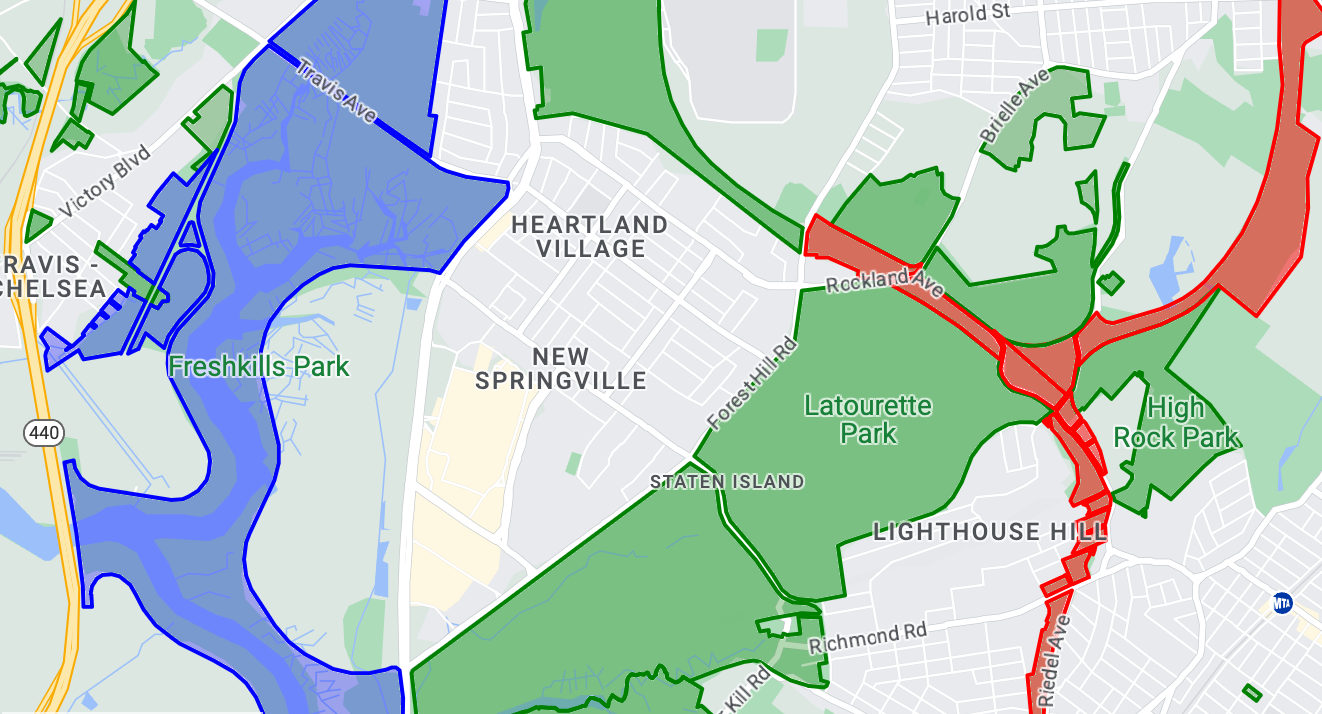
Ví dụ này cho thấy một phương pháp tạo kiểu cho các đối tượng dữ liệu dựa trên hình học đa giác.
Giới thiệu về tập dữ liệu
Tập dữ liệu dùng trong ví dụ này mô tả các công viên ở Thành phố New York. Đoạn trích sau đây từ tệp GeoJSON của tập dữ liệu cho thấy một mục đối tượng tiêu biểu.
{
  "type": "Feature",
  "properties": {
    "jurisdiction": "DPR",
    "mapped": "False",
    "zipcode": "11356",
    "acres": "0.05",
    "location": "College Pl., College Pt. Blvd., bet. 11 Ave. and 12 Ave.",
    "nys_assembly": "27",
    "councildistrict": "19",
    "url": "http://www.nycgovparks.org/parks/Q042/",
    "typecategory": "Triangle/Plaza",
    "us_congress": "14",
    "eapply": "Poppenhusen Park",
    "parentid": "Q-07",
    "gispropnum": "Q042",
    "retired": "false",
    "communityboard": "407",
    "objectid": "6248",
    "globalid": "F4810079-CBB9-4BE7-BBFA-B3C0C35D5DE5",
    "name311": "Poppenhusen Park",
    "department": "Q-07",
    "pip_ratable": "true",
    "subcategory": "Sitting Area/Triangle/Mall",
    "precinct": "109",
    "permit": "true",
    "acquisitiondate": null,
    "omppropid": "Q042",
    "gisobjid": "100000301",
    "signname": "Poppenhusen Park",
    "address": null,
    "permitparent": "Q-07",
    "class": "PARK",
    "nys_senate": "11",
    "permitdistrict": "Q-07",
    "borough": "Q",
    "waterfront": "false"
  },
  "geometry": {
    "type": "MultiPolygon",
    "coordinates": [
      [
        [
          [
            -73.84575702371716,
            40.78796240884273
          ],
          [
            -73.84593393292693,
            40.78796857347548
          ],
          [
            -73.84577256469657,
            40.787651355629556
          ],
          [
            -73.84575702371716,
            40.78796240884273
          ]
        ]
      ]
    ]
  }
},
Tạo kiểu cho các đối tượng dữ liệu đa giác
Mã trong ví dụ này áp dụng màu đặc biệt cho các đối tượng dữ liệu liên kết với typecategory "Undeveloped" (Chưa phát triển) hoặc "Parkway" (Đường công viên) và tô màu xanh lục cho tất cả các đối tượng khác.
Kotlin
private fun styleDatasetsLayer() {

    // Create the style factory function.
    val styleFactory = FeatureLayer.StyleFactory { feature: Feature ->

        // Check if the feature is an instance of DatasetFeature.
        if (feature is DatasetFeature) {
          // Determine the value of the typecategory attribute.
          val typeCategories: MutableMap<String, String> = feature.getDatasetAttributes()
          val typeCategory = typeCategories!!["typecategory"]
          // Set default colors to green.
          var fillColor = 0x4000ff00
          var strokeColor = 0xff00ff00
          when (typeCategory) {
            "Undeveloped" -> {
              // Color undeveloped areas blue.
              fillColor = 0x400000ff
              strokeColor = 0x400000ff
            }
            "Parkway" -> {
              // Color parkway areas red.
              fillColor = 0x40ff0000
              strokeColor = 0x40ff0000
            }
            else -> {
              // Color all other areas green.
              fillColor = 0x4000ff00
              strokeColor = 0xff00ff00
            }
          }
          return@StyleFactory FeatureStyle.Builder()
            .fillColor(fillColor)
            .strokeColor(strokeColor)
            .strokeWidth(2F)
            .build()
        }
        return@StyleFactory null
    }

    // Apply the style factory function to the feature layer.
    datasetLayer?.setFeatureStyle(styleFactory)
}
Java
private void styleDatasetsLayer() {

    // Create the style factory function.
    FeatureLayer.StyleFactory styleFactory = (Feature feature) -> {

      // Check if the feature is an instance of DatasetFeature.
      if (feature instanceof DatasetFeature) {

        // Determine the value of the typecategory attribute.
        Map<String, String> typeCategories = ((DatasetFeature) feature).getDatasetAttributes();
        String typeCategory = typeCategories.get("typecategory");
        // Set default colors to green.
        int fillColor = 0x4000ff00;
        int strokeColor = 0xff00ff00;
        switch (typeCategory) {
          case "Undeveloped":
            // Color undeveloped areas blue.
            fillColor = 0x400000ff;
            strokeColor = 0xff0000ff;
            break;
          case "Parkway":
            // Color parkway areas red.
            fillColor = 0x40ff0000;
            strokeColor = 0xffff0000;
            break;
          default:
            // Color all other areas green.
            fillColor = 0x4000ff00;
            strokeColor = 0xff00ff00;
        }
        return new FeatureStyle.Builder()
          .fillColor(fillColor)
          .strokeColor(strokeColor)
          .strokeWidth(2)
          .build();
      }
      return null;
    };

    // Apply the style factory function to the feature layer.
    datasetLayer.setFeatureStyle(styleFactory);
}
Ví dụ về cách định kiểu dữ liệu hình nhiều đường
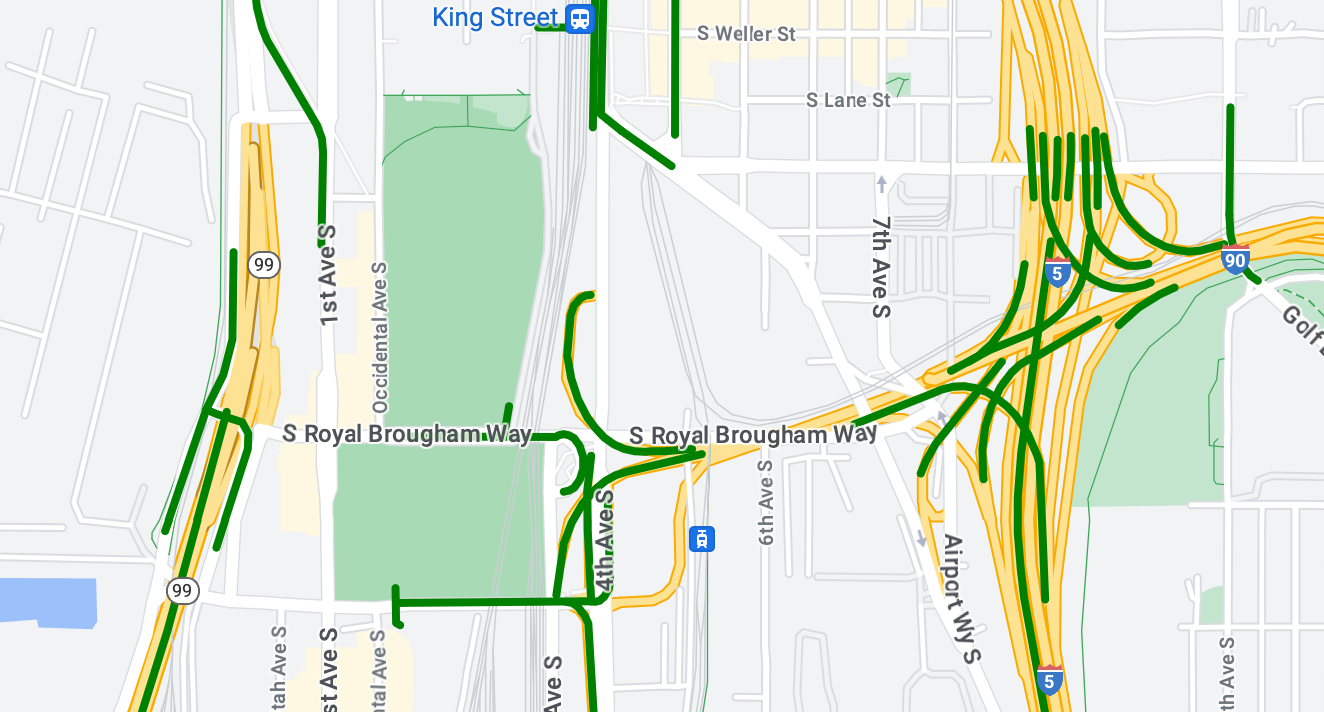
Ví dụ này cho thấy một phương pháp tạo kiểu cho các đối tượng dữ liệu dựa trên hình học hình nhiều đường.
Giới thiệu về tập dữ liệu
Tập dữ liệu được sử dụng trong ví dụ này cho thấy các cây cầu ở khu vực Seattle. Đoạn trích sau đây từ tệp GeoJSON của tập dữ liệu cho thấy một mục đối tượng tiêu biểu.
{
  "type": "Feature",
  "properties": {
      "OBJECTID": 1,
      "COMPTYPE": 66,
      "COMPKEY": 515774,
      "HANSEGKEY": 489781,
      "UNITID": "BRG-935",
      "UNITTYPE": " ",
      "BRGUNITID": "BRG-935",
      "UNITDESC_BRG": "YALE AVE BR REV LANE OC                                                                                                                                                                                                                                        ",
      "UNITDESC_SEG": "HOWELL ST ON RP BETWEEN HOWELL ST AND I5 SB                                                                                                                                                                                                                    ",
      "INSTDATE": null,
      "EXPDATE": null,
      "STATUS": " ",
      "STATUSDT": null,
      "CONDITION": " ",
      "CONDDT": null,
      "OWN": " ",
      "LSTVERIFY": null,
      "MAINTBY": " ",
      "ADDBY": "GARCIAA",
      "ADDDTTM": "2010-01-21T00:00:00Z",
      "MODBY": null,
      "MODDTTM": null,
      "BR_NBR": 935,
      "BR_CODE": " 935",
      "BR_TYPE": "ST",
      "BR_NAME": "YALE AVE BR REV LANE OC",
      "BR_FACILITIES": "YALE AVE-SR 5 ON RAMP",
      "BR_FEATURES": "SR 5 REV LANE",
      "BR_RATING": 0,
      "BR_INSET": 1,
      "BR_GEO": "DT",
      "BR_OWNER": "DOT",
      "BR_OWNER_NAME": "State of Washington",
      "GEOBASID": 0,
      "XGEOBASID": 0,
      "GISSEGKEY": 489781,
      "EARTHQUAKE_RESPONSE_TEAM": " ",
      "SHAPE_Length": 220.11891836147655
  },
  "geometry": {
      "type": "LineString",
      "coordinates": [
          [
              -122.329201929090928,
              47.616910448708538
          ],
          [
              -122.329206483407461,
              47.616976719821004
          ],
          [
              -122.32921802149356,
              47.617042137515213
          ],
          [
              -122.329236413912909,
              47.617105967923777
          ],
          [
              -122.329261454336034,
              47.617167494985758
          ],
          [
              -122.329292861855023,
              47.617226028479571
          ],
          [
              -122.329330284134699,
              47.617280911766009
          ],
          [
              -122.329373301365223,
              47.617331529154569
          ],
          [
              -122.329421430971635,
              47.617377312810319
          ],
          [
              -122.329474133027375,
              47.617417749124023
          ],
          [
              -122.32953081631139,
              47.617452384473893
          ]
      ]
  }
},
Tạo kiểu cho các đối tượng dữ liệu hình nhiều đường
Đoạn mã sau đây áp dụng cùng một kiểu trực tiếp cho tất cả các đối tượng dữ liệu.
Kotlin
private fun styleDatasetsLayer() {

  // Create the style factory function.
  val styleFactory = FeatureLayer.StyleFactory { feature: Feature ->

    // Check if the feature is an instance of DatasetFeature.
    if (feature is DatasetFeature) {

      return@StyleFactory FeatureStyle.Builder()
        // Define a style with green stroke with a width of 4.
        .strokeColor(0xff00ff00.toInt())
        .strokeWidth(4F)
        .build()
    }
    return@StyleFactory null
  }

  // Apply the style factory function to the feature layer.
  datasetLayer?.setFeatureStyle(styleFactory)
}
Java
private void styleDatasetsLayer() {

  // Create the style factory function.
  FeatureLayer.StyleFactory styleFactory = (Feature feature) -> {

    // Check if the feature is an instance of DatasetFeature.
    if (feature instanceof DatasetFeature) {

      return new FeatureStyle.Builder()
        // Define a style with green stroke with a width of 4.
        .strokeColor(0xff00ff00)
        .strokeWidth(4)
        .build();
    }
    return null;
  };

  // Apply the style factory function to the feature layer.
  datasetLayer.setFeatureStyle(styleFactory);
}