

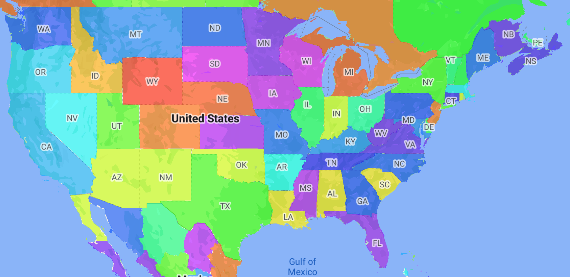
Kartogram to rodzaj mapy tematycznej, na której obszary administracyjne są oznaczone kolorami lub odcieniami zgodnie z wartością danych. Możesz użyć funkcji fabryki stylów, aby nadać mapie styl na podstawie danych, w których każdy region jest powiązany z zakresem wartości liczbowych. Poniższy przykład przedstawia kartogram dla stanów USA.
W tym przykładzie dane składają się z identyfikatora miejsca stanu. Funkcja fabryczna stylu warunkowo koloruje każdy stan na podstawie wartości skrótu identyfikatora miejsca dla danego stanu.
Jeśli jeszcze nie masz identyfikatora mapy i stylu mapy, wykonaj czynności opisane w sekcji Pierwsze kroki, aby je utworzyć. Pamiętaj, aby włączyć warstwę mapy Region – poziom 1.
Uzyskaj odwołanie do warstwy obiektów Obszar administracyjny – poziom 1 podczas inicjowania mapy. W przypadku Stanów Zjednoczonych te poziomy administracyjne odpowiadają poszczególnym stanom.
Java
private FeatureLayer areaLevel1Layer;

@Override
public void onMapReady(GoogleMap map) {
  areaLevel1Layer = map.getFeatureLayer(new FeatureLayerOptions.Builder()
    .featureType(FeatureType.ADMINISTRATIVE_AREA_LEVEL_1)
    .build());

  // Apply style factory function to ADMINISTRATIVE_AREA_LEVEL_1 layer.
  styleAreaLevel1Layer();
}
Kotlin
private var areaLevel1Layer: FeatureLayer? = null

override fun onMapReady(googleMap: GoogleMap) {
  // Get the ADMINISTRATIVE_AREA_LEVEL_1 feature layer.
  areaLevel1Layer = googleMap.getFeatureLayer(FeatureLayerOptions.Builder()
    .featureType(FeatureType.ADMINISTRATIVE_AREA_LEVEL_1)
    .build())

  // Apply style factory function to ADMINISTRATIVE_AREA_LEVEL_1 layer.
  styleAreaLevel1Layer()
}
Utwórz funkcję fabryki stylów i zastosuj ją do warstwy elementów Obszar administracyjny – poziom 1. W tym przykładzie funkcja jest stosowana do wielokąta reprezentującego każdy stan USA.
Java
private void styleAreaLevel1Layer() {
  FeatureLayer.StyleFactory styleFactory = (Feature feature) -> {
    if (feature instanceof PlaceFeature) {
      PlaceFeature placeFeature = (PlaceFeature) feature;

      // Return a hueColor in the range [-299,299]. If the value is
      // negative, add 300 to make the value positive.
      int hueColor = placeFeature.getPlaceId().hashCode() % 300;
      if (hueColor < 0) {
        hueColor += 300;
      }

      return new FeatureStyle.Builder()
        // Set the fill color for the state based on the hashed hue color.
        .fillColor(Color.HSVToColor(150, new float[] {hueColor, 1, 1}))
        .build();
    }
    return null;
  };

  // Apply the style factory function to the feature layer.
  areaLevel1Layer.setFeatureStyle(styleFactory);
}
Kotlin
private fun styleAreaLevel1Layer() {
  val styleFactory = FeatureLayer.StyleFactory { feature: Feature ->
      if (feature is PlaceFeature) {
          val placeFeature: PlaceFeature = feature as PlaceFeature

          // Return a hueColor in the range [-299,299]. If the value is
          // negative, add 300 to make the value positive.
          var hueColor: Int = placeFeature.getPlaceId().hashCode() % 300
          if (hueColor < 0) {
              hueColor += 300
          }
          return@StyleFactory FeatureStyle.Builder()
          // Set the fill color for the state based on the hashed hue color.
            .fillColor(Color.HSVToColor(150, floatArrayOf(hueColor.toFloat(), 1f, 1f)))
            .build()
      }
      return@StyleFactory null
  }

  // Apply the style factory function to the feature layer.
  areaLevel1Layer?.setFeatureStyle(styleFactory)
}