

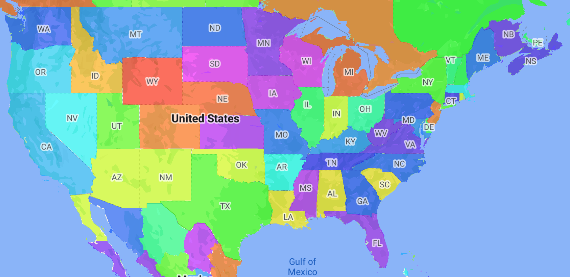
خريطة تظليل نسبي هي نوع من الخرائط الموضوعية التي يتم فيها تلوين المناطق الإدارية أو تظليلها وفقًا لقيمة بيانات معيّنة. يمكنك استخدام دالة مصنع الأنماط لتنسيق خريطة استنادًا إلى البيانات التي ترتبط فيها كل منطقة إدارية بنطاق من القيم الرقمية. تعرض خريطة المثال التالية خريطة تظليل نسبي لولايات الولايات المتحدة.
في هذا المثال، تتألف البيانات من رقم تعريف المكان للولاية. تلوّن دالة مصنع الأنماط كل ولاية بشكل مشروط استنادًا إلى قيمة مجزّأة لرقم تعريف المكان الخاص بالولاية.
إذا لم يسبق لك إجراء ذلك، اتّبِع الخطوات الواردة في مقالة البدء لإنشاء معرّف خريطة ونمط خريطة جديدَين. تأكَّد من تفعيل طبقة الميزات المنطقة الإدارية من المستوى 1.
احصل على مرجع لطبقة الميزات "المنطقة الإدارية من المستوى 1" عند تهيئة الخريطة. بالنسبة إلى الولايات المتحدة، تتوافق هذه المستويات الإدارية مع الولايات الفردية.
جافا
private FeatureLayer areaLevel1Layer;

@Override
public void onMapReady(GoogleMap map) {
  areaLevel1Layer = map.getFeatureLayer(new FeatureLayerOptions.Builder()
    .featureType(FeatureType.ADMINISTRATIVE_AREA_LEVEL_1)
    .build());

  // Apply style factory function to ADMINISTRATIVE_AREA_LEVEL_1 layer.
  styleAreaLevel1Layer();
}
Kotlin
private var areaLevel1Layer: FeatureLayer? = null

override fun onMapReady(googleMap: GoogleMap) {
  // Get the ADMINISTRATIVE_AREA_LEVEL_1 feature layer.
  areaLevel1Layer = googleMap.getFeatureLayer(FeatureLayerOptions.Builder()
    .featureType(FeatureType.ADMINISTRATIVE_AREA_LEVEL_1)
    .build())

  // Apply style factory function to ADMINISTRATIVE_AREA_LEVEL_1 layer.
  styleAreaLevel1Layer()
}
أنشئ دالة مصنع أنماط وطبِّقها على طبقة الميزات "المنطقة الإدارية من المستوى 1". يطبِّق المثال التالي الدالة على المضلّع الذي يمثّل كل ولاية من ولايات الولايات المتحدة.
جافا
private void styleAreaLevel1Layer() {
  FeatureLayer.StyleFactory styleFactory = (Feature feature) -> {
    if (feature instanceof PlaceFeature) {
      PlaceFeature placeFeature = (PlaceFeature) feature;

      // Return a hueColor in the range [-299,299]. If the value is
      // negative, add 300 to make the value positive.
      int hueColor = placeFeature.getPlaceId().hashCode() % 300;
      if (hueColor < 0) {
        hueColor += 300;
      }

      return new FeatureStyle.Builder()
        // Set the fill color for the state based on the hashed hue color.
        .fillColor(Color.HSVToColor(150, new float[] {hueColor, 1, 1}))
        .build();
    }
    return null;
  };

  // Apply the style factory function to the feature layer.
  areaLevel1Layer.setFeatureStyle(styleFactory);
}
Kotlin
private fun styleAreaLevel1Layer() {
  val styleFactory = FeatureLayer.StyleFactory { feature: Feature ->
      if (feature is PlaceFeature) {
          val placeFeature: PlaceFeature = feature as PlaceFeature

          // Return a hueColor in the range [-299,299]. If the value is
          // negative, add 300 to make the value positive.
          var hueColor: Int = placeFeature.getPlaceId().hashCode() % 300
          if (hueColor < 0) {
              hueColor += 300
          }
          return@StyleFactory FeatureStyle.Builder()
          // Set the fill color for the state based on the hashed hue color.
            .fillColor(Color.HSVToColor(150, floatArrayOf(hueColor.toFloat(), 1f, 1f)))
            .build()
      }
      return@StyleFactory null
  }

  // Apply the style factory function to the feature layer.
  areaLevel1Layer?.setFeatureStyle(styleFactory)
}