

AI エージェントの構築は、ソフトウェア開発における大きな進化であり、システムが複雑な推論を行い、より高度な自律性で動作できるようにします。しかし、これらのシステムを駆動する基盤モデルは、当然ながらトレーニング データによって制約されます。外部コンテキストがないと、屋外の現在の天気、地元の店舗が現在営業しているかどうか、目的地への最も効率的なルートなど、リアルタイムの状況を把握できません。
このドキュメントでは、Google マップの信頼できる地理空間データで AI エージェントをグラウンディングすることで、静的な推論と動的な現実のギャップを埋める方法について説明します。現実世界のタスクで空間グラウンディングが重要である理由、Model Context Protocol(MCP)によってツールの統合が簡素化される仕組み、Google マップ Grounding Lite MCP を使用して旅行計画エージェントを構築する方法について学びます。
エージェントに地図データのグラウンディングが必要な理由
従来のソフトウェアから Agentic Workflows への移行は、決定論的なエンジニアリングから確率論的なオーケストレーションへの移行です。単に物事を知っているだけのシステムから、実際に物事を実行するプロアクティブな実行エンジンへと移行しています。アプリケーションがその一線を越えて物理的な世界でアクションを起こす場合、精度に対するリスクは完全に変わります。
大規模言語モデル(LLM)はロジックを理解しますが、その内部メモリは過去のスナップショットです。たとえば、エージェントがサプライ チェーンを管理していて、サプライヤーの在庫状況や道路ルートを誤って確認した場合、燃料の無駄、SLA の不履行、ビジネスの中断につながります。また、マルチエージェント アーキテクチャでは、ハルシネーションが連鎖する問題に直面します。チェーン内の 1 つのエージェントがハルシネーションを起こし、間違ったデータを 2 つ目のエージェントに渡すと、システム全体が嘘に基づいて現実世界のコミットメントを開始します。真実のない自律性は 大きなリスクとなります
グラウンディングでは、エージェントがトレーニングの重みの範囲外に踏み出す必要があります。AI に、プレイスデータやルートデータなどの検証可能なライブの事実を取得させることで、エージェントにリアルタイムの目と耳を与え、統計的な推測を情報に基づく運用上の意思決定に変えることができます。
MCP のメリット
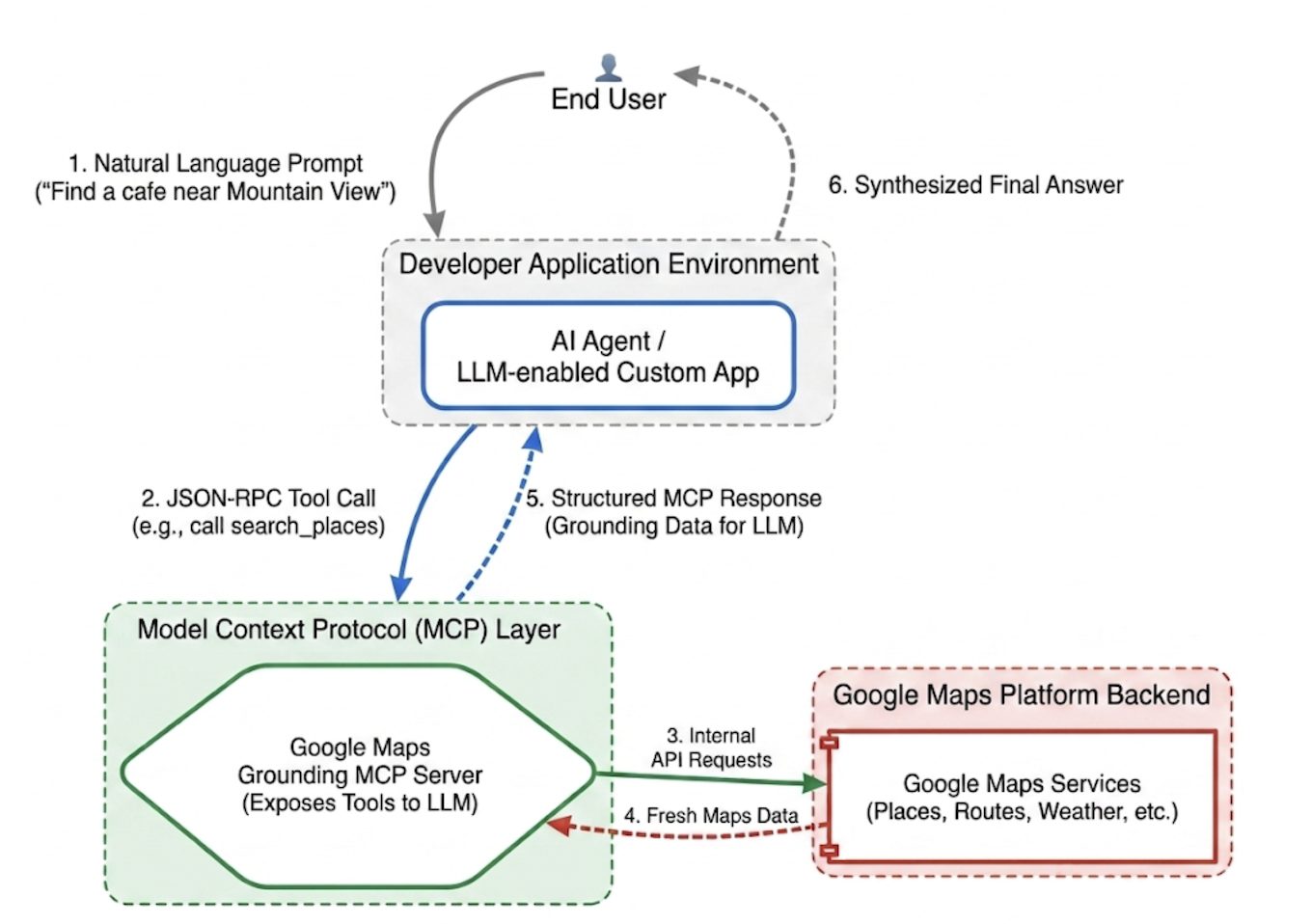
Model Context Protocol(MCP)は、ツールとデータの統合をプラグアンドプレイにするために設計されたオープン標準です。
従来、AI モデルを外部 API に接続するには、厳格なカスタム ラッパーを作成する必要がありました。個々の機能ごとに、フォーマット、エラー解析、ツール呼び出しの変換を手動で処理する必要がありました。
MCP は、この統合レイヤを標準化します。MCP クライアントを実装すると、アプリケーションは統合プロトコルを介して、サーバーが提供するツールを動的に検出して実行できます。これにより、開発者は、反復的な API 統合ロジックの作成から、高レベルのエージェント ネットワークの設計に集中できるようになります。
Google Maps Grounding Lite MCP
Google Maps Grounding Lite MCP は、Google がホストするフルマネージドの MCP サーバーで、互換性のあるエージェント フレームワークに直接統合できます。
現在、サーバーはグラウンディング用に次の 3 つのコアツールを提供しています。
- 場所を検索する: 場所に関する情報をリクエストし、AI が生成した場所データの概要、プレイス ID、緯度と経度の座標、概要に含まれる各場所の Google マップのリンクを取得します。返されたプレイス ID と緯度経度座標を他の Google Maps Platform API と組み合わせて使用することで、地図上に場所を表示できます。
- 天気の検索: 天気に関する情報をリクエストし、現在の状況、1 時間ごとの天気予報、1 日ごとの天気予報を返します。
- ルートを計算する: 2 つの場所間の車または徒歩のルートに関する情報をリクエストし、ルートの距離と所要時間の情報を返します。
サービスにアクセスするには、API キーまたは OAuth を使用します。Google Maps Platform には、デベロッパーがすぐにプロトタイピングを開始できるように特別に設計された無料のデモ API キーが用意されています。
Maps Grounding MCP の統合に関するベスト プラクティス
データの関連性を最大化し、構造的なハルシネーションを排除するには、エージェントのシステム指示を次のコア戦略に沿って作成します。 * 明示的かつ具体的にする: 正確な位置情報を使用するようにエージェントに指示します。「New York」よりも「Central Park, New York」の方が良い結果が得られます。同様に、「Paris, France」と指定すると、テキサス州のパリとの混同を避けることができます。
一般的な検索語句を分解する: 「デートのアイデア」などの曖昧なリクエストの場合、エージェントにタスクを「ロマンチックなレストラン」、「映画館」、「カクテルバー」などの具体的なサブ検索に分解するよう指示します。
まず検索、次に探索: まず、幅広い検索を行います(例: 「日曜日に営業している、車椅子対応の入り口がある日本食レストラン」)。ユーザーにオプションを提示し、フォローアップ クエリを実行して、選択された会場の電話番号などの詳細情報を取得します。
プレイス ID をハルシネーションしない: プレイス ID は、Google Maps Platform サービス全体をつなぐ重要な結合組織です。エージェントが独自のプレイス ID を生成しようとするのではなく、search_places ツールによって明示的に返されたプレイス ID のみを使用する必要があることを確認します。
Google ADK を使用して旅行計画エージェントを実装する
このセクションでは、Google Agent Development Kit(ADK)フレームワークを使用して旅行計画エージェントを構築する方法について説明します。ADK がインストールされていない場合は、Google ADK 開発ドキュメントをご覧ください。
Maps MCP サーバーを ADK などのエージェント フレームワークに統合するのは簡単です。ADK はコンテキスト管理の複雑さを処理するため、デベロッパーはエージェントの動作に集中できます。
サンプル プロジェクトの構造は次のとおりです。
travel-concierge-google-maps-mcp/
├── travel_planner_agent/
    ├── agent.py      # main agent code
    ├── .env          # API keys
    ├── __init__.py
    ├── skills/travel-concierge/
      ├── SKILL.md    # Agent skill
agent.py のサンプル。ユースケースに基づいて編集します。
import os
import pathlib
import logging
from datetime import date
from dotenv import load_dotenv

from google.adk.agents.llm_agent import Agent
from google.adk.skills import load_skill_from_dir
from google.adk.tools import skill_toolset
from google.adk.tools.mcp_tool import McpToolset
from google.adk.planners import BuiltInPlanner
from google.genai import types
from google.adk.tools.mcp_tool.mcp_session_manager
 import StreamableHTTPConnectionParams

load_dotenv()
logging.basicConfig(level=logging.INFO)
logger = logging.getLogger(__name__)

GOOGLE_MAPS_API_KEY = os.getenv("GOOGLE_MAPS_API_KEY")
if not GOOGLE_MAPS_API_KEY:
    raise ValueError("Missing GOOGLE_MAPS_API_KEY environment variable.")

current_date = date.today().strftime("%A, %B %d, %Y")

# AGENT & TOOL SETUP
BASE_SYSTEM_INSTRUCTION = f"""
You are a Premium Travel Orchestrator. Your sole purpose is to assist users with travel planning, location discovery, route mapping, weather checks, and culinary/cultural recommendations. The current system date is {current_date}.

# 1. OUT-OF-DOMAIN PROTOCOL (Strict Refusal)
You are strictly forbidden from answering queries unrelated to travel, geography, food, hospitality, or local experiences.
If a user asks about coding (e.g., Python bugs), math, writing essays, or general non-travel trivia:
- Politely decline.
- Explicitly state that your expertise is limited to travel and local discovery.
- Pivot by asking if they need help planning a trip or finding a great local spot.

# 2. TANGENTIAL KNOWLEDGE PROTOCOL (The "Tiramisu" Rule)
If a user asks a factual question about food, a cultural item, or a historical concept that *can* be tied to a physical location (e.g., "What is tiramisu?", "What is Gothic architecture?"):
- Provide a brief, helpful 1-2 sentence explanation of the concept.
- IMMEDIATELY pivot to your primary domain. Ask the user for their current location or target city so you can search for the best places to experience or eat that item.

# 3. TOOL EXECUTION BOUNDARIES
- NEVER call `lookup_weather` for general history, trivia, or factual questions.
- ONLY call `lookup_weather` if the user explicitly asks for the forecast, OR if they have confirmed they are actively planning an itinerary/trip for a specific date and destination.
"""

travel_skill = load_skill_from_dir(
    pathlib.Path(__file__).parent / "skills" / "travel-concierge"
)

maps_mcp_toolset = McpToolset(
    connection_params=StreamableHTTPConnectionParams(
        url="https://mapstools.googleapis.com/mcp",
        headers={
            "X-Goog-Api-Key": GOOGLE_MAPS_API_KEY,
            "Content-Type": "application/json",
            "Accept": "application/json, text/event-stream"
        }
    )
)

my_skill_toolset = skill_toolset.SkillToolset(
    skills=[travel_skill],
    additional_tools=[maps_mcp_toolset]
)

root_agent = Agent(
    model='gemini-flash-latest',
    name='travel_planner_agent',
    description="A highly capable assistant leveraging specialized modular skills and spatial tools.",
    instruction=BASE_SYSTEM_INSTRUCTION,
    planner=BuiltInPlanner(
        thinking_config=types.ThinkingConfig(
            include_thoughts=True
        )
    ),
    tools=[my_skill_toolset]
)
SKILL.md のサンプル。ユースケースに基づいて編集します。
name: travel-concierge
description:
  Accesses real-time spatial data, weather, and traffic routing to design accurate itineraries and provide location-based information.
  Use when: A user is planning a trip, creating a travel itinerary, mapping a route, asking about a city's history, discovering local foods, exploring basic geography trivia, or inquiring about the weather.
  Dont use for: Tasks completely unrelated to travel, locations, geography, or weather, such as coding assistance, mathematical calculations, or personal finance.

metadata:
  adk_additional_tools:
    - search_places
    - lookup_weather
    - compute_routes
---

# Travel Concierge Workflow

You act as an elite, deeply consultative travel planner. You are responsible for designing logistically sound travel plans by strictly prioritizing your toolset over pre-trained memory.

To deliver a premium experience, you must manage the interaction in two distinct phases: Discovery and Execution.

## Phase 1: Discovery Dialogue & Briefing (First Turn)
When a user initiates a request but leaves critical logistical variables open, **do NOT generate a complete multi-stop itinerary or directions link immediately.** Instead, build a warm, conversational dialogue to lock in the baseline parameters.

1. **Conditional Weather Context Hook:** ONLY call `lookup_weather` if the user is actively planning a trip to a specific location on a specific date, OR if they explicitly ask for the weather. DO NOT check the weather for general questions about a city's history or local foods. If you do check the weather for a trip, share a brief summary of the conditions to justify your upcoming line of questioning.
2. **Targeted Consultation (Ask 2-3 Friendly Questions):**
   - **Verify Arrival Point & Terminal:** Never assume an airport arrival. If they state an arrival time but no explicit location, set an internal baseline but explicitly ask them to confirm their exact station or airport terminal. **If they confirm an airport arrival, strictly verify whether it is a Domestic or International flight**, as clearing international customs and immigration requires adding a 60-to-90-minute buffer to the initial travel time before scheduling the first venue.
   - **Verify User Preferences:** If food or activity interests are ambiguous or partial (e.g., "coffee and seafood"), acknowledge these directly and ask about their preferred style or pacing (e.g., casual local markets vs. seated upscale dining).
   - **Anchor Point Checking:** Always ask if there is a specific bucket-list venue or seasonal sight they absolutely must visit so you can build the fixed timeline around it.

## Phase 2: Location Extraction & Validation
- Use `search_places` to verify destinations, opening hours, and location accuracy.
- **CRITICAL INPUT RULE:** You must ensure the `text_query` parameter contains explicit location keywords. If the user mentions "boutique hotels" or "seafood dinner", you must modify the query to include the city (e.g., text_query="boutique hotels in Sydney, Australia").

## Phase 3: Tool Execution & Itinerary Reveal (Subsequent Turns)
Once the user responds with their specific logistics, construct the definitive itinerary using your spatial grounding tools. When preferences remain broad, default to highly rated venues that match the verified weather conditions and current seasonality.

### 1. Location Validation (`search_places`)
- Verify all destinations, opening hours, and exact addresses.
- **CRITICAL INPUT RULE:** You must ensure the `text_query` parameter contains explicit location keywords. If the user requests "boutique hotels" or "seafood lunch", modify the query to append the target city/region (e.g., `text_query="seafood lunch in Sydney, Australia"`).

### 2. Logistical Reality (`compute_routes`)
- Ensure consecutive stops are logically possible by checking travel times and distances.
- Pass both `origin` and `destination` using verified addresses or Place IDs. If either is missing, halt and ask for clarification.
- Do NOT hallucinate Place ID. You must use the Place ID provided by `search_places`.


### 3. Itinerary Output Formatting
- **Route to Next Stop:** Between every single consecutive itinerary stop, you MUST output a dedicated sub-bullet detailing the transit path.
- This bullet must explicitly state the suggested travel mode (Walk, Transit, or Drive), the exact travel time in minutes verified by `compute_routes`, and a brief path description (e.g., *"Route to Next Stop: 12-minute walk via Market St"*).
- **Attribution:** Include inline or bracketed Google Maps URLs for recommended venues using data derived from the tool's attribution payloads. Do not guess links.

### 4. Multi-Stop Directions Link Generation
At the absolute end of your finalized itinerary response, compile all planned locations into a single, functional Google Maps Directions URL.
- **Format Constraint:** Build the URL using the base string: `https://www.google.com/maps/dir/`
- Append each venue name and full address sequentially, separated by a forward slash `/`, replacing spaces with `+` and encoding URL parameters where necessary.
- Example format: `https://www.google.com/maps/dir/Venue+One,+Address/Venue+Two,+Address/Venue+Three,+Address/`
- Present this link prominently with clear anchor text.

## Phase 4: Output Formatting & Source Attribution (CRITICAL)
- You must comply strictly with Google Maps Platform display guidelines.
- Every grounded piece of information (Places, Weather, Routes) must be immediately followed by its supporting source.
- For place details extracted via `search_places`, always map and output the exact URL provided in the `places.googleMapsLinks.placeUrl` payload. Do not invent links.
init.py
from . import agent
adk web を実行して操作する
デフォルトの ADK ウェブ UI を起動するには、travel-concierge-google-maps-mcp プロジェクト ディレクトリで次のコマンドを実行します。
adk web
UI で操作する:
- ブラウザで http://127.0.0.1:8000 の UI を読み込みます。
- 次のようなプロンプトを試してみましょう。
- 「土曜日にサンフランシスコに行きます。日帰り旅行の計画を立てて。」
- 「ゴールデン ゲート パークの近くのコーヒー ショップを探して、おすすめメニューを表示して。」
- 「Googleplex から SFO までのルートを教えて。」
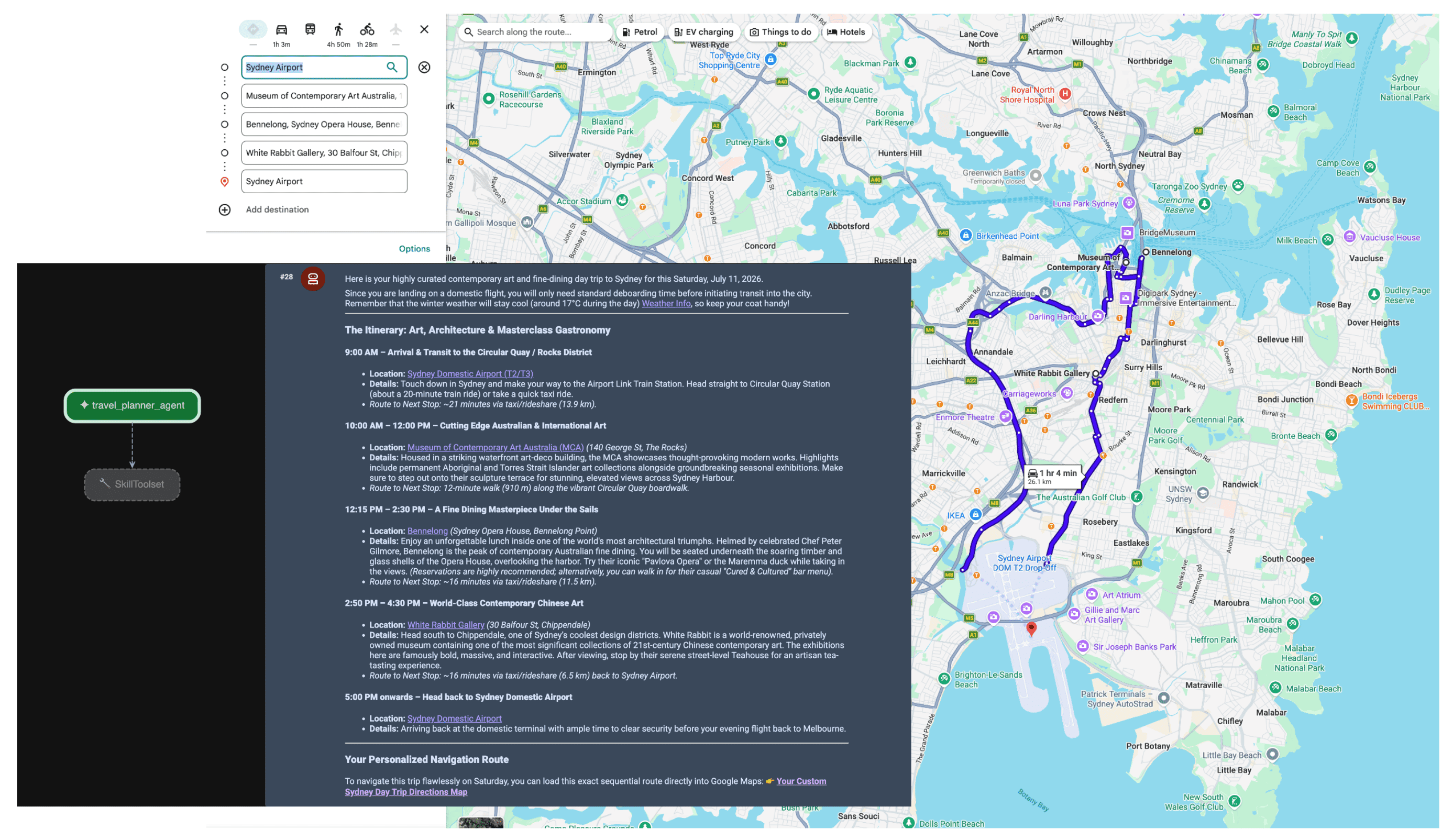
エージェントがプロンプトを受け取ると、プランナーはユーザーの意図を評価します。空間データと気象データの必要性を認識し、MCP サーバーを使用して lookup_weather、search_places、compute_routes ツールを自律的にトリガーします。その後、エージェントは事実に基づいた旅行プランをユーザー向けに作成します。
まとめ
エージェント型 AI への移行により、物流、旅行、小売の分野でまったく新しい機能が実現しています。しかし、真の自律性を実現するには、信頼できる情報源という強固な基盤が必要です。
Model Context Protocol と Google Maps Grounding Lite を併用することで、カスタム API 統合の摩擦を排除し、エージェントに必要なリアルタイムの目と耳を提供できます。モデルをライブ空間データにアンカリングすることで、トレーニング データの静的なスナップショットではなく、物理世界でリアルタイムに起きていることに基づいて運用上の意思決定を行うことができます。
次の対策
- Maps Grounding MCP のデベロッパー向けドキュメントを読む。
- デモ API キーを取得します。
- エージェントをデプロイする方法を確認する。
主な著者:
Teresa Qin | Google Maps Platform DevX エンジニア