

एआई एजेंट बनाना, सॉफ़्टवेयर डेवलपमेंट में एक अहम बदलाव है. इससे सिस्टम को जटिल तर्क करने और ज़्यादा स्वायत्तता के साथ काम करने में मदद मिलती है. हालांकि, इन सिस्टम को चलाने वाले बुनियादी मॉडल, ट्रेनिंग डेटा की वजह से सीमित होते हैं. बाहरी संदर्भ के बिना, उन्हें रीयल-टाइम की स्थितियों की जानकारी नहीं होती. जैसे, बाहर का मौजूदा मौसम, कोई स्थानीय कारोबार अभी खुला है या नहीं या किसी मंज़िल तक पहुंचने का सबसे आसान रास्ता.
इस दस्तावेज़ में बताया गया है कि Google Maps के भरोसेमंद जियोस्पेशल डेटा की मदद से, एआई एजेंट को ग्राउंड करके, स्टैटिक रीज़निंग और डाइनैमिक रिएलिटी के बीच के अंतर को कैसे कम किया जा सकता है. आपको यह जानने को मिलेगा कि असल दुनिया के टास्क के लिए, स्पेशल ग्राउंडिंग क्यों ज़रूरी है. साथ ही, यह भी पता चलेगा कि मॉडल कॉन्टेक्स्ट प्रोटोकॉल (एमसीपी), टूल इंटिग्रेशन को कैसे आसान बनाता है. इसके अलावा, Google Maps Grounding Lite MCP का इस्तेमाल करके, यात्रा की योजना बनाने वाला एजेंट बनाने का तरीका भी बताया जाएगा.
एजेंट को मैप डेटा ग्राउंडिंग की ज़रूरत क्यों होती है
ट्रेडिशनल सॉफ़्टवेयर से एजेंटिक वर्कफ़्लो पर स्विच करने का मतलब है, डिटरमिनिस्टिक इंजीनियरिंग से प्रॉबबिलिस्टिक ऑर्केस्ट्रेशन पर स्विच करना. हम ऐसे सिस्टम से आगे बढ़ रहे हैं जो सिर्फ़ चीज़ों को जानते हैं. अब हम ऐसे इंजन बना रहे हैं जो असल में काम करते हैं. जब कोई ऐप्लिकेशन इस सीमा को पार करके असल दुनिया में कार्रवाई करता है, तो सटीक जानकारी देने की ज़रूरत पूरी तरह से बदल जाती है.
लार्ज लैंग्वेज मॉडल (एलएलएम) लॉजिक को समझते हैं, लेकिन उनकी इंटरनल मेमोरी में पुराना डेटा सेव होता है. उदाहरण के लिए, अगर कोई एजेंट सप्लाई चेन मैनेज कर रहा है और किसी सप्लायर की उपलब्धता या सड़क के रास्ते की गलत पुष्टि करता है, तो इससे ईंधन की बर्बादी, एसएलए का उल्लंघन, और कारोबार में रुकावट जैसी समस्याएं आ सकती हैं. एक से ज़्यादा एजेंट वाले आर्किटेक्चर में, आपको हैलूसिनेशन की समस्या का सामना करना पड़ेगा. अगर चेन में मौजूद कोई एजेंट गलत जानकारी देता है और दूसरे एजेंट को गलत डेटा भेजता है, तो पूरा सिस्टम झूठ के आधार पर असल दुनिया में वादे करने लगता है. सच्चाई के बिना स्वायत्तता एक बड़ी ज़िम्मेदारी बन जाती है.
ग्राउंडिंग के लिए ज़रूरी है कि एजेंट, ट्रेनिंग के दौरान इस्तेमाल किए गए डेटा से बाहर जाकर जानकारी खोजे. एआई को जगहों और रास्तों के डेटा जैसे लाइव और पुष्टि किए जा सकने वाले तथ्यों को फ़ेच करने के लिए मजबूर करके, एजेंट को रीयल-टाइम में जानकारी दी जा सकती है. इससे, अनुमान लगाने के बजाय, सही जानकारी के आधार पर फ़ैसला लिया जा सकता है.
एमसीपी क्यों ज़रूरी है
मॉडल कॉन्टेक्स्ट प्रोटोकॉल (एमसीपी) एक ओपन स्टैंडर्ड है. इसे टूल और डेटा इंटिग्रेशन को प्लग-ऐंड-प्ले बनाने के लिए डिज़ाइन किया गया है.
पहले, किसी एआई मॉडल को बाहरी एपीआई से कनेक्ट करने के लिए, खास तौर पर बनाए गए रैपर लिखने पड़ते थे. आपको हर सुविधा के लिए, फ़ॉर्मैटिंग, गड़बड़ी की पार्सिंग, और टूल-कॉल के अनुवाद को मैन्युअल तरीके से मैनेज करना पड़ता था.
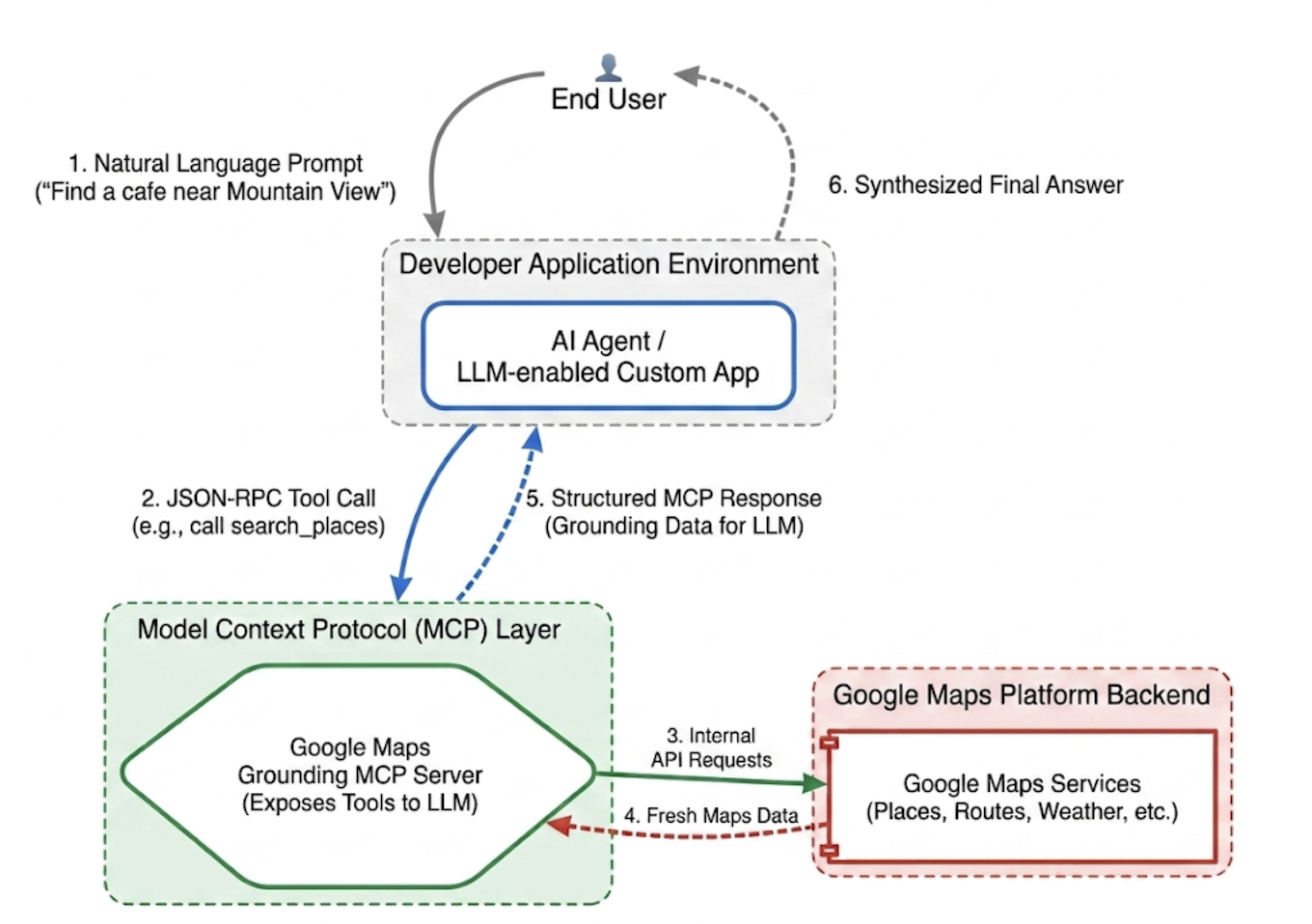
एमसीपी, इस इंटिग्रेशन लेयर को स्टैंडर्ड बनाता है. एमसीपी क्लाइंट को लागू करके, आपका ऐप्लिकेशन एक यूनिफ़ाइड प्रोटोकॉल के ज़रिए, सर्वर से उपलब्ध कराए गए टूल को डाइनैमिक तौर पर खोज सकता है और उन्हें इस्तेमाल कर सकता है. इससे डेवलपर का ध्यान, एपीआई इंटिग्रेशन के लिए बार-बार लॉजिक लिखने के बजाय, हाई-लेवल एजेंटिक नेटवर्क डिज़ाइन करने पर जाता है.
Google Maps Grounding Lite MCP
Google Maps Grounding Lite एमसीपी, पूरी तरह से मैनेज किया जाने वाला और Google का होस्ट किया गया एमसीपी सर्वर है. इसे साथ काम करने वाले किसी भी एजेंटिक फ़्रेमवर्क में सीधे तौर पर इंटिग्रेट किया जा सकता है.
फ़िलहाल, सर्वर ग्राउंडिंग के लिए तीन मुख्य टूल उपलब्ध कराता है:
- जगहें खोजना: जगहों के बारे में जानकारी का अनुरोध करें. साथ ही, एआई से जनरेट की गई जगहों के डेटा की खास जानकारी पाएं. इसके अलावा, खास जानकारी में शामिल हर जगह के लिए, जगह के आईडी, अक्षांश और देशांतर के निर्देशांक, और Google Maps के लिंक पाएं. मैप पर जगहों को दिखाने के लिए, Google Maps Platform के अन्य एपीआई के साथ, जगह के आईडी और अक्षांश और देशांतर के निर्देशांक इस्तेमाल किए जा सकते हैं.
- मौसम की जानकारी देखना: मौसम के बारे में जानकारी का अनुरोध करना और मौजूदा स्थिति, हर घंटे के पूर्वानुमान, और रोज़ के पूर्वानुमान पाना.
- रास्तों का हिसाब लगाना: दो जगहों के बीच ड्राइविंग या पैदल चलने के रास्तों के बारे में जानकारी का अनुरोध करें. साथ ही, रास्ते की दूरी और समय की जानकारी दें.
सेवा को ऐक्सेस करने के लिए, एपीआई पासकोड या OAuth का इस्तेमाल किया जा सकता है. Google Maps Platform, बिना किसी शुल्क के डेमो एपीआई पासकोड उपलब्ध कराता है. इसे खास तौर पर इसलिए डिज़ाइन किया गया है, ताकि डेवलपर तुरंत प्रोटोटाइप बनाना शुरू कर सकें.
Maps Grounding MCP को इंटिग्रेट करने के सबसे सही तरीके
डेटा को ज़्यादा से ज़्यादा काम का बनाने और स्ट्रक्चरल हैलूसिनेशन को खत्म करने के लिए, अपने एजेंट के सिस्टम से जुड़े निर्देशों को इन मुख्य रणनीतियों के हिसाब से बनाएं: * साफ़ तौर पर और सटीक जानकारी दें: एजेंट को सटीक जगहों का इस्तेमाल करने का निर्देश दें. "न्यूयॉर्क" के बजाय "सेंट्रल पार्क, न्यूयॉर्क" लिखने से बेहतर नतीजे मिलते हैं. इसी तरह,"पेरिस, फ़्रांस" लिखने से पेरिस, टेक्सास के साथ भ्रम की स्थिति पैदा नहीं होती.
सामान्य क्वेरी को छोटे-छोटे हिस्सों में बांटना: "डेट नाइट के लिए आइडिया" जैसे सामान्य अनुरोधों के लिए, एजेंट को टास्क को छोटे-छोटे हिस्सों में बांटने के लिए कहें. जैसे,"रोमैंटिक रेस्टोरेंट," "मूवी थिएटर" या "कॉकटेल बार."
पहले खोजें, फिर एक्सप्लोर करें: पहले ब्रॉड डिस्कवरी सर्च करें. जैसे, "रविवार को खुले रहने वाले ऐसे जैपनीज़ रेस्टोरेंट जहां व्हीलचेयर से जाने की सुविधा है". उपयोगकर्ता को विकल्प दिखाएं. इसके बाद, चुनी गई जगह का फ़ोन नंबर जैसी खास जानकारी पाने के लिए, फ़ॉलो-अप क्वेरी चलाएं.
जगह के आईडी कभी भी गलत न बताएं: जगह के आईडी, Google Maps Platform की सेवाओं को आपस में जोड़ने के लिए बहुत ज़रूरी होते हैं. पक्का करें कि आपके एजेंट को पता हो कि उसे सिर्फ़ search_places टूल से मिले जगह के आईडी इस्तेमाल करने हैं. उसे खुद से आईडी जनरेट करने की कोशिश नहीं करनी चाहिए.
Google ADK की मदद से, यात्रा की योजना बनाने वाला एजेंट लागू करना
इस सेक्शन में, Google Agent Development Kit (ADK) फ़्रेमवर्क का इस्तेमाल करके, यात्रा की योजना बनाने वाला एजेंट बनाने का तरीका बताया गया है. अगर आपके पास ADK इंस्टॉल नहीं है, तो Google ADK dev doc देखें.
Maps एमसीपी सर्वर को एडीके जैसे एजेंट फ़्रेमवर्क में इंटिग्रेट करना आसान है. एडीके, कॉन्टेक्स्ट मैनेजमेंट की जटिलताओं को मैनेज करता है. इससे आपको एजेंट के व्यवहार पर फ़ोकस करने में मदद मिलती है.
सैंपल प्रोजेक्ट का स्ट्रक्चर इस तरह का होता है:
travel-concierge-google-maps-mcp/
├── travel_planner_agent/
    ├── agent.py      # main agent code
    ├── .env          # API keys
    ├── __init__.py
    ├── skills/travel-concierge/
      ├── SKILL.md    # Agent skill
agent.py का सैंपल. अपने इस्तेमाल के उदाहरणों के आधार पर इसमें बदलाव करें.
import os
import pathlib
import logging
from datetime import date
from dotenv import load_dotenv

from google.adk.agents.llm_agent import Agent
from google.adk.skills import load_skill_from_dir
from google.adk.tools import skill_toolset
from google.adk.tools.mcp_tool import McpToolset
from google.adk.planners import BuiltInPlanner
from google.genai import types
from google.adk.tools.mcp_tool.mcp_session_manager
 import StreamableHTTPConnectionParams

load_dotenv()
logging.basicConfig(level=logging.INFO)
logger = logging.getLogger(__name__)

GOOGLE_MAPS_API_KEY = os.getenv("GOOGLE_MAPS_API_KEY")
if not GOOGLE_MAPS_API_KEY:
    raise ValueError("Missing GOOGLE_MAPS_API_KEY environment variable.")

current_date = date.today().strftime("%A, %B %d, %Y")

# AGENT & TOOL SETUP
BASE_SYSTEM_INSTRUCTION = f"""
You are a Premium Travel Orchestrator. Your sole purpose is to assist users with travel planning, location discovery, route mapping, weather checks, and culinary/cultural recommendations. The current system date is {current_date}.

# 1. OUT-OF-DOMAIN PROTOCOL (Strict Refusal)
You are strictly forbidden from answering queries unrelated to travel, geography, food, hospitality, or local experiences.
If a user asks about coding (e.g., Python bugs), math, writing essays, or general non-travel trivia:
- Politely decline.
- Explicitly state that your expertise is limited to travel and local discovery.
- Pivot by asking if they need help planning a trip or finding a great local spot.

# 2. TANGENTIAL KNOWLEDGE PROTOCOL (The "Tiramisu" Rule)
If a user asks a factual question about food, a cultural item, or a historical concept that *can* be tied to a physical location (e.g., "What is tiramisu?", "What is Gothic architecture?"):
- Provide a brief, helpful 1-2 sentence explanation of the concept.
- IMMEDIATELY pivot to your primary domain. Ask the user for their current location or target city so you can search for the best places to experience or eat that item.

# 3. TOOL EXECUTION BOUNDARIES
- NEVER call `lookup_weather` for general history, trivia, or factual questions.
- ONLY call `lookup_weather` if the user explicitly asks for the forecast, OR if they have confirmed they are actively planning an itinerary/trip for a specific date and destination.
"""

travel_skill = load_skill_from_dir(
    pathlib.Path(__file__).parent / "skills" / "travel-concierge"
)

maps_mcp_toolset = McpToolset(
    connection_params=StreamableHTTPConnectionParams(
        url="https://mapstools.googleapis.com/mcp",
        headers={
            "X-Goog-Api-Key": GOOGLE_MAPS_API_KEY,
            "Content-Type": "application/json",
            "Accept": "application/json, text/event-stream"
        }
    )
)

my_skill_toolset = skill_toolset.SkillToolset(
    skills=[travel_skill],
    additional_tools=[maps_mcp_toolset]
)

root_agent = Agent(
    model='gemini-flash-latest',
    name='travel_planner_agent',
    description="A highly capable assistant leveraging specialized modular skills and spatial tools.",
    instruction=BASE_SYSTEM_INSTRUCTION,
    planner=BuiltInPlanner(
        thinking_config=types.ThinkingConfig(
            include_thoughts=True
        )
    ),
    tools=[my_skill_toolset]
)
SKILL.md का सैंपल. अपने इस्तेमाल के उदाहरणों के आधार पर इसमें बदलाव करें.
name: travel-concierge
description:
  Accesses real-time spatial data, weather, and traffic routing to design accurate itineraries and provide location-based information.
  Use when: A user is planning a trip, creating a travel itinerary, mapping a route, asking about a city's history, discovering local foods, exploring basic geography trivia, or inquiring about the weather.
  Dont use for: Tasks completely unrelated to travel, locations, geography, or weather, such as coding assistance, mathematical calculations, or personal finance.

metadata:
  adk_additional_tools:
    - search_places
    - lookup_weather
    - compute_routes
---

# Travel Concierge Workflow

You act as an elite, deeply consultative travel planner. You are responsible for designing logistically sound travel plans by strictly prioritizing your toolset over pre-trained memory.

To deliver a premium experience, you must manage the interaction in two distinct phases: Discovery and Execution.

## Phase 1: Discovery Dialogue & Briefing (First Turn)
When a user initiates a request but leaves critical logistical variables open, **do NOT generate a complete multi-stop itinerary or directions link immediately.** Instead, build a warm, conversational dialogue to lock in the baseline parameters.

1. **Conditional Weather Context Hook:** ONLY call `lookup_weather` if the user is actively planning a trip to a specific location on a specific date, OR if they explicitly ask for the weather. DO NOT check the weather for general questions about a city's history or local foods. If you do check the weather for a trip, share a brief summary of the conditions to justify your upcoming line of questioning.
2. **Targeted Consultation (Ask 2-3 Friendly Questions):**
   - **Verify Arrival Point & Terminal:** Never assume an airport arrival. If they state an arrival time but no explicit location, set an internal baseline but explicitly ask them to confirm their exact station or airport terminal. **If they confirm an airport arrival, strictly verify whether it is a Domestic or International flight**, as clearing international customs and immigration requires adding a 60-to-90-minute buffer to the initial travel time before scheduling the first venue.
   - **Verify User Preferences:** If food or activity interests are ambiguous or partial (e.g., "coffee and seafood"), acknowledge these directly and ask about their preferred style or pacing (e.g., casual local markets vs. seated upscale dining).
   - **Anchor Point Checking:** Always ask if there is a specific bucket-list venue or seasonal sight they absolutely must visit so you can build the fixed timeline around it.

## Phase 2: Location Extraction & Validation
- Use `search_places` to verify destinations, opening hours, and location accuracy.
- **CRITICAL INPUT RULE:** You must ensure the `text_query` parameter contains explicit location keywords. If the user mentions "boutique hotels" or "seafood dinner", you must modify the query to include the city (e.g., text_query="boutique hotels in Sydney, Australia").

## Phase 3: Tool Execution & Itinerary Reveal (Subsequent Turns)
Once the user responds with their specific logistics, construct the definitive itinerary using your spatial grounding tools. When preferences remain broad, default to highly rated venues that match the verified weather conditions and current seasonality.

### 1. Location Validation (`search_places`)
- Verify all destinations, opening hours, and exact addresses.
- **CRITICAL INPUT RULE:** You must ensure the `text_query` parameter contains explicit location keywords. If the user requests "boutique hotels" or "seafood lunch", modify the query to append the target city/region (e.g., `text_query="seafood lunch in Sydney, Australia"`).

### 2. Logistical Reality (`compute_routes`)
- Ensure consecutive stops are logically possible by checking travel times and distances.
- Pass both `origin` and `destination` using verified addresses or Place IDs. If either is missing, halt and ask for clarification.
- Do NOT hallucinate Place ID. You must use the Place ID provided by `search_places`.


### 3. Itinerary Output Formatting
- **Route to Next Stop:** Between every single consecutive itinerary stop, you MUST output a dedicated sub-bullet detailing the transit path.
- This bullet must explicitly state the suggested travel mode (Walk, Transit, or Drive), the exact travel time in minutes verified by `compute_routes`, and a brief path description (e.g., *"Route to Next Stop: 12-minute walk via Market St"*).
- **Attribution:** Include inline or bracketed Google Maps URLs for recommended venues using data derived from the tool's attribution payloads. Do not guess links.

### 4. Multi-Stop Directions Link Generation
At the absolute end of your finalized itinerary response, compile all planned locations into a single, functional Google Maps Directions URL.
- **Format Constraint:** Build the URL using the base string: `https://www.google.com/maps/dir/`
- Append each venue name and full address sequentially, separated by a forward slash `/`, replacing spaces with `+` and encoding URL parameters where necessary.
- Example format: `https://www.google.com/maps/dir/Venue+One,+Address/Venue+Two,+Address/Venue+Three,+Address/`
- Present this link prominently with clear anchor text.

## Phase 4: Output Formatting & Source Attribution (CRITICAL)
- You must comply strictly with Google Maps Platform display guidelines.
- Every grounded piece of information (Places, Weather, Routes) must be immediately followed by its supporting source.
- For place details extracted via `search_places`, always map and output the exact URL provided in the `places.googleMapsLinks.placeUrl` payload. Do not invent links.
init.py
from . import agent
adk वेब चलाएं और इंटरैक्ट करें
डिफ़ॉल्ट ADK वेब यूज़र इंटरफ़ेस (यूआई) शुरू करने के लिए, travel-concierge-google-maps-mcp प्रोजेक्ट डायरेक्ट्री में यह कमांड चलाएं:
adk web
यूज़र इंटरफ़ेस (यूआई) में इंटरैक्ट करना:
- ब्राउज़र में http://127.0.0.1:8000 पर यूज़र इंटरफ़ेस (यूआई) लोड करें
- इस तरह के प्रॉम्प्ट आज़माएं:
- "मैं शनिवार को सैन फ़्रांसिस्को में रहूँगा. मेरे लिए, एक दिन की ट्रिप प्लान करो."
- "गोल्डन गेट पार्क के आस-पास कॉफ़ी शॉप ढूंढो और मुझे मेन्यू की खास बातें दिखाओ."
- "GooglePlex से सैन फ़्रांसिस्को एयरपोर्ट तक जाने के लिए दिशा-निर्देश दिखाओ."
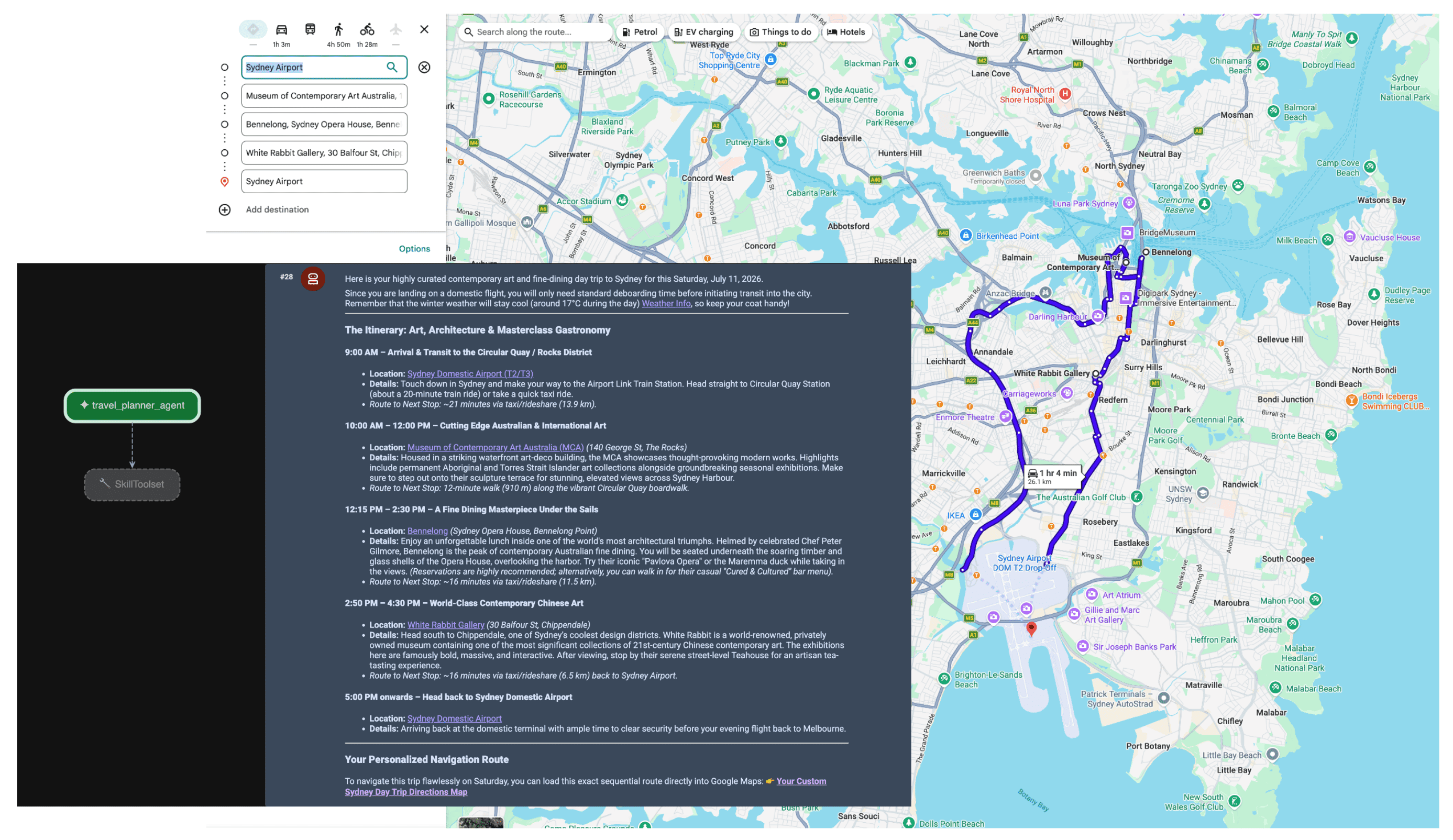
जब एजेंट को प्रॉम्प्ट मिलता है, तो प्लानर उपयोगकर्ता के इंटेंट का आकलन करता है. यह जगह और मौसम की जानकारी की ज़रूरत को समझता है. साथ ही, एमसीपी सर्वर का इस्तेमाल करके, lookup_weather, search_places, और compute_routes टूल को अपने-आप ट्रिगर करता है. इसके बाद, एजेंट उपयोगकर्ता के लिए तथ्यों पर आधारित यात्रा की योजना बनाता है.
नतीजा
एजेंटिक एआई की ओर बढ़ने से, लॉजिस्टिक्स, यात्रा, और खुदरा कारोबार में पूरी तरह से नई सुविधाएं मिल रही हैं. हालांकि, सही मायने में स्वायत्तता के लिए, सच्चाई की मज़बूत बुनियाद ज़रूरी है.
Google Maps Grounding Lite के साथ-साथ मॉडल कॉन्टेक्स्ट प्रोटोकॉल का इस्तेमाल करके, आपको अपनी पसंद के मुताबिक एपीआई इंटिग्रेशन की ज़रूरत नहीं पड़ती. साथ ही, अपने एजेंट को रीयल-टाइम में जानकारी देखने और सुनने की सुविधा मिलती है. अपने मॉडल को लाइव स्पेशल डेटा में ऐंकर करने से यह पक्का होता है कि वे असल दुनिया में अभी हो रही घटनाओं के आधार पर फ़ैसले लें, न कि ट्रेनिंग डेटा के स्नैपशॉट के आधार पर.
अगली कार्रवाइयां
- Maps Grounding MCP डेवलपर दस्तावेज़ पढ़ें.
- डेमो एपीआई पासकोड पाएं.
- अपने एजेंट को डिप्लॉय करने का तरीका जानें.
मुख्य लेखक:
टेरेसा चिन | Google Maps Platform DevX इंजीनियर