
This guide shows you how to use Google Mobile Ads SDK to load and display ads from BIGO Ads SDK using mediation, covering bidding integrations. It covers how to add BIGO Ads SDK to an ad unit's mediation configuration, and how to integrate the BIGO Ads SDK and adapter into an iOS app.
Supported integrations and ad formats
The mediation adapter for BIGO Ads SDK has the following capabilities:
| Integration | |
|---|---|
| Bidding | |
| Waterfall | |
| Formats | |
| App open | |
| Banner | |
| Interstitial | |
| Rewarded | |
| Rewarded Interstitial | |
| Native | |
Prerequisites
Before you continue, verify the following:
- iOS deployment target of 13.0 or later.
Latest Google Mobile Ads SDK version.
Step 1: Set up configurations in BIGO Ads SDK UI
Log in to your BIGO Ads dashboard.
Create an app
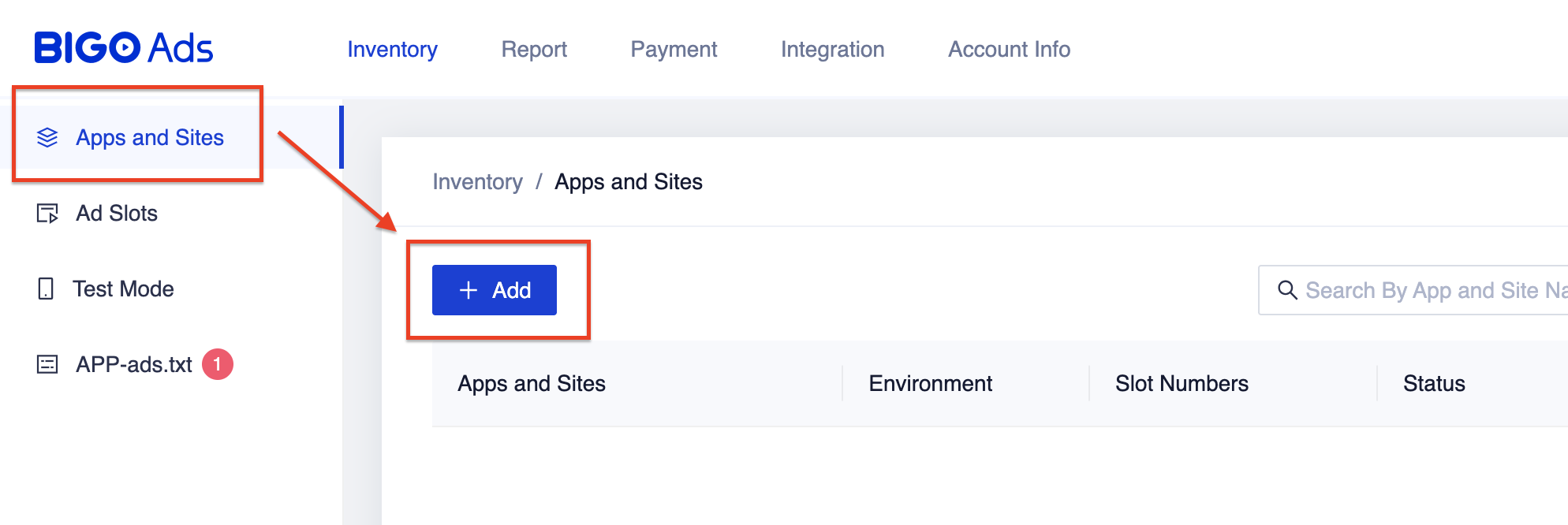
Navigate to the Inventory tab and under the Apps and Sites table, select the + Add button.
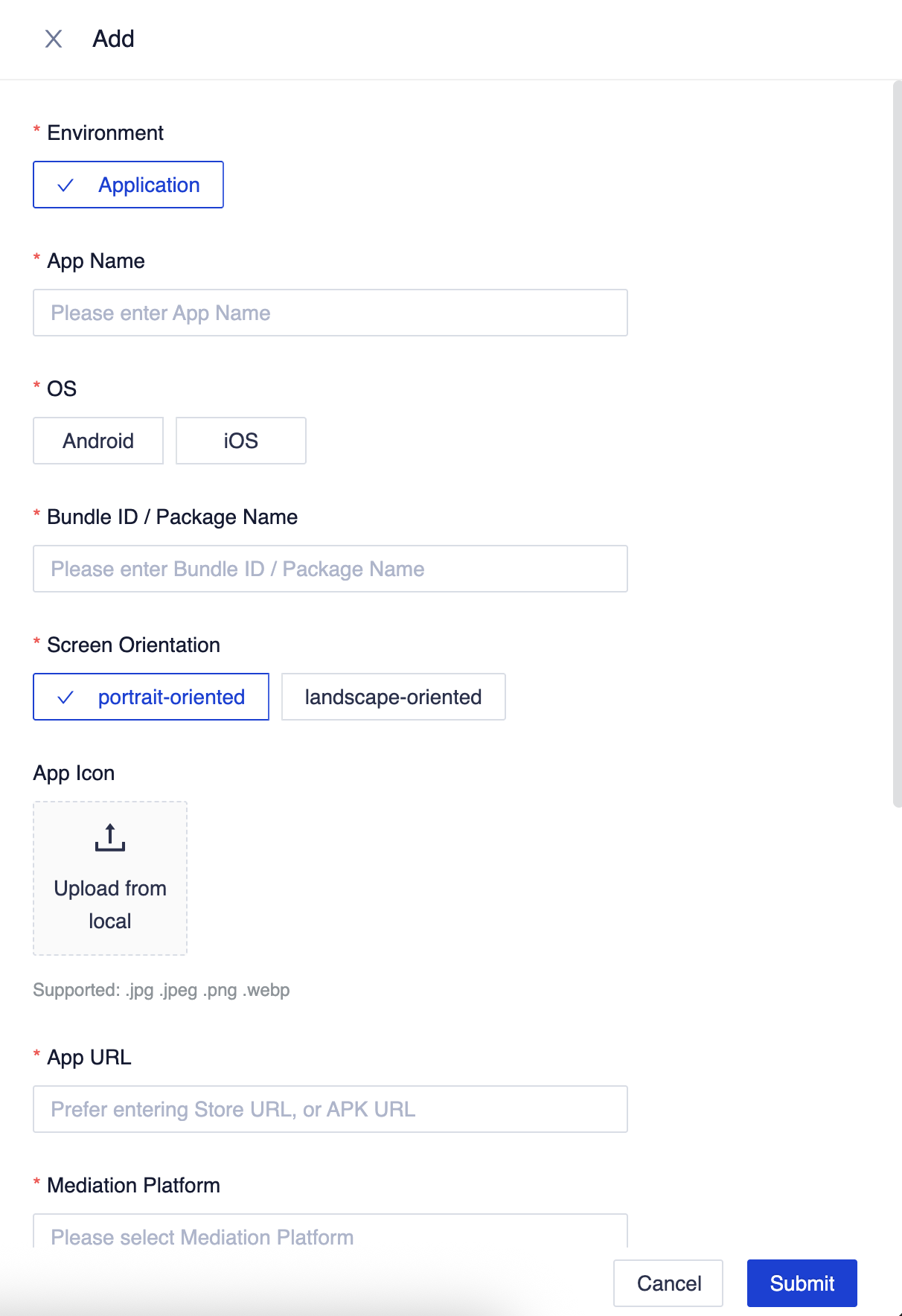
Fill out the rest of the form and click Submit.
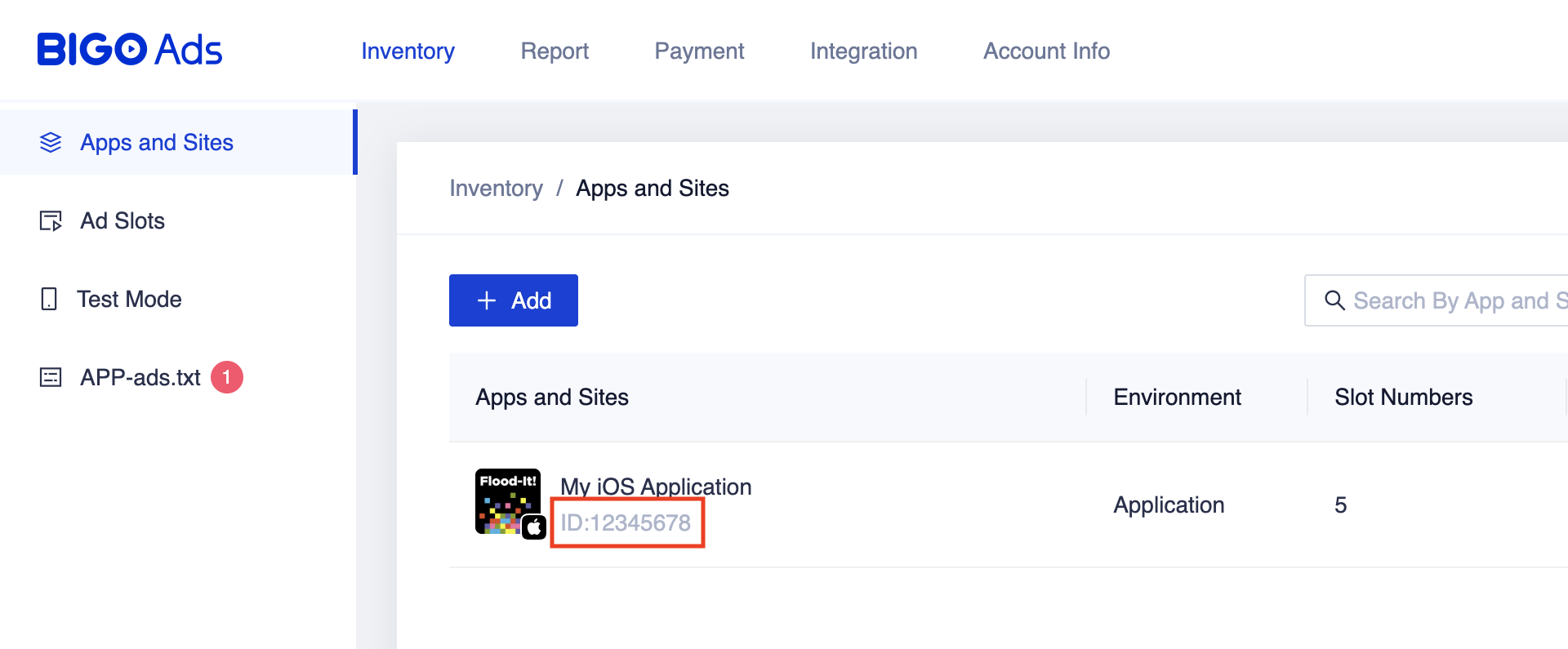
Take note of your Application ID.
Create an ad slot
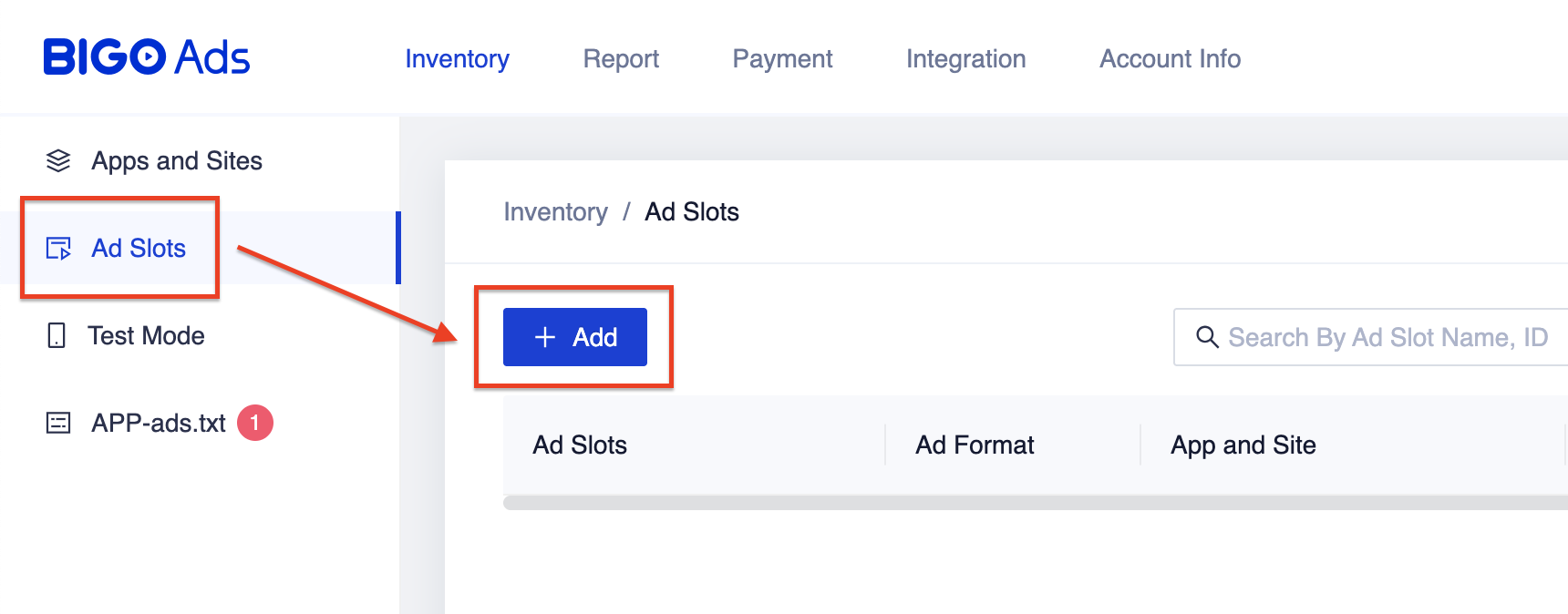
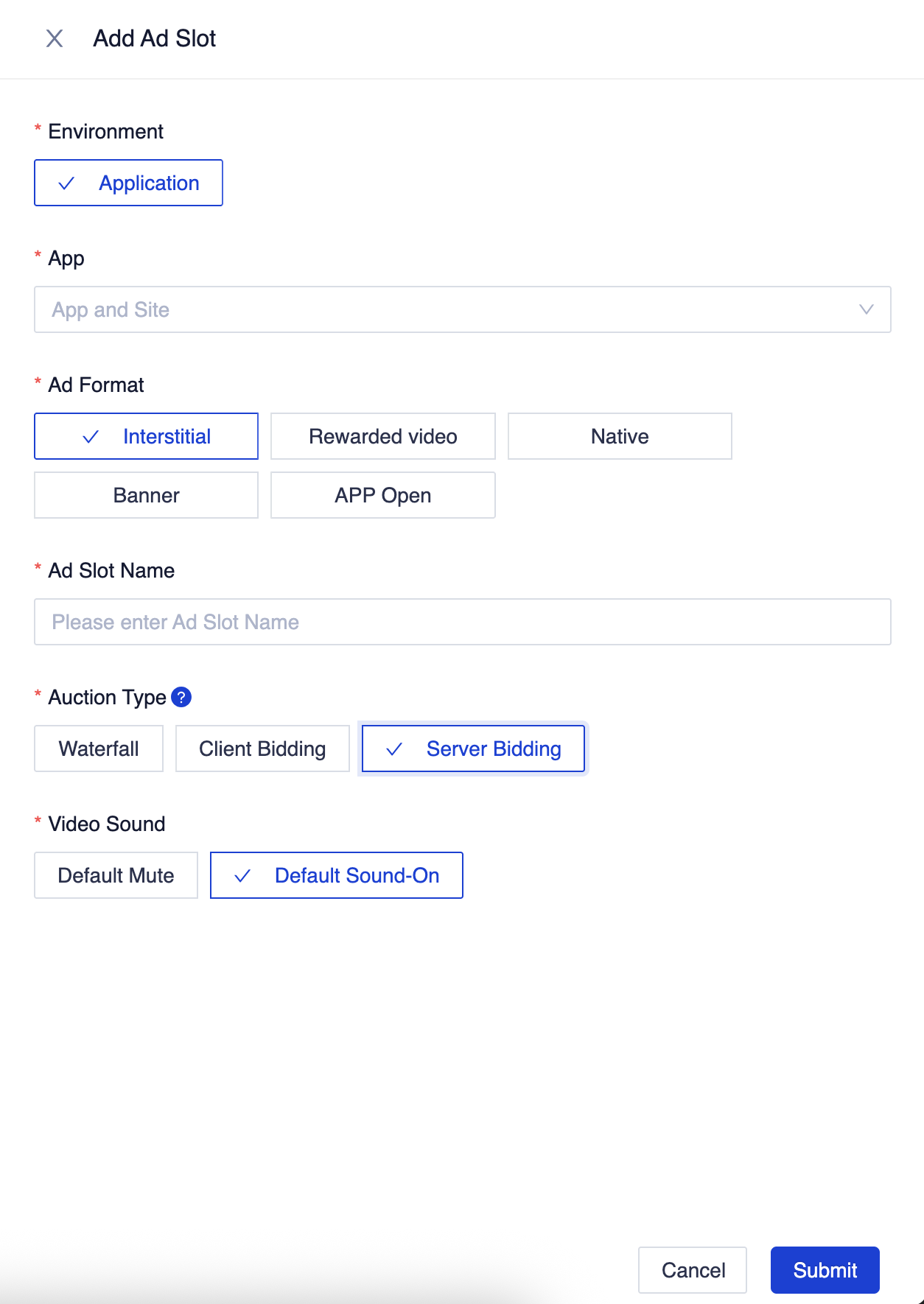
Once your application has been reviewed, navigate to the Ad Slots table and select the + Add button.
Select Server Bidding for the Auction Type, fill out the rest of the form and click Submit.
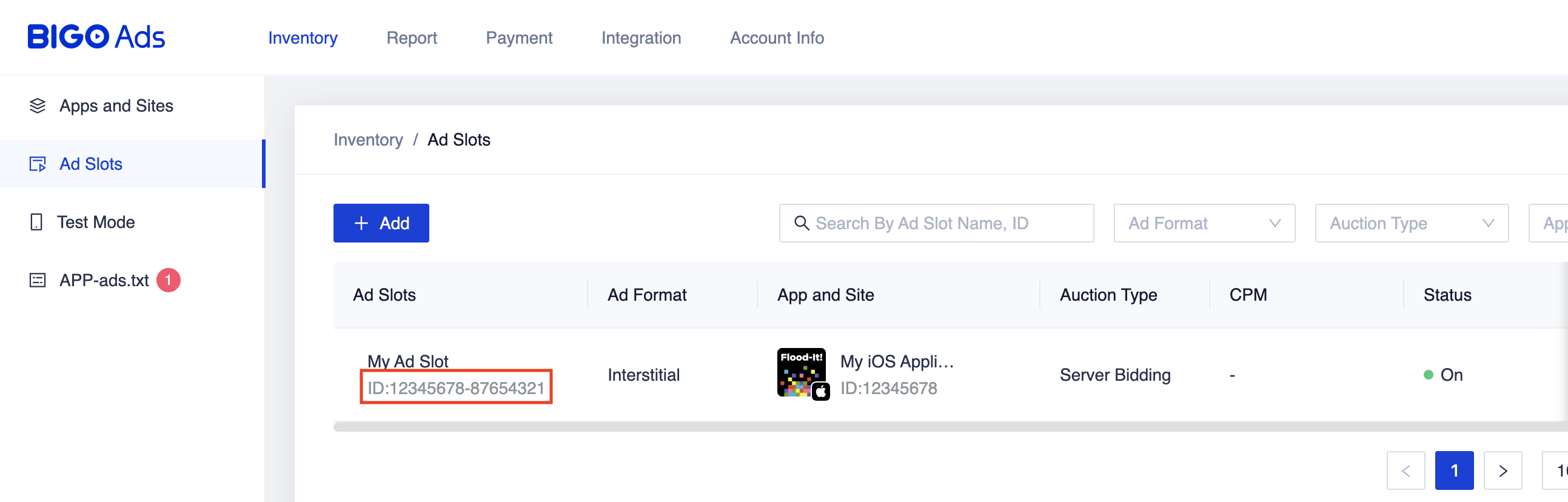
Take note of the Slot ID
Update your app-ads.txt
Authorized Sellers for Apps app-ads.txt is an IAB Tech Lab initiative that helps ensure your
app ad inventory is only sold through channels you've identified as authorized. To prevent a
significant loss in ad revenue, you'll need to implement an app-ads.txt file.
If you haven't done so already,
create an app-ads.txt file for Ad Manager.
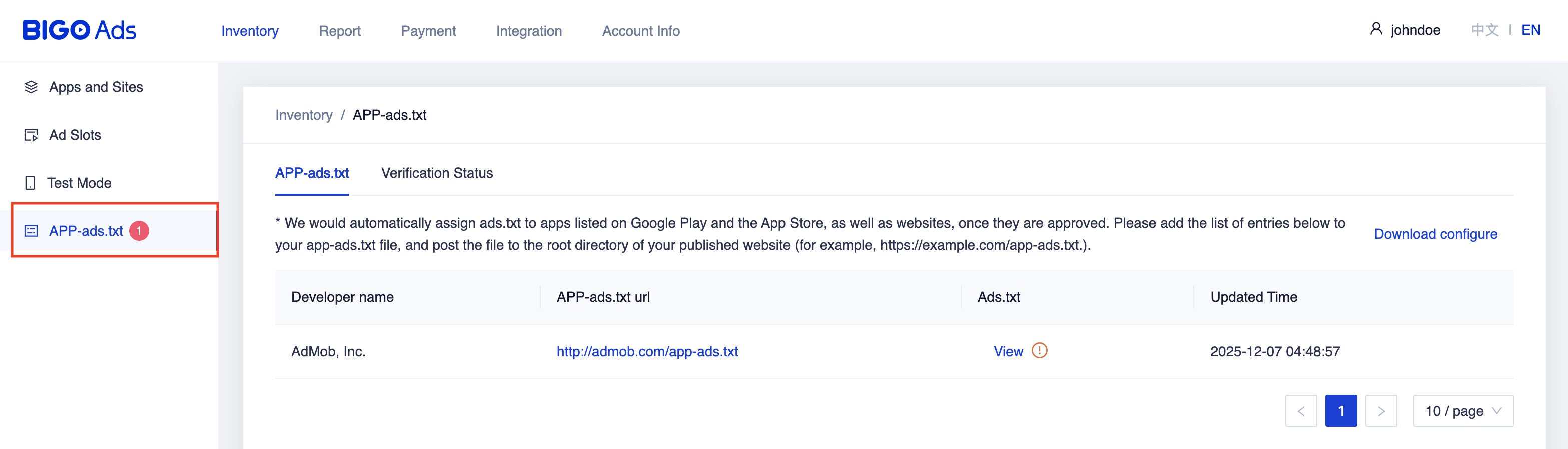
To implement app-ads.txt for BIGO Ads SDK, navigate to the APP-ads.txt
tab from the Dashboard and follow
the instructions located in the tab.
Step 2: Set up BIGO Ads SDK demand in Ad Manager UI
Sign in to your Ad Manager account.
Add BIGO Ads SDK in Companies
Bidding
This step isn't required for bidding integrations.
Waterfall
Navigate to Admin > Companies, then click the New company button in the All companies tab. Select Ad network.

Select BIGO Ads SDK as the Ad network, enter a unique Name and enable Mediation.
You don't need to enter a Username or Password. Click Save when done.

Enable secure signal sharing
Bidding
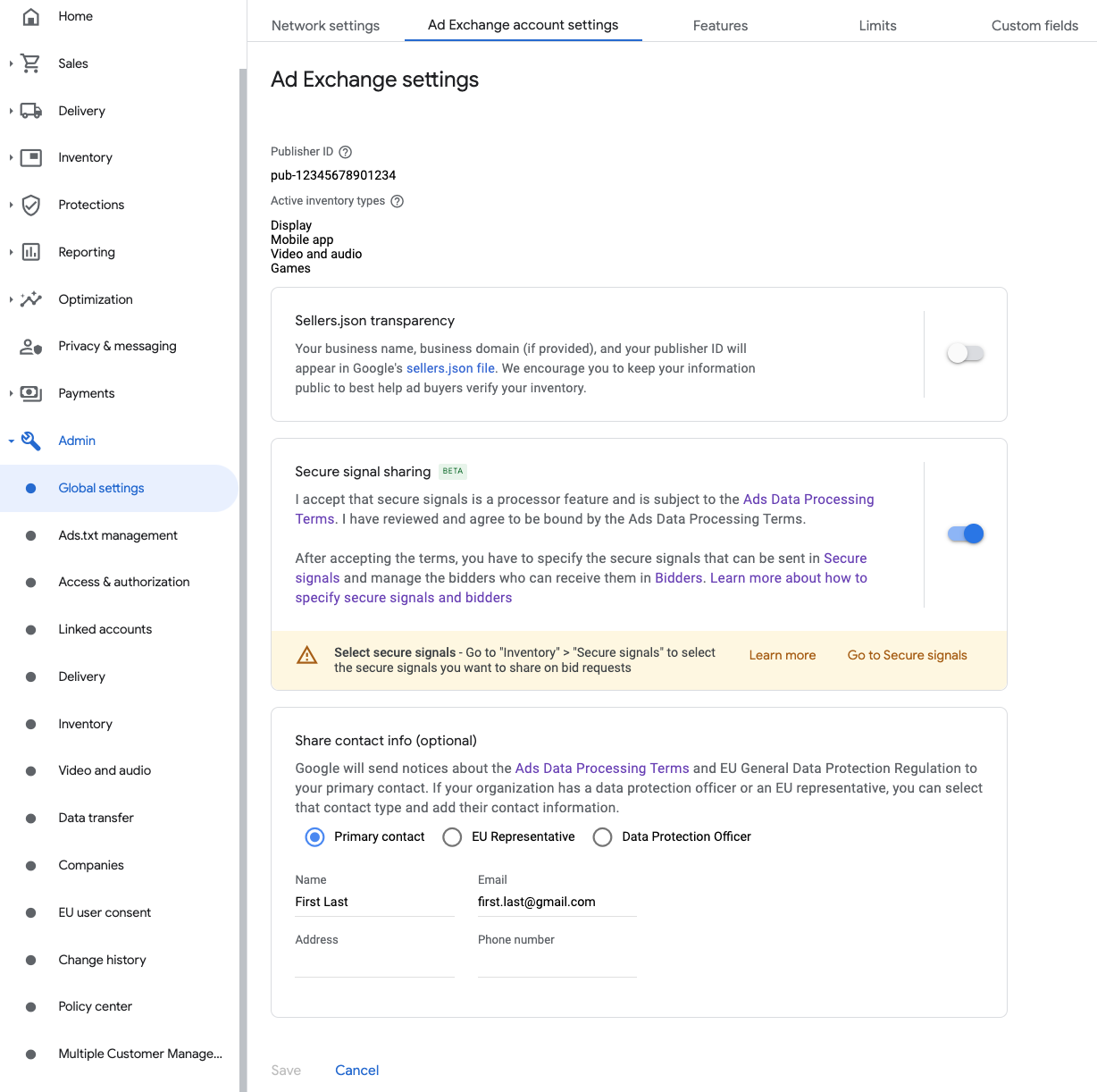
Navigate to Admin > Global settings. Go to the Ad Exchange account settings tab and review and turn on Secure signal sharing. Click Save.
Waterfall
This step isn't required for waterfall integrations.
Share secure signal on bid requests
Bidding
Navigate to Inventory > Secure Signals. Under Secure signals, search for BIGO TECHNOLOGY PTE LTD and turn on Enable app integration.

Click Save.
Waterfall
This step isn't required for waterfall integrations.
Allow secure signal sharing for SDK Bidding
Bidding
Navigate to Delivery > Demand channel settings. In the Default settings tab, turn on Allow secure signal sharing for SDK Bidding.
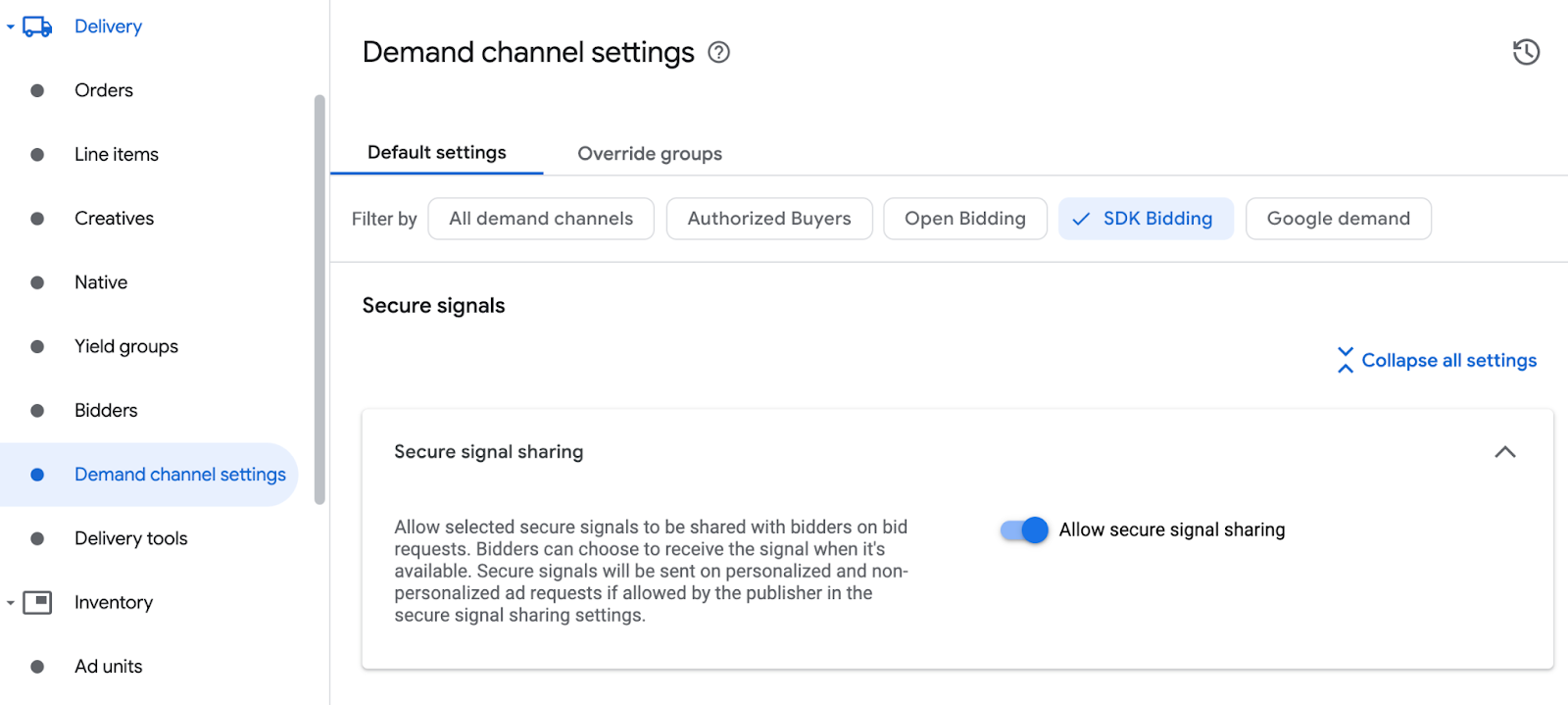
Click Save.
Waterfall
This step isn't required for waterfall integrations.
Configure BIGO Ads SDK bidding
Bidding
Navigate to Delivery > Bidders, and click Go to SDK Bidding.
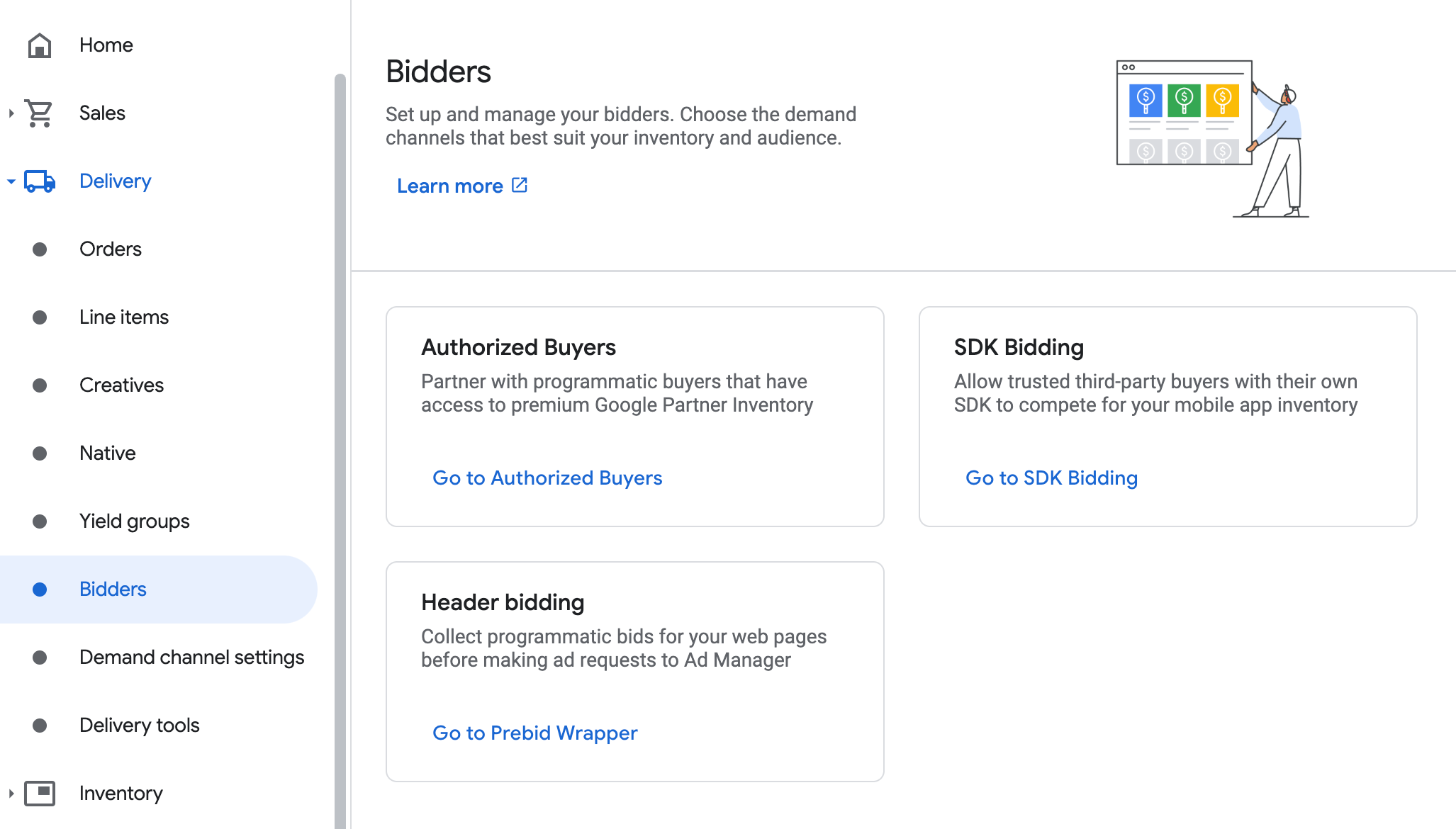
Click New bidder.
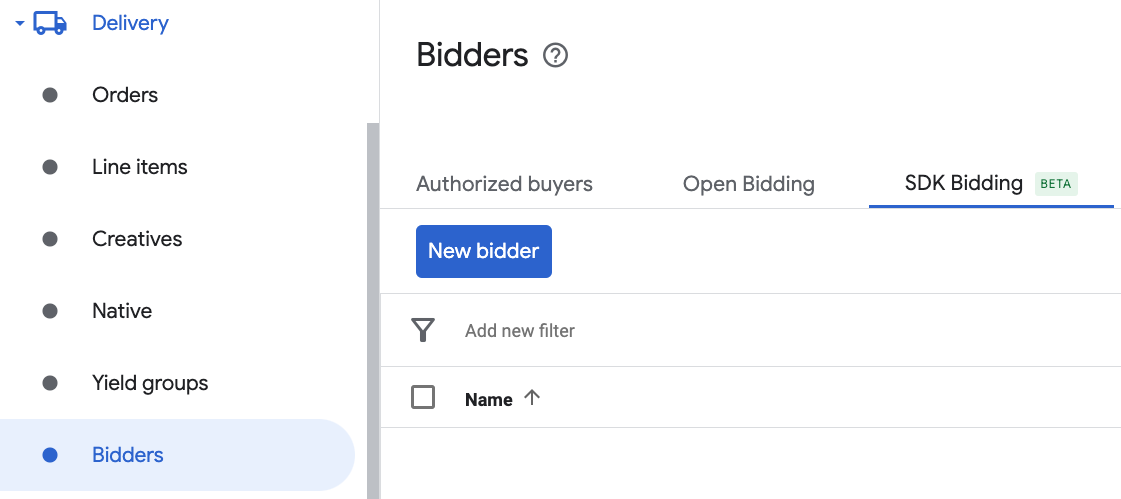
Select BIGO Ads SDK as the bidder.

Click Continue to enable SDK Bidding for this bidder.
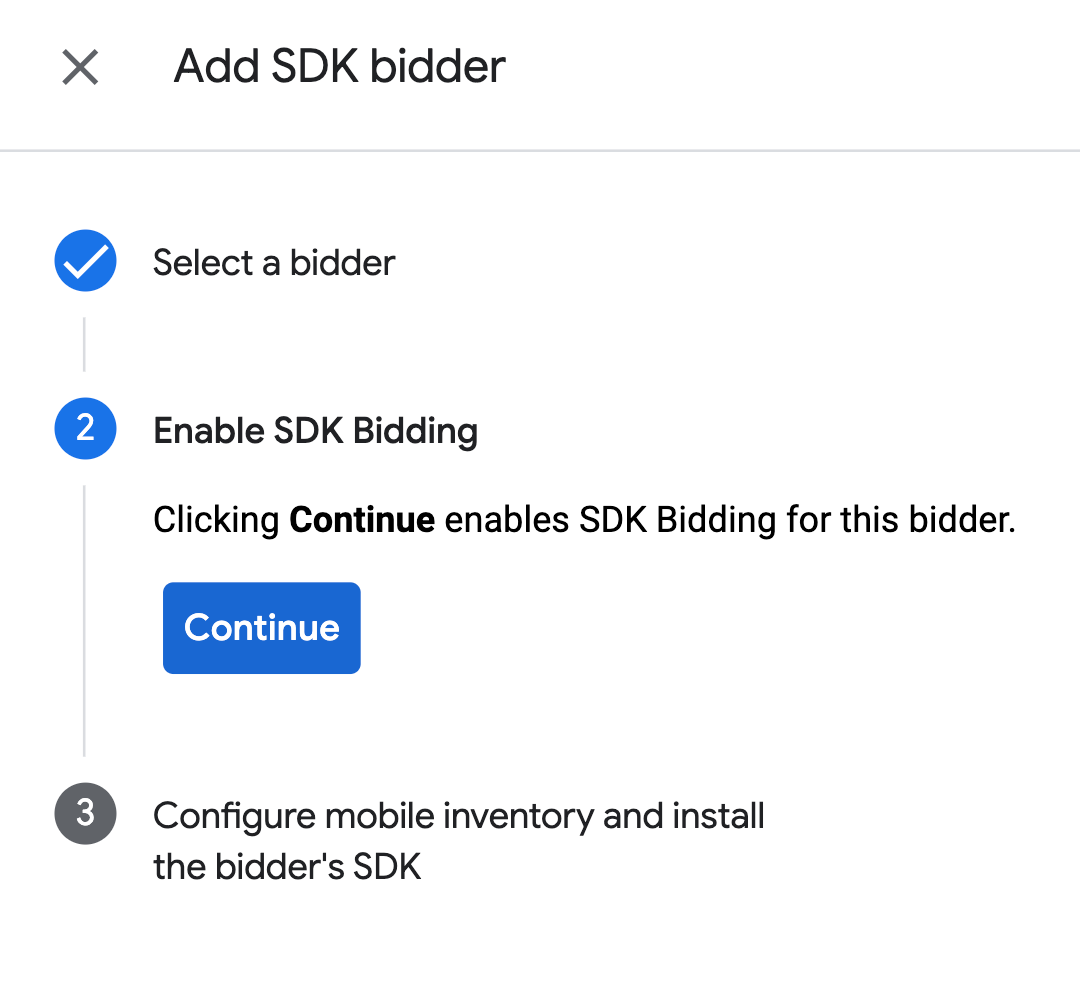
Click Done.
Waterfall
This step isn't required for waterfall integrations.
Configure ad unit mapping
Bidding
Navigate to Delivery > Bidders, and click Go to SDK Bidding.
Select the company for BIGO Ads SDK.
Go to the Ad unit mapping tab and click New ad unit mapping.
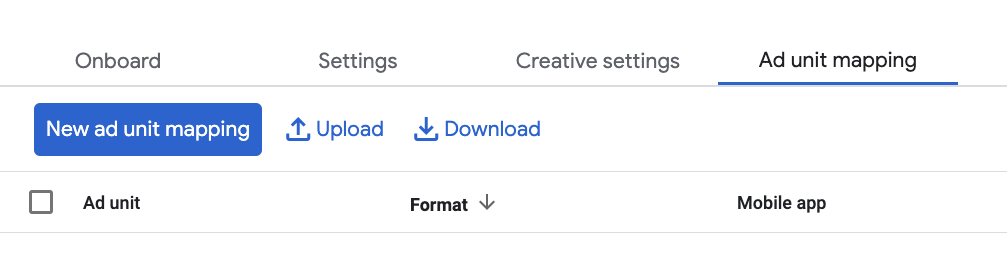
Choose Specific ad unit. Select an ad unit and format, Mobile app as the Inventory type, and your Mobile application. Then, enter Slot ID obtained in the previous section.
Finally, click Save.

Waterfall
Navigate to Delivery > Yield groups and click the New yield group button. Select your Inventory and App.
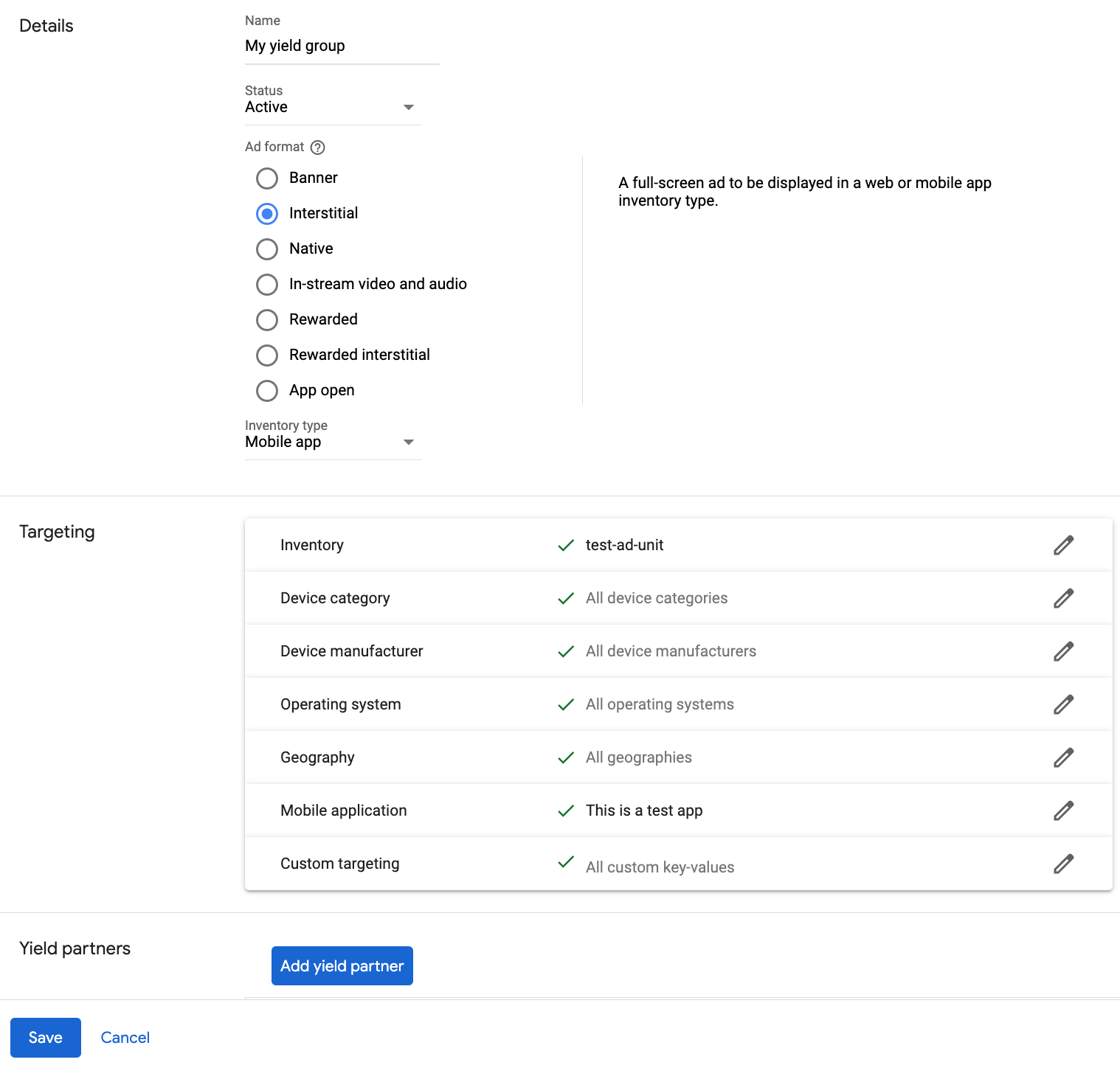
Scroll to Yield partners and click Add mediation partner.

Select the company you created for BIGO Ads SDK in the previous section. Choose Mobile SDK mediation as the Integration type, iOS as the Platform, and Active as the Status.
Enter the obtained in the previous section, and the Default CPM value. Click Save.

Add BIGO TECHNOLOGY PTE LTD to GDPR and US state regulations ad partners list
Follow the steps in European regulations settings and US state regulations settings to add Empathy Technology Pte.Ltd. (BIGO Ads) to the European regulations ad partners list and ** BIGOAds** to the US state regulations ad partners list in the Ad Manager UI.
Step 3: Import the BIGO Ads SDK and adapter
CocoaPods
Add the following line to your project's Podfile:
pod 'GoogleMobileAdsMediationBigo'From the command line run:
pod install --repo-update
Step 4: Implement privacy settings on BIGO Ads SDK
EU Consent and GDPR
To comply with the Google EU User Consent Policy, you must make certain disclosures to your users in the European Economic Area (EEA), the UK, and Switzerland, and obtain their consent for the use of cookies or other local storage where legally required, and for the collection, sharing, and use of personal data for ads personalization. This policy reflects the requirements of the EU ePrivacy Directive and the General Data Protection Regulation (GDPR). You are responsible for verifying that consent is propagated to each ad source in your mediation chain.
BIGO Ads SDK automatically reads GDPR consent set by consent management platforms including the UMP SDK. For more information, see BIGO Ads SDK's integration guide on GDPR.
US states privacy laws
US states privacy laws require giving users the right to opt out of the "sale" of their "personal information" (as the law defines those terms), with the opt-out offered through a prominent "Do Not Sell My Personal Information" link on the "selling" party's homepage. The US states privacy laws compliance guide offers the ability to enable restricted data processing for Google ad serving, but Google is unable to apply this setting to each ad network in your mediation chain. Therefore, you must identify each ad network in your mediation chain that may participate in the sale of personal information and follow guidance from each of those networks to ensure compliance.
The following sample code shows how to pass the consent flag to BIGO Ads SDK. Call this method before requesting ads through Google Mobile Ads SDK.
Swift
BigoAdSdk.setUserConsentWithOption(BigoConsentOptionsCCPA, consent: true)
Objective-C
[BigoAdSdk setUserConsentWithOption:BigoConsentOptionsCCPA consent:YES];
For more information, see BIGO Ads SDK's integration guide on CCPA.
Step 5: Add required code
Implement SKAdNetwork
Follow BIGO Ads SDK's documentation
to add the SKAdNetwork identifiers to your project's Info.plist file.
Step 6: Test your implementation
Enable test ads
Make sure you register your test device for Ad Manager.
BIGO Ads provides test Application IDs and Ad Slot IDs for iOS to help with testing and integration.
Verify test ads
To verify that you are receiving test ads from BIGO Ads SDK, enable single ad source testing in ad inspector using the BIGO Ads SDK (Bidding) ad source(s).
Optional Steps
Native ads
Ad rendering
The BIGO Ads SDK adapter returns its native ads as
GADNativeAd
objects. It populates the following
fields
for a
GADNativeAd.
| Field | Assets always included by BIGO Ads SDK adapter |
|---|---|
| Headline | |
| Image | |
| Body | |
| Icon | |
| Call to action | |
| Star rating | |
| Store | |
| Price | |
| Advertiser |
Error codes
If the adapter fails to receive an ad from BIGO Ads SDK, you can check the
underlying error from the ad response using
GADResponseInfo.adNetworkInfoArray
under the following classes:
GADMediationAdapterBigo
Here are the codes and accompanying messages thrown by the BIGO Ads SDK adapter when an ad fails to load:
| Error code | Domain | Reason |
|---|---|---|
| 101 | com.google.mediation.bigoadapter | Server configuration missing a required application ID. |
| 102 | com.google.mediation.bigoadapter | Invalid ad configuration. |
| 103 | com.google.mediation.bigoadapter | Ad presentation failure. |
| 104 | com.google.mediation.bigoadapter | Unsupported banner size. |
| 105 | com.google.mediation.bigoadapter | Bigo loaded a banner ad successfully but missing an ad view. |
| 1000-1100 | Sent by BIGO Ads SDK | BIGO Ads SDK returned an error. See BIGO Ads SDK's documentation for more details. |
BIGO Ads iOS Mediation Adapter Changelog
Version 6.1.0.0
- Verified compatibility with BIGO Ads SDK version 6.1.0.
Built and tested with:
- Google Mobile Ads SDK version 13.10.0.
- BIGO Ads SDK version 6.1.0.
Version 6.0.0.1
- Adapter now maps adaptive banner requests to the closest supported standard banner size.
Built and tested with:
- Google Mobile Ads SDK version 13.10.0.
- BIGO Ads SDK version 6.0.0.
Version 6.0.0.0
- Verified compatibility with BIGO Ads SDK version 6.0.0.
Built and tested with:
- Google Mobile Ads SDK version 13.9.0.
- BIGO Ads SDK version 6.0.0.
Version 5.3.0.0
- Verified compatibility with BIGO Ads SDK version 5.3.0.
Built and tested with:
- Google Mobile Ads SDK version 13.6.0.
- BIGO Ads SDK version 5.3.0.
Version 5.2.1.0
- Verified compatibility with BIGO Ads SDK version 5.2.1.
- Update the minimum Google Mobile Ads SDK dependency to 13.3.0 to use the new privacy APIs.
Built and tested with:
- Google Mobile Ads SDK version 13.4.0.
- BIGO Ads SDK version 5.2.1.
Version 5.2.0.0
- Verified compatibility with BIGO Ads SDK version 5.2.0.
Built and tested with:
- Google Mobile Ads SDK version 13.4.0.
- BIGO Ads SDK version 5.2.0.
Version 5.1.2.1
- Adapter now forwards the
ageRestrictedTreatmentGoogle Mobile Ads SDK flag to BIGO Ads SDK's COPPA API.
Built and tested with:
- Google Mobile Ads SDK version 13.3.0.
- BIGO Ads SDK version 5.1.2.
Version 5.1.2.0
- Verified compatibility with BIGO Ads SDK version 5.1.2.
Built and tested with:
- Google Mobile Ads SDK version 13.2.0.
- BIGO Ads SDK version 5.1.2.
Version 5.1.1.0
- Verified compatibility with BIGO Ads SDK version 5.1.1.
Built and tested with:
- Google Mobile Ads SDK version 13.2.0.
- BIGO Ads SDK version 5.1.1.
Version 5.1.0.1
- Updated the adapter to prevent ad request failures when a banner ad is loaded with an unsupported ad size.
Built and tested with:
- Google Mobile Ads SDK version 13.1.0.
- BIGO Ads SDK version 5.1.0.
Version 5.1.0.0
- Verified compatibility with BIGO Ads SDK version 5.1.0.
Built and tested with:
- Google Mobile Ads SDK version 13.1.0.
- BIGO Ads SDK version 5.1.0.
Version 5.0.6.2
- Updated the Google Mobile Ads SDK dependency to version 13.0.0.
Built and tested with:
- Google Mobile Ads SDK version 13.0.0.
- BIGO Ads SDK version 5.0.6.
Version 5.0.6.1
- Updated the CocoaPods minimum iOS version to
13.0.
Built and tested with:
- Google Mobile Ads SDK version 13.0.0.
- BIGO Ads SDK version 5.0.6.
Version 5.0.6.0
- Initial release!
- Added bidding support for app open, banner (includes MREC), interstitial, rewarded and native ad formats.
- Verified compatibility with BIGO Ads SDK version 5.0.6.
Built and tested with:
- Google Mobile Ads SDK version 12.14.0.
- BIGO Ads SDK version 5.0.6.