

این راهنما نحوه استفاده از Google Mobile Ads SDK (Legacy) را برای بار کردن و نمایش آگهیهای maio بااستفاده از واسطهگری، پوشش ادغامهای آبشاری، نشان میدهد. این راهنما نحوه افزودن maio به پیکربندی میانجیگری واحد آگهی و نحوه ادغام کیت توسعه نرمافزار و آداپتور maio در برنامه Android را پوشش میدهد.
میانای داشبورد maio از نوشتار ژاپنی برای برچسبها، دکمهها، و شرحهایش استفاده میکند و نماگرفتهای این راهنما ترجمه نشده است. بااینحال، در شرحها و دستورالعملهای این راهنما، برچسبها و دکمهها با معادلهای انگلیسی آنها ارجاع داده میشوند. برای مثال، «URL スキーム» بهمعنای «طرح نشانی وب» است.
یکپارچهسازیها و قالبهای آگهی پشتیبانیشده
آداپتور میانجیگری maio قابلیتهای زیر را دارد:
| یکپارچهسازی | |
|---|---|
| پیشنهاد قیمت | |
| آبشار | |
| قالبها | |
| برنما | |
| بینابینی | |
| پاداش | |
| بومی | |
پیشنیازها
قبلاز ادامه دادن، موارد زیر را درستیسنجی کنید:
- سطح میانای برنامه کاربردی Android 24 یا بالاتر.
- کیت توسعه نرمافزار maio نسخه 1.0.7 یا جدیدتر.
جدیدترین نسخه Google Mobile Ads SDK (Legacy).
مرحله ۱: پیکربندیها را در رابط کاربری maio تنظیم کنید
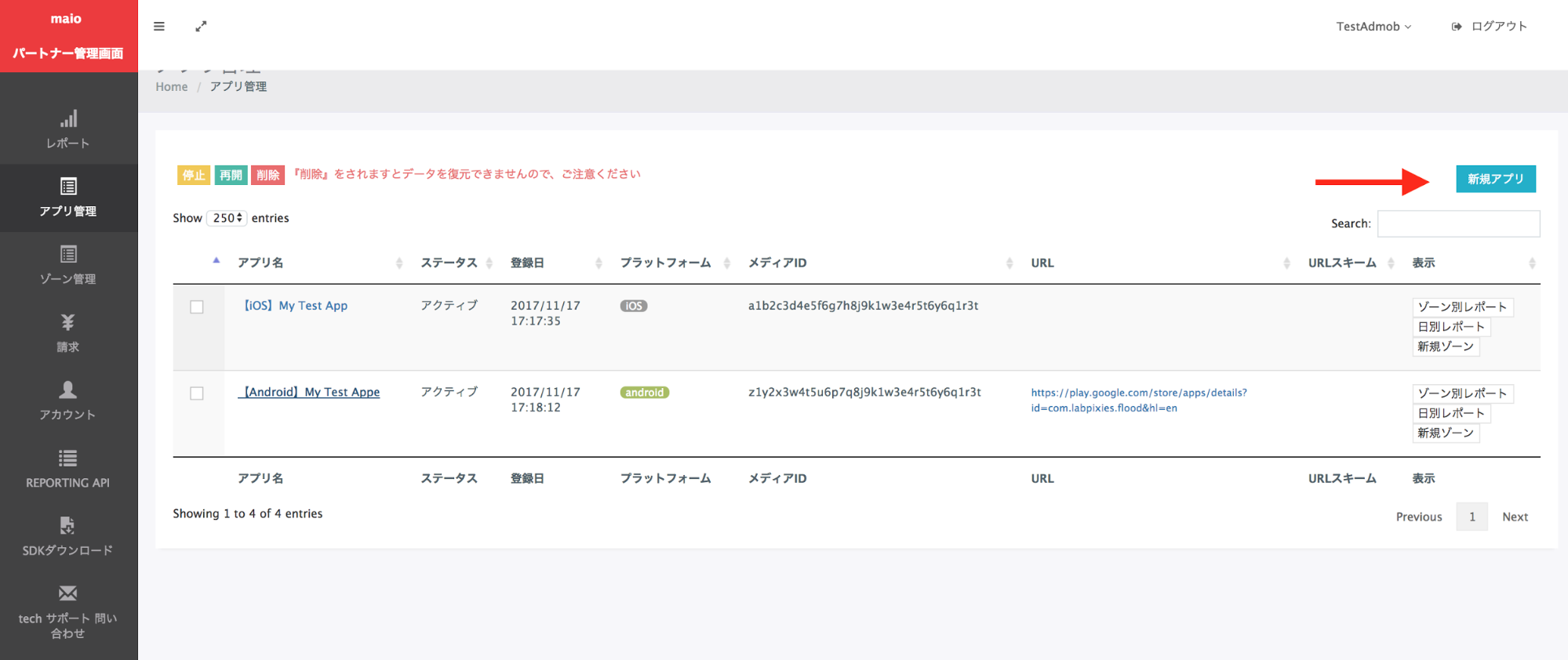
ابتدا در حساب maio خود ثبتنام کنید یا به سیستم وارد شوید. روی دکمه مدیریت برنامه در نوار کناری سمت راست کلیک کنید و سپس روی برنامه جدید کلیک کنید.
زبانه مربوط به نوع آگهی ترجیحیتان را انتخاب کنید.
بینابینی
نام برنامهتان را وارد کنید، پلاتفرم را انتخاب کنید، و نشانی وب برنامه را ارائه دهید. آگهی میانویدیویی را بهعنوان نوع آگهی انتخاب کنید، و سپس روی بهروزرسانی کلیک کنید.

پاداش
نام برنامهتان را وارد کنید، پلاتفرم را انتخاب کنید، و نشانی وب برنامه را ارائه دهید. پاداشهای ویدیویی را بهعنوان نوع آگهی انتخاب کنید و سپس روی بهروزرسانی کلیک کنید.

در صفحه مدیریت برنامه، شناسه رسانه را یادداشت کنید. برای راهاندازی واحد آگهی Ad Manager در بخش بعدی لازم است.

در صفحه مدیریت منطقه، شناسه منطقه را یادداشت کنید. همچنین برای راهاندازی واحد آگهی Ad Manager در بخش بعدی به آن نیاز خواهید داشت.


مرحله ۲: راهاندازی تقاضای maio در «میانای کاربر Ad Manager»
پیکربندی تنظیمات واسطهگری برای واحد آگهی
به سیستم حساب Ad Manager خود وارد شوید.
به ارائه > گروههای بازدهی پیمایش کنید و روی دکمه گروه بازدهی جدید کلیک کنید.
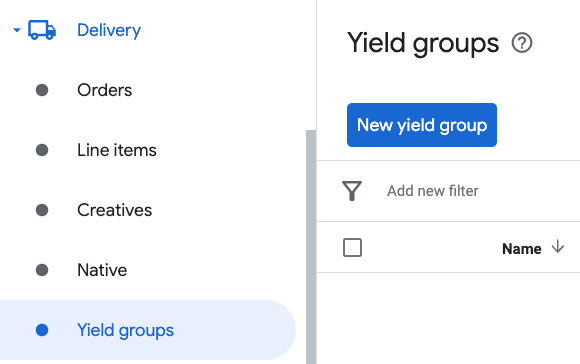
نام منحصربهفردی برای گروه درآمد خود وارد کنید، وضعیت را روی فعال تنظیم کنید، قالب آگهی خود را انتخاب کنید، و نوع فضای آگهی را روی برنامه تلفن همراه تنظیم کنید. در بخش هدفیابی > فضای آگهی، واحد آگهی را در فضای آگهی و برنامه تلفن همراه که میخواهید میانجیگری را به آن اضافه کنید انتخاب کنید.
سپس، روی دکمه افزودن شریک بازدهی کلیک کنید.

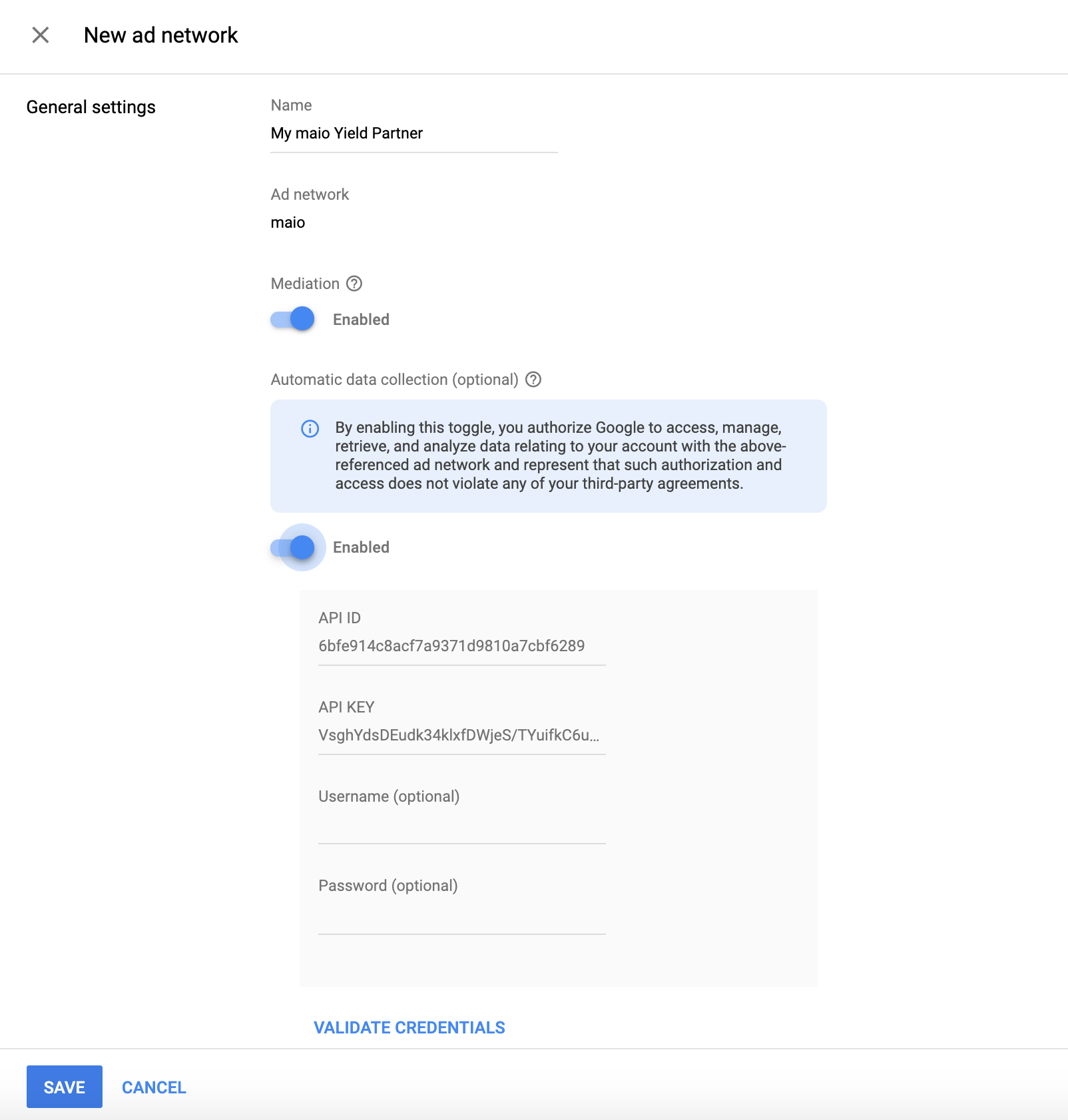
اگر ازقبل شریک بازدهی برای maio دارید، میتوانید آن را انتخاب کنید. درغیراینصورت، ایجاد شریک بازده جدید را انتخاب کنید.
maio را بهعنوان شبکه تبلیغات انتخاب کنید، نام منحصربهفردی وارد کنید و واسطهگری را فعال کنید.
جمعآوری خودکار دادهها را روشن کنید و شناسه API و کلید API دریافتشده در بخش قبلی را وارد کنید.
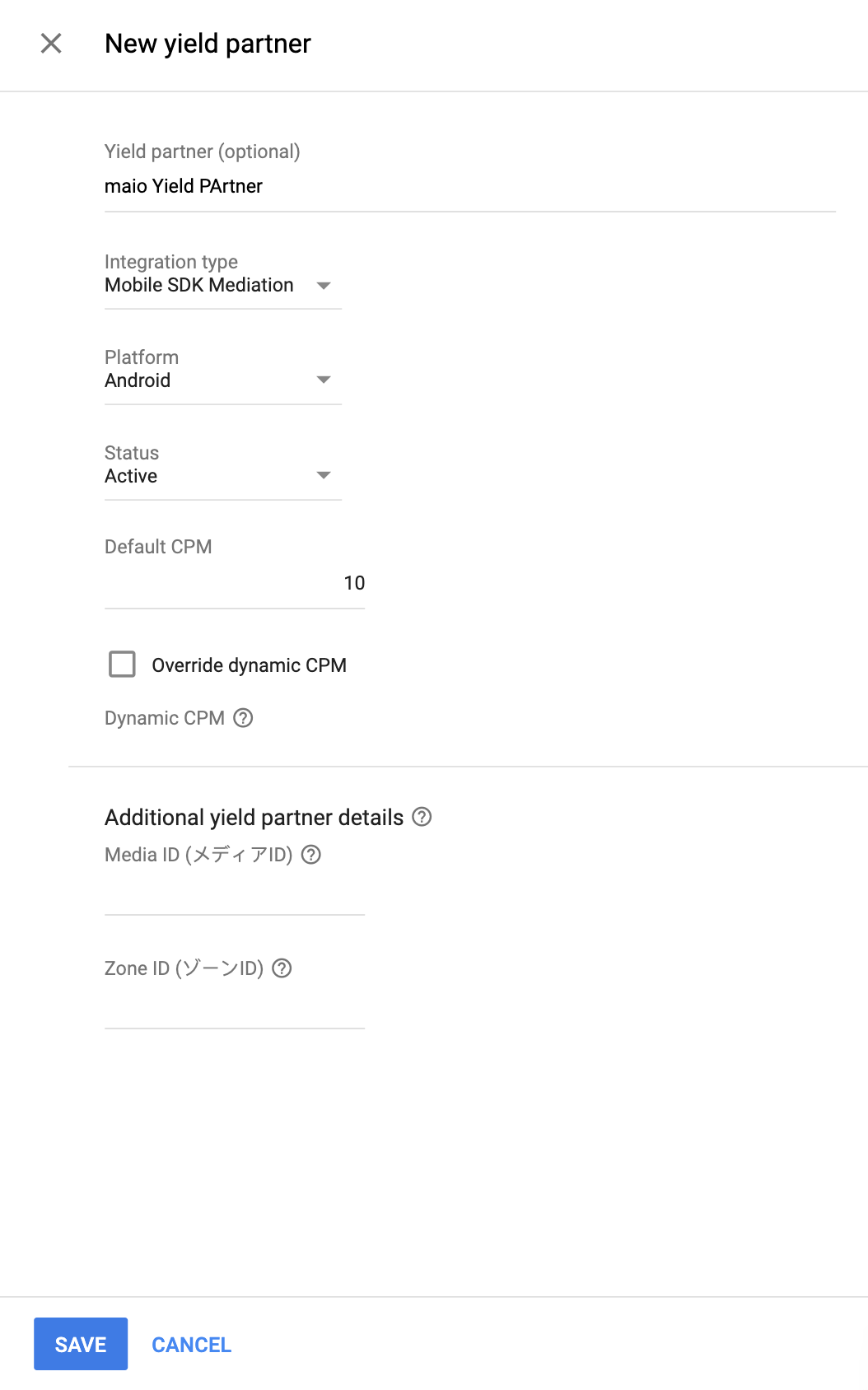
پساز انتخاب شریک بازدهی، واسطهگری کیت توسعه نرمافزار تلفن همراه را بهعنوان نوع ادغام، Android را بهعنوان پلاتفرم، و فعال را بهعنوان وضعیت انتخاب کنید. شناسه رسانه و شناسه منطقه دریافتشده در بخش قبلی را وارد کنید. سپس، مقدار هزارظهوربهای پیشفرض را وارد کنید.
پساز اتمام، در پایین صفحه روی ذخیره کلیک کنید.
مرحله ۳: وارد کردن کیت توسعه نرمافزار maio و آداپتور
یکپارچهسازی «استودیو Android» (توصیه میشود)
در فایل settings.gradle.kts سطح پروژه، مخزنهای زیر را اضافه کنید:
dependencyResolutionManagement {
  repositories {
    google()
    mavenCentral()
    maven {
      url = uri("https://imobile-maio.github.io/maven")
    }
  }
}
در فایل gradle سطح برنامه، وابستگیهای پیادهسازی زیر را اضافه کنید:
Kotlin
dependencies {
    implementation("com.google.android.gms:play-services-ads:25.5.0")
    implementation("com.google.ads.mediation:maio:2.0.9.1")
}
Groovy
dependencies {
    implementation 'com.google.android.gms:play-services-ads:25.5.0'
    implementation 'com.google.ads.mediation:maio:2.0.9.1'
}
یکپارچهسازی دستی
- جدیدترین نسخه کیت توسعه نرمافزار maio Android را بارگیری کنید و آن را به پروژهتان اضافه کنید.
- به آرتیفکتهای سازگار maio در «مخزن Maven» متعلق به Google بروید. جدیدترین نسخه را انتخاب کنید، فایل `.aar` سازگار maio را بارگیری کنید، و آن را به پروژهتان اضافه کنید.
مرحله ۴: افزودن کد الزامی
برای یکپارچهسازی maio Android، به کد اضافی نیاز نیست.
مرحله ۵: پیادهسازیتان را آزمایش کنید
فعال کردن آگهیهای آزمایشی
مطمئن شوید که دستگاه آزمایشی خود را برای Ad Manager ثبت کردهاید.
ناشرانی که از نسخه ۱۱.۶.۰ یا بالاتر Google Mobile Ads SDK (Legacy) استفاده میکنند هنگام درخواست دادن، بهطور خودکار آگهیهای آزمایشی از maio در تلفنها و رایانههای لوحی ثبتشده بهعنوان دستگاههای آزمایشی دریافت خواهند کرد.
درستیسنجی آگهیهای آزمایشی
برای درستیسنجی اینکه آگهیهای آزمایشی را از maio دریافت میکنید، آزمایش منبع آگهی تکی را در بازرس آگهی بااستفاده از منبع (های) آگهی maio(آبشاری) فعال کنید.
کدهای خطا
اگر این آداپتور نتواند آگهی را از maio دریافت کند،
ناشران میتوانند خطای زیربنایی را از پاسخ آگهی بااستفاده از
ResponseInfo.getAdapterResponses()
در کلاسهای زیر بررسی کنند:
| قالب | نام کلاس |
|---|---|
| بینابینی | jp.maio.sdk.android.mediation.admob.adapter.Interstitial |
| پاداش | jp.maio.sdk.android.mediation.admob.adapter.Rewarded |
در اینجا کدها و پیامهای همراهی که توسط آداپتور maio هنگام بار نشدن آگهی ارسال میشوند آورده شده است:
| کد خطا | استدلال |
|---|---|
| 0-10 | maio خطای ویژهای برای کیت توسعه نرمافزار برگرداند. برای جزئیات بیشتر، کد و اسناد maio را ببینید. |
| ۱۰۱ | Maio آگهی دردسترس ندارد. |
| 102 | پارامترهای سرور نامعتبر است (برای نمونه، «شناسه جای آگهی» وجود ندارد). |
| 103 | زمینه استفادهشده برای بار کردن آگهی نمونه `Activity` نبود. |
| 104 | درخواست دارای پردازش محدودیت سنی بود، اما «کیت توسعه نرمافزار maio» نمیتواند نشانهای محدودیت سنی را دریافت کند |
تغییرات گزارش میانجیگری maio Android
نسخه 2.0.9.1
- وابستگی Kotlin آداپتور را به 1.9.0 (حداقل نسخه Kotlin پشتیبانیشده توسط کیت توسعه نرمافزار GMA NextGen) سنجاق کنید.
- عملکرد برگشتی در شاخههای خطای محدودیت سنی درطول مقداردهی اولیه آگهی و درخواستهای بار آگهی اصلاح شد.
ساخته و آزمایششده با:
- نسخه ۲۵.۴.۰ «کیت توسعه نرمافزار آگهی تلفن همراه Google».
- نسخه ۱.۵.۰ «کیت توسعه نرمافزار نسل بعدی تبلیغات تلفن همراه Google».
- نسخه کیت توسعه نرمافزار Maio 2.0.9.1.
نسخه ۲.۰.۹.۰
- وقتی
AgeRestrictedTreatmentجدید رویCHILDتنظیم میشود، درخواستهای دارای محدودیت سنی برای کیت توسعه نرمافزار maio را فیلتر کنید. - سازگاری با نسخه ۲.۰.۹ کیت توسعه نرمافزار maio تأیید شد.
ساخته و آزمایششده با:
- نسخه ۲۵.۴.۰ «کیت توسعه نرمافزار آگهی تلفن همراه Google».
- نسخه ۱.۳.۱ «کیت توسعه نرمافزار نسل بعدی تبلیغات تلفن همراه Google».
- نسخه کیت توسعه نرمافزار Maio 2.0.9.0.
نسخه 2.0.8.2
- درخواستهای دارای محدودیت سنی را برای maio SDK فیلتر کنید زیرا نمیتواند نشانهای دارای محدودیت سنی را دریافت کند.
- دارایی برای ساختن آداپتور با وابستگی «کیت توسعه نرمافزار نسل بعدی GMA» اضافه شد.
ساخته و آزمایششده با:
- نسخه ۲۵.۱.۰ کیت توسعه نرمافزار آگهی تلفن همراه Google.
- نسخه ۱.۱.۰ «کیت توسعه نرمافزار نسل بعدی تبلیغات تلفن همراه Google».
- نسخه کیت توسعه نرمافزار Maio 2.0.8.2.
نسخه ۲.۰.۸.۱
- پشتیبانی از قالب آگهی «برنمایی» اضافه شد
ساخته و آزمایششده با:
- نسخه ۲۵.۰.۰ «کیت توسعه نرمافزار آگهی تلفن همراه Google».
- نسخه کیت توسعه نرمافزار Maio 2.0.8.1.
نسخه ۲.۰.۸.۰
- سازگاری با نسخه ۲.۰.۸ کیت توسعه نرمافزار maio تأیید شد.
ساخته و آزمایششده با:
- نسخه ۲۴.۹.۰ «کیت توسعه نرمافزار آگهی تلفن همراه Google».
- نسخه کیت توسعه نرمافزار Maio 2.0.8.0.
نسخه 2.0.7.0
- سازگاری با نسخه ۲.۰.۷ کیت توسعه نرمافزار maio تأیید شد.
ساخته و آزمایششده با:
- نسخه ۲۴.۷.۰ «کیت توسعه نرمافزار آگهی تلفن همراه Google».
- نسخه Maio SDK 2.0.7.0.
نسخه 2.0.6.0
- مرجعهای سطح کلاس به «زمینه» برداشته شد. میتواند به کاهش مشکلات نشت حافظه کمک کند
- سازگاری با نسخه ۲.۰.۶ کیت توسعه نرمافزار maio تأیید شد.
ساخته و آزمایششده با:
- نسخه ۲۴.۶.۰ «کیت توسعه نرمافزار آگهی تلفن همراه Google».
- نسخه Maio SDK 2.0.6.0.
نسخه ۲.۰.۵.۰
- سازگاری با نسخه ۲.۰.۵ کیت توسعه نرمافزار maio تأیید شد.
ساخته و آزمایششده با:
- نسخه ۲۴.۴.۰ کیت توسعه نرمافزار آگهی تلفن همراه Google.
- نسخه Maio SDK 2.0.5.0.
نسخه 2.0.4.0
- سازگاری با نسخه ۲.۰.۴ کیت توسعه نرمافزار maio تأیید شد.
ساخته و آزمایششده با:
- نسخه ۲۴.۳.۰ «کیت توسعه نرمافزار آگهی تلفن همراه Google».
- نسخه Maio SDK 2.0.4.0.
نسخه 2.0.3.1
- حداقل سطح میانای برنامهسازی کاربردی Android موردنیاز به ۲۳ بهروزرسانی شد.
- حداقل نسخه موردنیاز «کیت توسعه نرمافزار تبلیغات تلفن همراه Google» به ۲۴.۰.۰ بهروزرسانی شد.
ساخته و آزمایششده با:
- نسخه ۲۴.۰.۰ «کیت توسعه نرمافزار آگهی تلفن همراه Google».
- نسخه Maio SDK 2.0.3.0.
نسخه ۲.۰.۳.۰
- سازگاری با کیت توسعه نرمافزار maio نسخه 2.0.3.0 تأیید شد.
ساخته و آزمایششده با:
- نسخه ۲۳.۶.۰ «کیت توسعه نرمافزار آگهی تلفن همراه Google».
- نسخه Maio SDK 2.0.3.0.
نسخه ۱.۱.۱۶.۳
- حداقل نسخه کیت توسعه نرمافزار تبلیغات تلفن همراه Google موردنیاز به ۲۳.۰.۰ بهروزرسانی شد.
- سازگاری با نسخه ۱.۱.۱۶ کیت توسعه نرمافزار maio تأیید شد.
ساخته و آزمایششده با:
- نسخه ۲۳.۰.۰ «کیت توسعه نرمافزار آگهی تلفن همراه Google».
- نسخه Maio SDK 1.1.16.
نسخه 1.1.16.2
- برای استفاده از کلاس جدید
VersionInfo، آداپتور بهروزرسانی شد. - حداقل نسخه موردنیاز «کیت توسعه نرمافزار تبلیغات تلفن همراه Google» به ۲۲.۰.۰ بهروزرسانی شد.
ساخته و آزمایششده با:
- نسخه ۲۲.۰.۰ «کیت توسعه نرمافزار آگهی تلفن همراه Google».
- نسخه Maio SDK 1.1.16.
نسخه 1.1.16.1
-
compileSdkVersionوtargetSdkVersionبه API 31 بهروزرسانی شد. - حداقل نسخه موردنیاز «کیت توسعه نرمافزار تبلیغات تلفن همراه Google» به ۲۱.۰.۰ بهروزرسانی شد.
- حداقل سطح میانای برنامهسازی کاربردی Android موردنیاز به ۱۹ بهروز شد.
ساخته و آزمایششده با:
- نسخه ۲۱.۰.۰ «کیت توسعه نرمافزار آگهی تلفن همراه Google».
- نسخه Maio SDK 1.1.16.
نسخه ۱.۱.۱۶.۰
- کدهای خطا بهروزرسانی شد تا خطاهای maio بیشتری را ضبط کند.
- سازگاری با نسخه ۱.۱.۱۶ کیت توسعه نرمافزار maio تأیید شد.
- حداقل نسخه موردنیاز «کیت توسعه نرمافزار تبلیغات تلفن همراه Google» به نسخه ۲۰.۴.۰ بهروزرسانی شد.
ساخته و آزمایششده با:
- نسخه 20.4.0 کیت توسعه نرمافزار آگهی تلفن همراه Google.
- نسخه Maio SDK 1.1.16.
نسخه ۱.۱.۱۵.۰
- سازگاری با نسخه ۱.۱.۱۵ کیت توسعه نرمافزار maio تأیید شد.
- حداقل نسخه کیت توسعه نرمافزار تبلیغات تلفن همراه Google موردنیاز به نسخه ۲۰.۰.۰ بهروزرسانی شد.
ساخته و آزمایششده با:
- نسخه 20.0.0 کیت توسعه نرمافزار آگهی تلفن همراه Google.
- نسخه کیت توسعه نرمافزار Maio 1.1.15.
نسخه ۱.۱.۱۴.۰
- پیامها و کدهای خطای آداپتور استانداردشده اضافه شد.
- سازگاری با نسخه ۱.۱.۱۴ کیت توسعه نرمافزار maio تأیید شد.
- حداقل نسخه کیت توسعه نرمافزار تبلیغات تلفن همراه Google موردنیاز به نسخه 19.8.0 بهروزرسانی شد.
ساخته و آزمایششده با:
- نسخه 19.8.0 کیت توسعه نرمافزار آگهی تلفن همراه Google.
- نسخه Maio SDK 1.1.14.
نسخه ۱.۱.۱۳.۰
- سازگاری با نسخه ۱.۱.۱۳ کیت توسعه نرمافزار maio تأیید شد.
- حداقل نسخه کیت توسعه نرمافزار تبلیغات تلفن همراه Google موردنیاز به نسخه 19.5.0 بهروزرسانی شد.
ساخته و آزمایششده با:
- نسخه کیت توسعه نرمافزار آگهی تلفن همراه Google 19.5.0.
- نسخه کیت توسعه نرمافزار Maio 1.1.13.
نسخه ۱.۱.۱۲.۰
- حداقل نسخه کیت توسعه نرمافزار تبلیغات تلفن همراه Google موردنیاز به نسخه 19.4.0 بهروزرسانی شد.
ساخته و آزمایششده با:
- نسخه 19.4.0 کیت توسعه نرمافزار «آگهی تلفن همراه Google».
- نسخه Maio SDK 1.1.12.
نسخه 1.1.11.1
- برای محدود کردن زمانهای انتظار، اگر maio آگهی آمادهای برای نمایش نداشته باشد، درخواستهای آگهی اکنون بلافاصله ناموفق خواهد بود.
- حداقل نسخه کیت توسعه نرمافزار تبلیغات تلفن همراه Google موردنیاز به 19.1.0 بهروزرسانی شد.
ساخته و آزمایششده با:
- نسخه 19.1.0 کیت توسعه نرمافزار آگهی تلفن همراه Google.
- نسخه Maio SDK 1.1.11.
نسخه ۱.۱.۱۱.۰
- سازگاری با نسخه ۱.۱.۱۱ کیت توسعه نرمافزار maio تأیید شد.
- حداقل نسخه کیت توسعه نرمافزار تبلیغات تلفن همراه Google موردنیاز به نسخه ۱۸.۳.۰ بهروز شد.
ساخته و آزمایششده با:
- نسخه ۱۸.۳.۰ «کیت توسعه نرمافزار آگهی تلفن همراه Google».
- نسخه Maio SDK 1.1.11.
نسخه ۱.۱.۱۰.۰
- سازگاری با نسخه ۱.۱.۱۰ کیت توسعه نرمافزار maio درستیسنجی شد.
- حداقل نسخه کیت توسعه نرمافزار تبلیغات تلفن همراه Google موردنیاز به ۱۸.۲.۰ بهروزرسانی شد.
نسخه ۱.۱.۸.۰
- سازگاری با نسخه ۱.۱.۸ کیت توسعه نرمافزار maio تأیید شد.
- حداقل نسخه موردنیاز «کیت توسعه نرمافزار تبلیغات تلفن همراه Google» به 18.1.0 بهروزرسانی شد.
نسخه ۱.۱.۷.۰
- رفع اشکالها.
- سازگاری با نسخه ۱.۱.۷ کیت توسعه نرمافزار maio تأیید شد.
نسخه ۱.۱.۶.۱
- تبدیلکننده بهروزشده برای پشتیبانی از «میانای برنامهسازی کاربردی» جدید «پاداشدار».
- حداقل نسخه کیت توسعه نرمافزار تبلیغات تلفن همراه Google موردنیاز به 17.2.0 بهروزرسانی شد.
نسخه ۱.۱.۶.۰
- سازگاری با نسخه ۱.۱.۶ کیت توسعه نرمافزار maio تأیید شد.
نسخه ۱.۱.۵.۰
- سازگاری با نسخه ۱.۱.۵ کیت توسعه نرمافزار maio تأیید شد.
نسخه ۱.۱.۴.۰
- سازگاری با نسخه ۱.۱.۴ کیت توسعه نرمافزار maio تأیید شد.
نسخه ۱.۱.۳.۱
- آداپتور بهروزرسانی شد تا بهجای تکنمونه با کلاس نمونه کار کند.
نسخه ۱.۱.۳.۰
- سازگاری با نسخه ۱.۱.۳ کیت توسعه نرمافزار maio تأیید شد.
نسخه ۱.۱.۲.۱
- کاربر را با عملکردهای اولیه بهروزشده بهروزرسانی کرد.
نسخه ۱.۱.۲.۰
- سازگاری با نسخه ۱.۱.۲ کیت توسعه نرمافزار maio تأیید شد.
نسخه ۱.۱.۱.۱
- تبدیلکننده را بهروزرسانی کرد تا رویداد آگهی
onRewardedVideoComplete()را فراخوانی کند.
نسخه ۱.۱.۱.۰
- سازگاری با نسخه ۱.۱.۱ کیت توسعه نرمافزار maio تأیید شد.
نسخه ۱.۱.۰.۰
- سازگاری با نسخه ۱.۱.۰ کیت توسعه نرمافزار maio تأیید شد.
نسخه 1.0.8.0
- سازگاری با نسخه ۱.۰.۸ کیت توسعه نرمافزار maio تأیید شد.
نسخه ۱.۰.۷.۱
- رفع مشکلی که میتوانست باعث بروز خطاهای NullPointerException هنگام بار نشدن آگهیها شود.
نسخه 1.0.7.0
- امکان فعال کردن حالت آزمایش با افزودن شناسه دستگاه آزمایش به
AdRequestاضافه شد. - سازگاری با نسخه ۱.۰.۷ کیت توسعه نرمافزار maio تأیید شد.
نسخه 1.0.6.0
- اولین انتشار!
- پشتیبانی از آگهیهای بینابینی و آگهیهای ویدیویی پاداشدار اضافه شد.