
商品スニペット(Product、Review、Offer)の構造化データ
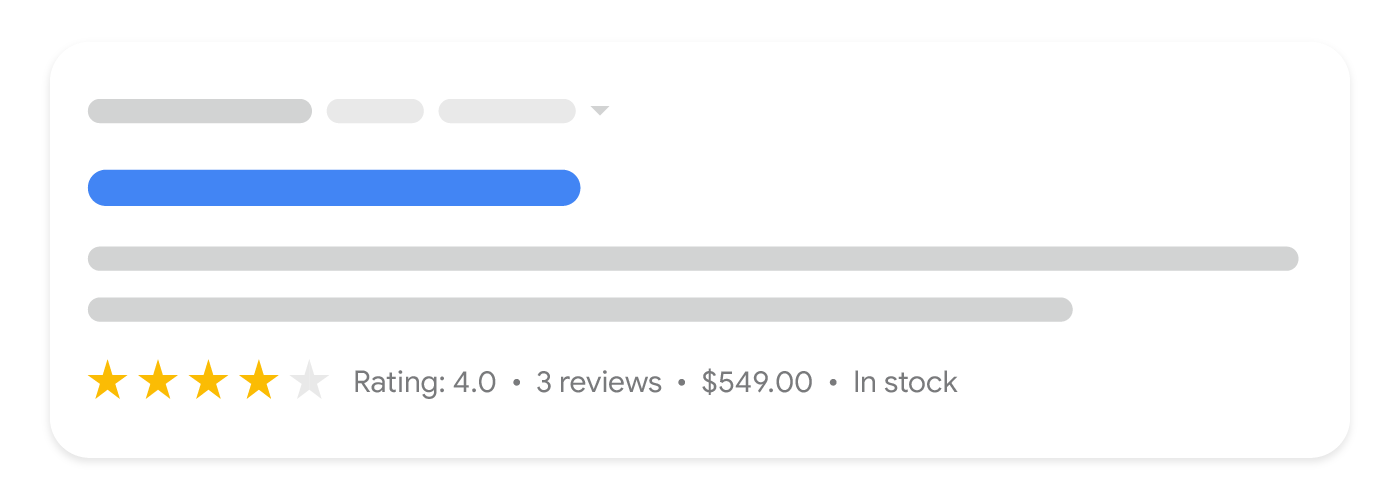
ページに Product マークアップを追加すると、商品スニペットとして表示できるようになります。商品スニペットとは、評価、レビュー情報、価格、在庫状況などの追加の商品情報を含むテキスト検索結果のことです。
このガイドでは、商品スニペットに適用される Product 構造化データの要件について説明します。どのマークアップを使用すればよいかわからない場合は、Product マークアップの概要をご覧ください。
構造化データを追加する方法
構造化データは、ページに関する情報を提供し、ページ コンテンツを分類するための標準化されたデータ形式です。構造化データを初めて使用する場合は、構造化データの仕組みについてをご覧ください。
構造化データの作成、テスト、リリースの概要は次のとおりです。
- 必須プロパティを追加します。使用している形式に基づいて、ページ上の構造化データを挿入する場所をご確認ください。
- ガイドラインに従います。
- リッチリザルト テストでコードを検証し、重大なエラーを修正します。ツールで報告される重大ではない問題の修正も検討してください。構造化データの品質向上に役立ちます(ただし、リッチリザルトの対象となるために必ずしも必要というわけではありません)。
- 構造化データが含まれているページを数ページ導入し、URL 検査ツールを使用して、Google でページがどのように表示されるかをテストします。Google がページにアクセスでき、robots.txt ファイル、
noindexタグ、ログイン要件によってページがブロックされていないことを確認します。ページが正常に表示されたら、Google に URL の再クロールを依頼できます。 - 今後の変更について Google に継続して情報を提供するために、サイトマップを送信することをおすすめします。これは、Search Console Sitemap API で自動化できます。
例
次の例は、さまざまな状況でウェブページに構造化データを追加する方法を示しています。
商品レビューページ
検索結果の商品スニペットに表示される商品レビューページの構造化データの例を以下に示します。
JSON-LD
 <html>
  <head>
    <title>Executive Anvil</title>
    <script type="application/ld+json">
    {
      "@context": "https://schema.org/",
      "@type": "Product",
      "name": "Executive Anvil",
      "description": "Sleeker than ACME's Classic Anvil, the Executive Anvil is perfect for the business traveler looking for something to drop from a height.",
      "review": {
        "@type": "Review",
        "reviewRating": {
          "@type": "Rating",
          "ratingValue": 4,
          "bestRating": 5
        },
        "author": {
          "@type": "Person",
          "name": "Fred Benson"
        }
      },
      "aggregateRating": {
        "@type": "AggregateRating",
        "ratingValue": 4.4,
        "reviewCount": 89
      }
    }
    </script>
  </head>
  <body>
  </body>
</html>
RDFa
 <html>
  <head>
    <title>Executive Anvil</title>
  </head>
  <body>
    <div typeof="schema:Product">
        <div rel="schema:review">
          <div typeof="schema:Review">
            <div rel="schema:reviewRating">
              <div typeof="schema:Rating">
                <div property="schema:ratingValue" content="4"></div>
                <div property="schema:bestRating" content="5"></div>
              </div>
            </div>
            <div rel="schema:author">
              <div typeof="schema:Person">
                <div property="schema:name" content="Fred Benson"></div>
              </div>
            </div>
          </div>
        </div>
        <div property="schema:name" content="Executive Anvil"></div>
        <div property="schema:description" content="Sleeker than ACME's Classic Anvil, the Executive Anvil is perfect for the business traveler looking for something to drop from a height."></div>
        <div rel="schema:aggregateRating">
          <div typeof="schema:AggregateRating">
            <div property="schema:reviewCount" content="89"></div>
            <div property="schema:ratingValue" content="4.4"></div>
          </div>
        </div>
      </div>
  </body>
</html>
microdata
 <html>
  <head>
    <title>Executive Anvil</title>
  </head>
  <body>
  <div>
    <div itemtype="https://schema.org/Product" itemscope>
      <meta itemprop="name" content="Executive Anvil" />
      <meta itemprop="description" content="Sleeker than ACME's Classic Anvil, the Executive Anvil is perfect for the business traveler looking for something to drop from a height." />
      <div itemprop="aggregateRating" itemtype="https://schema.org/AggregateRating" itemscope>
        <meta itemprop="reviewCount" content="89" />
        <meta itemprop="ratingValue" content="4.4" />
      </div>
      <div itemprop="review" itemtype="https://schema.org/Review" itemscope>
        <div itemprop="author" itemtype="https://schema.org/Person" itemscope>
          <meta itemprop="name" content="Fred Benson" />
        </div>
        <div itemprop="reviewRating" itemtype="https://schema.org/Rating" itemscope>
          <meta itemprop="ratingValue" content="4" />
          <meta itemprop="bestRating" content="5" />
        </div>
      </div>
    </div>
  </div>
  </body>
</html>
長所と短所
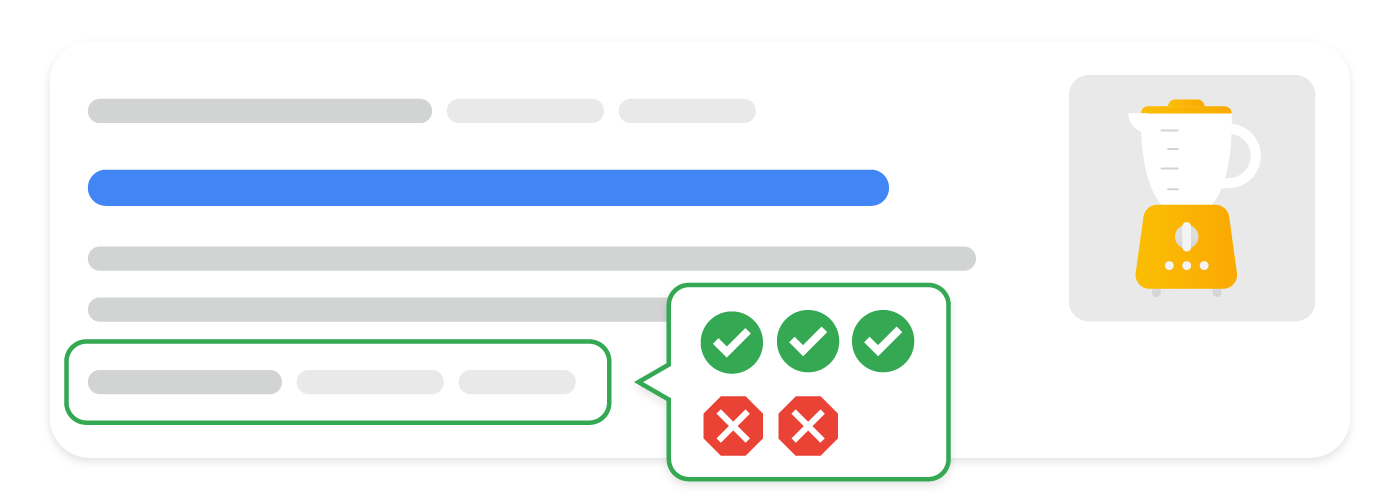
検索結果の商品スニペットに長所と短所が記載されている商品のエディター レビューページの例を以下に示します。
JSON-LD
 <html>
  <head>
    <title>Cheese Knife Pro review</title>
    <script type="application/ld+json">
      {
        "@context": "https://schema.org",
        "@type": "Product",
        "name": "Cheese Grater Pro",
        "review": {
          "@type": "Review",
          "name": "Cheese Knife Pro review",
          "author": {
            "@type": "Person",
            "name": "Pascal Van Cleeff"
          },
          "positiveNotes": {
            "@type": "ItemList",
            "itemListElement": [
              {
                "@type": "ListItem",
                "position": 1,
                "name": "Consistent results"
              },
              {
                "@type": "ListItem",
                "position": 2,
                "name": "Still sharp after many uses"
              }
            ]
          },
          "negativeNotes": {
            "@type": "ItemList",
            "itemListElement": [
              {
                "@type": "ListItem",
                "position": 1,
                "name": "No child protection"
              },
              {
                "@type": "ListItem",
                "position": 2,
                "name": "Lacking advanced features"
              }
            ]
          }
        }
      }
    </script>
  </head>
  <body>
  </body>
</html>
RDFa
 <html>
  <head>
    <title>Cheese Knife Pro review</title>
  </head>
  <body>
    <div typeof="schema:Product">
      <div property="schema:name" content="Cheese Knife Pro review"></div>
        <div rel="schema:review">
          <div typeof="schema:Review">
            <div rel="schema:positiveNotes">
              <div typeof="schema:ItemList">
                <div rel="schema:itemListElement">
                  <div typeof="schema:ListItem">
                    <div property="schema:position" content="1"></div>
                    <div property="schema:name" content="Consistent results"></div>
                  </div>
                  <div typeof="schema:ListItem">
                    <div property="schema:position" content="2"></div>
                    <div property="schema:name" content="Still sharp after many uses"></div>
                  </div>
                </div>
              </div>
            </div>
            <div rel="schema:negativeNotes">
              <div typeof="schema:ItemList">
                <div rel="schema:itemListElement">
                  <div typeof="schema:ListItem">
                    <div property="schema:position" content="1"></div>
                    <div property="schema:name" content="No child protection"></div>
                  </div>
                  <div typeof="schema:ListItem">
                    <div property="schema:position" content="2"></div>
                    <div property="schema:name" content="Lacking advanced features"></div>
                  </div>
                </div>
              </div>
            </div>
            <div rel="schema:author">
              <div typeof="schema:Person">
                <div property="schema:name" content="Pascal Van Cleeff"></div>
              </div>
            </div>
          </div>
        </div>
      </div>
  </body>
</html>
microdata
 <html>
  <head>
    <title>Cheese Knife Pro review</title>
  </head>
  <body>
    <div itemtype="https://schema.org/Product" itemscope>
      <meta itemprop="name" content="Cheese Knife Pro" />
      <div itemprop="review" itemtype="https://schema.org/Review" itemscope>
        <div itemprop="author" itemtype="https://schema.org/Person" itemscope>
          <meta itemprop="name" content="Pascal Van Cleeff" />
        </div>
        <div itemprop="positiveNotes" itemtype="https://schema.org/ItemList" itemscope>
          <div itemprop="itemListElement" itemtype="https://schema.org/ListItem" itemscope>
            <meta itemprop="position" content="1" />
            <meta itemprop="name" content="Consistent results" />
          </div>
          <div itemprop="itemListElement" itemtype="https://schema.org/ListItem" itemscope>
            <meta itemprop="position" content="2" />
            <meta itemprop="name" content="Still sharp after many uses" />
          </div>
        </div>
        <div itemprop="negativeNotes" itemtype="https://schema.org/ItemList" itemscope>
          <div itemprop="itemListElement" itemtype="https://schema.org/ListItem" itemscope>
            <meta itemprop="position" content="1" />
            <meta itemprop="name" content="No child protection" />
          </div>
          <div itemprop="itemListElement" itemtype="https://schema.org/ListItem" itemscope>
            <meta itemprop="position" content="2" />
            <meta itemprop="name" content="Lacking advanced features" />
          </div>
        </div>
      </div>
    </div>
  </body>
</html>
ショッピング アグリゲータ ページ
検索結果の商品スニペットに表示されるショッピング アグリゲータ ページの例を以下に示します。
JSON-LD
<html>
  <head>
    <title>Executive Anvil</title>
    <script type="application/ld+json">
      {
        "@context": "https://schema.org/",
        "@type": "Product",
        "name": "Executive Anvil",
        "image": [
          "https://example.com/photos/1x1/photo.jpg",
          "https://example.com/photos/4x3/photo.jpg",
          "https://example.com/photos/16x9/photo.jpg"
         ],
        "description": "Sleeker than ACME's Classic Anvil, the Executive Anvil is perfect for the business traveler looking for something to drop from a height.",
        "sku": "0446310786",
        "mpn": "925872",
        "brand": {
          "@type": "Brand",
          "name": "ACME"
        },
        "review": {
          "@type": "Review",
          "reviewRating": {
            "@type": "Rating",
            "ratingValue": 4,
            "bestRating": 5
          },
          "author": {
            "@type": "Person",
            "name": "Fred Benson"
          }
        },
        "aggregateRating": {
          "@type": "AggregateRating",
          "ratingValue": 4.4,
          "reviewCount": 89
        },
        "offers": {
          "@type": "AggregateOffer",
          "offerCount": 5,
          "lowPrice": 119.99,
          "highPrice": 199.99,
          "priceCurrency": "USD"
        }
      }
    </script>
  </head>
  <body>
  </body>
</html>
RDFa
 <html>
  <head>
    <title>Executive Anvil</title>
  </head>
  <body>
    <div typeof="schema:Product">
      <div rel="schema:review">
        <div typeof="schema:Review">
          <div rel="schema:reviewRating">
            <div typeof="schema:Rating">
              <div property="schema:ratingValue" content="4"></div>
              <div property="schema:bestRating" content="5"></div>
            </div>
          </div>
          <div rel="schema:author">
            <div typeof="schema:Person">
              <div property="schema:name" content="Fred Benson"></div>
            </div>
          </div>
        </div>
      </div>
      <div rel="schema:aggregateRating">
        <div typeof="schema:AggregateRating">
          <div property="schema:reviewCount" content="89"></div>
          <div property="schema:ratingValue" content="4.4"></div>
        </div>
      </div>
      <div rel="schema:image" resource="https://example.com/photos/4x3/photo.jpg"></div>
      <div property="schema:mpn" content="925872"></div>
      <div property="schema:name" content="Executive Anvil"></div>
      <div property="schema:description" content="Sleeker than ACME's Classic Anvil, the Executive Anvil is perfect for the business traveler looking for something to drop from a height."></div>
      <div rel="schema:image" resource="https://example.com/photos/1x1/photo.jpg">
      </div>
      <div rel="schema:brand">
        <div typeof="schema:Brand">
          <div property="schema:name" content="ACME"></div>
        </div>
      </div>
      <div rel="schema:offers">
        <div typeof="schema:AggregateOffer">
          <div property="schema:offerCount" content="5"></div>
          <div property="schema:lowPrice" content="119.99"></div>
          <div property="schema:highPrice" content="199.99"></div>
          <div property="schema:priceCurrency" content="USD"></div>
          <div rel="schema:url" resource="https://example.com/anvil"></div>
        </div>
      </div>
      <div rel="schema:image" resource="https://example.com/photos/16x9/photo.jpg"></div>
      <div property="schema:sku" content="0446310786"></div>
    </div>
  </body>
</html>
microdata
 <html>
  <head>
    <title>Executive Anvil</title>
  </head>
  <body>
  <div>
    <div itemtype="https://schema.org/Product" itemscope>
      <meta itemprop="mpn" content="925872" />
      <meta itemprop="name" content="Executive Anvil" />
      <link itemprop="image" href="https://example.com/photos/16x9/photo.jpg" />
      <link itemprop="image" href="https://example.com/photos/4x3/photo.jpg" />
      <link itemprop="image" href="https://example.com/photos/1x1/photo.jpg" />
      <meta itemprop="description" content="Sleeker than ACME's Classic Anvil, the Executive Anvil is perfect for the business traveler looking for something to drop from a height." />
      <div itemprop="offers" itemtype="https://schema.org/AggregateOffer" itemscope>
        <meta itemprop="lowPrice" content="119.99" />
        <meta itemprop="highPrice" content="199.99" />
        <meta itemprop="offerCount" content="6" />
        <meta itemprop="priceCurrency" content="USD" />
      </div>
      <div itemprop="aggregateRating" itemtype="https://schema.org/AggregateRating" itemscope>
        <meta itemprop="reviewCount" content="89" />
        <meta itemprop="ratingValue" content="4.4" />
      </div>
      <div itemprop="review" itemtype="https://schema.org/Review" itemscope>
        <div itemprop="author" itemtype="https://schema.org/Person" itemscope>
          <meta itemprop="name" content="Fred Benson" />
        </div>
        <div itemprop="reviewRating" itemtype="https://schema.org/Rating" itemscope>
          <meta itemprop="ratingValue" content="4" />
          <meta itemprop="bestRating" content="5" />
        </div>
      </div>
      <meta itemprop="sku" content="0446310786" />
      <div itemprop="brand" itemtype="https://schema.org/Brand" itemscope>
        <meta itemprop="name" content="ACME" />
      </div>
    </div>
  </div>
  </body>
</html>
ガイドライン
Product マークアップを使用して商品スニペットが表示されるようにするには、以下のガイドラインに準拠する必要があります。
技術に関するガイドライン
- 現在のところ、商品のリッチリザルトは単一の商品(または同じ商品の複数のバリエーション)に焦点を当てたページのみをサポートしています。たとえば、「当店の靴」は特定の商品ではありません。これには、それぞれ URL が異なるバリエーション商品も含まれます。複数の商品やある商品カテゴリを一覧表示するページではなく、特定の商品ページにマークアップを追加することをおすすめします。
- バリエーション商品のマークアップの追加方法について詳しくは、バリエーション商品の構造化データのドキュメントをご覧ください。
- 複数の通貨で商品を販売する場合は、通貨ごとに個別の URL を指定します。たとえば、ある商品がカナダドルと米ドルで購入可能な場合、2 つの異なる URL(1 つの通貨につき 1 つ)を使用します。
CarがProductのサブタイプとして自動的にサポートされることはありません。現時点では、評価を追加してこの検索結果の機能の表示対象となるようにするには、CarタイプとProductタイプの両方を含める必要があります。JSON-LD の例を以下に示します。{ "@context": "https://schema.org", "@type": ["Product", "Car"], ... }
- 長所と短所の構造化データの場合: 検索結果に長所と短所を表示する機能は、商品のエディター レビューページのみが対象であり、販売者の商品ページや顧客による商品レビューには利用できません。
- 販売者としてすべてのタイプのショッピング検索結果を最適化しようとしている場合は、最良の結果を得るために、
Product構造化データを初期 HTML に含めることをおすすめします。 - JavaScript で生成された
Productマークアップの場合: 動的に生成されるマークアップは、Google ショッピングのクロール頻度を低下させ、信頼性を損なう可能性があることにご注意ください。商品の在庫状況や価格など、頻繁に変更されるコンテンツでは問題となる場合があります。JavaScript を使用してProductマークアップを生成している場合は、Google からのトラフィック増加に対応できるだけの十分なコンピューティング リソースがサーバーにあることを確認してください。
コンテンツ ガイドライン
- 人に深刻な危害や直接的な危害、または長期的な危害をもたらす可能性があり、広く禁止または規制されている商品やサービス、情報を宣伝するコンテンツは認められません。これには、銃器を含む武器、危険ドラッグ、タバコ関連商品(電子タバコを含む)、ギャンブル関連商品に関連するコンテンツが含まれます。
構造化データタイプの定義
コンテンツがリッチリザルトとして表示されるようにするには、必須プロパティを含める必要があります。また、推奨プロパティを使用すると、構造化データにより多くの情報を追加でき、ユーザー エクスペリエンスの向上につながります。
Product
Product の定義の全文は schema.org/Product で確認できます。コンテンツで商品情報のマークアップを設定するには、Product タイプの以下のプロパティを使用します。
| 必須プロパティ | |
|---|---|
name |
商品名。 |
商品スニペットには review、aggregateRating、offers のいずれかが必須 |
次のいずれかのプロパティを含める必要があります。
|
| 推奨プロパティ | |
|---|---|
aggregateRating |
商品のネストされた |
offers |
ネストされた
値下げに関する拡張機能を利用するには、 |
review |
商品のネストされた 商品のレビューを追加する場合、その投稿者の名前は 非推奨: ブラック フライデーは 50% オフ 推奨: 「山田太郎」、「CNET クチコミ投稿者」
商品のエディター レビューページの長所と短所を Google に手動で伝えるには、ネストされた商品レビューに |
商品レビュー
Review
レビューは、複数の構造化データタイプ(例: Recipe および Movie)で共有されるため、Review タイプについてはクチコミ抜粋のドキュメントで個別に説明しています。
Review タイプのプロパティには以下のようなものもあります。これらは、商品のエディター レビューページの長所と短所の概要をユーザーに提示するために使用できます。長所と短所は、Google 検索を利用可能なすべての国において、オランダ語、英語、フランス語、ドイツ語、イタリア語、日本語、ポーランド語、ポルトガル語、スペイン語、トルコ語でご利用いただけます。
Google は商品のエディター レビューページの長所と短所を自動的に把握しようとしますが、ネストされた商品レビューに positiveNotes プロパティや negativeNotes プロパティを追加することにより、この情報を明確に指定できます。必ず長所と短所に関するガイドラインに準拠してください。
| 必須プロパティ | |
|---|---|
| 商品についての 2 つの記述 | 商品についての記述が少なくとも 2 つ必要です。2 つとも肯定的または否定的な記述でも、肯定的なものと否定的なものの組み合わせでも構いません(例: 肯定的な記述が 2 つある ItemList マークアップは有効)。
|
| 推奨プロパティ | |
|---|---|
negativeNotes |
商品に関する否定的な記述(短所)のネストされたリスト(省略可)。
複数の否定的な記述をリストするには、 "review": { "@type": "Review", "negativeNotes": { "@type": "ItemList", "itemListElement": [ { "@type": "ListItem", "position": 1, "name": "No child protection" }, { "@type": "ListItem", "position": 2, "name": "Lacking advanced features" } ] } } |
positiveNotes |
商品に関する肯定的な記述(長所)のネストされたリスト(省略可)。
複数の肯定的な記述をリストするには、 "review": { "@type": "Review", "positiveNotes": { "@type": "ItemList", "itemListElement": [ { "@type": "ListItem", "position": 1, "name": "Consistent results" }, { "@type": "ListItem", "position": 2, "name": "Still sharp after many uses" } ] } } |
肯定的なメモと否定的なメモの ItemList
Review タイプ内の肯定的なメモと否定的なメモ(長所と短所)では、汎用の ItemList タイプと ListItem タイプが使用されます。このセクションでは、これらのタイプを肯定的なメモと否定的なメモに使用する方法について説明します。
レビュー内の長所と短所を取得するには、次のプロパティを使用します。
| 必須プロパティ | |
|---|---|
itemListElement |
商品に関する記述のリスト。指定した順序でリストされます。
各記述は |
itemListElement.name |
レビューの要点を示す記述。 |
| 推奨プロパティ | |
|---|---|
itemListElement.position |
レビューの位置。位置が 1 の場合、リスト内の最初の記述を示します。 |
販売情報の詳細
Offer
Offer の定義の全文は schema.org/Offer で確認できます。商品内で販売情報をマークアップする場合は、schema.org の Offer タイプの以下に示すプロパティを使用します。
| 必須プロパティ | |
|---|---|
price または priceSpecification.price |
商品の価格。schema.org の使用ガイドラインに沿って指定してください。
"offers": {
  "@type": "Offer",
  "price": 39.99,
  "priceCurrency": "USD"
}
商品が支払いなしで提供されることを指定する方法の例を次に示します。 "offers": { "@type": "Offer", "price": 0, "priceCurrency": "EUR" }
または、 "offers": { "@type": "Offer", "priceSpecification": { "@type": "PriceSpecification", "price": 9.99, "priceCurrency": "AUD" } } |
| 推奨プロパティ | |
|---|---|
availability |
次のリストから最も適切な商品の在庫状況オプションを 1 つ使用してください。
URL 接頭辞が付加されていない略称もサポートされています(例: |
priceCurrency または priceSpecification.priceCurrency |
商品価格の記述に使用する通貨を 3 文字の ISO 4217 形式で指定します。 Google が通貨を認識する精度を高めるため、このプロパティは現在、商品スニペットでは推奨プロパティ、販売者のリスティングのエクスペリエンスでは必須プロパティとなっています。 そのため、このプロパティは常に指定することをおすすめします。 |
priceValidUntil |
その日以降は価格が使用できなくなる日付(ISO 8601 日付形式)(該当する場合)。 |
UnitPriceSpecification
UnitPriceSpecification の定義の全文は schema.org/UnitPriceSpecification で確認できます。より複雑な価格設定スキームを取得するには、次のプロパティを使用します。
| 必須プロパティ | |
|---|---|
price |
商品の価格。 |
| 推奨プロパティ | |
|---|---|
priceCurrency |
商品価格の記述に使用する通貨を 3 文字の ISO 4217 形式で指定します。
このプロパティは商品スニペットでは省略可能ですが、価格設定があいまいにならないように、販売者のリスティングのエクスペリエンスでは必須になっており、指定することを強くおすすめします。 |
AggregateOffer
AggregateOffer の定義の全文は schema.org/AggregateOffer で確認できます。AggregateOffer は Offer の一種で、その他の販売情報の集約を表します。たとえば、複数の販売者が販売している商品に使用できます。一連のバリエーション商品を記述する目的では AggregateOffer を使用しないでください。商品内で販売情報の集約をマークアップする場合は、schema.org の AggregateOffer タイプの以下のプロパティを使用します。
| 必須プロパティ | |
|---|---|
lowPrice |
すべての販売情報の中での最低価格。通貨単位の小数(1.23 米ドルに対して 1.23 など)を表す場合は、小数点の区切り( |
priceCurrency |
商品価格の記述に使用する通貨を 3 文字の ISO 4217 形式で指定します。 |
| 推奨プロパティ | |
|---|---|
highPrice |
すべての販売情報の中での最高価格。必要に応じて浮動小数点数を使用します。 |
offerCount |
商品の販売情報の数。 |
Search Console でリッチリザルトを監視する
Search Console は、Google 検索におけるページのパフォーマンスを監視できるツールです。Search Console に登録していなくても Google 検索結果に表示されますが、登録することにより、Google がサイトをどのように認識しているかを把握して改善できるようになります。次の場合は Search Console を確認することをおすすめします。
構造化データを初めてデプロイした後
ページがインデックスに登録されたら、関連するリッチリザルトのステータス レポートを使用して、問題がないかどうかを確認します。有効な項目が増え、無効な項目が増えていない状態が理想的です。構造化データに問題が見つかった場合の手順は次のとおりです。
- 無効な項目を修正します。
- 一般公開 URL の検査を行い、問題が解決したかどうかを確認します。
- ステータス レポートを使用して検証をリクエストします。
新しいテンプレートをリリースした後やコードを更新した後
ウェブサイトに大幅な変更を加えた場合は、構造化データの無効な項目が増加しないかどうか監視します。- 無効な項目が増加した場合は、新しく公開したテンプレートが正常に機能していないか、既存のテンプレートの新しい操作方法に問題があると考えられます。
- 有効な項目が減少している(無効な項目の増加と一致しない)場合は、ページに構造化データが埋め込まれていない可能性があります。URL 検査ツールを使用して問題の原因を特定します。
トラフィックを定期的に分析する場合
パフォーマンス レポートを使用して Google 検索のトラフィックを分析します。このデータから、検索でページがリッチリザルトとして表示される頻度、ユーザーがページをクリックする頻度、検索結果におけるページの平均掲載順位がわかります。この結果は、Search Console API を使用して自動的に取得することもできます。
Product 構造化データに関連する Search Console レポートは 2 つあります。
- 販売者リスティング レポート: 買い物客が商品を購入できるページ用。
- 商品スニペット レポート: 商品レビューや情報集約サイトなど、その他の商品関連ページ用。
どちらのレポートでも、Product 構造化データに関する警告とエラーが表示されますが、関連付けられているエクスペリエンスの要件が異なるため、個別に表示されます。たとえば、販売者リスティング レポートでは、Offer 構造化データを含む商品スニペットのチェックも実施されます。そのため、商品スニペット レポートの方では、販売者リスティング以外のページについてのみ参照すればよいことになります。
トラブルシューティング
構造化データの実装またはデバッグで問題が発生した場合は、以下のリソースが参考になります。
- コンテンツ管理システム(CMS)を使用している場合や、別の人がサイトを管理している場合は、担当者にサポートを依頼してください。その際は、問題の詳細を含む Search Console のメッセージを必ず転送してください。
- 構造化データを使用するコンテンツが必ず検索結果に表示されるとは限りません。コンテンツがリッチリザルトに表示されないときのよくある原因については、構造化データに関する一般的なガイドラインをご覧ください。
- 構造化データにエラーがある可能性があります。構造化データエラーの一覧と解析不能な構造化データに関するレポートを確認してください。
- 構造化データへの手動による対策がページに対して行われると、ページ上の構造化データが考慮されなくなります(ただし、Google 検索結果にはページは引き続き表示されます)。構造化データの問題を修正するには、手動による対策レポートを使用します。
- コンテンツにガイドライン違反がないか、ガイドラインを再度確認してください。スパム コンテンツまたはスパム マークアップの使用が原因で、問題が発生することがありますが、これは構文の問題ではない可能性があり、リッチリザルト テストでは特定できません。
- 構造化データに関する問題は、サイトのコンテンツが検索結果にどのように表示されるかに影響する可能性があります。リッチリザルトが見つからない場合やリッチリザルトの総数が減少している場合のトラブルシューティング ガイドを使用して、Search Console でこれらの問題を特定、修正、検証する手順を確認してください。
- 再クロールとインデックスの再登録にかかる時間を考慮してください。ページを公開した後、Google がそのページを検出してクロールするまで数日かかる場合があることにご注意ください。クロールとインデックス登録に関する一般的な質問については、Google 検索のクロールとインデックス登録に関するよくある質問をご覧ください。
- Google 検索セントラル フォーラムでも質問を受け付けています。