
雇用主の総合評価(EmployerAggregateRating)の構造化データ
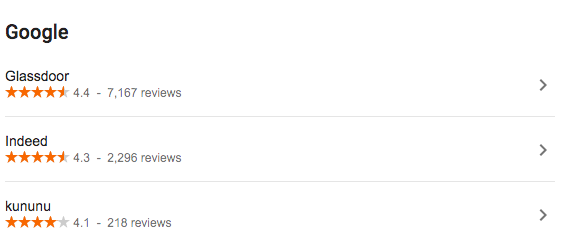
サイトで採用企業のユーザーによる評価を公開する場合は、EmployerAggregateRating 構造化データをサイトに追加してください。EmployerAggregateRating とは、採用企業に対する評価を多数のユーザーから集めたものです。EmployerAggregateRating を追加すると、求職者が仕事を選ぶ際に役立つ情報として、採用企業に関する評価を提供できます。また、Google の求人情報エンリッチ検索において、ブランドが検索結果の目立つ位置に表示されるようになります。
例
JSON-LD コードを使用した EmployerAggregateRating の例を次に示します。
<html>
  <head>
    <title>World's Best Coffee Shop</title>
    <script type="application/ld+json">
    {
      "@context" : "https://schema.org/",
      "@type": "EmployerAggregateRating",
      "itemReviewed": {
        "@type": "Organization",
        "name" : "World's Best Coffee Shop",
        "sameAs" : "https://example.com"
      },
      "ratingValue": 91,
      "bestRating": 100,
      "worstRating": 1,
      "ratingCount" : "10561"
    }
    </script>
  </head>
  <body>
  </body>
</html>
構造化データを追加する方法
構造化データは、ページに関する情報を提供し、ページ コンテンツを分類するための標準化されたデータ形式です。構造化データを初めて使用する場合は、構造化データの仕組みについてをご覧ください。
構造化データの作成、テスト、リリースの概要は次のとおりです。
- 必須プロパティを追加します。使用している形式に基づいて、ページ上の構造化データを挿入する場所をご確認ください。
- ガイドラインに従います。
- リッチリザルト テストでコードを検証し、重大なエラーを修正します。ツールで報告される重大ではない問題の修正も検討してください。構造化データの品質向上に役立ちます(ただし、リッチリザルトの対象となるために必ずしも必要というわけではありません)。
- 構造化データが含まれているページを数ページ導入し、URL 検査ツールを使用して、Google でページがどのように表示されるかをテストします。Google がページにアクセスでき、robots.txt ファイル、
noindexタグ、ログイン要件によってページがブロックされていないことを確認します。ページが正常に表示されたら、Google に URL の再クロールを依頼できます。 - 今後の変更について Google に継続して情報を提供するために、サイトマップを送信することをおすすめします。これは、Search Console Sitemap API で自動化できます。
ガイドライン
求人情報が Google の求人検索で表示されるようにするには、以下のガイドラインに準拠する必要があります。
技術に関するガイドライン
EmployerAggregateRating構造化データを追加したページで、評価がユーザーに表示される状態であることを確認してください。このページに評価コンテンツが含まれていることをユーザーがすぐにわかるようにする必要があります。- 提供する評価情報は、なんらかのカテゴリや項目リストに関する情報ではなく、特定の採用企業についての情報とします。たとえば、「最も働きがいのある職場トップ 10」や「テクノロジー企業」は、特定の採用企業を指すものではありません。
- デフォルトでは、Google はサイトで 5 段階評価(5 が最も高い評価で、1 が最も低い評価)が使われているものと見なしますが、他の評価方法を使用することも可能です。別の評価方法を使う場合は、最高評価と最低評価を指定でき、Google でその評価が 5 段階の星評価に変換されます。
コンテンツ ガイドライン
- ユーザーが自分自身の評価をサイトに投稿できるようにして、サイトではそうしたユーザーの評価をホストする必要があります。
- 評価の数は、ユーザーから提供される実際の評価を反映した値でなければなりません。
- 評価の総得点は、提供された評価から正確に算出する必要があります。
構造化データタイプの定義
ここでは、雇用主の総合評価に関連する構造化データタイプについて説明します。コンテンツがリッチリザルトとして表示されるようにするには、必須プロパティが必要です。
EmployerAggregateRating
EmployerAggregateRating の定義の全文は schema.org/EmployerAggregateRating で確認できます。
Google がサポートするプロパティは、次のとおりです。
| 必須プロパティ | |
|---|---|
itemReviewed |
評価対象の組織。 { "@context" : "https://schema.org/", "@type": "EmployerAggregateRating", "itemReviewed": { "@type": "Organization", "name" : "World's Best Coffee Shop", "sameAs" : "https://www.worlds-best-coffee-shop.example.com" } } |
ratingCount |
サイトに表示される、採用企業の評価の総数。 |
ratingValue |
数字、分数、またはパーセンテージで、アイテムの質の評価を表す数値(例: 「4」、「60%」、「6/10」)。分数やパーセンテージを使用する場合、比率であると認識されます。これは、比の値つまり比率は分数自体またはパーセンテージで表されるためです。数字のデフォルトの尺度は 5 段階評価(1 が最小、5 が最高)です。別の尺度にする場合は、 |
reviewCount
|
レビューを投稿した人の数。評価が関連付けられているかどうかは関係ありません。 |
| 推奨プロパティ | |
|---|---|
bestRating |
この評価システムで使用できる最大値。 |
worstRating |
この評価システムで使用できる最小値。 |
トラブルシューティング
構造化データの実装またはデバッグで問題が発生した場合は、以下のリソースが参考になります。
- コンテンツ管理システム(CMS)を使用している場合や、別の人がサイトを管理している場合は、担当者にサポートを依頼してください。その際は、問題の詳細を含む Search Console のメッセージを必ず転送してください。
- 構造化データを使用するコンテンツが必ず検索結果に表示されるとは限りません。コンテンツがリッチリザルトに表示されないときのよくある原因については、構造化データに関する一般的なガイドラインをご覧ください。
- 構造化データにエラーがある可能性があります。構造化データエラーの一覧と解析不能な構造化データに関するレポートを確認してください。
- 構造化データへの手動による対策がページに対して行われると、ページ上の構造化データが考慮されなくなります(ただし、Google 検索結果にはページは引き続き表示されます)。構造化データの問題を修正するには、手動による対策レポートを使用します。
- コンテンツにガイドライン違反がないか、ガイドラインを再度確認してください。スパム コンテンツまたはスパム マークアップの使用が原因で、問題が発生することがありますが、これは構文の問題ではない可能性があり、リッチリザルト テストでは特定できません。
- 構造化データに関する問題は、サイトのコンテンツが検索結果にどのように表示されるかに影響する可能性があります。リッチリザルトが見つからない場合やリッチリザルトの総数が減少している場合のトラブルシューティング ガイドを使用して、Search Console でこれらの問題を特定、修正、検証する手順を確認してください。
- 再クロールとインデックスの再登録にかかる時間を考慮してください。ページを公開した後、Google がそのページを検出してクロールするまで数日かかる場合があることにご注意ください。クロールとインデックス登録に関する一般的な質問については、Google 検索のクロールとインデックス登録に関するよくある質問をご覧ください。
- Google 検索セントラル フォーラムでも質問を受け付けています。