
パンくずリスト(BreadcrumbList)の構造化データ
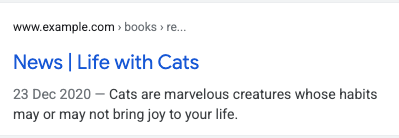
ページに表示されるパンくずリストは、そのページがサイト階層内のどこに位置するかを示しており、ユーザーはサイトを効果的に理解し、移動できます。ユーザーは、パンくずリスト内の最後のパンくずから順番にさかのぼることで、サイトの階層内を 1 レベルずつ上に移動できます。
機能の提供状況
この機能はパソコン版に対応したもので、Google 検索を利用できるすべての地域と言語でご利用いただけます。
構造化データを追加する方法
構造化データは、ページに関する情報を提供し、ページ コンテンツを分類するための標準化されたデータ形式です。構造化データを初めて使用する場合は、構造化データの仕組みについてをご覧ください。
構造化データの作成、テスト、リリースの概要は次のとおりです。
- 必須プロパティを追加します。使用している形式に基づいて、ページ上の構造化データを挿入する場所をご確認ください。
- ガイドラインに従います。
- リッチリザルト テストでコードを検証し、重大なエラーを修正します。ツールで報告される重大ではない問題の修正も検討してください。構造化データの品質向上に役立ちます(ただし、リッチリザルトの対象となるために必ずしも必要というわけではありません)。
- 構造化データが含まれているページを数ページ導入し、URL 検査ツールを使用して、Google でページがどのように表示されるかをテストします。Google がページにアクセスでき、robots.txt ファイル、
noindexタグ、ログイン要件によってページがブロックされていないことを確認します。ページが正常に表示されたら、Google に URL の再クロールを依頼できます。 - 今後の変更について Google に継続して情報を提供するために、サイトマップを送信することをおすすめします。これは、Search Console Sitemap API で自動化できます。
例
Google 検索では、検索結果内のウェブページからの情報を分類する際に、ページの本文内のパンくずリスト マークアップを使用します。以下の使用例に示すように、ユーザーがページにアクセスするときの検索クエリはさまざまです。異なる検索で同じウェブページが返されたとしても、そのコンテンツは Google 検索クエリのコンテキスト内でパンくずリストにより分類されています。フィクションの書籍に関する賞の受賞作を示すページでは、次のようなパンくずリストが使用される場合があります。
単一のパンくずリスト
ページにつながるパンくずリストが 1 つしかない場合は、ページで次のようにパンくずリストを指定できます。
書籍 ›サイエンス フィクション ›受賞作
JSON-LD
JSON-LD を使用してパンくずリストを記述した例です。
<html>
  <head>
    <title>Award Winners</title>
    <script type="application/ld+json">
    {
      "@context": "https://schema.org",
      "@type": "BreadcrumbList",
      "itemListElement": [{
        "@type": "ListItem",
        "position": 1,
        "name": "Books",
        "item": "https://example.com/books"
      },{
        "@type": "ListItem",
        "position": 2,
        "name": "Science Fiction",
        "item": "https://example.com/books/sciencefiction"
      },{
        "@type": "ListItem",
        "position": 3,
        "name": "Award Winners"
      }]
    }
    </script>
  </head>
  <body>
  </body>
</html>
RDFa
RDFa を使用してパンくずリストを記述した例です。
<html>
  <head>
    <title>Award Winners</title>
  </head>
  <body>
    <ol vocab="https://schema.org/" typeof="BreadcrumbList">
      <li property="itemListElement" typeof="ListItem">
        <a property="item" typeof="WebPage"
            href="https://example.com/books">
          <span property="name">Books</span></a>
        <meta property="position" content="1">
      </li>
      ›
      <li property="itemListElement" typeof="ListItem">
        <a property="item" typeof="WebPage"
            href="https://example.com/books/sciencefiction">
          <span property="name">Science Fiction</span></a>
        <meta property="position" content="2">
      </li>
      ›
      <li property="itemListElement" typeof="ListItem">
        <span property="name">Award Winners</span>
        <meta property="position" content="3">
      </li>
    </ol>
  </body>
</html>
microdata
microdata を使用してパンくずリストを記述した例です。
<html>
  <head>
    <title>Award Winners</title>
  </head>
  <body>
    <ol itemscope itemtype="https://schema.org/BreadcrumbList">
      <li itemprop="itemListElement" itemscope
          itemtype="https://schema.org/ListItem">
        <a itemprop="item" href="https://example.com/books">
            <span itemprop="name">Books</span></a>
        <meta itemprop="position" content="1" />
      </li>
      ›
      <li itemprop="itemListElement" itemscope
          itemtype="https://schema.org/ListItem">
        <a itemscope itemtype="https://schema.org/WebPage"
           itemprop="item" itemid="https://example.com/books/sciencefiction"
           href="https://example.com/books/sciencefiction">
          <span itemprop="name">Science Fiction</span></a>
        <meta itemprop="position" content="2" />
      </li>
      ›
      <li itemprop="itemListElement" itemscope
          itemtype="https://schema.org/ListItem">
        <span itemprop="name">Award winners</span>
        <meta itemprop="position" content="3" />
      </li>
    </ol>
  </body>
</html>
HTML
視覚的なデザインの一部としてページ内に挿入する HTML パンくずリストのブロックの例です。
<html>
  <head>
    <title>Award Winners</title>
  </head>
  <body>
    <ol>
      <li>
        <a href="https://www.example.com/books">Books</a>
      </li>
      <li>
        <a href="https://www.example.com/sciencefiction">Science Fiction</a>
      </li>
      <li>
        Award Winners
      </li>
    </ol>
  </body>
</html>
複数のパンくずリスト
ページに移動する方法がサイト内に複数ある場合は、1 つのページに複数のパンくずリストを指定できます。文学賞の受賞作のページに移動するパンくずリストの例の一つを次に示します。
書籍 ›サイエンス フィクション ›受賞作
同じページに移動する別のパンくずリストの例を次に示します。
文学 ›受賞作
JSON-LD
JSON-LD を使用して複数のパンくずリストを記述した例です。
<html>
  <head>
    <title>Award Winners</title>
    <script type="application/ld+json">
    [{
      "@context": "https://schema.org",
      "@type": "BreadcrumbList",
      "itemListElement": [{
        "@type": "ListItem",
        "position": 1,
        "name": "Books",
        "item": "https://example.com/books"
      },{
        "@type": "ListItem",
        "position": 2,
        "name": "Science Fiction",
        "item": "https://example.com/books/sciencefiction"
      },{
        "@type": "ListItem",
        "position": 3,
        "name": "Award Winners"
      }]
    },
    {
      "@context": "https://schema.org",
      "@type": "BreadcrumbList",
      "itemListElement": [{
        "@type": "ListItem",
        "position": 1,
        "name": "Literature",
        "item": "https://example.com/literature"
      },{
        "@type": "ListItem",
        "position": 2,
        "name": "Award Winners"
      }]
    }]
    </script>
  </head>
  <body>
  </body>
</html>
RDFa
RDFa を使用して複数のパンくずリストを記述した例です。
<html>
  <head>
    <title>Award Winners</title>
  </head>
  <body>
    <ol vocab="https://schema.org/" typeof="BreadcrumbList">
      <li property="itemListElement" typeof="ListItem">
        <a property="item" typeof="WebPage"
            href="https://example.com/books">
          <span property="name">Books</span></a>
        <meta property="position" content="1">
      </li>
      ›
      <li property="itemListElement" typeof="ListItem">
        <a property="item" typeof="WebPage"
            href="https://example.com/books/sciencefiction">
          <span property="name">Science Fiction</span></a>
        <meta property="position" content="2">
      </li>
      ›
      <li property="itemListElement" typeof="ListItem">
        <a property="item" typeof="WebPage"
            href="https://example.com/books/sciencefiction/awardwinners">
          <span property="name">Award Winners</span></a>
        <meta property="position" content="3">
      </li>
    </ol>
    <ol vocab="https://schema.org/" typeof="BreadcrumbList">
      <li property="itemListElement" typeof="ListItem">
        <a property="item" typeof="WebPage"
            href="https://example.com/literature">
          <span property="name">Literature</span></a>
        <meta property="position" content="1">
      </li>
      ›
      <li property="itemListElement" typeof="ListItem">
        <span property="name">Award Winners</span>
        <meta property="position" content="2">
      </li>
    </ol>
  </body>
</html>
microdata
microdata を使用して複数のパンくずリストを記述した例です。
<html>
  <head>
    <title>Award Winners</title>
  </head>
  <body>
    <ol itemscope itemtype="https://schema.org/BreadcrumbList">
      <li itemprop="itemListElement" itemscope
          itemtype="https://schema.org/ListItem">
        <a itemprop="item" href="https://example.com/books">
            <span itemprop="name">Books</span></a>
        <meta itemprop="position" content="1" />
      </li>
      ›
      <li itemprop="itemListElement" itemscope
          itemtype="https://schema.org/ListItem">
        <a itemscope itemtype="https://schema.org/WebPage"
           itemprop="item" itemid="https://example.com/books/sciencefiction"
           href="https://example.com/books/sciencefiction">
          <span itemprop="name">Science Fiction</span></a>
        <meta itemprop="position" content="2" />
      </li>
      ›
      <li itemprop="itemListElement" itemscope
          itemtype="https://schema.org/ListItem">
        <a itemprop="item" href="https://example.com/books/sciencefiction/awardwinners">
          <span itemprop="name">Award Winners</span></a>
        <meta itemprop="position" content="3" />
      </li>
    </ol>
    <ol itemscope itemtype="https://schema.org/BreadcrumbList">
      <li itemprop="itemListElement" itemscope
          itemtype="https://schema.org/ListItem">
        <a itemprop="item" href="https://example.com/literature">
          <span itemprop="name">Literature</span></a>
        <meta itemprop="position" content="1" />
      </li>
      ›
      <li itemprop="itemListElement" itemscope
          itemtype="https://schema.org/ListItem">
        <span itemprop="name">Award Winners</span>
        <meta itemprop="position" content="2" />
      </li>
    </ol>
  </body>
</html>
HTML
視覚的なデザインの一部としてページ内に挿入する HTML パンくずリストのブロックの例です。
<html>
  <head>
    <title>Award Winners</title>
  </head>
  <body>
    <ol>
      <li>
        <a href="https://www.example.com/books">Books</a>
      </li>
      <li>
        <a href="https://www.example.com/books/sciencefiction">Science Fiction</a>
      </li>
      <li>
        Award Winners
      </li>
    </ol>
    <ol>
      <li>
        <a href="https://www.example.com/literature">Literature</a>
      </li>
      <li>
        Award Winners
      </li>
    </ol>
  </body>
</html>
ガイドライン
Google 検索でパンくずリストとともに表示されるようにするには、下記のガイドラインを遵守する必要があります。
パンくずリストには URL 構造をそのまま反映させるのではなく、ユーザーが特定のページにたどり着くまでの一般的な経路を示すことをおすすめします。最上位パス(サイトのドメイン名またはホスト名)やページ自体にパンくずリストの ListItem を含める必要はありません。
構造化データタイプの定義
パンくずリストを指定するには、少なくとも 2 つの ListItems を含む BreadcrumbList を定義します。コンテンツがパンくずリストとともに表示されるようにするには、必須プロパティを含める必要があります。
BreadcrumbList
BreadcrumbList は、リスト内のすべての要素を保持するコンテナ アイテムです。BreadcrumbList の定義の全文は schema.org/BreadcrumbList で確認できます。
Google がサポートするプロパティは、次のとおりです。
| 必須プロパティ | |
|---|---|
itemListElement |
特定の順序でリストされたパンくずの配列。各パンくずリストを { "@context": "https://schema.org", "@type": "BreadcrumbList", "itemListElement": [{ "@type": "ListItem", "position": 1, "name": "Books", "item": "https://example.com/books" },{ "@type": "ListItem", "position": 2, "name": "Authors", "item": "https://example.com/books/authors" },{ "@type": "ListItem", "position": 3, "name": "Ann Leckie", "item": "https://example.com/books/authors/annleckie" }] } |
ListItem
ListItem には、リスト内の個々のアイテムに関する詳細情報を含めます。ListItem の定義の全文は schema.org/ListItem で確認できます。
Google がサポートするプロパティは、次のとおりです。
| 必須プロパティ | |
|---|---|
item |
パンくずを表すウェブページの URL。
パンくずがパンくずリストの最後のアイテムである場合、 |
name |
ユーザーに表示されるパンくずのタイトル。 |
position |
パンくずリスト内のパンくずの位置。位置が 1 の場合、リスト内の最初のパンくずを示します。 |
Search Console でリッチリザルトを監視する
Search Console は、Google 検索におけるページのパフォーマンスを監視できるツールです。Search Console に登録していなくても Google 検索結果に表示されますが、登録することにより、Google がサイトをどのように認識しているかを把握して改善できるようになります。次の場合は Search Console を確認することをおすすめします。
構造化データを初めてデプロイした後
ページがインデックスに登録されたら、関連するリッチリザルトのステータス レポートを使用して、問題がないかどうかを確認します。有効な項目が増え、無効な項目が増えていない状態が理想的です。構造化データに問題が見つかった場合の手順は次のとおりです。
- 無効な項目を修正します。
- 一般公開 URL の検査を行い、問題が解決したかどうかを確認します。
- ステータス レポートを使用して検証をリクエストします。
新しいテンプレートをリリースした後やコードを更新した後
ウェブサイトに大幅な変更を加えた場合は、構造化データの無効な項目が増加しないかどうか監視します。- 無効な項目が増加した場合は、新しく公開したテンプレートが正常に機能していないか、既存のテンプレートの新しい操作方法に問題があると考えられます。
- 有効な項目が減少している(無効な項目の増加と一致しない)場合は、ページに構造化データが埋め込まれていない可能性があります。URL 検査ツールを使用して問題の原因を特定します。
トラフィックを定期的に分析する場合
パフォーマンス レポートを使用して Google 検索のトラフィックを分析します。このデータから、検索でページがリッチリザルトとして表示される頻度、ユーザーがページをクリックする頻度、検索結果におけるページの平均掲載順位がわかります。この結果は、Search Console API を使用して自動的に取得することもできます。トラブルシューティング
構造化データの実装またはデバッグで問題が発生した場合は、以下のリソースが参考になります。
- コンテンツ管理システム(CMS)を使用している場合や、別の人がサイトを管理している場合は、担当者にサポートを依頼してください。その際は、問題の詳細を含む Search Console のメッセージを必ず転送してください。
- 構造化データを使用するコンテンツが必ず検索結果に表示されるとは限りません。コンテンツがリッチリザルトに表示されないときのよくある原因については、構造化データに関する一般的なガイドラインをご覧ください。
- 構造化データにエラーがある可能性があります。構造化データエラーの一覧と解析不能な構造化データに関するレポートを確認してください。
- 構造化データへの手動による対策がページに対して行われると、ページ上の構造化データが考慮されなくなります(ただし、Google 検索結果にはページは引き続き表示されます)。構造化データの問題を修正するには、手動による対策レポートを使用します。
- コンテンツにガイドライン違反がないか、ガイドラインを再度確認してください。スパム コンテンツまたはスパム マークアップの使用が原因で、問題が発生することがありますが、これは構文の問題ではない可能性があり、リッチリザルト テストでは特定できません。
- 構造化データに関する問題は、サイトのコンテンツが検索結果にどのように表示されるかに影響する可能性があります。リッチリザルトが見つからない場合やリッチリザルトの総数が減少している場合のトラブルシューティング ガイドを使用して、Search Console でこれらの問題を特定、修正、検証する手順を確認してください。
- 再クロールとインデックスの再登録にかかる時間を考慮してください。ページを公開した後、Google がそのページを検出してクロールするまで数日かかる場合があることにご注意ください。クロールとインデックス登録に関する一般的な質問については、Google 検索のクロールとインデックス登録に関するよくある質問をご覧ください。
- Google 検索セントラル フォーラムでも質問を受け付けています。