
Aggregator unit in Google Search
People in European Economic Area (EEA) countries who are searching for things like "hotels near me" may notice that the experience has changed. These experiences include the aggregator units and supplier units. This page explains how the aggregator unit works and how businesses that serve users in EEA can express interest in the aggregator unit.
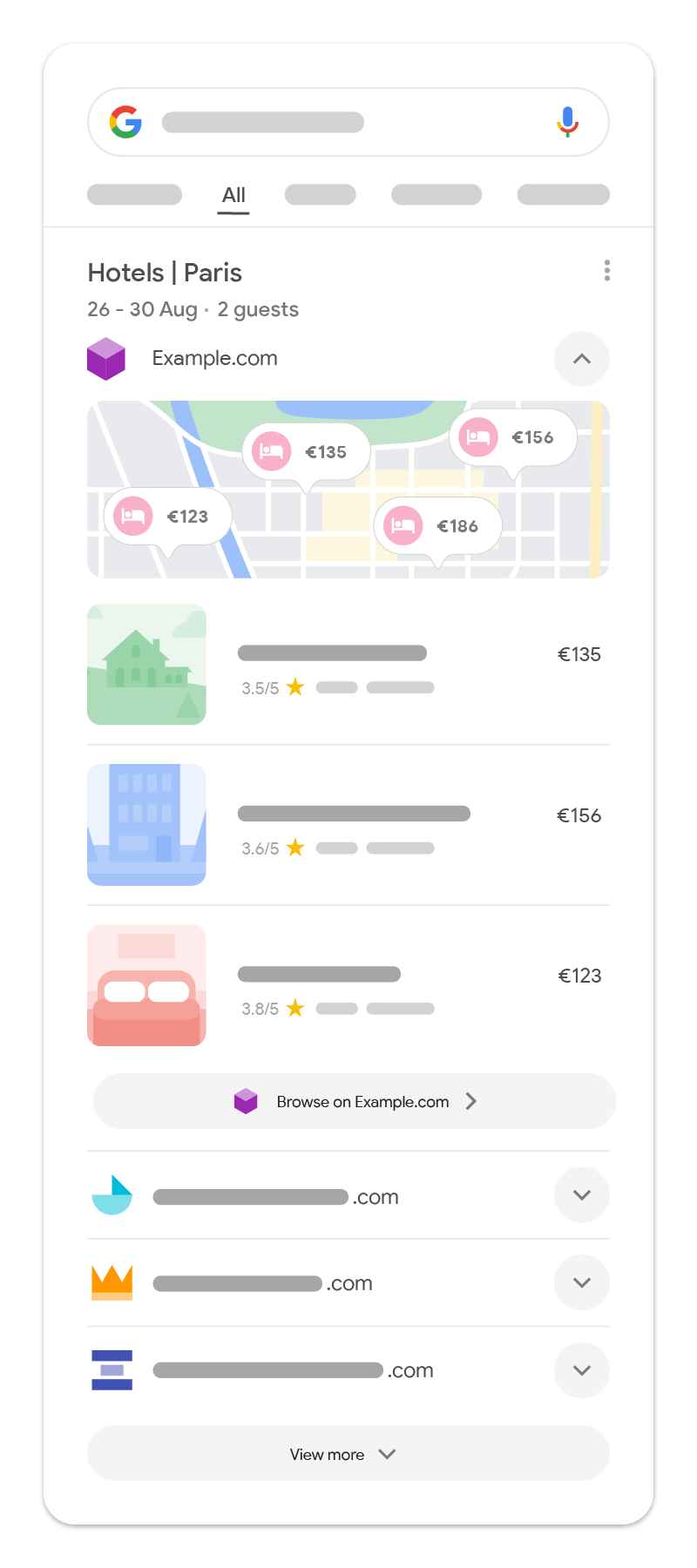
How the aggregator unit works
The aggregator unit is a multi-provider feature designed for Vertical Search Services (VSSs), including Online Travel Agencies (OTAs), Comparison Shopping Services, metasearch engines, and directories. Aggregator units allow users to more easily see results from aggregators for queries related to hotels, flights, long-distance trains, products, and local businesses.
In this unit, eligible aggregators populate their unit with results relevant to the user's query. The top-ranked provider's results are expanded by default. For example, if a user searched for "hotels in paris", they may see a list of top-ranked hotels with photos, prices, or star ratings from an eligible provider. User clicks within the unit lead to the web page provided by the aggregator.
Users have the ability to select a different provider from a list of alternative aggregators, if available, expanding a unit populated with results from the new aggregator. Only one aggregator unit will show at a time.
Feature availability
The aggregator unit is available to users in the EEA for queries related to hotels, flights, long distance trains or buses, products, and local businesses.
Eligibility criteria
Businesses are eligible to appear in the aggregator unit when they are approved as a Vertical Search Service (VSS), they provide the necessary data, and they meet the established quality standards to participate:
-
Express interest: If your business serves users in EEA, and you would like to express
interest in participating in the aggregator units, you can start by filling out the applicable
form:
- For ground transportation, flight, hotel, and local business queries, fill out the Google Search Aggregator Features form.
- For product queries, contact us through the comparison shopping services contact form.
- Have relevant content: Given the aggregator unit will only appear in response to certain queries (for example, for hotels, flights, ground transportation, and local businesses), businesses must have the relevant content for the respective query to be eligible for the aggregator unit.
-
Provide data: Eligible aggregators that wish to participate must provide data to populate
a unit by direct data feed integrations or real-time APIs for queries such as flights or long
distance trains and buses. For more information on the data required for the aggregator unit,
see the applicable guides:
- For hotel queries, see the Lodging Point of Interest Feed documentation.
- For ground transportation queries, see the Transport features API documentation.
- For flight queries, see the Partner standard Live API documentation.
- For product queries, learn how to start showing product pages across Google.
- For local business queries, see the Local Point of Interest Feed documentation.
- Comply with Google Search content policies: All content in the aggregator unit must comply with Google Search's content policies.
Aggregator unit best practices
The unit is designed to help users connect with aggregators when it is helpful for the query. For flight and transport queries, the unit is populated by real-time APIs. For lodging and local business queries, the unit is populated by direct data feed integrations. Just like all of our search features, we show information in the unit based on what is most helpful to users for their queries. To learn more about how we think about Search quality, you can view the Search Quality Raters guidelines, as outlined in our blog.
To help deliver the best possible experience for users, we encourage you to follow these best practices for this feature:
-
Include rich entity details: Where available, providing more comprehensive attributes
helps users better evaluate options. Depending on your business type, consider including:
- Images of the entity
- Detailed descriptions and specifications
- Verified user ratings and review counts
- Specific categories (for example, "Boutique hotel" or "Eco-resort" instead of just a generic "Hotel")
- Key amenities, features, and operating hours
- Use accurate titles: Factual, descriptive titles formatted in title case are easier for users to read. We recommend avoiding all caps, excessive punctuation, emoji, or promotional text (such as "BEST DEALS" or "Free shipping") in entity names.
- Provide high-quality imagery: Clear, original photography gives users a better sense of the place or service. For the best presentation, use images with clean backgrounds without watermarks or promotional overlay badges. Where possible, provide high-resolution photos.
- Keep pricing and availability up to date: Accurate data helps prevent frustrating experiences for users. Ensure prices and availability in feeds match the landing page as closely as possible, and refresh feeds regularly to remove expired or out-of-stock listings.
- Monitor your overall performance: Keep up with what's happening across Search with Search Console.