

Komponent Znaczniki miejsc
Komponent Place Markers umożliwia tworzenie dostosowywanych adnotacji na mapie, które wyświetlają kluczowe informacje o miejscu bezpośrednio na mapie. Możesz wyświetlać treści takie jak ocena miejsca, typ miejsca, stan (otwarte lub zamknięte), przedział cenowy lub tekst niestandardowy (np. wygenerowana przez AI etykieta lub numer planu podróży). Dzięki temu użytkownicy mogą uzyskać więcej informacji o mapie bez konieczności klikania szczegółowej karty miejsca.
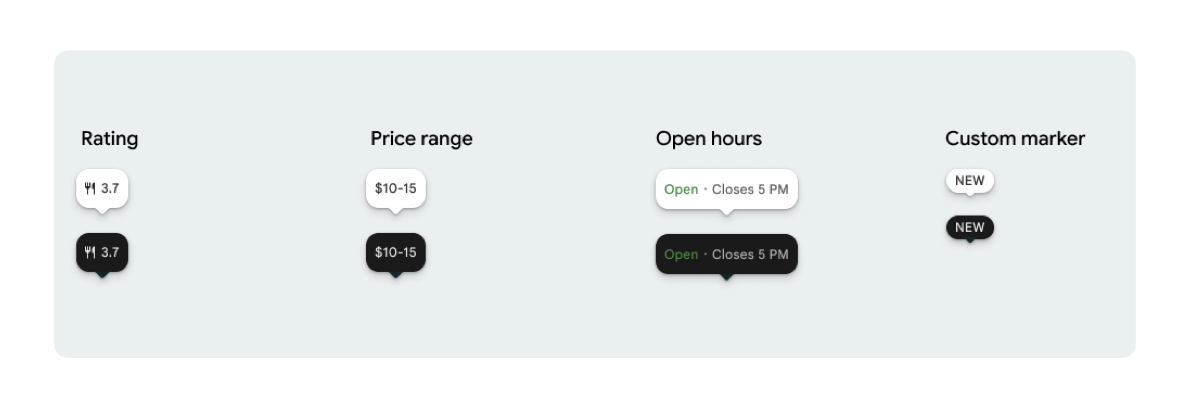
Możesz wyświetlić 1 ikonę znacznika i opcjonalny tekst znacznika dla każdego elementu PlaceMarker.
Dostępne ikony:
Type: typ miejsca.None: brak ikony.
Rating: ocena.PriceRange: przedział cenowy (np. 10–20 zł).OpenStatus: czy firma jest otwarta czy zamknięta.Custom: tekst niestandardowy (np. „POPULAR”).
Odwołaj się do miejsca, używając identyfikatora miejsca (PlaceId), nazwy zasobu (ResourceName) lub współrzędnych geograficznych (Coordinates).
Wymagania dotyczące wyświetlania i podawania źródła
Gdy wyświetlane są znaczniki mapy z interfejsu Places UI Kit, nie mogą one pojawiać się pojedynczo. Muszą być interaktywne i po kliknięciu lub dotknięciu otwierać powiązany komponent informacji o miejscu lub lightbox, aby zapewnić wymagany branding Google, informację o pochodzeniu danych o współtwórcy i proces zgłaszania problemu.
W przypadku ograniczonej przestrzeni zapoznaj się z naszymi wymaganiami dotyczącymi atrybucji zdjęć i opinii.
Przykłady znacznika miejsca
Udostępniamy funkcje Jetpack Compose @Composable, aby wyeliminować narzut związany z otoczką View-to-Compose i uniknąć problemów z niedopasowaniem motywu.
Podstawowe dostosowywanie znaczników
W przykładzie kodu poniżej pokazujemy podstawowe dostosowania znacznika miejsca, w tym ukrywanie trójkątnego elementu dymka domyślnego znacznika.
Kotlin
import androidx.compose.runtime.Composable
import com.google.android.libraries.places.compose.PlaceMarker
import com.google.android.libraries.places.compose.marker.MarkerIcon
import com.google.android.libraries.places.compose.marker.MarkerText
import com.google.android.libraries.places.compose.PlaceReference

@Composable
fun DefaultMarker() {
    PlaceMarker(
        reference = PlaceReference.PlaceId("PLACE_ID"),
        icon = MarkerIcon.None,
        beakPresence = false, // remove beak
    )
}

@Composable
fun RatingMarker() {
    PlaceMarker(
        reference = PlaceReference.PlaceId("PLACE_ID"),
        icon = MarkerIcon.None,
        text = MarkerText.Rating
    )
}

@Composable
fun TypeAndRatingMarker() {
    PlaceMarker(
        reference = PlaceReference.PlaceId("PLACE_ID"),
        icon = MarkerIcon.Type,
        text = MarkerText.Rating

    )
}

@Composable
fun PriceRangeMarker() {
    PlaceMarker(
        reference = PlaceReference.ResourceName("places/PLACE_RESOURCE_NAME"),
        icon = MarkerIcon.None,
        text = MarkerText.PriceRange
    )
}

@Composable
fun OpenStatusMarker() {
   PlaceMarker(
       reference = PlaceReference.Coordinates(latitude = 37.7749, longitude = -122.4194),
        icon = MarkerIcon.None,
        text = MarkerText.OpenStatus
   )
}

@Composable
fun CustomTextMarker() {
    PlaceMarker(
        reference = PlaceReference.PlaceId("PLACE_ID"),
        icon = MarkerIcon.None,
        // Custom text accepts a String to display a number (e.g. "3") or text (e.g. "NEW")
        text = MarkerText.Custom("NEW")
    )
}
Tworzenie detektora kliknięć
Możesz podać wywołanie zwrotne onClick, aby wywoływać niestandardowe działania po kliknięciu samodzielnego markera. Gdy jednak znacznik jest renderowany na mapie (np. w MarkerComposable), zdarzenia kliknięcia są przechwytywane przez mapę. W takim przypadku musisz użyć funkcji obsługi MarkerComposable onClick zamiast funkcji obsługi markera.
Poniższy przykład kodu pokazuje, jak używać modułu obsługi MarkerComposable onClick.
Kotlin
import android.util.Log
import androidx.compose.runtime.Composable
import com.google.android.libraries.places.compose.PlaceMarker
import com.google.android.libraries.places.compose.marker.MarkerIcon
import com.google.android.libraries.places.compose.PlaceReference


/**
 * PlaceMarker used outside of a map (e.g. in a list, bottom sheet, or custom overlay).
 *
 * There is no host component that provides a default click behavior here, so PlaceMarker's own
 * `onClick` is the only way for a developer to react to a tap. This is why `onClick` must stay
 * on the PlaceMarker API.
 */
@Composable
fun ClickableMarkerWithCustomConfig() {
   PlaceMarker(
       reference = PlaceReference.PlaceId("PLACE_ID"),
       icon = MarkerIcon.Type,

       onClick = { place ->
           openPlaceCard(place.id) // developer might want to open the place card
           Log.i("PlacesMarker", "Marker was tapped by user!")
       }
   )
}

/**
 * PlaceMarker used as the content of a MarkerComposable on a GoogleMap.
 *
 * MarkerComposable does NOT add PlaceMarker to the touch-input hierarchy: it snapshots the
 * composable into a bitmap and hands that bitmap to the Maps renderer as the marker icon. The
 * rendered marker is a map object, not a Compose node, so:
 *
 *   - PlaceMarker's own `onClick` would never be invoked here (no touch events ever reach it).
 *   - The tap is delivered by the Maps SDK to MarkerComposable's `onClick`, which is the only
 *     click entry point on a map.
 *
 * Accordingly, the state-based `PlaceMarker(state = ...)` overload used below deliberately does
 * not expose an `onClick` parameter, so the correct handler is the only one available.
 */
@Composable
fun PlaceMarkerOnMap(markerState: PlaceMarkerState) {
  GoogleMap(
    modifier = Modifier.fillMaxSize(),
    cameraPositionState = rememberCameraPositionState(),
  ) {
    markerState.location?.let { position ->
      MarkerComposable(
        state = rememberUpdatedMarkerState(position = position),
        // this is the click handler for the map use case.
        onClick = {
          markerState.place?.let { place -> openPlaceCard(place.id) }
          true // consume the event
        },
      ) {
        PlaceMarker(state = markerState)
      }
    }
  }
}
Obsługa stanu wczytywania i wywołań zwrotnych
Poniższy przykład kodu pokazuje, jak przekazywać wywołania zwrotne do obsługi błędów renderowania lub brakujących danych.
Kotlin
import android.util.Log
import androidx.compose.runtime.Composable
import com.google.android.libraries.places.compose.PlaceMarker
import com.google.android.libraries.places.compose.marker.MarkerIcon
import com.google.android.libraries.places.compose.PlaceReference

@Composable
fun StatusHandlingMarker() {
    PlaceMarker(
        reference = PlaceReference.PlaceId("PLACE_ID"),
        icon = MarkerIcon.Type,
        // Triggered when attribute data is successfully fetched and the marker is rendered.
        // Returns a minimal Place object with ID, location (LatLng), and viewport fields set.
        onMarkerLoaded = { place ->
            Log.i("PlacesMarker", "Marker successfully loaded for place ID: ${place.id}")
        },
        // Triggered when data fetching fails or required attribute data is missing for the place.
        // Returns an optional Place object and an Exception describing the root cause.
        onMarkerLoadFailed = { place, exception ->
            Log.e("PlacesMarker", "Failed to load marker for place ID: ${place?.id}", exception)
        }
    )
}
Używanie PlaceMarkerState do umieszczania znaczników na mapie
Obiekt Place jest zwracany z lokalizacją i obszarem widoku, co pomaga zdecydować, gdzie umieścić znacznik.
Kotlin
// Step 1: Obtain configured handle in a single 1-line call (PlaceMarker mounted internally)
val markerState = rememberPlaceMarkerState(
  reference = PlaceReference.PlaceId(placeId),
  icon = MarkerIcon.Type
)

// Step 2: Pass PlaceMarkerState.location and PlaceMarker(state = PlaceMarkerState) directly to the map marker
GoogleMap(...) {
  markerState.location?.let { position ->
    MarkerComposable(
      state = rememberMarkerState(position = position),
      onClick = {
        markerState.place?.let { place ->
          // Handle marker click
        }
        true
      }
    ) {
      PlaceMarker(state = markerState) // Render marker UI content directly on map canvas
    }
  }
}
Skalowanie znacznika do rozmiaru niestandardowego
Kotlin
// Off the map: scale with a one-line modifier.
// Modifier.scale is a draw-time transform, so the bubble, beak, icon and text all scale together.
@Composable
fun ScaledMarker() {
  PlaceMarker(
    reference = PlaceReference.PlaceId(placeId),
    icon = MarkerIcon.Type,
    text = MarkerText.Rating,
    modifier = Modifier.scale(2.1f),
  )
}

// On the map: scale by overriding LocalDensity.
// MarkerComposable snapshots its content into a marker bitmap sized to the measured layout bounds.
// Modifier.scale does not change those bounds, so the marker would be clipped and blurry. Scaling
// the density re-measures every dp and sp inside the marker, so the bitmap, the layout bounds and
// the map hit target all grow with it.
@Composable
fun ScaledMarkerOnMap(markerState: PlaceMarkerState) {
  val density = LocalDensity.current
  val scaledDensity = remember(density) {
    Density(density = density.density * 2.1f, fontScale = density.fontScale * 2.1f)
  }
  GoogleMap(...) {
    markerState.location?.let { position ->
      MarkerComposable(
        state = rememberUpdatedMarkerState(position = position),
        anchor = Offset(0.5f, 1.0f),
      ) {
        CompositionLocalProvider(LocalDensity provides scaledDensity) {
          PlaceMarker(state = markerState)
        }
      }
    }
  }
}