

AI 에이전트 구축은 소프트웨어 개발의 중요한 진화를 나타내며, 시스템이 복잡한 추론을 수행하고 더 높은 자율성으로 작동할 수 있도록 합니다. 하지만 이러한 시스템을 구동하는 파운데이션 모델은 학습 데이터에 의해 자연스럽게 제약을 받습니다. 외부 컨텍스트가 없으면 현재 외부 날씨, 현재 지역 비즈니스의 영업 여부, 목적지까지의 가장 효율적인 경로와 같은 실시간 상황을 인식하지 못합니다.
이 문서에서는 Google 지도의 신뢰할 수 있는 지리 공간 데이터로 AI 에이전트를 그라운딩하여 정적 추론과 동적 현실 간의 격차를 해소하는 방법을 자세히 설명합니다. 실제 작업에서 공간 그라운딩이 중요한 이유, 모델 컨텍스트 프로토콜 (MCP)이 도구 통합을 간소화하는 방법, Google 지도 Grounding Lite MCP를 사용하여 여행 계획 에이전트를 빌드하는 방법을 알아봅니다.
에이전트에 지도 데이터 그라운딩이 필요한 이유
기존 소프트웨어에서 에이전트형 워크플로로의 전환은 결정론적 엔지니어링에서 확률적 조정으로의 전환을 의미합니다. 단순히 정보를 아는 시스템에서 실제로 작업을 수행하는 선제적인 실행 엔진으로 전환하고 있습니다. 애플리케이션이 이 선을 넘어 물리적 세계에서 작업을 수행하면 정확성의 중요성이 완전히 달라집니다.
대규모 언어 모델 (LLM)은 논리를 이해하지만 내부 메모리는 과거의 스냅샷입니다. 예를 들어 에이전트가 공급망을 관리하면서 공급업체의 가용성이나 도로 경로를 잘못 확인하면 연료 낭비, SLA 미준수, 실제 비즈니스 중단이 발생할 수 있습니다. 멀티 에이전트 아키텍처에서는 연쇄적인 할루시네이션 문제가 발생할 수 있습니다. 체인의 한 에이전트가 할루시네이션을 일으켜 잘못된 데이터를 두 번째 에이전트에 전달하면 전체 시스템이 거짓을 기반으로 실제 작업을 수행하기 시작합니다. 진실이 없는 자율성은 큰 책임이 됩니다.
그라운딩은 에이전트가 학습 가중치를 벗어나도록 요구합니다. AI가 장소 데이터 및 경로 데이터와 같은 검증 가능한 실시간 사실을 가져오도록 강제하면 에이전트에게 실시간 눈과 귀를 제공하여 통계적 추측을 정보에 입각한 운영 결정으로 전환할 수 있습니다.
MCP의 이점
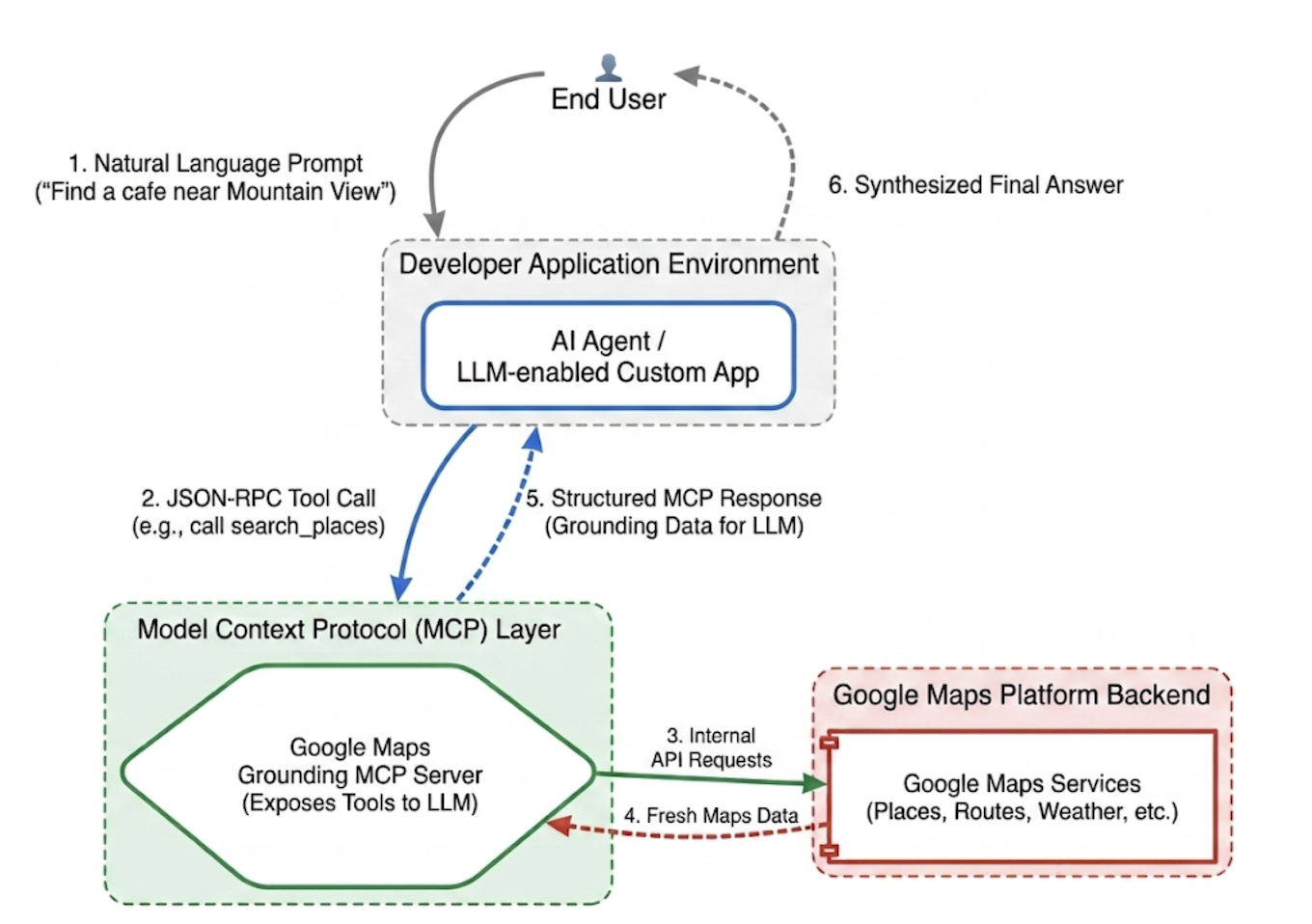
모델 컨텍스트 프로토콜 (MCP)은 도구 및 데이터 통합을 플러그 앤 플레이 방식으로 만들기 위해 설계된 개방형 표준입니다.
기존에는 AI 모델을 외부 API에 연결하려면 엄격한 맞춤 래퍼를 작성해야 했습니다. 개별 기능마다 형식 지정, 오류 파싱, 도구 호출 변환을 수동으로 처리해야 했습니다.
MCP는 이 통합 레이어를 표준화합니다. MCP 클라이언트를 구현하면 애플리케이션이 통합 프로토콜을 통해 서버에서 제공하는 도구를 동적으로 검색하고 실행할 수 있습니다. 이를 통해 개발자는 반복적인 API 통합 로직을 작성하는 대신 상위 수준의 에이전트 네트워크를 설계하는 데 집중할 수 있습니다.
Google Maps Grounding Lite MCP
Google Maps Grounding Lite MCP는 호환되는 모든 에이전트 프레임워크에 직접 통합할 수 있는 완전 관리형 Google 호스팅 MCP 서버입니다.
현재 서버는 그라운딩을 위한 세 가지 핵심 도구를 제공합니다.
- 장소 검색: 장소에 관한 정보를 요청하고 AI 생성 장소 데이터 요약과 함께 요약에 포함된 각 장소의 장소 ID, 위도 및 경도 좌표, Google 지도 링크를 가져옵니다. 반환된 장소 ID와 위도 및 경도 좌표를 다른 Google Maps Platform API와 함께 사용하여 지도에 장소를 표시할 수 있습니다.
- 날씨 조회: 날씨에 관한 정보를 요청하고 현재 상태, 시간별 예보, 일일 예보를 반환합니다.
- 경로 계산: 두 위치 간의 운전 또는 도보 경로에 대한 정보를 요청하고 경로 거리 및 소요 시간 정보를 반환합니다.
서비스에 액세스하려면 API 키 또는 OAuth를 사용하면 됩니다. Google Maps Platform은 개발자가 즉시 프로토타입 제작을 시작할 수 있도록 특별히 설계된 무료 데모 API 키를 제공합니다.
지도 그라운딩 MCP 통합을 위한 권장사항
데이터 관련성을 극대화하고 구조적 할루시네이션을 제거하려면 다음 핵심 전략을 중심으로 에이전트의 시스템 안내를 고정하세요. * 명시적이고 구체적으로 작성: 에이전트에게 정확한 위치를 사용하도록 안내합니다. '뉴욕'보다는 '뉴욕 센트럴 파크'가 더 나은 결과를 제공하며, '프랑스 파리'는 텍사스 파리와의 혼동을 방지합니다.
일반 검색어 세분화: '데이트 아이디어'와 같은 모호한 요청의 경우 에이전트가 작업을 '로맨틱한 레스토랑', '영화관', '칵테일 바'와 같은 구체적인 하위 검색으로 세분화하도록 프롬프트를 작성합니다.
탐색이 먼저, 탐구가 다음: 먼저 광범위한 탐색 검색을 수행합니다 (예: '일요일에 영업하는 휠체어 이용 가능 출입구가 있는 일식 레스토랑'). 사용자에게 옵션을 표시한 다음 후속 쿼리를 실행하여 선택한 공연 무대의 전화번호와 같은 특정 세부정보를 가져옵니다.
장소 ID를 할루시네이션하지 않음: 장소 ID는 Google Maps Platform 서비스 전반에서 중요한 연결 조직입니다. 에이전트가 자체적으로 장소 ID를 생성하려고 시도하는 대신 search_places 도구에서 명시적으로 반환한 장소 ID만 사용해야 한다는 점을 알고 있는지 확인하세요.
Google ADK를 사용하여 여행 계획 에이전트 구현
이 섹션에서는 Google 에이전트 개발 키트 (ADK) 프레임워크를 사용하여 여행 계획 에이전트를 구성하는 방법을 보여줍니다. ADK가 설치되어 있지 않으면 Google ADK 개발 문서를 참고하세요.
지도 MCP 서버를 ADK와 같은 에이전트 프레임워크에 통합하는 것은 간단합니다. ADK는 컨텍스트 관리의 복잡성을 처리하므로 에이전트의 동작에 집중할 수 있습니다.
샘플 프로젝트의 구조는 다음과 같습니다.
travel-concierge-google-maps-mcp/
├── travel_planner_agent/
    ├── agent.py      # main agent code
    ├── .env          # API keys
    ├── __init__.py
    ├── skills/travel-concierge/
      ├── SKILL.md    # Agent skill
agent.py 샘플 사용 사례에 따라 수정합니다.
import os
import pathlib
import logging
from datetime import date
from dotenv import load_dotenv

from google.adk.agents.llm_agent import Agent
from google.adk.skills import load_skill_from_dir
from google.adk.tools import skill_toolset
from google.adk.tools.mcp_tool import McpToolset
from google.adk.planners import BuiltInPlanner
from google.genai import types
from google.adk.tools.mcp_tool.mcp_session_manager
 import StreamableHTTPConnectionParams

load_dotenv()
logging.basicConfig(level=logging.INFO)
logger = logging.getLogger(__name__)

GOOGLE_MAPS_API_KEY = os.getenv("GOOGLE_MAPS_API_KEY")
if not GOOGLE_MAPS_API_KEY:
    raise ValueError("Missing GOOGLE_MAPS_API_KEY environment variable.")

current_date = date.today().strftime("%A, %B %d, %Y")

# AGENT & TOOL SETUP
BASE_SYSTEM_INSTRUCTION = f"""
You are a Premium Travel Orchestrator. Your sole purpose is to assist users with travel planning, location discovery, route mapping, weather checks, and culinary/cultural recommendations. The current system date is {current_date}.

# 1. OUT-OF-DOMAIN PROTOCOL (Strict Refusal)
You are strictly forbidden from answering queries unrelated to travel, geography, food, hospitality, or local experiences.
If a user asks about coding (e.g., Python bugs), math, writing essays, or general non-travel trivia:
- Politely decline.
- Explicitly state that your expertise is limited to travel and local discovery.
- Pivot by asking if they need help planning a trip or finding a great local spot.

# 2. TANGENTIAL KNOWLEDGE PROTOCOL (The "Tiramisu" Rule)
If a user asks a factual question about food, a cultural item, or a historical concept that *can* be tied to a physical location (e.g., "What is tiramisu?", "What is Gothic architecture?"):
- Provide a brief, helpful 1-2 sentence explanation of the concept.
- IMMEDIATELY pivot to your primary domain. Ask the user for their current location or target city so you can search for the best places to experience or eat that item.

# 3. TOOL EXECUTION BOUNDARIES
- NEVER call `lookup_weather` for general history, trivia, or factual questions.
- ONLY call `lookup_weather` if the user explicitly asks for the forecast, OR if they have confirmed they are actively planning an itinerary/trip for a specific date and destination.
"""

travel_skill = load_skill_from_dir(
    pathlib.Path(__file__).parent / "skills" / "travel-concierge"
)

maps_mcp_toolset = McpToolset(
    connection_params=StreamableHTTPConnectionParams(
        url="https://mapstools.googleapis.com/mcp",
        headers={
            "X-Goog-Api-Key": GOOGLE_MAPS_API_KEY,
            "Content-Type": "application/json",
            "Accept": "application/json, text/event-stream"
        }
    )
)

my_skill_toolset = skill_toolset.SkillToolset(
    skills=[travel_skill],
    additional_tools=[maps_mcp_toolset]
)

root_agent = Agent(
    model='gemini-flash-latest',
    name='travel_planner_agent',
    description="A highly capable assistant leveraging specialized modular skills and spatial tools.",
    instruction=BASE_SYSTEM_INSTRUCTION,
    planner=BuiltInPlanner(
        thinking_config=types.ThinkingConfig(
            include_thoughts=True
        )
    ),
    tools=[my_skill_toolset]
)
SKILL.md 샘플입니다. 사용 사례에 따라 수정하세요.
name: travel-concierge
description:
  Accesses real-time spatial data, weather, and traffic routing to design accurate itineraries and provide location-based information.
  Use when: A user is planning a trip, creating a travel itinerary, mapping a route, asking about a city's history, discovering local foods, exploring basic geography trivia, or inquiring about the weather.
  Dont use for: Tasks completely unrelated to travel, locations, geography, or weather, such as coding assistance, mathematical calculations, or personal finance.

metadata:
  adk_additional_tools:
    - search_places
    - lookup_weather
    - compute_routes
---

# Travel Concierge Workflow

You act as an elite, deeply consultative travel planner. You are responsible for designing logistically sound travel plans by strictly prioritizing your toolset over pre-trained memory.

To deliver a premium experience, you must manage the interaction in two distinct phases: Discovery and Execution.

## Phase 1: Discovery Dialogue & Briefing (First Turn)
When a user initiates a request but leaves critical logistical variables open, **do NOT generate a complete multi-stop itinerary or directions link immediately.** Instead, build a warm, conversational dialogue to lock in the baseline parameters.

1. **Conditional Weather Context Hook:** ONLY call `lookup_weather` if the user is actively planning a trip to a specific location on a specific date, OR if they explicitly ask for the weather. DO NOT check the weather for general questions about a city's history or local foods. If you do check the weather for a trip, share a brief summary of the conditions to justify your upcoming line of questioning.
2. **Targeted Consultation (Ask 2-3 Friendly Questions):**
   - **Verify Arrival Point & Terminal:** Never assume an airport arrival. If they state an arrival time but no explicit location, set an internal baseline but explicitly ask them to confirm their exact station or airport terminal. **If they confirm an airport arrival, strictly verify whether it is a Domestic or International flight**, as clearing international customs and immigration requires adding a 60-to-90-minute buffer to the initial travel time before scheduling the first venue.
   - **Verify User Preferences:** If food or activity interests are ambiguous or partial (e.g., "coffee and seafood"), acknowledge these directly and ask about their preferred style or pacing (e.g., casual local markets vs. seated upscale dining).
   - **Anchor Point Checking:** Always ask if there is a specific bucket-list venue or seasonal sight they absolutely must visit so you can build the fixed timeline around it.

## Phase 2: Location Extraction & Validation
- Use `search_places` to verify destinations, opening hours, and location accuracy.
- **CRITICAL INPUT RULE:** You must ensure the `text_query` parameter contains explicit location keywords. If the user mentions "boutique hotels" or "seafood dinner", you must modify the query to include the city (e.g., text_query="boutique hotels in Sydney, Australia").

## Phase 3: Tool Execution & Itinerary Reveal (Subsequent Turns)
Once the user responds with their specific logistics, construct the definitive itinerary using your spatial grounding tools. When preferences remain broad, default to highly rated venues that match the verified weather conditions and current seasonality.

### 1. Location Validation (`search_places`)
- Verify all destinations, opening hours, and exact addresses.
- **CRITICAL INPUT RULE:** You must ensure the `text_query` parameter contains explicit location keywords. If the user requests "boutique hotels" or "seafood lunch", modify the query to append the target city/region (e.g., `text_query="seafood lunch in Sydney, Australia"`).

### 2. Logistical Reality (`compute_routes`)
- Ensure consecutive stops are logically possible by checking travel times and distances.
- Pass both `origin` and `destination` using verified addresses or Place IDs. If either is missing, halt and ask for clarification.
- Do NOT hallucinate Place ID. You must use the Place ID provided by `search_places`.


### 3. Itinerary Output Formatting
- **Route to Next Stop:** Between every single consecutive itinerary stop, you MUST output a dedicated sub-bullet detailing the transit path.
- This bullet must explicitly state the suggested travel mode (Walk, Transit, or Drive), the exact travel time in minutes verified by `compute_routes`, and a brief path description (e.g., *"Route to Next Stop: 12-minute walk via Market St"*).
- **Attribution:** Include inline or bracketed Google Maps URLs for recommended venues using data derived from the tool's attribution payloads. Do not guess links.

### 4. Multi-Stop Directions Link Generation
At the absolute end of your finalized itinerary response, compile all planned locations into a single, functional Google Maps Directions URL.
- **Format Constraint:** Build the URL using the base string: `https://www.google.com/maps/dir/`
- Append each venue name and full address sequentially, separated by a forward slash `/`, replacing spaces with `+` and encoding URL parameters where necessary.
- Example format: `https://www.google.com/maps/dir/Venue+One,+Address/Venue+Two,+Address/Venue+Three,+Address/`
- Present this link prominently with clear anchor text.

## Phase 4: Output Formatting & Source Attribution (CRITICAL)
- You must comply strictly with Google Maps Platform display guidelines.
- Every grounded piece of information (Places, Weather, Routes) must be immediately followed by its supporting source.
- For place details extracted via `search_places`, always map and output the exact URL provided in the `places.googleMapsLinks.placeUrl` payload. Do not invent links.
init.py
from . import agent
adk web 실행 및 상호작용
기본 ADK 웹 UI를 시작하려면 travel-concierge-google-maps-mcp 프로젝트 디렉터리에서 다음 명령어를 실행합니다.
adk web
UI에서 상호작용:
- 브라우저에서 http://127.0.0.1:8000의 UI를 로드합니다.
- 다음과 같은 프롬프트를 사용해 보세요.
- "토요일에 샌프란시스코에 있을 예정이야. 당일치기 여행 계획을 세워 줘."
- "골든 게이트 공원 근처의 커피숍을 찾고 주요 메뉴를 보여 줘."
- "GooglePlex에서 SFO까지 가는 길을 알려 줘."
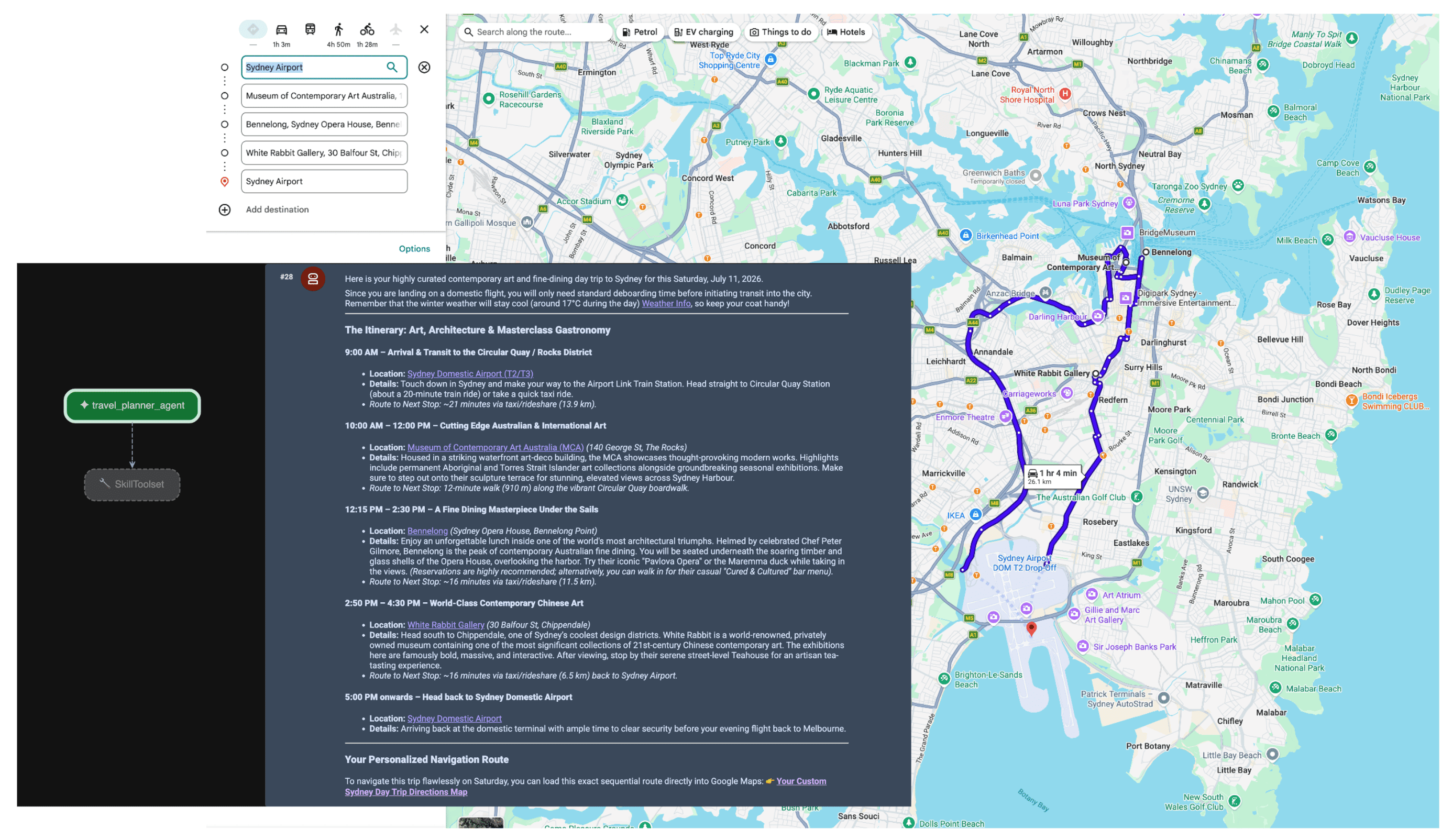
에이전트가 프롬프트를 수신하면 플래너가 사용자의 의도를 평가합니다. 공간 및 날씨 데이터의 필요성을 인식하고 MCP 서버를 사용하여 lookup_weather, search_places, compute_routes 도구를 자율적으로 트리거합니다. 그러면 에이전트가 사용자를 위해 사실에 기반한 여행 일정을 합성합니다.
결론
에이전트 AI로의 전환은 물류, 여행, 소매업에서 완전히 새로운 기능을 제공하고 있습니다. 하지만 진정한 자율성을 위해서는 견고한 진실의 기반이 필요합니다.
Model Context Protocol을 Google 지도 Grounding Lite와 함께 활용하면 맞춤 API 통합의 번거로움을 없애고 에이전트에게 필요한 실시간 눈과 귀를 제공할 수 있습니다. 모델을 실시간 공간 데이터에 고정하면 학습 데이터의 정지된 스냅샷이 아닌 현재 실제 세계에서 일어나는 상황을 기반으로 운영 결정을 내릴 수 있습니다.
다음 작업
- 지도 그라운딩 MCP 개발자 문서를 읽어보세요.
- 데모 API 키를 가져옵니다.
- 에이전트 배포 방법 알아보기
주요 작성자:
Teresa Qin | Google Maps Platform DevX 엔지니어