
Page Summary
-
The
ui.Chart.featuremodule provides functions to create charts fromFeatureandFeatureCollectionobjects. -
Different functions like
byFeature,byProperty,groups, andhistogramarrange data differently for charting, affecting x-axis, y-axis, and series definitions. -
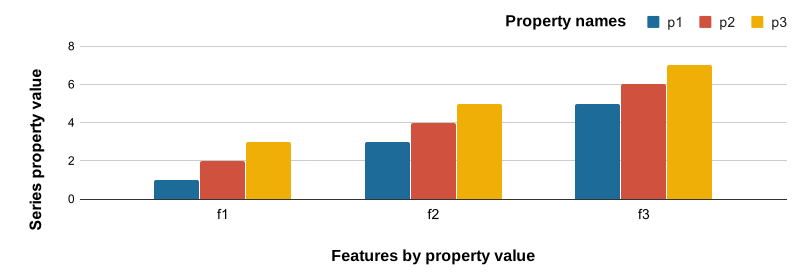
ui.Chart.feature.byFeatureplots features along the x-axis and properties as series on the y-axis. -
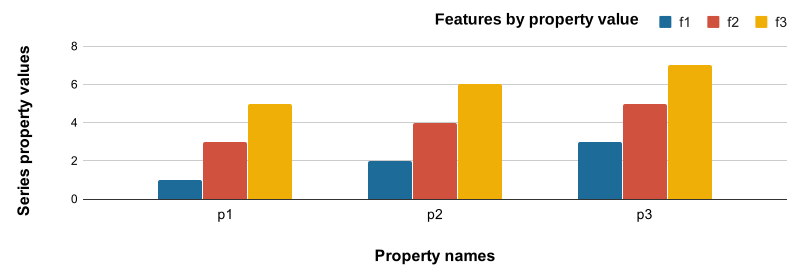
ui.Chart.feature.byPropertyplots properties on the x-axis and features as series on the y-axis. -
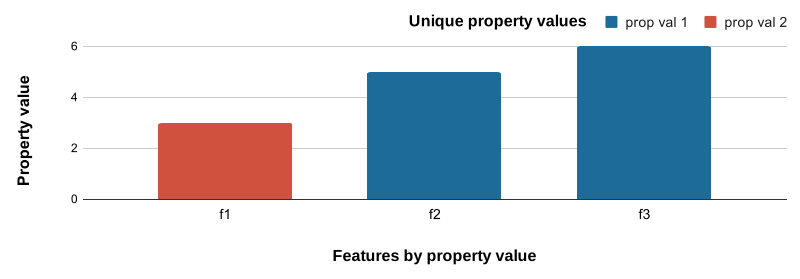
ui.Chart.feature.groupsplots features on the x-axis, uses a property for series, and another property for the y-axis value. -
ui.Chart.feature.histogramshows the frequency distribution of values for a selected property.
The ui.Chart.feature module contains a set of functions for rendering
charts from Feature and FeatureCollection objects. The choice of
function determines the arrangement of data in the chart, i.e., what defines
x- and y-axis values and what defines the series. Use the following function
descriptions and examples to determine the best function and chart type for
your purpose.
Chart functions
Use the following plot diagrams as a visual guide to understand how each function arranges features and their properties in a chart; i.e., what elements define x values, y values, and series.
Features are plotted along the x-axis by values of a selected property. Series are defined by a list of property names whose values are plotted along the y-axis.
Feature properties are plotted along the x-axis by name; values of the given properties are plotted along the y-axis. Series are features labeled by values of a selected property.
Features are plotted along the x-axis by values of a selected property. Series are defined by unique values of a given property. Y-axis position is defined by a given property’s value.
Frequency histogram for values of a selected property.
- X-axis: histogram buckets for values of a selected property
- Y-axis: frequency of features qualified for each histogram bucket
Example data
The following examples rely on a FeatureCollection composed of three
ecoregion features with properties that describe climate normals.
See how the example data were created
Code Editor (JavaScript)
// Define three representative ecoregions in the USA.
var desert = ee.Feature(
    ee.Geometry.Rectangle(-109.21, 31.42, -108.3, 32.03),
    {label: 'Desert', value: 0});

var forest = ee.Feature(
    ee.Geometry.Rectangle(-122.73, 43.45, -122.28, 43.91),
    {label: 'Forest', value: 1});

var grassland = ee.Feature(
    ee.Geometry.Rectangle(-101.81, 41.7, -100.53, 42.51),
    {label: 'Grassland', value: 2});

// Combine features into a feature collection.
var ecoregions = ee.FeatureCollection([desert, forest, grassland]);

// Load PRISM climate normals image collection; convert images to bands.
var normClim = ee.ImageCollection('OREGONSTATE/PRISM/Norm81m').toBands();

// Summarize climate normals for each ecoregion feature as a set or properties.
ecoregions = normClim.reduceRegions(
    {collection: ecoregions, reducer: ee.Reducer.mean(), scale: 5e4});

// Add a property for whether January temperature is warm or not.
ecoregions = ecoregions.map(function(ecoregion) {
  return ecoregion.set('warm', ee.Number(ecoregion.get('01_tmean')).gt(0));
});
ui.Chart.feature.byFeature
Column chart
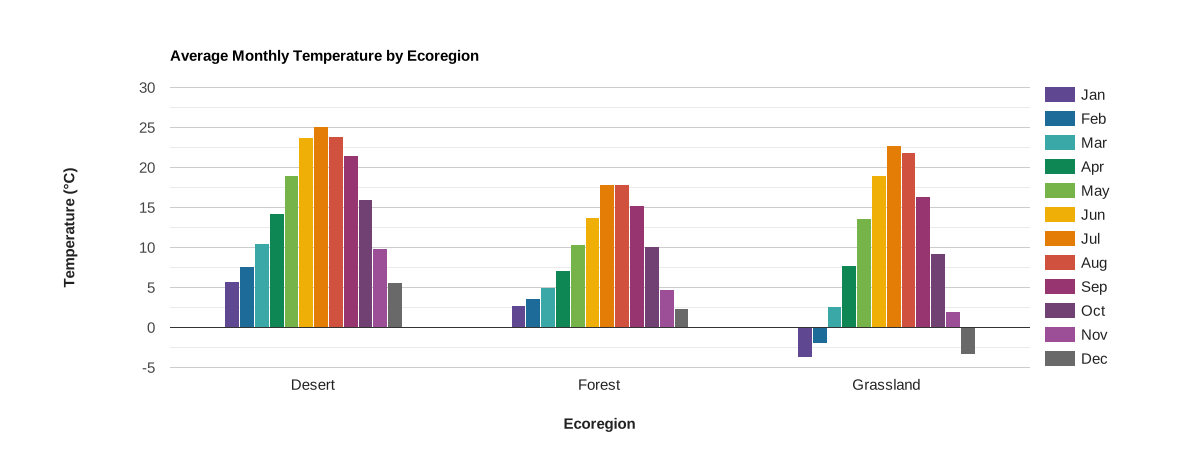
Features are plotted along the x-axis, labeled by values of a selected property. Series are represented by adjacent columns defined by a list of property names whose values are plotted along the y-axis.
Code Editor (JavaScript)
// Import the example feature collection.
var ecoregions = ee.FeatureCollection('projects/google/charts_feature_example');

// Define the chart and print it to the console.
var chart =
    ui.Chart.feature
        .byFeature({
          features: ecoregions.select('[0-9][0-9]_tmean|label'),
          xProperty: 'label',
        })
        .setSeriesNames([
          'Jan', 'Feb', 'Mar', 'Apr', 'May', 'Jun', 'Jul', 'Aug', 'Sep', 'Oct',
          'Nov', 'Dec'
        ])
        .setChartType('ColumnChart')
        .setOptions({
          title: 'Average Monthly Temperature by Ecoregion',
          hAxis:
              {title: 'Ecoregion', titleTextStyle: {italic: false, bold: true}},
          vAxis: {
            title: 'Temperature (°C)',
            titleTextStyle: {italic: false, bold: true}
          },
          colors: [
            '604791', '1d6b99', '39a8a7', '0f8755', '76b349', 'f0af07',
            'e37d05', 'cf513e', '96356f', '724173', '9c4f97', '696969'
          ]
        });
print(chart);
Bar chart
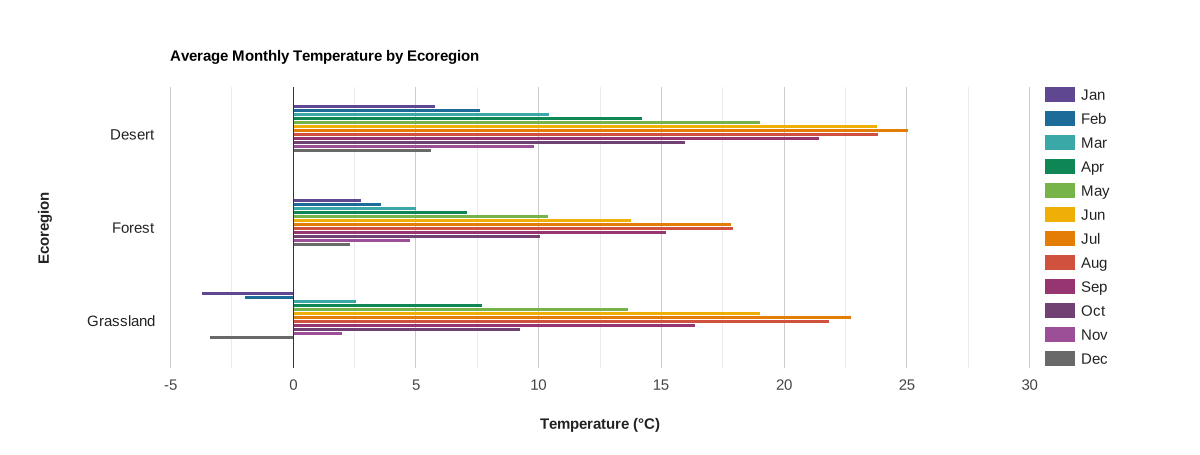
Features are plotted along the y-axis, labeled by values of a selected property. Series are represented by adjacent bars defined by a list of property names whose values are plotted along the x-axis.
Code Editor (JavaScript)
// Import the example feature collection.
var ecoregions = ee.FeatureCollection('projects/google/charts_feature_example');

// Define the chart and print it to the console.
var chart =
    ui.Chart.feature
        .byFeature({
          features: ecoregions.select('[0-9][0-9]_tmean|label'),
          xProperty: 'label',
        })
        .setSeriesNames([
          'Jan', 'Feb', 'Mar', 'Apr', 'May', 'Jun', 'Jul', 'Aug', 'Sep', 'Oct',
          'Nov', 'Dec'
        ])
        .setChartType('BarChart')
        .setOptions({
          title: 'Average Monthly Temperature by Ecoregion',
          hAxis: {
            title: 'Temperature (°C)',
            titleTextStyle: {italic: false, bold: true}
          },
          vAxis:
              {title: 'Ecoregion', titleTextStyle: {italic: false, bold: true}},
          colors: [
            '604791', '1d6b99', '39a8a7', '0f8755', '76b349', 'f0af07',
            'e37d05', 'cf513e', '96356f', '724173', '9c4f97', '696969'
          ]
        });
print(chart);
Stacked column chart
Absolute
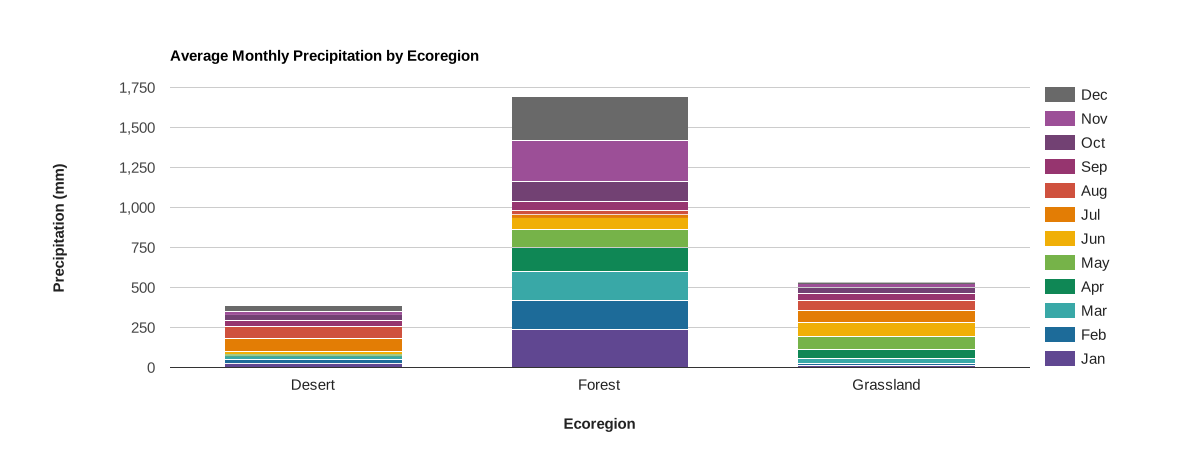
Features are plotted along the x-axis, labeled by values of a selected property. Series are represented by stacked columns defined by a list of property names whose values are plotted along the y-axis as the cumulative series sum.
Code Editor (JavaScript)
// Import the example feature collection.
var ecoregions = ee.FeatureCollection('projects/google/charts_feature_example');

// Define the chart and print it to the console.
var chart =
    ui.Chart.feature
        .byFeature({
          features: ecoregions.select('[0-9][0-9]_ppt|label'),
          xProperty: 'label'
        })
        .setSeriesNames([
          'Jan', 'Feb', 'Mar', 'Apr', 'May', 'Jun', 'Jul', 'Aug', 'Sep', 'Oct',
          'Nov', 'Dec'
        ])
        .setChartType('ColumnChart')
        .setOptions({
          title: 'Average Monthly Precipitation by Ecoregion',
          hAxis:
              {title: 'Ecoregion', titleTextStyle: {italic: false, bold: true}},
          vAxis: {
            title: 'Precipitation (mm)',
            titleTextStyle: {italic: false, bold: true}
          },
          colors: [
            '604791', '1d6b99', '39a8a7', '0f8755', '76b349', 'f0af07',
            'e37d05', 'cf513e', '96356f', '724173', '9c4f97', '696969'
          ],
          isStacked: 'absolute'
        });
print(chart);
Relative
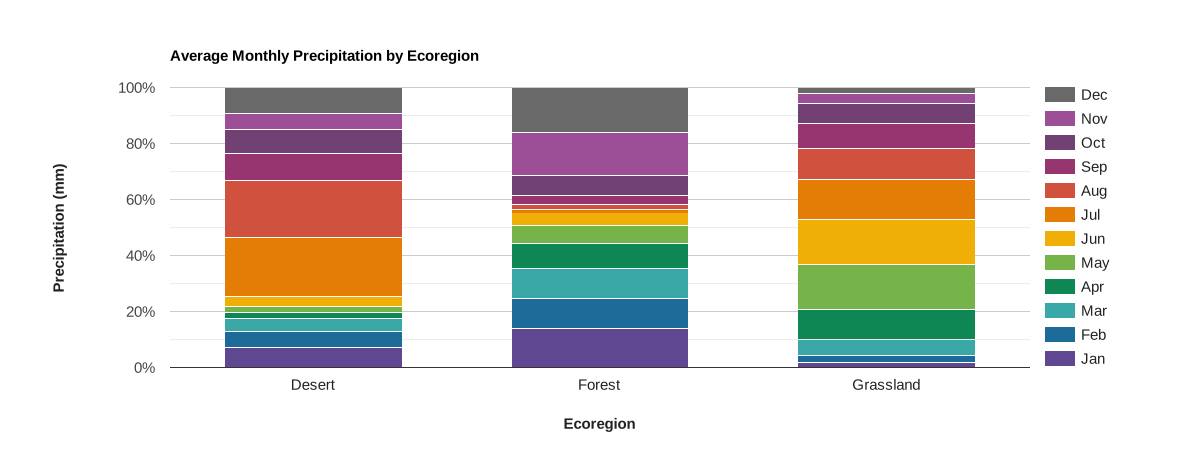
Features are plotted along the x-axis, labeled by values of a selected property. Series are represented by stacked columns defined by a list of property names whose values are plotted along the y-axis as percent of the summed series.
Code Editor (JavaScript)
// Import the example feature collection.
var ecoregions = ee.FeatureCollection('projects/google/charts_feature_example');

// Define the chart and print it to the console.
var chart =
    ui.Chart.feature
        .byFeature({
          features: ecoregions.select('[0-9][0-9]_ppt|label'),
          xProperty: 'label'
        })
        .setSeriesNames([
          'Jan', 'Feb', 'Mar', 'Apr', 'May', 'Jun', 'Jul', 'Aug', 'Sep', 'Oct',
          'Nov', 'Dec'
        ])
        .setChartType('ColumnChart')
        .setOptions({
          title: 'Average Monthly Precipitation by Ecoregion',
          hAxis:
              {title: 'Ecoregion', titleTextStyle: {italic: false, bold: true}},
          vAxis: {
            title: 'Precipitation (mm)',
            titleTextStyle: {italic: false, bold: true}
          },
          colors: [
            '604791', '1d6b99', '39a8a7', '0f8755', '76b349', 'f0af07',
            'e37d05', 'cf513e', '96356f', '724173', '9c4f97', '696969'
          ],
          isStacked: 'percent'
        });
print(chart);
Scatter chart
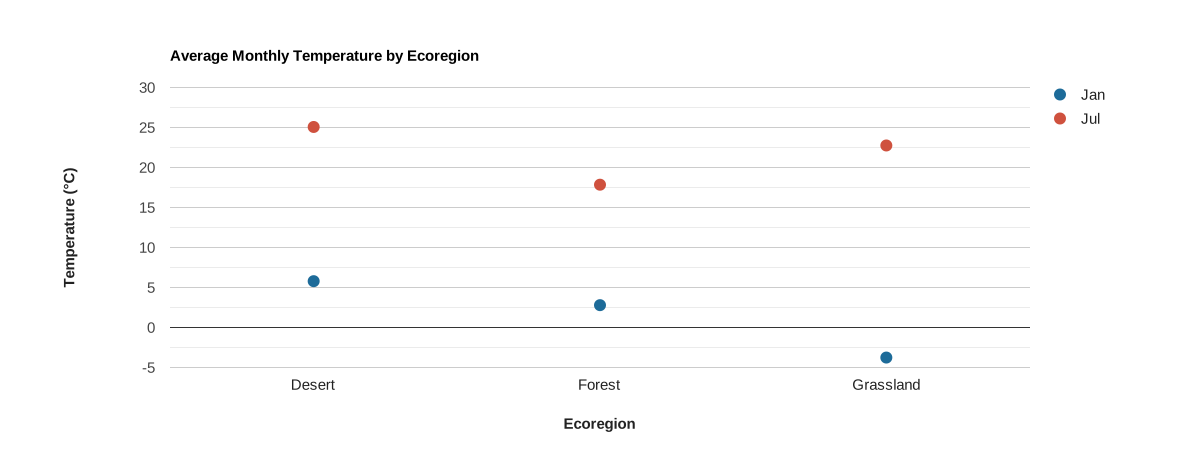
Features are plotted along the x-axis, labeled by values of a selected property. Series are represented by points defined by a list of property names whose values are plotted along the y-axis.
Code Editor (JavaScript)
// Import the example feature collection.
var ecoregions = ee.FeatureCollection('projects/google/charts_feature_example');

// Define the chart and print it to the console.
var chart =
    ui.Chart.feature
        .byFeature({
          features: ecoregions,
          xProperty: 'label',
          yProperties: ['01_tmean', '07_tmean']
        })
        .setSeriesNames(['Jan', 'Jul'])
        .setChartType('ScatterChart')
        .setOptions({
          title: 'Average Monthly Temperature by Ecoregion',
          hAxis:
              {title: 'Ecoregion', titleTextStyle: {italic: false, bold: true}},
          vAxis: {
            title: 'Temperature (°C)',
            titleTextStyle: {italic: false, bold: true}
          },
          pointSize: 10,
          colors: ['1d6b99', 'cf513e'],
        });
print(chart);
Combo chart
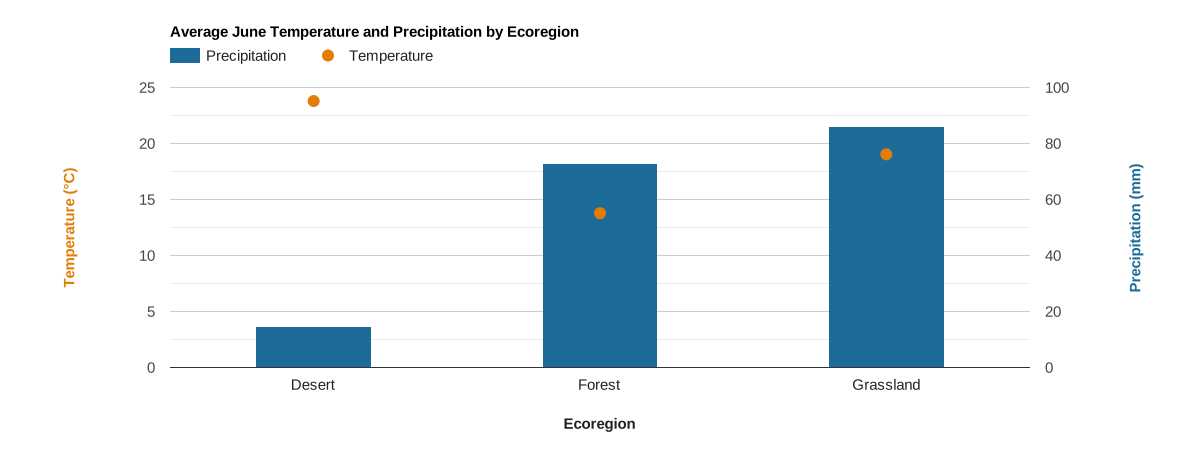
Features are plotted along the x-axis, labeled by values of a selected property. Series are represented by points and columns defined by a list of property names whose values are plotted along the y-axis. This chart is achieved using two axes and series-specific styling.
Code Editor (JavaScript)
// Import the example feature collection.
var ecoregions = ee.FeatureCollection('projects/google/charts_feature_example');

// Define the chart and print it to the console.
var chart =
    ui.Chart.feature
        .byFeature({
          features: ecoregions,
          xProperty: 'label',
          yProperties: ['06_ppt', '06_tmean']
        })
        .setSeriesNames(['Precipitation', 'Temperature'])
        .setChartType('ColumnChart')
        .setOptions({
          title: 'Average June Temperature and Precipitation by Ecoregion',
          series: {
            0: {targetAxisIndex: 1, type: 'bar', color: '1d6b99'},
            1: {
              targetAxisIndex: 0,
              type: 'line',
              lineWidth: 0,
              pointSize: 10,
              color: 'e37d05'
            }
          },
          hAxis:
              {title: 'Ecoregion', titleTextStyle: {italic: false, bold: true}},
          vAxes: {
            0: {
              title: 'Temperature (°C)',
              baseline: 0,
              titleTextStyle: {italic: false, bold: true, color: 'e37d05'}
            },
            1: {
              title: 'Precipitation (mm)',
              titleTextStyle: {italic: false, bold: true, color: '1d6b99'}
            },
          },
          bar: {groupWidth: '40%'},
        });
print(chart);
ui.Chart.feature.byProperty
Example setup
The ui.Chart.feature.byProperty function accepts a dictionary that allows
you to control the label and order of property names along the x-axis by
assigning numerical values to them. The following cartesian grid charts use this
option to set month labels and sort month names in chronological order for
average monthly precipitation.
Column chart
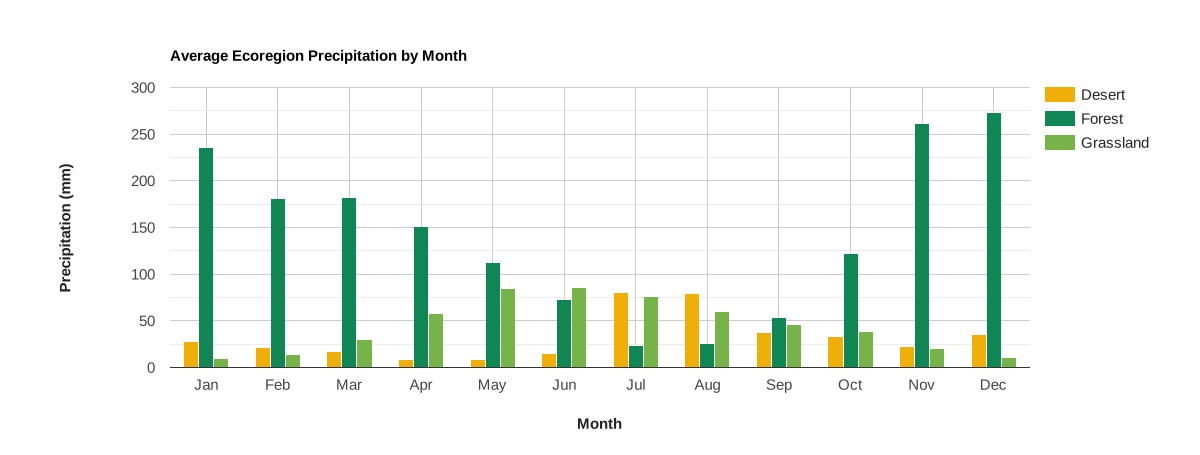
Feature properties are plotted along the x-axis, labeled and sorted by a
dictionary input; the values of the given properties are plotted along the
y-axis. Series are features, represented by columns, labeled by
values of a selected property. To convert to a bar chart, use
.setChartType('BarChart').
Code Editor (JavaScript)
// Import the example feature collection.
var ecoregions = ee.FeatureCollection('projects/google/charts_feature_example');

// Define a dictionary that associates property names with values and labels.
var precipInfo = {
  '01_ppt': {v: 1, f: 'Jan'},
  '02_ppt': {v: 2, f: 'Feb'},
  '03_ppt': {v: 3, f: 'Mar'},
  '04_ppt': {v: 4, f: 'Apr'},
  '05_ppt': {v: 5, f: 'May'},
  '06_ppt': {v: 6, f: 'Jun'},
  '07_ppt': {v: 7, f: 'Jul'},
  '08_ppt': {v: 8, f: 'Aug'},
  '09_ppt': {v: 9, f: 'Sep'},
  '10_ppt': {v: 10, f: 'Oct'},
  '11_ppt': {v: 11, f: 'Nov'},
  '12_ppt': {v: 12, f: 'Dec'}
};

// Organize property information into objects for defining x properties and
// their tick labels.
var xPropValDict = {};  // Dictionary to codify x-axis property names as values.
var xPropLabels = [];   // Holds dictionaries that label codified x-axis values.
for (var key in precipInfo) {
  xPropValDict[key] = precipInfo[key].v;
  xPropLabels.push(precipInfo[key]);
}

// Define the chart and print it to the console.
var chart = ui.Chart.feature
                .byProperty({
                  features: ecoregions,
                  xProperties: xPropValDict,
                  seriesProperty: 'label'
                })
                .setChartType('ColumnChart')
                .setOptions({
                  title: 'Average Ecoregion Precipitation by Month',
                  hAxis: {
                    title: 'Month',
                    titleTextStyle: {italic: false, bold: true},
                    ticks: xPropLabels
                  },
                  vAxis: {
                    title: 'Precipitation (mm)',
                    titleTextStyle: {italic: false, bold: true}
                  },
                  colors: ['f0af07', '0f8755', '76b349'],
                });
print(chart);
Line chart
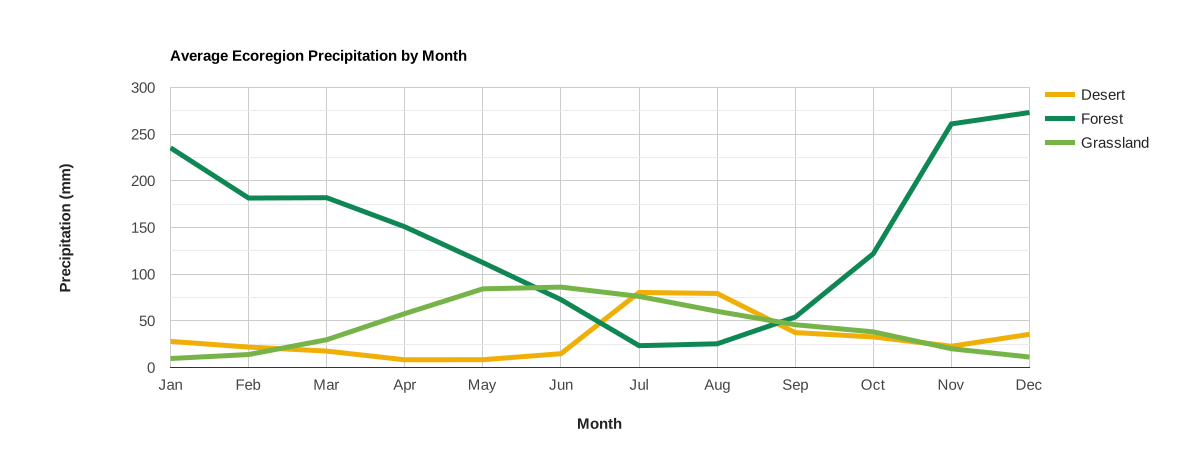
Feature properties are plotted along the x-axis, labeled and sorted by a dictionary input; the values of the given properties are plotted along the y-axis. Series are features, represented by lines, labeled by values of a selected property.
Code Editor (JavaScript)
// Import the example feature collection.
var ecoregions = ee.FeatureCollection('projects/google/charts_feature_example');

// Define a dictionary that associates property names with values and labels.
var precipInfo = {
  '01_ppt': {v: 1, f: 'Jan'},
  '02_ppt': {v: 2, f: 'Feb'},
  '03_ppt': {v: 3, f: 'Mar'},
  '04_ppt': {v: 4, f: 'Apr'},
  '05_ppt': {v: 5, f: 'May'},
  '06_ppt': {v: 6, f: 'Jun'},
  '07_ppt': {v: 7, f: 'Jul'},
  '08_ppt': {v: 8, f: 'Aug'},
  '09_ppt': {v: 9, f: 'Sep'},
  '10_ppt': {v: 10, f: 'Oct'},
  '11_ppt': {v: 11, f: 'Nov'},
  '12_ppt': {v: 12, f: 'Dec'}
};

// Organize property information into objects for defining x properties and
// their tick labels.
var xPropValDict = {};  // Dictionary to codify x-axis property names as values.
var xPropLabels = [];   // Holds dictionaries that label codified x-axis values.
for (var key in precipInfo) {
  xPropValDict[key] = precipInfo[key].v;
  xPropLabels.push(precipInfo[key]);
}

// Define the chart and print it to the console.
var chart = ui.Chart.feature
                .byProperty({
                  features: ecoregions,
                  xProperties: xPropValDict,
                  seriesProperty: 'label'
                })
                .setChartType('ScatterChart')
                .setOptions({
                  title: 'Average Ecoregion Precipitation by Month',
                  hAxis: {
                    title: 'Month',
                    titleTextStyle: {italic: false, bold: true},
                    ticks: xPropLabels
                  },
                  vAxis: {
                    title: 'Precipitation (mm)',
                    titleTextStyle: {italic: false, bold: true}
                  },
                  colors: ['f0af07', '0f8755', '76b349'],
                  lineSize: 5,
                  pointSize: 0
                });
print(chart);
Area chart
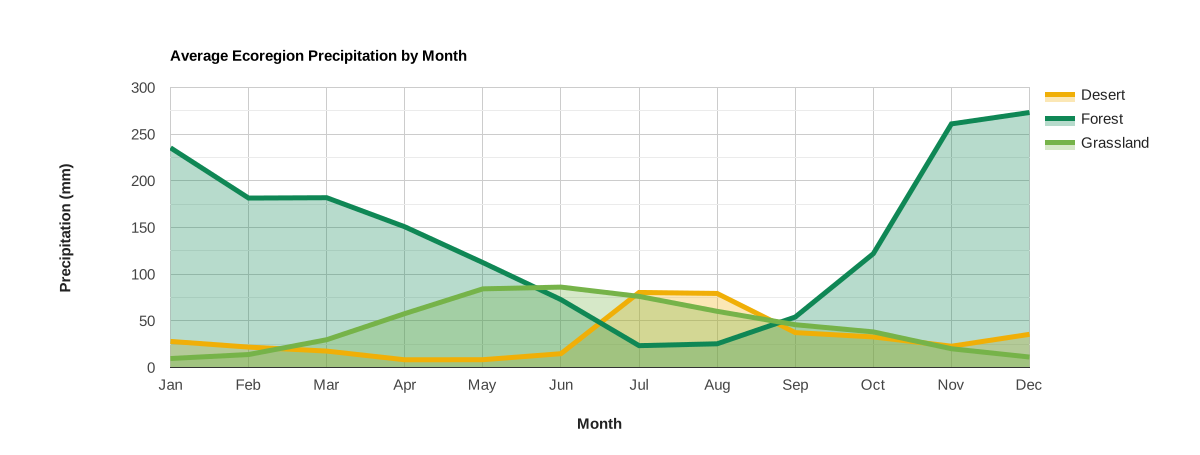
Feature properties are plotted along the x-axis, labeled and sorted by a dictionary input; the values of the given properties are plotted along the y-axis. Series are features, represented by lines and shaded areas, labeled by values of a selected property.
Code Editor (JavaScript)
// Import the example feature collection.
var ecoregions = ee.FeatureCollection('projects/google/charts_feature_example');

// Define a dictionary that associates property names with values and labels.
var precipInfo = {
  '01_ppt': {v: 1, f: 'Jan'},
  '02_ppt': {v: 2, f: 'Feb'},
  '03_ppt': {v: 3, f: 'Mar'},
  '04_ppt': {v: 4, f: 'Apr'},
  '05_ppt': {v: 5, f: 'May'},
  '06_ppt': {v: 6, f: 'Jun'},
  '07_ppt': {v: 7, f: 'Jul'},
  '08_ppt': {v: 8, f: 'Aug'},
  '09_ppt': {v: 9, f: 'Sep'},
  '10_ppt': {v: 10, f: 'Oct'},
  '11_ppt': {v: 11, f: 'Nov'},
  '12_ppt': {v: 12, f: 'Dec'}
};

// Organize property information into objects for defining x properties and
// their tick labels.
var xPropValDict = {};  // Dictionary to codify x-axis property names as values.
var xPropLabels = [];   // Holds dictionaries that label codified x-axis values.
for (var key in precipInfo) {
  xPropValDict[key] = precipInfo[key].v;
  xPropLabels.push(precipInfo[key]);
}

// Define the chart and print it to the console.
var chart = ui.Chart.feature
                .byProperty({
                  features: ecoregions,
                  xProperties: xPropValDict,
                  seriesProperty: 'label'
                })
                .setChartType('AreaChart')
                .setOptions({
                  title: 'Average Ecoregion Precipitation by Month',
                  hAxis: {
                    title: 'Month',
                    titleTextStyle: {italic: false, bold: true},
                    ticks: xPropLabels
                  },
                  vAxis: {
                    title: 'Precipitation (mm)',
                    titleTextStyle: {italic: false, bold: true}
                  },
                  colors: ['f0af07', '0f8755', '76b349'],
                  lineSize: 5,
                  pointSize: 0,
                  curveType: 'function'
                });
print(chart);
Pie chart
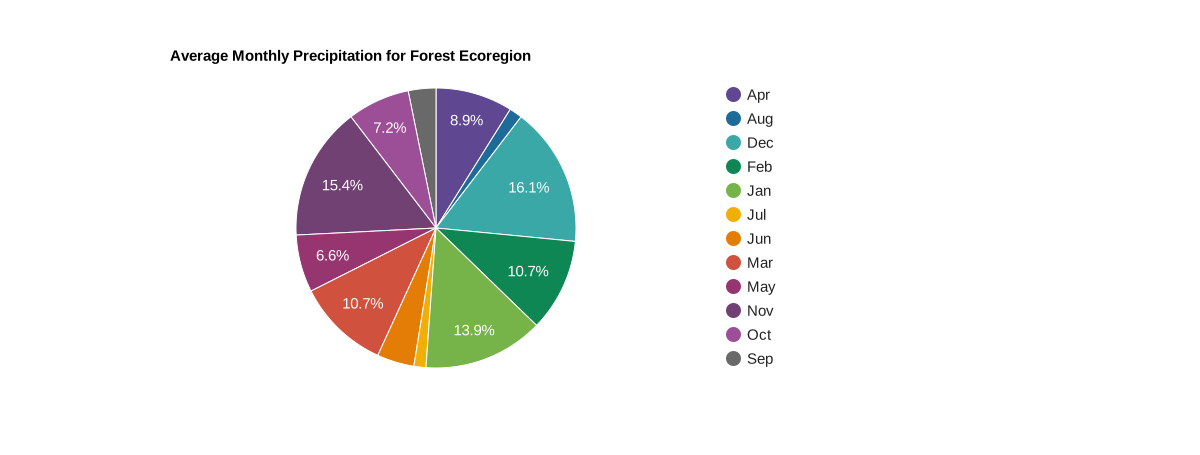
The pie is a feature, each slice is a property label whose value is cast as a percentage of the sum of all values of properties composing the pie.
Code Editor (JavaScript)
// Import the example feature collection.
var ecoregions = ee.FeatureCollection('projects/google/charts_feature_example');

// Subset the forest ecoregion feature and select the monthly precipitation
// properties, rename them as abbreviated months.
var thisForest = ecoregions.filter(ee.Filter.eq('label', 'Forest'))
                     .select(Object.keys(precipInfo), [
                       'Jan', 'Feb', 'Mar', 'Apr', 'May', 'Jun', 'Jul', 'Aug',
                       'Sep', 'Oct', 'Nov', 'Dec'
                     ]);

// Define the chart and print it to the console.
var chart = ui.Chart.feature
                .byProperty({
                  features: thisForest,
                  xProperties: [
                    'Jan', 'Feb', 'Mar', 'Apr', 'May', 'Jun', 'Jul', 'Aug',
                    'Sep', 'Oct', 'Nov', 'Dec'
                  ]
                })
                .setChartType('PieChart')
                .setOptions({
                  title: 'Average Monthly Precipitation for Forest Ecoregion',
                  colors: [
                    '604791', '1d6b99', '39a8a7', '0f8755', '76b349', 'f0af07',
                    'e37d05', 'cf513e', '96356f', '724173', '9c4f97', '696969'
                  ]
                });
print(chart);
Donut chart
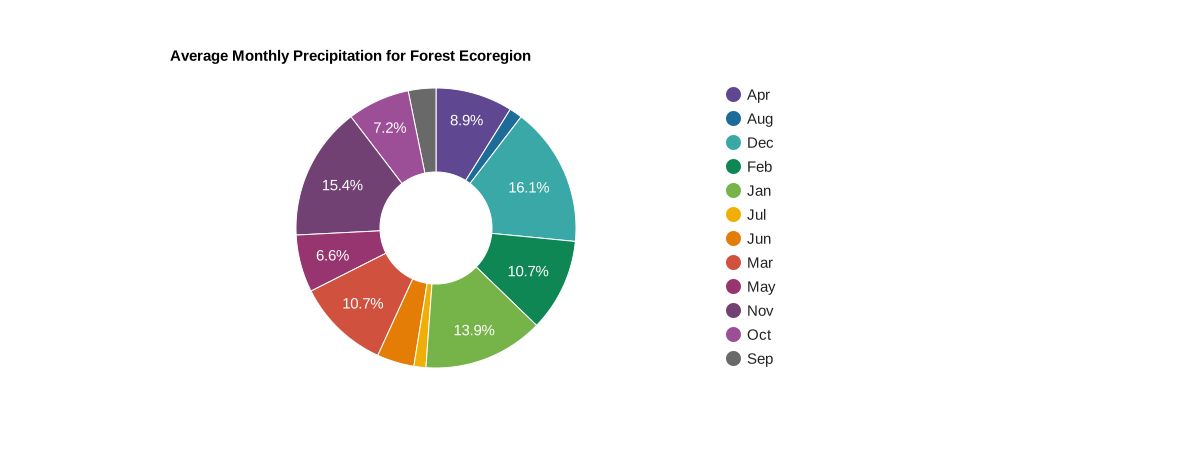
Convert a pie chart to a donut chart by setting the
pieHole
chart option; numbers between 0.4 and 0.6 will look best on most charts.
Code Editor (JavaScript)
// Import the example feature collection.
var ecoregions = ee.FeatureCollection('projects/google/charts_feature_example');

// Subset the forest ecoregion feature and select the monthly precipitation
// properties, rename them as abbreviated months.
var thisForest = ecoregions.filter(ee.Filter.eq('label', 'Forest'))
                     .select(Object.keys(precipInfo), [
                       'Jan', 'Feb', 'Mar', 'Apr', 'May', 'Jun', 'Jul', 'Aug',
                       'Sep', 'Oct', 'Nov', 'Dec'
                     ]);

// Define the chart and print it to the console.
var chart = ui.Chart.feature
                .byProperty({
                  features: thisForest,
                  xProperties: [
                    'Jan', 'Feb', 'Mar', 'Apr', 'May', 'Jun', 'Jul', 'Aug',
                    'Sep', 'Oct', 'Nov', 'Dec'
                  ]
                })
                .setChartType('PieChart')
                .setOptions({
                  title: 'Average Monthly Precipitation for Forest Ecoregion',
                  colors: [
                    '604791', '1d6b99', '39a8a7', '0f8755', '76b349', 'f0af07',
                    'e37d05', 'cf513e', '96356f', '724173', '9c4f97', '696969'
                  ],
                  pieHole: 0.4,
                });
print(chart);
ui.Chart.feature.groups
Column chart
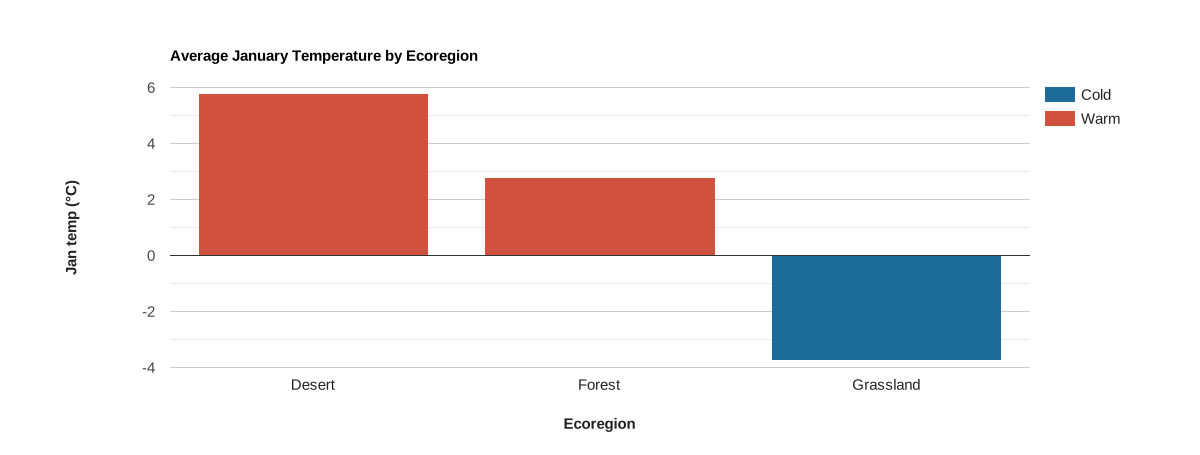
Features are plotted along the x-axis, labeled by values of a selected property.
Series are represented by columns defined by the set of unique values of a given
property. Y-axis position is defined by a given property’s value. This
plot can be changed to a scatter plot by setting the chart type as
'ScatterChart' (.setChartType('ScatterChart')). Alternatively, if time is
the x-axis variable, you might prefer to use a line chart:
.setChartType('LineChart').
Code Editor (JavaScript)
// Import the example feature collection.
var ecoregions = ee.FeatureCollection('projects/google/charts_feature_example');

// Define the chart and print it to the console.
var chart =
    ui.Chart.feature
        .groups({
          features: ecoregions,
          xProperty: 'label',
          yProperty: '01_tmean',
          seriesProperty: 'warm'
        })
        .setSeriesNames(['Warm', 'Cold'])
        .setChartType('ColumnChart')
        .setOptions({
          title: 'Average January Temperature by Ecoregion',
          hAxis:
              {title: 'Ecoregion', titleTextStyle: {italic: false, bold: true}},
          vAxis: {
            title: 'Jan temp (°C)',
            titleTextStyle: {italic: false, bold: true}
          },
          bar: {groupWidth: '80%'},
          colors: ['cf513e', '1d6b99'],
          isStacked: true
        });
print(chart);
ui.Chart.feature.histogram
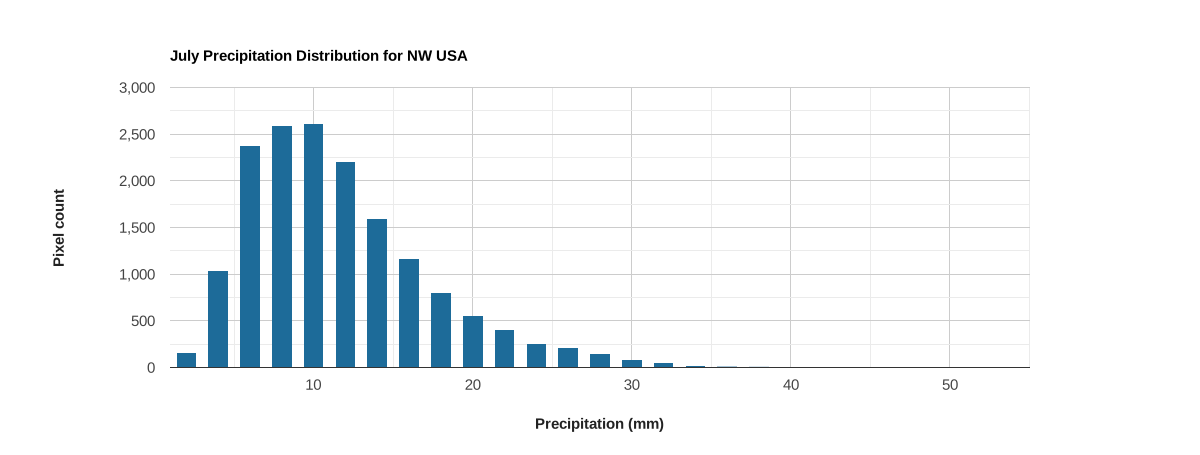
The x-axis is defined by value bins for the range of values of a selected property; the y-axis is the number of elements in the given bin.
Code Editor (JavaScript)
// Load PRISM climate normals image collection; convert images to bands.
var normClim = ee.ImageCollection('OREGONSTATE/PRISM/Norm81m').toBands();

// Make a point sample of climate variables for a region in western USA.
var region = ee.Geometry.Rectangle(-123.41, 40.43, -116.38, 45.14);
var climSamp = normClim.sample(region, 5000);

// Define the chart and print it to the console.
var chart =
    ui.Chart.feature
        .histogram({features: climSamp, property: '07_ppt', maxBuckets: 30})
        .setOptions({
          title: 'July Precipitation Distribution for NW USA',
          hAxis: {
            title: 'Precipitation (mm)',
            titleTextStyle: {italic: false, bold: true}
          },
          vAxis: {
            title: 'Pixel count',
            titleTextStyle: {italic: false, bold: true}
          },
          colors: ['1d6b99'],
          legend: {position: 'none'}
        });
print(chart);